两种方式对el-table二次封装
1、序言
完整源码:el-table-example: 两种方式对el-table二次封装
最近在公司写了好多的后台管理系统,管理系统很大部分都是elementui下的el-table,el-table中有很多

能不能通过配置项让其自动生成
2、自定义组件方式封装el-table
2.1、封装
(1)在src下建立components文件夹
(2)在components文件夹下建立Table/index.vue、index.js两个文件夹

(3)index.js文件全局注册封装的Table组件
import Vue from 'vue';
import Table from './index.vue';/* 封装的表格组件 */// 全局注册组件
Vue.component('CommonTable', Table);
(4)index.vue文件封装Table组件
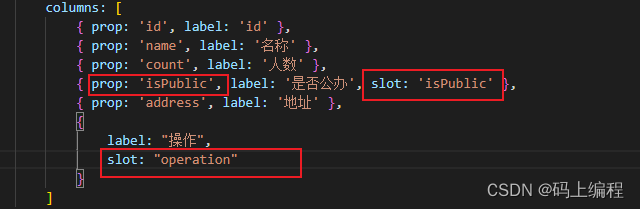
遇到一些自定义列就使用作用域名插槽填充,名称为prop值,并在coloum中配置slot属性。像这样:
(5)main.js中引入全局注册组件
import Vue from 'vue'
import App from './App.vue'
import router from './router'
import store from './store'
import "./assets/css/main.css";/* 全局注册的组件 */
import './components/Table/index'; // 表格组件new Vue({router,store,render: h => h(App)
}).$mount('#app')
2.2、使用
{{ transformPublic(row.isPublic) }}编辑 删除
3、jsx方式封装el-table
3.1、jsx
我看网上还有使用jsx方式来封装el-table,jsx能够抽象组件,jsx是一种javascript和xml结合的一种语法,它既有javascript的灵活性,也有xml的规范性,但是有一说一,写起来真不习惯、真不舒服!
babel能将es6转换成es5,还能将jsx转换成javascript,所以babel插件必不可少!惊喜的发现脚手架cli已经配置好babel插件,基本可以直接上手写jsx了!jsx语法和vue语法还是有一些差别的,详细去看看网上例子,掌握好它上手react比较容易!
写jsx记得要把vue中的template、script、style标签去掉
3.2、封装
(1)src/components/JsxTable/index.js 建立文件夹
(2)render()中 return
(3)自定义指令v-loading还有语法糖@selection-change 使用不了,需要转译一下让jsx识别
// @selection-change语法糖没法在jsx直接使用,需要转译一下const listeners = {on: {['selection-change']: val => this.$emit('commitSelection', val)}};// v-loading没法在jsx直接使用,需要转译一下const directives = {directives: [{ name: 'loading', value: loading }]};
(4)attrs和scopedSlots
attrs 属性是用于将父组件属性传递(除了 prop 传递的属性、class 和 style )给子组件, 这通常用于将事件监听器和自定义属性传递给子组件。
scopedSlots 是用于将父组件的作用域插槽(scoped slot)传递给子组件,以便子组件可以在父组件提供的数据上进行渲染。在父组件中,标签并设置slot-scope属性来创建作用域插槽,然后在子组件中使用this.$slots属性来获取这些插槽
// 渲染列const renderColumn = () => {return columns.map(item => {const attribute = {attrs: { ...item }};if (item.slot) {attribute.scopedSlots = {default: this.$scopedSlots[item.slot]};}return
(5)将属性、事件、指令组装到el-table中,并通过render()返回组装好的el-table
// 渲染表格const renderTable = ({renderColumn()} );return {renderTable};
3.3、使用
{{ transformPublic(row.isPublic) }}编辑 删除
本文来自互联网用户投稿,文章观点仅代表作者本人,不代表本站立场,不承担相关法律责任。如若转载,请注明出处。 如若内容造成侵权/违法违规/事实不符,请点击【内容举报】进行投诉反馈!
