仿淘宝商品详情页,上拉查看更多详情demo(Activity和Fragment)。2种应用场景
最近项目中有个功能,在课程播放页,有个讲师详情页:上面展示文字信息,下面展示一个webView,但是webView,要通过上拉才出现。网上找的一个开源的demo。对里面进行了一定的修改,以符合项目要求:
https://github.com/cnbleu/SlideDetailsLayout注:
**1、滑动的自定义布局 SlideDetailsLayout 中,只包含2个子view。多了会有问题
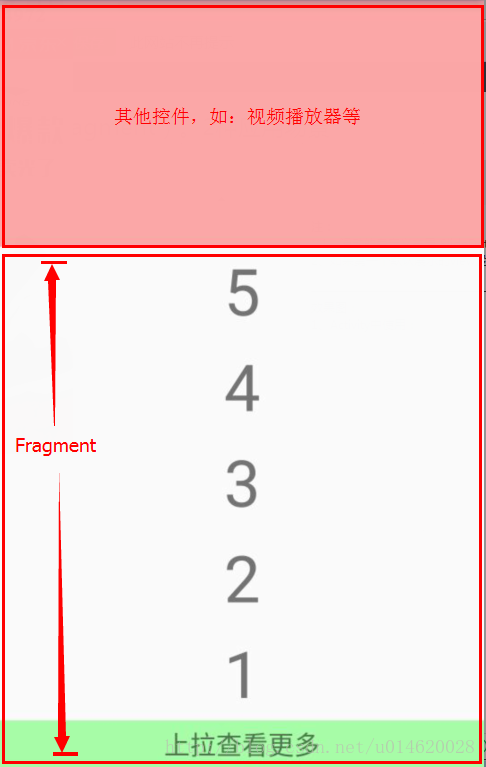
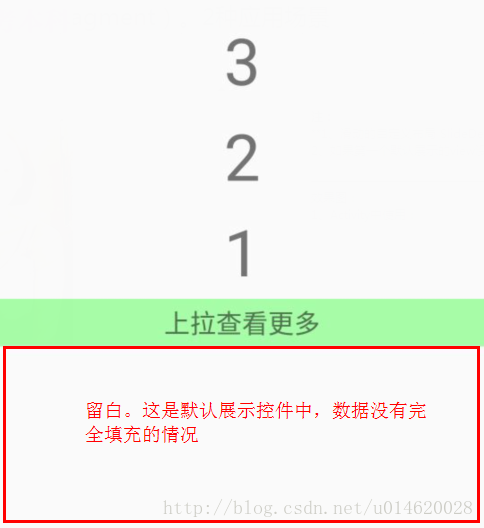
2、如果第一个默认展示的view没有被填满,会有留白。详见效果图**
以下会对在Activity中,已经在Fragment中使用,分别附上源码(代码、布局文件)
—————————————————————————————————
效果图:
1、Activity中使用:

2、Fragment中使用
3、默认展示控件中的数据没有完全填充
代码:
1、因为有webView,先加上网络权限:
<uses-permission android:name="android.permission.INTERNET"/>2、有自定义属性,所以,需要在 values文件夹下,创建 attrs.xml
<resources><declare-styleable name="SlideDetailsLayout"><attr name="percent" format="float"/><attr name="duration" format="integer"/><attr name="default_panel" format="enum"><enum name="front" value="0"/><enum name="behind" value="1"/>attr>declare-styleable>resources>3、回调接口
/*** 滑动回调接口*/
public interface ISlideCallback {//展开详情void openDetails(boolean smooth);//关闭详情void closeDetails(boolean smooth);
}
4、最核心的代码:SlideDetailsLayout
import android.animation.Animator;
import android.animation.AnimatorListenerAdapter;
import android.animation.ValueAnimator;
import android.content.Context;
import android.content.res.TypedArray;
import android.os.Parcel;
import android.os.Parcelable;
import android.support.v4.view.MotionEventCompat;
import android.support.v4.view.ViewCompat;
import android.util.AttributeSet;
import android.view.MotionEvent;
import android.view.VelocityTracker;
import android.view.View;
import android.view.ViewConfiguration;
import android.view.ViewGroup;
import android.widget.AbsListView;/*** 滑动的自定义view*/
public class SlideDetailsLayout extends ViewGroup {/*** Callback for panel OPEN-CLOSE status changed.*/public interface OnSlideDetailsListener {/*** Called after status changed.** @param status {@link Status}*/void onStatucChanged(Status status);}/*** 状态值*/public enum Status {CLOSE,OPEN;public static Status valueOf(int stats) {if (0 == stats) {return CLOSE;} else if (1 == stats) {return OPEN;} else {return CLOSE;}}}//默认百分比private static final float DEFAULT_PERCENT = 0.2f;//默认执行时间private static final int DEFAULT_DURATION = 300;//默认最大速度private static final float DEFAULT_MAX_VELOCITY = 2500f;private View mFrontView;private View mBehindView;private float mTouchSlop;private float mInitMotionY;private float mInitMotionX;private View mTarget;private float mSlideOffset;private Status mStatus = Status.CLOSE;private boolean isFirstShowBehindView = true;private float mPercent = DEFAULT_PERCENT;private long mDuration = DEFAULT_DURATION;private int mDefaultPanel = 0;private VelocityTracker mVelocityTracker;private OnSlideDetailsListener mOnSlideDetailsListener;public SlideDetailsLayout(Context context) {this(context, null);}public SlideDetailsLayout(Context context, AttributeSet attrs) {this(context, attrs, 0);}public SlideDetailsLayout(Context context, AttributeSet attrs, int defStyleAttr) {super(context, attrs, defStyleAttr);TypedArray a = context.obtainStyledAttributes(attrs, R.styleable.SlideDetailsLayout, defStyleAttr, 0);mPercent = a.getFloat(R.styleable.SlideDetailsLayout_percent, DEFAULT_PERCENT);mDuration = a.getInt(R.styleable.SlideDetailsLayout_duration, DEFAULT_DURATION);mDefaultPanel = a.getInt(R.styleable.SlideDetailsLayout_default_panel, 0);a.recycle();mTouchSlop = ViewConfiguration.get(getContext()).getScaledTouchSlop();}/*** Set the callback of panel OPEN-CLOSE status.** @param listener {@link OnSlideDetailsListener}*/public void setOnSlideDetailsListener(OnSlideDetailsListener listener) {this.mOnSlideDetailsListener = listener;}/*** Open pannel smoothly.** @param smooth true, smoothly. false otherwise.*/public void smoothOpen(boolean smooth) {if (mStatus != Status.OPEN) {mStatus = Status.OPEN;final float height = -getMeasuredHeight();animatorSwitch(0, height, true, smooth ? mDuration : 0);}}/*** Close pannel smoothly.** @param smooth true, smoothly. false otherwise.*/public void smoothClose(boolean smooth) {if (mStatus != Status.CLOSE) {mStatus = Status.OPEN;final float height = -getMeasuredHeight();animatorSwitch(height, 0, true, smooth ? mDuration : 0);}}/*** Set the float value for indicate the moment of switch panel** @param percent (0.0, 1.0)*/public void setPercent(float percent) {this.mPercent = percent;}@Overrideprotected LayoutParams generateDefaultLayoutParams() {return new MarginLayoutParams(MarginLayoutParams.WRAP_CONTENT, MarginLayoutParams.WRAP_CONTENT);}@Overridepublic LayoutParams generateLayoutParams(AttributeSet attrs) {return new MarginLayoutParams(getContext(), attrs);}@Overrideprotected LayoutParams generateLayoutParams(LayoutParams p) {return new MarginLayoutParams(p);}@Overrideprotected void onFinishInflate() {super.onFinishInflate();final int childCount = getChildCount();if (1 >= childCount) {throw new RuntimeException("SlideDetailsLayout only accept childs more than 1!!");}mFrontView = getChildAt(0);mBehindView = getChildAt(1);// set behindview's visibility to GONE before show.mBehindView.setVisibility(GONE);if (mDefaultPanel == 1) {post(new Runnable() {@Overridepublic void run() {smoothOpen(false);}});}}@Overrideprotected void onMeasure(int widthMeasureSpec, int heightMeasureSpec) {final int pWidth = MeasureSpec.getSize(widthMeasureSpec);final int pHeight = MeasureSpec.getSize(heightMeasureSpec);final int childWidthMeasureSpec =MeasureSpec.makeMeasureSpec(pWidth, MeasureSpec.EXACTLY);final int childHeightMeasureSpec =MeasureSpec.makeMeasureSpec(pHeight, MeasureSpec.EXACTLY);View child;for (int i = 0; i < getChildCount(); i++) {child = getChildAt(i);// skip measure if goneif (child.getVisibility() == GONE) {continue;}measureChild(child, childWidthMeasureSpec, childHeightMeasureSpec);}setMeasuredDimension(pWidth, pHeight);}@Overrideprotected void onLayout(boolean changed, int l, int t, int r, int b) {final int left = l;final int right = r;int top;int bottom;final int offset = (int) mSlideOffset;View child;for (int i = 0; i < getChildCount(); i++) {child = getChildAt(i);// skip layoutif (child.getVisibility() == GONE) {continue;}if (child == mBehindView) {top = b + offset;bottom = top + b - t;} else {top = t + offset;bottom = b + offset;}child.layout(left, top, right, bottom);}}@Overridepublic boolean onInterceptTouchEvent(MotionEvent ev) {ensureTarget();if (null == mTarget) {return false;}if (!isEnabled()) {return false;}final int aciton = MotionEventCompat.getActionMasked(ev);boolean shouldIntercept = false;switch (aciton) {case MotionEvent.ACTION_DOWN: {if (null == mVelocityTracker) {mVelocityTracker = VelocityTracker.obtain();} else {mVelocityTracker.clear();}mVelocityTracker.addMovement(ev);mInitMotionX = ev.getX();mInitMotionY = ev.getY();shouldIntercept = false;break;}case MotionEvent.ACTION_MOVE: {final float x = ev.getX();final float y = ev.getY();final float xDiff = x - mInitMotionX;final float yDiff = y - mInitMotionY;if (canChildScrollVertically((int) yDiff)) {shouldIntercept = false;} else {final float xDiffabs = Math.abs(xDiff);final float yDiffabs = Math.abs(yDiff);// intercept rules:// 1. The vertical displacement is larger than the horizontal displacement;// 2. Panel stauts is CLOSE:slide up// 3. Panel status is OPEN:slide downif (yDiffabs > mTouchSlop && yDiffabs >= xDiffabs&& !(mStatus == Status.CLOSE && yDiff > 0|| mStatus == Status.OPEN && yDiff < 0)) {shouldIntercept = true;}}break;}case MotionEvent.ACTION_UP:case MotionEvent.ACTION_CANCEL: {shouldIntercept = false;break;}}return shouldIntercept;}private void recycleVelocityTracker() {if (null != mVelocityTracker) {mVelocityTracker.recycle();mVelocityTracker = null;}}@Overridepublic boolean onTouchEvent(MotionEvent ev) {ensureTarget();if (null == mTarget) {return false;}if (!isEnabled()) {return false;}boolean wantTouch = true;final int action = MotionEventCompat.getActionMasked(ev);switch (action) {case MotionEvent.ACTION_DOWN: {// if target is a view, we want the DOWN action.if (mTarget instanceof View) {wantTouch = true;}break;}case MotionEvent.ACTION_MOVE: {mVelocityTracker.addMovement(ev);mVelocityTracker.computeCurrentVelocity(1000);final float y = ev.getY();final float yDiff = y - mInitMotionY;if (canChildScrollVertically(((int) yDiff))) {wantTouch = false;} else {processTouchEvent(yDiff);wantTouch = true;}break;}case MotionEvent.ACTION_UP:case MotionEvent.ACTION_CANCEL: {finishTouchEvent();recycleVelocityTracker();wantTouch = false;break;}}return wantTouch;}/*** @param offset Displacement in vertically.*/private void processTouchEvent(final float offset) {if (Math.abs(offset) < mTouchSlop) {return;}final float oldOffset = mSlideOffset;// pull up to openif (mStatus == Status.CLOSE) {// reset if pull downif (offset >= 0) {mSlideOffset = 0;} else {mSlideOffset = offset;}if (mSlideOffset == oldOffset) {return;}// pull down to close} else if (mStatus == Status.OPEN) {final float pHeight = -getMeasuredHeight();// reset if pull upif (offset <= 0) {mSlideOffset = pHeight;} else {final float newOffset = pHeight + offset;mSlideOffset = newOffset;}if (mSlideOffset == oldOffset) {return;}}// relayoutrequestLayout();}/*** Called after gesture is ending.*/private void finishTouchEvent() {final int pHeight = getMeasuredHeight();final int percent = (int) (pHeight * mPercent);final float offset = mSlideOffset;boolean changed = false;final float yVelocity = mVelocityTracker.getYVelocity();if (Status.CLOSE == mStatus) {if (offset <= -percent || yVelocity <= -DEFAULT_MAX_VELOCITY) {mSlideOffset = -pHeight;mStatus = Status.OPEN;changed = true;} else {// keep panel closedmSlideOffset = 0;}} else if (Status.OPEN == mStatus) {if ((offset + pHeight) >= percent || yVelocity >= DEFAULT_MAX_VELOCITY) {mSlideOffset = 0;mStatus = Status.CLOSE;changed = true;} else {// keep panel openedmSlideOffset = -pHeight;}}animatorSwitch(offset, mSlideOffset, changed);}private void animatorSwitch(final float start, final float end) {animatorSwitch(start, end, true, mDuration);}private void animatorSwitch(final float start, final float end, final long duration) {animatorSwitch(start, end, true, duration);}private void animatorSwitch(final float start, final float end, final boolean changed) {animatorSwitch(start, end, changed, mDuration);}private void animatorSwitch(final float start,final float end,final boolean changed,final long duration) {ValueAnimator animator = ValueAnimator.ofFloat(start, end);animator.addUpdateListener(new ValueAnimator.AnimatorUpdateListener() {@Overridepublic void onAnimationUpdate(ValueAnimator animation) {mSlideOffset = (float) animation.getAnimatedValue();requestLayout();}});animator.addListener(new AnimatorListenerAdapter() {@Overridepublic void onAnimationEnd(Animator animation) {super.onAnimationEnd(animation);if (changed) {if (mStatus == Status.OPEN) {checkAndFirstOpenPanel();}if (null != mOnSlideDetailsListener) {mOnSlideDetailsListener.onStatucChanged(mStatus);}}}});animator.setDuration(duration);animator.start();}/*** Whether the closed pannel is opened at first time.* If open first, we should set the behind view's visibility as VISIBLE.*/private void checkAndFirstOpenPanel() {if (isFirstShowBehindView) {isFirstShowBehindView = false;mBehindView.setVisibility(VISIBLE);}}/*** When pulling, target view changed by the panel status. If panel opened, the target is behind view.* Front view is for otherwise.*/private void ensureTarget() {if (mStatus == Status.CLOSE) {mTarget = mFrontView;} else {mTarget = mBehindView;}}/*** Check child view can srcollable in vertical direction.** @param direction Negative to check scrolling up, positive to check scrolling down.* @return true if this view can be scrolled in the specified direction, false otherwise.*/protected boolean canChildScrollVertically(int direction) {return innerCanChildScrollVertically(mTarget, -direction);}private boolean innerCanChildScrollVertically(View view, int direction) {if (view instanceof ViewGroup) {final ViewGroup vGroup = (ViewGroup) view;View child;boolean result;for (int i = 0; i < vGroup.getChildCount(); i++) {child = vGroup.getChildAt(i);if (child instanceof View) {result = ViewCompat.canScrollVertically(child, direction);} else {result = innerCanChildScrollVertically(child, direction);}if (result) {return true;}}}return ViewCompat.canScrollVertically(view, direction);}protected boolean canListViewSroll(AbsListView absListView) {if (mStatus == Status.OPEN) {return absListView.getChildCount() > 0&& (absListView.getFirstVisiblePosition() > 0 || absListView.getChildAt(0).getTop() else {final int count = absListView.getChildCount();return count > 0&& (absListView.getLastVisiblePosition() < count - 1|| absListView.getChildAt(count - 1).getBottom() > absListView.getMeasuredHeight());}}@Overrideprotected Parcelable onSaveInstanceState() {SavedState ss = new SavedState(super.onSaveInstanceState());ss.offset = mSlideOffset;ss.status = mStatus.ordinal();return ss;}@Overrideprotected void onRestoreInstanceState(Parcelable state) {SavedState ss = (SavedState) state;super.onRestoreInstanceState(ss.getSuperState());mSlideOffset = ss.offset;mStatus = Status.valueOf(ss.status);if (mStatus == Status.OPEN) {mBehindView.setVisibility(VISIBLE);}requestLayout();}static class SavedState extends BaseSavedState {private float offset;private int status;/*** Constructor used when reading from a parcel. Reads the state of the superclass.** @param source*/public SavedState(Parcel source) {super(source);offset = source.readFloat();status = source.readInt();}/*** Constructor called by derived classes when creating their SavedState objects** @param superState The state of the superclass of this view*/public SavedState(Parcelable superState) {super(superState);}@Overridepublic void writeToParcel(Parcel out, int flags) {super.writeToParcel(out, flags);out.writeFloat(offset);out.writeInt(status);}public static final Creator CREATOR =new Creator() {public SavedState createFromParcel(Parcel in) {return new SavedState(in);}public SavedState[] newArray(int size) {return new SavedState[size];}};}
}
————————————————————————————–
具体使用:前提:项目中有以上的代码
1、在Activity中直接使用:
MainActivity_2:
import android.app.Activity;
import android.os.Build;
import android.os.Bundle;
import android.view.Gravity;
import android.view.View;
import android.webkit.WebSettings;
import android.webkit.WebView;
import android.webkit.WebViewClient;
import android.widget.LinearLayout;
import android.widget.TextView;public class MainActivity_2 extends Activity implements ISlideCallback {private SlideDetailsLayout mSlideDetailsLayout;TextView change;LinearLayout chen_ll;@Overrideprotected void onCreate(Bundle savedInstanceState) {super.onCreate(savedInstanceState);setContentView(R.layout.activity_main_2);mSlideDetailsLayout = (SlideDetailsLayout) findViewById(R.id.slidedetails);change = (TextView) findViewById(R.id.change);change.setOnClickListener(new View.OnClickListener() {@Overridepublic void onClick(View v) {openDetails(true);}});chen_ll = (LinearLayout) findViewById(R.id.chen_ll);for (int i = 0; i < 20; i++) {TextView tv = new TextView(this);tv.setText(i + 1 + "");tv.setGravity(Gravity.CENTER);tv.setPadding(0, 10, 0, 10);tv.setTextSize(50);chen_ll.addView(tv, 0);}final WebView webView = (WebView) findViewById(R.id.slidedetails_behind);final WebSettings settings = webView.getSettings();settings.setJavaScriptEnabled(true);settings.setSupportZoom(true);settings.setBuiltInZoomControls(true);settings.setUseWideViewPort(true);settings.setDomStorageEnabled(true);webView.setWebViewClient(new WebViewClient() {@Overridepublic boolean shouldOverrideUrlLoading(WebView view, String url) {view.loadUrl(url);return true;}});if (Build.VERSION.SDK_INT >= Build.VERSION_CODES.ECLAIR_MR1) {new Object() {public void setLoadWithOverviewMode(boolean overview) {settings.setLoadWithOverviewMode(overview);}}.setLoadWithOverviewMode(true);}settings.setCacheMode(WebSettings.LOAD_DEFAULT);getWindow().getDecorView().post(new Runnable() {@Overridepublic void run() {webView.loadUrl("http://www.baidu.com");}});}@Overridepublic void openDetails(boolean smooth) {mSlideDetailsLayout.smoothOpen(smooth);}@Overridepublic void closeDetails(boolean smooth) {mSlideDetailsLayout.smoothClose(smooth);}}
对应布局:activity_main_2
<com.chen.demo.SlideDetailsLayout
    android:id="@+id/slidedetails"xmlns:android="http://schemas.android.com/apk/res/android"xmlns:app="http://schemas.android.com/apk/res-auto"android:layout_width="match_parent"android:layout_height="match_parent"app:default_panel="front"app:duration="300"app:percent="0.4"><ScrollView
        android:layout_width="match_parent"android:layout_height="match_parent"><LinearLayout
            android:id="@+id/chen_ll"android:layout_width="match_parent"android:layout_height="match_parent"android:orientation="vertical"><TextView
                android:id="@+id/change"android:layout_width="match_parent"android:layout_height="wrap_content"android:background="#5500ff00"android:gravity="center"android:padding="5dp"android:text="上拉查看更多"android:textSize="20sp"/>LinearLayout>ScrollView><WebView
        android:id="@+id/slidedetails_behind"android:layout_width="match_parent"android:layout_height="match_parent"android:background="#FF0"/>com.chen.demo.SlideDetailsLayout>
—————————————————————————————–
在Fragment中嵌套使用
MainActivity_3
import android.os.Bundle;
import android.support.v4.app.FragmentManager;
import android.support.v7.app.AppCompatActivity;public class MainActivity_3 extends AppCompatActivity{@Overrideprotected void onCreate(Bundle savedInstanceState) {super.onCreate(savedInstanceState);setContentView(R.layout.activity_main_3);FragmentManager fm = getSupportFragmentManager();fm.beginTransaction().replace(R.id.chen_fragment, new ChenFragment()).commit();}}
ChenFragment
import android.os.Build;
import android.os.Bundle;
import android.support.annotation.Nullable;
import android.support.v4.app.Fragment;
import android.view.Gravity;
import android.view.LayoutInflater;
import android.view.View;
import android.view.ViewGroup;
import android.webkit.WebSettings;
import android.webkit.WebView;
import android.webkit.WebViewClient;
import android.widget.LinearLayout;
import android.widget.TextView;public class ChenFragment extends Fragment implements ISlideCallback {public ChenFragment() {}TextView change;WebView webView;private SlideDetailsLayout mSlideDetailsLayout;LinearLayout chen_ll;@Nullable@Overridepublic View onCreateView(LayoutInflater inflater,@Nullable ViewGroup container,@Nullable Bundle savedInstanceState) {return inflater.inflate(R.layout.fragment_layout, null);}@Overridepublic void onViewCreated(View view, Bundle savedInstanceState) {super.onViewCreated(view, savedInstanceState);mSlideDetailsLayout = (SlideDetailsLayout) view.findViewById(R.id.slidedetails);change = (TextView) view.findViewById(R.id.change);webView = (WebView) view.findViewById(R.id.slidedetails_behind);chen_ll = (LinearLayout) view.findViewById(R.id.chen_ll);for (int i = 0; i < 20; i++) {TextView tv = new TextView(getActivity());tv.setText(i + 1 + "");tv.setGravity(Gravity.CENTER);tv.setPadding(0, 10, 0, 10);tv.setTextSize(50);chen_ll.addView(tv, 0);}change.setOnClickListener(new View.OnClickListener() {@Overridepublic void onClick(View v) {openDetails(true);}});final WebSettings settings = webView.getSettings();settings.setJavaScriptEnabled(true);settings.setSupportZoom(true);settings.setBuiltInZoomControls(true);settings.setUseWideViewPort(true);settings.setDomStorageEnabled(true);webView.setWebViewClient(new WebViewClient() {@Overridepublic boolean shouldOverrideUrlLoading(WebView view, String url) {view.loadUrl(url);return true;}});if (Build.VERSION.SDK_INT >= Build.VERSION_CODES.ECLAIR_MR1) {new Object() {public void setLoadWithOverviewMode(boolean overview) {settings.setLoadWithOverviewMode(overview);}}.setLoadWithOverviewMode(true);}settings.setCacheMode(WebSettings.LOAD_DEFAULT);getActivity().getWindow().getDecorView().post(new Runnable() {@Overridepublic void run() {webView.loadUrl("http://www.baidu.com");}});}@Overridepublic void openDetails(boolean smooth) {mSlideDetailsLayout.smoothOpen(smooth);}@Overridepublic void closeDetails(boolean smooth) {mSlideDetailsLayout.smoothClose(smooth);}
}
布局文件:
activity_main_3
<LinearLayout
    xmlns:android="http://schemas.android.com/apk/res/android"android:layout_width="match_parent"android:layout_height="match_parent"android:orientation="vertical"><View
        android:layout_width="match_parent"android:layout_height="200dp"android:background="#55ff0000"/><FrameLayout
        android:id="@+id/chen_fragment"android:layout_width="match_parent"android:layout_height="match_parent"/>LinearLayout>
fragment_layout
<com.chen.demo.SlideDetailsLayout
    android:id="@+id/slidedetails"xmlns:android="http://schemas.android.com/apk/res/android"xmlns:app="http://schemas.android.com/apk/res-auto"android:layout_width="match_parent"android:layout_height="match_parent"app:default_panel="front"app:duration="300"app:percent="0.4"><ScrollView
        android:layout_width="match_parent"android:layout_height="match_parent"><LinearLayout
            android:id="@+id/chen_ll"android:layout_width="match_parent"android:layout_height="match_parent"android:orientation="vertical"><TextView
                android:id="@+id/change"android:layout_width="match_parent"android:layout_height="wrap_content"android:background="#5500ff00"android:gravity="center"android:padding="5dp"android:text="上拉查看更多"android:textSize="20sp"/>LinearLayout>ScrollView><WebView
        android:id="@+id/slidedetails_behind"android:layout_width="match_parent"android:layout_height="match_parent"android:background="#FF0"/>com.chen.demo.SlideDetailsLayout>
本文来自互联网用户投稿,文章观点仅代表作者本人,不代表本站立场,不承担相关法律责任。如若转载,请注明出处。 如若内容造成侵权/违法违规/事实不符,请点击【内容举报】进行投诉反馈!