开发H5游戏“穿越小行星”并适配微信小游戏
最近手里有个Phaser游戏工程,上面让转化为微信小游戏,由于对这块儿不了解,所以上网查了很多资料,终于让我找到了案例,在此要感谢下 作者;下面是我转载的他的文章
这篇笔记主要记录使用phaser.js开发一个完整HTML5游戏的整个过程,并将web端程序适配到微信小游戏。
1、游戏基本架构
由于phaser社区目前仅有phaser2对微信小程序的支持,因此我选择phaser v2.6.2作为游戏的引擎。为便于开发调试,以单独的phaser.min.js方式引入文件。游戏主要分三个场景,开始场景,游戏场景和重新开始场景,index.html文件如下。
2、开始场景
开始场景需要星空背景、标题、开始按键和下方火焰,开发完成的效果如下。
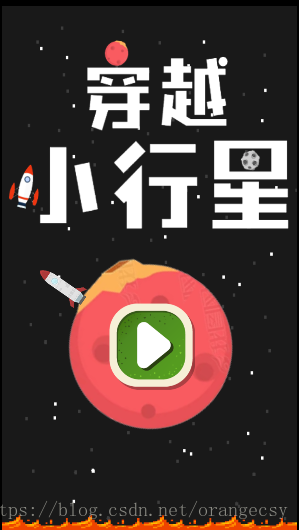
start.js为入口文件,内容如下。
let game;
// 全局游戏设置
const gameOptions = {
// 初始分数
scoreInit: 1000,
// 本局分数
score: 0,
// 屏幕宽高
width: 750,
height: 1334,
// 重力
gravity: 200,
// 墙
rectWidth: 100,
wallWidth: 5,
// 地球
earthRadius: 100,
// 飞船速度
speed: 600
}
window.onload = () => {
// 配置信息
const config = {
// 界面宽度,单位像素
// width: 750,
width: gameOptions.width,
// 界面高度
height: gameOptions.height,
// 渲染类型
renderer: Phaser.AUTO,
parent: 'render'
};
// 声明游戏对象
game = new Phaser.Game(config);
// 添加状态
game.state.add('start', Start);
game.state.add('game', Game);
game.state.add('restart', Restart);
// 开始界面
game.state.start('start');
}
class Start extends Phaser.State {
// 构造器
constructor() {
super("Start");
}
// 预加载
preload() {
// 图片路径
const images = {
'earth': './assets/img/earth.png',
'sat1': './assets/img/sat1.png',
'sat2': './assets/img/sat2.png',
'sat3': './assets/img/sat3.png',
'rocket': './assets/img/rocket.png',
'play': './assets/img/play.png',
'title': './assets/img/title.png',
'fire': './assets/img/fire.png',
'over': './assets/img/over.png',
'restart': './assets/img/restart.png',
'particle1': './assets/img/particulelune1.png',
'particle2': './assets/img/particulelune2.png',
'station': './assets/img/station.png'
};
// 载入图片
for (let name in images) {
this.load.image(name, images[name]);
}
// 载入天空盒
this.load.spritesheet('skybox', './assets/img/stars.png', 480, 640, 5);
// 音乐路径
const audios = {
'bgMusic':'./assets/audio/music.mp3',
'jump':'./assets/audio/jump.wav',
'explosion':'./assets/audio/explosion.mp3'
}
// 载入音乐
for(let name in audios){
this.load.audio(name, audios[name]);
}
}
create() {
// 播放背景音乐
const bgMusic = this.add.audio('bgMusic', 0.3, true);
bgMusic.play();
// 屏幕比例系数
const screenWidthRatio = gameOptions.width / 480;
const screenHeightRatio = gameOptions.height / 640;
// 星星闪烁
const skybox = game.add.sprite(0, 0, 'skybox');
skybox.width = gameOptions.width;
skybox.height = gameOptions.height;
const twinkle = skybox.animations.add('twinkle');
skybox.animations.play('twinkle', 3, true);
// 标题
const title = this.add.sprite(gameOptions.width / 2, gameOptions.height / 5, 'title');
title.width *= screenWidthRatio;
title.height *= 0.8 * screenHeightRatio;
title.anchor.set(0.5);
this.add.tween(title).to(
{y: gameOptions.height / 4},
1500,
Phaser.Easing.Sinusoidal.InOut,
true, 0, -1, true);
// 开始按钮
const startButton = this.add.group();
startButton.x = this.world.width / 2;
startButton.y = gameOptions.height * 0.65;
startButton.scale.set(0.7);
// 开始按钮中加入地球、火箭
const earthGroup = this.add.group();
const earth = this.add.sprite(0, 0, 'earth');
earth.scale.set(screenHeightRatio * 1.7);
earth.anchor.set(0.5);
earthGroup.add(earth);
const rocket = this.add.sprite(0, 0, 'rocket');
rocket.anchor.set(0.5, 1);
rocket.scale.set(0.25 * screenHeightRatio);
rocket.y = -140 * screenHeightRatio;
earthGroup.add(rocket);
this.add.tween(earthGroup).to(
{rotation: Math.PI * 2},
5000,
Phaser.Easing.Linear.Default,
true, 0, -1);
// 整体加入到开始按钮
startButton.add(earthGroup);
// 开始按钮中加入播放键
const playButton = this.add.sprite(10, 0, 'play');
playButton.scale.set(0.7 * screenHeightRatio);
playButton.anchor.set(0.5);
startButton.add(playButton);
// startButton可点击,只能挂载到earth上
earth.inputEnabled = true;
earth.events.onInputDown.add(function () {
this.play();
}, this);
// 下方火焰
const fire = this.add.sprite(0, gameOptions.height * 0.98, 'fire');
fire.width = gameOptions.width;
this.add.tween(fire).to(
{y: gameOptions.height * 0.9},
1000,
Phaser.Easing.Sinusoidal.InOut,
true, 0, -1, true);
}
play() {
this.state.start('game');
}
}
window.onload中声明游戏对象game,传入配置信息。Start继承场景状态类Phaser.State,preload方法中完成图片、音频的载入,其中starts.png被横向分为5份,依次变换,展现背景星空的闪烁。create方法将在场景被创建时调用。将sprite元素依次加入,sprite的叠放顺序是加入顺序的倒序,即加入越早越底层。通过tween(sprite名)可以添加动画,Phaser.Easing.XX为动画的变化曲线,可参考官方文档。当点击按钮时,调用this.state.start('game')切换状态名为‘game’的游戏状态。
3、游戏场景
游戏的主要玩法是:玩家驾驶的火箭随小行星转动,点击屏幕完成跳跃。当检测到火箭包围盒与另一行星包围盒重叠时,火箭登陆到另一行星并随之转动。下方火焰的速度将随着分数的增长而不断增长。当火焰吞没火箭时,游戏结束,记录分数。

game.js文件包含场景状态类Game,如下所示。
class Game extends Phaser.State {
// 构造器
constructor() {
super("Game");
}
create() {
// 物理引擎
// 上下要对称
this.world.setBounds(0, -1000000, 480, 1000000);
this.physics.startSystem(Phaser.Physics.ARCADE);
// 初始化参数
this.score = gameOptions.scoreInit;
this.gravity = gameOptions.gravity;
this.screenWidthRatio = gameOptions.width / 480;
this.screenHeightRatio = gameOptions.height / 640;
// 生成sprite
// 星星闪烁
// const skybox = game.add.sprite(0, 0, 'skybox');
const skybox = this.add.sprite(0, 0, 'skybox');
skybox.width = gameOptions.width;
skybox.height = gameOptions.height;
const twinkle = skybox.animations.add('twinkle');
skybox.animations.play('twinkle', 3, true);
skybox.fixedToCamera = true;
// 生成左右墙体
this.walls = this.add.group();
for(let lr of ['left', 'right']) {
let wall;
if (lr === 'left') {
wall = this.add.graphics(- gameOptions.rectWidth + gameOptions.wallWidth, 0);
wall.type = 'l';
} else {
wall = this.add.graphics(this.camera.view.width - gameOptions.wallWidth , 0);
wall.type = 'r';
}
wall.beginFill(0xFFFFFF);
wall.drawRect(0, 0, 100, this.camera.view.height);
wall.endFill();
this.physics.arcade.enable(wall);
wall.body.immovable = true;
wall.fixedToCamera = true;
this.walls.add(wall);
}
// 生成地球和小行星
this.asteroids = this.add.group();
const earthRadius = gameOptions.earthRadius * this.screenWidthRatio;
// const earth = this.add.sprite(this.world.width / 2, this.world.height / 3 * 2, 'earth');
const earth = this.add.sprite(gameOptions.width / 2, -gameOptions.height * 0.22, 'sat2');
earth.scale.set(this.screenWidthRatio * 0.1);
earth.anchor.setTo(0.5, 0.5);
earth.radius = earthRadius;
earth.width = earthRadius * 2;
earth.height = earthRadius * 2;
// 生成火箭
// const rocket = this.add.sprite(this.world.width / 2, this.world.height / 3 * 2 - earthRadius, 'rocket');
const rocket = this.add.sprite(gameOptions.width / 2, -gameOptions.height / 3 * 2 - earthRadius, 'rocket');
rocket.anchor.set(0.5, 0.55);
// 调节行星生成,避免出界
rocket.radius = 15;
rocket.scale.set(0.25);
this.physics.arcade.enable(rocket);
// 着陆星球
rocket.landed = {
asteroid: earth,
angle: - Math.PI / 2
};
this.rocket = rocket;
this.camera.follow(this.rocket);
// 生成行星
this.generateAsteroids();
// 生成火焰
const fire = this.add.sprite(0, -gameOptions.height / 10, 'fire');
fire.width = gameOptions.width;
fire.height = gameOptions.height / 3 * 2;
this.physics.arcade.enable(fire);
fire.body.immovable = true;
this.fire = fire;
// 灰尘特效
const dust = this.add.emitter();
dust.makeParticles(['particle1', 'particle2']);
dust.gravity = 200;
dust.setAlpha(1, 0, 3000, Phaser.Easing.Quintic.Out);
this.dust = dust;
// 分数,放到后面,越晚加入越在上层
const scoreText = this.add.text(
gameOptions.width - 20,
10,
'分数 ' + this.score,
{
font: this.screenWidthRatio * 30 + 'px Arial',
fill: '#ffffff'
}
);
scoreText.anchor.x = 1;
scoreText.fixedToCamera = true;
this.scoreText = scoreText;
// 点击交互
this.input.onDown.add(() => {
this.jump();
});
// 载入音乐
this.jumpAudio = this.add.audio('jump', 0.3);
this.explosionAudio = this.add.audio('explosion', 0.2);
}
jump() {
if (this.rocket.landed) {
this.rocket.body.moves = true;
const speed = gameOptions.speed;
this.rocket.body.velocity.x = speed * Math.cos(
this.rocket.landed.angle +
this.rocket.landed.asteroid.rotation);
this.rocket.body.velocity.y = speed * Math.sin(
this.rocket.landed.angle +
this.rocket.landed.asteroid.rotation);
this.rocket.body.gravity.y = this.gravity;
this.rocket.leftTime = Date.now();
this.rocket.landed = null;
this.jumpAudio.play();
} else if (this.rocket.type) {
// 触墙
const speed = gameOptions.speed;
const gravity = gameOptions.gravity;
if (this.rocket.type === 'l') {
this.rocket.body.velocity.x = speed;
this.rocket.body.velocity.y = -0.2 * speed;
// this.rocket.body.gravity.y = gravity;
} else if (this.rocket.type === 'r') {
this.rocket.body.velocity.x = -speed;
this.rocket.body.velocity.y = -0.2 * speed;
// this.rocket.body.gravity.y = gravity;
}
this.rocket.leftTime = Date.now();
this.rocket.type = false;
this.jumpAudio.play();
}
}
generateAsteroids() {
// 生成小行星带
// 生成数据
const getRatio = (min, max) => {
return Math.min(this.score / 10000, 1) * (max - min) + min;
}
const getValue = () => {
return {
distance: this.screenHeightRatio * this.rnd.between(getRatio(50, 150), getRatio(100, 200)),
angle: this.rnd.realInRange(-Math.PI * 0.15, -Math.PI * 0.85),
radius: this.screenHeightRatio * this.rnd.between(getRatio(60, 20), getRatio(90, 40)),
rotationSpeed: this.rnd.sign() * this.rnd.between(getRatio(1, 3), getRatio(3, 6))
};
}
// 生成第一颗小行星
if(this.asteroids.children.length === 0) {
const values = getValue();
this.asteroids.add(this.generateOneAsteroid(
this.world.width / 2,
- gameOptions.height * 0.4 - 2 * values.radius,
values.radius,
values.rotationSpeed
));
}
// console.log(this.asteroids.children[0].angle)
// 生成其他小行星
const maxDistance = this.camera.view.height;
while(this.asteroids.children[this.asteroids.children.length - 1].y >= this.rocket.y - maxDistance){
const previousAsteroid = this.asteroids.children[this.asteroids.children.length - 1];
let newOne;
let values;
do{
values = getValue();
newOne = {
x: previousAsteroid.x + Math.cos(values.angle) * (values.distance + previousAsteroid.radius + values.radius),
y: previousAsteroid.y + Math.sin(values.angle) * (values.distance + previousAsteroid.radius + values.radius)
}
} while(newOne.x - this.rocket.radius * 2 - values.radius < 10
|| newOne.x + this.rocket.radius * 2 + values.radius > this.world.width);
this.asteroids.add(this.generateOneAsteroid(newOne.x, newOne.y, values.radius, values.rotationSpeed));
}
}
generateOneAsteroid(x, y, radius, rotationSpeed) {
const rnd = Math.random();
let oneAsteroid;
// 设定生成不同小行星的概率
if (rnd < 1 / 4) {
oneAsteroid = this.add.sprite(this.screenWidthRatio * x, y, 'sat1');
} else if (rnd < 1 / 2) {
oneAsteroid = this.add.sprite(this.screenWidthRatio * x, y, 'sat2');
} else {
oneAsteroid = this.add.sprite(this.screenWidthRatio * x, y, 'sat3');
}
oneAsteroid.anchor.setTo(0.5, 0.5);
oneAsteroid.radius = radius;
oneAsteroid.width = radius * 2;
oneAsteroid.height = radius * 2;
this.physics.arcade.enable(oneAsteroid);
oneAsteroid.body.immovable = true;
oneAsteroid.body.setCircle(
radius,
-radius + 0.5 * oneAsteroid.width / oneAsteroid.scale.x,
-radius + 0.5 * oneAsteroid.height / oneAsteroid.scale.y
);
oneAsteroid.rotationSpeed = rotationSpeed;
return oneAsteroid;
}
update() {
// 记录火箭旋转
this.rocket.rotation = this.rocket.body.angle + Math.PI/2;
// 小行星旋转
for (let i = 0; i < this.asteroids.children.length; i++) {
this.asteroids.children[i].angle += this.asteroids.children[i].rotationSpeed;
}
// 火焰
const fireSpeed = Math.min(this.score / 8000, 1);
this.fire.body.velocity.set(0, -fireSpeed * 300);
// 被火焰吞没
this.physics.arcade.overlap(this.rocket, this.fire, (rocket, fire) => {
this.gameover();
});
// 火箭随行星转动
if (this.rocket.landed) {
this.rocket.body.moves = false;
const asteroid = this.rocket.landed.asteroid;
this.rocket.body.gravity.y = 0;
this.rocket.x = asteroid.x +
(asteroid.width * 0.5 + this.rocket.radius) *
Math.cos(this.rocket.landed.angle + asteroid.rotation);
this.rocket.y = asteroid.y +
(asteroid.width * 0.5 + this.rocket.radius) *
Math.sin(this.rocket.landed.angle + asteroid.rotation);
this.rocket.rotation = this.rocket.landed.angle + asteroid.rotation + Math.PI / 2;
// 防止相机随着行星转动上下抖动
this.camera.follow(asteroid, null, 1, 0.2);
}else{
this.camera.follow(this.rocket, null, 1, 0.2);
}
// 火箭起飞
if (!this.rocket.landed) {
this.physics.arcade.overlap(this.rocket, this.asteroids, (rocket, asteroid) => {
// 防止粘到刚跳出来的行星
if (!rocket.leftTime || Date.now() - rocket.leftTime > 200) {
this.rocket.landed = {
asteroid: asteroid,
angle: this.physics.arcade.angleBetween(asteroid, rocket) - asteroid.rotation
};
// 降落灰尘特效
// const asteroid = this.hero.grab.wheel;
const dust = this.dust;
dust.x = asteroid.x +
(asteroid.width * 0.5 + this.rocket.radius) *
Math.cos(this.rocket.landed.angle + asteroid.rotation);
dust.y = asteroid.y +
(asteroid.width * 0.5 + this.rocket.radius) *
Math.sin(this.rocket.landed.angle + asteroid.rotation);
dust.start(true, 2000, 0, 20, true);
this.score = Math.floor(-rocket.y + gameOptions.scoreInit);
this.scoreText.setText('分数 ' + this.score);
}
});
// 火箭触墙
this.physics.arcade.overlap(this.rocket, this.walls, (rocket, wall) => {
if (!rocket.leftTime || Date.now() - rocket.leftTime > 200) {
// 缓慢下滑
this.rocket.body.gravity.y = gameOptions.gravity;
// 左墙
if (wall.type === 'l') {
this.rocket.x = wall.x + wall.width + this.rocket.radius - 2;
this.rocket.rotation = Math.PI / 2;
} else if (wall.type === 'r'){
this.rocket.x = wall.x - this.rocket.radius + 2;
this.rocket.rotation = - Math.PI / 2;
}
this.rocket.body.velocity.x = 0;
this.rocket.type = wall.type;
}
});
}
// 生成新行星
this.generateAsteroids();
}
gameover() {
this.explosionAudio.play();
gameOptions.score = this.score;
const bestScore = localStorage.getItem('bestScore');
if (!bestScore || bestScore < this.score) {
localStorage.setItem('bestScore', this.score);
}
this.state.start('restart');
}
}
create方法创建游戏场景。首先指定空间范围,开启物理引擎。初始化分数,指定重力大小,并设置屏幕拉伸比,以适应不同大小的屏幕。使用drawRect方法绘制两侧墙体,并将墙体固定,不随相机移动。之后生成地球、火箭和小行星。生成小行星的算法是:根据当前分数的高低设定随机数范围,确定参数,包括行星间距离、角度、半径、旋转速度。当火箭在初始位置(地球)上,因为地球没有转动,因此第一颗行星单独生成在地球正上方。每颗行星生成时判断距离是否满足最小最大条件,不断生成卫星直到确保有足够的行星。
当发生点击事件时,调用jump函数。判断此时火箭位于小行星还是两侧墙体,并重新赋值火箭速度。update函数内记录火箭及小行星的旋转。根据分数高低改变下面的火焰速度,分数越高火焰上升越快,以增加游戏难度。判断火箭是否被火焰吞没,若吞没则调用gameover函数。当火箭在某一小行星上着陆时,为火箭赋予相同的角速度,从而让火箭随小行星一同旋转。判断火箭是否处于飞行状态,若是,则判断是否与其他行星碰撞。碰撞时触发粒子效果。游戏结束时记录分数,并判断当前分数是否超过localStorage中存储的最高分。
4、结束场景
结束场景中展示本局分数及历史最高分。当点击重新开始按钮时,返回新的游戏场景。

class Restart extends Phaser.State {
// 构造器
constructor() {
super("Restart");
}
create() {
// 禁止物理引擎作用
this.world.setBounds(0, 0, 0, 0);
// 屏幕缩放
const screenWidthRatio = gameOptions.width / 480;
const screenHeightRatio = gameOptions.height / 640;
// 生成sprite
// 星星闪烁
const skybox = this.add.sprite(0, 0, 'skybox');
skybox.width = gameOptions.width;
skybox.height = gameOptions.height;
const twinkle = skybox.animations.add('twinkle');
skybox.animations.play('twinkle', 3, true);
// 空间站
const station = this.add.sprite(gameOptions.width / 2, gameOptions.height / 2, 'station');
station.scale.set(screenHeightRatio * 0.5);
station.anchor.setTo(0.5, 0.5);
this.add.tween(station).to(
{rotation: Math.PI * 2},
5000,
Phaser.Easing.Linear.Default,
true, 0, -1);
// 下方火焰
const fire = this.add.sprite(0, gameOptions.height * 0.98, 'fire');
fire.width = gameOptions.width;
this.add.tween(fire).to(
{y: gameOptions.height * 0.9},
1000,
Phaser.Easing.Sinusoidal.InOut,
true, 0, -1, true);
// GameOver
const gameover = this.add.sprite(gameOptions.width / 2, 0, 'over');
gameover.width *= 0.98 * screenWidthRatio;
gameover.height *= 0.8 * screenHeightRatio;
gameover.anchor.x = 0.5;
this.add.tween(gameover).to(
{y: gameOptions.height / 8},
1500,
Phaser.Easing.Bounce.Out,
true
);
// 得分
const bestScore = localStorage.getItem('bestScore');
const scoreText = this.add.text(
50 * screenWidthRatio,
gameOptions.height / 6 * 5,
'本局得分 ' + gameOptions.score + '\n历史最高 ' + bestScore,
{
font: "40px Arial",
fill: "#ffffff"
}
);
scoreText.scale.set(screenWidthRatio);
scoreText.anchor.x = 0;
scoreText.anchor.y = 0.5;
const restart = this.add.sprite(
gameOptions.width - 80 * screenWidthRatio,
gameOptions.height / 6 * 5,
'restart'
);
restart.scale.setTo(0.4 * screenWidthRatio);
restart.anchor.x = 0.5;
restart.anchor.y = 0.5;
restart.inputEnabled = true;
restart.events.onInputDown.add(function () {
this.restart();
}, this);
}
restart() {
this.state.start('game');
}
}
Web版完整程序见我的github-web。
5、适配微信小程序
由于微信小程序的限制,web版程序需要进行一些修改。主要的几个修改有:
使用wx.getSystemInfo方法获取屏幕分辨率并调整各sprite比例。
创建Phaser.Game对象时,传入的renderer类型必须为Phaser.CANVAS。
微信不支持Phaser的音乐播放,使用微信自带的Audio类代替。
微信中点击事件修改为this.input.onDown.add(this.xxx, this)。
微信版完整程序见我的github-wx。
转自:https://blog.csdn.net/orangecsy/article/details/80624250
Phaser开发相关资料:https://segmentfault.com/a/1190000009282734
本文来自互联网用户投稿,文章观点仅代表作者本人,不代表本站立场,不承担相关法律责任。如若转载,请注明出处。 如若内容造成侵权/违法违规/事实不符,请点击【内容举报】进行投诉反馈!