iOS使用UITableView实现的富文本编辑器
https://my.oschina.net/u/1242477/blog/1486577
摘要: iOS使用UITableView实现的富文本编辑器
前言
公司最近做一个项目,其中有一个模块是富文本编辑模块,之前没做个类似的功能模块,本来以为这个功能很常见应该会有已经造好的轮子,或许我只要找到轮子,研究下轮子,然后修改打磨轮子,这件事就八九不离十了。不过,还是 too young to simple 了,有些事,还是得自己去面对的,或许这就叫做成长,感觉最近一年,对于编程这件事,更多了一点热爱,我感觉我不配过只会复制粘贴代码的人生,编程需要有挑战。所以,遇到困难,保持一份正念,路其实就在脚下,如果没有困难,那就制造困哪,迎难而上,人生没有白走的路,每一步都算数,毒鸡汤就到此为止,下面是干货了。
结果
实现的功能包含了:
- 编辑器文字编辑
- 编辑器图片编辑
- 编辑器图文混排编辑
- 编辑器图片上传,带有进度和失败提示,可以重新上传操作
- 编辑器模型转换为HTML格式内容
- 简单的本地数据存储和恢复编辑实现(草稿箱功能)
- 配套的Java实现的服务器
后期有进行了性能的优化,可以看我的这篇文章: iOS使用Instrument-Time Profiler工具分析和优化性能问题
以及客户端代码开源托管地址:MMRichTextEdit
还有java实现的文件服务器代码开源托管地址:javawebserverdemo
没图没真相,下面是几张实现的效果图
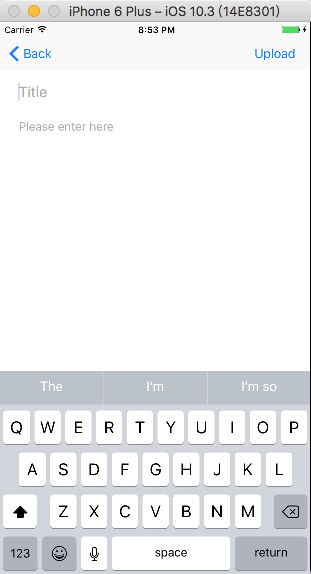
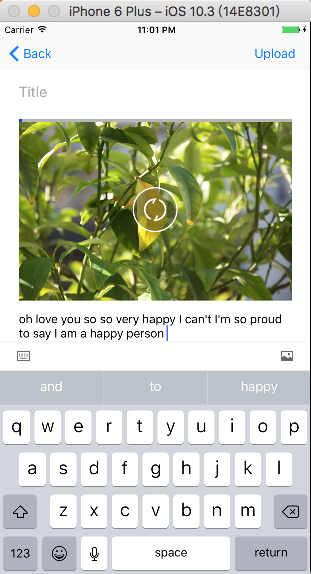
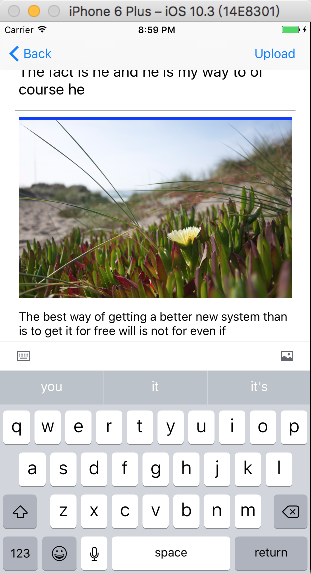
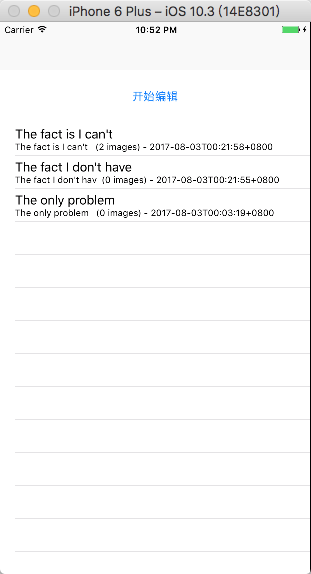
调研分析
基本上有以下几种的实现方案:
- UITextView结合NSAttributeString实现图文混排编辑,这个方案可以在网上找到对应的开源代码,比如 SimpleWord 的实现就是使用这种方式,不过缺点是图片不能有交互,比如说在图片上添加进度条,添加上传失败提示,图片点击事件处理等等都不行,如果没有这种需求那么可以选择这种方案。
- 使用WebView通过js和原生的交互实现,比如 WordPress-Editor 、RichTextDemo ,主要的问题就是性能不够好,还有需要你懂得前端知识才能上手。
- 使用CoreText或者TextKit,这种也有实现方案的开源代码,比如说这个 YYText ,这个很有名气,不过他使用的图片插入编辑图片的位置是固定的,文字是围绕着图片,所以这种不符合我的要求,如果要使用这种方案,那修改的地方有很多,并且CoreText/TextKit使用是有一定的门槛的。
- 使用UITableView结合UITextView的假实现,主要的思路是每个Cell是一个文字输入的UITextView或者是用于显示图片使用的UITextView,图片显示之所以是选择UITextView是因为图片位置需要有输入光标,所以使用UITextView结合NSAttributeString的方式正好可以实现这个功能。图片和文字混排也就是显示图片的Cell和显示文字的Cell混排就可以实现了,主要的工作量是处理光标位置输入以及处理光标位置删除。
选型定型
前面三种方案都有了开源的实现,不过都不满足需要,只有第二种方案会比较接近一点,不过WebView结合JS的操作确实是性能不够好,内存占用也比较高, WordPress-Editor 、RichTextDemo ,这两种方法实现的编辑器会明显的感觉到不够流畅,并且离需要还有挺大的距离,所有没有选择在这基础上进行二次开发。第三种方案在网上有比较多的人推荐,不过我想他们大概也只是推荐而已,真正实现起来需要花费大把的时间,需要填的坑有很多,考虑到时间有限,以及项目的进度安排,这个坑我就没有去踩了。
我最终选择的是第四种方案,这种方案好的地方就是UITableView、UITextView都是十分熟悉的组件,使用组合的模式通过以上的分析,理论上是没有问题的,并且,UITableView有复用Cell的优势,所以时间性能和空间性能应该是不差的。
实现细节分析
使用UITableView集合UITextView的这种方案有很多细节需要注意
- Cell中添加UITextView,文字输入换行或者超过一行Cell高度自动伸缩处理
- Cell中添加UITextView显示图片的处理
- 光标处删除和添加图片的处理,换行的处理
需要解决问题,好的是有些是已经有人遇到并且解决的,其他的即使其他人没有遇到过,作为第一个吃螃蟹的人,我们详细的去分析下其实也不难
- 这个问题刚好有人遇到过,这里就直接发链接了iOS UITextView 输入内容实时更新cell的高度
实现上面效果的基本原理是:
1.在 cell 中设置好 text view 的 autolayout,让 cell 可以根据内容自适应大小
2.text view 中输入内容,根据内容更新 textView 的高度
3.调用 tableView 的 beginUpdates 和 endUpdates,重新计算 cell 的高度
4.将 text view 更新后的数据保存,以免 table view 滚动超过一屏再滚回来 text view 中的数据又不刷新成原来的数据了。
注意:上面文章中提到的思路是对的,不过在开发过程中遇到一个问题:使用自动布局计算高度的方式调用 tableView 的 beginUpdates 和 endUpdates,重新计算 cell 的高度会出现一个严重的BUG,textView中的文字会偏移导致不在正确的位置,所以实际的项目中禁用了tableView自动计算Cell高度的特性,采用手动计算Cell高度的方式,具体的可以看我的项目代码。
2.这个问题很简单,使用属性文字就行了,下面直接贴代码了
NSAttributedString结合NSTextAttachment就行了
/**显示图片的属性文字*/
- (NSAttributedString*)attrStringWithContainerWidth:(NSInteger)containerWidth {if (!_attrString) {CGFloat showImageWidth = containerWidth - MMEditConfig.editAreaLeftPadding - MMEditConfig.editAreaRightPadding - MMEditConfig.imageDeltaWidth;NSTextAttachment *textAttachment = [[NSTextAttachment alloc] init];CGRect rect = CGRectZero;rect.size.width = showImageWidth;rect.size.height = showImageWidth * self.image.size.height / self.image.size.width;textAttachment.bounds = rect;textAttachment.image = self.image;NSAttributedString *attachmentString = [NSAttributedString attributedStringWithAttachment:textAttachment];NSMutableAttributedString *attributedString = [[NSMutableAttributedString alloc] initWithString:@""];[attributedString insertAttributedString:attachmentString atIndex:0];_attrString = attributedString;// 设置SizeCGRect tmpImageFrame = rect;tmpImageFrame.size.height += MMEditConfig.editAreaTopPadding + MMEditConfig.editAreaBottomPadding;_imageFrame = tmpImageFrame;}return _attrString;
}
3.这个问题比较棘手,我自己也是先把可能的情况列出来,然后一个一个分支去处理这些情况,不难就是麻烦,下面的文本是我写在 备忘录 上的情况分析,- [x] 这种标识这种情况已经实现,- [ ] 这种标识暂时未实现,后面这部分会进行优化,主要的工作已经完成了,优化的工作量不会很大了。
UITableView实现的编辑器return换行情况分析:
- [x] text节点:不处理
- [x] Image节点-前面:上面是text,光标移动到上面一行,并且在最后添加一个换行,定位光标在最后将
- [x] Image节点-前面:上面是图片或者空,在上面添加一个Text节点,光标移动到上面一行,
- [x] Image节点-后面:下面是图片或者空,在下面添加一个Text节点,光标移动到下面一行,
- [x] Image节点-后面:下面是text,光标移动到下面一行,并且在最前面添加一个换行,定位光标在最前面

Delete情况分析:
- [x] Text节点-当前的Text不为空-前面-:上面是图片,定位光标到上面图片的最后
- [x] Text节点-当前的Text不为空-前面-:上面是Text,合并当前Text和上面Text  这种情况不存在,在图片删除的时候进行合并
- [x] Text节点-当前的Text不为空-前面-:上面是空,不处理
- [x] Text节点-当前的Text为空-前面-没有其他元素(第一个)-:不处理
- [x] Text节点-当前的Text为空-前面-有其他元素-:删除这一行,定位光标到下面图片的最后
- [x] Text节点-当前的Text不为空-后面-:正常删除
- [x] Text节点-当前的Text为空-后面-:正常删除,和第三种情况:为空的情况处理一样

- [x] Image节点-前面-上面为Text(不为空)/Image定位到上面元素的后面
- [x] Image节点-前面-上面为Text(为空):删除上面Text节点
- [x] Image节点-前面-上面为空:不处理
- [ ] Image节点-后面-上面为空(第一个位置)-列表只有一个元素:添加一个Text节点,删除当前Image节点,光标放在添加的Text节点上 ****TODO:上面元素不处于显示区域不可定位****
- [x] Image节点-后面-上面为空(第一个位置)-列表多于一个元素:删除当前节点,光标放在后面元素之前
- [x] Image节点-后面-上面为图片:删除Image节点,定位到上面元素的后面
- [x] Image节点-后面-上面为Text-下面为图片或者空:删除Image节点,定位到上面元素的后面
- [x] Image节点-后面-上面为Text-下面为Text:删除Image节点,合并下面的Text到上面,删除下面Text节点,定位到上面元素的后面

图片节点添加文字的情况分析:
- [ ] 前面输入文字
- [ ] 后面输入文字

插入图片的情况分析:
- [x] activeIndex是Image节点-后面:下面添加一个图片节点
- [x] activeIndex是Image节点-前面:上面添加一个图片节点
- [x] activeIndex是Text节点:拆分光标前后内容插入一个图片节点和Text节点
- [x] 图片插入之后更新 activeIndexPath
基本上分析就到此为止了,talk is cheap, show me code,下面就是代码实现了。
代码实现
编辑模块
文字输入框的Cell实现
下面是文字输入框的Cell的主要代码,包含了
- 初始设置文字编辑Cell的高度、文字内容、是否显示Placeholder
- 在
UITextViewDelegate回调方法textViewDidChange中处理Cell的高度自动拉伸 - 删除的回调方法中处理前面删除和后面删除,删除回调的代理方法是继承
UITextView重写deleteBackward方法进行的回调,具体的可以额查看MMTextView这个类的实现,很简单的一个实现。
@implementation MMRichTextCell
// ...
- (void)updateWithData:(id)data indexPath:(NSIndexPath*)indexPath {if ([data isKindOfClass:[MMRichTextModel class]]) {MMRichTextModel* textModel = (MMRichTextModel*)data;_textModel = textModel;// 重新设置TextView的约束[self.textView mas_remakeConstraints:^(MASConstraintMaker *make) {make.left.top.right.equalTo(self);make.bottom.equalTo(self).priority(900);make.height.equalTo(@(textModel.textFrame.size.height));}];// Content_textView.text = textModel.textContent;// Placeholderif (indexPath.row == 0) {self.textView.showPlaceHolder = YES;} else {self.textView.showPlaceHolder = NO;}}
}- (void)beginEditing {[_textView becomeFirstResponder];if (![_textView.text isEqualToString:_textModel.textContent]) {_textView.text = _textModel.textContent;// 手动调用回调方法修改[self textViewDidChange:_textView];}if ([self curIndexPath].row == 0) {self.textView.showPlaceHolder = YES;} else {self.textView.showPlaceHolder = NO;}
}#pragma mark - ......::::::: UITextViewDelegate :::::::......- (void)textViewDidChange:(UITextView *)textView {CGRect frame = textView.frame;CGSize constraintSize = CGSizeMake(frame.size.width, MAXFLOAT);CGSize size = [textView sizeThatFits:constraintSize];// 更新模型数据_textModel.textFrame = CGRectMake(frame.origin.x, frame.origin.y, frame.size.width, size.height);_textModel.textContent = textView.text;_textModel.selectedRange = textView.selectedRange;_textModel.isEditing = YES;if (ABS(_textView.frame.size.height - size.height) > 5) {// 重新设置TextView的约束[self.textView mas_remakeConstraints:^(MASConstraintMaker *make) {make.left.top.right.equalTo(self);make.bottom.equalTo(self).priority(900);make.height.equalTo(@(_textModel.textFrame.size.height));}];UITableView* tableView = [self containerTableView];[tableView beginUpdates];[tableView endUpdates];}
}- (BOOL)textViewShouldBeginEditing:(UITextView *)textView {textView.inputAccessoryView = [self.delegate mm_inputAccessoryView];if ([self.delegate respondsToSelector:@selector(mm_updateActiveIndexPath:)]) {[self.delegate mm_updateActiveIndexPath:[self curIndexPath]];}return YES;
}- (BOOL)textViewShouldEndEditing:(UITextView *)textView {textView.inputAccessoryView = nil;return YES;
}- (void)textViewDeleteBackward:(MMTextView *)textView {// 处理删除NSRange selRange = textView.selectedRange;if (selRange.location == 0) {if ([self.delegate respondsToSelector:@selector(mm_preDeleteItemAtIndexPath:)]) {[self.delegate mm_preDeleteItemAtIndexPath:[self curIndexPath]];}} else {if ([self.delegate respondsToSelector:@selector(mm_PostDeleteItemAtIndexPath:)]) {[self.delegate mm_PostDeleteItemAtIndexPath:[self curIndexPath]];}}
}@end
显示图片Cell的实现
下面显示图片Cell的实现,主要包含了
- 初始设置文字编辑Cell的高度、图片显示内容
- 在
UITextViewDelegate回调方法shouldChangeTextInRange中处理换行和删除,这个地方的删除和Text编辑的Cell不一样,所以在这边做了特殊的处理,具体看一看shouldChangeTextInRange这个方法的处理方式。 - 处理图片上传的进度回调、失败回调、成功回调
@implementation MMRichImageCell
// 省略部否代码...
- (void)updateWithData:(id)data {if ([data isKindOfClass:[MMRichImageModel class]]) {MMRichImageModel* imageModel = (MMRichImageModel*)data;// 设置旧的数据delegate为nil_imageModel.uploadDelegate = nil;_imageModel = imageModel;// 设置新的数据delegate_imageModel.uploadDelegate = self;CGFloat width = [MMRichTextConfig sharedInstance].editAreaWidth;NSAttributedString* imgAttrStr = [_imageModel attrStringWithContainerWidth:width];_textView.attributedText = imgAttrStr;// 重新设置TextView的约束[self.textView mas_remakeConstraints:^(MASConstraintMaker *make) {make.left.top.right.equalTo(self);make.bottom.equalTo(self).priority(900);make.height.equalTo(@(imageModel.imageFrame.size.height));}];self.reloadButton.hidden = YES;// 根据上传的状态设置图片信息if (_imageModel.isDone) {self.progressView.hidden = NO;self.progressView.progress = _imageModel.uploadProgress;self.reloadButton.hidden = YES;}if (_imageModel.isFailed) {self.progressView.hidden = NO;self.progressView.progress = _imageModel.uploadProgress;self.reloadButton.hidden = NO;}if (_imageModel.uploadProgress > 0) {self.progressView.hidden = NO;self.progressView.progress = _imageModel.uploadProgress;self.reloadButton.hidden = YES;}}
}#pragma mark - ......::::::: UITextViewDelegate :::::::......- (BOOL)textView:(UITextView *)textView shouldChangeTextInRange:(NSRange)range replacementText:(NSString *)text {// 处理换行if ([text isEqualToString:@"\n"]) {if (range.location == 0 && range.length == 0) {// 在前面添加换行if ([self.delegate respondsToSelector:@selector(mm_preInsertTextLineAtIndexPath:textContent:)]) {[self.delegate mm_preInsertTextLineAtIndexPath:[self curIndexPath]textContent:nil];}} else if (range.location == 1 && range.length == 0) {// 在后面添加换行if ([self.delegate respondsToSelector:@selector(mm_postInsertTextLineAtIndexPath:textContent:)]) {[self.delegate mm_postInsertTextLineAtIndexPath:[self curIndexPath] textContent:nil];}} else if (range.location == 0 && range.length == 2) {// 选中和换行}}// 处理删除if ([text isEqualToString:@""]) {NSRange selRange = textView.selectedRange;if (selRange.location == 0 && selRange.length == 0) {// 处理删除if ([self.delegate respondsToSelector:@selector(mm_preDeleteItemAtIndexPath:)]) {[self.delegate mm_preDeleteItemAtIndexPath:[self curIndexPath]];}} else if (selRange.location == 1 && selRange.length == 0) {// 处理删除if ([self.delegate respondsToSelector:@selector(mm_PostDeleteItemAtIndexPath:)]) {[self.delegate mm_PostDeleteItemAtIndexPath:[self curIndexPath]];}} else if (selRange.location == 0 && selRange.length == 2) {// 处理删除if ([self.delegate respondsToSelector:@selector(mm_preDeleteItemAtIndexPath:)]) {[self.delegate mm_preDeleteItemAtIndexPath:[self curIndexPath]];}}}return NO;
}- (BOOL)textViewShouldBeginEditing:(UITextView *)textView {textView.inputAccessoryView = [self.delegate mm_inputAccessoryView];if ([self.delegate respondsToSelector:@selector(mm_updateActiveIndexPath:)]) {[self.delegate mm_updateActiveIndexPath:[self curIndexPath]];}return YES;
}- (BOOL)textViewShouldEndEditing:(UITextView *)textView {textView.inputAccessoryView = nil;return YES;
}#pragma mark - ......::::::: MMRichImageUploadDelegate :::::::......// 上传进度回调
- (void)uploadProgress:(float)progress {dispatch_async(dispatch_get_main_queue(), ^{[self.progressView setProgress:progress];});
}// 上传失败回调
- (void)uploadFail {[self.progressView setProgress:0.01f];self.reloadButton.hidden = NO;
}// 上传完成回调
- (void)uploadDone {[self.progressView setProgress:1.0f];
}@end
图片上传模块
图片上传模块中,上传的元素和上传回调抽象了对应的协议,图片上传模块是一个单利的管理类,管理进行中的上传元素和排队中的上传元素,
图片上传的元素和上传回调的抽象协议
@protocol UploadItemCallBackProtocal <NSObject>- (void)mm_uploadProgress:(float)progress;
- (void)mm_uploadFailed;
- (void)mm_uploadDone:(NSString*)remoteImageUrlString;@end@protocol UploadItemProtocal <NSObject>- (NSData*)mm_uploadData;
- (NSURL*)mm_uploadFileURL;@end
图片上传的管理类
图片上传使用的是 NSURLSessionUploadTask 类处理
- 在
completionHandler回调中处理结果 - 在
NSURLSessionDelegate的方法URLSession:task:didSendBodyData:totalBytesSent:totalBytesExpectedToSend:中处理上传进度 - 在
NSURLSessionDelegate的方法URLSession:task:didCompleteWithError:中处理失败
上传管理类的关键代码如下:
@interface MMFileUploadUtil () <NSURLSessionDataDelegate, NSURLSessionDelegate, NSURLSessionTaskDelegate>
@property (strong,nonatomic) NSURLSession * session;
@property (nonatomic, strong) NSMutableArray* uploadingItems;
@property (nonatomic, strong) NSMutableDictionary* uploadingTaskIDToUploadItemMap;
@property (nonatomic, strong) NSMutableArray* todoItems;@property (nonatomic, assign) NSInteger maxUploadTask;
@end@implementation MMFileUploadUtil- (void)addUploadItem:(id)uploadItem {[self.todoItems addObject:uploadItem];[self startNextUploadTask];
}- (void)startNextUploadTask {if (self.uploadingItems.count < _maxUploadTask) {// 添加下一个任务if (self.todoItems.count > 0) {id uploadItem = self.todoItems.firstObject;[self.uploadingItems addObject:uploadItem];[self.todoItems removeObject:uploadItem];[self uploadItem:uploadItem];}}
}- (void)uploadItem:(id)uploadItem {NSMutableURLRequest * request = [self TSuploadTaskRequest];NSData* uploadData = [uploadItem mm_uploadData];NSData* totalData = [self TSuploadTaskRequestBody:uploadData];__block NSURLSessionUploadTask * uploadtask = nil;uploadtask = [self.session uploadTaskWithRequest:request fromData:totalData completionHandler:^(NSData *data, NSURLResponse *response, NSError *error) {NSString* result = [[NSString alloc] initWithData:data encoding:NSUTF8StringEncoding];NSLog(@"completionHandler  %@", result);NSString* imgUrlString = @"";NSError *JSONSerializationError;id obj = [NSJSONSerialization JSONObjectWithData:data options:NSJSONReadingAllowFragments error:&JSONSerializationError];if ([obj isKindOfClass:[NSDictionary class]]) {imgUrlString = [obj objectForKey:@"url"];}// 成功回调// FIXME: ZYT uploadtask ???id uploadItem = [self.uploadingTaskIDToUploadItemMap objectForKey:@(uploadtask.taskIdentifier)];if (uploadItem) {if ([uploadItem respondsToSelector:@selector(mm_uploadDone:)]) {[uploadItem mm_uploadDone:imgUrlString];}[self.uploadingTaskIDToUploadItemMap removeObjectForKey:@(uploadtask.taskIdentifier)];[self.uploadingItems removeObject:uploadItem];}[self startNextUploadTask];}];[uploadtask resume];// 添加到映射中[self.uploadingTaskIDToUploadItemMap setObject:uploadItem forKey:@(uploadtask.taskIdentifier)];
}#pragma mark - ......::::::: NSURLSessionDelegate :::::::......-(void)URLSession:(NSURLSession *)session task:(NSURLSessionTask *)task didCompleteWithError:(NSError *)error{NSLog(@"didCompleteWithError = %@",error.description);// 失败回调if (error) {id uploadItem = [self.uploadingTaskIDToUploadItemMap objectForKey:@(task.taskIdentifier)];if (uploadItem) {if ([uploadItem respondsToSelector:@selector(mm_uploadFailed)]) {[uploadItem mm_uploadFailed];}[self.uploadingTaskIDToUploadItemMap removeObjectForKey:@(task.taskIdentifier)];[self.uploadingItems removeObject:uploadItem];}}[self startNextUploadTask];
}-(void)URLSession:(NSURLSession *)session task:(NSURLSessionTask *)task didSendBodyData:(int64_t)bytesSent totalBytesSent:(int64_t)totalBytesSent totalBytesExpectedToSend:(int64_t)totalBytesExpectedToSend{NSLog(@"bytesSent:%@-totalBytesSent:%@-totalBytesExpectedToSend:%@", @(bytesSent), @(totalBytesSent), @(totalBytesExpectedToSend));// 进度回调id uploadItem = [self.uploadingTaskIDToUploadItemMap objectForKey:@(task.taskIdentifier)];if ([uploadItem respondsToSelector:@selector(mm_uploadProgress:)]) {[uploadItem mm_uploadProgress:(totalBytesSent * 1.0f/totalBytesExpectedToSend)];}
}@end
图片上传的回调会通过 UploadItemCallBackProtocal 协议的实现方法回调到图片编辑的模型中,更新对应的数据。图片编辑的数据模型是 MMRichImageModel ,该模型实现了 UploadItemProtocal 和 UploadItemCallBackProtocal 协议,实现 UploadItemCallBackProtocal 的方法更新数据模型的同时,会通过delegate通知到Cell更新进度和失败成功的状态。 关键的实现如下
@implementation MMRichImageModel- (void)setUploadProgress:(float)uploadProgress {_uploadProgress = uploadProgress;if ([_uploadDelegate respondsToSelector:@selector(uploadProgress:)]) {[_uploadDelegate uploadProgress:uploadProgress];}
}- (void)setIsDone:(BOOL)isDone {_isDone = isDone;if ([_uploadDelegate respondsToSelector:@selector(uploadDone)]) {[_uploadDelegate uploadDone];}
}- (void)setIsFailed:(BOOL)isFailed {_isFailed = isFailed;if ([_uploadDelegate respondsToSelector:@selector(uploadFail)]) {[_uploadDelegate uploadFail];}
}#pragma mark - ......::::::: UploadItemCallBackProtocal :::::::......
- (void)mm_uploadProgress:(float)progress {self.uploadProgress = progress;
}- (void)mm_uploadFailed {self.isFailed = YES;
}- (void)mm_uploadDone:(NSString *)remoteImageUrlString {self.remoteImageUrlString = remoteImageUrlString;self.isDone = YES;
}#pragma mark - ......::::::: UploadItemProtocal :::::::......
- (NSData*)mm_uploadData {return UIImageJPEGRepresentation(_image, 0.6);
}- (NSURL*)mm_uploadFileURL {return nil;
}@end
内容处理模块
最终是要把内容序列化然后上传到服务端的,我们的序列化方案是转换为HTML,内容处理模块主要包含了以下几点:
- 生成HTML格式的内容
- 验证内容是否有效,判断图片时候全部上传成功
- 压缩图片
- 保存图片到本地
这部分收尾的工作比较的简单,下面是实现代码:
#define kRichContentEditCache @"RichContentEditCache"@implementation MMRichContentUtil+ (NSString*)htmlContentFromRichContents:(NSArray*)richContents {NSMutableString *htmlContent = [NSMutableString string];for (int i = 0; i< richContents.count; i++) {NSObject* content = richContents[i];if ([content isKindOfClass:[MMRichImageModel class]]) {MMRichImageModel* imgContent = (MMRichImageModel*)content;[htmlContent appendString:[NSString stringWithFormat:@" ", imgContent.remoteImageUrlString, @(imgContent.image.size.width), @(imgContent.image.size.height)]];} else if ([content isKindOfClass:[MMRichTextModel class]]) {MMRichTextModel* textContent = (MMRichTextModel*)content;[htmlContent appendString:textContent.textContent];}// 添加换行if (i != richContents.count - 1) {[htmlContent appendString:@"
"];}}return htmlContent;
}+ (BOOL)validateRichContents:(NSArray*)richContents {for (int i = 0; i< richContents.count; i++) {NSObject* content = richContents[i];if ([content isKindOfClass:[MMRichImageModel class]]) {MMRichImageModel* imgContent = (MMRichImageModel*)content;if (imgContent.isDone == NO) {return NO;}}}return YES;
}+ (UIImage*)scaleImage:(UIImage*)originalImage {float scaledWidth = 1242;return [originalImage scaletoSize:scaledWidth];
}+ (NSString*)saveImageToLocal:(UIImage*)image {NSString *path=[self createDirectory:kRichContentEditCache];NSData* data = UIImageJPEGRepresentation(image, 1.0);NSString *filePath = [path stringByAppendingPathComponent:[self.class genRandomFileName]];[data writeToFile:filePath atomically:YES];return filePath;
}// 创建文件夹
+ (NSString *)createDirectory:(NSString *)path {BOOL isDir = NO;NSString *finalPath = [CACHE_PATH stringByAppendingPathComponent:path];if (!([[NSFileManager defaultManager] fileExistsAtPath:finalPathisDirectory:&isDir]&& isDir)){[[NSFileManager defaultManager] createDirectoryAtPath:finalPathwithIntermediateDirectories :YESattributes :nilerror :nil];}return finalPath;
}+ (NSString*)genRandomFileName {NSTimeInterval timeStamp = [[NSDate date] timeIntervalSince1970];uint32_t random = arc4random_uniform(10000);return [NSString stringWithFormat:@"%@-%@.png", @(timeStamp), @(random)];
}@end
总结
这个功能从选型定型到实现大概花费了3天的时间,因为时间原因,有很多地方优化的不到位,如果看官有建议意见希望给我留言,我会继续完善,或者你有时间欢迎加入这个项目,可以一起做得更好,代码开源看下面的链接。
代码托管位置
客户端代码开源托管地址:MMRichTextEdit
java实现的文件服务器代码开源托管地址:javawebserverdemo
参考链接
iOS UITextView 输入内容实时更新cell的高度
如何实现移动端的图文混排编辑功能?
JavaWeb实现文件上传下载功能实例解析
使用NSURLSessionUploadTask完成上传文件
本文来自互联网用户投稿,文章观点仅代表作者本人,不代表本站立场,不承担相关法律责任。如若转载,请注明出处。 如若内容造成侵权/违法违规/事实不符,请点击【内容举报】进行投诉反馈!