pygame游戏之旅14:添加icon和bgm音效
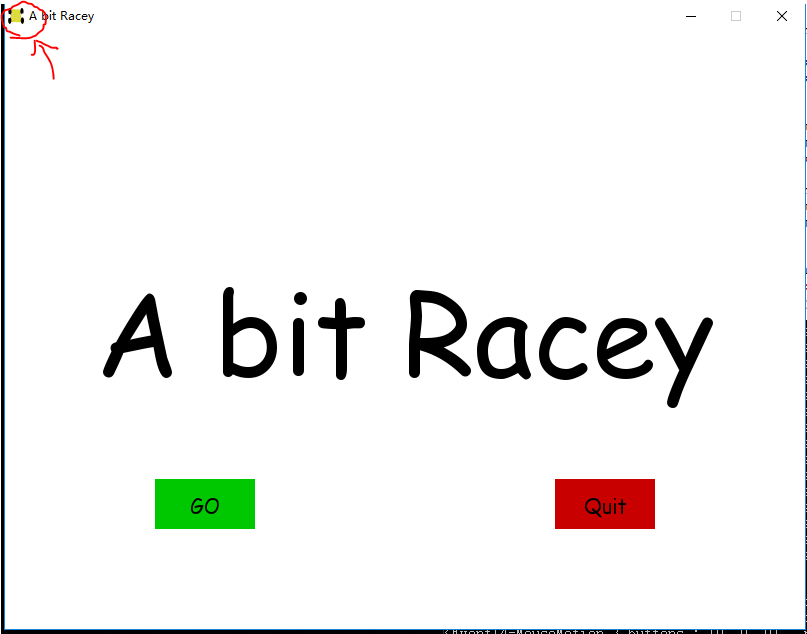
添加icon需要用的函数是:
gameIcon = pygame.image.load("carIcon.png")
pygame.display.set_icon(gameIcon)
添加bgm和音效的函数是:
crash_sound = pygame.mixer.Sound("crashed.wav")
pygame.mixer.music.load("bgm.wav")
源码:
import pygame
import time
import randompygame.init()crash_sound = pygame.mixer.Sound("crashed.wav")
pygame.mixer.music.load("bgm.wav")white = (255,255,255)
black = (0,0,0)
gray = (128,128,128)
red = (200,0,0)
green = (0,200,0)
bright_red = (255,0,0)
bright_green = (0,255,0)
blue = (0,0,255)car_width = 100display_width = 800
display_height = 600gameDisplay = pygame.display.set_mode( (display_width,display_height) )
pygame.display.set_caption('A bit Racey')
clock = pygame.time.Clock()carImg = pygame.image.load('car.png')
gameIcon = pygame.image.load("carIcon.png")
pygame.display.set_icon(gameIcon)pause = False
##crash = Truedef things_dodged(count):font = pygame.font.SysFont(None, 25)text = font.render("Dodged:"+str(count), True, black)gameDisplay.blit(text,(0,0))def things(thingx, thingy, thingw, thingh, color):pygame.draw.rect(gameDisplay, color, [thingx, thingy, thingw, thingh])def car(x, y):gameDisplay.blit(carImg, (x,y))def text_objects(text, font):textSurface = font.render(text, True, black)return textSurface, textSurface.get_rect()##def message_diaplay(text):
##    largeText = pygame.font.Font('freesansbold.ttf',115)
##    TextSurf, TextRect = text_objects(text, largeText)
##    TextRect.center = ((display_width/2),(display_height/2))
##    gameDisplay.blit(TextSurf, TextRect)
##    pygame.display.update()
##    time.sleep(2)
##    game_loop()def crash():pygame.mixer.music.stop()pygame.mixer.Sound.play(crash_sound)largeText = pygame.font.SysFont('comicsansms',115)TextSurf, TextRect = text_objects('You Crashed!', largeText)TextRect.center = ((display_width/2),(display_height/2))gameDisplay.blit(TextSurf, TextRect)while True:for event in pygame.event.get():print(event)if event.type == pygame.QUIT:pygame.quit()quit()
##        gameDisplay.fill(white)button("Play Again", 150, 450, 100, 50, green, bright_green,game_loop)button("Quit",550, 450, 100, 50, red, bright_red,quitgame)pygame.display.update()clock.tick(15)def button (msg, x, y, w, h, ic, ac, action=None):mouse =pygame.mouse.get_pos()click = pygame.mouse.get_pressed()
##    print(click)if x + w > mouse[0] > x and y + h > mouse[1] > y:pygame.draw.rect(gameDisplay, ac, (x,y,w,h))if click[0] == 1 and action != None:action()
##                if action == "play":
##                    action()
##                if action == "quit":
##                    pygame.quit()
##                    quit()else:pygame.draw.rect(gameDisplay, ic, (x,y,w,h))smallText = pygame.font.SysFont('comicsansms', 20)textSurf, textRect = text_objects(msg, smallText)textRect.center = ( (x+(w/2)), (y+(h/2)))gameDisplay.blit(textSurf, textRect)def quitgame():pygame.quit()quit()
def unpause():pygame.mixer.music.unpause()global pausepause = Falsedef paused():pygame.mixer.music.pause()largeText = pygame.font.SysFont('comicsansms',115)TextSurf, TextRect = text_objects('Paused', largeText)TextRect.center = ((display_width/2),(display_height/2))gameDisplay.blit(TextSurf, TextRect)while pause:for event in pygame.event.get():print(event)if event.type == pygame.QUIT:pygame.quit()quit()
##        gameDisplay.fill(white)button("Continue", 150, 450, 100, 50, green, bright_green,unpause)button("Quit",550, 450, 100, 50, red, bright_red,quitgame)pygame.display.update()clock.tick(15)def game_intro():global pasuepause = Falseintro = Truewhile intro:for event in pygame.event.get():print(event)if event.type == pygame.QUIT:pygame.quit()quit()gameDisplay.fill(white)largeText = pygame.font.SysFont('comicsansms',115)TextSurf, TextRect = text_objects('A bit Racey', largeText)TextRect.center = ((display_width/2),(display_height/2))gameDisplay.blit(TextSurf, TextRect)button("GO", 150, 450, 100, 50, green, bright_green,game_loop)button("Quit",550, 450, 100, 50, red, bright_red,quitgame)pygame.display.update()clock.tick(15)def game_loop():global pausepygame.mixer.music.play(-1)x = display_width * 0.45y = display_height * 0.8x_change = 0dodged = 0gameExit = Falsething_startx = random.randrange(0, display_width)thing_starty = -600thing_speed = 7thing_width = 100thing_height = 100while not gameExit:for event in pygame.event.get():if event.type == pygame.QUIT:pygame.quit()quit()if event.type == pygame.KEYDOWN:if event.key == pygame.K_LEFT:x_change = -5elif event.key == pygame.K_RIGHT:x_change = 5elif event.key == pygame.K_p:pause = Truepaused()if event.type == pygame.KEYUP:if event.key == pygame.K_LEFT or event.key == pygame.K_RIGHT:x_change = 0print(event)x += x_changegameDisplay.fill(white)things(thing_startx, thing_starty, thing_width, thing_height, black)thing_starty += thing_speedcar(x,y)things_dodged(dodged)if x > display_width - car_width or x < 0:gameExit = Trueif thing_starty > display_height:thing_starty = 0 - thing_heightthing_startx = random.randrange(0, display_width)dodged += 1thing_speed += 1thing_width += (dodged * 1.2)if y < thing_starty + thing_height:print('y crossover')if x > thing_startx and x < thing_startx + thing_width or x + car_width > thing_startx and x + car_width < thing_startx + thing_width:print('x crossover')crash()pygame.display.update()clock.tick(60)
#crash()
game_intro()
game_loop()
pygame.quit()
quit()
结果图:
本文来自互联网用户投稿,文章观点仅代表作者本人,不代表本站立场,不承担相关法律责任。如若转载,请注明出处。 如若内容造成侵权/违法违规/事实不符,请点击【内容举报】进行投诉反馈!