Word控件Spire.Doc 【文本框】教程(6):如何在文本框中设置文本方向
Spire.Doc for .NET是一款专门对 Word 文档进行操作的 .NET 类库。在于帮助开发人员无需安装 Microsoft Word情况下,轻松快捷高效地创建、编辑、转换和打印 Microsoft Word 文档。拥有近10年专业开发经验Spire系列办公文档开发工具,专注于创建、编辑、转换和打印Word/PDF/Excel等格式文件处理,小巧便捷。
E-iceblue 功能类库Spire 系列文档处理组件均由中国本土团队研发,不依赖第三方软件,不受其他国家的技术或法律法规限制,同时适配国产操作系统如中科方德、中标麒麟等,兼容国产文档处理软件 WPS(如 .wps/.et/.dps 等格式
Spire.Doc for.NET 最新下载(qun:767755948) https://www.evget.com/product/3368/download
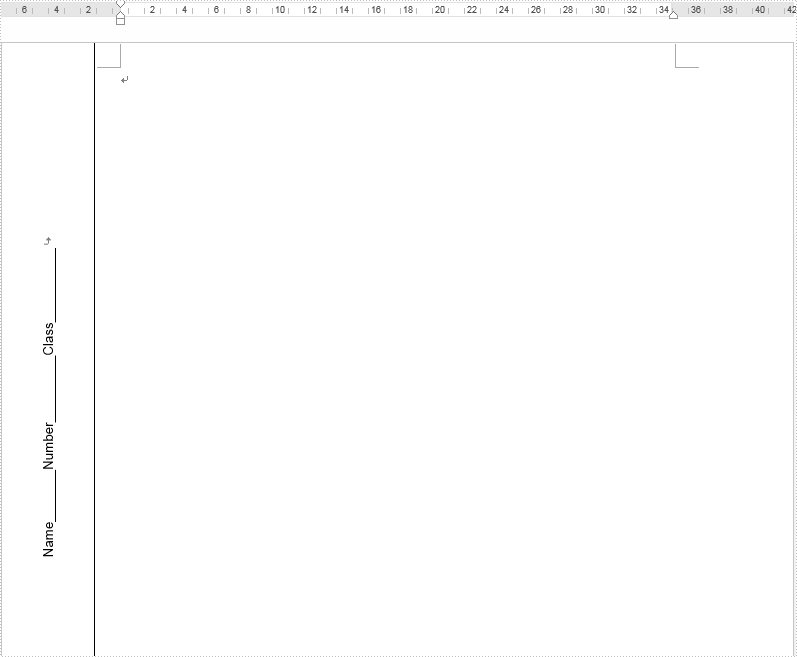
在前面的教程中,我们简要介绍了如何在Word中插入文本框,本文将演示如何使用Spire.Doc for .NET在文本框中垂直定位文本。
【C#】
using Spire.Doc;
using Spire.Doc.Documents;
using Spire.Doc.Fields;
using System;namespace WordTextbox
{
class Program
{
static void Main(string[] args)
{
// Instantiate document object
Document document = new Document();//Add a section
Section section = document.AddSection();//Set the margin
section.PageSetup.Margins.Left = 90;
section.PageSetup.Margins.Right = 90;
Paragraph paragraph = section.AddParagraph();//Add texbox 1
TextBox textBox1 = paragraph.AppendTextBox(section.PageSetup.Margins.Left - 20, section.PageSetup.PageSize.Height + 20);//Fix the position of textbox
textBox1.Format.HorizontalOrigin = HorizontalOrigin.Page;
textBox1.Format.HorizontalPosition = 0;
textBox1.Format.VerticalPosition = -10f;
textBox1.Format.VerticalOrigin = VerticalOrigin.Page;//Set the text vertically
textBox1.Format.TextAnchor = ShapeVerticalAlignment.Center;
textBox1.Format.LayoutFlowAlt = TextDirection.LeftToRight;//Add text and set the font
Paragraph textboxPara1 = textBox1.Body.AddParagraph();
TextRange txtrg = textboxPara1.AppendText("Name_______Number_________Class__________");
txtrg.CharacterFormat.FontName = "Arial";
txtrg.CharacterFormat.FontSize = 10;
txtrg.CharacterFormat.TextColor = System.Drawing.Color.Black;
textboxPara1.Format.HorizontalAlignment = HorizontalAlignment.Center;//Save the document
document.SaveToFile("Result.docx");}
}
}
【VB.NET】
Namespace WordTextboxClass ProgramPrivate Shared Sub Main(ByVal args() As String)
Dim document As Document = New Document
Dim section As Section = document.AddSection
section.PageSetup.Margins.Left = 90
section.PageSetup.Margins.Right = 90
Dim paragraph As Paragraph = section.AddParagraph
Dim textBox1 As TextBox = paragraph.AppendTextBox((section.PageSetup.Margins.Left - 20), (section.PageSetup.PageSize.Height + 20))
textBox1.Format.HorizontalOrigin = HorizontalOrigin.Page
textBox1.Format.HorizontalPosition = 0
textBox1.Format.VerticalPosition = -10!
textBox1.Format.VerticalOrigin = VerticalOrigin.Page
textBox1.Format.TextAnchor = ShapeVerticalAlignment.Center
textBox1.Format.LayoutFlowAlt = TextDirection.LeftToRight
Dim textboxPara1 As Paragraph = textBox1.Body.AddParagraph
Dim txtrg As TextRange = textboxPara1.AppendText("Name_______Number_________Class__________")
txtrg.CharacterFormat.FontName= "Arial"
txtrg.CharacterFormat.FontSize = 10
txtrg.CharacterFormat.TextColor = System.Drawing.Color.Black
textboxPara1.Format.HorizontalAlignment = HorizontalAlignment.Center
document.SaveToFile("Result.docx")
End Sub
End Class
End Namespace
输出
以上便是如何在文本框中设置文本方向的教程,如果您有其他问题也可以继续浏览本系列文章,获取相关教程。
本文来自互联网用户投稿,文章观点仅代表作者本人,不代表本站立场,不承担相关法律责任。如若转载,请注明出处。 如若内容造成侵权/违法违规/事实不符,请点击【内容举报】进行投诉反馈!