扫雷(简单版+升级版)
✨作者:@平凡的人1
✨专栏:《C语言从0到1》
✨一句话:凡是过往,皆为序章
✨说明: 过去无可挽回, 未来可以改变

文章目录
- @[toc]
- 🎁前言
- 简单版💌
- game.h📄
- test.c📄
- game.c📄
- 测试运行🔧
- 升级版💌
- game.h📄
- test.c📄
- game.c📄
- 测试运行🔧
- 💺结语
- @[toc]
- 🎁前言
- 简单版💌
- game.h📄
- test.c📄
- game.c📄
- 测试运行🔧
- 升级版💌
- game.h📄
- test.c📄
- game.c📄
- 测试运行🔧
- 💺结语
🎁前言
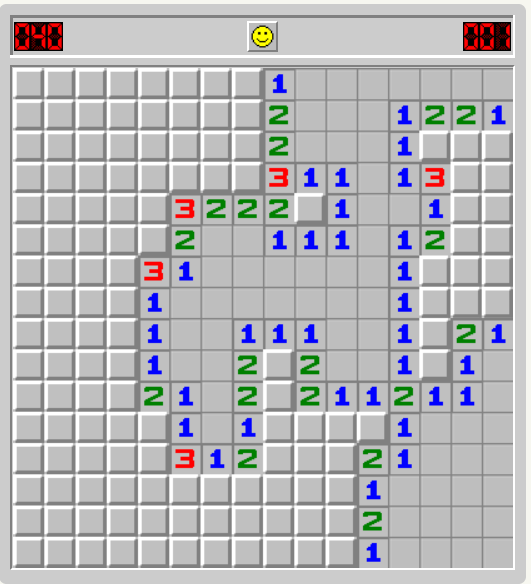
大家好,今天又开始了新的篇章,本篇博客将用两种方式实现扫雷游戏的逻辑实现,第一种简单版——是直接输入一个坐标看看周围雷的数量,当然,如果你很不幸踩到雷了游戏自然game over,自然每次我们都要输入一个坐标,而不会展开,每次都只能一个坐标,对于这我称之为简单版。第二种升级版——我们随便打开网页:搜索扫雷游戏。如图所示:
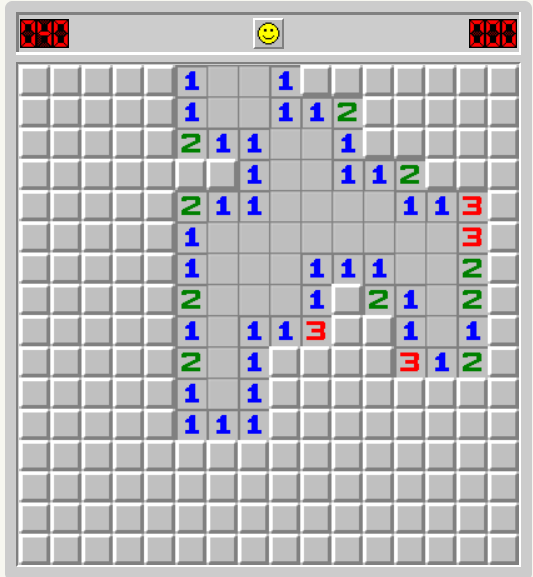
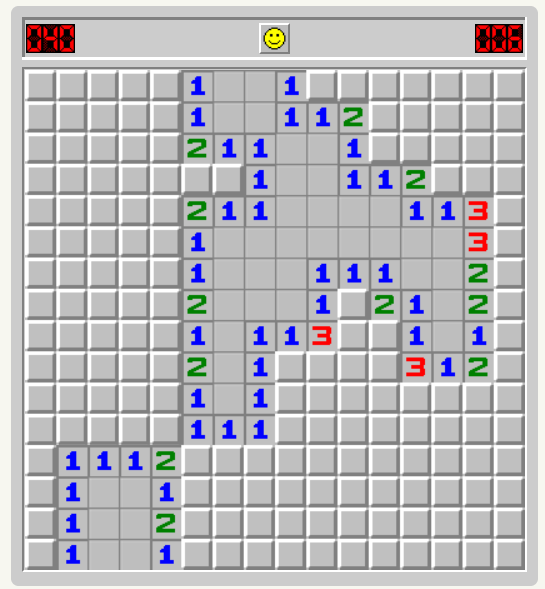
每当周围没雷的时候,我们只需要一个坐标,就会展开一大片,游戏体验感大大提升。我们不妨来试一试,随便点击一下,我们可以展开周围没雷的区域:
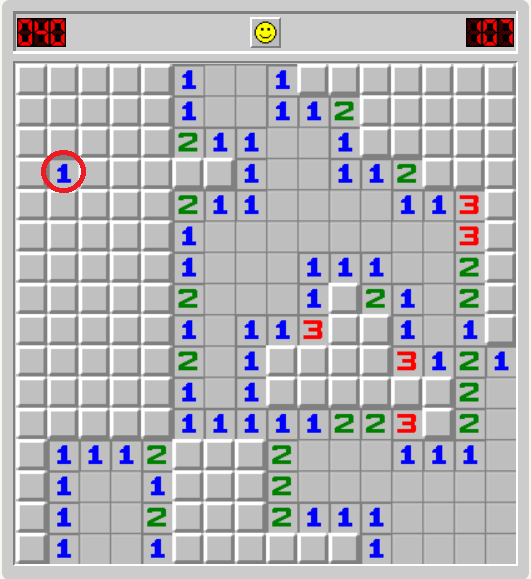
同时,当周围一圈有雷的时候,自然不会展开我们来看一下(注意红色圈子⭕):
基于此,本篇博客主将用两种方法来实现扫雷游戏。一种为简单版,另一种为升级版。让我们一起来看一看吧!为了方便大家的观看,相关代码截图及代码块形式我都会一并提供💖
另外提多一句:本篇博客并不追求图形界面,感兴趣的小伙伴可以去了解了解!🎈

简单版💌
很自然的,采用模块化设计,分为3个部分:test.c,game.c,game.h
模块化设计很大程度上让代码逻辑更加清晰,形成良好的代码风格习惯
游戏逻辑:
1.游戏基于二维数组,界面由二维数组构成
2.玩家选择菜单,进入游戏
3.游戏的初始化
4.布置雷
5.打印
6.玩家输入坐标
7.找雷等
注意:我们需要两个棋盘:1.存放布置好的雷的信息2.存放排查出的雷的信息
game.h📄
进行头文件的引用,函数声明,定义变量
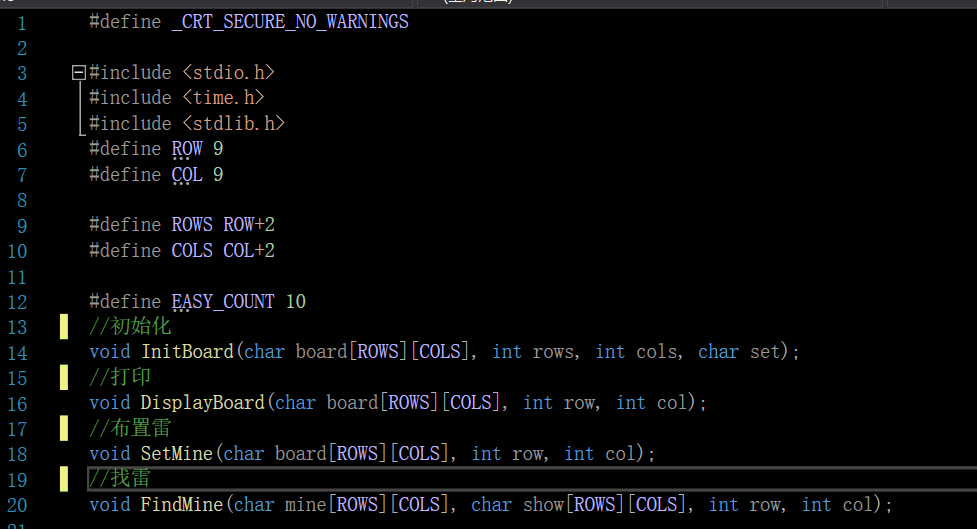
#include test.c📄
游戏的逻辑主体测试
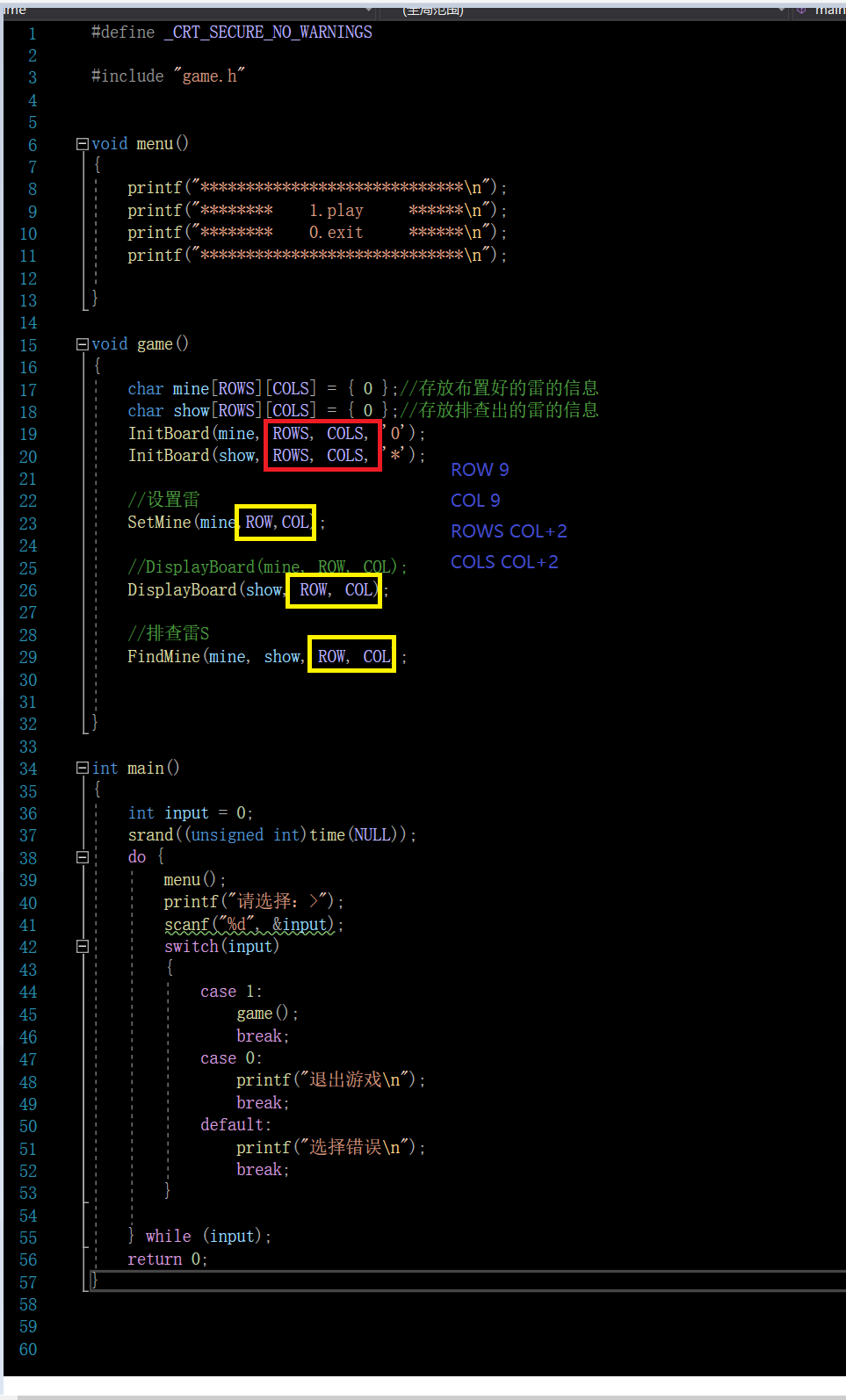
#include "game.h"void menu()
{printf("*****************************\n");printf("********    1.play     ******\n");printf("********    0.exit     ******\n");printf("*****************************\n");}void game()
{char mine[ROWS][COLS] = { 0 };//存放布置好的雷的信息char show[ROWS][COLS] = { 0 };//存放排查出的雷的信息InitBoard(mine, ROWS, COLS, '0');InitBoard(show, ROWS, COLS, '*');//设置雷SetMine(mine,ROW,COL);//DisplayBoard(mine, ROW, COL);DisplayBoard(show, ROW, COL);//排查雷FindMine(mine, show, ROW, COL);}int main()
{int input = 0;srand((unsigned int)time(NULL));do {menu();printf("请选择:>");scanf("%d", &input);switch(input){case 1:game();break;case 0:printf("退出游戏\n");break;default:printf("选择错误\n");break;}} while (input);return 0;
}
为了方便处理边界问题,实际上,我们对于雷的操作都是在ROW和COL上的。对于初始化棋盘都是ROWS和COLS上
game.c📄
游戏功能的实现
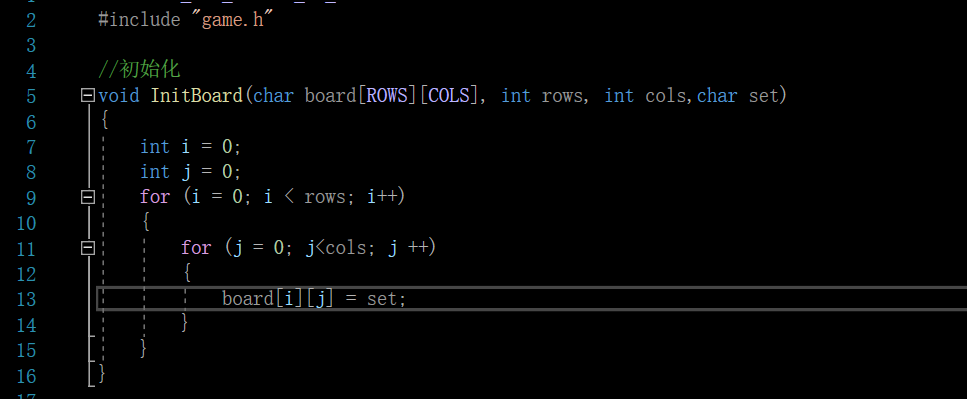
初始化
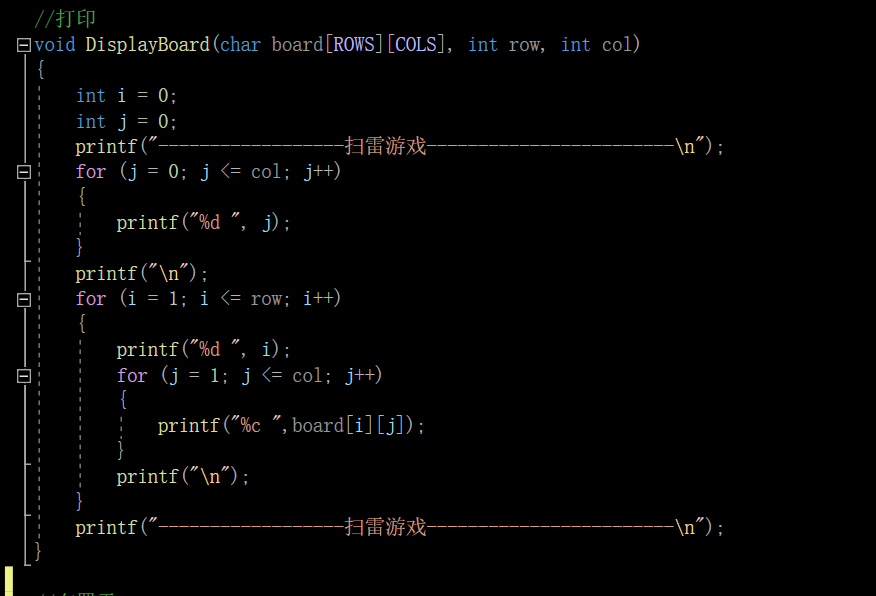
打印
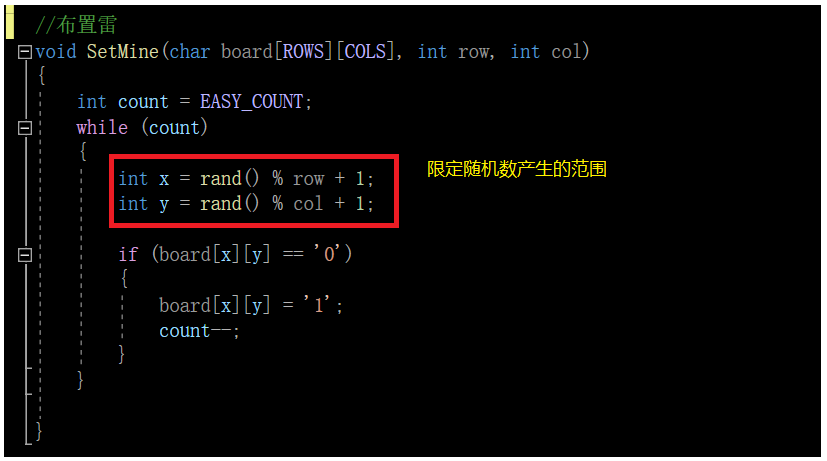
布置雷
找雷
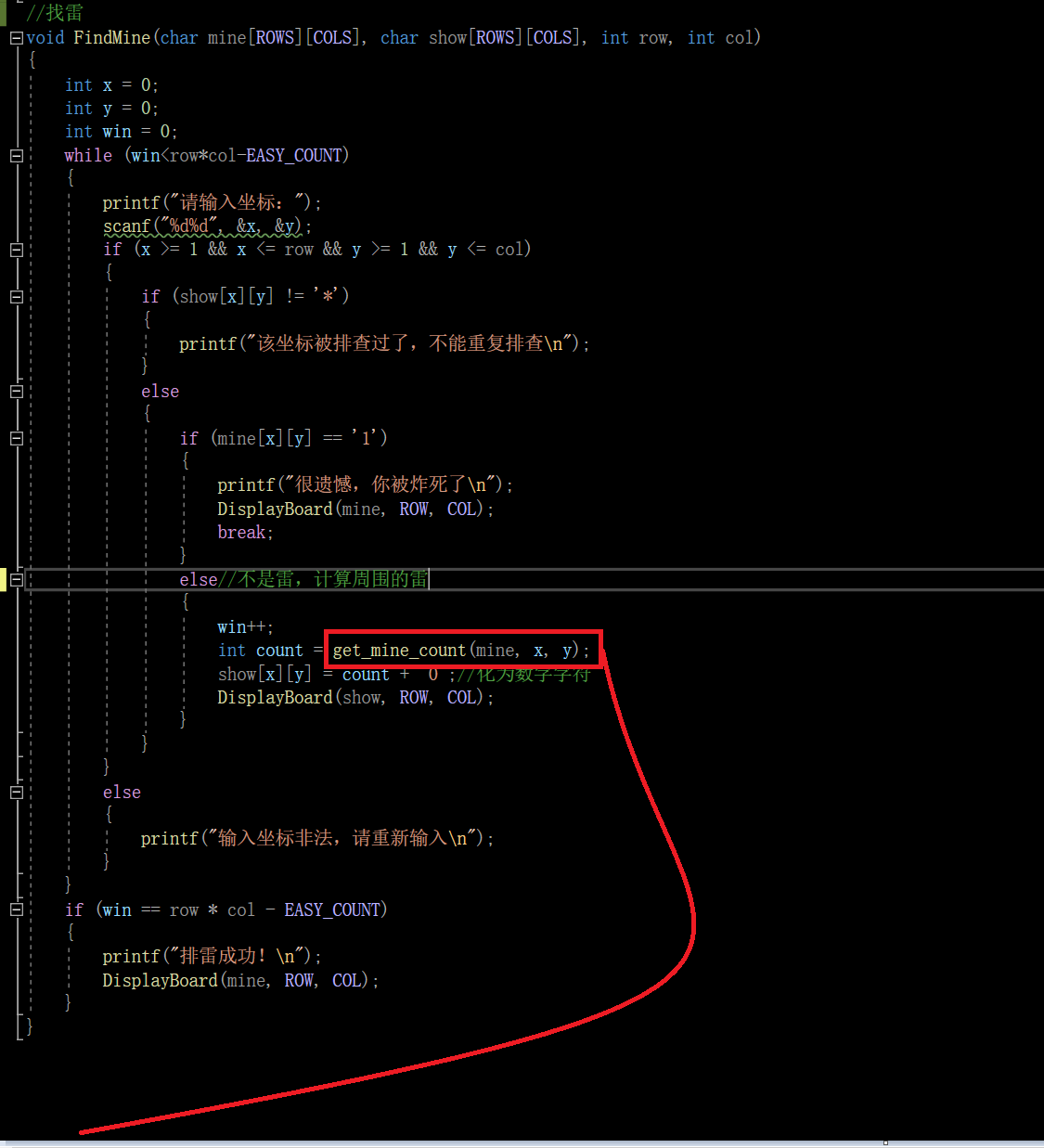
计算周围雷的数量
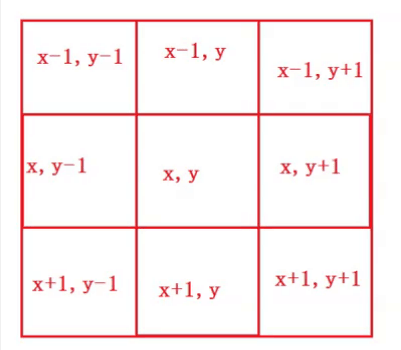
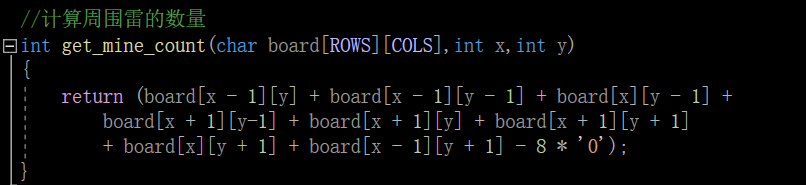
汇总代码:
#include "game.h"//初始化
void InitBoard(char board[ROWS][COLS], int rows, int cols,char set)
{int i = 0;int j = 0;for (i = 0; i < rows; i++){for (j = 0; j<cols; j ++){board[i][j] = set;}}
}//打印
void DisplayBoard(char board[ROWS][COLS], int row, int col)
{int i = 0;int j = 0;printf("------------------扫雷游戏------------------------\n");for (j = 0; j <= col; j++){printf("%d ", j);}printf("\n");for (i = 1; i <= row; i++){printf("%d ", i);for (j = 1; j <= col; j++){printf("%c ",board[i][j]);}printf("\n");}printf("------------------扫雷游戏------------------------\n");
}//布置雷
void SetMine(char board[ROWS][COLS], int row, int col)
{int count = EASY_COUNT;while (count){int x = rand() % row + 1;int y = rand() % col + 1;if (board[x][y] == '0'){board[x][y] = '1';count--;}}}//计算周围雷的数量
int get_mine_count(char board[ROWS][COLS],int x,int y)
{return (board[x - 1][y] + board[x - 1][y - 1] + board[x][y - 1] +board[x + 1][y-1] + board[x + 1][y] + board[x + 1][y + 1]+ board[x][y + 1] + board[x - 1][y + 1] - 8 * '0');
}
//找雷
void FindMine(char mine[ROWS][COLS], char show[ROWS][COLS], int row, int col)
{int x = 0;int y = 0;int win = 0;while (win<row*col-EASY_COUNT){printf("请输入坐标:");scanf("%d%d", &x, &y);if (x >= 1 && x <= row && y >= 1 && y <= col){if (show[x][y] != '*'){printf("该坐标被排查过了,不能重复排查\n");}else{if (mine[x][y] == '1'){printf("很遗憾,你被炸死了\n");DisplayBoard(mine, ROW, COL);break;}else//不是雷,计算周围的雷{win++;int count = get_mine_count(mine, x, y);show[x][y] = count + '0';//化为数字字符DisplayBoard(show, ROW, COL);}}}else{printf("输入坐标非法,请重新输入\n");}}if (win == row * col - EASY_COUNT){printf("排雷成功!\n");DisplayBoard(mine, ROW, COL);}
}测试运行🔧
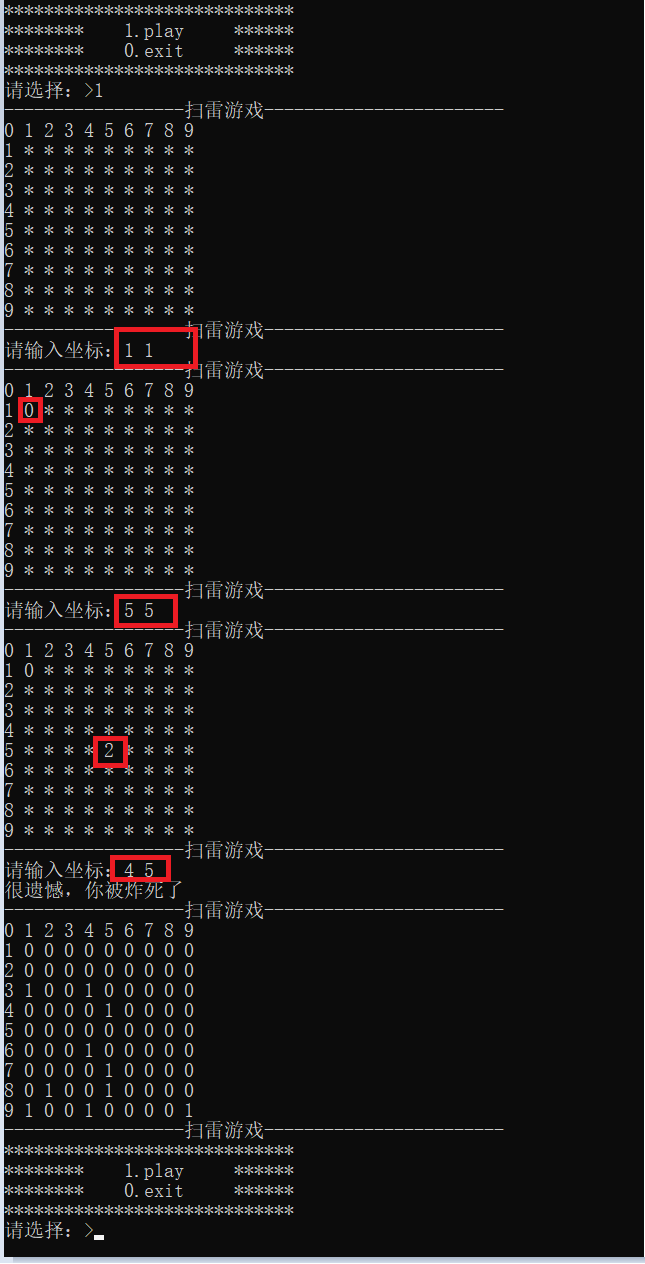
好了。介绍完简单版的实现之后,现在我们来实现升级版。
升级版💌
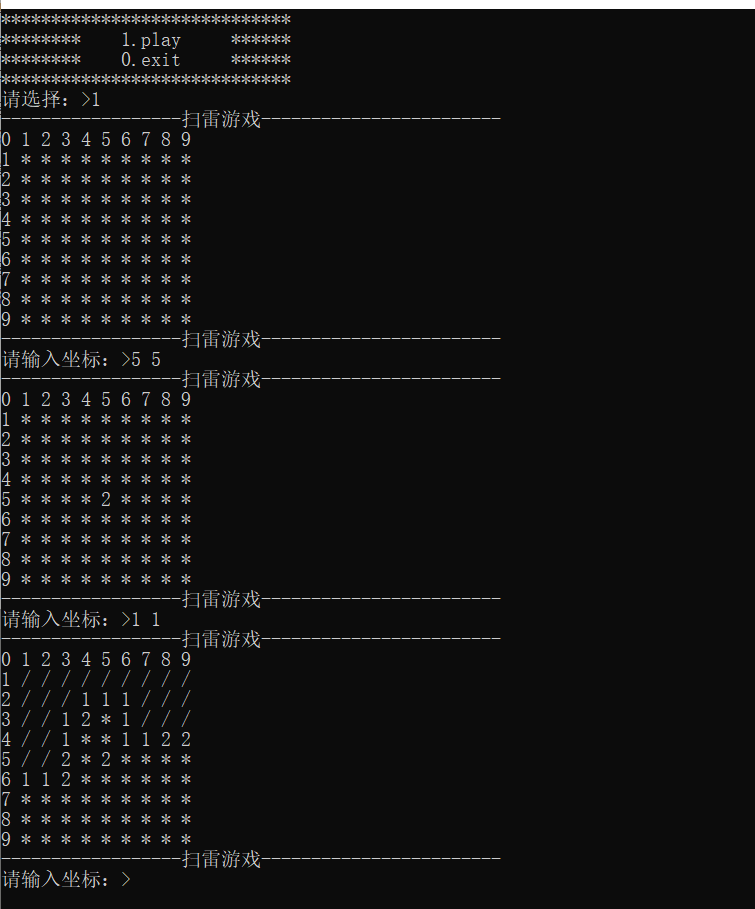
在我们输入一个坐标时:当周围没有雷的时候会往外展开,展开一大片,在前面刚开始我们也有提到
现在我们开始来着手实现
还是分为3个部分,与上面的模块化设计是一样的。
game.h📄
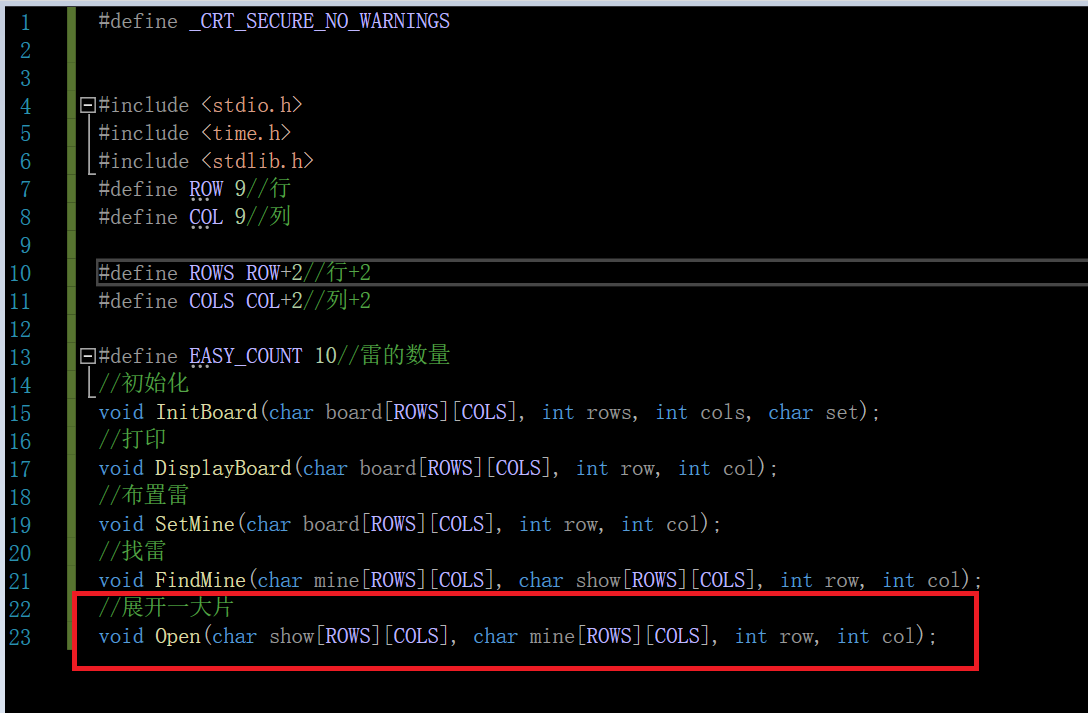
#include 不同在于我们多加了一个展开功能的函数,这也是升级版的核心部分!
test.c📄
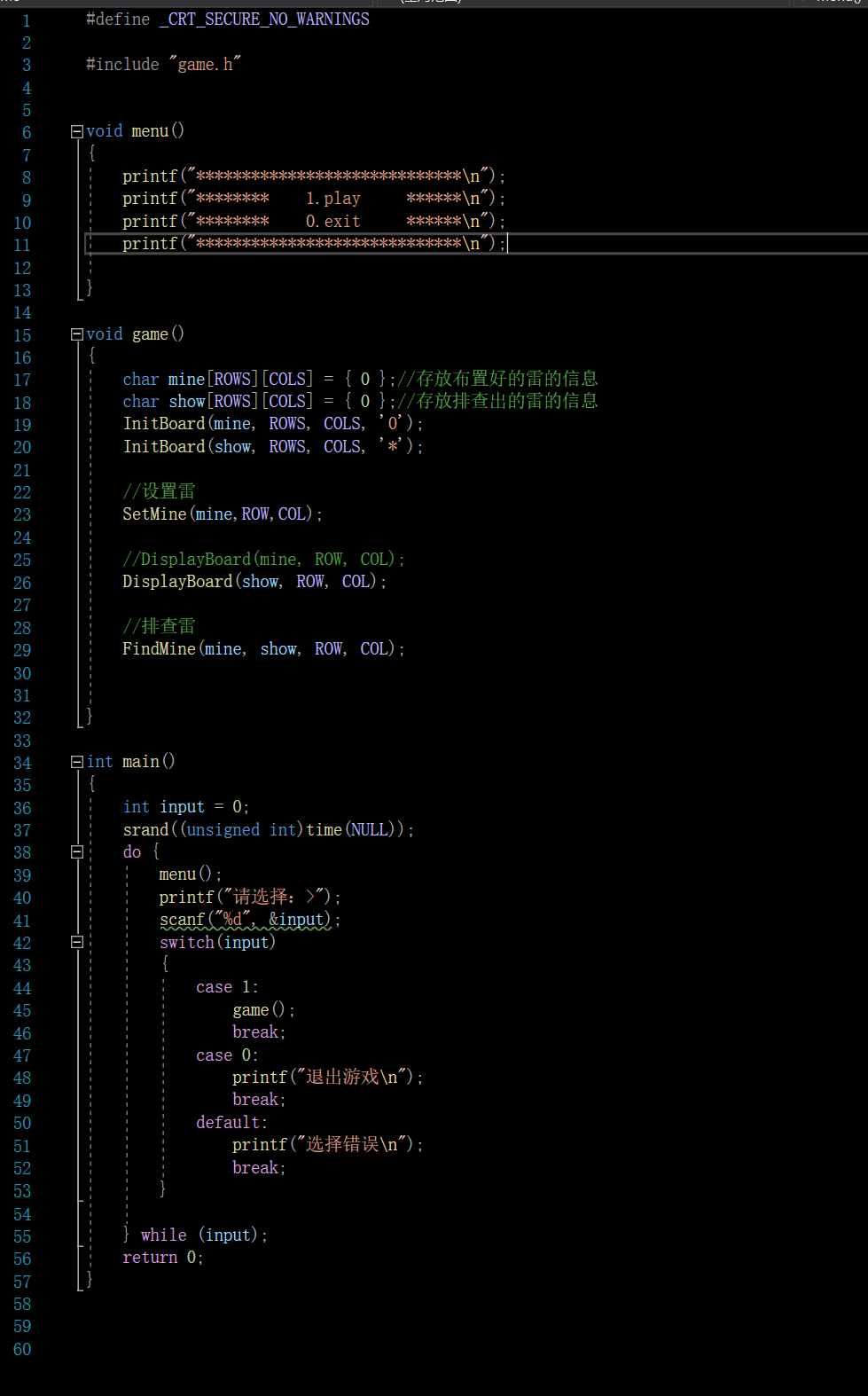
test.c的逻辑并没有改变
#include "game.h"
void menu()
{printf("*****************************\n");printf("********    1.play     ******\n");printf("********    0.exit     ******\n");printf("*****************************\n");}void game()
{char mine[ROWS][COLS] = { 0 };//存放布置好的雷的信息char show[ROWS][COLS] = { 0 };//存放排查出的雷的信息InitBoard(mine, ROWS, COLS, '0');InitBoard(show, ROWS, COLS, '*');//设置雷SetMine(mine,ROW,COL);//DisplayBoard(mine, ROW, COL);DisplayBoard(show, ROW, COL);//排查雷FindMine(mine, show, ROW, COL);}int main()
{int input = 0;srand((unsigned int)time(NULL));do {menu();printf("请选择:>");scanf("%d", &input);switch(input){case 1:game();break;case 0:printf("退出游戏\n");break;default:printf("选择错误\n");break;}} while (input);return 0;
}game.c📄
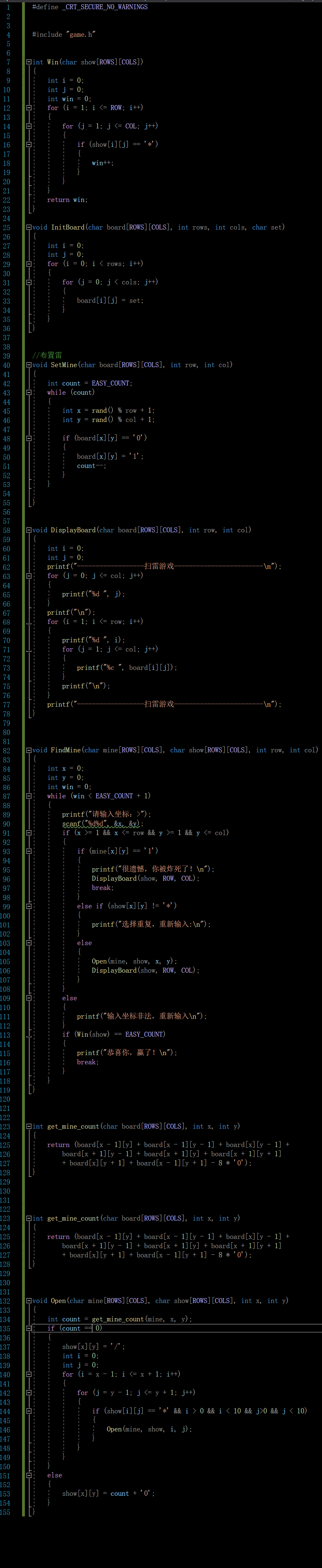
#include "game.h"int Win(char show[ROWS][COLS])
{int i = 0;int j = 0;int win = 0;for (i = 1; i <= ROW; i++){for (j = 1; j <= COL; j++){if (show[i][j] == '*'){win++;}}}return win;
}void InitBoard(char board[ROWS][COLS], int rows, int cols, char set)
{int i = 0;int j = 0;for (i = 0; i < rows; i++){for (j = 0; j < cols; j++){board[i][j] = set;}}
}//布置雷
void SetMine(char board[ROWS][COLS], int row, int col)
{int count = EASY_COUNT;while (count){int x = rand() % row + 1;int y = rand() % col + 1;if (board[x][y] == '0'){board[x][y] = '1';count--;}}}void DisplayBoard(char board[ROWS][COLS], int row, int col)
{int i = 0;int j = 0;printf("------------------扫雷游戏------------------------\n");for (j = 0; j <= col; j++){printf("%d ", j);}printf("\n");for (i = 1; i <= row; i++){printf("%d ", i);for (j = 1; j <= col; j++){printf("%c ", board[i][j]);}printf("\n");}printf("------------------扫雷游戏------------------------\n");
}void FindMine(char mine[ROWS][COLS], char show[ROWS][COLS], int row, int col)
{int x = 0;int y = 0;int win = 0;while (win < EASY_COUNT + 1){printf("请输入坐标:>");scanf("%d%d", &x, &y);if (x >= 1 && x <= row && y >= 1 && y <= col){if (mine[x][y] == '1'){printf("很遗憾,你被炸死了!\n");DisplayBoard(show, ROW, COL);break;}else if (show[x][y] != '*'){printf("选择重复,重新输入:\n");}else{Open(mine, show, x, y);DisplayBoard(show, ROW, COL);}}else{printf("输入坐标非法,重新输入\n");}if (Win(show) == EASY_COUNT){printf("恭喜你,赢了!\n");break;}}
}int get_mine_count(char board[ROWS][COLS], int x, int y)
{return (board[x - 1][y] + board[x - 1][y - 1] + board[x][y - 1] +board[x + 1][y - 1] + board[x + 1][y] + board[x + 1][y + 1]+ board[x][y + 1] + board[x - 1][y + 1] - 8 * '0');
}void Open(char mine[ROWS][COLS], char show[ROWS][COLS], int x, int y)
{int count = get_mine_count(mine, x, y);if (count == 0){show[x][y] = '/';int i = 0;int j = 0;for (i = x - 1; i <= x + 1; i++){for (j = y - 1; j <= y + 1; j++){if (show[i][j] == '*' && i > 0 && i < 10 && j>0 && j < 10){Open(mine, show, i, j);}}}}else{show[x][y] = count + '0';}
}
测试运行🔧
效果图如下:
💺结语
好啦,本次博客到了这里这也结束了!🌹

本文来自互联网用户投稿,文章观点仅代表作者本人,不代表本站立场,不承担相关法律责任。如若转载,请注明出处。 如若内容造成侵权/违法违规/事实不符,请点击【内容举报】进行投诉反馈!