变化太快的Roop项目(版本1.0.1)
文章目录
- (一)版本1.0.1的变化
- (1.1)项目依赖
- (1.2)模型位置
- (1.3)命令行
- (1.4)界面UI
- (1.5)处理与结果
最早的🔗接触和介绍,而后的🔗讨论和加速,以及🔗同DFL/Simswap对比视频
然后现在新版本又很多变化了……唉。
(一)版本1.0.1的变化
没怎么关注,突然发现又更新了好多。
而且增加了SD WEBUI的插件,蛤?
如果只拉代码下来,直接运行是不行的。
(1.1)项目依赖
依赖也有变化,
不安装启动不了。
也懒得细看了,直接从requirements.txt安装依赖吧。
PS D:\roop> .\venv\Scripts\python.exe -mpip install -r requirements.txt
(1.2)模型位置
再运行,嗯?为啥要在线下载模型?(而且一定会失败)
原来是模型文件移动位置了。
这个inswapper_128.onnx文件需要从旧版的roop\项目根目录,移到roop\models\子目录中(Why T_T)。
(1.3)命令行
命令行也有变化,之前的写法(参数)不能用了。
现在可以传入编码方式。但是支持的有限,不能选nvenc一类……
PS D:\roop> .\venv\Scripts\python.exe .\run.py --execution-provider cuda --video-encoder libx265 --video-quality 1
官网的完整参数介绍(也许过两天又改了?):
options:-h, --help show this help message and exit-s SOURCE_PATH, --source SOURCE_PATHselect an source image-t TARGET_PATH, --target TARGET_PATHselect an target image or video-o OUTPUT_PATH, --output OUTPUT_PATHselect output file or directory--frame-processor {face_swapper,face_enhancer} [{face_swapper,face_enhancer} ...]pipeline of frame processors--keep-fps keep original fps--keep-audio keep original audio--keep-frames keep temporary frames--many-faces process every face--video-encoder {libx264,libx265,libvpx-vp9}adjust output video encoder--video-quality VIDEO_QUALITYadjust output video quality--max-memory MAX_MEMORYmaximum amount of RAM in GB--execution-provider {cpu,...} [{cpu,...} ...]execution provider--execution-threads EXECUTION_THREADSnumber of execution threads-v, --version show program's version number and exit
(1.4)界面UI
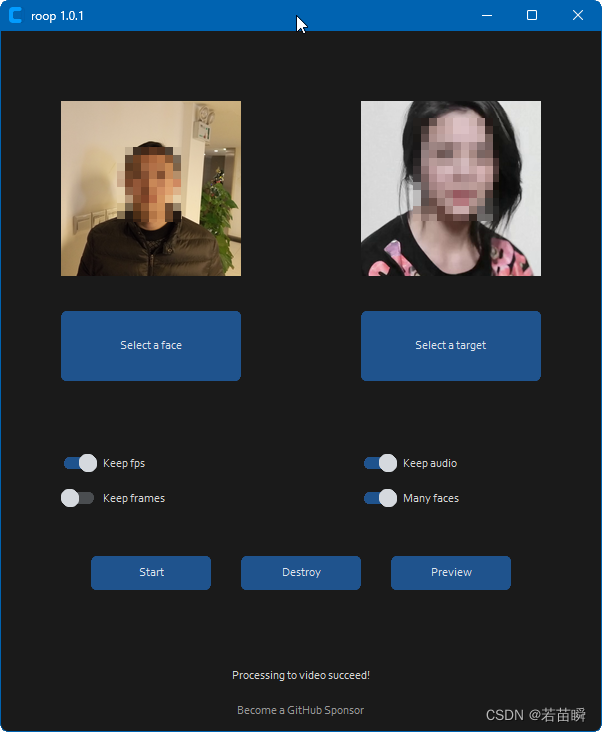
界面变得更加好看。
在Select a face 和 Select a target 后,显示的图片按比例,不会再被压扁了。
(1.5)处理与结果
开始处理吧。
日志步骤详细了一些。
上面那一大堆模型相关的依然只会显示一次。
> .\venv\Scripts\python.exe .\run.py --execution-provider cuda --video-encoder libx265 --video-quality 1
mp4v2::impl::MP4File::FindIntegerProperty: no such property - moov.trak[0].mdia.minf.stbl.stsd.*.width (c:\work\mp3infp\git\src\lib\mp4v2\src\mp4file.cpp,747)
mp4v2::impl::MP4File::FindIntegerProperty: no such property - moov.trak[0].mdia.minf.stbl.stsd.*.height (c:\work\mp3infp\git\src\lib\mp4v2\src\mp4file.cpp,747)
Applied providers: ['CUDAExecutionProvider', 'CPUExecutionProvider'], with options: {'CUDAExecutionProvider': {'do_copy_in_default_stream': '1', 'cudnn_conv_algo_search': 'EXHAUSTIVE', 'device_id': '0', 'gpu_external_alloc': '0', 'enable_cuda_graph': '0', 'gpu_mem_limit': '18446744073709551615', 'gpu_external_free': '0', 'gpu_external_empty_cache': '0', 'arena_extend_strategy': 'kNextPowerOfTwo', 'cudnn_conv_use_max_workspace': '1', 'cudnn_conv1d_pad_to_nc1d': '0', 'tunable_op_enable': '0', 'tunable_op_tuning_enable': '0', 'enable_skip_layer_norm_strict_mode': '0'}, 'CPUExecutionProvider': {}}
find model: C:\Users\Shion/.insightface\models\buffalo_l\1k3d68.onnx landmark_3d_68 ['None', 3, 192, 192] 0.0 1.0
Applied providers: ['CUDAExecutionProvider', 'CPUExecutionProvider'], with options: {'CUDAExecutionProvider': {'do_copy_in_default_stream': '1', 'cudnn_conv_algo_search': 'EXHAUSTIVE', 'device_id': '0', 'gpu_external_alloc': '0', 'enable_cuda_graph': '0', 'gpu_mem_limit': '18446744073709551615', 'gpu_external_free': '0', 'gpu_external_empty_cache': '0', 'arena_extend_strategy': 'kNextPowerOfTwo', 'cudnn_conv_use_max_workspace': '1', 'cudnn_conv1d_pad_to_nc1d': '0', 'tunable_op_enable': '0', 'tunable_op_tuning_enable': '0', 'enable_skip_layer_norm_strict_mode': '0'}, 'CPUExecutionProvider': {}}
find model: C:\Users\Shion/.insightface\models\buffalo_l\2d106det.onnx landmark_2d_106 ['None', 3, 192, 192] 0.0 1.0
Applied providers: ['CUDAExecutionProvider', 'CPUExecutionProvider'], with options: {'CUDAExecutionProvider': {'do_copy_in_default_stream': '1', 'cudnn_conv_algo_search': 'EXHAUSTIVE', 'device_id': '0', 'gpu_external_alloc': '0', 'enable_cuda_graph': '0', 'gpu_mem_limit': '18446744073709551615', 'gpu_external_free': '0', 'gpu_external_empty_cache': '0', 'arena_extend_strategy': 'kNextPowerOfTwo', 'cudnn_conv_use_max_workspace': '1', 'cudnn_conv1d_pad_to_nc1d': '0', 'tunable_op_enable': '0', 'tunable_op_tuning_enable': '0', 'enable_skip_layer_norm_strict_mode': '0'}, 'CPUExecutionProvider': {}}
find model: C:\Users\Shion/.insightface\models\buffalo_l\det_10g.onnx detection [1, 3, '?', '?'] 127.5 128.0
Applied providers: ['CUDAExecutionProvider', 'CPUExecutionProvider'], with options: {'CUDAExecutionProvider': {'do_copy_in_default_stream': '1', 'cudnn_conv_algo_search': 'EXHAUSTIVE', 'device_id': '0', 'gpu_external_alloc': '0', 'enable_cuda_graph': '0', 'gpu_mem_limit': '18446744073709551615', 'gpu_external_free': '0', 'gpu_external_empty_cache': '0', 'arena_extend_strategy': 'kNextPowerOfTwo', 'cudnn_conv_use_max_workspace': '1', 'cudnn_conv1d_pad_to_nc1d': '0', 'tunable_op_enable': '0', 'tunable_op_tuning_enable': '0', 'enable_skip_layer_norm_strict_mode': '0'}, 'CPUExecutionProvider': {}}
find model: C:\Users\Shion/.insightface\models\buffalo_l\genderage.onnx genderage ['None', 3, 96, 96] 0.0 1.0
Applied providers: ['CUDAExecutionProvider', 'CPUExecutionProvider'], with options: {'CUDAExecutionProvider': {'do_copy_in_default_stream': '1', 'cudnn_conv_algo_search': 'EXHAUSTIVE', 'device_id': '0', 'gpu_external_alloc': '0', 'enable_cuda_graph': '0', 'gpu_mem_limit': '18446744073709551615', 'gpu_external_free': '0', 'gpu_external_empty_cache': '0', 'arena_extend_strategy': 'kNextPowerOfTwo', 'cudnn_conv_use_max_workspace': '1', 'cudnn_conv1d_pad_to_nc1d': '0', 'tunable_op_enable': '0', 'tunable_op_tuning_enable': '0', 'enable_skip_layer_norm_strict_mode': '0'}, 'CPUExecutionProvider': {}}
find model: C:\Users\Shion/.insightface\models\buffalo_l\w600k_r50.onnx recognition ['None', 3, 112, 112] 127.5 127.5
set det-size: (640, 640)
[ROOP.CORE] Creating temp resources...
[ROOP.CORE] Extracting frames...
[ROOP.FACE-SWAPPER] Progressing...
Processing:   0%|                                                                           | 0/50 [00:00<?, ?frame/s, execution_providers=['CUDAExecutionProvider'], threads=8, memory=16]Applied providers: ['CUDAExecutionProvider', 'CPUExecutionProvider'], with options: {'CUDAExecutionProvider': {'do_copy_in_default_stream': '1', 'cudnn_conv_algo_search': 'EXHAUSTIVE', 'device_id': '0', 'gpu_external_alloc': '0', 'enable_cuda_graph': '0', 'gpu_mem_limit': '18446744073709551615', 'gpu_external_free': '0', 'gpu_external_empty_cache': '0', 'arena_extend_strategy': 'kNextPowerOfTwo', 'cudnn_conv_use_max_workspace': '1', 'cudnn_conv1d_pad_to_nc1d': '0', 'tunable_op_enable': '0', 'tunable_op_tuning_enable': '0', 'enable_skip_layer_norm_strict_mode': '0'}, 'CPUExecutionProvider': {}}
inswapper-shape: [1, 3, 128, 128]
Processing: 100%|██████████████████████████████████████████████████████████████████| 50/50 [00:09<00:00,  5.40frame/s, execution_providers=['CUDAExecutionProvider'], threads=8, memory=16]
[ROOP.CORE] Detecting fps...
[ROOP.CORE] Creating video with 25.0 fps...
[ROOP.CORE] Restoring audio...
[ROOP.CORE] Processing to video succeed!
每次会清理缓存(clear CUDA cache)。
似乎除了避免OOM,在我笔记本上不定期特别慢的现象减少了。
但神秘的变慢在笔记本上一直存在(台式机没有问题),某次处理就可能全称从10帧/秒降到0.5帧/秒。
并不是NSFW内容检查器的问题。
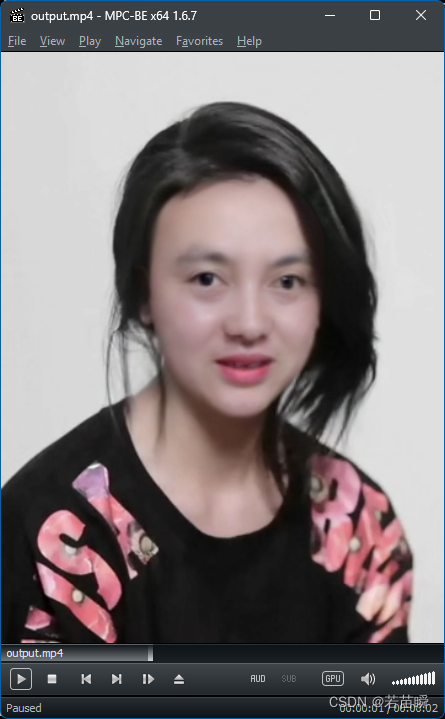
最终结果和之前的版本没区别。
本文来自互联网用户投稿,文章观点仅代表作者本人,不代表本站立场,不承担相关法律责任。如若转载,请注明出处。 如若内容造成侵权/违法违规/事实不符,请点击【内容举报】进行投诉反馈!