fl_chart 图表的使用
哈哈,我现在去做app了,用的flutter,刚好做了两个图表,这里指写第一个图表,直接贴代码干就完了,如果有缘看到帮点个赞(#^.^#)
其他图,你需要更改为曲线,其他差不多
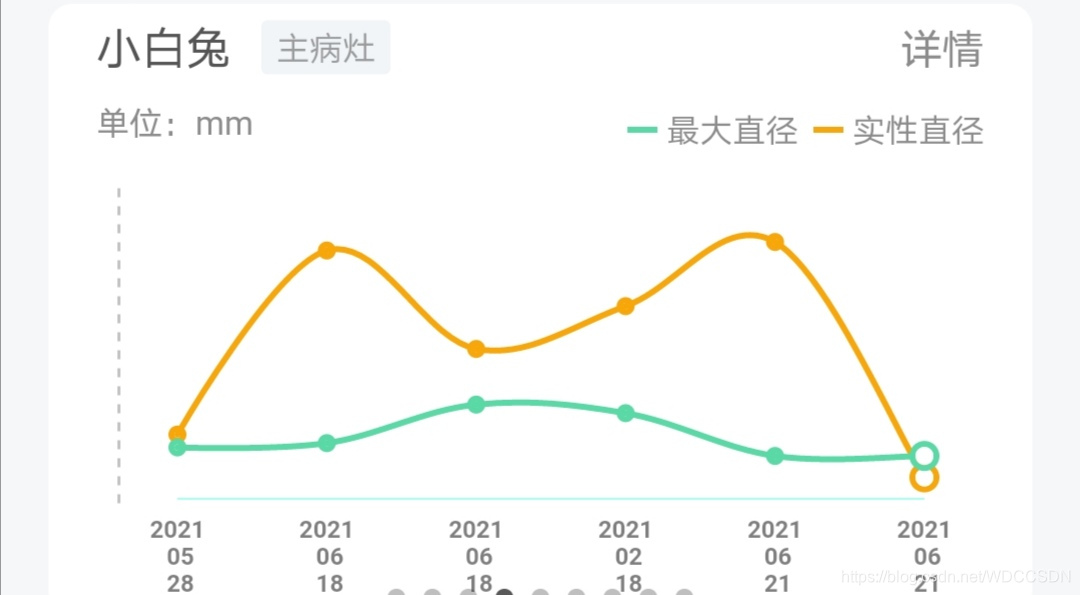
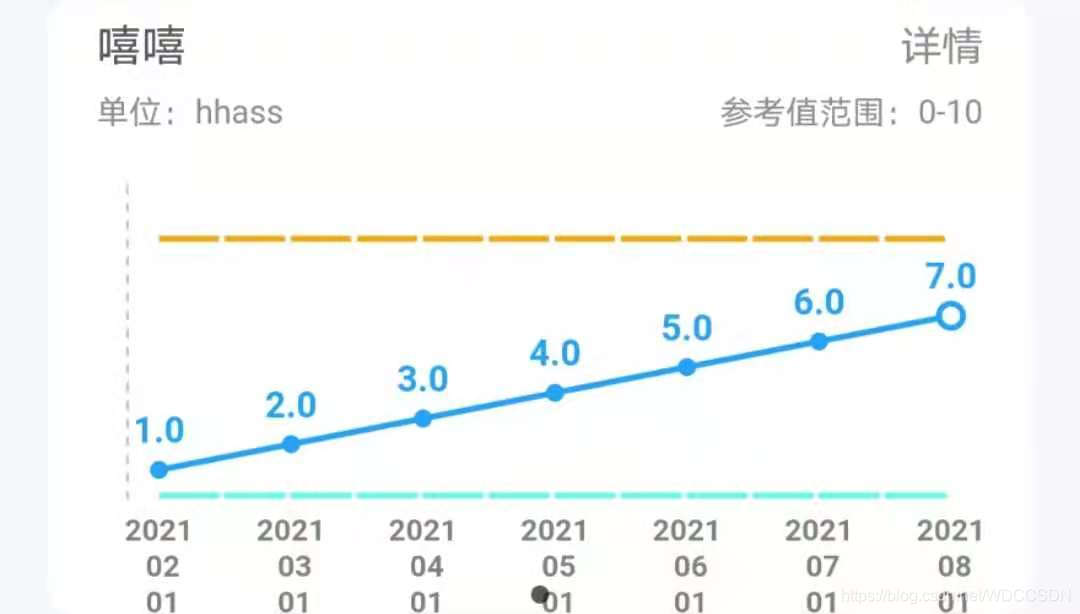
效果图:当前代码图片:
import 'package:flutter/material.dart';
import 'package:fl_chart/fl_chart.dart';
import 'package:flutter/gestures.dart';
import 'package:wisemedical/base/common_widget/dashed_rect.dart';class MyLineChartIndex extends StatefulWidget {// 传递过来的参数我删除了,不影响代码的执行,页面中的数据都是死的@overrideState createState() => _MyLineChartIndexState();
}class _MyLineChartIndexState extends State {double touchedValue;List weekDays = [];bool showcir = false;List yValues = [];@overridevoid initState() {touchedValue = -1;showcir = true;weekDays = ["2021-02-01","2021-03-01","2021-04-01","2021-05-01","2021-06-01","2021-07-01","2021-08-01"];yValues = [1.0, 2.0, 3.0, 4.0, 5.0, 6.0, 7.0];super.initState();}@overrideWidget build(BuildContext context) {final List showIndexes = yValues.asMap().keys.toList();final lineBarsData = [LineChartBarData(isStepLineChart: false,showingIndicators: showIndexes,spots: yValues.asMap().entries.map((e) {return FlSpot(e.key.toDouble(), e.value);}).toList(),isCurved: true,barWidth: 2,// dashArray: [30, 1],colors: [Color(0xFF22A3FD),],belowBarData: BarAreaData(show: false,colors: [Colors.orange.withOpacity(0.5),Colors.orange.withOpacity(0.0),],gradientColorStops: [0.1, 1.0],gradientFrom: const Offset(0, 0),gradientTo: const Offset(0, 1),spotsLine: BarAreaSpotsLine(show: true,flLineStyle: FlLine(color: Colors.blue,strokeWidth: 3,),checkToShowSpotLine: (spot) {if (spot.x == 0 || spot.x == 6) {return false;}return true;},),),dotData: FlDotData(show: true,getDotPainter: (spot, percent, barData, index) {if (index != weekDays.length - 1 && showcir) {return FlDotCirclePainter(radius: 1,color: Color(0xFF22A3FD),strokeWidth: 2,strokeColor: Color(0xFF22A3FD));} else {return FlDotCirclePainter(radius: 3,color: Colors.white,strokeWidth: 2,strokeColor: Color(0xFF22A3FD),);}},// checkToShowDot: (spot, barData) {//   return spot.x != 0 && spot.x != 6;// }),),];final tooltipsOnBar = lineBarsData[0];final referenceValueUpper =double.parse(widget.medicalCaseIndexVary.referenceValueUpper);final referenceValueLower =double.parse(widget.medicalCaseIndexVary.referenceValueLower);double numMax = referenceValueUpper > referenceValueLower? referenceValueUpper: referenceValueLower;for (int i = 0; i < yValues.length; i++) {if (numMax < yValues[i]) {numMax = yValues[i];}}numMax = numMax * 1.25;return weekDays.length > 0? Column(mainAxisSize: MainAxisSize.max,crossAxisAlignment: CrossAxisAlignment.center,children: [Container(margin: EdgeInsets.only(left: 16, right: 16),child: Row(mainAxisAlignment: MainAxisAlignment.spaceBetween,children: [Container(margin: EdgeInsets.only(top: 4),child: Row(mainAxisAlignment: MainAxisAlignment.start,crossAxisAlignment: CrossAxisAlignment.center,children: [Text('嘻嘻',style: TextStyle(color: Color(0xFF555555), fontSize: 15.0),),],)),GestureDetector(onTap: () {Navigator.of(context).push(MaterialPageRoute(builder: (context) => IndexDetailsPage(patientId: widget.patientId,indexIdentifier: widget.medicalCaseIndexVary.indexIdentifier)));},child: Container(width: 30,height: 20,padding: EdgeInsets.only(top: 3),child: Text('详情',style: TextStyle(color: Color(0xFF8C8C8C),fontSize: 14.0,),textAlign: TextAlign.right,),),)],),),Container(margin: EdgeInsets.only(left: 16, right: 16),child: Row(mainAxisAlignment: MainAxisAlignment.spaceBetween,crossAxisAlignment: CrossAxisAlignment.center,children: [Container(margin: EdgeInsets.only(top: 5),child: Text('单位:hhass',style: TextStyle(color: Color(0xFF8C8C8C), fontSize: 11.0),),),Container(margin: EdgeInsets.only(top: 5),child: Text('参考值范围:0-10',style: TextStyle(color: Color(0xFF8C8C8C), fontSize: 11.0),),),],),),const SizedBox(height: 15,),Container(margin: EdgeInsets.only(left: 16, right: 16),height: 135,child: Row(children: [Container(height: 135,margin: EdgeInsets.only(right: 10, left: 10),padding: EdgeInsets.only(bottom: 23),child: DashedRect(color: Color(0xFFC3C3C3),strokeWidth: 1,gap: 3.0),),Expanded(child: LineChart(LineChartData(showingTooltipIndicators:showIndexes.map((index) {return ShowingTooltipIndicators([LineBarSpot(tooltipsOnBar,lineBarsData.indexOf(tooltipsOnBar),tooltipsOnBar.spots[index]),]);}).toList(),lineTouchData: LineTouchData(enabled: false,getTouchedSpotIndicator:(LineChartBarData barData,List spotIndexes) {return spotIndexes.map((index) {return TouchedSpotIndicatorData(FlLine(color: Colors.transparent,),FlDotData(show: false,getDotPainter:(spot, percent, barData, index) =>FlDotCirclePainter(radius: 8,color: Colors.black12,strokeWidth: 2,strokeColor: Colors.black,),),);}).toList();},touchTooltipData: LineTouchTooltipData(tooltipBgColor: Colors.transparent,tooltipRoundedRadius: 4,tooltipPadding: EdgeInsets.only(bottom: -10),getTooltipItems:(List lineBarsSpot) {return lineBarsSpot.map((lineBarSpot) {return LineTooltipItem(lineBarSpot.y.toString(),const TextStyle(color: Color(0xFF22A3FD),fontSize: 12,fontWeight: FontWeight.bold),);}).toList();},),),extraLinesData: ExtraLinesData(horizontalLines: [HorizontalLine(y: 0.0,color: Color(0xFF64FFE4),strokeWidth: 2,dashArray: [20, 2],),HorizontalLine(y: 10.0,color: Color(0xFFF8A70A),strokeWidth: 2,dashArray: [20, 2],),]),lineBarsData: lineBarsData,borderData: FlBorderData(show: true,border: Border(bottom: BorderSide(width: 0.5,color: Color(0xFF8FFFEB)))),minY: 0,maxY: numMax,// axisTitleData: FlAxisTitleData(//     leftTitle://         AxisTitle(showTitle: true, titleText: 'Value', margin: 4),//     bottomTitle: AxisTitle(//         showTitle: true,//         margin: 0,//         titleText: '2019',//         textStyle: dateTextStyle,//         textAlign: TextAlign.left)),gridData: FlGridData(show: true,drawHorizontalLine: false,drawVerticalLine: false,getDrawingHorizontalLine: (value) {if (value == 1) {return FlLine(color: Colors.deepOrange,strokeWidth: 2,);} else {return FlLine(color: Colors.grey,strokeWidth: 0.5,);}},getDrawingVerticalLine: (value) {if (value == 0) {return FlLine(color: Colors.black,strokeWidth: 2,);} else {return FlLine(color: Colors.grey,strokeWidth: 0.5,);}},),titlesData: FlTitlesData(show: true,leftTitles: SideTitles(showTitles: false,reservedSize: 30,getTitles: (value) {switch (value.toInt()) {case 0:return '';}return '';},getTextStyles: (value) => const TextStyle(color: Colors.black, fontSize: 10),),bottomTitles: SideTitles(showTitles: true,getTitles: (value) {return "${weekDays[value.toInt()].substring(0, 4)} \n ${weekDays[value.toInt()].substring(5, 7)} \n ${weekDays[value.toInt()].substring(8, 10)}";},getTextStyles: (value) {final isTouched = value == touchedValue;return TextStyle(fontSize: 10,color: isTouched? Color(0xFF000000): Color(0xFF000000).withOpacity(0.5),fontWeight: FontWeight.bold,);},),),),),),Container(width: 11,),],))]): Image.asset(Define.GUIDE_IMG + "pic_temp2.png",);;}
}
本文来自互联网用户投稿,文章观点仅代表作者本人,不代表本站立场,不承担相关法律责任。如若转载,请注明出处。 如若内容造成侵权/违法违规/事实不符,请点击【内容举报】进行投诉反馈!