查询listener的日志排除不能登录的错误(TNS-12514)
现象
一个开发人员反映navicat不能登录Oracle数据库,请我帮忙看看:
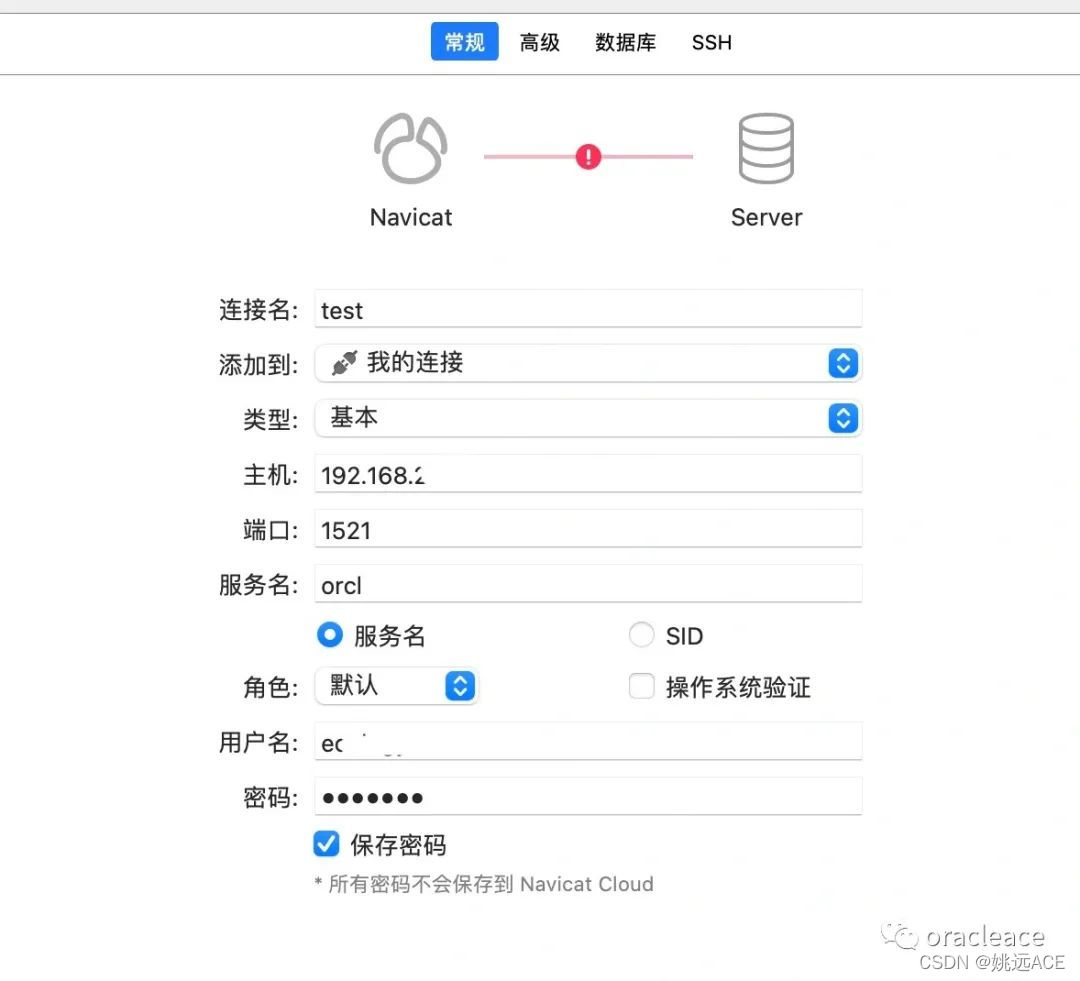
我查看listener的日志里有下面的记录
<msg time='2022-03-09T08:05:44.750+00:00' org_id='oracle' comp_id='tnslsnr'type='UNKNOWN' level='16' host_id='ecology-data'host_addr='192.168.99.99'><txt>09-MAR-2022 08:05:44 * (CONNECT_DATA=(SERVICE_NAME=ORCL)(CID=(PROGRAM=C:\Program?Files\PremiumSoft\Navicat?Premium?15\navicat.exe)(HOST=LENOVO-X270)(USER=vito))) * (ADDRESS=(PROTOCOL=tcp)(HOST=192.168.9.49)(PORT=58419)) * establish * ORCL * 12514</txt>
</msg>
<msg time='2022-03-09T08:05:44.750+00:00' org_id='oracle' comp_id='tnslsnr'type='UNKNOWN' level='16' host_id='ecology-data'host_addr='192.168.99.99'><txt>TNS-12514: TNS:listener does not currently know of service requested in connect descriptor</txt>
</msg>
分析
查询一下TNS-12514的错误:
$ oerr tns 12514
12514, 00000, "TNS:listener does not currently know of service requested in connect descriptor"
// *Cause: The listener received a request to establish a connection to a
// database or other service. The connect descriptor received by the listener
// specified a service name for a service (usually a database service)
// that either has not yet dynamically registered with the listener or has
// not been statically configured for the listener. This may be a temporary
// condition such as after the listener has started, but before the database
// instance has registered with the listener.
// *Action:
// - Wait a moment and try to connect a second time.
// - Check which services are currently known by the listener by executing:
// lsnrctl services 显然是Oracle的服务名设置错误,orcl的服务名是Oracle数据库最常用的服务名,难道会错?仔细看看listener的状态:
$ lsnrctl statusLSNRCTL for Linux: Version 11.2.0.1.0 - Production on 09-MAR-2022 08:03:50Copyright (c) 1991, 2009, Oracle.  All rights reserved.Connecting to (DESCRIPTION=(ADDRESS=(PROTOCOL=TCP)(HOST=192.168.99.99)(PORT=1521)))
STATUS of the LISTENER
------------------------
Alias                     LISTENER
Version                   TNSLSNR for Linux: Version 11.2.0.1.0 - Production
Start Date                18-FEB-2022 02:44:00
Uptime                    19 days 5 hr. 19 min. 50 sec
Trace Level               off
Security                  ON: Local OS Authentication
SNMP                      OFF
Listener Parameter File   /oracledata/oracle/product/11.2.0/db_1/network/admin/listener.ora
Listener Log File         /oracledata/oracle/diag/tnslsnr/aaaa-data/listener/alert/log.xml
Listening Endpoints Summary...(DESCRIPTION=(ADDRESS=(PROTOCOL=tcp)(HOST=192.168.99.99)(PORT=1521)))
Services Summary...
Service "orcls" has 1 instance(s).Instance "orcl", status UNKNOWN, has 1 handler(s) for this service...
The command completed successfully
发现服务名居然是orcls!把navicat里面的服务名对应改过来即可。实际上使用instance名也可以进行连接。
总结
客户端连接失败的故障很常见,通常查询listener的日志就可以找到原因。
文章下方是我的微信,欢迎加我。👇
本文来自互联网用户投稿,文章观点仅代表作者本人,不代表本站立场,不承担相关法律责任。如若转载,请注明出处。 如若内容造成侵权/违法违规/事实不符,请点击【内容举报】进行投诉反馈!