JDBC快速入门(PS:韩顺平jdbc笔记及代码)
JDBC
1.JDBC概述
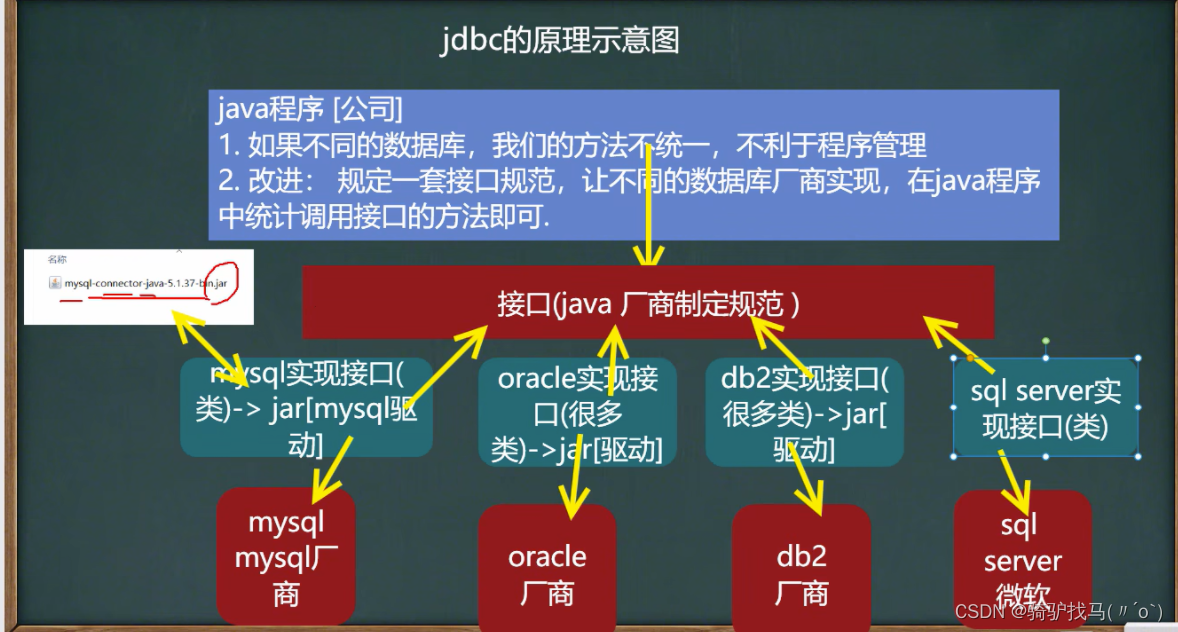
- 为访问不同的数据库提供了统一的接口
- Java程序员使用jdbc,可以连接任何提供了jdbc驱动程序的数据库系统
- JDBC基本原理图
package com.qx.jdbc.myjdbc;/*** @Author Cris* @Date 2022/10/21 14:20* @Version 1.0* 我们规定的jdbc接口*/
public interface JdbcInterface {//连接public Object getConnection();//crudpublic void crud();//关闭连接public void close();
}
package com.qx.jdbc.myjdbc;/*** @Author Cris* @Date 2022/10/21 14:22* @Version 1.0* mysql 数据库实现了jdbc接口*/
public class MysqlJdbcImpl implements JdbcInterface {@Overridepublic Object getConnection() {System.out.println("得到 mysql 的连接");return null;}@Overridepublic void crud() {System.out.println("完成mysql的增删改查");}@Overridepublic void close() {System.out.println("关闭MySQL的连接");}
}package com.qx.jdbc.myjdbc;/*** @Author Cris* @Date 2022/10/21 14:32* @Version 1.0* 模拟Oracle数据库实现 jdbc*/
public class OracleJdbcImpl implements JdbcInterface{@Overridepublic Object getConnection() {System.out.println("得到 Oracle 的连接");return null;}@Overridepublic void crud() {System.out.println("完成Oracle的增删改查");}@Overridepublic void close() {System.out.println("关闭Oracle的连接");}
}package com.qx.jdbc.myjdbc;/*** @Author Cris* @Date 2022/10/21 14:25* @Version 1.0*/
public class TestJdbc {public static void main(String[] args) {//完成对MySQL的操作JdbcInterface jdbcInterface = new MysqlJdbcImpl();jdbcInterface.getConnection();//通过接口来调用实现类【动态绑定】jdbcInterface.crud();jdbcInterface.close();System.out.println("=============================") ;jdbcInterface = new OracleJdbcImpl();jdbcInterface.getConnection();//通过接口来调用实现类【动态绑定】jdbcInterface.crud();jdbcInterface.close();}
}- Java程序员只需要面向这套接口编程即可但是不同的厂商需要针对这些接口实现不同的实现
2.jdbc快速入门
- 注册驱动 - 加载Driver类
- 获取连接 - 得到Connection
- 执行增删改查 - 发送SQL命令给到mysql执行
- 释放资源 - 关闭相关的连接
(1)创建actor数据库

(2)导入jar包
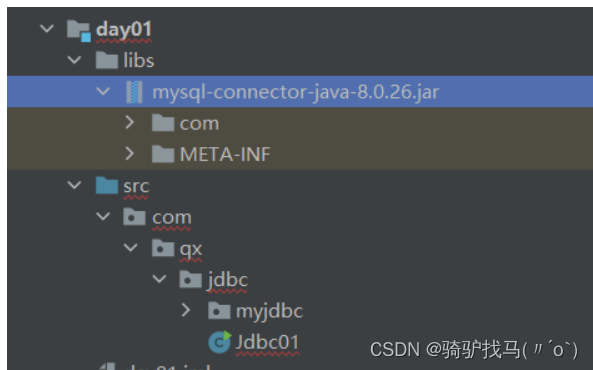
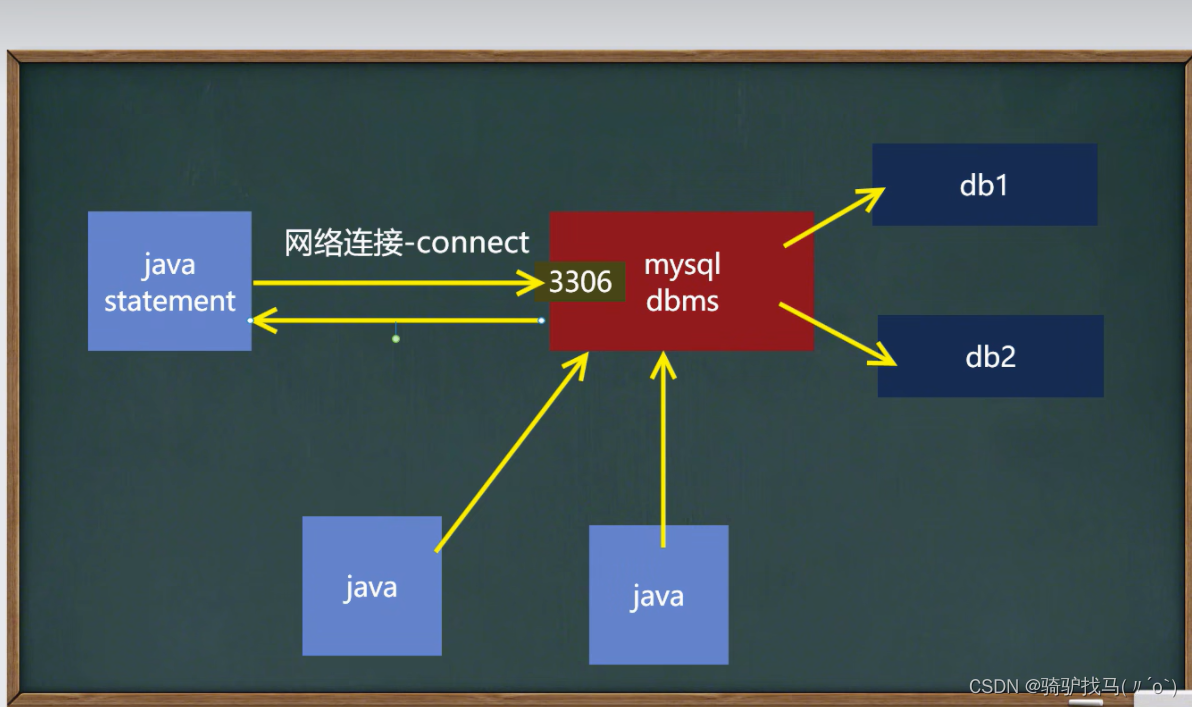
(3)编写代码
package com.qx.jdbc;import com.mysql.cj.jdbc.Driver;import java.sql.Connection;
import java.sql.SQLException;
import java.sql.Statement;
import java.util.Properties;/*** @Author Cris* @Date 2022/10/21 14:56* @Version 1.0* 这是第一个Jdbc程序,完成简单的操作*/
public class Jdbc01 {public static void main(String[] args) throws SQLException {//将mysql.jar 拷贝到该目录下,加载为库//1. 注册驱动Driver driver = new Driver();//创建一个driver对象:new com.cj.mysql.jdbc.Driver   8.0版本需要.cj//2. 得到连接//解读:jdbc:mysql:// 规定好的协议,通过jdbc的方式来连接mysql//(2)localhost 主机,可以是IP地址//(3)3306 表示mysql监听的端口//(4)jdbc 表示连接到mysql dbms 的哪个数据库//(5)mysql的连接本质:就是socket连接String url = "jdbc:mysql://localhost:3306/jdbc";//将 用户名和密码放入到Properties 对象Properties properties = new Properties();//说明:user  和 password 是规定好的,后边的值根据实际情况来写properties.setProperty("user","root");//用户properties.setProperty("password","123456");//密码//根据url连接数据库Connection connect = driver.connect(url, properties);//3. 执行sql语句String sql = "insert into actor values(null,'吴彦祖','男','1970-11-05','1235')";//用于执行静态sql语句,并返回结果Statement statement = connect.createStatement();int i = statement.executeUpdate(sql);//如果是 dml 语句,返回的就是影响行数System.out.println(i>0?"成功":"失败");//4. 关闭连接资源statement.close();connect.close();}
}
3.获取数据库连接的五种方式
-
方式1:com.cj.mysql.jdbc.Driver 属于静态加载,灵活性差,依赖性强
-
方式2:通过反射
@Test
public void connect02() throws ClassNotFoundException, InstantiationException, IllegalAccessException, SQLException {//使用反射加载Driver类Class<?> aClass = Class.forName("com.mysql.jdbc.Driver");Driver driver =(Driver) aClass.newInstance();String url = "jdbc:mysql://localhost:3306/jdbc";Properties properties = new Properties();properties.setProperty("user","root");//用户properties.setProperty("password","123456");//密码Connection connect = driver.connect(url, properties);System.out.println("方式二=" + connect);
}
- 方式3:使用使用DriverManager
@Test
public void connect03() throws ClassNotFoundException, InstantiationException, IllegalAccessException, SQLException {//使用反射加载Driver类Class<?> aClass = Class.forName("com.mysql.jdbc.Driver");//得到Driver对象Driver driver = (Driver) aClass.newInstance();//创建url 和 user 和 passwordString url = "jdbc:mysql://localhost:3306/jdbc";String user = "root";String password = "123456";DriverManager.registerDriver(driver);//注册Driver驱动Connection connection = DriverManager.getConnection(url, user, password);System.out.println("第三种方式=" + connection);
}
- 方式4:使用Class.forName 自动完成注册驱动,简化代码
@Test
public void connect04() throws ClassNotFoundException, SQLException {//使用反射加载了 Driver类//在加载 Driver 类时,完成注册/*源码:1. 静态代码块,在类加载时,会执行一次2. DriverManager.registerDriver(new Driver());3. 因此注册driver的工作已经完成static {try {DriverManager.registerDriver(new Driver());} catch (SQLException var1) {throw new RuntimeException("Can't register driver!");}}*/Class.forName("com.mysql.jdbc.Driver");//创建url 和 user 和 passwordString url = "jdbc:mysql://localhost:3306/jdbc";String user = "root";String password = "123456";Connection connection = DriverManager.getConnection(url, user, password);System.out.println("第四种方式=" + connection);
}
- 方式5:在方式四的基础上改进,增加配置文件,让连接mysql更加灵活
@Test
public void connect05() throws IOException, ClassNotFoundException, SQLException {//通过properties获取配置文件的信息Properties properties = new Properties();properties.load(new FileInputStream("src\\mysql.properties"));//获取相关的值String user = properties.getProperty("user");String password = properties.getProperty("password");String driver = properties.getProperty("driver");String url = properties.getProperty("url");Class.forName(driver);Connection connection = DriverManager.getConnection(url, user, password);System.out.println("方式5 = "+ connection);
}
4.课堂练习
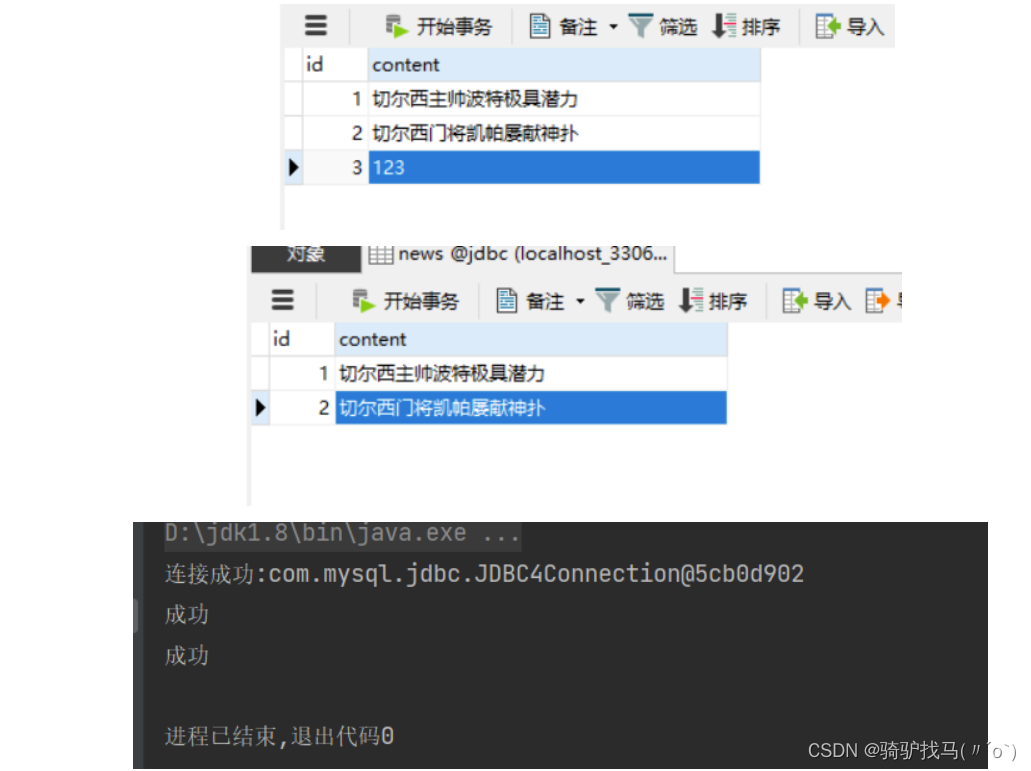
参考老师代码,使用方式5完成
- 创建news表
- 使用jdbc添加5条数据
- 修改id =1的记录,将content改成一个新的消息
- 删除idL3的记录
public class JdbcConnect {public static void main(String[] args) throws IOException, ClassNotFoundException, SQLException {Properties properties = new Properties();properties.load(new FileInputStream("D:\\idea学习\\javaweb\\jdbc\\day01\\src\\mysql.properties"));String user = properties.getProperty("user");String password = properties.getProperty("password");String driver = properties.getProperty("driver");String url = properties.getProperty("url");Class.forName(driver);Connection connection = DriverManager.getConnection(url, user,password);System.out.println("连接成功:" + connection);//执行sql语句String sql = "UPDATE news SET content = '切尔西主帅波特极具潜力' WHERE id = 1;";String sql1 =  "DELETE FROM news WHERE id = '3';";Statement statement = connection.createStatement();int i = statement.executeUpdate(sql);int i1 = statement.executeUpdate(sql1);System.out.println(i>0?"成功":"失败");System.out.println(i1>0?"成功":"失败");//关闭资源statement.close();connection.close();}
}
运行截图
5.ResultSet
-
表示数据库结果集的数据表,通常通过执行查询数据库的语句生成
-
ResultSet对象保持一个光标指向其当前的数据行。最初,光标位于第一行之前
-
next方法将光标移动到下一行,并且由于在ResultSet对象中没有更多行时返回false,因此可以在while循环中使用循环来遍历结果集
String sql = "select id,name,sex,borndate from actor";
//执行语句,返回单个ResultSet对象
ResultSet resultSet = statement.executeQuery(sql);
//5.使用while循环取出数据
while (resultSet.next()){//将光标向后移动,如果没有更多行,则返回falseint id = resultSet.getInt(1);//该行第一列String name = resultSet.getString(2);String sex = resultSet.getString(3);Date borndate = resultSet.getDate(4);System.out.println(id + "\t" + name + "\t" + sex + "\t" + borndate);
}
6.SQL注入
- SQL注入是利用某些系统没有对用户输入的数据进行充分的检查,而任用尸输入数据中注入非法的SQL语句段或命令,恶意攻击数据库。
- 防范SQL注入使用PreparedStatement
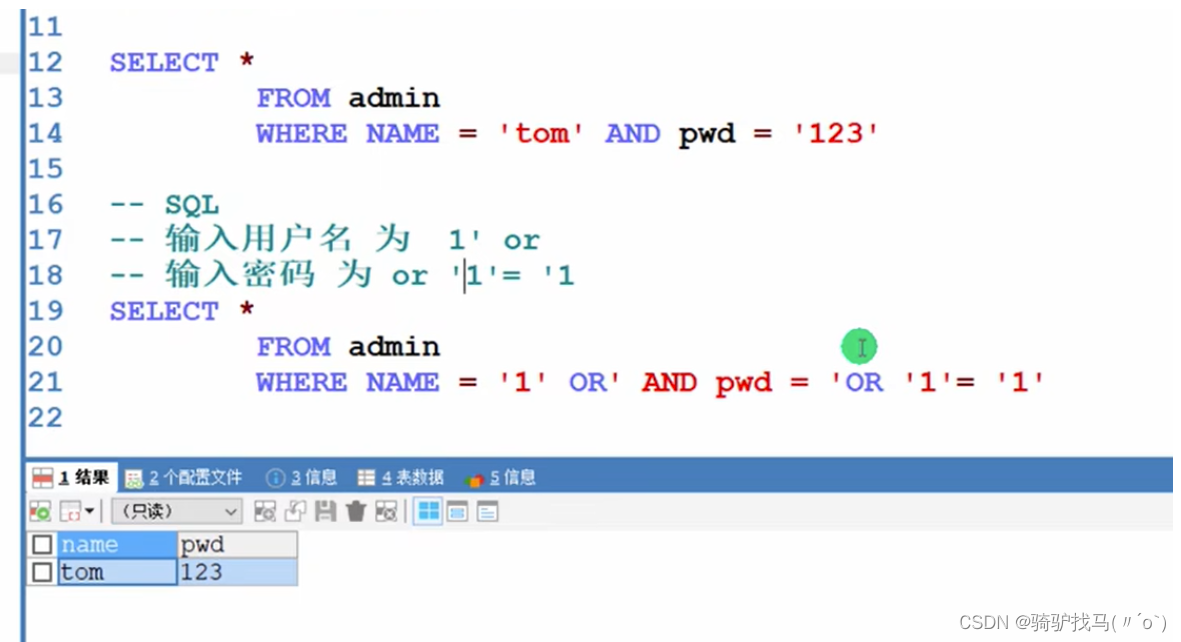
代码界面演示
public class statement_ {public static void main(String[] args) throws IOException, SQLException, ClassNotFoundException {Scanner scanner = new Scanner(System.in);//让用户输入管理员名和密码System.out.print("请输入管理员的名字:");//next 接收到 空格就结束String admin_name = scanner.nextLine();//如果希望看到sql注入,则这里需要使用nextLineSystem.out.print("请输入管理员的密码:");String admin_pwd = scanner.nextLine();//通过properties获取配置文件的信息Properties properties = new Properties();properties.load(new FileInputStream("D:\\idea学习\\javaweb\\jdbc\\day01\\src\\mysql.properties"));//获取相关的值String user = properties.getProperty("user");String password = properties.getProperty("password");String driver = properties.getProperty("driver");String url = properties.getProperty("url");//1.注册驱动Class.forName(driver);//2.得到连接Connection connection = DriverManager.getConnection(url, user, password);//3.得到statementStatement statement = connection.createStatement();//4.组织一个sql语句String sql = "select name ,pwd from admin where NAME ='"+ admin_name +"' and pwd = '"+ admin_pwd +"'";ResultSet resultSet = statement.executeQuery(sql);if (resultSet.next()){ //查询到一条记录,则说明该管理存在System.out.println("成功");}else {System.out.println("失败");}resultSet.close();statement.close();connection.close();}
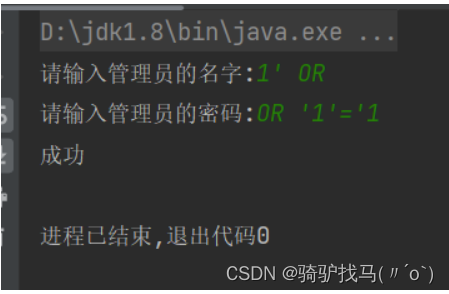
7.PreparedStatement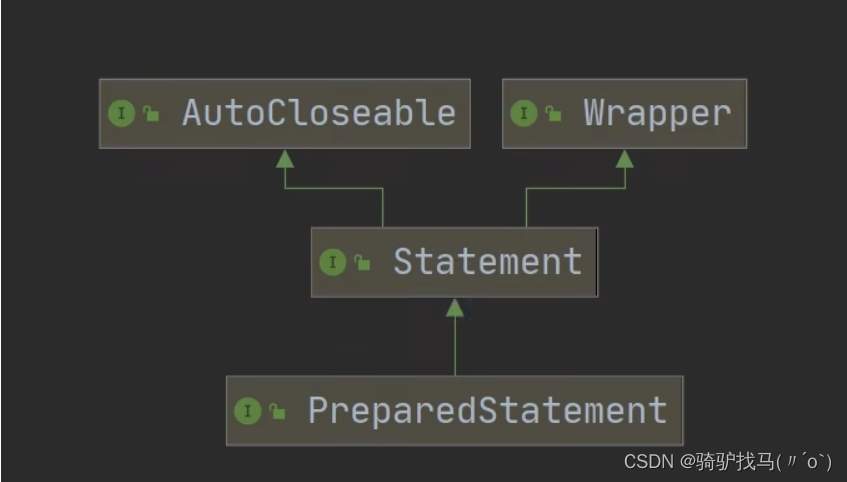
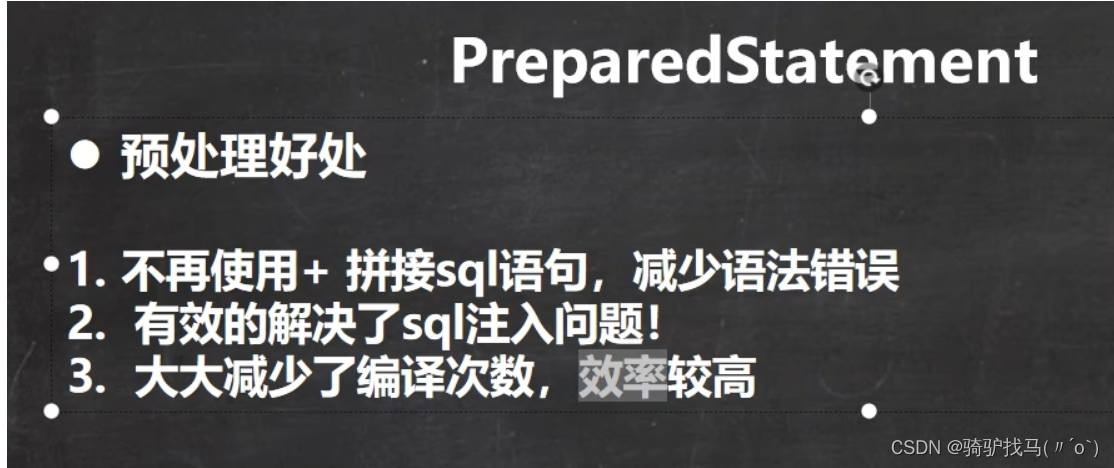
public class PreparedStatement_ {public static void main(String[] args) throws Exception{//看类图Scanner scanner = new Scanner(System.in);//让用户输入管理员名和密码System.out.print("请输入管理员的名字:");//next 接收到 空格就结束String admin_name = scanner.nextLine();//如果希望看到sql注入,则这里需要使用nextLineSystem.out.print("请输入管理员的密码:");String admin_pwd = scanner.nextLine();//通过properties获取配置文件的信息Properties properties = new Properties();properties.load(new FileInputStream("D:\\idea学习\\javaweb\\jdbc\\day01\\src\\mysql.properties"));//获取相关的值String user = properties.getProperty("user");String password = properties.getProperty("password");String driver = properties.getProperty("driver");String url = properties.getProperty("url");//1.注册驱动Class.forName(driver);//2.得到连接Connection connection = DriverManager.getConnection(url, user, password);//3.得到PreparedStatement//3.1 组织一个sql语句 ?:相当于占位符String sql = "select name ,pwd from admin where NAME =? and pwd =?";//3.2 preparedStatement 实现了 PreparedStatement 接口的一个实现类的对象PreparedStatement preparedStatement = connection.prepareStatement(sql);//3.3 给? 赋值preparedStatement.setString(1,admin_name);preparedStatement.setString(2,admin_pwd);//4.执行// 这里执行 executeQuery ,不要写sql,之前已经赋值ResultSet resultSet = preparedStatement.executeQuery();if (resultSet.next()){  //查询到一条记录,则说明该管理存在System.out.println("成功");}else {System.out.println("失败");}resultSet.close();preparedStatement.close();connection.close();}
}
8.练习题
- 创建admin表
- 使用PreparedStatement添加5条数据
- 修改tom的记录,将name改成 king
- 删除一条的记录
- 查询全部记录,并显示在控制台
9.jdbc API总结
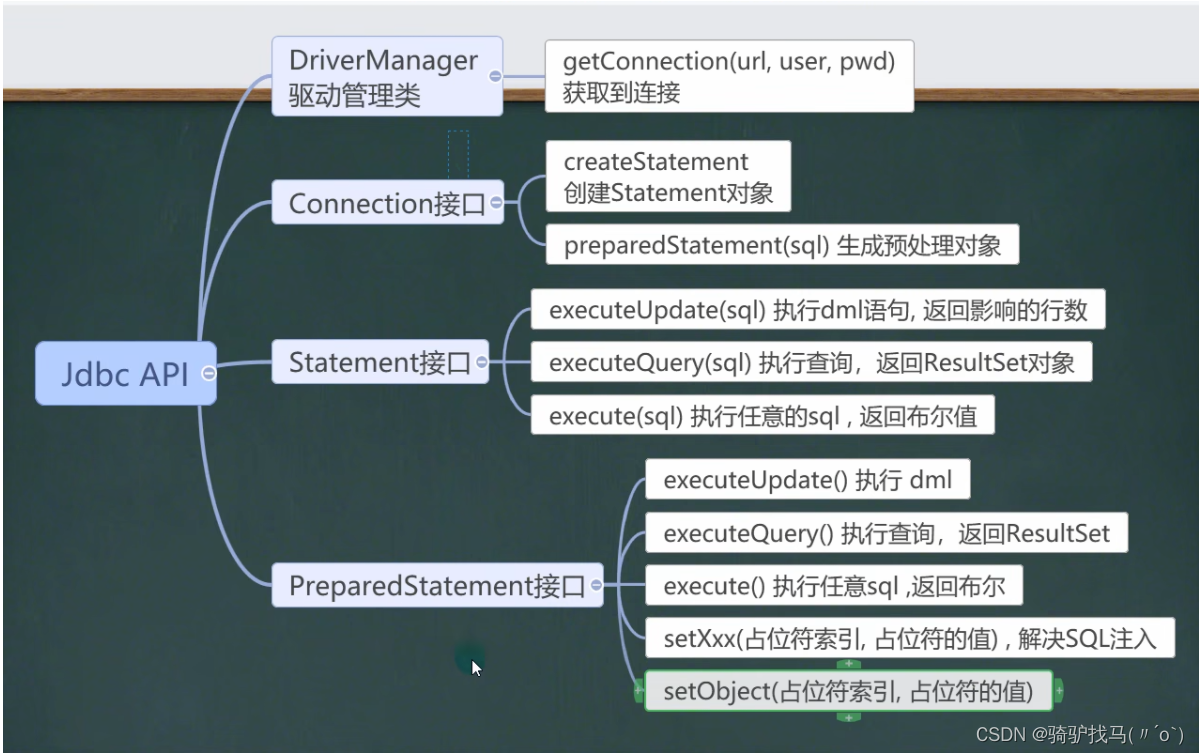
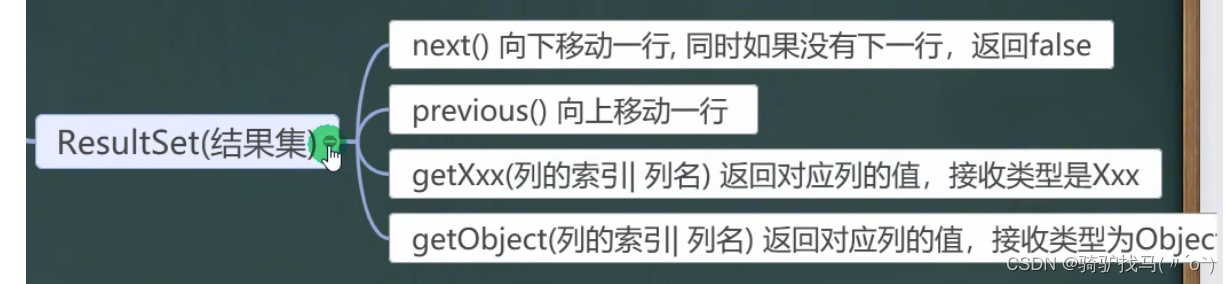
10.jdbc 工具类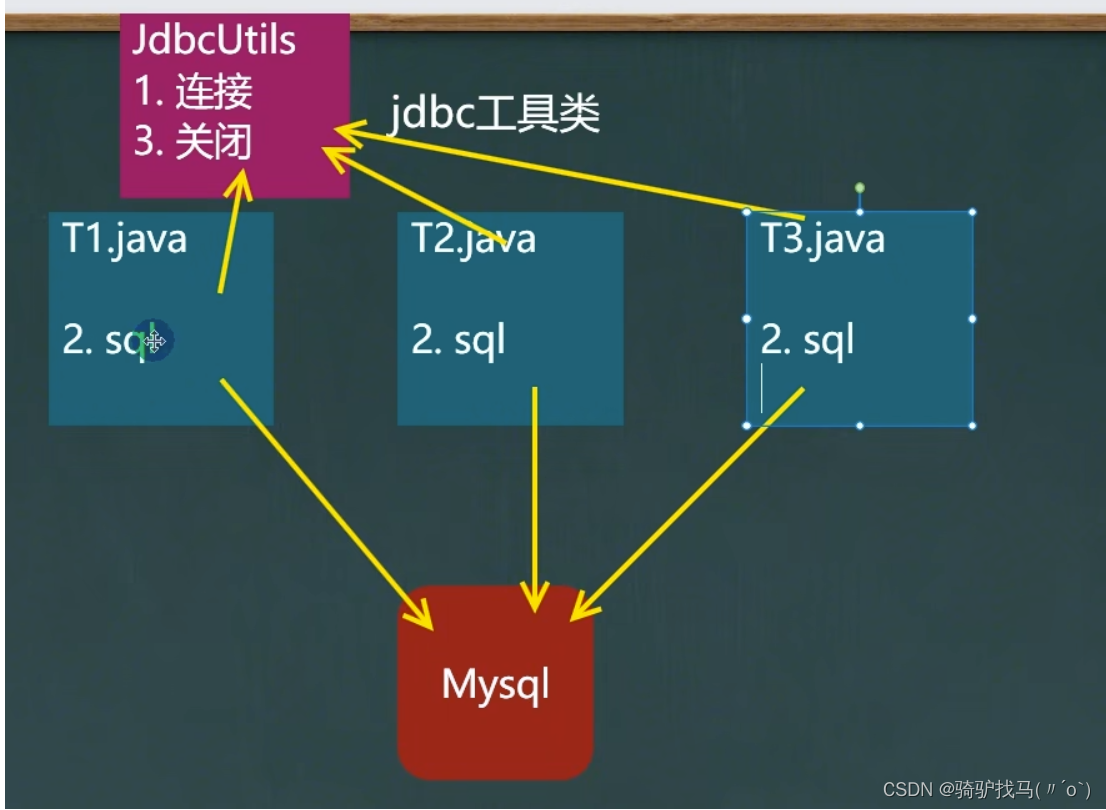
public class JDBCUtils {//定义相关的属性(4个),因为因为只需要一次,因此,我们做成staticprivate static String user;//用户名private static String password;//密码private static String url;//urlprivate static String driver;//驱动名字//在static代码块中去初始化static {Properties properties = new Properties();try {properties.load(new FileInputStream("src\\mysql.properties"));//读取相关的属性值user = properties.getProperty("user");password = properties.getProperty("password");url = properties.getProperty("url");driver = properties.getProperty("driver");} catch (IOException e) {//在实际开发中,我们可以这样处理//1.将编译异常变成运行异常//2.这是调用者,可以选择捕获该异常,也可以选择默认处理该异常,比较方便throw new RuntimeException(e);}}//连接数据库,返回Connectionpublic static Connection getConnection(){try {return DriverManager.getConnection(url,user,password);} catch (SQLException e) {//1.将编译异常变成运行异常//2.这是调用者,可以选择捕获该异常,也可以选择默认处理该异常,比较方便throw new RuntimeException(e);}}//关闭相关资源/*1.ResultSet 结果集2.Statement 或者 PrepareStatement3.Connection4.如果需要关闭资源,就传入对象否则传入null*/public static void close(ResultSet resultSet, Statement statement, Connection connection){//判断是否为nulltry {if (resultSet!=null){resultSet.close();}if (statement!=null){statement.close();}if (connection!=null){connection.close();}} catch (SQLException e) {//将编译异常转成运行异常抛出throw new RuntimeException(e);}}
}
工具类的实现
DML
    @Testpublic void testDML(){//1.得到连接Connection connection = null;//2.组织sql语句String sql = "update actor set name = ? where id = ?";//delete 与 insertPreparedStatement preparedStatement = null;//3.创建PrepareStatement 对象try {connection = JDBCUtils.getConnection();preparedStatement = connection.prepareStatement(sql);//给占位符赋值preparedStatement.setObject(1,"周星驰");preparedStatement.setObject(2,1);//执行preparedStatement.executeUpdate();} catch (SQLException e) {throw new RuntimeException(e);} finally {//关闭资源JDBCUtils.close(null,preparedStatement,connection);}}
}
select语句
@Test
public void testSelect(){//1.得到连接Connection connection = null;//2.组织sql语句String sql = "select * from actor";//delete 与 insertPreparedStatement preparedStatement = null;ResultSet set = null;//3.创建PrepareStatement 对象try {connection = JDBCUtils.getConnection();preparedStatement = connection.prepareStatement(sql);//执行set = preparedStatement.executeQuery();//遍历该结果集while (set.next()) {int id = set.getInt("id");String name = set.getString("name");String sex = set.getString("sex");Date borndate = set.getDate("borndate");String phone = set.getString("phone");System.out.println(id + "\t" + name + "\t" + sex + "\t" + borndate + "\t" + phone);}} catch (SQLException e) {throw new RuntimeException(e);} finally {//关闭资源JDBCUtils.close(set,preparedStatement,connection);}
}
10.事务
要么都成功,要么都失败
参考博客链接:事务ACID理解
- 不使用事务的情况
@Test
public void noTransaction(){//操作转账的业务//1.得到连接Connection connection = null;//2.组织sql语句String sql = "update account set balance = balance - 100 where id = 1";String sql2 = "update account set balance = balance + 100 where id = 2";PreparedStatement preparedStatement = null;//3.创建PrepareStatement 对象try {connection = JDBCUtils.getConnection();//在默认情况下,connection对象是默认自动提交preparedStatement = connection.prepareStatement(sql);preparedStatement.executeUpdate();//执行第一条sql//int i = 1/0;         会抛出异常preparedStatement = connection.prepareStatement(sql2);preparedStatement.executeUpdate();//执行第二条sql} catch (SQLException e) {throw new RuntimeException(e);} finally {//关闭资源JDBCUtils.close(null,preparedStatement,connection);}
}
- 使用事务
@Test
//使用事务解决
public void useTransaction(){//1.得到连接Connection connection = null;//2.组织sql语句String sql = "update account set balance = balance - 100 where id = 1";String sql2 = "update account set balance = balance + 100 where id = 2";PreparedStatement preparedStatement = null;//3.创建PrepareStatement 对象try {connection = JDBCUtils.getConnection();//在默认情况下,connection对象是默认自动提交//将connection 设置为不自动提交connection.setAutoCommit(false);//相当于开启了事务preparedStatement = connection.prepareStatement(sql);preparedStatement.executeUpdate();//执行第一条sql//int i = 1/0;        // 会抛出异常preparedStatement = connection.prepareStatement(sql2);preparedStatement.executeUpdate();//执行第二条sql//这里提交事务connection.commit();} catch (SQLException e) {//这里我们可以进行回滚,撤销即将执行的sql//默认回滚到事务开始的状态System.out.println("执行发生了异常,撤销执行的sql");try {connection.rollback();} catch (SQLException ex) {throw new RuntimeException(ex);}throw new RuntimeException(e);} finally {//关闭资源JDBCUtils.close(null,preparedStatement,connection);}
}
11.批处理
基本介绍
-
当需要成批插入或者更新记录时。可以采用Java的批量更新机制,这一机制允许多条语句一次性提交给数据库批量处理。通常情况下比单独提交处理更有效率
-
JDBC的批量处理语句包括下面方法:
-
JDBC连接MySQL时,如果要使用批处理功能,请再url中加参数? rewriteBatchedStatements=true
- addBatch():添加需要批量处理的SQL语句或参数;
- executeBatch():执行批量处理语句;
- clearBatch():清空批处理包的语句;
-
批处理往往和PreparedStatement一起搭配使用,可以既减少编译次数,又减少运行次数,效率大大提高
相关代码:
@Test
public void noBatch() throws Exception {//3000msConnection connection = JDBCUtils.getConnection();String sql = "insert into admin2 values(null,?,?)";PreparedStatement preparedStatement = connection.prepareStatement(sql);System.out.println("开始执行了");long start = System.currentTimeMillis();for (int i = 0; i < 5000; i++) {preparedStatement.setObject(1,"jack" + i);preparedStatement.setObject(2,"666");preparedStatement.executeUpdate();}long end = System.currentTimeMillis();System.out.println("传统的方式 耗时=" + (end - start));JDBCUtils.close(null,preparedStatement,connection);
}
//使用批量处理添加数据
@Test
public void batch() throws Exception {Connection connection = JDBCUtils.getConnection();String sql = "insert into admin2 values(null,?,?)";PreparedStatement preparedStatement = connection.prepareStatement(sql);System.out.println("开始执行了");long start = System.currentTimeMillis();for (int i = 0; i < 5000; i++) {preparedStatement.setObject(1,"jack" + i);preparedStatement.setObject(2,"666");//将sql语句加入到批处理包中 -> 源码preparedStatement.addBatch();//当有1000条记录时,再批量执行if ((i + 1) % 1000 == 0){preparedStatement.executeBatch();//清空preparedStatement.clearBatch();}}long end = System.currentTimeMillis();System.out.println("传统的方式 耗时=" + (end - start));JDBCUtils.close(null,preparedStatement,connection);
}
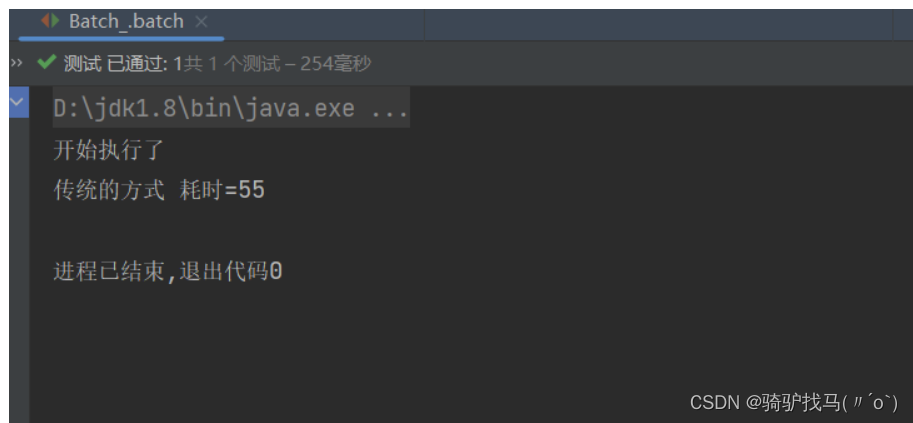
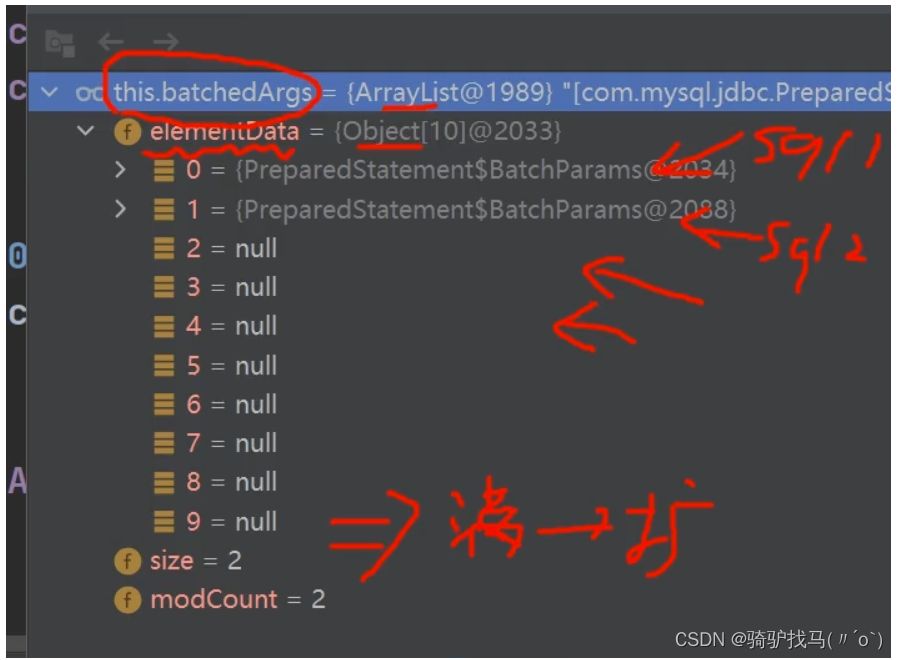
源码分析
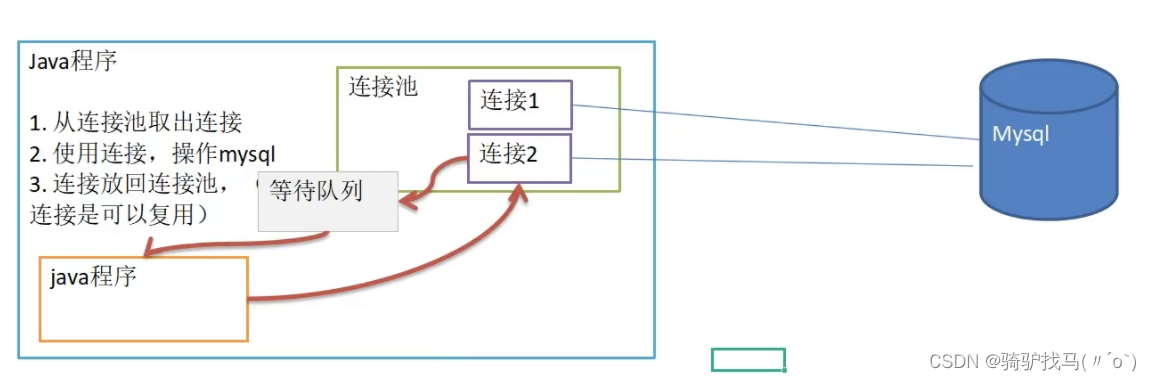
12.MySQL数据库连接池
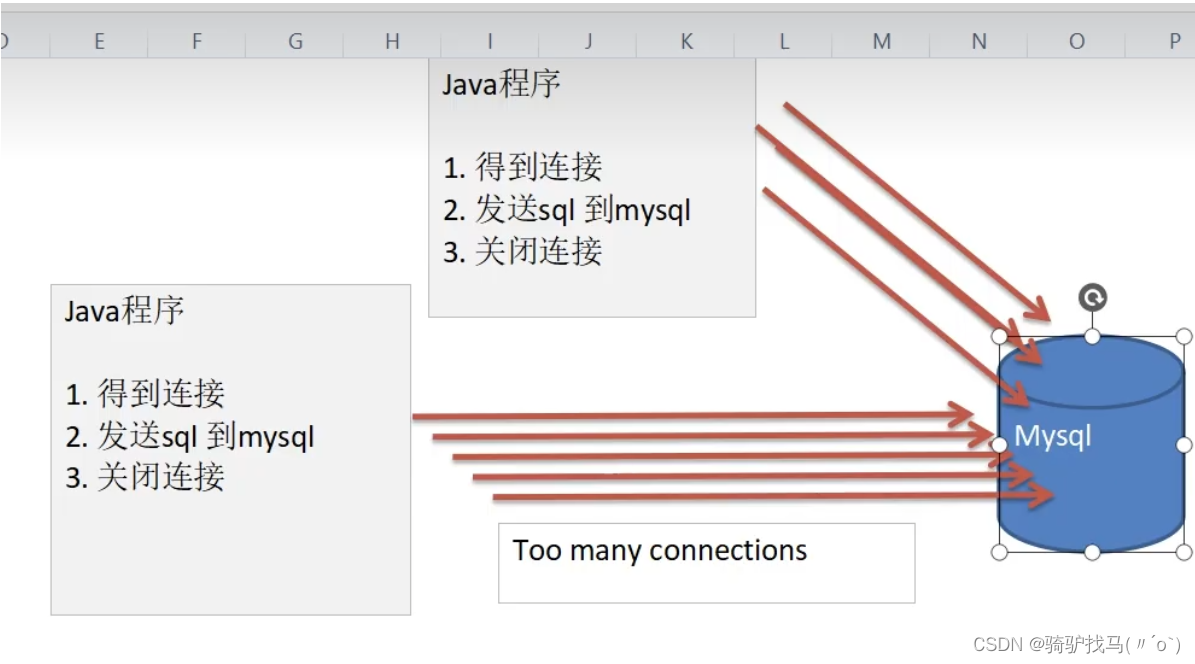
- 传统方式

- 相关代码
//连接MySQL5000次
@Test
public void testCon(){//看看连接--关闭,会耗时多久long start = System.currentTimeMillis();for (int i = 0; i < 5000; i++) {//使用传统的jdbc方式,得到连接Connection connection = JDBCUtils.getConnection();//做一些工作,比如得到PreparedStatement,发送sql//........//关闭JDBCUtils.close(null,null,connection);}long end = System.currentTimeMillis();System.out.println("传统方式5000次 耗时=" + (end - start));//传统方式5000次 耗时=6287
}
传统问题分析
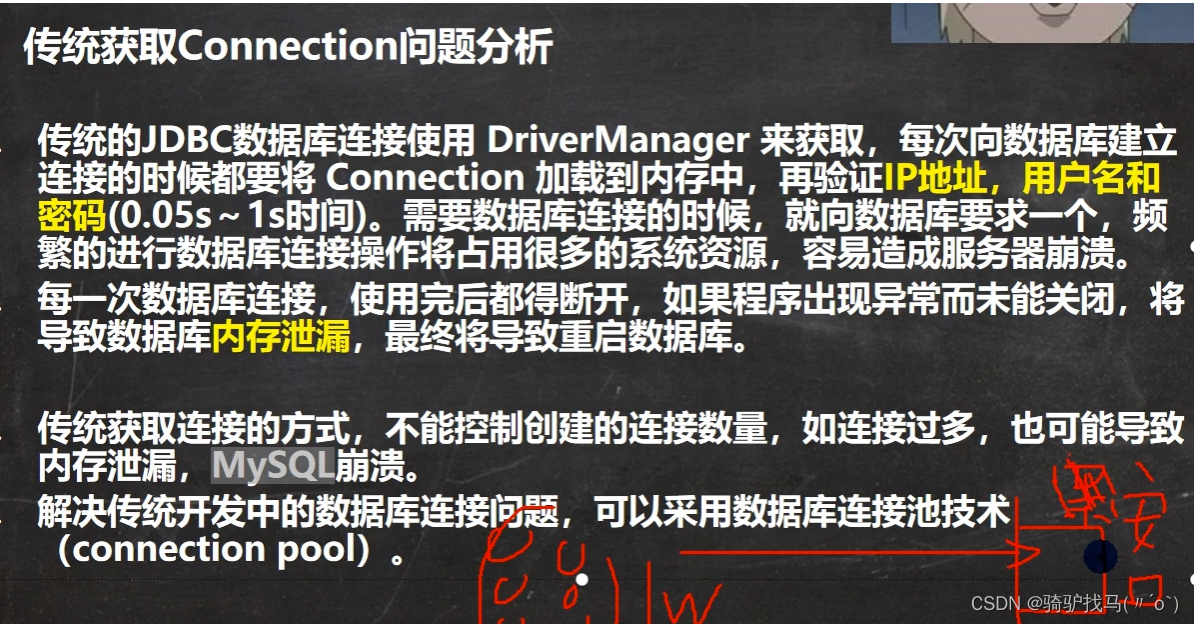
传统方式没有缓冲技术
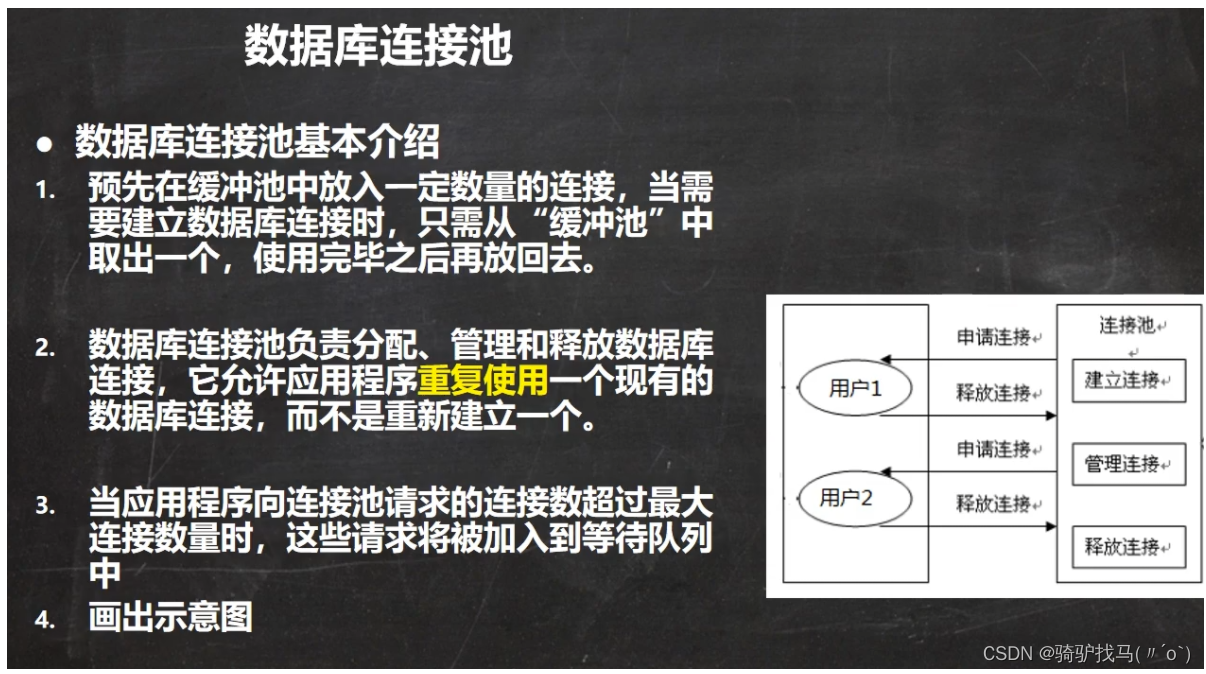
基本介绍
13.两种重要的连接池技术
1.C3P0
1.1配置文件
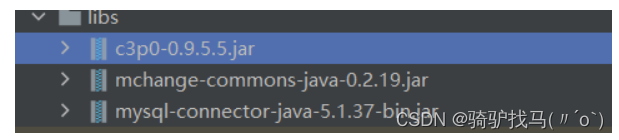
进入官网:**https://sourceforge.net/**直接download ——> 添加为库——>设置配置文件c3p0-config.xml文件
<c3p0-config>
<named-config name="c3p0_mysql">           <property name="driverClass">com.mysql.jdbc.Driverproperty>    <property name="jdbcUrl">jdbc:mysql://localhost:3306/mysql?characterEncoding=utf-8&serverTimezone=UTCproperty>  <property name="user">rootproperty>            <property name="password">property>      <property name="initialPoolSize">10property>  <property name="acquireIncrement">5property>  <property name="maxIdleTime">30property><property name="maxPoolSize">60property>  <property name="minPoolSize">10property>   named-config>
c3p0-config>
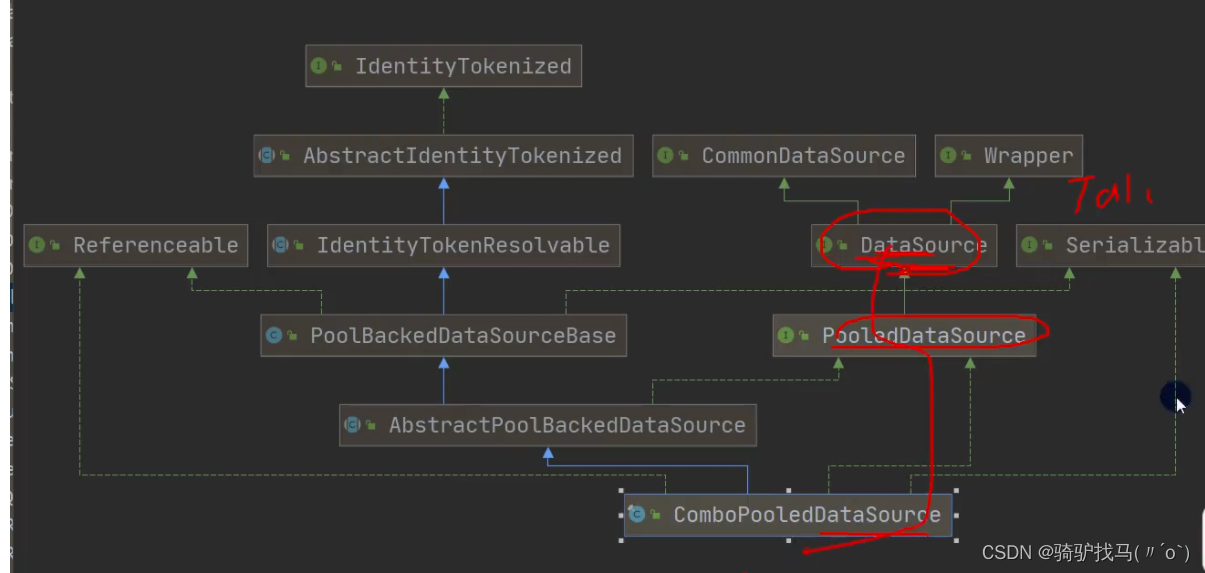
相关类图
1.2代码以及速度比较
1.2.1 方式一
@Test
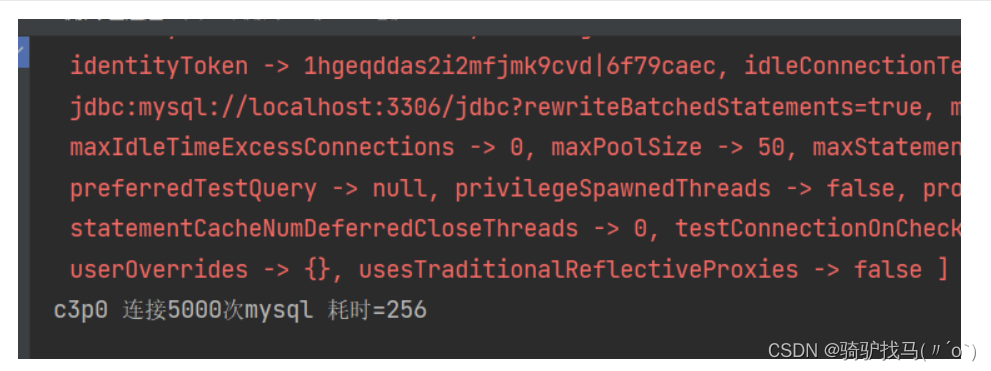
public void testC3P0_01() throws Exception{//1.创建一个数据源对象ComboPooledDataSource comboPooledDataSource = new ComboPooledDataSource();//2.通过配置文件mysql.propertie获取相关的信息Properties properties = new Properties();properties.load(new FileInputStream("src\\mysql.properties"));//读取相关的属性值String user = properties.getProperty("user");String password = properties.getProperty("password");String url = properties.getProperty("url");String driver = properties.getProperty("driver");//给数据源 comboPooledDataSource 设置相关的参数//注意:连接管理是由 comboPooledDataSource 来管理comboPooledDataSource.setDriverClass(driver);comboPooledDataSource.setJdbcUrl(url);comboPooledDataSource.setUser(user);comboPooledDataSource.setPassword(password);//设置初始化连接数comboPooledDataSource.setInitialPoolSize(10);//设置最大连接数comboPooledDataSource.setMaxPoolSize(50);//测试连接池的效率,测试对mysql 5000ci操作long start = System.currentTimeMillis();for (int i = 0; i < 5000; i++) {//这个方法是从 DataSource 接口实现的Connection connection = comboPooledDataSource.getConnection();connection.close();}long end = System.currentTimeMillis();System.out.println("c3p0 连接5000次mysql 耗时=" + (end-start));}
1.2.2方式二
//方式二:使用配置文件模板来完成//1. 将c3p0 提供的 xml 文件拷贝到src目录下
//2. 该文件指定了连接数据库和连接池的相关参数
@Test
public void testC3P0_02() throws SQLException {ComboPooledDataSource com = new ComboPooledDataSource("c3p0_mysql");//测试5000次连接MySQLlong start = System.currentTimeMillis();System.out.println("开始执行");for (int i = 0; i < 5000; i++) {Connection connection = com.getConnection();//System.out.println("连接成功---");connection.close();}long end = System.currentTimeMillis();System.out.println("c390的第二种方式 耗时=" + (end-start));
}
2.德鲁伊连接池
@Test
public void testDruid() throws Exception {//1. 加入jar 包//2. 加入配置文件//3. 创建Properties对象,读取配置文件Properties properties = new Properties();properties.load(new FileInputStream("src\\druid.properties"));//4. 创建一个指定参数的数据库连接池,Druid连接池DataSource dataSource = DruidDataSourceFactory.createDataSource(properties);long start = System.currentTimeMillis();for (int i = 0; i < 500000; i++) {Connection connection = dataSource.getConnection();//System.out.println("连接成功");connection.close();}//druid连接池 操作5000次 耗时268long end = System.currentTimeMillis();System.out.println("druid连接池 耗时" + (end - start));//耗时332
}
工具以及实现
public class JDBCUtilsByDruid {private static DataSource ds;//在静态代码块完成 ds 初始化static {Properties properties = new Properties();try {properties.load(new FileInputStream("D:\\idea学习\\javaweb\\jdbc\\day01\\src\\druid.properties"));ds = DruidDataSourceFactory.createDataSource(properties);} catch (Exception e) {throw new RuntimeException(e);}}//编写getConnection方法public static Connection getConnection() throws SQLException {return ds.getConnection();}//关闭连接,强调:在数据库连接池技术中,close不是真的断掉连接//而是把使用的Connection对象放回连接池public static void close(ResultSet resultSet, Statement statement,Connection connection){try {if (resultSet != null){resultSet.close();}if (statement != null){statement.close();}if (connection  != null){connection.close();}} catch (Exception e) {throw new RuntimeException(e);}}
}
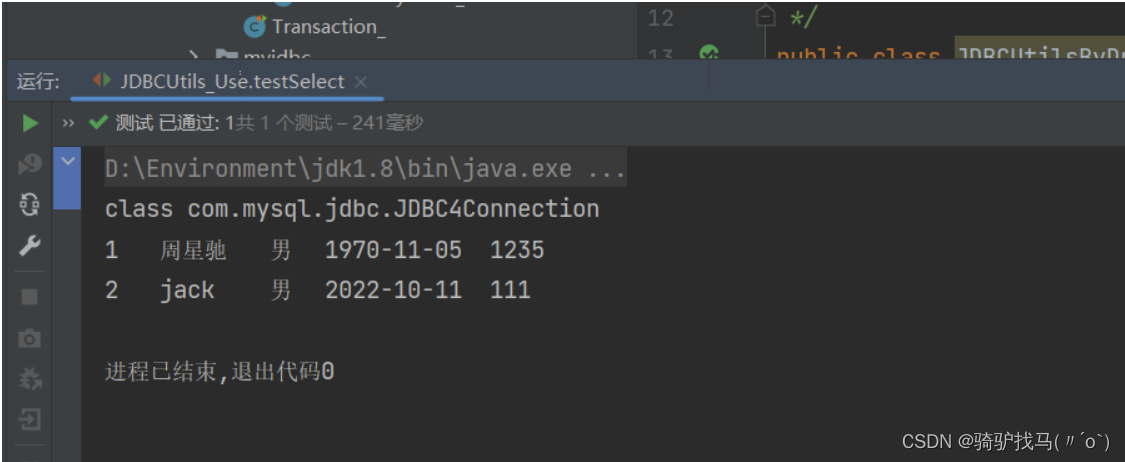
@Test
public void testSelect(){System.out.println("我们使用Druid方式完成");//1.得到连接Connection connection = null;//2.组织sql语句String sql = "select * from actor";//delete 与 insertPreparedStatement preparedStatement = null;ResultSet set = null;//3.创建PrepareStatement 对象try {connection = JDBCUtilsByDruid.getConnection();System.out.println(connection.getClass());//运行类型preparedStatement = connection.prepareStatement(sql);//执行set = preparedStatement.executeQuery();//遍历该结果集while (set.next()) {int id = set.getInt("id");String name = set.getString("name");String sex = set.getString("sex");Date borndate = set.getDate("borndate");String phone = set.getString("phone");System.out.println(id + "\t" + name + "\t" + sex + "\t" + borndate + "\t" + phone);}} catch (SQLException e) {throw new RuntimeException(e);} finally {//关闭资源JDBCUtilsByDruid.close(set,preparedStatement,connection);}
}
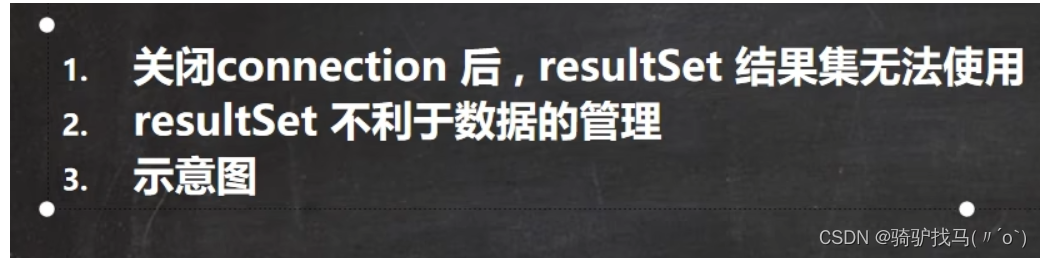
14.不足之处
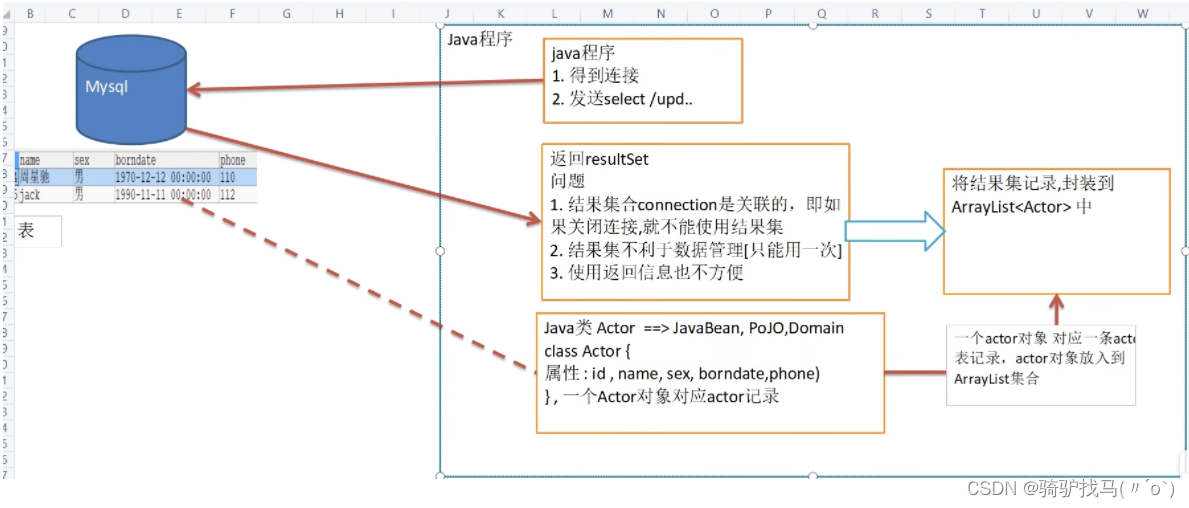
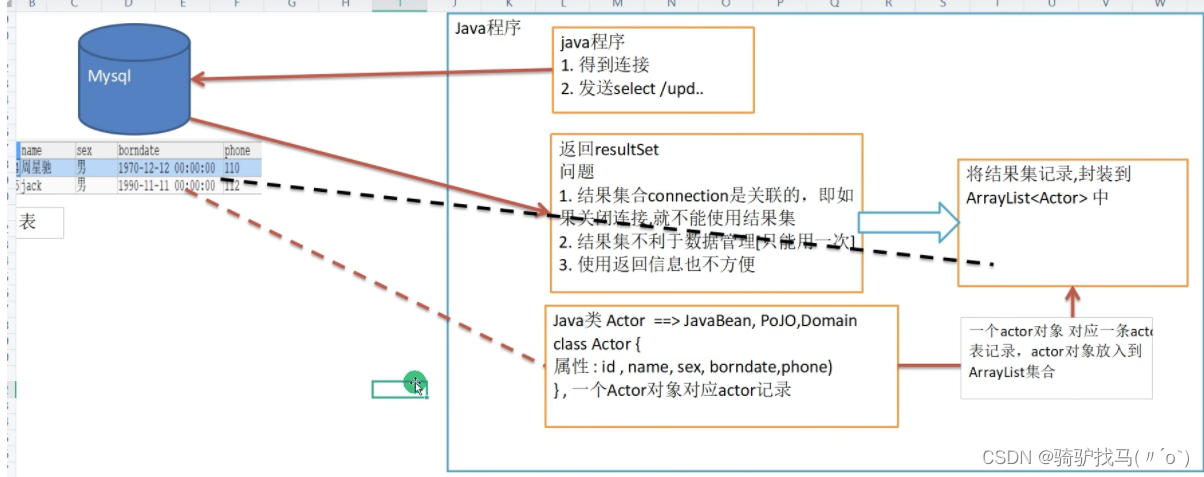
15.代码实现
15.1土方法
相关代码
@Test
public void testSelectToArrayList(){System.out.println("我们使用Druid方式完成");//1.得到连接Connection connection = null;//2.组织sql语句String sql = "select * from actor";//delete 与 insertPreparedStatement preparedStatement = null;ResultSet set = null;ArrayList<actor> list = new ArrayList<actor>();//3.创建PrepareStatement 对象try {connection = JDBCUtilsByDruid.getConnection();System.out.println(connection.getClass());//运行类型preparedStatement = connection.prepareStatement(sql);//执行set = preparedStatement.executeQuery();//遍历该结果集while (set.next()) {int id = set.getInt("id");String name = set.getString("name");String sex = set.getString("sex");Date borndate = set.getDate("borndate");String phone = set.getString("phone");//把得到的result 的记录,封装到 actor 对象,放入到list集合list.add(new actor(id,name,sex,borndate,phone));}System.out.println("list集合数据=" + list);} catch (SQLException e) {throw new RuntimeException(e);} finally {//关闭资源JDBCUtilsByDruid.close(set,preparedStatement,connection);}
}
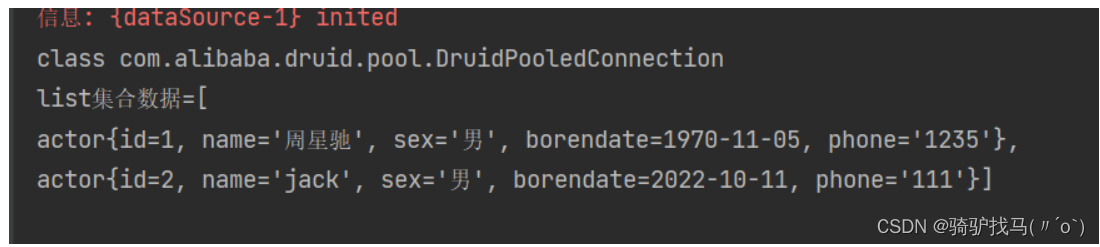
15.2DBUtils
- 相关的代码
@Testpublic void testQueryMany() throws SQLException {//返回结果是多行的情况//1.先得到一个连接 druidConnection connection = JDBCUtilsByDruid.getConnection();//2.使用DBUtils 类和接口,先引入DBUtils相关的jar文件,加入到本Project//3.创建一个 QueryRunnerQueryRunner queryRunner = new QueryRunner();//4.就可以执行相关的方法,返回ArrayList结果集String sql = "select * from actor where id >= ?";//解读 query 方法就是执行一个sql 语句,得到resultset --封装--> ArrayList 集合中,然后返回// 返回集合// connection:连接// sql:执行的sql语句// new BeanListHandler<>(actor.class):将resultset -> actor对象 -> 封装到 ArrayList// 底层使用反射机制 去获取actor类的属性,然后进行封装// 1就是给sql语句中?赋值的,可以有多个值,因为是可变参数// 底层得到的resultset,会在query关闭,关闭PreparedStatementList<actor> list = queryRunner.query(connection, sql, new BeanListHandler<>(actor.class), 1);System.out.println("输出集合的的信息");for(actor actor : list){System.out.println(actor);}//释放资源JDBCUtilsByDruid.close(null,null,connection);}
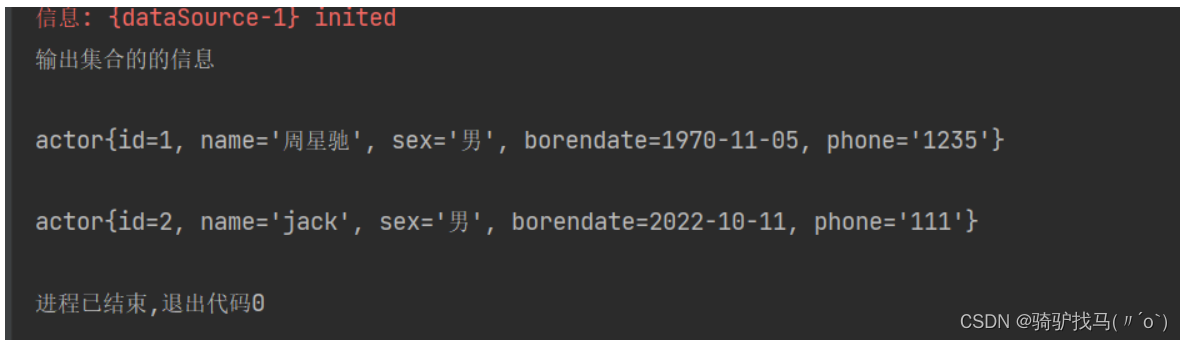
16.DBUtils
多个对象查询
@Test
public void testQueryMany() throws SQLException {//返回结果是多行的情况//1.先得到一个连接 druidConnection connection = JDBCUtilsByDruid.getConnection();//2.使用DBUtils 类和接口,先引入DBUtils相关的jar文件,加入到本Project//3.创建一个 QueryRunnerQueryRunner queryRunner = new QueryRunner();//4.就可以执行相关的方法,返回ArrayList结果集String sql = "select * from actor where id >= ?";//解读 query 方法就是执行一个sql 语句,得到resultset --封装--> ArrayList 集合中,然后返回// 返回集合// connection:连接// sql:执行的sql语句// new BeanListHandler<>(actor.class):将resultset -> actor对象 -> 封装到 ArrayList// 底层使用反射机制 去获取actor类的属性,然后进行封装// 1就是给sql语句中?赋值的,可以有多个值,因为是可变参数// 底层得到的resultset,会在query关闭,关闭PreparedStatementList<actor> list = queryRunner.query(connection, sql, new BeanListHandler<>(actor.class), 1);System.out.println("输出集合的的信息");for(actor actor : list){System.out.println(actor);}//释放资源JDBCUtilsByDruid.close(null,null,connection);}

单行多列查询
@Test
public void testQuerySingle() throws SQLException {//1.先得到一个连接 druidConnection connection = JDBCUtilsByDruid.getConnection();//2.使用DBUtils 类和接口,先引入DBUtils相关的jar文件,加入到本Project//3.创建一个 QueryRunnerQueryRunner queryRunner = new QueryRunner();//4.就可以执行相关的方法,返回单个对象String sql = "select * from actor where id = ?";//解读:因为我们返回的单行记录<-->单个对象,使用的Hander是BeanHandleractor actor = queryRunner.query(connection, sql, new BeanHandler<>(actor.class), 1);System.out.println(actor);//释放资源JDBCUtilsByDruid.close(null,null,connection);
}

单行单列查询
@Test
public void testScalar() throws SQLException {//1.先得到一个连接 druidConnection connection = JDBCUtilsByDruid.getConnection();//2.使用DBUtils 类和接口,先引入DBUtils相关的jar文件,加入到本Project//3.创建一个 QueryRunnerQueryRunner queryRunner = new QueryRunner();//4.就可以执行相关的方法,返回单行单列,返回的就是ObjectString sql = "select name from actor where id = ?";//解读:因为返回的是一个对象,使用的handler 就是ScalarHandlerObject obj = queryRunner.query(connection, sql, new ScalarHandler<>(), 1);System.out.println(obj);//释放资源JDBCUtilsByDruid.close(null,null,connection);
}

DBUtilsDML
@Test
public void testDML() throws SQLException {//1.先得到一个连接 druidConnection connection = JDBCUtilsByDruid.getConnection();//2.使用DBUtils 类和接口,先引入DBUtils相关的jar文件,加入到本Project//3.创建一个 QueryRunnerQueryRunner queryRunner = new QueryRunner();//4.这里组织sql完成update、insert、deleteString sql = "update actor set name = ? where id = ?";//(1)执行dml 操作是 queryRunner.update//(2)返回的值是受影响的行数int affectedRow = queryRunner.update(connection, sql, "张三丰", 1);System.out.println(affectedRow > 0?"执行成功":"执行没有影响到表");//释放资源JDBCUtilsByDruid.close(null,null,connection);
}
17.BasicDao
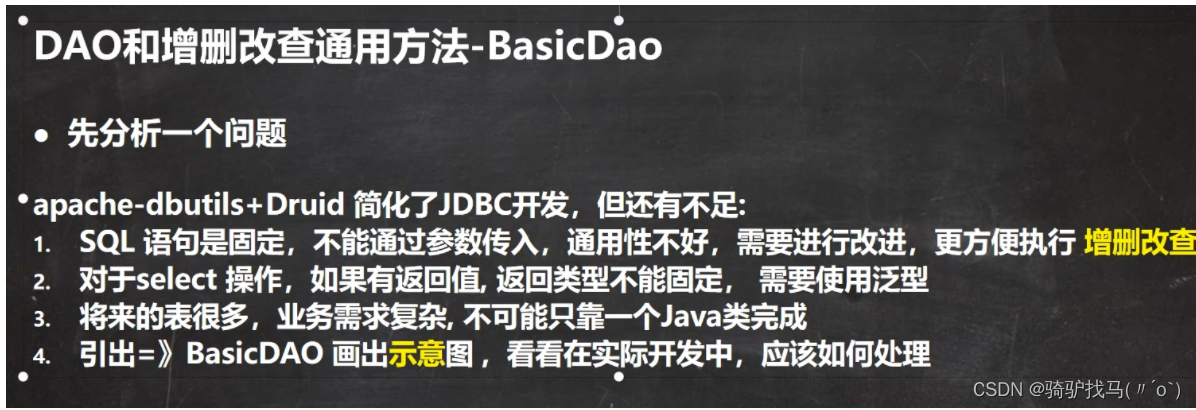
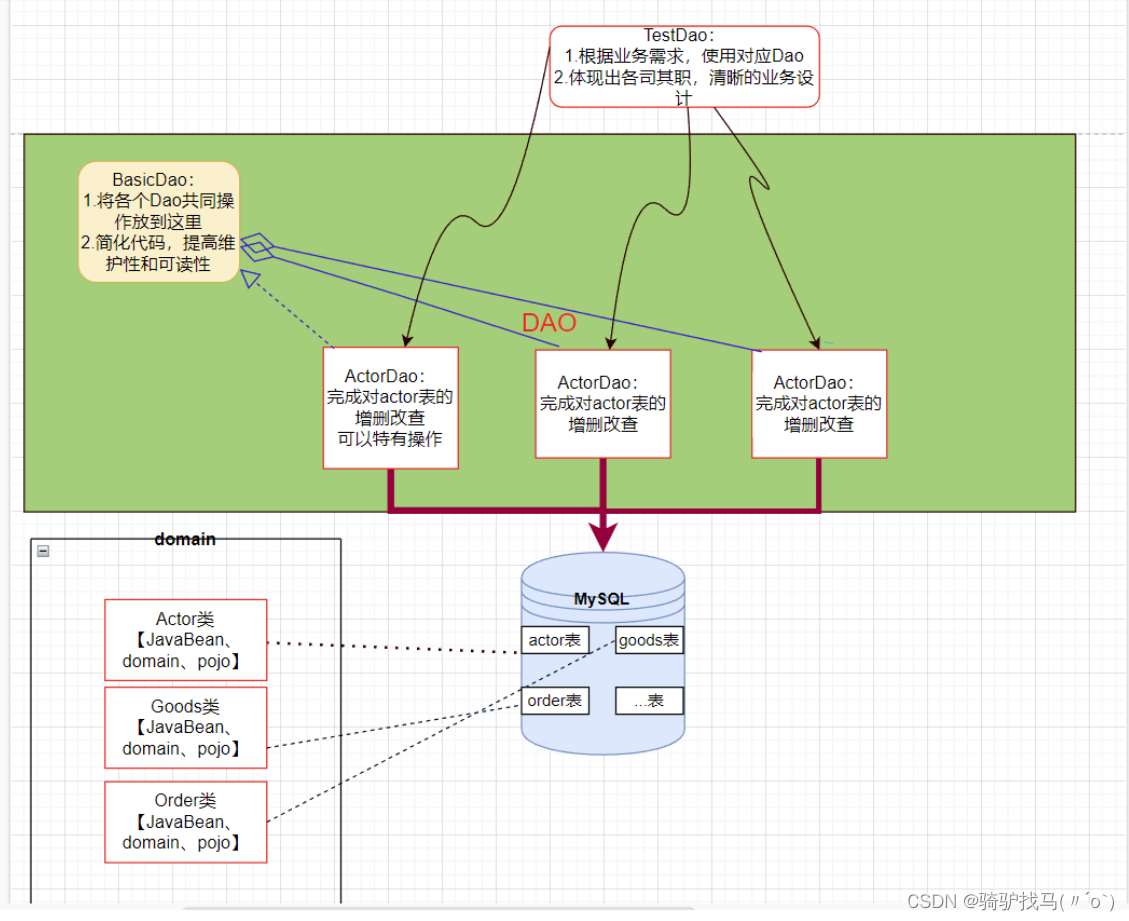
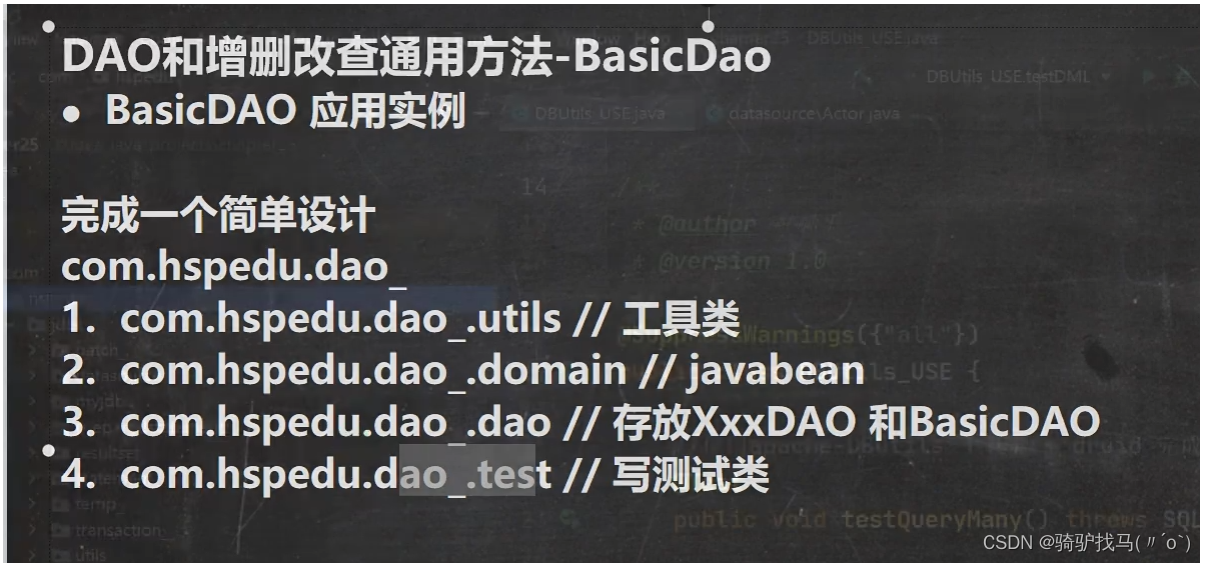
代码实现
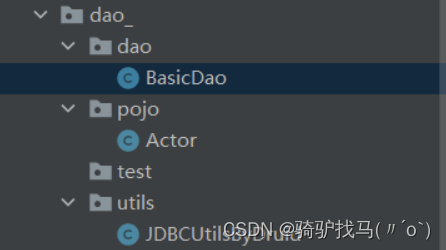
public class BasicDao<T> {//泛型指定具体的类型private QueryRunner qr = new QueryRunner();//开发通用的dml方法,针对任意的表public int update(String sql,Object... parameters){Connection connection = null;try {connection = JDBCUtilsByDruid.getConnection();int update = qr.update(connection, sql, parameters);return update;} catch (SQLException e) {throw new RuntimeException(e);//将一个编译异常->运行异常} finally {JDBCUtilsByDruid.close(null,null,connection);}}/**** @param sql sql语句,可以有?* @param clazz 传入一个类的class对象 比如actor.class* @param parameters 传入?具体的值,可以是多个* @return 根据actor.class 返回对应的arraylist 集合*///返回多个对象(即查询的结果是多行),针对任意的表public List<T> queryMulti(String sql,Class<T> clazz,Object... parameters){Connection connection = null;try {connection = JDBCUtilsByDruid.getConnection();return qr.query(connection,sql,new BeanListHandler<T>(clazz),parameters);} catch (SQLException e) {throw new RuntimeException(e);//将一个编译异常->运行异常} finally {JDBCUtilsByDruid.close(null,null,connection);}}//查询单行结果的通用方法public T querySingle(String sql,Class<T> clazz,Object... parameters){Connection connection = null;try {connection = JDBCUtilsByDruid.getConnection();return qr.query(connection,sql,new BeanHandler<T>(clazz));} catch (SQLException e) {throw new RuntimeException(e);//将一个编译异常->运行异常} finally {JDBCUtilsByDruid.close(null,null,connection);}}//查询单行单列的方法,即返回单值的方法public Object  queryScalar(String sql,Object... parameters){Connection connection = null;try {connection = JDBCUtilsByDruid.getConnection();return qr.query(connection,sql,new ScalarHandler<>(),parameters);} catch (SQLException e) {throw new RuntimeException(e);//将一个编译异常->运行异常} finally {JDBCUtilsByDruid.close(null,null,connection);}}
}
public class JDBCUtilsByDruid {private static DataSource ds;//在静态代码块完成 ds 初始化static {Properties properties = new Properties();try {properties.load(new FileInputStream("D:\\idea学习\\javaweb\\jdbc\\day01\\src\\druid.properties"));ds = DruidDataSourceFactory.createDataSource(properties);} catch (Exception e) {throw new RuntimeException(e);}}//编写getConnection方法public static Connection getConnection() throws SQLException {return ds.getConnection();}//关闭连接,强调:在数据库连接池技术中,close不是真的断掉连接//而是把使用的Connection对象放回连接池public static void close(ResultSet resultSet, Statement statement,Connection connection){try {if (resultSet != null){resultSet.close();}if (statement != null){statement.close();}if (connection  != null){connection.close();}} catch (Exception e) {throw new RuntimeException(e);}}
}
public class Actor {//JavaBeanprivate Integer id;private String name;private String sex;private Date  borndate;private String phone;public Actor() {//一定要给一个无参构造器【反射需要】}public Actor(Integer id, String name, String sex, Date borendate, String phone) {this.id = id;this.name = name;this.sex = sex;this.borndate = borndate;this.phone = phone;}public Integer getId() {return id;}public void setId(Integer id) {this.id = id;}public String getName() {return name;}public void setName(String name) {this.name = name;}public String getSex() {return sex;}public void setSex(String sex) {this.sex = sex;}public Date getBorndate() {return borndate;}public void setBorndate(Date borndate) {this.borndate = borndate;}public String getPhone() {return phone;}public void setPhone(String phone) {this.phone = phone;}@Overridepublic String toString() {return "\nactor{" +"id=" + id +", name='" + name + '\'' +", sex='" + sex + '\'' +", borendate=" + borndate +", phone='" + phone + '\'' +'}';}
}
public class TestDao {//测试ActorDao 对actor表crud操作@Testpublic void testActorDao(){ActorDao actorDao = new ActorDao();//1.查询List<Actor> actors = actorDao.queryMulti("select * from actor where id>=?", Actor.class, 1);for (Actor actor: actors) {System.out.println(actor);}//2.查询单行记录Actor actor = actorDao.querySingle("select * from actor where id =?", Actor.class, 1);System.out.println("查询单行结果");System.out.println(actor);//3.查询单行单列Object o = actorDao.queryScalar("select name from actor where id =?", 3);System.out.println("====查询单行单列值=======");System.out.println(o);//4.dml 操作int update = actorDao.update("insert into actor values(null,?,?,?,?)", "岳小琳", "女", "1999-06-01", "13266");System.out.println(update > 0?"执行成功":"执行没有影响");}
}
  return phone;
}public void setPhone(String phone) {this.phone = phone;
}@Override
public String toString() {return "\nactor{" +"id=" + id +", name='" + name + '\'' +", sex='" + sex + '\'' +", borendate=" + borndate +", phone='" + phone + '\'' +'}';
}
}
```java
public class TestDao {//测试ActorDao 对actor表crud操作@Testpublic void testActorDao(){ActorDao actorDao = new ActorDao();//1.查询List actors = actorDao.queryMulti("select * from actor where id>=?", Actor.class, 1);for (Actor actor: actors) {System.out.println(actor);}//2.查询单行记录Actor actor = actorDao.querySingle("select * from actor where id =?", Actor.class, 1);System.out.println("查询单行结果");System.out.println(actor);//3.查询单行单列Object o = actorDao.queryScalar("select name from actor where id =?", 3);System.out.println("====查询单行单列值=======");System.out.println(o);//4.dml 操作int update = actorDao.update("insert into actor values(null,?,?,?,?)", "岳小琳", "女", "1999-06-01", "13266");System.out.println(update > 0?"执行成功":"执行没有影响");}
}
本文来自互联网用户投稿,文章观点仅代表作者本人,不代表本站立场,不承担相关法律责任。如若转载,请注明出处。 如若内容造成侵权/违法违规/事实不符,请点击【内容举报】进行投诉反馈!