【css常用布局】带图片的名片介绍布局(小白向)
文章目录
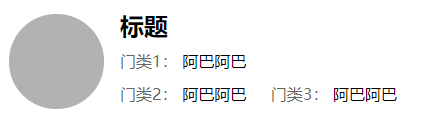
- 效果展示
- 实现原理
效果展示
实现原理
布局分析:
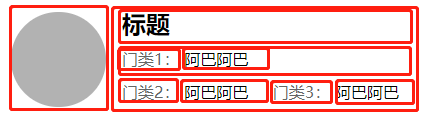
这个布局可以根据实际业务需求进行调整。
html部分:
<div class="container"><div class="container_image">div><div class="container_feature"><p class="title">标题p><div class="content"><p>门类1:p><p>阿巴阿巴p>div><div class="content"><p>门类2:p><p>阿巴阿巴p><p>门类3:p><p>阿巴阿巴p>div>div>
div>
css部分:
* {box-sizing: border-box;margin: 0;
}
/* 外容器 */
.container {display: flex;margin: 16px 0;
}/* 左边图片 */
.container_image {background-color: rgba(0, 0, 0, 0.3);border-radius: 9999px;height: 95px;width: 95px;margin: 0 16px;
}/* 右边内容 */
.container_feature {flex: 1;
}
.container_feature .title {font-size: 24px;line-height: 24px;font-weight: bold;
}
.container_feature .content p {display: inline-block;line-height: 16px;margin-top: 15px;
}
.container_feature .content p:nth-child(2n-1) {color: rgb(99, 102, 101);
}
.container_feature .content p:nth-child(2n) {margin-right: 20px;
}
要学会灵活运用选择器代替类名,让代码更简洁一些。
本文来自互联网用户投稿,文章观点仅代表作者本人,不代表本站立场,不承担相关法律责任。如若转载,请注明出处。 如若内容造成侵权/违法违规/事实不符,请点击【内容举报】进行投诉反馈!