CEPH单机版、分布式部署说明和测试分析
CEPH单机版部署
环境说明
1台VMware虚拟机(ubuntu)
安装CEPH部署工具(Ubuntu)
-
添加release key
wget -q -O- 'https://download.ceph.com/keys/release.asc' | sudo apt-key add - -
添加Ceph软件包源,用Ceph稳定版(如
cuttlefish、dumpling、emperor、firefly等等)替换掉{ceph-stable-release}. 如:echo deb http://download.ceph.com/debian-{ceph-stable-release}/ $(lsb_release -sc) main | sudo tee /etc/apt/sources.list.d/ceph.list -
更新你的仓库,并安装
ceph-deploy:sudo apt-get update && sudo apt-get install ceph-deploy
部署CEPH软件
mkdir myceph
cd myceph
ceph-deploy new {hostname}
若提示
UnableToResolveError: Unable to resolve host: {hostname}
则修改 /etc/hosts,添加相应的IP地址和hostname,然后重新deploy。
设置集群副本数量
把如下内容加入到 ceph.conf 里面。
[global]
osd pool default size = 1
osd pool default  min size = 1
安装(luminous 版)
ceph-deploy install --release luminous {hostname}
初始化 mon
ceph-deploy mon create-initial
ceph-deploy admin {hostname}
部署ceph mgr
sudo chmod +r /etc/ceph/ceph.client.admin.keyring
ceph-deploy mgr create {hostname}
部署osd
安装lvm2
sudo apt install lvm2
若无sdb,则在虚拟机里添加一个硬盘,然后
sudo su
cd
pvcreate /dev/sdb
然后在myceph目录下
ceph-deploy osd create --data /dev/sdb {hostname}
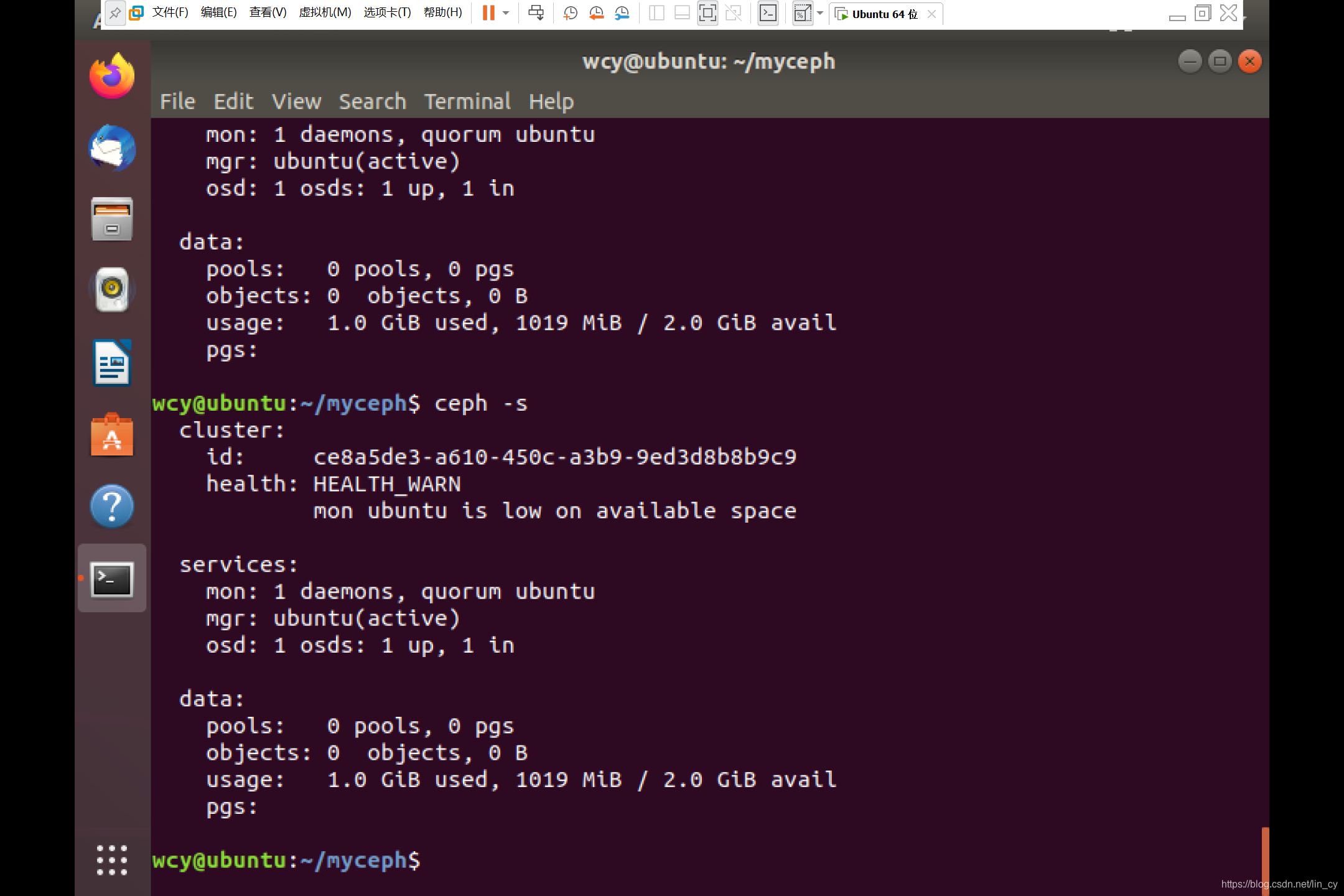
部署完毕,可以通过以下命令查看系统状态
ceph -s
CEPH分布式部署
一、环境说明
3台VMware虚拟机:Ubuntu18.04(python3版本为3.6.9,实测python版本3.8.10不支持platform.linux_distribution属性,也需要python2环境)
node1: admin node, monitor, mgr
node2: osd0
node3: osd1
二、准备工作
在所有节点安装SSH服务器
sudo apt-get insatll openssh-server
修改hostname为node1, node2, node3
sudo vim /etc/hostname
确保各节点主机名解析为网络IP地址而非回环接口地址(127.0.0.1)
ip address      #查看网络IP地址
sudo vim /etc/hosts		#添加一行: {hostname}  {IP address}
配置管理主机node1, 使之可以通过SSH无密码访问各节点
ssh-keygen
ssh-copy-id node2
ssh-copy-id node3
管理主机上安装ceph-deploy
shudo apt-get install ceph-deploy
ceph-deploy --version	#查看ceph-deploy版本 e.g. 2.0.1
在所有节点安装NTP并使用同一个NTP服务器, 避免时钟偏移
sudo apt-get install ntp
ntpstat		#查看ntp连接的服务器
确保各节点的用户都有sudo权限
echo "{username} ALL = (root) NOPASSWD:ALL" | sudo tee /etc/sudoers.d/{username}
sudo chmod 0440 /etc/sudoers.d/{username}
三、CEPH部署
在管理节点新建工作目录,后续操作在工作目录下完成
mkdir my-cluster
cd my-cluster
创建monitor节点,生成一个ceph 配置文件、一个monitor密钥环和一个日志文件
ceph-deploy new node1 #node1作为monitor节点
把ceph .conf里的默认副本数从3改成2, 把下面这行加入global段:
osd pool default size = 2
安装ceph, --release {stable ceph version}设置希望安装的ceph版本
echo deb http://download.ceph.com/debian-{ceph-stable-release}/ $(lsb_release -sc) main | sudo tee /etc/apt/sources.list.d/ceph.list		#添加ceph软件包源
ceph-deploy install --release nautilus node1 node2 node3
初始化monitor节点,生成monitor节点检测集群所需要的密钥文件
ceph-deploy mon create-initial
sudo chmod +r /etc/ceph/ceph.client.admin.keyring	#确保有读权限
ceph-deploy admin node1 node2 node3		#将生成的ceph.client.admin.keyring和配置文件push到各节点
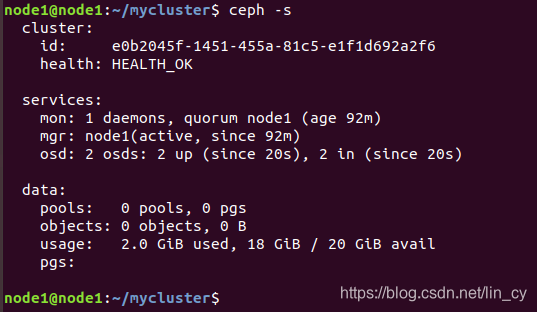
有monitor节点之后就可以查看集群状态
ceph -s
ceph health
部署mgr节点
ceph-deploy mgr create node1
部署osd节点
ceph-deploy osd create node2 --data /dev/sdb #如果没有硬盘,需要新建ceph-deploy osd create node3 --data /dev/sdb
CEPH性能测试
配置pool
查看现有pool列表
ceph osd lspools
创建pool
ceph osd pool create {poolname} {pg_num}
poolname自定义
pg_num根据osd个数决定
若少于5个osd,设置为128
5~10个设置为512
10~50个设置为4096
RADOS性能测试
使用 rados bench 工具,语法为:
rados bench -p {poolname} -b -t --no-cleanup
-
pool_name:测试所针对的存储池
-
seconds:测试所持续的秒数
-
-
-b:block size,即块大小,默认为 4M
-
-t:读/写并行数,默认为 16
-
–no-cleanup 表示测试完成后不删除测试用数据。在做读测试之前,需要使用该参数来运行一遍写测试来产生测试数据,在全部测试结束后可以运行 rados -p {poolname} cleanup 来清理所有测试数据。
写性能:
rados bench -p {poolname} 10 write --no-cleanup
单机版结果:
hints = 1
Maintaining 16 concurrent writes of 4194304 bytes to objects of size 4194304 for up to 10 seconds or 0 objects
Object prefix: benchmark_data_ubuntu_3299sec Cur ops   started  finished  avg MB/s  cur MB/s last lat(s)  avg lat(s)0       0         0         0         0         0           -           01      16        16         0         0         0           -           02      16        32        16   31.9723        32     1.92392     1.925293      16        94        78   103.898       248    0.114933    0.5759434      16       176       160   159.859       328    0.361561    0.3938535      16       249       233   186.255       292    0.125467    0.3333686      16       324       308   205.156       300    0.176233    0.3021787      16       417       401    228.94       372    0.130945    0.2768388      16       511       495   247.291       376    0.121559    0.2573819      16       597       581   257.981       344   0.0660743    0.24658110      16       699       683   272.939       408    0.168625    0.233924
Total time run:         10.182057
Total writes made:      700
Write size:             4194304
Object size:            4194304
Bandwidth (MB/sec):     274.994
Stddev Bandwidth:       141.789
Max bandwidth (MB/sec): 408
Min bandwidth (MB/sec): 0
Average IOPS:           68
Stddev IOPS:            35
Max IOPS:               102
Min IOPS:               0
Average Latency(s):     0.232217
Stddev Latency(s):      0.266586
Max latency(s):         1.932
Min latency(s):         0.0660743
分布式结果:
hints = 1
Maintaining 16 concurrent writes of 4194304 bytes to objects of size 4194304 for up to 10 seconds or 0 objects
Object prefix: benchmark_data_node1_4847sec Cur ops   started  finished  avg MB/s  cur MB/s last lat(s)  avg lat(s)0       0         0         0         0         0           -           01      16        27        11    43.934        44    0.958087    0.8100962      16        57        41   81.9217       120     0.61323    0.6595353      16        87        71    94.572       120    0.503445    0.5707994      16       111        95   94.9214        96    0.468569    0.6428065      16       148       132    105.52       148     0.33698    0.5821016      16       190       174   115.919       168    0.366644    0.5315767      16       232       216    123.33       168    0.290543    0.5031758      16       278       262   130.898       184    0.295768    0.4808169      16       325       309   137.163       188     0.35907    0.45843910      16       374       358   142.985       196    0.277222    0.440417
Total time run:         10.1864
Total writes made:      374
Write size:             4194304
Object size:            4194304
Bandwidth (MB/sec):     146.862
Stddev Bandwidth:       48.1405
Max bandwidth (MB/sec): 196
Min bandwidth (MB/sec): 44
Average IOPS:           36
Stddev IOPS:            12.0351
Max IOPS:               49
Min IOPS:               11
Average Latency(s):     0.435129
Stddev Latency(s):      0.184439
Max latency(s):         1.20688
Min latency(s):         0.179783
顺序读:
rados bench -p {poolname} 10 seq
单机版结果:
hints = 1sec Cur ops   started  finished  avg MB/s  cur MB/s last lat(s)  avg lat(s)0       7         7         0         0         0           -           01      16        27        11   43.8893        44    0.984048    0.5356512      16        41        25   49.8692        56     1.22267    0.9086453      16        56        40   53.2291        60    0.901194    0.9640864      16        69        53    52.912        52    0.855935    0.9889265      16        84        68    54.324        60    0.581672    0.9995176      16        97        81   53.9307        52    0.452083     1.000627      16       113        97   55.3639        64    0.289436     1.016638      16       138       122   60.9318       100    0.584262    0.9740269      16       166       150   66.5934       112    0.447022    0.92651410      16       187       171   68.3247        84    0.267998    0.891268
Total time run:       10.388094
Total reads made:     188
Read size:            4194304
Object size:          4194304
Bandwidth (MB/sec):   72.3906
Average IOPS:         18
Stddev IOPS:          5
Max IOPS:             28
Min IOPS:             11
Average Latency(s):   0.879502
Max latency(s):       2.77958
Min latency(s):       0.128939
分布式结果:
hints = 1sec Cur ops   started  finished  avg MB/s  cur MB/s last lat(s)  avg lat(s)0      16        16         0         0         0           -           01      16        35        19   75.9691        76    0.844994    0.3343282      16        71        55   109.918       144    0.025664    0.3939453      16        79        63   83.9544        32   0.0236074    0.4456314      16        92        76   75.9504        52     2.41877     0.467345      16       104        88   70.3483        48     3.21936    0.5983866      16       116       100   66.6158        48     3.51801    0.7066937      16       126       110   62.8141        40   0.0227477    0.7893088      16       140       124   61.9596        56   0.0286146    0.8520149      16       154       138   61.2958        56     3.75188    0.92829210      16       167       151    60.364        52     3.44796    0.927477
Total time run:       10.97
Total reads made:     168
Read size:            4194304
Object size:          4194304
Bandwidth (MB/sec):   61.2577
Average IOPS:         15
Stddev IOPS:          7.88036
Max IOPS:             36
Min IOPS:             8
Average Latency(s):   1.04367
Max latency(s):       5.15464
Min latency(s):       0.0209998
随机读:
rados bench -p {poolname} 10 rand
单机版结果:
hints = 1sec Cur ops   started  finished  avg MB/s  cur MB/s last lat(s)  avg lat(s)0       0         0         0         0         0           -           01      16        32        16    63.861        64    0.982781    0.5564152      16        74        58   115.701       168    0.289066    0.4897993      15       137       122   162.339       256    0.427532     0.366934      16       199       183   182.695       244    0.118992    0.3315375      16       237       221   176.395       152    0.409733    0.3382576      16       291       275   182.962       216    0.149843    0.3332957      16       337       321   182.986       184    0.302139    0.3365278      15       397       382   190.581       244    0.166876    0.3286849      16       502       486   215.568       416    0.087144    0.28981710      16       614       598   238.764       448    0.123667    0.262413
Total time run:       10.148457
Total reads made:     614
Read size:            4194304
Object size:          4194304
Bandwidth (MB/sec):   242.007
Average IOPS:         60
Stddev IOPS:          29
Max IOPS:             112
Min IOPS:             16
Average Latency(s):   0.26046
Max latency(s):       1.00095
Min latency(s):       0.0197968
分布式结果:
hints = 1sec Cur ops   started  finished  avg MB/s  cur MB/s last lat(s)  avg lat(s)0       0         0         0         0         0           -           01      16        68        52   207.866       208    0.301147    0.1601942      16        81        65   129.917        52     1.49991    0.2270133      16       108        92   122.605       108   0.0262147    0.3771654      16       174       158   157.929       264     0.32342    0.3752915      16       232       216   172.719       232     0.28657    0.3575646      16       315       299   199.249       332    0.149081    0.3145317      16       385       369    210.77       280    0.424625    0.2851318      16       450       434   216.919       260    0.537691    0.2857949      16       537       521   231.473       348    0.115179     0.2712310      16       625       609   243.516       352    0.186903    0.25941211      15       626       611   222.102         8    0.627918    0.259884
Total time run:       11.0713
Total reads made:     626
Read size:            4194304
Object size:          4194304
Bandwidth (MB/sec):   226.171
Average IOPS:         56
Stddev IOPS:          29.5207
Max IOPS:             88
Min IOPS:             2
Average Latency(s):   0.280889
Max latency(s):       2.4916
Min latency(s):       0.00970343
测试完后清理测试数据:
rados -p {poolname} cleanup
分析:写带宽比顺序读和随机读大,随机读带宽比顺序读大。写的延迟最小,顺序读的延迟最大。写的IOPS和随机读的接近,顺序读的较小。
基于我们的部署,分布式部署的最大延迟明显高于单机部署,但是最小延迟却明显小于单机部署。分布式部署的读写速度均低于单机部署。
配置参数优化
修改ceph.conf
1.filestore_fd_cache参数
filestore_fd_cache_shards = 32
filestore_fd_cache_size = 32768
filestore的fd cache加速访问,在非一次性写入的应用场景,增大配置可以很明显的提升filestore的性能。
2.filestore sync参数
filestore_min_sync_interval = 1
filestore_max_sync_interval = 10
filestore_commit_timeout = 1000
filestore_min_sync_interval和filestore_max_sync_interval是配置filestore flush outstanding IO到disk的时间间隔的;增大配置可以让系统做尽可能多的IO merge,减少filestore写磁盘的压力,但也会增大page cache占用内存的开销,增大数据丢失的可能性;
filestore_commit_timeout是配置filestore sync entry到disk的超时时间,在filestore压力很大时,调大这个值能尽量避免IO超时导致OSD crush;
结果
写性能:
hints = 1
Maintaining 16 concurrent writes of 4194304 bytes to objects of size 4194304 for up to 10 seconds or 0 objects
Object prefix: benchmark_data_ubuntu_3338sec Cur ops   started  finished  avg MB/s  cur MB/s last lat(s)  avg lat(s)0       0         0         0         0         0           -           01      16        98        82   327.084       328    0.138832    0.1826042      16       196       180   359.324       392    0.154765    0.1707453      16       288       272   361.839       368    0.191919    0.1724974      16       378       362   361.328       360    0.105692    0.1709245      16       475       459   366.571       388    0.137447    0.1730456      16       564       548   364.784       356    0.142131    0.1735017      16       653       637   363.438       356    0.156795    0.1744328      16       756       740   369.487       412    0.125955     0.172069      16       852       836   370.979       384    0.135375    0.17100710      15       966       951    379.85       460   0.0963606    0.167036
Total time run:         10.113000
Total writes made:      966
Write size:             4194304
Object size:            4194304
Bandwidth (MB/sec):     382.082
Stddev Bandwidth:       36.5854
Max bandwidth (MB/sec): 460
Min bandwidth (MB/sec): 328
Average IOPS:           95
Stddev IOPS:            9
Max IOPS:               115
Min IOPS:               82
Average Latency(s):     0.167306
Stddev Latency(s):      0.0485496
Max latency(s):         0.352612
Min latency(s):         0.047893
顺序读:
hints = 1sec Cur ops   started  finished  avg MB/s  cur MB/s last lat(s)  avg lat(s)0       1         1         0         0         0           -           01      16        70        54   215.534       216    0.225474    0.2362562      16       117       101   201.711       188    0.384736    0.2815053      16       171       155   206.401       216    0.242041    0.2920374      16       248       232   231.685       308     0.18295    0.2684335      16       329       313   250.063       324   0.0916033    0.2474846      16       421       405   269.628       368    0.240974    0.2321267      16       486       470   268.243       260    0.322225    0.2302438      16       558       542   270.699       288    0.122256    0.2300789      16       657       641    284.58       396    0.224304    0.21984710      16       762       746   298.017       420    0.142215    0.210116
Total time run:       10.152429
Total reads made:     763
Read size:            4194304
Object size:          4194304
Bandwidth (MB/sec):   300.618
Average IOPS:         75
Stddev IOPS:          19
Max IOPS:             105
Min IOPS:             47
Average Latency(s):   0.210082
Max latency(s):       0.564497
Min latency(s):       0.0414586
随机读:
hints = 1sec Cur ops   started  finished  avg MB/s  cur MB/s last lat(s)  avg lat(s)0       0         0         0         0         0           -           01      16       102        86    342.45       344     0.24186    0.1672352      15       194       179    357.07       372     0.15139     0.170773      16       321       305   405.899       504    0.189961     0.151184      16       462       446   445.151       564   0.0725454    0.1403225      16       601       585   467.239       556    0.173793    0.1331046      16       717       701    466.64       464    0.152518    0.1327857      16       860       844   481.634       572    0.108298    0.1294158      15      1006       991   494.828       588   0.0967869    0.1265049      16      1148      1132   502.403       564    0.172386    0.12402310      16      1295      1279   510.808       588    0.107241    0.122303
Total time run:       10.154751
Total reads made:     1295
Read size:            4194304
Object size:          4194304
Bandwidth (MB/sec):   510.106
Average IOPS:         127
Stddev IOPS:          22
Max IOPS:             147
Min IOPS:             86
Average Latency(s):   0.123086
Max latency(s):       0.385023
Min latency(s):       0.018103
分析:修改参数后,各测试带宽均有显著提升,特别是顺序读和随机读。延迟也有所减小。
本文来自互联网用户投稿,文章观点仅代表作者本人,不代表本站立场,不承担相关法律责任。如若转载,请注明出处。 如若内容造成侵权/违法违规/事实不符,请点击【内容举报】进行投诉反馈!