java实现自定义导出模板
java实现自定义导出Excel模板
由于最近用户经常提出导出Excel的格式进行调整,包括列的前后位置,增加字段等等。比如调整位置,不但需要调整表头,还要调整表头下面所对应的内容也要一块调整,所以想对这个功能进行一个改造。因为我是使用的springboot, 有一些方法是使用到spring组件里的方法。这里我大致将实现方法记录如下,省去了SpringBoot组件中的一些内容。
- 这里的模板我使用的是xml, 所以需要使用到解析xml相关的一些jar包,所以需要使用到的一些Maven依赖:
<dependency><groupId>com.google.guavagroupId><artifactId>guavaartifactId><version>19.0version>dependency> <dependency><groupId>org.apache.poigroupId><artifactId>poiartifactId><version>4.1.2version>dependency><dependency><groupId>org.apache.poigroupId><artifactId>poi-ooxmlartifactId><version>4.1.2version>dependency><dependency><groupId>dom4jgroupId><artifactId>dom4jartifactId><version>1.6.1version>dependency><dependency><groupId>jaxengroupId><artifactId>jaxenartifactId><version>1.2.0version>dependency><dependency><groupId>org.apache.commonsgroupId><artifactId>commons-lang3artifactId><version>3.11version>dependency><dependency><groupId>com.alibabagroupId><artifactId>fastjsonartifactId><version>1.2.75version>dependency>- 首先定义一个模板,.创建UserList.xml:
<table filename="UserList" sheetname="detail"><column name="name" title="User Name" index="0" width="30"/><column name="tel" title="Telphone" index="1" width="30"/><column name="address" title="Address" index="2"  width="30"/>
table>
filename: 这个是导出时候的文件名字
sheetname: sheet的名字
column.name: 对应导出实体的属性名字,到时通过取这个属性对应的value
column.title: Excel表的title
index: 表头所在的位置
width: 表头的宽度
-
接下来创建一个读取Xml文件的内容,并进行封装。
import java.io.File; import java.util.ArrayList; import java.util.HashMap; import java.util.Iterator; import java.util.List; import org.dom4j.Attribute; import org.dom4j.Document; import org.dom4j.DocumentException; import org.dom4j.Element; import org.dom4j.io.SAXReader;public class XMLUtil {public static HashMap getConfig(String src){HashMap result = new HashMap();SAXReader reader = new SAXReader();Document document = null;try{document = reader.read(new File(src));}catch (DocumentException e1){e1.printStackTrace();}Element root = document.getRootElement();String sheetName = root.attributeValue("sheetname");String fileName = root.attributeValue("filename");result.put("sheetname", sheetName);result.put("filename", fileName);List columns = root.elements("column");ArrayList<HashMap> config = new ArrayList<HashMap>();for(Iterator car = columns.iterator(); car.hasNext();){Element e = (Element)car.next();HashMap child = new HashMap();for(Iterator tank = e.attributes().iterator();tank.hasNext();){Attribute attr = (Attribute)tank.next();child.put(attr.getName(), attr.getStringValue());}config.add(child);}result.put("list", config);return result;}} -
创建生成Excel的工具类
import java.io.File; import java.io.FileOutputStream; import java.io.IOException; import java.util.ArrayList; import java.util.HashMap; import java.util.Iterator; import java.util.List; import java.util.Map; import java.util.concurrent.TimeUnit; import org.apache.poi.ss.usermodel.BorderStyle; import org.apache.poi.ss.usermodel.Cell; import org.apache.poi.ss.usermodel.CellStyle; import org.apache.poi.ss.usermodel.CellType; import org.apache.poi.ss.usermodel.Font; import org.apache.poi.ss.usermodel.HorizontalAlignment; import org.apache.poi.ss.usermodel.Row; import org.apache.poi.ss.usermodel.Sheet; import org.apache.poi.xssf.streaming.SXSSFWorkbook; import com.alibaba.fastjson.JSONObject; import com.google.common.base.Stopwatch;public class ExcelExportUtils {public static void export(List sourceData, String xmlPath, String targetPath){Stopwatch executeWatch = Stopwatch.createStarted();FileOutputStream fos = null;SXSSFWorkbook wb = null;try {File targetFile = new File(targetPath);HashMap result = XMLUtil.getConfig(xmlPath);ArrayList<HashMap> config = (ArrayList<HashMap>) result.get("list");wb = new SXSSFWorkbook();Sheet sheet = wb.createSheet(result.get("sheetname") + "");Row row = null;Map tds = null;Cell cell = null;int index = 0;Map.Entry<String, Object> entry = null;HashMap configSingle = null;if (config != null && config.size() > 0) {row = sheet.createRow(0);row.setHeight((short) 600);CellStyle style = wb.createCellStyle();Font f = wb.createFont();f.setFontHeightInPoints((short) 11);f.setBold(true);style.setFont(f);style.setAlignment(HorizontalAlignment.CENTER);style.setBorderBottom(BorderStyle.DOTTED);//创建表头for (HashMap map : config) {cell = row.createCell(Integer.parseInt(map.get("index") + ""), CellType.STRING);cell.setCellStyle(style);cell.setCellValue(map.get("title") + "");if (org.apache.commons.lang3.StringUtils.isNotBlank(map.get("width").toString())) {sheet.setColumnWidth(new Short(map.get("index") + "").shortValue(), new Short(map.get("width") + "").shortValue() * 256);}}//创建各个值的Cell,并赋值if(null != sourceData && sourceData.size() > 0){for (int i = 0; i < sourceData.size(); i++) {row = sheet.createRow(i + 1);row.setHeight((short) 500);String s = JSONObject.toJSONString(sourceData.get(i));tds = JSONObject.parseObject(s, Map.class);for (HashMap map : config) {for (Iterator car = tds.entrySet().iterator(); car.hasNext(); ) {entry = (Map.Entry<String, Object>) car.next();if (map.get("name").equals(entry.getKey())) {cell = row.createCell(Integer.parseInt(map.get("index") + ""), CellType.STRING);cell.setCellStyle(style);cell.setCellValue(entry.getValue() + "");}}}}fos = new FileOutputStream(targetFile);wb.write(fos);executeWatch.stop();System.out.println("共执行多久:" + executeWatch.elapsed(TimeUnit.MILLISECONDS));}}} catch (Exception e) {e.printStackTrace();}finally {try {if(wb != null) {//处理SXSSFWorkbook导出excel时,产生的临时文件wb.dispose();}if(fos != null) {fos.close();}} catch (IOException e) {e.printStackTrace();}}} } -
创建个测试类,测试是否成功
import java.util.ArrayList;
import java.util.List;public class Test {public static void main(String[] args) {String xmlPath = "E:\\UserList.xml";String targetPath = "E:\\UserList.xlsx";List<User> users = new ArrayList<User>();User user = null;for(int i = 1; i < 101; i++) {user = new User("name"+i, "0755-0"+i, "深圳市龙岗区坂田街道"+i);users.add(user);}ExcelExportUtils.export(users, xmlPath, targetPath);}
}class User{private String name;private String tel;private String address;public User() {super();}public User(String name, String tel, String address) {super();this.name = name;this.tel = tel;this.address = address;}public String getName() {return name;}public void setName(String name) {this.name = name;}public String getTel() {return tel;}public void setTel(String tel) {this.tel = tel;}public String getAddress() {return address;}public void setAddress(String address) {this.address = address;}
}
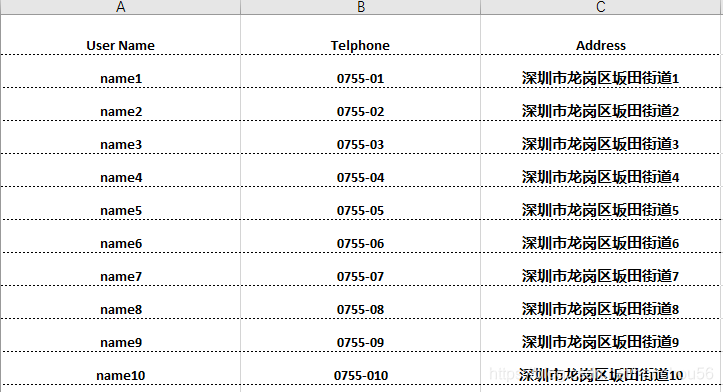
导入效果如图,看着还可以。
注意:
- xml文件中的column name需要与实体属性的名称一致。
- 这个实现的比较简陋,可以在column标记中增加一些其他属于,比如样式、时间转换等功能
- 如果需要调整位置,只需要调整column中的index属性即可,不再需要同时调整表头和内容
- 当然也可以在此基础上面进行一些增强,比如合并列之类的,后期有时间我再想想如何对这个模板进行改造下吧
本文来自互联网用户投稿,文章观点仅代表作者本人,不代表本站立场,不承担相关法律责任。如若转载,请注明出处。 如若内容造成侵权/违法违规/事实不符,请点击【内容举报】进行投诉反馈!