简单实现一个ChatGPT Plugin
OpenAI对ChatGPT Plus用户开放了Plugin的权限。初步体验下来虽然bug不少,不过效果很不错,是一个较为成熟的feature。个人认为,ChatGPT Plugin的体验要远优于New Bing(bing还要继续努力..)
今天从零开始开发一个ChatGPT Plugin,试水一下plugin的潜力。
ChatGPT Plugin如何工作?
ChatGPT Plugin通过访问外部API来:
-
获得实时信息:例如当天天气,股价;近期招聘信息等。
-
进行实时操作:例如预定酒店,餐厅;甚至直接操作Gmail,Google docs等。
具体来讲,ChatGPT需要以下两个文件:
-
.well-known/ai-plugin.json:类似于Chrome Extension开发中的manifest.json。该文件记录plugin的一些metadata。这些信息将用来在插件商店展示该插件,并用来告诉ChatGPT这个插件是干啥的。
-
openapi.yaml:是一个标准化文档,向ChatGPT解释了API所提供的functions。并说明了如何调用function和function 的responses的具体格式等。
接下来我们开发一个ChatGPT Plugin,实现查询未来几个月即将举办的AI会议,管理会议投稿deadline,收藏会议并制定To-do list等功能。
.well-known/ai-plugin.json
我们首先在这个文件中声明Plugin的基础信息,包括名字,版本号,介绍(有给人类看的介绍,也有给GPT看的描述),logo,联系方式等等。这里不涉及任何具体功能的实现。
{"schema_version": "v1","name_for_human": "AI Conferences","name_for_model": "AIConf","description_for_human": "Plugin to get information about upcoming AI conferences.","description_for_model": "Plugin to get information about upcoming AI conferences.","auth": {"type": "none"},"api": {"type": "openapi","url": "http://localhost:5023/openapi.yaml","is_user_authenticated": false},"logo_url": "http://localhost:5023/logo.png","contact_email": "yuchengli@example.com","legal_info_url": "http://example.com/AIConf"}
如果Plugin需要进行身份验证(比如预定酒店等plugin),可以在auth 这里使用OAuth,不过这里我们不需要身份验证。
在本地实现我们的server
这里我们用Flask跑一个本地的server来实现plugin的具体功能。
from flask import Flask, send_from_directoryfrom flask_cors import CORSapp = Flask(__name__)CORS(app, origins='https://chat.openai.com/')@app.get("/logo.png")def logo():return send_from_directory(app.root_path, "logo.png")@app.get("/.well-known/ai-plugin.json")def plugin_manifest():with open(".well-known/ai-plugin.json") as f:return f.read()@app.get("/openapi.yaml")def openapi():with open("openapi.yaml") as f:return f.read()# 从Github搞来最近的AI会议数据def update_db():confs_yaml_file = requests.get('https://raw.githubusercontent.com/paperswithcode/ai-deadlines/gh-pages/_data/conferences.yml').textconfs = yaml_load(confs_yaml_file, Loader=Loader)global up_coming_conferencesup_coming_conferences = []for conf in confs:if 'abstract_deadline' in conf:deadline = conf['abstract_deadline']elif 'deadline' in conf:deadline = conf['deadline']try:deadline = datetime.strptime(deadline, "%Y-%m-%d %H:%M:%S")except:deadline = datetime.strptime(deadline, "%Y-%m-%d %H:%M")if deadline > datetime.now():up_coming_conferences.append(conf)# 当GPT访问http://localhost:5023/all时,返回list of conference。每个conference包含了title,year,link,place,sub,deadline等信息。@app.get("/all")def all():update_db()results = []# we only need title, year, link, place, sub, and deadlinefor conf in up_coming_conferences:result = {}result['title'] = conf['title']result['year'] = conf['year']result['link'] = conf['link']result['place'] = conf['place']result['sub'] = conf['sub']result['deadline'] = conf['deadline']results.append(result)responses = json.dumps(results)return responsesif __name__ == '__main__':app.run(debug=True, host='0.0.0.0', port=5023)
我们在def update_db()搞来最近的会议数据。
在@app.get("/all")里确定了Api的endpoint。访问该endpoint,也即http://localhost:5023/all ,将返回一个list的conference信息。
其他需要注意的是:
-
我们需要CORS来允许http://chat.openai.com访问我们的server。
-
@app.get("/logo.png") :render 一个logo文件。
-
@app.get("/.well-known/ai-plugin.json"):render manifest文件。
-
@app.get("/openapi.yaml"):render api说明文件。
这里我们为我们的插件精心挑选一个清心寡欲的logo,像极了写论文时的我:

openapi.yaml
该文件是标准的OpenAPI格式的文档,目的是告诉GPT我们的Plugin提供了哪些function,该如何调用这些function,和function的输出形式是什么。
分开来讲:首先是插件基本信息的插件的url地址。
openapi: 3.0.1info:title: AI Conferencesdescription: Plugin to get information about upcoming AI conferences.version: 'v1'servers:- url: http://localhost:5023
Endpoint:/all ,也即访问http://localhost:5023/all 的方法和结果。我们这里,我们告诉GPT使用get与服务器交流。summary则告诉GPT这个function是干啥的用的。
paths:/all:get:operationId: getAllUpcomingConfsummary: Get information about all the upcoming conferencesresponses:"200":description: OKcontent:application/json:schema:$ref: '#/components/schemas/getAllUpcomingConfResponses'
Response格式:这里告诉GPT该怎么解读返回的结果。
components:schemas:getAllUpcomingConfResponses:type: arrayitems:type: objectproperties:link:type: stringdescription: The link to the conference website.place:type: stringdescription: The place where the conference will be held.sub:type: stringdescription: The subfield of AI that the conference is about.deadline:type: stringdescription: The deadline for submitting papers.
放在一起有:
openapi: 3.0.1info:title: AI Conferencesdescription: Plugin to get information about upcoming AI conferences.version: 'v1'servers:- url: http://localhost:5023paths:/all:get:operationId: getAllUpcomingConfsummary: Get information about all the upcoming conferencesresponses:"200":description: OKcontent:application/json:schema:$ref: '#/components/schemas/getAllUpcomingConfResponses'components:schemas:getAllUpcomingConfResponses:type: arrayitems:type: objectproperties:link:type: stringdescription: The link to the conference website.place:type: stringdescription: The place where the conference will be held.sub:type: stringdescription: The subfield of AI that the conference is about.deadline:type: stringdescription: The deadline for submitting papers.
在ChatGPT页面注册Plugin
搞定上面的之后,需要去ChatGPT的商店注册我们的插件。
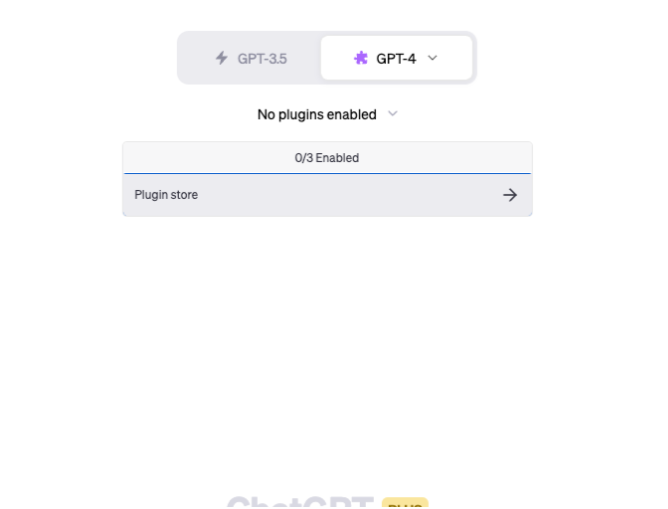
打开plugin store.

点develop your own plugin.

输入我们的server地址
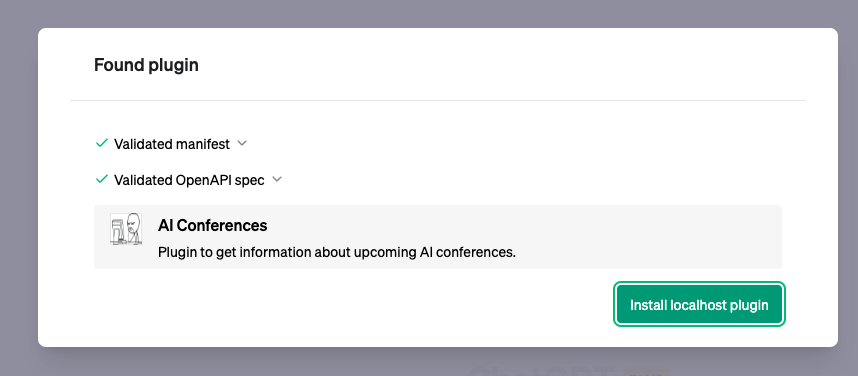
这里点install,安装我们清新寡欲的plugin
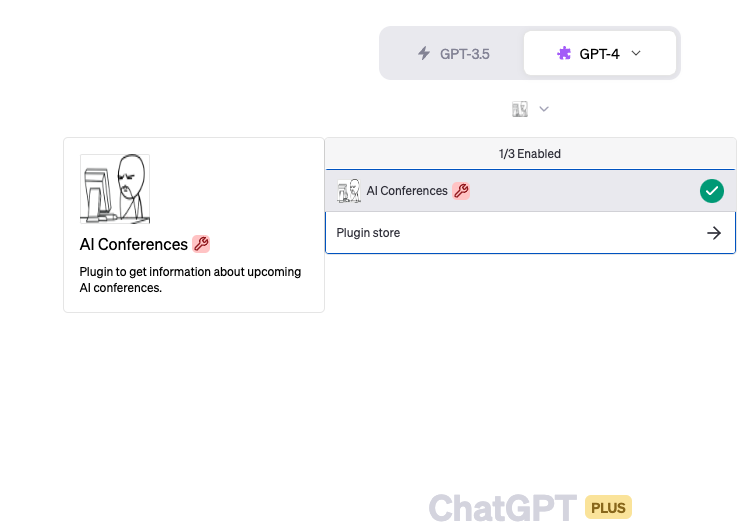
安装好了在这里选定,开始对话!
使用体验
首先,我们问一下最近都有哪些会议可以投稿:

Amazing!看起来挺靠谱,点一下最上方的展开按钮,我们可以看到我们服务器返回给GPT的真实内容:

可以看到ChatGPT就是把得到的内容翻译成了自然语言。
添加新功能
OK,我们再实现一个新功能,让ChatGPT可以为我们收藏目标会议,以便今后打算。
starred_conferences = []@app.get("/star/") def star(conf_name):update_db()for conf in up_coming_conferences:if conf['title'] == conf_name:starred_conferences.append(conf)return "OK"return "Not Found"
如代码所示,我们添加了一个新的function,让GPT可以通过GET请求,收藏一个特定的会议。
根据这个功能更新openapi.yaml(具体改动略,详见文末的Github repo) 。
Done!光收藏还不行,收藏完了我们总是要查看我们收藏了什么。所以我们需要实现查看已收藏会议的方法。添加新的endpoint /starred用于查询已收藏内容
@app.get("/starred")def starred():results = []for conf in starred_conferences:result = {}result['title'] = conf['title']result['year'] = conf['year']result['link'] = conf['link']result['place'] = conf['place']result['sub'] = conf['sub']result['deadline'] = conf['deadline']results.append(result)responses = json.dumps(results)return responses
同时更新openapi.yaml (具体改动略,详见文末的Github repo)。
测试一下新功能:
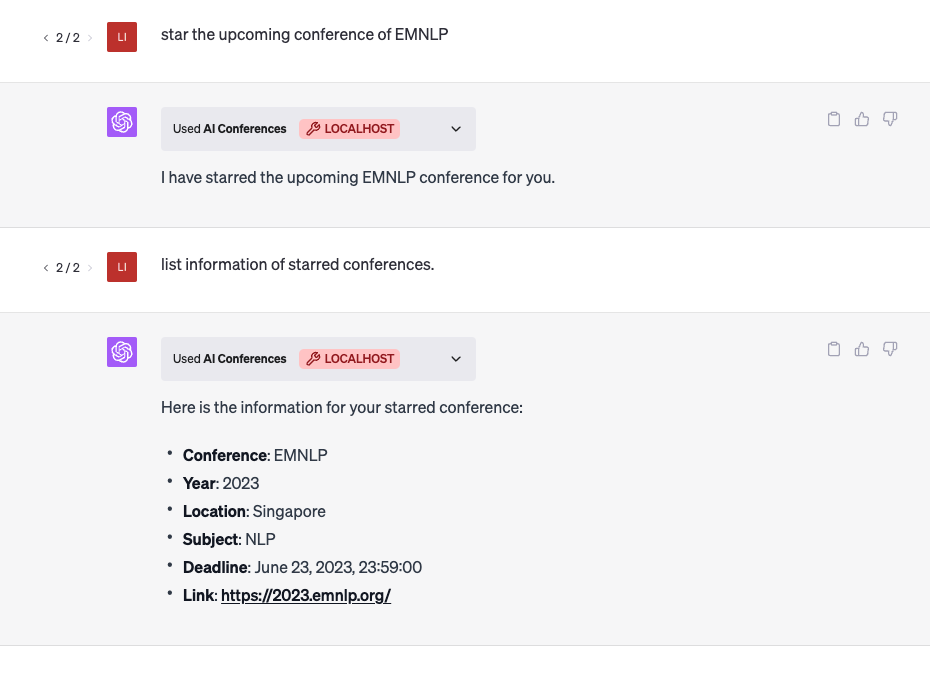
这里我们成功收藏了EMNLP会议,并随后查询了所收藏会议的一些信息。
OpenAI是怎么教会GPT使用Plugin的?
很好奇OpenAI是怎么调教GPT来让它使用plugin的。根据OpenAI关于Plugin的文档,基本可以确定是将manifest文件和openapi.yaml直接给GPT过目。不过不能确定这里是不是用了某些很神奇的prompt。
简单问一下GPT,看会不会漏出什么马脚。


并没有漏出什么马脚,所以我们暂时无法得知OpenAI具体用什么指令来指导GPT了。
参考
完整的实现参见github repo:
https://github.com/liyucheng09/aiconf_plugin
OpenAI对plugin的说明:
https://platform.openai.com/docs/plugins/introduction?utm_medium=email&_hsmi=258126318&_hsenc=p2ANqtz-8Xi_Zr1TCX6GUPwJd40qklxEEiSsqvmzN6153ZkAjpO6POh0N_q3F0LBdWi7DEfPQddcbiIslA2WNndFySMM-1Gu3rcQ&utm_content=258126318&utm_source=hs_email
https://platform.openai.com/docs/plugins/review?utm_medium=email&_hsmi=25812631
本文来自互联网用户投稿,文章观点仅代表作者本人,不代表本站立场,不承担相关法律责任。如若转载,请注明出处。 如若内容造成侵权/违法违规/事实不符,请点击【内容举报】进行投诉反馈!