用 ChatGPT 制作中英双语字幕
用 ChatGPT 制作中英双语字幕
- 0. 背景
- 1. 使用剪映生成英文字幕
- 2. 使用 ChatGPT 的制作中英双语字幕
0. 背景
最近在学习 AI 相关的知识,有很多视频是英文的。
为了提高学习效率,我考虑将这些视频加上中英双语字幕。
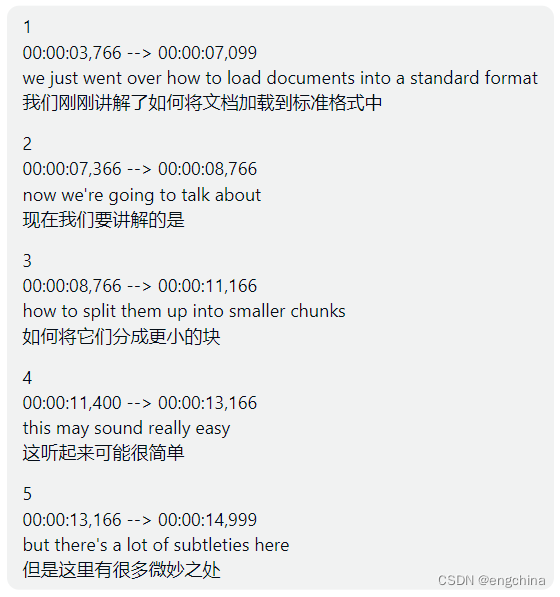
效果展示如下,
1. 使用剪映生成英文字幕
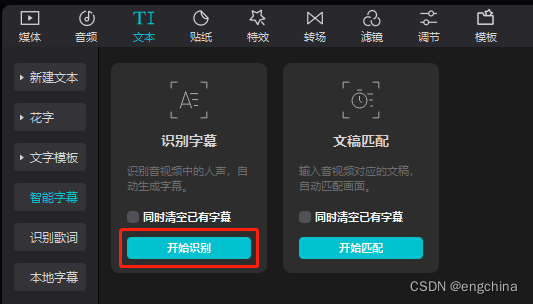
使用剪映的 “文本” => “智能字幕” => “开始识别” 功能,自动生成英文字幕。
2. 使用 ChatGPT 的制作中英双语字幕
通过 ChatGPT 强大的提示词功能,制作中英双语字幕。
我使用的提示词如下,
Please help me convert this English subtitle into a bilingual subtitle file in Chinese and English, \
with the Chinese translation starting on a new line. \
The formatting should be as follows: \
"""
1
00:00:00,066 --> 00:00:00,533
English subtitle
Chinese translation
"""English subtitle is:
"""
1
00:00:03,766 --> 00:00:07,099
we just went over how to load documents into a standard format2
00:00:07,366 --> 00:00:08,766
now we're going to talk about3
00:00:08,766 --> 00:00:11,166
how to split them up into smaller chunks4
00:00:11,400 --> 00:00:13,166
this may sound really easy5
00:00:13,166 --> 00:00:14,999
but there's a lot of subtleties here
"""
示例,
Please help me convert this English subtitle into a bilingual subtitle file in Chinese and English, \
with the Chinese translation starting on a new line. \
The formatting should be as follows: \
"""
1
00:00:00,066 --> 00:00:00,533
English subtitle
Chinese translation
"""English subtitle is:
"""
<< 使用剪映导出的字幕文件里面的内容>>
"""
ChatGPT 输出结果如下,
1
00:00:03,766 --> 00:00:07,099
we just went over how to load documents into a standard format
我们刚刚讲解了如何将文档加载到标准格式中2
00:00:07,366 --> 00:00:08,766
now we're going to talk about
现在我们要讲解的是3
00:00:08,766 --> 00:00:11,166
how to split them up into smaller chunks
如何将它们分成更小的块4
00:00:11,400 --> 00:00:13,166
this may sound really easy
这听起来可能很简单5
00:00:13,166 --> 00:00:14,999
but there's a lot of subtleties here
但是这里有很多微妙之处
完结!
本文来自互联网用户投稿,文章观点仅代表作者本人,不代表本站立场,不承担相关法律责任。如若转载,请注明出处。 如若内容造成侵权/违法违规/事实不符,请点击【内容举报】进行投诉反馈!