Vue移动端搜索页面的历史记录写法
Vue移动端搜索页面的历史记录写法
前言
本文用于记录对于搜索页的历史记录的学习。
预览
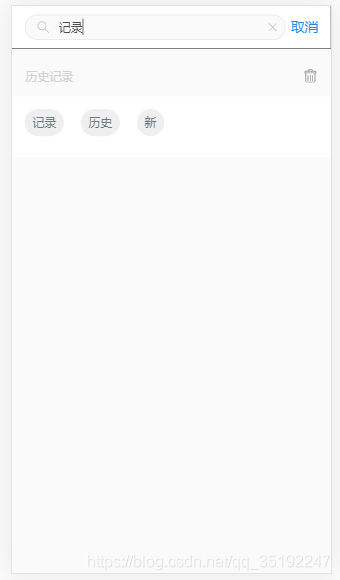
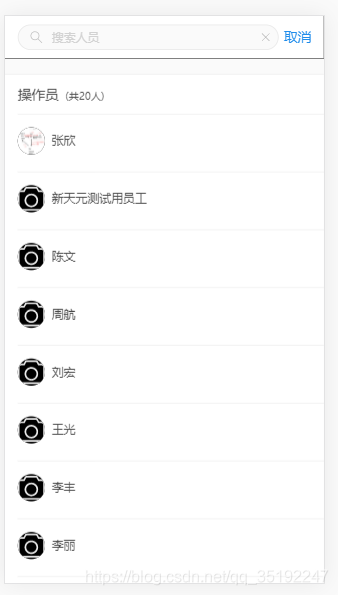
先上两张图,分别为展示隐藏搜索列表和历史记录。
html部分
<template><hips-viewclass="home"header-height="48"footer-height="48"><div slot="header" class="header"><hips-nav-bar theme="default"><!-- 搜索框区start --><div slot="center" class="input"><img src="../assets/images/search.svg" alt="" class="search" ><inputref="test"v-model="searchValue"type="text"placeholder="搜索操作员"@focus="inputFocus"@blur="inputBlur"@keyup.enter="search"><img src="../assets/images/clearsearch.svg" alt="" class="clearsearch" @click="cancleSearch"></div><!-- 搜索框区end --><div slot="right" @click="$router.backPage()">取消</div></hips-nav-bar></div><div style="margin-top:10px"><!-- 历史记录区start --><div v-if="showHistory" ><div class="history-clear"><span>历史记录</span><img src="../assets/images/ashbin.svg" alt="" @click="clearHistory"></div><div><div v-if="!history.length" class="his-none"><span>暂无数据</span></div><div v-else class="his-content"><span v-for="(item, index) in history" :key="index" @click="searchHistory(item)">{{ item }}</span></div></div></div><!-- 历史记录区end --></div><!-- 分页加载区start --><div class="content demo-scroll" style="padding-top:10px;height:calc(100vh - 13.333vw)"><hips-scrollv-if="!showHistory"ref="scroll":data="[orderList]":scroll-options="scrollOption"@pulling-down="loadRefresh"@pulling-up="loadMore"><!-- 展示列表区start --><div class="search-result"><div class="search-title">操作员<span>(共{{ sum }}人)</span></div><div v-for="(order, index) of orderList" :key="index" class="result-content" @click="chooseValue(order)"><p class="type"><img :src="order.pictureUrl?order.pictureUrl:img" alt="" class="type-img"><span>{{ order.workerName }}</span></p></div></div><!-- 展示列表区end --></hips-scroll></div><!-- 分页加载区end --></hips-view>
</template>
JS部分
methods: {// 聚焦inputFocus () {this.getHistorys()this.showHistory = true},// historys存入localStoragesetHistorys () {// 搜索框有内容且不在历史记录里let vm = thisif (vm.searchValue && vm.searchValue !== '' && vm.searchValue !== ' ' && vm.history.indexOf(vm.searchValue) === -1) {let Arr = Array.from(new Set(vm.history))vm.history = [vm.searchValue, ...Arr]}// 历史记录只保存6条if (vm.history && vm.history.length && vm.history.length > 6) {vm.history = vm.history.slice(0, 6)}localStorage.setItem('historys', JSON.stringify(vm.history))},// historys获取localStoragegetHistorys () {let history = localStorage.getItem('historys')if (history) {this.history = JSON.parse(history)}},// 失去焦点inputBlur () {this.setHistorys()this.orderList = []this.page = 0this.getWorkerApi()this.showHistory = false},// 回车search () {// 失焦this.$refs.test.blur()},// 删除历史记录clearHistory () {this.history = []localStorage.removeItem('historys')},...},
- 首先
inputFocus()方法聚焦即点击搜索区时,显示历史记录,并调用获取历史记录的方法getHistorys()。这里使用localStorage存历史记录,所以使用localStorage.getItem('historys')拿到缓存中的历史记录给this.histor用于展示历史记录区。 inputBlur()失去搜索区焦点时隐藏历史记录区,并调用添加历史记录方法setHistorys(),接着初始化搜索添加并条用搜索方法显示展示区列表。这里搜索框有内容且不在历史记录里时才将搜索内容添加到历史记录展示区和通过localStorage.setItem()放入缓存中。添加上限是6条,超出的会从第一条覆盖。要注意放入缓存中的数据必须是JSON格式。search()搜索区按回车时执行此方法。按回车时让其失焦搜索框,然后进入inputBlur()的方法中clearHistory ()清空历史记录方法,使用localStorage.removeItem('historys')并初始化历史记录显示区。- 其他的逻辑如选中历史记录和选中展示区列表数据等就不赘述了。
总结
历史记录功能主要是运用聚焦、失焦、回车、缓存等方法,对数据进行删选和拼接再展示。
本文来自互联网用户投稿,文章观点仅代表作者本人,不代表本站立场,不承担相关法律责任。如若转载,请注明出处。 如若内容造成侵权/违法违规/事实不符,请点击【内容举报】进行投诉反馈!