Android软键盘windowSoftInputMode的使用与原理(原理篇)
文章目录
- 前言
- 一、可见性原理
- 1.stateUnchanged
- 2.stateHidden和stateAlwaysHidden
- 3.stateVisible和stateAlwaysVisible
- 4.stateUnspecified
- 二、显示方式原理
- 1.adjustResize
- 2.adjustPan
- 3.adjustNothing
- 4.adjustUnspecified
前言
上一篇文章Android软键盘windowSoftInputMode的使用与原理使用篇介绍了windowSoftInputMode各个属性的具体作用,下面我们在源码层面来分析一下各个属性的实现原理(基于Android9)。
一、可见性原理
要去分析软键盘的隐藏和显示首先要搞懂Android系统的软键盘架构是怎样的,看下图:
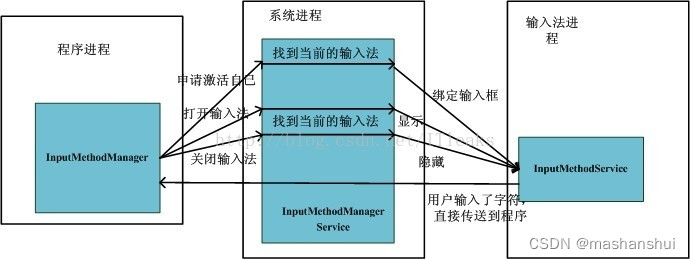
InputMethodManagerService(下文也称IMMS)负责管理系统的所有输入法,包括输入法service(InputMethodService简称IMS)加载及切换。程序获得焦点时,就会通过InputMethodManager向InputMethodManagerService通知自己获得焦点并请求绑定自己到当前输入法上。同时,当程序的某个需要输入法的view比如EditorView获得焦点时就会通过InputMethodManager向InputMethodManagerService请求显示输入法,而这时InputMethodManagerService收到请求后,会将请求的EditText的数据通信接口发送给当前输入法,并请求显输入法。输入法收到请求后,就显示自己的UI dialog,同时保存目标view的数据结构,当用户实现输入后,直接通过view的数据通信接口将字符传递到对应的View。
除此之外我们还要了解Android的窗口管理系统,看下图:
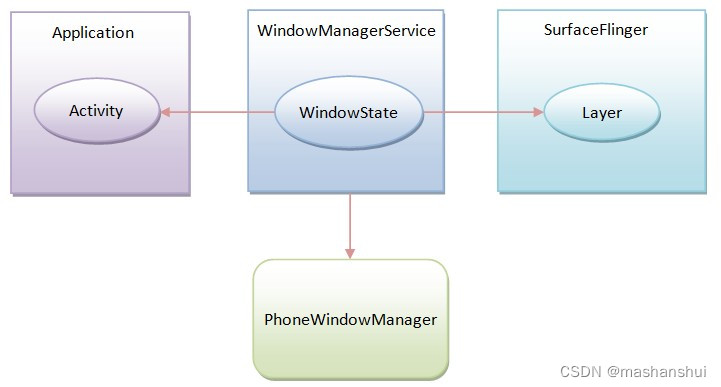
WindowManagerService(下文也称WMS)非常复杂,负责管理系统所有窗口,我们只需要知道当窗口发生变化(焦点状态和大小)他会通知到app进程。
当app的窗口也就是页面的Focus状态发生变化(例如:进入一个新的窗口,这个窗口的Focus状态变成ture,上一个窗口变成false),事件会回调到ViewRootImpl的WindowInputEventReceiver中,经过一系列调用之后会进入到IMMS的startInputOrWindowGainedFocusInternalLocked方法中,看一下这个方法的核心代码:
@NonNullprivate InputBindResult startInputOrWindowGainedFocusInternalLocked(@StartInputReason int startInputReason, IInputMethodClient client,@NonNull IBinder windowToken, @StartInputFlags int startInputFlags,@SoftInputModeFlags int softInputMode, int windowFlags, EditorInfo attribute,IInputContext inputContext, @MissingMethodFlags int missingMethods,int unverifiedTargetSdkVersion, @UserIdInt int userId) {......省略........InputBindResult res = null;switch (softInputMode & LayoutParams.SOFT_INPUT_MASK_STATE) {case LayoutParams.SOFT_INPUT_STATE_UNSPECIFIED:if (!isTextEditor || !doAutoShow) {if (LayoutParams.mayUseInputMethod(windowFlags)) {// There is no focus view, and this window will// be behind any soft input window, so hide the// soft input window if it is shown.if (DEBUG) Slog.v(TAG, "Unspecified window will hide input");hideCurrentInputLocked(mCurFocusedWindow, InputMethodManager.HIDE_NOT_ALWAYS, null,SoftInputShowHideReason.HIDE_UNSPECIFIED_WINDOW);// If focused display changed, we should unbind current method// to make app window in previous display relayout after Ime// window token removed.// Note that we can trust client's display ID as long as it matches// to the display ID obtained from the window.if (cs.selfReportedDisplayId != mCurTokenDisplayId) {unbindCurrentMethodLocked();}}} else if (isTextEditor && doAutoShow&& (softInputMode & LayoutParams.SOFT_INPUT_IS_FORWARD_NAVIGATION) != 0) {// There is a focus view, and we are navigating forward// into the window, so show the input window for the user.// We only do this automatically if the window can resize// to accommodate the IME (so what the user sees will give// them good context without input information being obscured// by the IME) or if running on a large screen where there// is more room for the target window + IME.if (DEBUG) Slog.v(TAG, "Unspecified window will show input");if (attribute != null) {res = startInputUncheckedLocked(cs, inputContext, missingMethods,attribute, startInputFlags, startInputReason);didStart = true;}showCurrentInputLocked(windowToken, InputMethodManager.SHOW_IMPLICIT, null,SoftInputShowHideReason.SHOW_AUTO_EDITOR_FORWARD_NAV);}break;case LayoutParams.SOFT_INPUT_STATE_UNCHANGED:// Do nothing.break;case LayoutParams.SOFT_INPUT_STATE_HIDDEN:if ((softInputMode & LayoutParams.SOFT_INPUT_IS_FORWARD_NAVIGATION) != 0) {if (DEBUG) Slog.v(TAG, "Window asks to hide input going forward");hideCurrentInputLocked(mCurFocusedWindow, 0, null,SoftInputShowHideReason.HIDE_STATE_HIDDEN_FORWARD_NAV);}break;case LayoutParams.SOFT_INPUT_STATE_ALWAYS_HIDDEN:if (DEBUG) Slog.v(TAG, "Window asks to hide input");hideCurrentInputLocked(mCurFocusedWindow, 0, null,SoftInputShowHideReason.HIDE_ALWAYS_HIDDEN_STATE);break;case LayoutParams.SOFT_INPUT_STATE_VISIBLE:if ((softInputMode & LayoutParams.SOFT_INPUT_IS_FORWARD_NAVIGATION) != 0) {if (DEBUG) Slog.v(TAG, "Window asks to show input going forward");if (InputMethodUtils.isSoftInputModeStateVisibleAllowed(unverifiedTargetSdkVersion, startInputFlags)) {if (attribute != null) {res = startInputUncheckedLocked(cs, inputContext, missingMethods,attribute, startInputFlags, startInputReason);didStart = true;}showCurrentInputLocked(windowToken, InputMethodManager.SHOW_IMPLICIT, null,SoftInputShowHideReason.SHOW_STATE_VISIBLE_FORWARD_NAV);} else {Slog.e(TAG, "SOFT_INPUT_STATE_VISIBLE is ignored because"+ " there is no focused view that also returns true from"+ " View#onCheckIsTextEditor()");}}break;case LayoutParams.SOFT_INPUT_STATE_ALWAYS_VISIBLE:if (DEBUG) Slog.v(TAG, "Window asks to always show input");if (InputMethodUtils.isSoftInputModeStateVisibleAllowed(unverifiedTargetSdkVersion, startInputFlags)) {if (attribute != null) {res = startInputUncheckedLocked(cs, inputContext, missingMethods,attribute, startInputFlags, startInputReason);didStart = true;}showCurrentInputLocked(windowToken, InputMethodManager.SHOW_IMPLICIT, null,SoftInputShowHideReason.SHOW_STATE_ALWAYS_VISIBLE);} else {Slog.e(TAG, "SOFT_INPUT_STATE_ALWAYS_VISIBLE is ignored because"+ " there is no focused view that also returns true from"+ " View#onCheckIsTextEditor()");}break;}
可以看到windowSoftInputMode的六个stateXXX就是在这里处理的,当窗口的focus状态变成true的时候(无论是前进还是后退)都会走到这个里面。下面我们逐个分析:
1.stateUnchanged
当 Activity 转至前台时保留软键盘最后所处的任何状态,无论是可见还是隐藏。
case LayoutParams.SOFT_INPUT_STATE_UNCHANGED:// Do nothing.break;
可以看到这里的保留状态就是Do nothing,不做任何操作,之前是显示就是显示,隐藏就是隐藏。
2.stateHidden和stateAlwaysHidden
当用户选择 Activity 时 — 也就是说,当用户确实是向前导航到 Activity,而不是因离开另一 Activity 而返回时 — 隐藏软键盘。
case LayoutParams.SOFT_INPUT_STATE_HIDDEN:if ((softInputMode & LayoutParams.SOFT_INPUT_IS_FORWARD_NAVIGATION) != 0) {if (DEBUG) Slog.v(TAG, "Window asks to hide input going forward");hideCurrentInputLocked(mCurFocusedWindow, 0, null,SoftInputShowHideReason.HIDE_STATE_HIDDEN_FORWARD_NAV);}break;case LayoutParams.SOFT_INPUT_STATE_ALWAYS_HIDDEN:if (DEBUG) Slog.v(TAG, "Window asks to hide input");hideCurrentInputLocked(mCurFocusedWindow, 0, null,SoftInputShowHideReason.HIDE_ALWAYS_HIDDEN_STATE);break;
从代码上看stateHidden只比stateAlwaysHidden多了一个LayoutParams.SOFT_INPUT_IS_FORWARD_NAVIGATION的判断,LayoutParams.SOFT_INPUT_IS_FORWARD_NAVIGATION标识窗口是通过前进获取的焦点,简单来说就是跳转到一个新页面而非返回到当前页面,stateHidden只有在向前跳转的时候才会去调用hideCurrentInputLocked方法隐藏输入法,而stateAlwaysHidden则没有这个判断,任何情况下窗口获取到焦点都会去隐藏输入法。
3.stateVisible和stateAlwaysVisible
当用户选择 Activity 时 — 也就是说,当用户确实是向前导航到 Activity,而不是因离开另一 Activity 而返回时 — 显示软键盘。
当 Activity 的主窗口有输入焦点时始终显示软键盘。
case LayoutParams.SOFT_INPUT_STATE_VISIBLE:if ((softInputMode & LayoutParams.SOFT_INPUT_IS_FORWARD_NAVIGATION) != 0) {if (DEBUG) Slog.v(TAG, "Window asks to show input going forward");if (InputMethodUtils.isSoftInputModeStateVisibleAllowed(unverifiedTargetSdkVersion, startInputFlags)) {if (attribute != null) {res = startInputUncheckedLocked(cs, inputContext, missingMethods,attribute, startInputFlags, startInputReason);didStart = true;}showCurrentInputLocked(windowToken, InputMethodManager.SHOW_IMPLICIT, null,SoftInputShowHideReason.SHOW_STATE_VISIBLE_FORWARD_NAV);} else {Slog.e(TAG, "SOFT_INPUT_STATE_VISIBLE is ignored because"+ " there is no focused view that also returns true from"+ " View#onCheckIsTextEditor()");}}break;case LayoutParams.SOFT_INPUT_STATE_ALWAYS_VISIBLE:if (DEBUG) Slog.v(TAG, "Window asks to always show input");if (InputMethodUtils.isSoftInputModeStateVisibleAllowed(unverifiedTargetSdkVersion, startInputFlags)) {if (attribute != null) {res = startInputUncheckedLocked(cs, inputContext, missingMethods,attribute, startInputFlags, startInputReason);didStart = true;}showCurrentInputLocked(windowToken, InputMethodManager.SHOW_IMPLICIT, null,SoftInputShowHideReason.SHOW_STATE_ALWAYS_VISIBLE);} else {Slog.e(TAG, "SOFT_INPUT_STATE_ALWAYS_VISIBLE is ignored because"+ " there is no focused view that also returns true from"+ " View#onCheckIsTextEditor()");}break;
和隐藏一样,显示也是同样的套路,这里就不多说了。
在显示的时候会去调用isSoftInputModeStateVisibleAllowed方法判断允许显示,看一下这个方法:
static boolean isSoftInputModeStateVisibleAllowed(int targetSdkVersion,@StartInputFlags int startInputFlags) {if (targetSdkVersion < Build.VERSION_CODES.P) {// for compatibility.return true;}if ((startInputFlags & StartInputFlags.VIEW_HAS_FOCUS) == 0) {return false;}if ((startInputFlags & StartInputFlags.IS_TEXT_EDITOR) == 0) {return false;}return true;}
在安卓9以下会直接返回true,安卓9以上就加了两个判断,这里就解释了为什么安卓9之后软键盘不能自动弹出了,具体可以看上一篇文章。
进入判断后会去判断输入法进程有没有开启,没有开启会去调用startInputUncheckedLocked开启,开启之后会去掉用showCurrentInputLocked显示软键盘。
4.stateUnspecified
不指定软键盘的状态(隐藏还是可见)。 将由系统选择合适的状态,或依赖主题中的设置。
系统自己去选择显示还是隐藏,这里就不介绍了,有兴趣的自己去研究一下。
case LayoutParams.SOFT_INPUT_STATE_UNSPECIFIED:if (!isTextEditor || !doAutoShow) {if (LayoutParams.mayUseInputMethod(windowFlags)) {// There is no focus view, and this window will// be behind any soft input window, so hide the// soft input window if it is shown.if (DEBUG) Slog.v(TAG, "Unspecified window will hide input");hideCurrentInputLocked(mCurFocusedWindow, InputMethodManager.HIDE_NOT_ALWAYS, null,SoftInputShowHideReason.HIDE_UNSPECIFIED_WINDOW);// If focused display changed, we should unbind current method// to make app window in previous display relayout after Ime// window token removed.// Note that we can trust client's display ID as long as it matches// to the display ID obtained from the window.if (cs.selfReportedDisplayId != mCurTokenDisplayId) {unbindCurrentMethodLocked();}}} else if (isTextEditor && doAutoShow&& (softInputMode & LayoutParams.SOFT_INPUT_IS_FORWARD_NAVIGATION) != 0) {// There is a focus view, and we are navigating forward// into the window, so show the input window for the user.// We only do this automatically if the window can resize// to accommodate the IME (so what the user sees will give// them good context without input information being obscured// by the IME) or if running on a large screen where there// is more room for the target window + IME.if (DEBUG) Slog.v(TAG, "Unspecified window will show input");if (attribute != null) {res = startInputUncheckedLocked(cs, inputContext, missingMethods,attribute, startInputFlags, startInputReason);didStart = true;}showCurrentInputLocked(windowToken, InputMethodManager.SHOW_IMPLICIT, null,SoftInputShowHideReason.SHOW_AUTO_EDITOR_FORWARD_NAV);}break;
二、显示方式原理
显示方式比较复杂,牵扯到很多方面,首先是在PhoneWindowManager(属于系统进程)的layoutWindowLw方法中,这个方法主要是设置窗口的一些位置大小参数,当软键盘弹出或收起的时候都会走到这里去重新设置窗口的大小,看一下我精简后的相关代码:
public void layoutWindowLw(WindowState win, WindowState attached, DisplayFrames displayFrames) {final int type = attrs.type;final int fl = PolicyControl.getWindowFlags(win, attrs);final int pfl = attrs.privateFlags;final int sim = attrs.softInputMode;final int requestedSysUiFl = PolicyControl.getSystemUiVisibility(null, attrs);final int sysUiFl = requestedSysUiFl | getImpliedSysUiFlagsForLayout(attrs);final Rect pf = mTmpParentFrame;final Rect df = mTmpDisplayFrame;final Rect of = mTmpOverscanFrame;final Rect cf = mTmpContentFrame;final Rect vf = mTmpVisibleFrame;final Rect dcf = mTmpDecorFrame;final Rect sf = mTmpStableFrame;Rect osf = null;dcf.setEmpty();final boolean hasNavBar = (isDefaultDisplay && mHasNavigationBar&& mNavigationBar != null && mNavigationBar.isVisibleLw());final int adjust = sim & SOFT_INPUT_MASK_ADJUST;final boolean requestedFullscreen = (fl & FLAG_FULLSCREEN) != 0|| (requestedSysUiFl & View.SYSTEM_UI_FLAG_FULLSCREEN) != 0;final boolean layoutInScreen = (fl & FLAG_LAYOUT_IN_SCREEN) == FLAG_LAYOUT_IN_SCREEN;final boolean layoutInsetDecor = (fl & FLAG_LAYOUT_INSET_DECOR) == FLAG_LAYOUT_INSET_DECOR;sf.set(displayFrames.mStable);if (adjust != SOFT_INPUT_ADJUST_RESIZE) {cf.set(displayFrames.mDock);} else {cf.set(displayFrames.mContent);}applyStableConstraints(sysUiFl, fl, cf, displayFrames);if (adjust != SOFT_INPUT_ADJUST_NOTHING) {vf.set(displayFrames.mCurrent);} else {vf.set(cf);}}
首先方法里有很多Rect类型的参数被mTmpXXXFrame赋值,我们知道Rect是用来表示一个矩形区域,这里就是用来表示窗口尺寸的,我们需要关注Rect cf = mTmpContentFrame和Rect vf = mTmpVisibleFrame; 这两个参数,cf表示的是窗口内容区域的尺寸(可以理解为可供开发者使用的区域),vf表示的是窗口可见区域的尺寸;当输入法弹出或收起时根据设置的windowSoftInputMode不同这里的尺寸会发生变化,最终窗口大小的改变会回调到应用进程的ViewRootImpl中,最后到ViewRootHandler中的MSG_RESIZED事件里。
1.adjustResize
根据上面的代码我们发现当设置SOFT_INPUT_ADJUST_RESIZE时cf(内容区域)会被设置成displayFrames.mContent(展示区域),vf(可见区域)会被设置成displayFrames.mCurrent,注意这里有个地方容易混淆,cf和displayFrames.mContent表达的东西不一样,当软键盘弹出的时候我们可以理解为app窗口的展示区域变小了,但是内容区域没有变小,虽然被软键盘遮住了,但是内容区域也是可以使用的。
这里cf被设置成displayFrames.mContent就代表被软键盘遮住的地方应该是不能被使用的,最终这个cf会被回调到MSG_RESIZED中,我们来看一下代码:
public void handleMessage(Message msg) {switch (msg.what) {........case MSG_RESIZED: {// Recycled in the fall through...SomeArgs args = (SomeArgs) msg.obj;if (mWinFrame.equals(args.arg1)&& mPendingOverscanInsets.equals(args.arg5)&& mPendingContentInsets.equals(args.arg2)&& mPendingStableInsets.equals(args.arg6)&& mPendingDisplayCutout.get().equals(args.arg9)&& mPendingVisibleInsets.equals(args.arg3)&& mPendingOutsets.equals(args.arg7)&& mPendingBackDropFrame.equals(args.arg8)&& args.arg4 == null&& args.argi1 == 0&& mDisplay.getDisplayId() == args.argi3) {break;}} // fall through...case MSG_RESIZED_REPORT:if (mAdded) {SomeArgs args = (SomeArgs) msg.obj;final int displayId = args.argi3;MergedConfiguration mergedConfiguration = (MergedConfiguration) args.arg4;final boolean displayChanged = mDisplay.getDisplayId() != displayId;if (!mLastReportedMergedConfiguration.equals(mergedConfiguration)) {// If configuration changed - notify about that and, maybe,// about move to display.performConfigurationChange(mergedConfiguration, false /* force */,displayChanged? displayId : INVALID_DISPLAY /* same display */);} else if (displayChanged) {// Moved to display without config change - report last applied one.onMovedToDisplay(displayId, mLastConfigurationFromResources);}final boolean framesChanged = !mWinFrame.equals(args.arg1)|| !mPendingOverscanInsets.equals(args.arg5)|| !mPendingContentInsets.equals(args.arg2)|| !mPendingStableInsets.equals(args.arg6)|| !mPendingDisplayCutout.get().equals(args.arg9)|| !mPendingVisibleInsets.equals(args.arg3)|| !mPendingOutsets.equals(args.arg7);mWinFrame.set((Rect) args.arg1);mPendingOverscanInsets.set((Rect) args.arg5);mPendingContentInsets.set((Rect) args.arg2);mPendingStableInsets.set((Rect) args.arg6);mPendingDisplayCutout.set((DisplayCutout) args.arg9);mPendingVisibleInsets.set((Rect) args.arg3);mPendingOutsets.set((Rect) args.arg7);mPendingBackDropFrame.set((Rect) args.arg8);mForceNextWindowRelayout = args.argi1 != 0;mPendingAlwaysConsumeNavBar = args.argi2 != 0;args.recycle();if (msg.what == MSG_RESIZED_REPORT) {reportNextDraw();}if (mView != null && framesChanged) {forceLayout(mView);}requestLayout();}break;.........}}
SomeArgs中的args.arg2就是我们之前设置的cf,
1.进入到MSG_RESIZED中后会判断SomeArgs中的参数是不是和之前一样,如果不同就会走到MSG_RESIZED_REPORT中,
2.这里将尺寸信息保存之后就会去调用forceLayout(mView)—>ViewTree里每个View/ViewGroup打上layout、draw标记,也就是说每个View/ViewGroup 最后都会执行三大流程,最后requestLayout()—>触发执行三大流程。
既然记录了尺寸的变化,继续跟踪这些值怎么使用。调用requestLayout()将会触发执行performTraversals()方法:
#ViewRootImpl.javaprivate void performTraversals() {if (mFirst || windowShouldResize || insetsChanged ||viewVisibilityChanged || params != null || mForceNextWindowRelayout) {...boolean hwInitialized = false;//内容边界是否发生变化boolean contentInsetsChanged = false;try {...//内容区域变化----------->1contentInsetsChanged = !mPendingContentInsets.equals(mAttachInfo.mContentInsets);if (contentInsetsChanged || mLastSystemUiVisibility !=mAttachInfo.mSystemUiVisibility || mApplyInsetsRequested|| mLastOverscanRequested != mAttachInfo.mOverscanRequested|| outsetsChanged) {...//分发Inset----------->2dispatchApplyInsets(host);contentInsetsChanged = true;}...} catch (RemoteException e) {}...}...}
1.当设置SOFT_INPUT_ADJUST_RESIZE,键盘弹起时内容区域发生变化,因此会执行dispatchApplyInsets()。
2.分发Inset。
这些记录的值会存储在AttachInfo对应的变量里。
该方法调用栈如下:
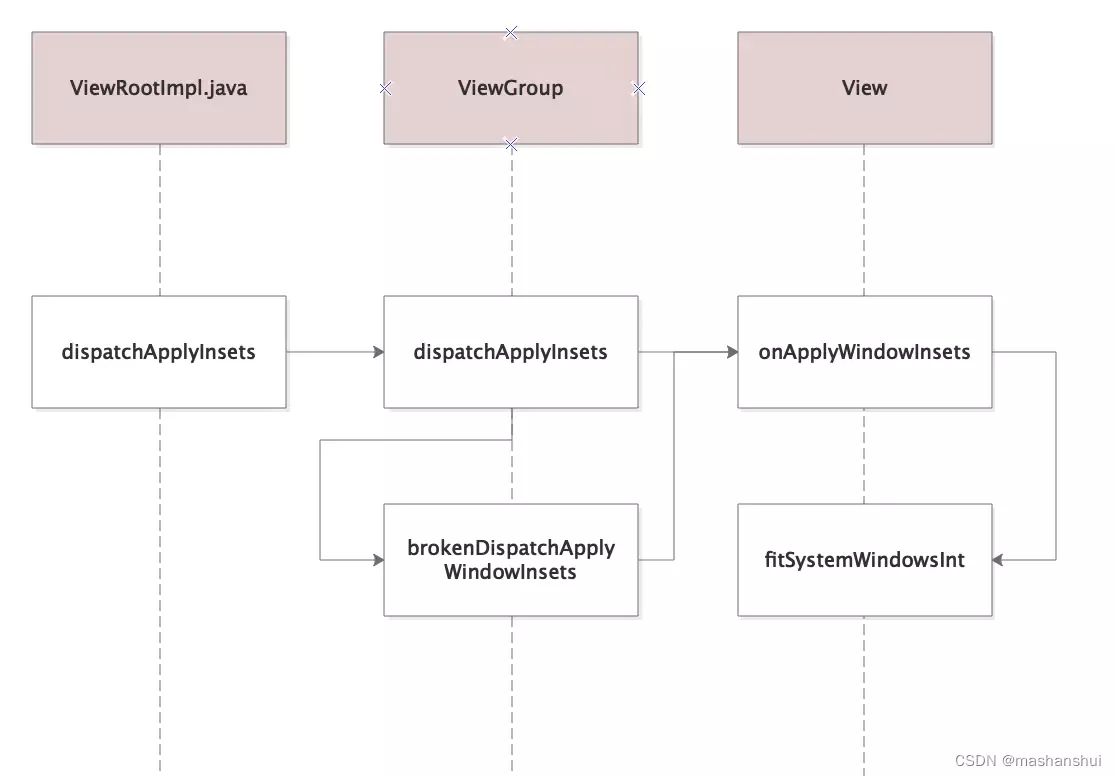
dispatchApplyWindowInsets(WindowInsets insets)里的insets构成是通过计算之前记录在mPendingXX里的边界值。
最终调用fitSystemWindowsInt():
#View.javaprivate boolean fitSystemWindowsInt(Rect insets) {//FITS_SYSTEM_WINDOWS 为xml里设置 android:fitsSystemWindows="true"//对于DecorView的子布局LinearLayout来说,默认fitsSystemWindows=trueif ((mViewFlags & FITS_SYSTEM_WINDOWS) == FITS_SYSTEM_WINDOWS) {...//设置View的paddinginternalSetPadding(localInsets.left, localInsets.top,localInsets.right, localInsets.bottom);return res;}return false;}protected void internalSetPadding(int left, int top, int right, int bottom) {...if (mPaddingLeft != left) {changed = true;mPaddingLeft = left;}if (mPaddingTop != top) {changed = true;mPaddingTop = top;}if (mPaddingRight != right) {changed = true;mPaddingRight = right;}if (mPaddingBottom != bottom) {changed = true;mPaddingBottom = bottom;}if (changed) {requestLayout();invalidateOutline();}}
看到这答案就呼之欲出了,DecorView的子布局LinearLayout设置padding,最终会影响LinearLayout子布局的高度,一层层传递下去,就会影响到Demo里的Activity 布局文件的高度。
小结
当设置SOFT_INPUT_ADJUST_RESIZE 时,DecorView的子布局padding会改变,最后影响子孙布局的高度。
2.adjustPan
当设置SOFT_INPUT_ADJUST_PAN时cf(内容区域)会被设置成displayFrames.mDock,vf(可见区域)同样被设置成displayFrames.mCurrent,displayFrames.mDock是什么呢?
/** During layout, the current screen borders along which input method windows are placed. */public final Rect mDock = new Rect();
布局期间,输入法窗口所在的当前屏幕边框. 我理解其实就是除去导航栏和状态栏的app可使用内容区域,后来通过断点验证果然是的,SOFT_INPUT_ADJUST_RESIZE将cf设置成可见区域,而SOFT_INPUT_ADJUST_PAN这里cf被设置成内容区域,这也就意味着app可以使用被输入法挡住的部分。
最终同样会到MSG_RESIZED中:
SomeArgs中的args.arg2也就是cf的大小是没有变化的,但是args.arg3也就是vf变了,所以依然会进入MSG_RESIZED_REPORT中,也依然会去调用forceLayout(mView)和requestLayout()—>触发执行三大流程。
但是由于内容区域没有发生变化,这里不会再去执行dispatchApplyInsets()。那SOFT_INPUT_ADJUST_PAN的处理在哪里呢?
我们知道SOFT_INPUT_ADJUST_PAN的效果是页面整体向上移动,布局移动无非就是坐标发生改变,或者内容滚动了,不管是何种形式最终都需要通过对Canvas进行位移才能实现移动的效果。在performDraw->draw方法中有一个scrollToRectOrFocus方法:
#View.javaboolean scrollToRectOrFocus(Rect rectangle, boolean immediate) {//窗口内容区域final Rect ci = mAttachInfo.mContentInsets;//窗口可见区域final Rect vi = mAttachInfo.mVisibleInsets;//滚动距离int scrollY = 0;boolean handled = false;if (vi.left > ci.left || vi.top > ci.top|| vi.right > ci.right || vi.bottom > ci.bottom) {scrollY = mScrollY;//找到当前有焦点的View------------>(1)final View focus = mView.findFocus();...if (focus == lastScrolledFocus && !mScrollMayChange && rectangle == null) {//焦点没有发生切换,不做操作} else {// We need to determine if the currently focused view is// within the visible part of the window and, if not, apply// a pan so it can be seen.mLastScrolledFocus = new WeakReference<View>(focus);mScrollMayChange = false;if (DEBUG_INPUT_RESIZE) Log.v(mTag, "Need to scroll?");// Try to find the rectangle from the focus view.if (focus.getGlobalVisibleRect(mVisRect, null)) {...//找到当前焦点与可见区域的相交部分//mVisRect 为当前焦点在Window里的可见部分if (mTempRect.intersect(mVisRect)) {if (mTempRect.height() >(mView.getHeight()-vi.top-vi.bottom)) {...}else if (mTempRect.top < vi.top) {//如果当前焦点位置在窗口可见区域上边,说明焦点View应该往下移动到可见区域里边scrollY = mTempRect.top - vi.top;} else if (mTempRect.bottom > (mView.getHeight()-vi.bottom)) {//如果当前焦点位置在窗口可见区域之下,说明其应该往上移动到可见区域里边------->(2)scrollY = mTempRect.bottom - (mView.getHeight()-vi.bottom);} else {//无需滚动------->(3)scrollY = 0;}handled = true;}}}}if (scrollY != mScrollY) {//滚动距离发生变化if (!immediate) {if (mScroller == null) {mScroller = new Scroller(mView.getContext());}//开始设置滚动----------->(4)mScroller.startScroll(0, mScrollY, 0, scrollY-mScrollY);} else if (mScroller != null) {mScroller.abortAnimation();}//赋值给成员变量mScrollY = scrollY;}return handled;}
1.对于上面的Demo来说,当前的焦点View就是EditText,点击哪个EditText,哪个就获得焦点。
2.对于输入框2来说,因为键盘弹出会遮住它,通过计算满足"当前焦点位置在窗口可见区域之下,说明其应该往上移动到可见区域里边" 条件,因此srolly > 0。
3.而对于输入框1来说,当键盘弹出时,它没有被键盘遮挡,走到else分支,因此scrollY = 0。
4.滚动是借助Scoller.java类完成的。
上面的操作实际上就是为了确认滚动值,并记录在成员变量mScrollY里,继续来看如何使用滚动值呢?
#ViewRootImpl.javaprivate boolean draw(boolean fullRedrawNeeded) {...boolean animating = mScroller != null && mScroller.computeScrollOffset();final int curScrollY;//获取当前需要滚动的scroll值if (animating) {curScrollY = mScroller.getCurrY();} else {curScrollY = mScrollY;}...int xOffset = -mCanvasOffsetX;//记录在yOffset里int yOffset = -mCanvasOffsetY + curScrollY;boolean useAsyncReport = false;if (!dirty.isEmpty() || mIsAnimating || accessibilityFocusDirty) {if (mAttachInfo.mThreadedRenderer != null && mAttachInfo.mThreadedRenderer.isEnabled()) {...//对于走硬件加速绘制if (mHardwareYOffset != yOffset || mHardwareXOffset != xOffset) {//记录偏移量到mHardwareYOffset里mHardwareYOffset = yOffset;mHardwareXOffset = xOffset;invalidateRoot = true;}..mAttachInfo.mThreadedRenderer.draw(mView, mAttachInfo, this);} else {//软件绘制//传入yOffsetif (!drawSoftware(surface, mAttachInfo, xOffset, yOffset,scalingRequired, dirty, surfaceInsets)) {return false;}}}...return useAsyncReport;}
滚动值分别传递给了硬件加速绘制分支和软件绘制分支,在各自的分支里对Canvas进行平移,具体如何平移此处不细说了,大家可以继续跟踪代码分析。
小结
1、当设置SOFT_INPUT_ADJUST_PAN时,如果发现键盘遮住了当前有焦点的View,那么会对RootView(此处Demo里DecorView作为RootView)的Canvas进行平移,直至有焦点的View显示到可见区域为止。
2、这就是为什么点击输入框2的时候布局会整体向上移动的原因。
3.adjustNothing
当设置成SOFT_INPUT_ADJUST_NOTHING时cf(内容区域)会被设置成displayFrames.mDock,vf(可见区域)会被设置成cf,其实这里就相当于窗口尺寸参数没有变化,就不会回调到MSG_RESIZED中,自然布局也不会有什么改变。
4.adjustUnspecified
设置了SOFT_INPUT_ADJUST_UNSPECIFIED,其内部最终使用SOFT_INPUT_ADJUST_PAN和SOFT_INPUT_ADJUST_RESIZE之一进行展示。接下来就来探究选择的标准是什么。
softInputMode 没有设值的时候,默认是SOFT_INPUT_ADJUST_UNSPECIFIED模式。
还是从ViewRootImpl.java的performTraversals()方法开始分析:
private void performTraversals() {...if (mFirst || mAttachInfo.mViewVisibilityChanged) {mAttachInfo.mViewVisibilityChanged = false;//先查看有没有提前设置了模式int resizeMode = mSoftInputMode &WindowManager.LayoutParams.SOFT_INPUT_MASK_ADJUST;//如果没有设置,那么默认为0,也就是SOFT_INPUT_ADJUST_UNSPECIFIEDif (resizeMode == WindowManager.LayoutParams.SOFT_INPUT_ADJUST_UNSPECIFIED) {//查看mScrollContainers 数组有没有元素(View 作为元素) -------->(1)final int N = mAttachInfo.mScrollContainers.size();for (int i=0; i<N; i++) {if (mAttachInfo.mScrollContainers.get(i).isShown()) {//如果有元素,则设置为SOFT_INPUT_ADJUST_RESIZE 模式resizeMode = WindowManager.LayoutParams.SOFT_INPUT_ADJUST_RESIZE;}}if (resizeMode == 0) {//如果没有设置为resize模式,则设置pan模式resizeMode = WindowManager.LayoutParams.SOFT_INPUT_ADJUST_PAN;}if ((lp.softInputMode &WindowManager.LayoutParams.SOFT_INPUT_MASK_ADJUST) != resizeMode) {lp.softInputMode = (lp.softInputMode &~WindowManager.LayoutParams.SOFT_INPUT_MASK_ADJUST) |resizeMode;//最后赋值给params,让Window属性生效params = lp;}}}...}
上一篇文章已经说过了,这里主要是通过mAttachInfo.mScrollContainers判断是否有可滚动的view,如果有就设置成SOFT_INPUT_ADJUST_RESIZE,如果没有就设置成SOFT_INPUT_ADJUST_PAN。
本文来自互联网用户投稿,文章观点仅代表作者本人,不代表本站立场,不承担相关法律责任。如若转载,请注明出处。 如若内容造成侵权/违法违规/事实不符,请点击【内容举报】进行投诉反馈!