jxl读写excel, poi读写excel,word, 读取Excel数据到MySQL
这篇blog是介绍:
1. java中的poi技术读取Excel数据,然后保存到MySQL数据中。
2. jxl读写excel
你也可以在 : java的poi技术读取和导入Excel 了解到写入Excel的方法信息
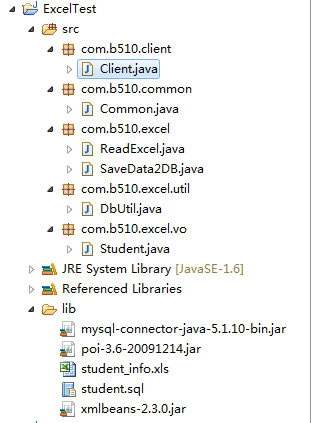
项目结构:
Excel中的测试数据:

数据库结构:
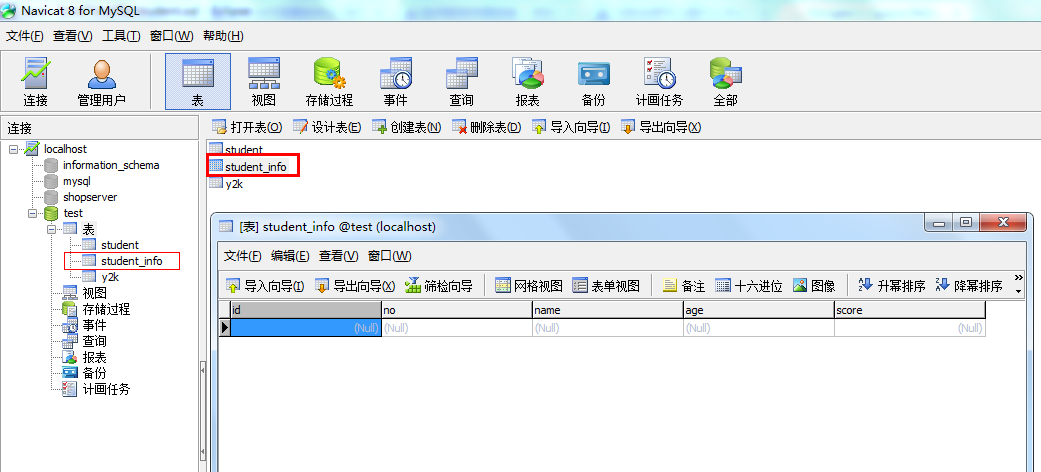
对应的SQL:

1 CREATE TABLE `student_info` (
2   `id` int(11) NOT NULL AUTO_INCREMENT,
3   `no` varchar(20) DEFAULT NULL,
4   `name` varchar(20) DEFAULT NULL,
5   `age` varchar(10) DEFAULT NULL,
6   `score` float DEFAULT '0',
7   PRIMARY KEY (`id`)
8 ) ENGINE=InnoDB DEFAULT CHARSET=utf8;
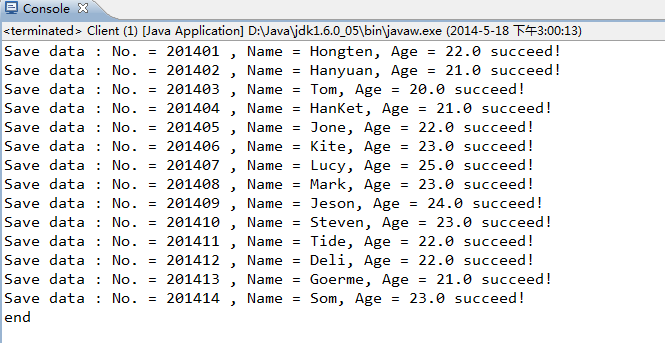
插入数据成功:
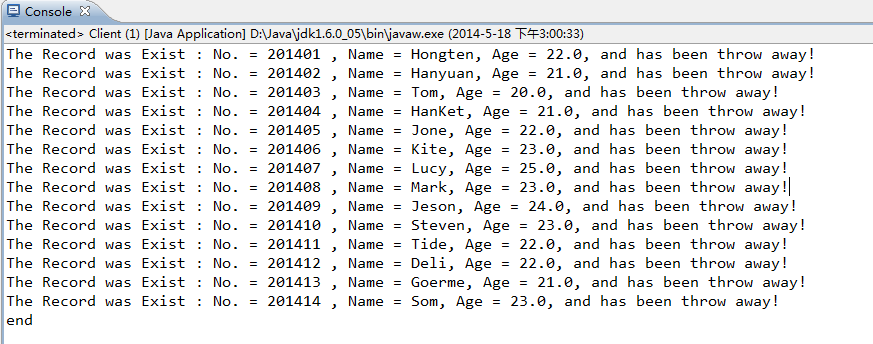
如果重复数据,则丢掉:
=============================================
源码部分:
=============================================
/ExcelTest/src/com/b510/client/Client.java
 1 /**2  * 3  */4 package com.b510.client;5 6 import java.io.IOException;7 import java.sql.SQLException;8 9 import com.b510.excel.SaveData2DB;
10
11 /**
12  * @author Hongten
13  * @created 2014-5-18
14  */
15 public class Client {
16
17     public static void main(String[] args) throws IOException, SQLException {
18         SaveData2DB saveData2DB = new SaveData2DB();
19         saveData2DB.save();
20         System.out.println("end");
21     }
22 }
/ExcelTest/src/com/b510/common/Common.java
 1 /**2  * 3  */4 package com.b510.common;5 6 /**7  * @author Hongten8  * @created 2014-5-189  */
10 public class Common {
11
12     // connect the database
13     public static final String DRIVER = "com.mysql.jdbc.Driver";
14     public static final String DB_NAME = "test";
15     public static final String USERNAME = "root";
16     public static final String PASSWORD = "root";
17     public static final String IP = "192.168.1.103";
18     public static final String PORT = "3306";
19     public static final String URL = "jdbc:mysql://" + IP + ":" + PORT + "/" + DB_NAME;
20
21     // common
22     public static final String EXCEL_PATH = "lib/student_info.xls";
23
24     // sql
25     public static final String INSERT_STUDENT_SQL = "insert into student_info(no, name, age, score) values(?, ?, ?, ?)";
26     public static final String UPDATE_STUDENT_SQL = "update student_info set no = ?, name = ?, age= ?, score = ? where id = ? ";
27     public static final String SELECT_STUDENT_ALL_SQL = "select id,no,name,age,score from student_info";
28     public static final String SELECT_STUDENT_SQL = "select * from student_info where name like ";
29 }
/ExcelTest/src/com/b510/excel/ReadExcel.java
 1 /**2  * 3  */4 package com.b510.excel;5 6 import java.io.FileInputStream;7 import java.io.IOException;8 import java.io.InputStream;9 import java.util.ArrayList;
10 import java.util.List;
11
12 import org.apache.poi.hssf.usermodel.HSSFCell;
13 import org.apache.poi.hssf.usermodel.HSSFRow;
14 import org.apache.poi.hssf.usermodel.HSSFSheet;
15 import org.apache.poi.hssf.usermodel.HSSFWorkbook;
16
17 import com.b510.common.Common;
18 import com.b510.excel.vo.Student;
19
20 /**
21  * @author Hongten
22  * @created 2014-5-18
23  */
24 public class ReadExcel {
25
26     public List readXls() throws IOException {
27         InputStream is = new FileInputStream(Common.EXCEL_PATH);
28         HSSFWorkbook hssfWorkbook = new HSSFWorkbook(is);
29         Student student = null;
30         List list = new ArrayList();
31         // 循环工作表Sheet
32         for (int numSheet = 0; numSheet < hssfWorkbook.getNumberOfSheets(); numSheet++) {
33             HSSFSheet hssfSheet = hssfWorkbook.getSheetAt(numSheet);
34             if (hssfSheet == null) {
35                 continue;
36             }
37             // 循环行Row
38             for (int rowNum = 1; rowNum <= hssfSheet.getLastRowNum(); rowNum++) {
39                 HSSFRow hssfRow = hssfSheet.getRow(rowNum);
40                 if (hssfRow != null) {
41                     student = new Student();
42                     HSSFCell no = hssfRow.getCell(0);
43                     HSSFCell name = hssfRow.getCell(1);
44                     HSSFCell age = hssfRow.getCell(2);
45                     HSSFCell score = hssfRow.getCell(3);
46                     student.setNo(getValue(no));
47                     student.setName(getValue(name));
48                     student.setAge(getValue(age));
49                     student.setScore(Float.valueOf(getValue(score)));
50                     list.add(student);
51                 }
52             }
53         }
54         return list;
55     }
56
57      @SuppressWarnings("static-access")
58     private String getValue(HSSFCell hssfCell) {
59             if (hssfCell.getCellType() == hssfCell.CELL_TYPE_BOOLEAN) {
60                 // 返回布尔类型的值
61                 return String.valueOf(hssfCell.getBooleanCellValue());
62             } else if (hssfCell.getCellType() == hssfCell.CELL_TYPE_NUMERIC) {
63                 // 返回数值类型的值
64                 return String.valueOf(hssfCell.getNumericCellValue());
65             } else {
66                 // 返回字符串类型的值
67                 return String.valueOf(hssfCell.getStringCellValue());
68             }
69         }
70 }
/ExcelTest/src/com/b510/excel/SaveData2DB.java
 1 /**2  * 3  */4 package com.b510.excel;5 6 import java.io.IOException;7 import java.sql.SQLException;8 import java.util.List;9
10 import com.b510.common.Common;
11 import com.b510.excel.util.DbUtil;
12 import com.b510.excel.vo.Student;
13
14 /**
15  * @author Hongten
16  * @created 2014-5-18
17  */
18 public class SaveData2DB {
19
20     @SuppressWarnings({ "rawtypes" })
21     public void save() throws IOException, SQLException {
22         ReadExcel xlsMain = new ReadExcel();
23         Student student = null;
24         List list = xlsMain.readXls();
25
26         for (int i = 0; i < list.size(); i++) {
27             student = list.get(i);
28             List l = DbUtil.selectOne(Common.SELECT_STUDENT_SQL + "'%" + student.getName() + "%'", student);
29             if (!l.contains(1)) {
30                 DbUtil.insert(Common.INSERT_STUDENT_SQL, student);
31             } else {
32                 System.out.println("The Record was Exist : No. = " + student.getNo() + " , Name = " + student.getName() + ", Age = " + student.getAge() + ", and has been throw away!");
33             }
34         }
35     }
36 }
/ExcelTest/src/com/b510/excel/util/DbUtil.java
  1 /**2  * 3  */4 package com.b510.excel.util;5 6 import java.sql.Connection;7 import java.sql.DriverManager;8 import java.sql.PreparedStatement;9 import java.sql.ResultSet;10 import java.sql.SQLException;11 import java.util.ArrayList;12 import java.util.List;13 14 import com.b510.common.Common;15 import com.b510.excel.vo.Student;16 17 /**18  * @author Hongten19  * @created 2014-5-1820  */21 public class DbUtil {22 23     /**24      * @param sql25      */26     public static void insert(String sql, Student student) throws SQLException {27         Connection conn = null;28         PreparedStatement ps = null;29         try {30             Class.forName(Common.DRIVER);31             conn = DriverManager.getConnection(Common.URL, Common.USERNAME, Common.PASSWORD);32             ps = conn.prepareStatement(sql);33             ps.setString(1, student.getNo());34             ps.setString(2, student.getName());35             ps.setString(3, student.getAge());36             ps.setString(4, String.valueOf(student.getScore()));37             boolean flag = ps.execute();38             if(!flag){39                 System.out.println("Save data : No. = " + student.getNo() + " , Name = " + student.getName() + ", Age = " + student.getAge() + " succeed!");40             }41         } catch (Exception e) {42             e.printStackTrace();43         } finally {44             if (ps != null) {45                 ps.close();46             }47             if (conn != null) {48                 conn.close();49             }50         }51     }52 53     @SuppressWarnings({ "unchecked", "rawtypes" })54     public static List selectOne(String sql, Student student) throws SQLException {55         Connection conn = null;56         PreparedStatement ps = null;57         ResultSet rs = null;58         List list = new ArrayList();59         try {60             Class.forName(Common.DRIVER);61             conn = DriverManager.getConnection(Common.URL, Common.USERNAME, Common.PASSWORD);62             ps = conn.prepareStatement(sql);63             rs = ps.executeQuery();64             while(rs.next()){65                 if(rs.getString("no").equals(student.getNo()) || rs.getString("name").equals(student.getName())|| rs.getString("age").equals(student.getAge())){66                     list.add(1);67                 }else{68                     list.add(0);69                 }70             }71         } catch (Exception e) {72             e.printStackTrace();73         } finally {74             if (rs != null) {75                 rs.close();76             }77             if (ps != null) {78                 ps.close();79             }80             if (conn != null) {81                 conn.close();82             }83         }84         return list;85     }86     87     88     public static ResultSet selectAll(String sql) throws SQLException {89         Connection conn = null;90         PreparedStatement ps = null;91         ResultSet rs = null;92         try {93             Class.forName(Common.DRIVER);94             conn = DriverManager.getConnection(Common.URL, Common.USERNAME, Common.PASSWORD);95             ps = conn.prepareStatement(sql);96             rs = ps.executeQuery();97         } catch (Exception e) {98             e.printStackTrace();99         } finally {
100             if (rs != null) {
101                 rs.close();
102             }
103             if (ps != null) {
104                 ps.close();
105             }
106             if (conn != null) {
107                 conn.close();
108             }
109         }
110         return rs;
111     }
112
113 }
/ExcelTest/src/com/b510/excel/vo/Student.java
 1 /**2  * 3  */4 package com.b510.excel.vo;5 6 /**7  * Student8  * 9  * @author Hongten
10  * @created 2014-5-18
11  */
12 public class Student {
13     /**
14      * id
15      */
16     private Integer id;
17     /**
18      * 学号
19      */
20     private String no;
21     /**
22      * 姓名
23      */
24     private String name;
25     /**
26      * 学院
27      */
28     private String age;
29     /**
30      * 成绩
31      */
32     private float score;
33
34     public Integer getId() {
35         return id;
36     }
37
38     public void setId(Integer id) {
39         this.id = id;
40     }
41
42     public String getNo() {
43         return no;
44     }
45
46     public void setNo(String no) {
47         this.no = no;
48     }
49
50     public String getName() {
51         return name;
52     }
53
54     public void setName(String name) {
55         this.name = name;
56     }
57
58     public String getAge() {
59         return age;
60     }
61
62     public void setAge(String age) {
63         this.age = age;
64     }
65
66     public float getScore() {
67         return score;
68     }
69
70     public void setScore(float score) {
71         this.score = score;
72     }
73
74 }
源码下载:http://files.cnblogs.com/hongten/ExcelTest.zip
poi读写excel
org.apache.poi poi 3.14
一. 创建Excel 文档
import org.apache.poi.hssf.usermodel.HSSFWorkbook;
import org.apache.poi.hssf.usermodel.HSSFSheet;
import org.apache.poi.hssf.usermodel.HSSFRow;
import org.apache.poi.hssf.usermodel.HSSFCell;
import java.io.FileOutputStream;
public class XLS {public static String outputFile = "./test.xls";public static void main(String argv[]) {try {// 创建新的Excel 工作簿HSSFWorkbook workbook = new HSSFWorkbook();// 在Excel工作簿中建一工作表,其名为缺省值// 如要新建一名为"效益指标"的工作表,其语句为:// HSSFSheet sheet = workbook.createSheet("效益指标");HSSFSheet sheet = workbook.createSheet();//创建第一行HSSFRow row = sheet.createRow((short)0);//创建第一列HSSFCell cell = row.createCell((short)0);//定义单元格为字符串类型cell.setCellType(HSSFCell.CELL_TYPE_STRING);//在单元格中输入一些内容cell.setCellValue("增加值");// 新建一输出文件流FileOutputStream fOut = new FileOutputStream(outputFile);// 把相应的Excel 工作簿存盘workbook.write(fOut);fOut.flush();fOut.close();System.out.println("文件已经生成...");} catch (Exception e) {System.out.println("已运行 xlCreate() : " + e);}}
}
二. 读取Excel文档中的数据
import org.apache.poi.hssf.usermodel.HSSFWorkbook;
import org.apache.poi.hssf.usermodel.HSSFSheet;
import org.apache.poi.hssf.usermodel.HSSFRow;
import org.apache.poi.hssf.usermodel.HSSFCell;import java.io.FileInputStream;public class XLS {/** windows目录用反斜线 */public static String fileToBeRead = "./test.xls";//"D:\\test1.xls";public static void main(String argv[]) {try {// 创建对Excel工作簿文件的引用HSSFWorkbook workbook = new HSSFWorkbook(new FileInputStream(fileToBeRead));// 创建对工作表的引用。此处按名引用(让我们假定那张表有着缺省名"Sheet1")HSSFSheet sheet = workbook.getSheet("Sheet0");// 也可用getSheetAt(int index)按索引引用,在Excel文档中,第一张工作表的缺省索引是0,其语句为:HSSFSheet sheet = workbook.getSheetAt(0);// 读取左上端单元HSSFRow row = sheet.getRow(0);HSSFCell cell = row.getCell((short) 0);
// 输出单元内容,cell.getStringCellValue()就是取所在单元的值System.out.println("左上端单元是: " + cell.getStringCellValue());} catch (Exception e) {System.out.println("已运行xlRead() : " + e);}}
}
设置单元格格式
在这里,我们将只介绍一些和格式设置有关的语句,我们假定workbook就是对一个工作簿的引用。在Java中,第一步要做的就是创建和设置字体和单元格的格式,然后再应用这些格式:
1、创建字体,设置其为红色、粗体:
| 1 2 3 | HSSFFont font = workbook.createFont(); font.setColor(HSSFFont.COLOR_RED); font.setBoldweight(HSSFFont.BOLDWEIGHT_BOLD); |
2、创建格式
| 1 2 | HSSFCellStyle cellStyle= workbook.createCellStyle(); cellStyle.setFont(font); |
3、应用格式
| 1 2 3 4 | HSSFCell cell = row.createCell(( short ) 0 ); cell.setCellStyle(cellStyle); cell.setCellType(HSSFCell.CELL_TYPE_STRING); cell.setCellValue( "标题 " ); |
三. 处理WORD文档
| 1 2 3 4 5 6 7 8 9 10 11 12 13 14 15 16 | import java.io. * ; import org.apache.poi.hwpf.extractor.WordExtractor; import org.apache.poi.hssf.usermodel.HSSFWorkbook; import org.apache.poi.hssf.usermodel.HSSFSheet; import org.apache.poi.hssf.usermodel.HSSFRow; import org.apache.poi.hssf.usermodel.HSSFCell; public class TestPoi { public TestPoi() {} public static void main(String args[]) throws Exception{ FileInputStream in = new FileInputStream( "D:\\a.doc" ); WordExtractor extractor = new WordExtractor(); String str = extractor.extractText(in); //System.out.println("the result length is"+str.length()); System.out.println(str); } } |
poi读写word:
http://mvnrepository.com/artifact/org.apache.poi/poi
Apache POI - Java API To Access Microsoft Format Files
http://wuhaidong.iteye.com/blog/1728406
实例一:读excel:
import java.io.File;
import java.io.FileInputStream;
import java.io.InputStream;
import jxl.Cell;
import jxl.CellType;
import jxl.Sheet;
import jxl.Workbook;
import jxl.write.Label;
public class xls
{public static void main(String[] args){jxl.Workbook readwb = null;try{// 构建Workbook对象, 只读Workbook对象,直接从本地文件创建WorkbookInputStream instream = new FileInputStream("./活动日历.xls");readwb = Workbook.getWorkbook(instream);// 获取第一张Sheet表Sheet readsheet = readwb.getSheet(0);int rsColumns = readsheet.getColumns();//总列数int rsRows = readsheet.getRows();//总行数for (int i = 0; i < rsRows; i++){for (int j = 0; j < rsColumns; j++){Cell cell = readsheet.getCell(j, i);System.out.print(cell.getContents() + " ");}System.out.println();}//创建新的可写入的Excel工作薄jxl.write.WritableWorkbook wwb = Workbook.createWorkbook(new File("./活动日历1.xls"), readwb);// 读取第一张工作表jxl.write.WritableSheet ws = wwb.getSheet(0);// 获得第一个单元格对象jxl.write.WritableCell wc = ws.getWritableCell(0, 0);// 判断单元格的类型, 做出相应的转化if (wc.getType() == CellType.LABEL){Label l = (Label) wc;l.setString("新姓名");}wwb.write();wwb.close();} catch (Exception e) {e.printStackTrace();} finally {readwb.close();}}
}
实例二:写excel:
import java.io.File;
import java.io.FileNotFoundException;
import java.io.FileOutputStream;
import java.io.IOException;
import java.io.OutputStream;import jxl.Workbook; import jxl.write.Label; import jxl.write.WritableSheet; import jxl.write.WritableWorkbook; import jxl.write.WriteException; import jxl.write.biff.RowsExceededException; public class xls { public void createExcel(OutputStream os) throws WriteException, IOException { // 创建工作薄 WritableWorkbook workbook = Workbook.createWorkbook(os); // 创建新的一页 WritableSheet sheet = workbook.createSheet("First Sheet", 0); // 创建要显示的内容,创建一个单元格,第一个参数为列坐标,第二个参数为行坐标,第三个参数为内容 Label xuexiao = new Label(0, 0, "学校"); sheet.addCell(xuexiao); Label zhuanye = new Label(1, 0, "专业"); sheet.addCell(zhuanye); Label jingzhengli = new Label(2, 0, "专业竞争力"); sheet.addCell(jingzhengli); Label qinghua = new Label(0, 1, "清华大学"); sheet.addCell(qinghua); Label jisuanji = new Label(1, 1, "计算机专业"); sheet.addCell(jisuanji); Label gao = new Label(2, 1, "高"); sheet.addCell(gao); Label beida = new Label(0, 2, "北京大学"); sheet.addCell(beida); Label falv = new Label(1, 2, "法律专业"); sheet.addCell(falv); Label zhong = new Label(2, 2, "中"); sheet.addCell(zhong); Label ligong = new Label(0, 3, "北京理工大学"); sheet.addCell(ligong); Label hangkong = new Label(1, 3, "航空专业"); sheet.addCell(hangkong); Label di = new Label(2, 3, "低"); sheet.addCell(di); // 把创建的内容写入到输出流中,并关闭输出流  workbook.write(); workbook.close(); os.close(); } public static void main(String[] args) throws IOException, RowsExceededException, WriteException { try { // 打开文件 WritableWorkbook book = Workbook.createWorkbook(new File("./测试.xls")); // 生成名为“第一页”的工作表,参数0表示这是第一页 WritableSheet sheet = book.createSheet("第一页", 0); // 在Label对象的构造子中指名单元格位置是第一列第一行(0,0)的内容 Label label = new Label(0, 0, "测试"); // 将定义好的单元格添加到工作表中  sheet.addCell(label); jxl.write.Number number = new jxl.write.Number(1, 0, 1234567); sheet.addCell(number); jxl.write.Label s = new jxl.write.Label(1, 2, "水电站"); sheet.addCell(s); // 写入数据并关闭文件  book.write(); book.close(); // 最好在finally中关闭,此处仅作为示例不太规范 } catch (Exception e) { System.out.println(e); } } }
实例二:3个功能-----从excel文件F:\红楼人物.xls读取数据;生成新的excel文件F:\红楼人物2.xls;修改原excel一个单元并输出为F:\红楼人物3.xls。
import jxl.*;
import jxl.format.UnderlineStyle;
import jxl.write.*;
import jxl.write.Number;
import jxl.write.Boolean;
import jxl.Cell;import java.io.*;public class xls {public xls() {}/*** 读取Excel */public static void readExcel(String filePath) {try {InputStream is = new FileInputStream(filePath);Workbook rwb = Workbook.getWorkbook(is);// 这里有两种方法获取sheet表:名字和下标(从0开始)// Sheet st = rwb.getSheet("original");Sheet st = rwb.getSheet(0);/*** //获得第一行第一列单元的值 Cell c00 = st.getCell(0,0); //通用的获取cell值的方式,返回字符串* String strc00 = c00.getContents(); //获得cell具体类型值的方式* if(c00.getType() == CellType.LABEL) { LabelCell labelc00 =* (LabelCell)c00; strc00 = labelc00.getString(); } //输出* System.out.println(strc00);*/// Sheet的下标是从0开始// 获取第一张Sheet表Sheet rst = rwb.getSheet(0);// 获取Sheet表中所包含的总列数int rsColumns = rst.getColumns();// 获取Sheet表中所包含的总行数int rsRows = rst.getRows();// 获取指定单元格的对象引用for (int i = 0; i < rsRows; i++) {for (int j = 0; j < rsColumns; j++) {Cell cell = rst.getCell(j, i);System.out.print(cell.getContents() + " ");}System.out.println();}// 关闭rwb.close();} catch (Exception e) {e.printStackTrace();}}/** 输出Excel */public static void writeExcel(OutputStream os) {try {/*** 只能通过API提供的 工厂方法来创建Workbook,而不能使用WritableWorkbook的构造函数,* 因为类WritableWorkbook的构造函数为 protected类型:方法一:直接从目标文件中读取* WritableWorkbook wwb = Workbook.createWorkbook(new* File(targetfile));方法 二:如下实例所示 将WritableWorkbook直接写入到输出流*/WritableWorkbook wwb = Workbook.createWorkbook(os);// 创建Excel工作表 指定名称和位置WritableSheet ws = wwb.createSheet("Test Sheet 1", 0);/************** 往工作表中添加数据 *****************/// 1.添加Label对象Label label = new Label(0, 0, "测试");ws.addCell(label);// 添加带有字型Formatting对象WritableFont wf = new WritableFont(WritableFont.TIMES, 18, WritableFont.BOLD, true);WritableCellFormat wcf = new WritableCellFormat(wf);Label labelcf = new Label(1, 0, "this is a label test", wcf);ws.addCell(labelcf);// 添加带有字体颜色的Formatting对象WritableFont wfc = new WritableFont(WritableFont.ARIAL, 10, WritableFont.NO_BOLD, false,UnderlineStyle.NO_UNDERLINE, jxl.format.Colour.DARK_YELLOW);WritableCellFormat wcfFC = new WritableCellFormat(wfc);Label labelCF = new Label(1, 0, "Ok", wcfFC);ws.addCell(labelCF);// 2.添加Number对象Number labelN = new Number(0, 1, 3.1415926);ws.addCell(labelN);// 添加带有formatting的Number对象NumberFormat nf = new NumberFormat("#.##");WritableCellFormat wcfN = new WritableCellFormat(nf);Number labelNF = new jxl.write.Number(1, 1, 3.1415926, wcfN);ws.addCell(labelNF);// 3.添加Boolean对象Boolean labelB = new jxl.write.Boolean(0, 2, true);ws.addCell(labelB);Boolean labelB1 = new jxl.write.Boolean(1, 2, false);ws.addCell(labelB1);// 4.添加DateTime对象jxl.write.DateTime labelDT = new jxl.write.DateTime(0, 3, new java.util.Date());ws.addCell(labelDT);// 5.添加带有formatting的DateFormat对象DateFormat df = new DateFormat("dd MM yyyy hh:mm:ss");WritableCellFormat wcfDF = new WritableCellFormat(df);DateTime labelDTF = new DateTime(1, 3, new java.util.Date(), wcfDF);ws.addCell(labelDTF);// 6.添加图片对象,jxl只支持png格式图片File image = new File("f:\\1.png");WritableImage wimage = new WritableImage(0, 4, 6, 17, image);ws.addImage(wimage);// 7.写入工作表wwb.write();wwb.close();} catch (Exception e) {e.printStackTrace();}}/*** 将file1拷贝后,进行修改并创建输出对象file2 单元格原有的格式化修饰不能去掉,但仍可将新的单元格修饰加上去,* 以使单元格的内容以不同的形式表现*/public static void modifyExcel(File file1, File file2) {try {Workbook rwb = Workbook.getWorkbook(file1);WritableWorkbook wwb = Workbook.createWorkbook(file2, rwb);// copyWritableFont wfc = new WritableFont(WritableFont.ARIAL, 10, WritableFont.NO_BOLD, false,UnderlineStyle.NO_UNDERLINE, jxl.format.Colour.BLUE);WritableCellFormat wcfFC = new WritableCellFormat(wfc);WritableSheet ws = wwb.getSheet(0);WritableCell wc = ws.getWritableCell(0, 0);// 判断单元格的类型,做出相应的转换if (wc.getType() == CellType.LABEL) {Label labelCF = new Label(0, 0, "人物(新)", wcfFC);ws.addCell(labelCF);// Label label = (Label)wc;// label.setString("被修改");}wwb.write();wwb.close();rwb.close();} catch (Exception e) {e.printStackTrace();}}// 测试public static void main(String args[]) {try {// 读EXCELxls.readExcel("F:/红楼人物.xls");// 输出EXCELFile filewrite = new File("F:/红楼人物2.xls");filewrite.createNewFile();OutputStream os = new FileOutputStream(filewrite);xls.writeExcel(os);// 修改EXCELxls.modifyExcel(new File("F:/红楼人物.xls"), new File("F:/红楼人物3.xls"));} catch (Exception e) {e.printStackTrace();}}
}
net.sourceforge.jexcelapi jxl 2.6.12
本文来自互联网用户投稿,文章观点仅代表作者本人,不代表本站立场,不承担相关法律责任。如若转载,请注明出处。 如若内容造成侵权/违法违规/事实不符,请点击【内容举报】进行投诉反馈!