解析视频分辨率和时长
解析视频分辨率和时长
下载工具
使用的工具是:FFmpeg 分为win 和 linux
需要提前安装 FFmpeg
windows版本
linux版本
有道笔记
windows 安装
将下载的进行解压,配置系统环境变量
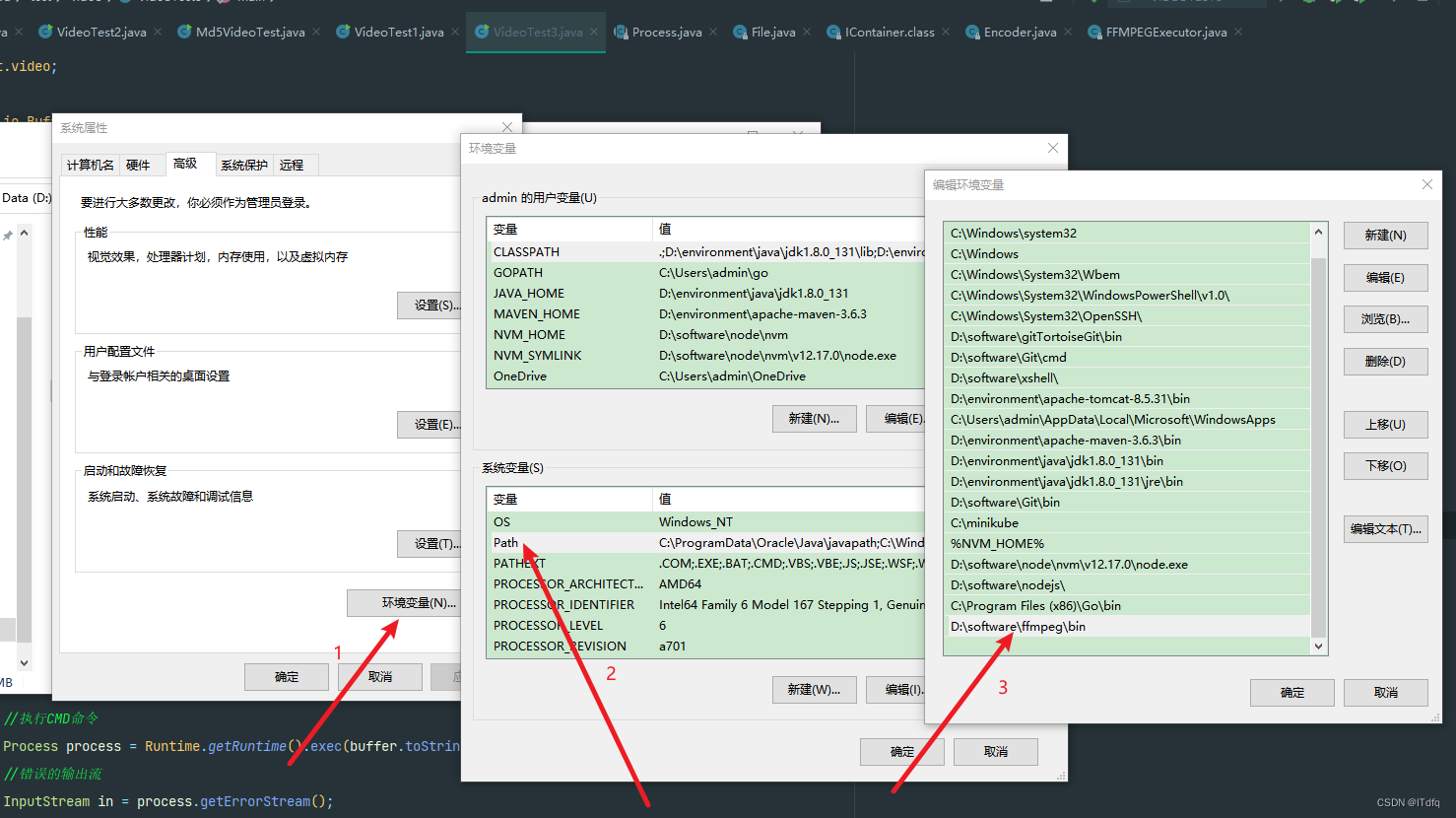
CMD命令行解析视频信息
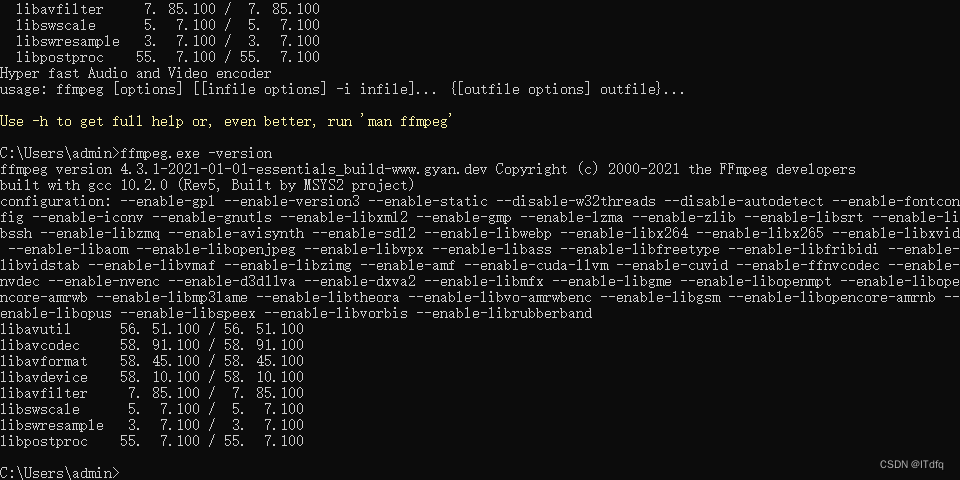
配置结束后,可以使用
ffmpeg.exe -version查看是否安装成功
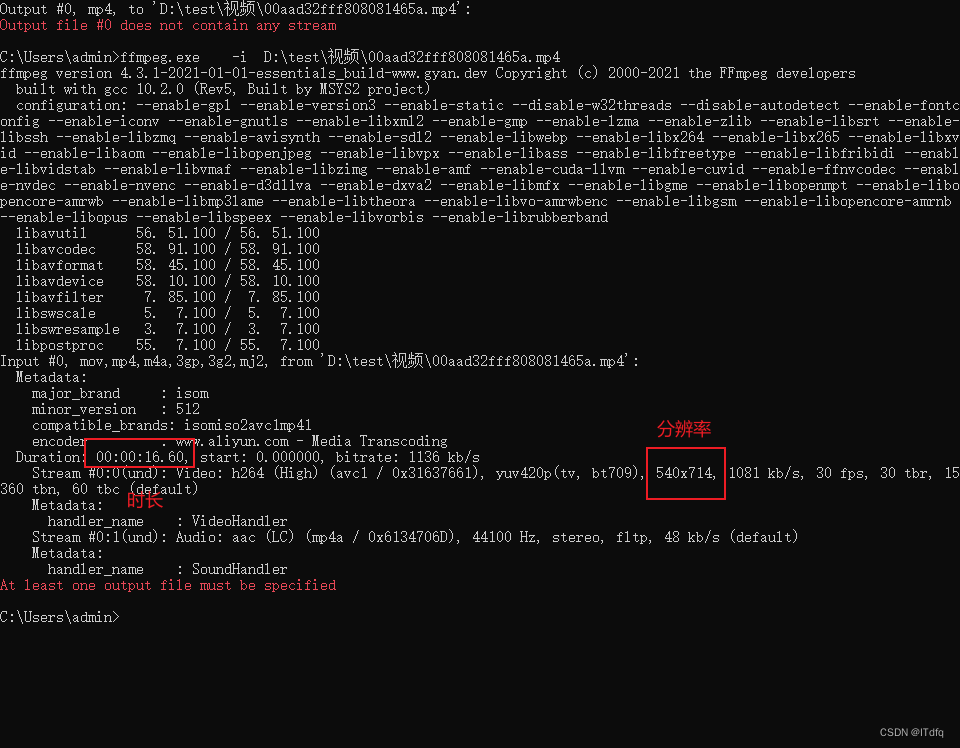
解析视频信息:ffmpeg.exe -i D:\test\视频\00aad32fff808081465a.mp4
Linux安装
具体安装步骤可以参考:https://cloud.tencent.com/developer/article/1711770
代码解析
/***    ffmepg工具地址*/
private  static final String FFMPEG_PATH =  "D:\\software\\ffmpeg\\bin\\ffmpeg.exe";public static VideoInfoResponse getVideoInfo2(String url, Integer id) throws BaseAppException {File file = getUrl(url);//Integer index = url.lastIndexOf("/");//String name = url.substring(index + 1);//String videoPath = "D:\\test\\视频\\" + name;//File file = new File(videoPath);long length = file.length();BigDecimal bigDecimal = BigDecimal.valueOf(length);//文件大小BigDecimal size = bigDecimal.divide(new BigDecimal(1048576), 4, RoundingMode.HALF_UP);//拼接cmd命令语句StringBuffer buffer = new StringBuffer();buffer.append(FFMPEG_PATH);//注意要保留单词之间有空格buffer.append(" -i ");buffer.append(file.getAbsolutePath());VideoInfoResponse response = new VideoInfoResponse();response.setId(id);response.setSize(size);//执行命令语句并返回执行结果try {//执行CMD命令Process process = Runtime.getRuntime().exec(buffer.toString());//错误的输出流InputStream in = process.getErrorStream();BufferedReader br = new BufferedReader(new InputStreamReader(in));String line;while ((line = br.readLine()) != null) {if (line.trim().startsWith("Duration:")) {//根据字符匹配进行切割String substring = line.trim().substring(0, line.trim().indexOf(","));//00:00:11.60String substring1 = substring.substring(substring.lastIndexOf(' ') + 1);String[] my = substring1.split(":");int hour = Integer.parseInt(my[0]);int min = Integer.parseInt(my[1]);double sec = Double.valueOf(my[2]);double zong = hour * 3600 + min * 60 + sec;response.setDuration((long) zong);}//一般包含fps的行就包含分辨率if (line.contains("fps")) {//解析 Stream #0:0(und): Video: h264 (High) (avc1 / 0x31637661), yuv420p(tv, bt709), 540x714, 1081 kb/s, 30 fps, 30 tbr, 15360 tbn, 60 tbc (default)int x = line.lastIndexOf('x');// 360x360String substring = line.substring(x - 4, x + 4);//去除所有的空格和逗号String s = substring.replaceAll(",", "");String s1 = s.replaceAll(" ", "");int x1 = s1.indexOf('x');Integer width = Integer.parseInt(s1.substring(0,x1));Integer height = Integer.parseInt(s1.substring(x1+1));response.setHeight(height);response.setWidth(width);log.info("id:"+id+" 宽:"+width+" 高:"+height+" 时长="+response.getDuration()+" 大小:"+size+"MB");}}response.setResult(true);return response;} catch (Exception e) {log.error("id:{}解析失败",id,e.getMessage(),e);VideoInfoResponse response1 = new VideoInfoResponse();response1.setId(id);response1.setResult(false);return response1;}
}public static File getUrl(String url) throws BaseAppException {try {Integer index = url.lastIndexOf("/");String name = url.substring(index + 1);URL urls = new URL(url);URLConnection connection = urls.openConnection();connection.setDoOutput(true);InputStream inputStream = connection.getInputStream();//时间戳+6位随机数//SimpleDateFormat sdf2 = new SimpleDateFormat("yyyyMMddhhmmssSSS");//String date2 = sdf2.format(new Date());//String random = String.valueOf((int) ((Math.random() * 9 + 1) * Math.pow(10,5)));String preName = "D:\\test\\视频2\\" + name;File file = new File(preName);try {FileOutputStream outputStream = FileUtils.openOutputStream(file);try {IOUtils.copy(inputStream, outputStream);outputStream.close();} finally {IOUtils.closeQuietly(outputStream);}} finally {IOUtils.closeQuietly(inputStream);} commons-io//FileUtils.copyInputStreamToFile(inputStream, file);return file;} catch (Exception e) {log.error("读取url文件异常,msg:{}", e.getMessage(), e);throw new BaseAppException(e.getMessage());}
}@Data
public static class VideoInfoResponse implements Serializable {Integer id;/*** 视频大小(单位MB 保留4为小数)*/private BigDecimal size;private Integer height;private Integer width;/*** 时长*/private Long duration;/*** true:通过校验*/private Boolean result;/*** 备注*/private String remark;}
执行结果:

本文来自互联网用户投稿,文章观点仅代表作者本人,不代表本站立场,不承担相关法律责任。如若转载,请注明出处。 如若内容造成侵权/违法违规/事实不符,请点击【内容举报】进行投诉反馈!