dropwizard中上传和下载文件
传输格式基础知识
MIME 类型
MIME (Multipurpose Internet Mail Extensions) 是描述消息内容类型的因特网标准。
MIME 消息能包含文本、图像、音频、视频以及其他应用程序专用的数据。
MINE类型详细列表:https://www.w3school.com.cn/media/media_mimeref.asp
multipart/form-data
我们在通过 HTTP 向服务器发送 POST 请求提交数据,都是通过 form 表单形式提交的,如下:
提交时会向服务器端发出这样的数据
POST /t2/upload.do HTTP/1.1
User-Agent: SOHUWapRebot
Accept-Language: zh-cn,zh;q=0.5
Accept-Charset: GBK,utf-8;q=0.7,*;q=0.7
Connection: keep-alive
Content-Length: 60408
Content-Type:multipart/form-data; boundary=ZnGpDtePMx0KrHh_G0X99Yef9r8JZsRJSXC
Host: w.sohu.com--ZnGpDtePMx0KrHh_G0X99Yef9r8JZsRJSXC
Content-Disposition: form-data; name="city"Santa colo
--ZnGpDtePMx0KrHh_G0X99Yef9r8JZsRJSXC
Content-Disposition: form-data;name="desc"
Content-Type: text/plain; charset=UTF-8
Content-Transfer-Encoding: 8bit...
--ZnGpDtePMx0KrHh_G0X99Yef9r8JZsRJSXC
Content-Disposition: form-data;name="pic"; filename="photo.jpg"
Content-Type: application/octet-stream
Content-Transfer-Encoding: binary... binary data of the jpg ...
--ZnGpDtePMx0KrHh_G0X99Yef9r8JZsRJSXC--- application/x-www-urlencoded
- multipart/form-data
- text-plain
默认情况下是 application/x-www-urlencoded,当表单使用 POST 请求时,数据会被以 x-www-urlencoded 方式编码到 Body 中来传送, 而如果 GET 请求,则是附在 url 链接后面来发送。GET 请求只支持 ASCII 字符集,因此,如果我们要发送更大字符集的内容,我们应使用 POST 请求。
如果要发送大量的二进制数据(non-ASCII),"application/x-www-form-urlencoded" 显然是低效的。因此,这种情况下,应该使用 "multipart/form-data" 格式。
参考:https://www.jianshu.com/p/29e38bcc8a1d
代码实现
依赖
org.glassfish.jersey.media jersey-media-multipart 2.33 commons-io commons-io 2.11.0 接口实现
package com.jsq.hibernate.resource;import com.google.common.collect.ImmutableMap;
import lombok.extern.slf4j.Slf4j;
import org.apache.commons.io.FileUtils;
import org.apache.commons.io.IOUtils;
import org.glassfish.jersey.media.multipart.FormDataContentDisposition;
import org.glassfish.jersey.media.multipart.FormDataParam;import javax.servlet.http.HttpServletRequest;
import javax.ws.rs.*;
import javax.ws.rs.core.Context;
import javax.ws.rs.core.MediaType;
import javax.ws.rs.core.Response;
import javax.ws.rs.core.StreamingOutput;
import java.io.*;
import java.util.Map;@Path("file")
@Slf4j
@Produces(MediaType.APPLICATION_JSON)
public class FileResource {@POST@Path("upload")@Consumes(MediaType.MULTIPART_FORM_DATA)public Response uploadFile(@Context HttpServletRequest request,@FormDataParam("file") InputStream inputStream,@FormDataParam("file") FormDataContentDisposition formDataContentDisposition) {log.info("start tp upload");Map parameters = formDataContentDisposition.getParameters();log.info("parameters is {}", parameters);String fileName = formDataContentDisposition.getFileName();String path = "D:";File file = new File(path + File.separator + fileName);try (FileOutputStream outputStream = FileUtils.openOutputStream(file);BufferedOutputStream bufferedOutputStream = new BufferedOutputStream(outputStream)) {IOUtils.copy(inputStream, bufferedOutputStream, 8192);return Response.ok().entity(ImmutableMap.of("code", 0, "message", "success")).build();} catch (IOException e) {return Response.ok().type(MediaType.APPLICATION_JSON).entity(ImmutableMap.of("code", 0, "message", e.getMessage())).build();}}@GET@Path("download")public Response downloadFile(@QueryParam("filename") String filename, @Context HttpServletRequest request) {Map parameterMap = request.getParameterMap();log.info("parameters of request is {}", parameterMap);String path = "D:";File file = new File(path + File.separator + filename);if (!file.exists()) {return Response.ok().entity(ImmutableMap.of("code", 1, "message", "file does not exist")).build();}return Response.ok().entity(file).header("Content-disposition", "attachment;filename=" + filename).header("Cache-Control", "no-cache").build();}@GET@Path("download/stream")public Response downloadStream(@QueryParam("filename") String filename, @Context HttpServletRequest request) throws IOException {Map parameterMap = request.getParameterMap();log.info("parameters of request is {}", parameterMap);String path = "D:";File file = new File(path + File.separator + filename);if (!file.exists()) {return Response.ok().entity(ImmutableMap.of("code", 1, "message", "file does not exist")).build();}return Response.ok().entity(new StreamingOutput() {@Overridepublic void write(OutputStream output) throws IOException, WebApplicationException {output.write(FileUtils.readFileToByteArray(file));}}).header("Content-disposition", "attachment;filename=" + filename).header("Cache-Control", "no-cache").build();}
}
上传文件
-
@Consumes(MediaType.MULTIPART_FORM_DATA),消费的是表单样式
-
@Produces(MediaType.APPLICATION_JSON),返回的响应是json样式
-
输入参数:@FormDataParam("file") InputStream inputStream,文件流
-
输入参数:@FormDataParam("file") FormDataContentDisposition formDataContentDisposition,文件相关信息
-
将输入的流转化为文件存于本地
-
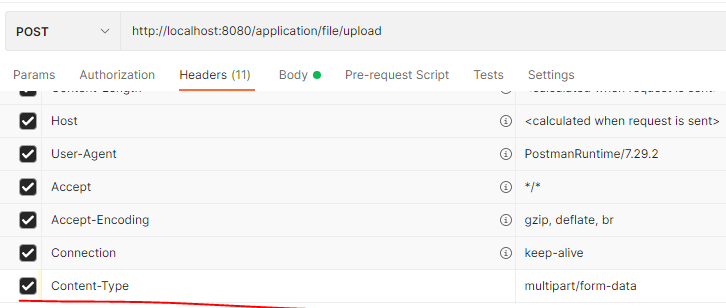
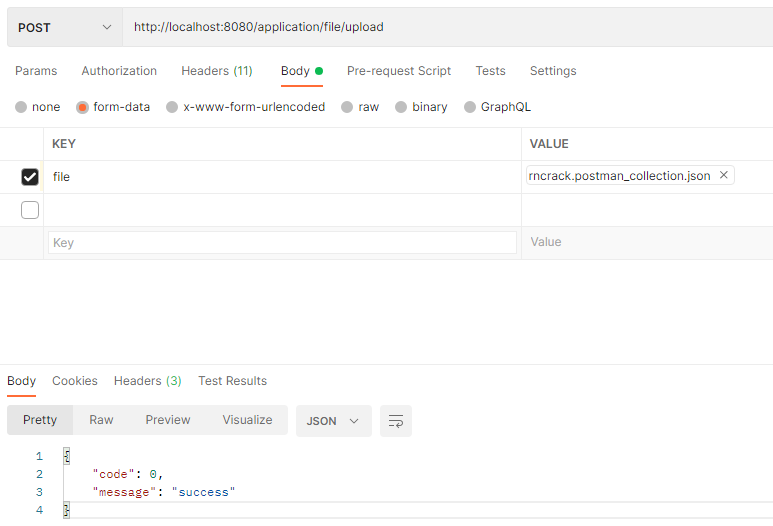
postman操作
下载文件
- 两种下载文件的方式:文件形式和流的形式
- 响应头中放入"Content-disposition", "attachment;filename=" + filename,**
Content-Disposition**响应标头是指示内容是否预期在浏览器中内联显示的标题,即,作为网页或作为网页的一部分或作为附件下载并且本地保存 - header中相关知识点见:https://cloud.tencent.com/developer/section/1189916
启动类
package com.jsq.hibernate;import com.jsq.hibernate.config.HelloWorldConfiguration;
import com.jsq.hibernate.resource.FileResource;
import io.dropwizard.Application;
import io.dropwizard.setup.Bootstrap;
import io.dropwizard.setup.Environment;
import org.glassfish.jersey.media.multipart.MultiPartFeature;import java.net.URL;public class HelloWorldApplication extends Application {public static void main(String[] args) throws Exception {URL yml = HelloWorldApplication.class.getClassLoader().getResource("server.yml");String configFile = yml.getFile();System.out.println(configFile);args = new String[]{"server", configFile};new HelloWorldApplication().run(args);}@Overridepublic void run(HelloWorldConfiguration helloWorldConfiguration, Environment environment) {environment.jersey().register(new MultiPartFeature());environment.jersey().register(new FileResource());}@Overridepublic String getName() {return "hello-world";}@Overridepublic void initialize(Bootstrap bootstrap) {      }
}
注:
- MultiPartFeature必须注册
- 注册Resource类
本文来自互联网用户投稿,文章观点仅代表作者本人,不代表本站立场,不承担相关法律责任。如若转载,请注明出处。 如若内容造成侵权/违法违规/事实不符,请点击【内容举报】进行投诉反馈!