< 纯前端实现「羊了个羊」小游戏 >

纯前端实现「羊了个羊」小游戏🐏
- 👉 背景
- 👉 游戏本体
- 👉 原理讲解
- > 地图模拟
- > 地图生成
- > 覆盖关系
- > 填充数据
- > 点击交互
- 往期内容 💨
👉 背景
最近简单的「羊了个羊」小游戏火到出圈,据说狂赚几百几千万。这么弱智的玩意,即便是前端,我上我也行!
最终成果
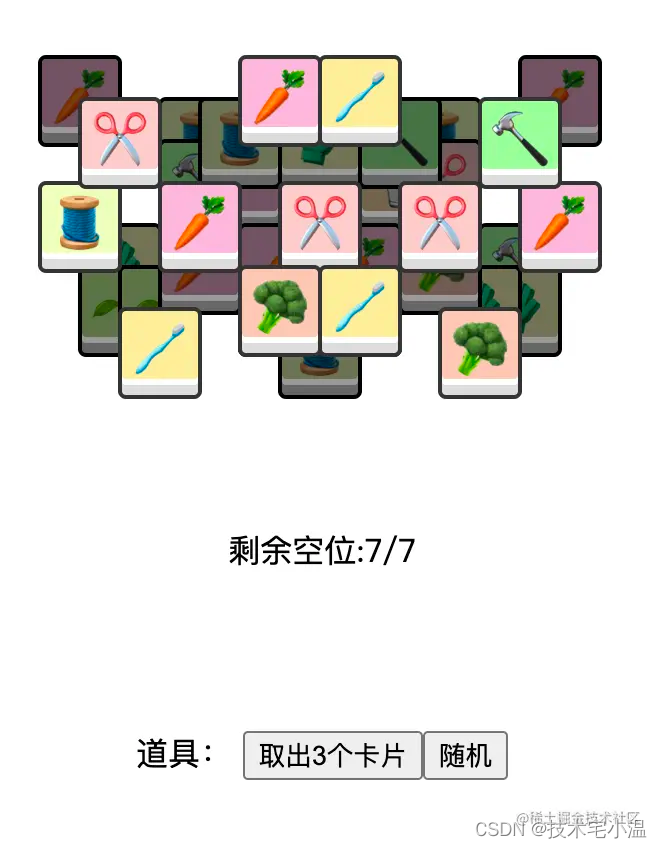 效果演示: 点击跳转
👉 游戏本体
<template><div v-if="step === 0" class="intro"><div>横向卡片最大平铺排数<inputv-model="option.x" min="2"max="10" type="range"> {{ option.x }}div><div>纵向卡片最大平铺排数<inputv-model="option.y" min="2"max="10" type="range"> {{ option.y }}div><div>卡片最大堆叠层数<inputv-model="option.z" min="2"max="10" type="range"> {{ option.z }}div><div>卡片密度<inputv-model="option.cardRandom" min="0"max="1" step="0.1"type="range">{{ option.cardRandom }}div><div>最大卡片种类<inputv-model="option.maxCardType" min="3"max="14" step="1"type="range">{{ option.maxCardType }}div><br><button @click="startGame">开始游戏button>div><div v-else-if="step === 2" class="intro"><h1>{{ result ? "You Win!🎉" : "You Lose!😢" }}h1><button @click="rePlay">再来一轮button><button @click="setGame">难度调节button>div><div v-else class="box"><div class="card-wrap" :style="cardWrapStyle"><divv-for="item in cardItemList":key="item.key":class="{'item-cover': item.cover}"class="card-item":style="item.style"@click="clickCard(item)">{{ item.content }}div><divv-for="item in penddingList":key="item.key"class="card-item":style="item.style">{{ item.content }}div><divv-for="item in clearList":key="item.key"class="card-item clear-item":style="item.style">{{ item.content }}div><divv-for="item in saveList":key="item.key"class="card-item":style="item.style"@click="clickSaveCard(item)">{{ item.content }}div><p class="card-tips">剩余空位:{{ 7 - penddingList.length }}/7;已消除:{{ clearList.length }}/{{cardItemList.length + penddingList.length + saveList.length + clearList.length}}p>div><div class="tools">道具:<button :disabled="!tools.save" @click="saveCard">取出3个卡片button><button :disabled="!tools.rand" @click="randCard">随机button><button @click="rePlay">再来一轮button>div>div>
template><script>
import Vue from 'vue';class CardItem {static x = 20;static y = 21;static colorType = {1: {background: '#FFB7DD'},2: {background: '#FFCCCC'},3: {background: '#FFC8B4'},4: {background: '#FFDDAA'},5: {background: '#FFEE99'},6: {background: '#FFFFBB'},7: {background: '#EEFFBB'},8: {background: '#CCFF99'},9: {background: '#99FF99'},10: {background: '#BBFFEE'},11: {background: '#AAFFEE'},12: {background: '#99FFFF'},13: {background: '#CCEEFF'},14: {background: '#CCDDFF'}};static contentType = {1: '🥕',2: '✂️',3: '🥦',4: '🥛',5: '🌊',6: '🧤',7: '🧵',8: '🌱',9: '🔨',10: '🌽',11: '🌾',12: '🐑',13: '🪵',14: '🔥'};constructor({x, y, z, key}) {this.x = x;this.y = y;this.z = z;this.key = key;const offset = z * 0;this.val = key;this.style = {top: y * CardItem.y + offset + 'px',left: x * CardItem.x + offset + 'px',width: CardItem.x * 2 - 2 + 'px',height: CardItem.y * 2 - 8 + 'px'};}setValue(val) {this.val = val;this.content = CardItem.contentType[val];Object.assign(this.style, CardItem.colorType[val]);}
}export default {data() {return {option: {x: 6,y: 4,z: 8,cardRandom: 0.2,maxCardType: 11},step: 0,win: false,cardMap: [],cardItemList: [],penddingList: [],clearList: [],saveList: [],calcValueList: [],maxWidth: 0,maxHeight: 0,tools: {save: true,rand: true},timer: 0};},computed: {cardWrapStyle() {return {width: (this.maxWidth + 2) * CardItem.x + 'px',height: (this.maxHeight + 1) * CardItem.y + 'px'};},leftOffset() {const wrapWidth = (this.maxWidth + 2) * CardItem.x;return (wrapWidth - 7 * CardItem.x * 2) / 2;}},methods: {randCard() {if (!this.tools.rand) {return;}this.tools.rand = false;const length = this.cardItemList.length;this.cardItemList.forEach(item => {const randNum = Math.floor(length * Math.random());const newItem = this.cardItemList[randNum];let temp;temp = item.style.left;item.style.left = newItem.style.left;newItem.style.left = temp;temp = item.style.top;item.style.top = newItem.style.top;newItem.style.top = temp;temp = item.x;item.x = newItem.x;newItem.x = temp;temp = item.y;item.y = newItem.y;newItem.y = temp;temp = item.z;item.z = newItem.z;newItem.z = temp;});this.cardItemList.sort((a, b) => a.z - b.z);this.calcCover();},saveCard() {if (!this.tools.save) {return false;}this.tools.save = false;this.saveList = this.penddingList.slice(0, 3);setTimeout(() => {this.saveList.forEach((item, index) => {item.style.top = '110%';item.style.left = this.leftOffset + index * CardItem.x * 2 + 'px';this.calcValueList[item.val]--;});}, 0);this.penddingList = this.penddingList.slice(3);this.penddingList.forEach((item, index) => {item.style.top = '160%';item.style.left = this.leftOffset + index * CardItem.x * 2 + 'px';});},initGame() {this.step = 1;this.getMap(this.option);this.penddingList = [];this.clearList = [];this.saveList = [];this.tools.save = true;this.tools.rand = true;this.setCardValue({maxCardType: Number(this.option.maxCardType)});this.calcCover();},// 表示地图最大为 x * y 张牌,最多有 z 层getMap({x, y, z, cardRandom} = {}) {this.maxWidth = (x - 1) * 2;this.maxHeight = (y - 1) * 2 + 1;const cardMap = new Array(z);const cardItemList = [];let key = 0;// 地图初始化for (let k = 0; k < z; k++) {cardMap[k] = new Array(this.maxHeight);for (let i = 0; i <= this.maxHeight; i++) {cardMap[k][i] = new Array(this.maxWidth).fill(0);}}for (let k = 0; k < z; k++) {const shrink = Math.floor((z - k) / 3);// 行for (let i = shrink; i < this.maxHeight - shrink; i++) {// 列,对称设置const mid = Math.ceil((this.maxWidth - shrink) / 2);for (let j = shrink; j <= mid; j++) {let canSetCard = true;if (j > 0 && cardMap[k][i][j - 1]) {// 左边不能有牌canSetCard = false;}else if (i > 0 && cardMap[k][i - 1][j]) {// 上边不能有牌canSetCard = false;}else if (i > 0 && j > 0 && cardMap[k][i - 1][j - 1]) {// 左上不能有牌canSetCard = false;}else if (i > 0 && cardMap[k][i - 1][j + 1]) {// 右上不能有牌canSetCard = false;}else if (k > 0 && cardMap[k - 1][i][j]) {// 正底不能有牌canSetCard = false;}else if (Math.random() >= cardRandom) {canSetCard = false;}if (canSetCard) {key++;const cardItem = new CardItem({x: j, y: i, z: k, key});cardMap[k][i][j] = cardItem;cardItemList.push(cardItem);// 对称放置if (j < mid) {key++;const cardItem = new CardItem({x: this.maxWidth - j,y: i,z: k,key});cardMap[k][i][j] = cardItem;cardItemList.push(cardItem);}}}}}cardItemList.reverse();for (let i = 1; i <= key % 3; i++) {const clearItem = cardItemList.pop();cardMap[clearItem.z][clearItem.y][clearItem.x] = 0;}cardItemList.reverse();this.cardMap = cardMap;this.cardItemList = cardItemList;},setCardValue({maxCardType} = {}) {// 卡片种类const valStack = new Array(maxCardType);this.calcValueList = new Array(maxCardType + 1).fill(0);// 给卡片设置值this.cardItemList.forEach(item => {const value = Math.ceil(Math.random() * maxCardType);if (valStack[value]) {valStack[value].push(item);if (valStack[value].length === 3) {valStack[value].forEach(item => {item.setValue(value);});valStack[value] = null;}}else {valStack[value] = [item];}});let count = 2;// console.log(valStack)valStack.forEach(list => {list&& list.forEach(item => {count++;item.setValue(Math.floor(count / 3));});});},// 计算遮挡关系calcCover() {// 构建一个遮挡 mapconst coverMap = new Array(this.maxHeight);for (let i = 0; i <= this.maxHeight; i++) {coverMap[i] = new Array(this.maxWidth).fill(false);}// 从后往前,后面的层数高for (let i = this.cardItemList.length - 1; i >= 0; i--) {const item = this.cardItemList[i];const {x, y, z} = item;if (coverMap[y][x]) {item.cover = true;}else if (coverMap[y][x + 1]) {item.cover = true;}else if (coverMap[y + 1][x]) {item.cover = true;}else if (coverMap[y + 1][x + 1]) {item.cover = true;}else {item.cover = false;}coverMap[y][x] = true;coverMap[y + 1][x] = true;coverMap[y][x + 1] = true;coverMap[y + 1][x + 1] = true;}},clickSaveCard(item) {this.cardItemList.push(item);const index = this.saveList.indexOf(item);this.saveList = this.saveList.slice(0, index).concat(this.saveList.slice(index + 1));this.clickCard(item);},removeThree() {this.penddingList.some(item => {if (this.calcValueList[item.val] === 3) {this.penddingList.forEach(newItem => {if (newItem.val === item.val) {this.clearList.push(newItem);}});setTimeout(() => {this.clearList.forEach((item, index) => {item.style.left = this.leftOffset - 60 + 'px';});}, 300);this.penddingList = this.penddingList.filter(newItem => {return newItem.val !== item.val;});this.penddingList.forEach((item, index) => {item.style.top = '160%';item.style.left = this.leftOffset + index * CardItem.x * 2 + 'px';});this.calcValueList[item.val] = 0;if (this.cardItemList.length === 0) {this.step = 2;this.result = true;}}});if (this.penddingList.length >= 7) {this.step = 2;this.result = false;}},// 点击卡片clickCard(item) {clearTimeout(this.timer);this.removeThree();this.penddingList.push(item);const index = this.cardItemList.indexOf(item);this.cardItemList = this.cardItemList.slice(0, index).concat(this.cardItemList.slice(index + 1));this.calcCover();this.calcValueList[item.val]++;setTimeout(() => {item.style.top = '160%';item.style.left= this.leftOffset + (this.penddingList.length - 1) * CardItem.x * 2 + 'px';}, 0);this.timer = setTimeout(() => {this.removeThree();}, 500);},// 开始startGame() {this.initGame();},// 设置setGame() {this.step = 0;},// 重来rePlay() {this.initGame();}}
};
script><style>
.box {position: relative;
}
.intro {margin: 10% auto 0 auto;text-align: center;
}.card-wrap {position: relative;margin: 10% auto 0 auto;
}.card-item {font-size: 28px;text-align: center;position: absolute;border-radius: 2px;box-sizing: border-box;background: #ddd;opacity: 1;cursor: pointer;transition: all 0.3s;box-shadow: 0px 3px 0 0 #fff, 0 8px 0 0 #ddd, 0 8px 0 2px #333, 0 0 0 2px #333;
}.card-item:hover {transform: scale3d(1.1, 1.1, 1.1);z-index: 1;
}.item-cover {pointer-events: none;box-shadow: 0px 3px 0 0 #999, 0 8px 0 0 #666, 0 8px 0 2px #000, 0 0 0 2px #000;
}.item-cover:after {border-radius: 2px;content: "";position: absolute;width: 100%;height: 100%;left: 0;top: 0;background: #000;opacity: 0.55;
}.card-tips {white-space: nowrap;position: absolute;left: 50%;top: 130%;transform: translate(-50%, 0);pointer-events: none;
}.tools {position: absolute;top: 200%;width: 100%;left: 0;text-align: center;
}
.clear-item {pointer-events: none;
}
style>
👉 原理讲解
> 地图模拟
游戏本体长这样
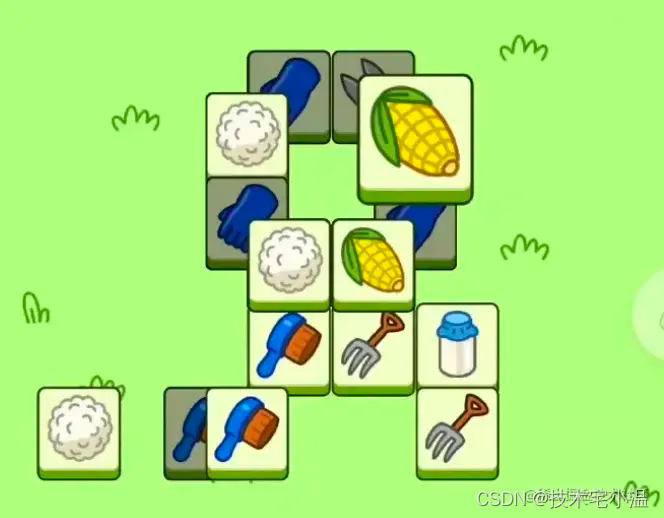
可以很明显的观察到,卡片是以 1/4 为单位排列的
- 单层
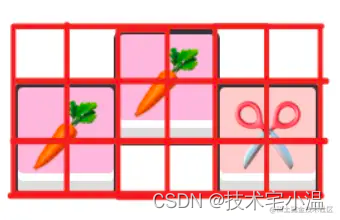
假设有这种布局,模拟成二维数组应该如下表示,每个格子就是一个数字元素
// 通过0/1代表是否占用格子
[[0, 0, 1, 0, 0, 0],[1, 0, 0, 0, 1, 0],[0, 0, 0, 0, 0, 0],
]
- 多层
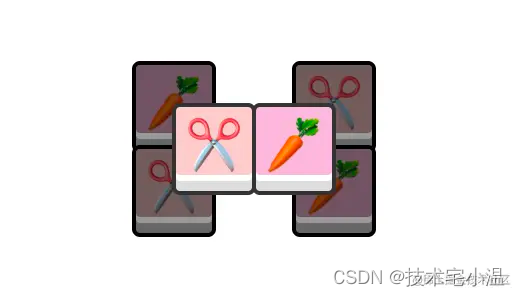
[// 第1层[[1, 0, 0, 0, 1, 0],[0, 0, 0, 0, 0, 0],[1, 0, 0, 0, 1, 0],[0, 0, 0, 0, 0, 0],],// 第2层[[0, 0, 0, 0, 0, 0],[0, 1, 0, 1, 0, 0],[0, 0, 0, 0, 0, 0],[0, 0, 0, 0, 0, 0],],
]
> 地图生成
- 基础生成:
最基础的地图只关乎当前层,假设当前需要判定是否放置卡片的坐标为 [i, j],那么下面四个位置就不能存在卡片,否则就会出现同层卡片重叠
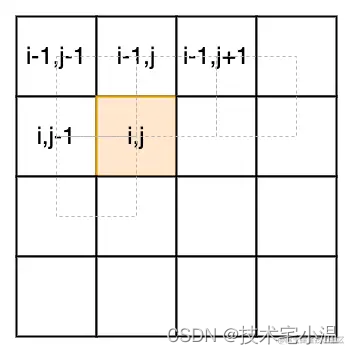
// 一个图片占据四格,通过下标去索引上层数组有无未消除的内容。[i-1,j] != 1[i,j-1] != 1[i-1, j-1] ! = 1[i-1, j+1] ! = 1
同时我们加入一个随机系数,保证每次生成的地图不同
Math.random() < 0.3 === true 的时候该位置才放置卡片
- 优化地图:
以一层为例,按上面的逻辑只能生成最简单的地图,实际我们观察游戏,会发现卡片的放置是有一定规律的:
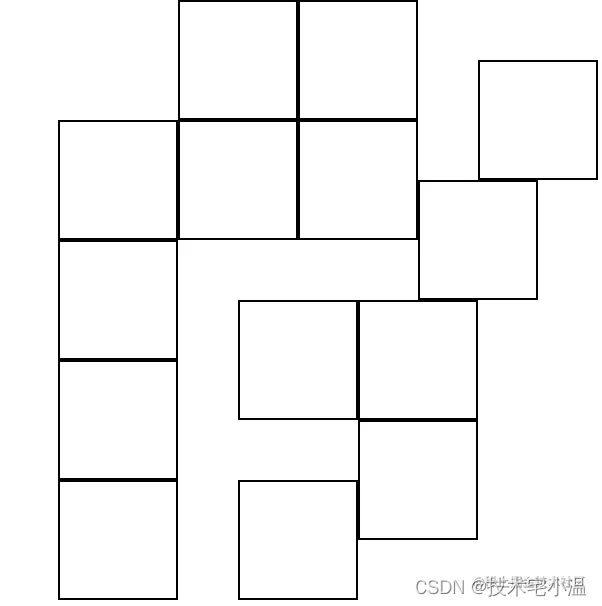
- 左右对称
- 从顶层到底层越来越往中心聚集,卡片越来越少
- 上一层不会完全覆盖下一层
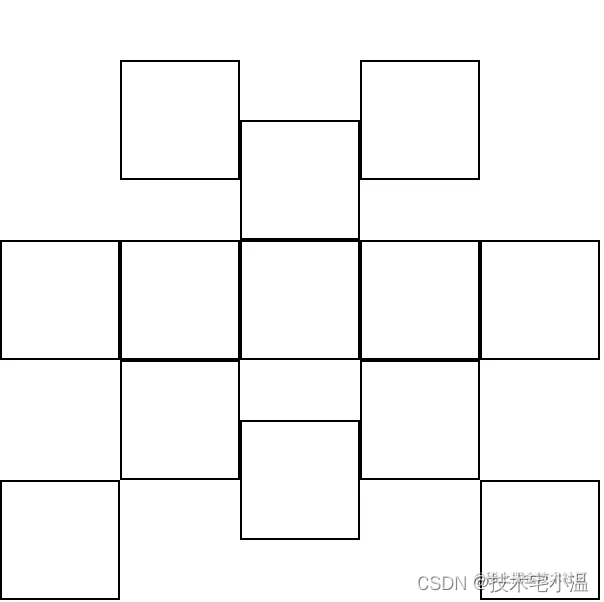
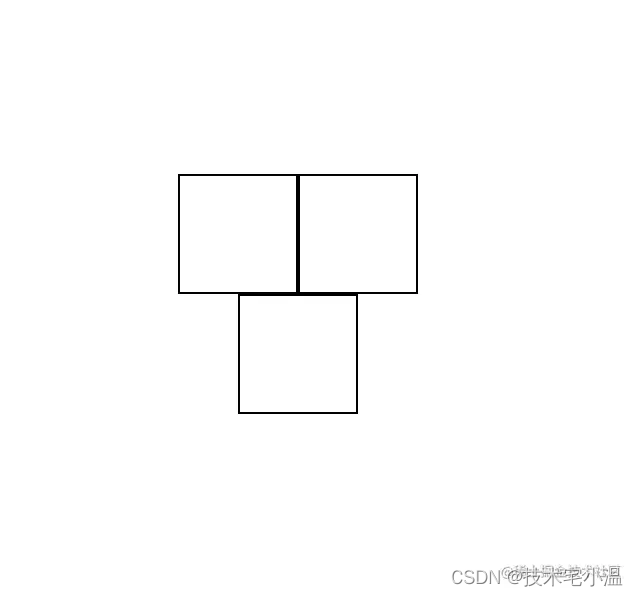
加上这两点优化之后,地图应该如下展示:
顶层
底层
- 卡片渲染
每次位置和随机数判定合格,我们应该实际放置一张卡片,一个实际的 dom。然后根据卡片的 x、y、z、宽高 值设置实际位置
const style = {position: "absolute",top: (y * CardItem.height) / 2 + offset + "px",left: (x * CardItem.width) / 2 + offset + "px",width: CardItem.width + "px",height: CardItem.height + "px",
}
> 覆盖关系
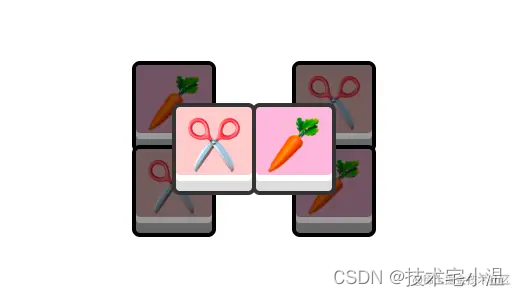
我们可以先按一层的大小初始化一个处理遮挡用的二维数组 coverMap,然后在之前生成的游戏地图上,从最后一层往第一层遍历。
[// 第1层[[1, 0, 0, 0, 1, 0],[0, 0, 0, 0, 0, 0],[1, 0, 0, 0, 1, 0],[0, 0, 0, 0, 0, 0],],// 第2层[[0, 0, 0, 0, 0, 0],[0, 1, 0, 1, 0, 0],[0, 0, 0, 0, 0, 0],[0, 0, 0, 0, 0, 0],],
]
先遍历第二层,发现 [1,1] 位置有卡片(由于是最上层可以先不考虑本身被遮挡的情况)所以我们把 coverMap 的对应 4 个坐标置为 1,第 [1,4] 位置的卡片也一样处理。
处理完顶层之后的 coverMap 结果如下
const coverMap = [[0, 0, 0, 0, 0, 0],[0, 1, 1, 1, 1, 0],[0, 1, 1, 1, 1, 0],[0, 0, 0, 0, 0, 0],
]
第二次(底层)遍历到 [0,0] 位置发现有卡片,并且实际会占据:
[0,0]
[0,1]
[1,0]
[1,1]
而其中 [1,1] 位置,是被遮挡的,所以这张卡片也应该被判定成遮挡状态。依次处理完这一层所有卡片,同时遮挡数组更新
const coverMap = [[1, 1, 0, 0, 1, 1],[1, 1, 1, 1, 1, 1],[1, 1, 1, 1, 1, 1],[1, 1, 0, 0, 1, 1],
]
> 填充数据
整改游戏的核心逻辑是 pending 区域存在 3 个同样图案的卡片时会消除。所以我们有两个关键点要注意
- 保证卡片是
3的倍数(三张一消)
之前都是用 0、1 代指卡片,实际之前设置卡片的时候,我们可以新建 CardItem 类的实例,每个卡片实例会记录自己的位置、样式、是否被覆盖等状况。并且我们可以用一个 cardList 数组保存下这些实例
并且在地图生成完之后,根据数组数量除 3 的余数,从前开始删除对应数量的卡片
可以想想为什么不从后面删~
- 填充卡片类型
我们需要随机的把指定种类的卡片类型,以 3 的倍数填充到现有卡片中去
随机
创建一个新数组,并且随机交换顺序即可
const tempList = [...this.cardList];
const listLength = tempList.length;
for (let i = 0; i < listLength; i++) {const j = Math.ceil(Math.random() * listLength);const tempItem = tempList[i];tempList[i] = tempList[j];tempList[j] = tempItem;
}
填充
假设有 cardType 种类型的卡片,那么按 3 张重复填充即可
for (let i = 0; i < listLength; i++) {const item = tempList[i];item.setVal(Math.floor(i / 3) % this.cardType);
}
> 点击交互
- 是否可以点击
只有顶层可以被点击,我们之前已经判定过卡片是否被覆盖的逻辑,做对应处理即可。一个简单的方法是给被覆盖的卡片设置一个特殊 style(禁止点击)
.covered-item {pointer-event: none;
}
这样对应卡片上的任何事件都不会生效
- 点击卡片
点击到最上层的卡片之后,我们按如下步骤处理:
-
把点击到的卡片实例 push 到暂存数组 pendingList 中
-
把卡片实例从 cardMap、cardList 中去除
-
pendingList 遍历
-
如果 pendingList 中存在 3 张相同的卡片,则消除这 3 张卡片
-
如果不存在,且pendingList 中卡片数为 7,游戏结束 。本局失败
-
如果 cardList 中的卡片数量为 0,游戏结束。本局成功
总结
到这一步,整个游戏的基础框架就已经搭建好了。剩下的难点还有
道具的实现
- 暂存道具
- 随机道具
- 撤销道具
动效的实现
- 从排堆进入 pendding 区域
- 从 pendding 区域进入暂存区
- 使用随机道具时候的动画
- 集齐 3 个卡片时候的消除动画
样式美化
这些基本属于锦上添花了,感兴趣的同学可以自行探索一下。我提供的实时代码里基本已经实现了大部分
作者:QCY
链接:https://juejin.cn/post/7143897892531486727
往期内容 💨
🔥 < 今日份知识点: 浅述对函数式编程的理解 及其 优缺点 >
🔥 < 每日知识点:关于Javascript 精进小妙招 ( Js技巧 ) >
🔥 < 今日份知识点:谈谈内存泄漏 及 在 Javascript 中 针对内存泄漏的垃圾回收机制 >
🔥 < 今日份知识点:浅述对 “ Vue 插槽 (slot) ” 的理解 以及 插槽的应用场景 >
本文来自互联网用户投稿,文章观点仅代表作者本人,不代表本站立场,不承担相关法律责任。如若转载,请注明出处。 如若内容造成侵权/违法违规/事实不符,请点击【内容举报】进行投诉反馈!