OA实战项目
OA项目(12天)
一,什么是OA(办公自动化)
辅助管理,提高办公效率的系统。
二,OA中有些什么功能?
文字处理,电子邮件之类......
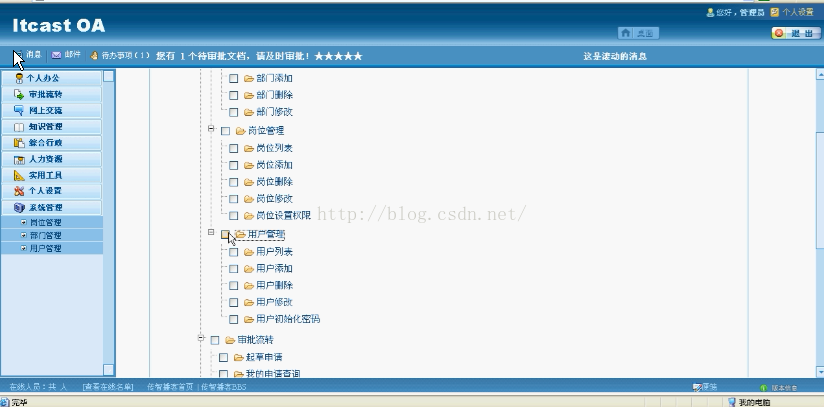
三,项目大概效果图:
-------------------------------------------------------------------------------------------------------------------------------------------------------------------
一,软件开发的步骤:
1,需要分析
2,分析设计
3,实现编码
4,测试项目
5,部署维护
二,每个步骤都要做些什么?谁来做?
设计,编码,部署
三,我们要做什么?
设计,编码,部署
-------------------------------------------------------------------------------------------------------------------------------------------------------------
一,分层:3层(View,service,Dao)
View----------->servlet
service-------->接口/实现类
Dao------------->接口/实现类
耦合------>解耦
二,所用技术
struts2+hibernate+spring+jbpm+junit+jQuery+...
三,开发环境
Linux/windows+Tomcat+Eclipse/myeclipse+mysql/oracle+IE
四,代码规范
代码格式化(ctrl+shift+f)
注释
命名规范:驼峰命名法------>
*命名:
类,接口:第一个单词的首字母小写,其他单词的首字母都大写。
变量,方法:第一个单词首字母小写,其他单词的首字母都大写。
常量:全部字母都大写,单词之间使用'_'隔开
* 使用有意义的名称,慎用缩写
五,一些约定
工程中所有的文件都采用utf-8编码
id:long
六,项目计划
共12天四个模块
搭建环境和基本功能 系统管理2天,权限2天,论坛3天,工作流2天,审批流转2天
--------------------------------------------------------------------------------------------------------------------------------------------------------------------------------------
搭建环境
一,数据库(mysql密码:123)
mysql> create database itcastoa0728 default character set utf8;
Query OK, 1 row affected (0.25 sec)mysql> show create database itcastoa0728;
+--------------+----------------------------------------------------------------
-------+
| Database     | Create Database|
+--------------+----------------------------------------------------------------
-------+
| itcastoa0728 | CREATE DATABASE `itcastoa0728` /*!40100 DEFAULT CHARACTER SET u
tf8 */ |
+--------------+----------------------------------------------------------------
-------+
1 row in set (0.05 sec)
二,myeclipse工程
1,新建web工程,并把编码设为utf-8;
2,添加框架环境
junit
struts2
hibernate
spring
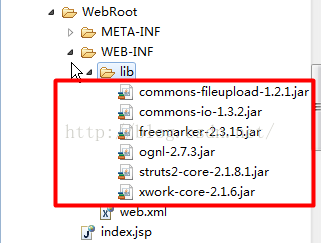
补: struts2:jar包:
struts2.xml:
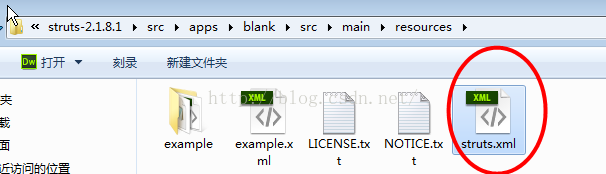
代码如下:
web.xml:
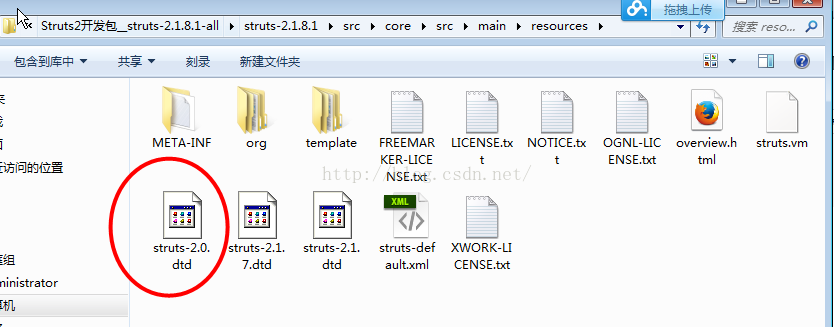
struts2 org.apache.struts2.dispatcher.ng.filter.StrutsPrepareAndExecuteFilter struts2 /* index.jsp struts提示dtd:
Hibernate:
org.hibernate.dialect.MySQLDialect com.mysql.jdbc.Driver jdbc:mysql://localhost:3306/hibernate2 root 123 true update spring:
jar包
application.xml/beans.xml ,
3,整合ssH
stuts2与spring整合
4,资源分类
5,配置日志
日志相关知识:
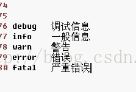
-------------------------------------------------------------------------------------------------------------------------------------------------------------------------------------------
基本功能
BaseDao
save(),update(),delete(),dind()
User,userDao
save(),update(),delete(),dind()
Role,RoleDao
save(),update(),delete(),dind()
Student,StudentDao
save(),update(),delete(),dind()
-----------------------------------------------------------------------------------------------------------------------------------------------------------------------------------------------
岗位管理:
1,设计实体/表
设计实体------>javaBean----->hbm.xml------->建表
1)设计实体:
package cn.itcast.oa.domain;/*** 岗位* @author Administrator**/
public class Role {private Long id;private String name;private String description;public Long getId() {return id;}public void setId(Long id) {this.id = id;}public String getName() {return name;}public void setName(String name) {this.name = name;}public String getDescription() {return description;}public void setDescription(String description) {this.description = description;}
}
2),将Role.cfg.xml加入hibernate.cfg.xml中实现自动创建表:
2,分析有几个功能,对应几个请求。
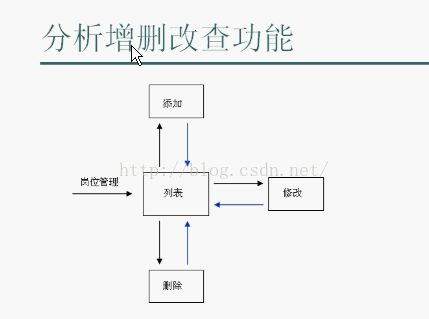
3,实现功能:
(1)写Action 类和Action方法,确定Service中的方法
(2)写Service方法,确定Dao中的方法
(3) 写DAO,
(4)写jsp页面
-------------------------------------------------------------------------------------------------------------------------
转发和重定义的区别:
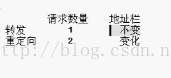
增删改查共4个功能,需要6个请求。
所以需要相应的6个Action方法,每个Action方法处理一种请求。
作用: -----------------------------------------------------------------------------------------------------------------------------------------------------------------------------------------
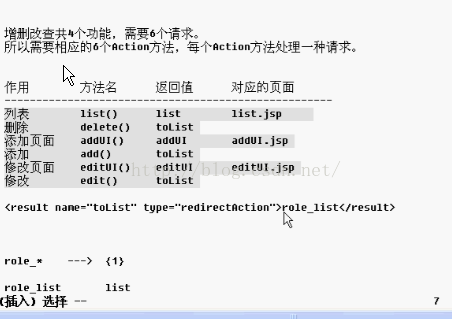
增删改查模板:
/** 列表 */public String list() throws Exception {return "list";}/** 删除 */public String delete() throws Exception {return "toList";}/** 添加页面 */public String addUI() throws Exception {return "saveUI";}/** 添加 */public String add() throws Exception {return "toList";}/** 修改页面 */public String editUI() throws Exception {return "saveUI";}/**修改 */public String edit() throws Exception {return "toList";}设计实体流程:
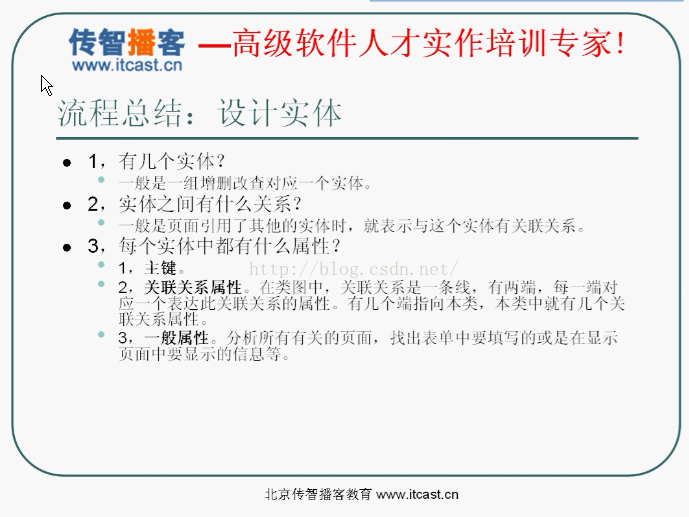
设计思路:
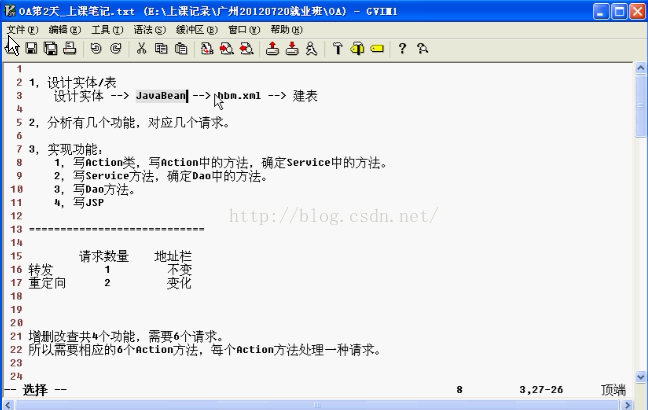
映射文件里的关联关系模板:
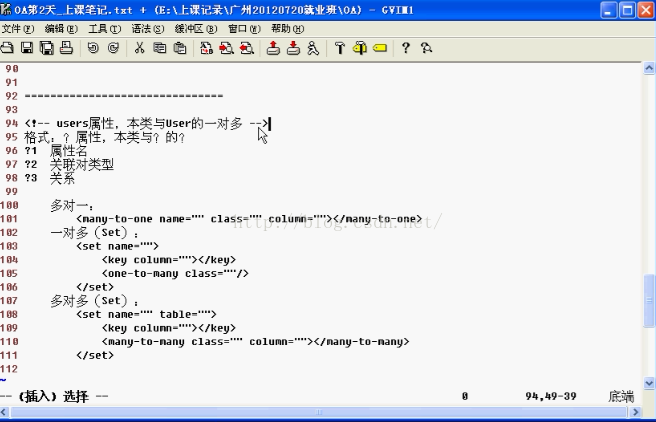
具体的映射文件的写法:
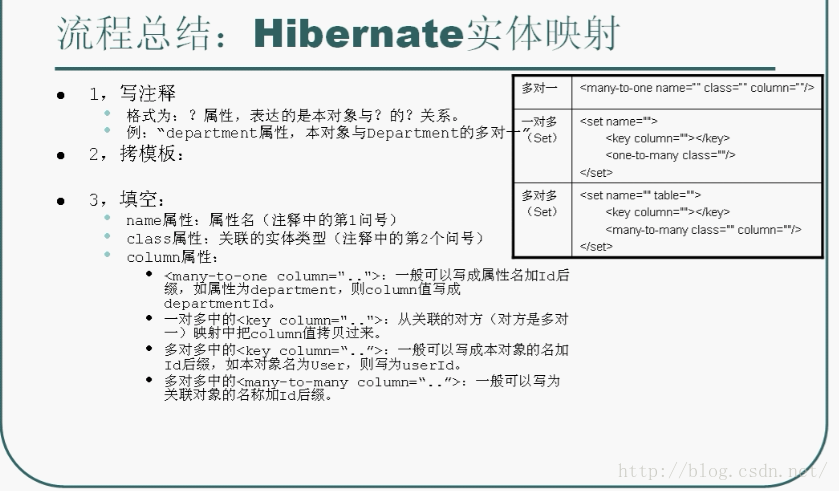
部门管理设计思路:
部门管理:
1,基本的增删改查;
2,增删改查中对于“上级部门”的处理;
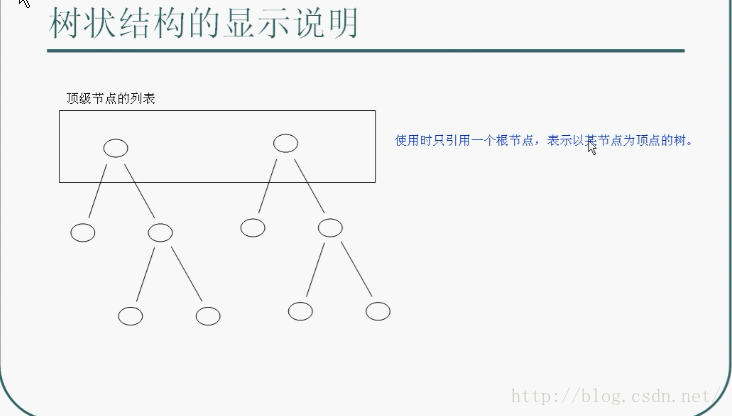
3,处理部门的树状结构显示;
用于解决懒加载问题的过滤技术:
OpenSessionInViewFilter org.springframework.orm.hibernate3.support.OpenSessionInViewFilter OpenSessionInViewFilter *.action 树状结构的显示:
树状结构的表示练习:
package cn.itcast.oa.test;import java.util.ArrayList;
import java.util.Collection;
import java.util.LinkedHashSet;
import java.util.List;
import java.util.Set;import org.junit.Test;import cn.itcast.oa.domain.Department;/*** 说明:不能使用多层循环的方式,因为需要能支持任意层。*/
public class TreeViewPractice {/*** 练习一:打印所有顶层部门及其子孙部门的信息(名称) 提示:假设有一个 打印部门树 的信息 的方法* * 要求打印如下效果:* * * 市场部* 宣传部* 业务部* 业务一部* 业务二部* 开发部* 开发一部* 开发二部* */@Testpublic void printAllDepts_1() {List topList = findTopLevelDepartmentList();// // 方式一// for (Department top : topList) {// showTree(top);// }// 方式二showTreeList(topList);}/*** 显示一颗部门树中所有节点的信息* * @param top*            树的顶点(根节点)*/private void showTree(Department top) {// 顶点System.out.println(top.getName());// 子树for (Department child : top.getChildren()) {showTree(child);}}/*** 显示多颗树的所有节点的信息* * @param topList*/private void showTreeList(Collection topList) {for (Department top : topList) {// 顶点System.out.println(top.getName());// 子树showTreeList(top.getChildren());}}/*** 练习二:打印所有顶层部门及其子孙部门的信息(名称),用不同的缩进表示层次(使用全角空格)。
* 子部门的名称前比上级部门多一个空格,最顶层部门的名字前没有空格。 提示:假设有一个打印部门集合中所有部门信息的方法* * 要求打印如下效果:* * * ┣市场部*    ┣宣传部*    ┣业务部*       ┣业务一部*       ┣业务二部* ┣开发部*    ┣开发一部*    ┣开发二部* */@Testpublic void printAllDepts_2() {List topList = findTopLevelDepartmentList();showTreeList_2(topList, "┣");}// 显示树private void showTreeList_2(Collection topList, String prefix) {for (Department top : topList) {// 顶点System.out.println(prefix + top.getName());// 子树showTreeList_2(top.getChildren(), "    " + prefix);}}/*** 结构如下:* * * ┣市场部*    ┣宣传部*    ┣业务部*       ┣业务一部*       ┣业务二部* ┣开发部*    ┣开发一部*    ┣开发二部* * * @return 所有最顶层的部门的列表*/public static List findTopLevelDepartmentList() {Department dept_1_1 = new Department();dept_1_1.setId(new Long(11));dept_1_1.setName("宣传部");Department dept_1_2 = new Department();dept_1_2.setId(new Long(12));dept_1_2.setName("业务部");Department dept_1_2_1 = new Department();dept_1_2_1.setId(new Long(121));dept_1_2_1.setName("业务一部");Department dept_1_2_2 = new Department();dept_1_2_2.setId(new Long(122));dept_1_2_2.setName("业务二部");dept_1_2_1.setParent(dept_1_2);dept_1_2_2.setParent(dept_1_2);Set children_0 = new LinkedHashSet();children_0.add(dept_1_2_1);children_0.add(dept_1_2_2);dept_1_2.setChildren(children_0);// ================================Department dept_1 = new Department();dept_1.setId(new Long(1));dept_1.setName("市场部");dept_1_1.setParent(dept_1);dept_1_2.setParent(dept_1);Set children_1 = new LinkedHashSet();children_1.add(dept_1_1);children_1.add(dept_1_2);dept_1.setChildren(children_1);// ---Department dept_2_1 = new Department();dept_2_1.setId(new Long(21));dept_2_1.setName("开发一部");Department dept_2_2 = new Department();dept_2_2.setId((new Long(22)));dept_2_2.setName("开发二部");Department dept_2 = new Department();dept_2.setId(new Long(2));dept_2.setName("开发部");dept_2_1.setParent(dept_2);dept_2_2.setParent(dept_2);Set children_2 = new LinkedHashSet();children_2.add(dept_2_1);children_2.add(dept_2_2);dept_2.setChildren(children_2);// ---List depts = new ArrayList();depts.add(dept_1);depts.add(dept_2);return depts;}}
注意:session是一级缓存,sessionFactoy是二级缓存。
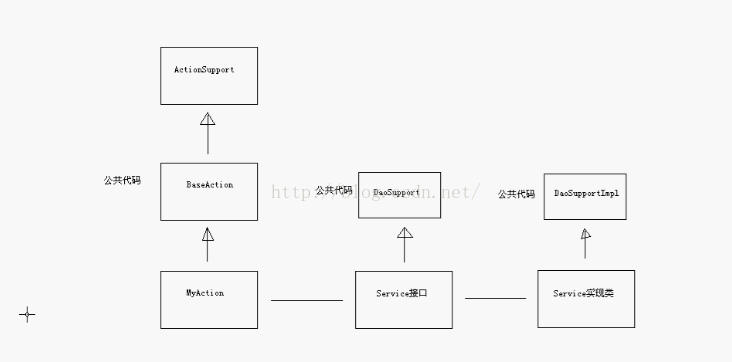
代码优化理解:
用户管理:
UserAction的写法:
package cn.itcast.oa.view.action;import java.util.HashSet;
import java.util.List;import org.apache.commons.codec.digest.DigestUtils;
import org.springframework.context.annotation.Scope;
import org.springframework.stereotype.Controller;
import cn.itcast.oa.base.BaseAction;
import cn.itcast.oa.domain.Department;
import cn.itcast.oa.domain.Role;
import cn.itcast.oa.domain.User;
import cn.itcast.oa.util.DepartmentUtils;
import com.opensymphony.xwork2.ActionContext;@Controller
@Scope("prototype")
public class UserAction extends BaseAction {private Long departmentId;private Long[] roleIds;/** 列表 */public String list() throws Exception {List userList = userService.findAll();ActionContext.getContext().put("userList", userList);return "list";}/** 删除 */public String delete() throws Exception {userService.delete(model.getId());return "toList";}/** 添加页面 */public String addUI() throws Exception {// 准备数据, departmentListList topList = departmentService.findTopList();List departmentList = DepartmentUtils.getAllDepartments(topList);ActionContext.getContext().put("departmentList", departmentList);// 准备数据, roleListList roleList = roleService.findAll();ActionContext.getContext().put("roleList", roleList);return "saveUI";}/** 添加 */public String add() throws Exception {// 封装到对象中(当model是实体类型时,也可以使用model,但要设置未封装的属性)// >> 设置所属部门model.setDepartment(departmentService.getById(departmentId));// >> 设置关联的岗位List roleList = roleService.getByIds(roleIds);model.setRoles(new HashSet(roleList));// >> 设置默认密码为1234(要使用MD5摘要)String md5Digest = DigestUtils.md5Hex("1234");model.setPassword(md5Digest);// 保存到数据库userService.save(model);return "toList";}/** 修改页面 */public String editUI() throws Exception {// 准备数据, departmentListList topList = departmentService.findTopList();List departmentList = DepartmentUtils.getAllDepartments(topList);ActionContext.getContext().put("departmentList", departmentList);// 准备数据, roleListList roleList = roleService.findAll();ActionContext.getContext().put("roleList", roleList);// 准备回显的数据User user = userService.getById(model.getId());ActionContext.getContext().getValueStack().push(user);if (user.getDepartment() != null) {departmentId = user.getDepartment().getId();}if (user.getRoles() != null) {roleIds = new Long[user.getRoles().size()];int index = 0;for (Role role : user.getRoles()) {roleIds[index++] = role.getId();}}return "saveUI";}/** 修改 */public String edit() throws Exception {// 1,从数据库中取出原对象User user = userService.getById(model.getId());// 2,设置要修改的属性user.setLoginName(model.getLoginName());user.setName(model.getName());user.setGender(model.getGender());user.setPhoneNumber(model.getPhoneNumber());user.setEmail(model.getEmail());user.setDescription(model.getDescription());// >> 设置所属部门user.setDepartment(departmentService.getById(departmentId));// >> 设置关联的岗位List roleList = roleService.getByIds(roleIds);user.setRoles(new HashSet(roleList));// 3,更新到数据库userService.update(user);return "toList";}/** 初始化密码为1234 */public String initPassword() throws Exception {// 1,从数据库中取出原对象User user = userService.getById(model.getId());// 2,设置要修改的属性(要使用MD5摘要)String md5Digest = DigestUtils.md5Hex("1234");user.setPassword(md5Digest);// 3,更新到数据库userService.update(user);return "toList";}// ---public Long getDepartmentId() {return departmentId;}public void setDepartmentId(Long departmentId) {this.departmentId = departmentId;}public Long[] getRoleIds() {return roleIds;}public void setRoleIds(Long[] roleIds) {this.roleIds = roleIds;}}
----------------------------------------------------------------------------------------------------------------------------------------------------------------------------------------------------------------
-----------------------------------------------------------------------------------------------------------------------------------------------------------------------------------------------------------------------------------
1,权限:控制功能的使用
web应用中的权限:
每个功能都有相应的url地址。
对功能的控制就是对url地址的访问控制。
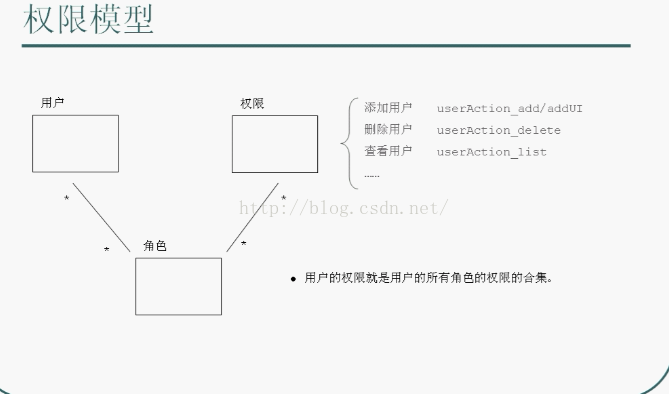
权限方案:用户,角色,权限
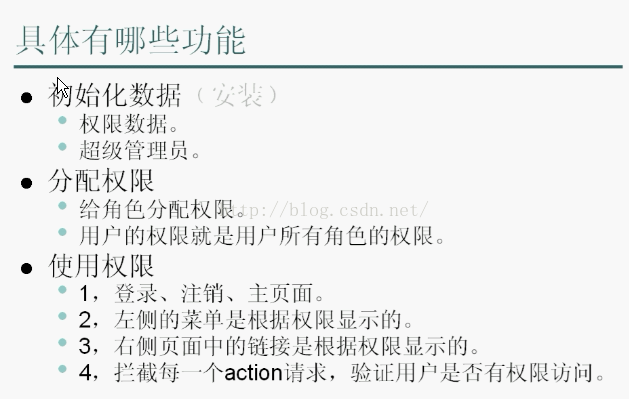
使用权限:
任务:
1,实体:javabean----->hbm.xml------>建表,
2,安装...
登录注销主页面:
/**登录页面*/public String LoginUI() throws Exception {return "LoginUI";}/** 登录 */public String Login() throws Exception {return "toIndex";}/** 注销*/public String LoginOut() throws Exception {return "LoginOut";}struts2中显示错误,两部分:
1,Action中:addFieldError("login", "用户名或密码不正确!");
2,JSP中:
OA项目之论坛模块
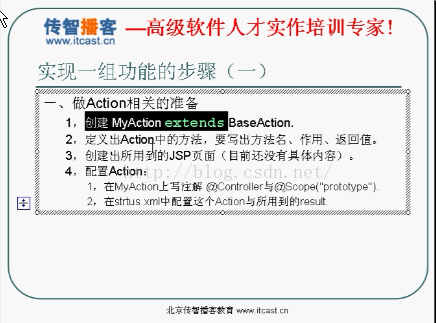
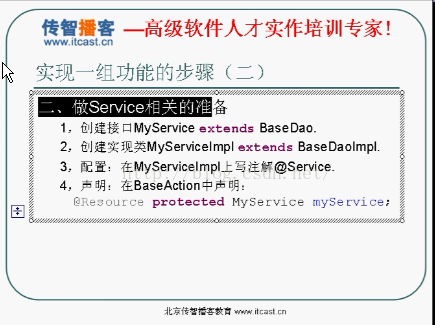
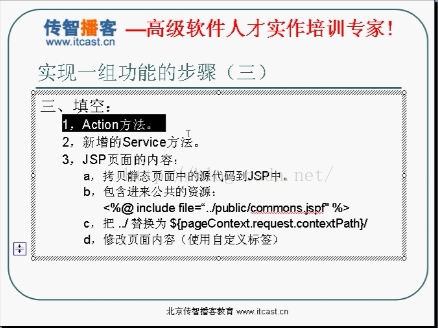
实现一组功能的步骤:
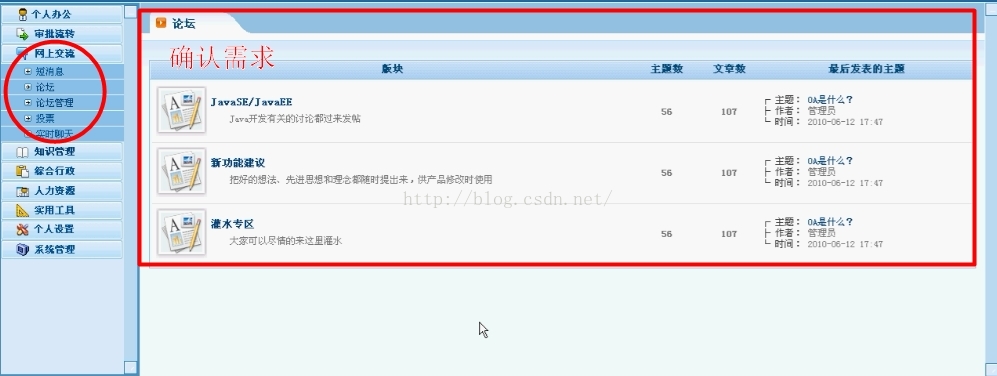
1,充分了解需求,包括所有的细节,需要知道要做成什么样子
2,设计实体/表
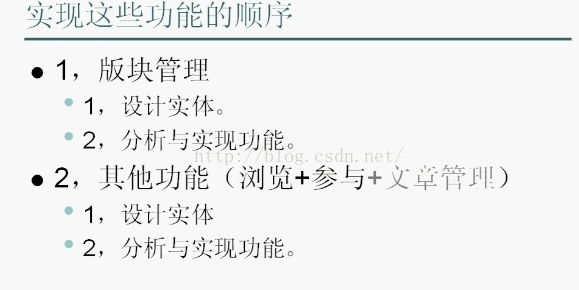
3,分析功能:
分析到每个请求的粒度。
得到的结果是我们需要处理多少种请求,其中每种请求对应一个Action方法。
4,实现功能:
(1)创建action,并定义其中的方法
(2)实现action方法,并创建出所用到的新的Service方法。
(3)实现Service方法,并创建出所用到的Dao方法。
(4)实现Dao方法。
(5)测试,运行。
论坛实体中的特殊属性:
一、特殊属性的作用
| Forum | topicCount | 主题数量 |
| articleCount | 文章数量(主题数+回复数) | |
| lastTopic | 最后发表的主题 | |
| Topic | replyCount | 回复数量 |
| lastReply | 最后发表的回复 | |
| lastUpdateTime | 最后更新时间(主题的发表时间或最后回复的时间) |
二、特殊属性的维护
|
|
| 发表新主题 | 发表新回复 |
| Forum | topicCount | 加1 |
|
| articleCount | 加1 | 加1 | |
| lastTopic | 更新为当前的新主题 |
| |
| Topic | replyCount | 0,默认值 | 加1 |
| lastReply | Null,默认值 | 更新为当前的新回复 | |
| lastUpdateTime | 主题的发表时间 | 更新为当前新回复的时间 |
本文来自互联网用户投稿,文章观点仅代表作者本人,不代表本站立场,不承担相关法律责任。如若转载,请注明出处。 如若内容造成侵权/违法违规/事实不符,请点击【内容举报】进行投诉反馈!