gitbook book.json 定制功能
Gitbook book.json
文章目录
- Gitbook book.json
- 1. 简介
- 2. 通用配置
- 3. 插件配置
- 4. 结构配置
- 5. PDF配置
- 6. 简单示例
- 7. demo
1. 简介
配置 GitBook 允许您使用灵活的配置自定义您的书。这些选项在book.json文件中指定。
2. 通用配置
| 配置名 | 描述 |
|---|---|
| root | 包含所有图书文件的根文件夹的路径,除了book.json |
| structure | 要指定自述文件、摘要、词汇表等的路径。请参阅结构段落。 |
| title | 您的书名,默认值是从 README 中提取的。在 legacy.gitbook.com 上,此字段已预先填写。 |
| author | 作者姓名。在 legacy.gitbook.com 上,此字段已预先填写。 |
| isbn | 书的 ISBN |
| language | 书籍语言的ISO 代码,默认值为en |
| direction | 文本的方向。可以是rtl或ltr,默认值取决于language |
| gitbook | 应该使用的 GitBook 版本。使用SemVer规范并接受如下条件">= 3.0.0" |
3. 插件配置
| 配置名 | 描述 |
|---|---|
| plugins | 要加载的插件列表 |
| pluginsConfig | 插件的配置 |
4. 结构配置
除了root变量之外,您还可以告诉 Gitbook 自述文件、摘要、词汇表、语言的文件名称(而不是使用默认名称,例如README.md)。这些文件必须位于您书籍的根目录(或每本语言书籍的根目录)。dir/MY_README.md不接受诸如此类的路径。
| 配置名 | 描述 |
|---|---|
| structure.readme | 自述文件名(默认为README.md) |
| structure.summary | 摘要文件名(默认为SUMMARY.md) |
| structure.glossary | 词汇表文件名(默认为GLOSSARY.md) |
| structure.languages | 语言文件名(默认为LANGS.md) |
5. PDF配置
PDF 输出可以使用以下中的一组选项进行自定义book.json:
| 多变的 | 描述 |
|---|---|
| pdf.pageNumbers | 在每页底部添加页码(默认为true) |
| pdf.fontSize | 基本字体大小(默认为12) |
| pdf.fontFamily | 基本字体系列(默认为Arial) |
| pdf.paperSize | 纸张大小,选项为’a0’, ‘a1’, ‘a2’, ‘a3’, ‘a4’, ‘a5’, ‘a6’, ‘b0’, ‘b1’, ‘b2’, ‘b3’, ‘b4’, ‘b5’, ‘b6’, ‘legal’, ‘letter’(默认为a4) |
| pdf.margin.top | 上边距(默认为56) |
| pdf.margin.bottom | 下边距(默认为56) |
| pdf.margin.right | 右边距(默认为62) |
| pdf.margin.left | 左边距(默认为62) |
6. 简单示例
gitbook 在编译书籍的时候会读取书籍源码顶层目录中的 book.js或者 book.json,这里以 book.json 为例.
{// Folders to use for output// Caution: it overrides the value from the command line// It's not advised this option in the book.json"output": null,// Generator to use for building// Caution: it overrides the value from the command line// It's not advised this option in the book.json"generator": "site",// Book metadats (somes are extracted from the README by default)"title": null,"description": null,"isbn": null,// For ebook format, the extension to use for generation (default is detected from output extension)// "epub", "pdf", "mobi"// Caution: it overrides the value from the command line// It's not advised this option in the book.json"extension": null,// Plugins list, can contain "-name" for removing default plugins"plugins": [],// Global configuration for plugins"pluginsConfig": {"fontSettings": {"theme": "sepia", "night" or "white","family": "serif" or "sans","size": 1 to 4}},// Variables for templating"variables": {},// Links in template (null: default, false: remove, string: new value)"links": {// Custom links at top of sidebar"sidebar": {"Custom link name": "https://customlink.com"},// Sharing links"sharing": {"google": null,"facebook": null,"twitter": null,"weibo": null,"all": null}},// Options for PDF generation"pdf": {// Add page numbers to the bottom of every page"pageNumbers": false,// Font size for the fiel content"fontSize": 12,// Paper size for the pdf// Choices are [u’a0’, u’a1’, u’a2’, u’a3’, u’a4’, u’a5’, u’a6’, u’b0’, u’b1’, u’b2’, u’b3’, u’b4’, u’b5’, u’b6’, u’legal’, u’letter’]"paperSize": "a4",// Margin (in pts)// Note: 72 pts equals 1 inch"margin": {"right": 62,"left": 62,"top": 36,"bottom": 36},//Header HTML template. Available variables: _PAGENUM_, _TITLE_, _AUTHOR_ and _SECTION_."headerTemplate": null,//Footer HTML template. Available variables: _PAGENUM_, _TITLE_, _AUTHOR_ and _SECTION_."footerTemplate": null}
}
首先,将book.json放到书籍代码顶层目录中,然后编译书籍:
$ gitbook build可以看到,编译完成,使用
$ gitbook serve然后将浏览器指向 http://127.0.0.1:4000,可以看到,什么都没有改变!
是的,虽然这里 book.json 文件非法,但是 gitbook build 并没有报错!
<aside>
💡 ConfigurationError: Error with book's configuration: config.isbn is not of a type(s) string</aside>
所以,用户需要自己准备工具来保证 book.json 必须是一个合法的 JSON 文件,并且不能含有非法配置项。
首先,删除注释项,以及空行,如果是在 vim 中,可以执行下面的命令:
:%g/\s*\/\//d
:%g/^\s*$/d
然后,使用 python 来检查 book.json 是否合法,同样,在 vim 中执行下面的命令:
:%!python -m json.tool很显然,下面的配置不能通过,所以删去(注:但是默认主题却是使用的这个配置!)。
"pluginsConfig": {"fontSettings": {"theme": "sepia", "night" or "white","family": "serif" or "sans","size": 1 to 4}},最后,剩下的内容如下:
{"description": null,"extension": null,"generator": "site","isbn": null,"links": {"sharing": {"all": null,"facebook": null,"google": null,"twitter": null,"weibo": null},"sidebar": {}},"output": null,"pdf": {"fontSize": 12,"footerTemplate": null,"headerTemplate": null,"margin": {"bottom": 36,"left": 62,"right": 62,"top": 36},"pageNumbers": false,"paperSize": "a4"},"plugins": [],"title": null,"variables": {}
}
现在,修改一些配置,修改后为:
$ cat book.json
{"author": "zongxun " ,"description": "This is a sample book created by gitbook","extension": null,"generator": "site","links": {"sharing": {"all": null,"facebook": null,"google": null,"twitter": null,"weibo": null},"sidebar": {"zongxun's Blog": "https://smoothies.com.cn"}},"output": null,"pdf": {"fontSize": 12,"footerTemplate": null,"headerTemplate": null,"margin": {"bottom": 36,"left": 62,"right": 62,"top": 36},"pageNumbers": false,"paperSize": "a4"},"plugins": [],"title": "Git Handbook","variables": {}
}7. demo
执行gitbook install 会安装 GitBook 依赖插件
gitbook install
book.json配置内容:
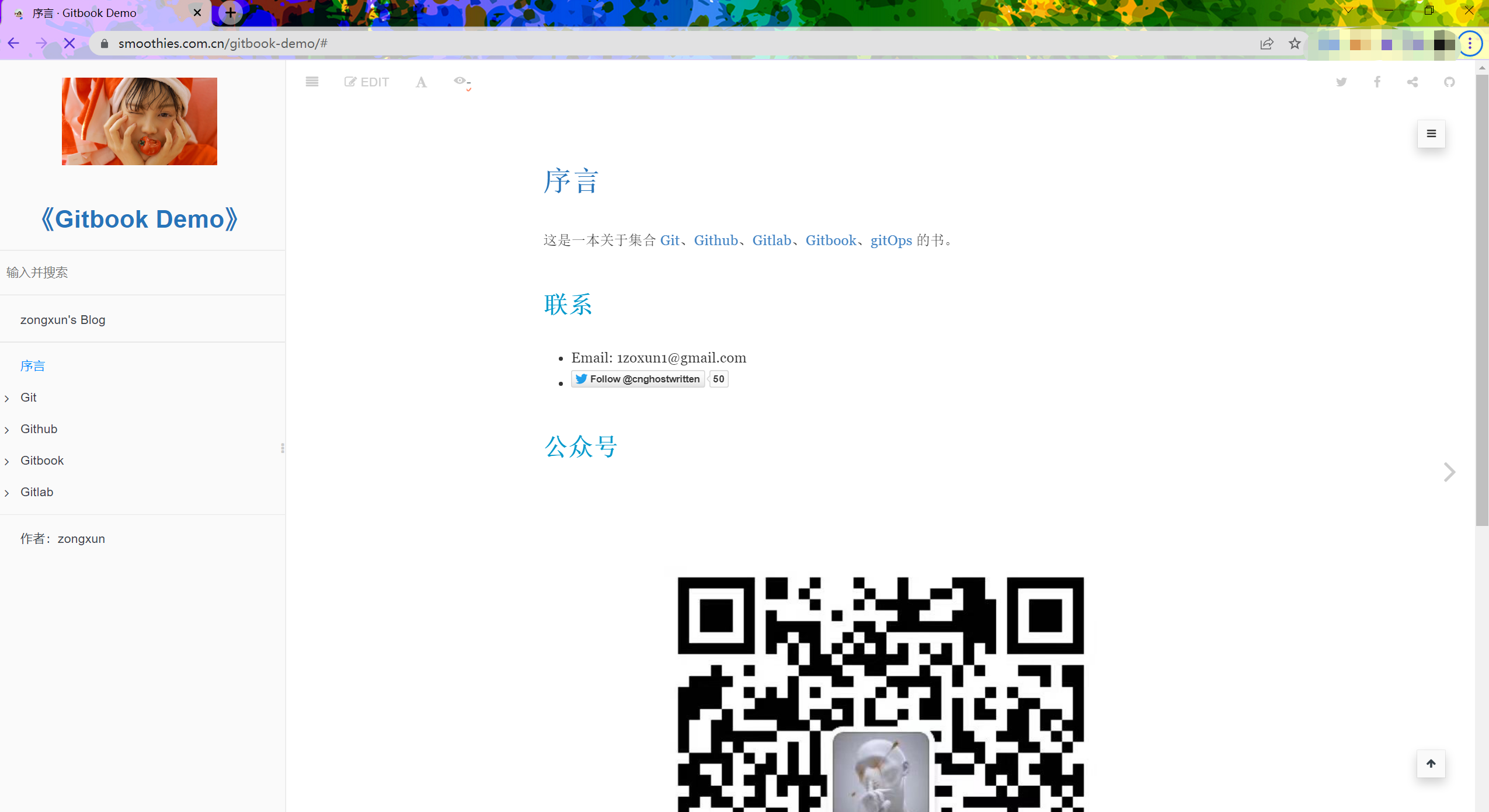
{"title": "Gitbook Docs","author": "宗勋 - zongxun","description": "这是一本关于Git、Github、Gitlab、Gitbook、GitOps的书籍","language": "zh-hans","links": {"sharing": {"all": null,"facebook": null,"google": null,"twitter": null,"weibo": null},"sidebar": {"zongxun's Blog": "https://smoothies.com.cn"}},"plugins": ["3-ba","accordion","advanced-emoji","anchor-navigation-ex","baidu-tongji","code","change_girls","custom-favicon","donate","chapter-fold","edit-link","flexible-alerts","github-buttons","github","lightbox","insert-logo","musicxml","prism","pageview-count","-highlight","-search","-lunr","rss","search-plus","splitter","-sharing","sharing-plus","sidebar-style","theme-comscore","tbfed-pagefooter"],"pluginsConfig": {"github": {"url": "https://github.com/Ghostwritten"},"github-buttons": {"buttons": [{"user": "Ghostwritten","repo": "gitbook-docs", "type": "star","count": true,"size": "small"}]},"change_girls" : {"time" : 10,"urls" : ["https://www.bizhishe.com/d/file/2019-08-26/1566827846505876.jpg", "https://www.bizhishe.com/d/file/2019-07-24/1563977671157231.jpg", "https://www.bizhishe.com/d/file/2019-07-14/1563116649970786.jpg"]},"chapter-fold":{},"favicon": "assets/imgs/1_girl.ico","donate": {"button": "打赏","alipayText": "支付宝打赏","wechatText": "微信打赏","alipay": "https://github.com/Ghostwritten/gitbook-docs/blob/gh-pages/assets/imgs/aplipay.png?raw=true","wechat": "https://github.com/Ghostwritten/gitbook-docs/blob/gh-pages/assets/imgs/wechat.png?raw=true"},"edit-link": {"base": "https://github.com/Ghostwritten/gitbook-docs/edit/master/","label": "Edit"},"prism": {"lang": {"shell": "bash"}},"tbfed-pagefooter": {"copyright":"Copyright © ghostwritten 浙ICP备2020032454号 2022","modify_label": "该文件修订时间:","modify_format": "YYYY-MM-DD HH:mm:ss"},"baidu-tongji": {"token": "55e7dfe47f4dc1c018d4042fdfa62565"},"anchor-navigation-ex": {"showLevel": false},"sidebar-style": {"title": "《Gitbook Docs》","author": "zongxun"},"flexible-alerts": {"note": {"label": "Note"},"tip": {"label": "Tip"},"warning": {"label": "Warning"},"danger": {"label": "Danger"}},"3-ba": {"token": "9ffc0dce8d7079aceab6b0bc18eb626b"},"insert-logo": {"url": "https://www.bizhishe.com/d/file/2019-07-14/1563116649268975.jpg","style": "background: none; max-height: 100px; min-height: 100px"},"rss": {"title": "Gitbook Docs","description": "This is the best book ever.","author": "Zong Xun","site_url": "https://smoothies.com.cn/gitbook-docs/","managingEditor": "writer@smoothies.com.cn (Zong Xun)","webMaster": "webmaster@smoothies.com.cn (Zong Xun)","categories": ["gitbook"]},"sharing": {"douban": false,"facebook": true,"google": false,"pocket": false,"qq": false,"qzone": false,"twitter": true,"weibo": false,"all": ["facebook", "google", "twitter"]}}
}
效果:
本文来自互联网用户投稿,文章观点仅代表作者本人,不代表本站立场,不承担相关法律责任。如若转载,请注明出处。 如若内容造成侵权/违法违规/事实不符,请点击【内容举报】进行投诉反馈!