uni-app 实现 fullpage 组件(适用于微信小程序,h5等)
uni-app 实现 fullpage 组件(适用于微信小程序,h5等)
业务需求。
本文github 源码地址
1.组件 src/components/FullPage/index.vue
<template><view class="full-page-container"><viewclass="full-page-main"@touchstart="handleTouchStart"@touchmove="handleTouchMove"@touchend="handleTouchEnd":style="style"><slot />view>view>
template><script>export default {name: 'FullPage',props: {// 触发翻页的临界值critical: {type: Number,default: 50,},// 总共页面数totalPage: {type: Number,required: true,default: 0,},// 当前页面的索引值activeIndex: {type: Number,required: true,default: 0,},},data() {return {pageIndex: 0, // 当前页面的索引值startPageY: 0, // 开始的位置endPageY: 0, // 结束的位置marginTop: 0, // 滑动下拉(上拉)距离}},mounted() {this.pageIndex = this.activeIndex},computed: {style() {return `transform:translateY(-${this.pageIndex * 100}%);margin-top:${this.marginTop}px`},},watch: {activeIndex(value) {this.pageIndex = value},},methods: {// 开始滑动handleTouchStart(e) {const { pageY } = e.touches[0]this.startPageY = pageY},// 滑动中handleTouchMove(e) {const { pageY } = e.touches[0]if (pageY - this.startPageY < this.critical &&pageY - this.startPageY > -this.critical) {this.marginTop = pageY - this.startPageY}this.endPageY = pageY},// 滑动结束handleTouchEnd() {if (!this.endPageY) {return}if (this.endPageY - this.startPageY > this.critical &&this.pageIndex > 0) {this.pageIndex -= 1} else if (this.endPageY - this.startPageY < -this.critical &&this.pageIndex < this.totalPage - 1) {this.pageIndex += 1}this.$emit('update:activeIndex', this.pageIndex)this.startPageY = 0this.endPageY = 0this.marginTop = 0},},}
script><style lang="scss" scoped>.full-page-container {height: 100%;overflow: hidden;.full-page-main {height: 100%;transition: all 0.3s;}}
style>
2.使用 /src/pages/index/index.vue
<template><full-page :active-index.sync="activeIndex" :total-page="totalPage"><viewclass="section"v-for="(item, index) in totalPage":key="index":style="getRandomStyle()"><div :class="'page page-' + index">{{ index + 1 }}<button type="primary" @click="toPage(1)">跳转到第1页button><button type="primary" @click="toPage(10)">跳转到第10页button>div>view>full-page>
template><script>import FullPage from '@/components/FullPage'export default {components: {FullPage,},data() {return {totalPage: 10,activeIndex: 0,}},methods: {getRandomStyle() {const r = Math.floor(Math.random() * 256)const g = Math.floor(Math.random() * 256)const b = Math.floor(Math.random() * 256)const color = '#' + r.toString(16) + g.toString(16) + b.toString(16)return `background-color:${color}`},toPage(index) {this.activeIndex = index - 1},},}
script>
<style lang="scss" scoped>page {height: 100%;}.section {height: 100%;width: 100%;position: relative;}.page {height: 100%;width: 100%;text-align: center;font-size: 50rpx;padding-top: 150rpx;box-sizing: border-box;}button {font-size: 30rpx;width: 400rpx;margin: 50rpx;}
style>
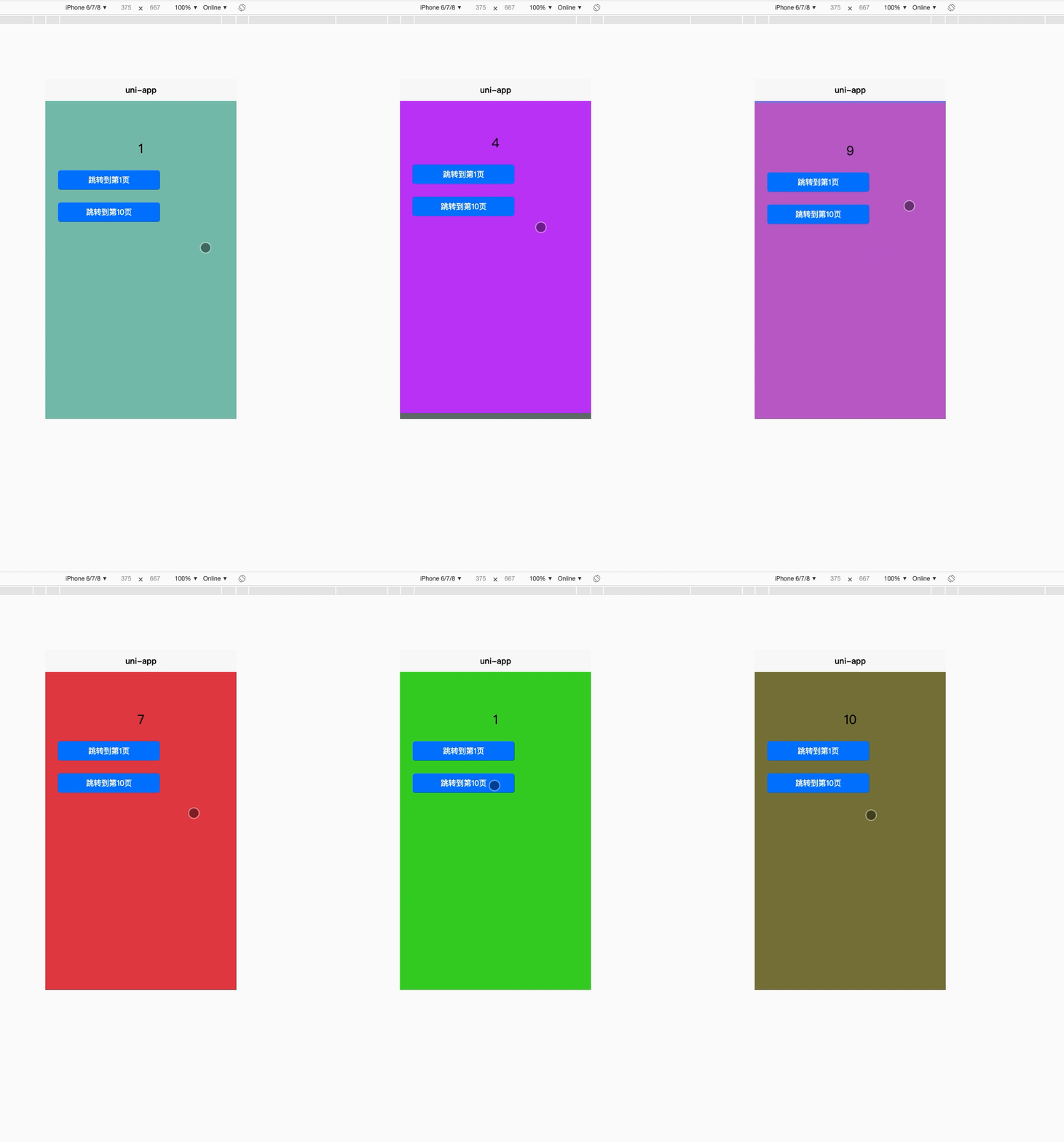
3.实现效果
参考链接
1.https://github.com/rongj/wechatapp-fullpage-scroll
本文来自互联网用户投稿,文章观点仅代表作者本人,不代表本站立场,不承担相关法律责任。如若转载,请注明出处。 如若内容造成侵权/违法违规/事实不符,请点击【内容举报】进行投诉反馈!