web开发之分页案例jQueryBootStrap
考虑到用户数据量大,为了用户有更好的体验。一般情况下,数据在展示时都会进行分页操作。分页有两种。1.物理分页 :使用数据库本身提供的分页操作来完成数据查询,查询到的就是当前页的信息。例如mysql可以使用limit ,oracle数据库可以使用rownum来完成。这种方案的优点是性能比较好,但是它存在不通用问题。2.逻辑分页 :它是利用数据库的游标来操作 (将数据库所有数据都查询出来,存储在内存中),性能比较低,但是它通用。现在开发中一般使用的比较多的是物理分页。
涉及到的技术点:
1.前端使用bootstrap的分页组件来完成数据分页显示。
2.服务器端使用javaee经典三层架构
3.使用c3p0连接池,dbutils来完成数据库操作。
javaee三层架构如下:
Web层:它主要包含的关于javaweb相关操作,例如request,response,session对象操作,它调用业务层来实现具体的功能。
业务层(service层):它主要是业务逻辑操作,它不包含web常用对象,它只是java代码。
数据访问层(dao层):它主要是与数据库进行交互,完成crud操作。
注意:在使用bootstrap的分页组件时,需要导入相关的css文件与js文件,并且bootstrap它依赖于jquery,在导入bootstrap的js文件前要导入jquery的js文件,并且它的版本要求必须是1.9.1以上版本.
1)MySQL5.7,创建数据库,创建表,并插入一些记录,具体如下:
CREATE DATABASE if not exists test;
USE test;
CREATE TABLE if not exists product(id INT PRIMARY KEY AUTO_INCREMENT,NAME VARCHAR(20),COUNT INT,price DOUBLE
);
INSERT INTO product VALUES(NULL,'电视机',100,2000);
INSERT INTO product VALUES(NULL,'洗衣机',200,1000);
INSERT INTO product VALUES(NULL,'空调',300,3000);
INSERT INTO product VALUES(NULL,'投影仪',50,2000);
INSERT INTO product VALUES(NULL,'HP电脑',100,4000);
INSERT INTO product VALUES(NULL,'苹果手机',100,5000);
INSERT INTO product VALUES(NULL,'缝纫机',100,2000);
INSERT INTO product VALUES(NULL,'小米盒子',100,2200);
INSERT INTO product VALUES(NULL,'饮水机',100,2000);
INSERT INTO product VALUES(NULL,'净水器',100,2000);
INSERT INTO product VALUES(NULL,'电暖器',100,2000);
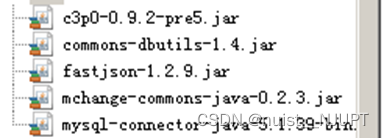
2)引入相关的jar包,包括:C3p0连接池jar , Dbutils, json处理的相关jar包,mysql的驱动jar包。
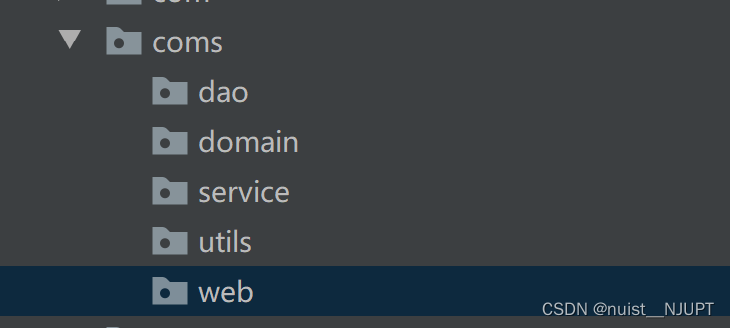
3)创建服务器项目结构
4)编写数据库表对应的实体类,同时创建一个Bean类,用于对页面相关信息进行封装。
public class Product {private int id ;private String name ;private int count ;private double price ;public int getId() {return id;}public void setId(int id) {this.id = id;}public String getName() {return name;}public void setName(String name) {this.name = name;}public int getCount() {return count;}public void setCount(int count) {this.count = count;}public double getPrice() {return price;}public void setPrice(double price) {this.price = price;}@Overridepublic String toString() {return "Product{" +"id=" + id +", name='" + name + '\'' +", count=" + count +", price=" + price +'}';}
}
import java.util.List;public class PageBean {private int pageNo ; //页码数private int pageSize ; //每页显示的条数private int totalPage ; //总页数private int totalCount ; //总条数private List content ; //当前页显示的数据public int getPageNo() {return pageNo;}public void setPageNo(int pageNo) {this.pageNo = pageNo;}public int getPageSize() {return pageSize;}public void setPageSize(int pageSize) {this.pageSize = pageSize;}public int getTotalPage() {return totalPage;}public void setTotalPage(int totalPage) {this.totalPage = totalPage;}public int getTotalCount() {return totalCount;}public void setTotalCount(int totalCount) {this.totalCount = totalCount;}public List getContent() {return content;}public void setContent(List content) {this.content = content;}@Overridepublic String toString() {return "PageBean{" +"pageNo=" + pageNo +", pageSize=" + pageSize +", totalPage=" + totalPage +", totalCount=" + totalCount +", content=" + content +'}';}
}
5)创建一个JdbcUtils 工具类,在使用dbutils的QueryRunner进行crud时需要Connection对象或DataSource对象,工具类代码如下:
import com.mchange.v2.c3p0.ComboPooledDataSource;import javax.sql.DataSource;
import java.sql.Connection;
import java.sql.SQLException;public class JDBCUtils {private static ComboPooledDataSource dataSource = new ComboPooledDataSource() ;public static DataSource getDataSource(){return dataSource ;}public static Connection getConnection() throws SQLException {return dataSource.getConnection() ;}
}
5)dao层创建接口和实现类
import coms.domain.Product;import java.sql.SQLException;
import java.util.List;public interface ProductDao {List findAll(int pageNo, int pageSize) throws SQLException;int findAllCount() throws SQLException;
}
import coms.utils.JDBCUtils;
import coms.domain.Product;
import org.apache.commons.dbutils.QueryRunner;
import org.apache.commons.dbutils.handlers.BeanListHandler;
import org.apache.commons.dbutils.handlers.ScalarHandler;import java.sql.SQLException;
import java.util.List;public class ProductDaoImpl implements ProductDao {@Overridepublic List findAll(int pageNo, int pageSize) throws SQLException {QueryRunner queryRunner = new QueryRunner(JDBCUtils.getDataSource()) ;return queryRunner.query("select * from product limit ?,?", new BeanListHandler(Product.class),(pageNo-1)*pageSize,pageSize) ;}@Overridepublic int findAllCount() throws SQLException {QueryRunner queryRunner = new QueryRunner(JDBCUtils.getDataSource()) ;Long l = (Long) queryRunner.query("select count(*) from product", new ScalarHandler());return l.intValue() ;}
}
6)业务层(service)调用接口中的方法对获取的数据进行封装,并返回bean对象。
import coms.dao.ProductDao;
import coms.dao.ProductDaoImpl;
import coms.domain.PageBean;
import coms.domain.Product;import java.sql.SQLException;
import java.util.List;public class ProductService  {public PageBean findAll(int pageNo, int pageSize) throws SQLException {ProductDao productDao = new ProductDaoImpl() ;List ps = productDao.findAll(pageNo,pageSize) ; //分页的产品信息//将分页的数据信息封装到PageBean中PageBean productPageBean = new PageBean() ;productPageBean.setPageNo(pageNo);productPageBean.setPageSize(pageSize);productPageBean.setContent(ps);//总条数int totalCount = productDao.findAllCount() ;//总页数int totalPage = (int) Math.ceil(1.0 * totalCount / pageSize);productPageBean.setTotalCount(totalCount);productPageBean.setTotalPage(totalPage);return productPageBean ;}
}
7)web层响应浏览器的请求,并将封装的bean转换成json回传到浏览器。
import com.alibaba.fastjson.JSONObject;
import coms.domain.PageBean;
import coms.domain.Product;
import coms.service.ProductService;import javax.servlet.ServletException;
import javax.servlet.annotation.WebServlet;
import javax.servlet.http.HttpServlet;
import javax.servlet.http.HttpServletRequest;
import javax.servlet.http.HttpServletResponse;
import java.io.IOException;
import java.sql.SQLException;
import java.util.List;@WebServlet(name = "ProductServlet")
public class ProductServlet extends HttpServlet {protected void doPost(HttpServletRequest request, HttpServletResponse response) throws ServletException, IOException {doGet(request,response);}protected void doGet(HttpServletRequest request, HttpServletResponse response) throws ServletException, IOException {response.setCharacterEncoding("utf-8");request.setCharacterEncoding("utf-8");ProductService productService = new ProductService() ;int pageNo = Integer.parseInt(request.getParameter("pageNo")) ;int pageSize = Integer.parseInt(request.getParameter("pageSize")) ;try {PageBean pageBean = productService.findAll(pageNo,pageSize) ;//将从数据库查询的数据转换成json响应到浏览器String json = JSONObject.toJSONString(pageBean) ;response.getWriter().write(json);} catch (SQLException e) {e.printStackTrace();}}
}
html页面根据jQuery和Bootstrap添加表格和分页条,根据得到的分页信息,进行处理。
Title
序号 名称 数量 价格
8)需要在web.xml中配置servlet。
ProductServlet coms.web.ProductServlet ProductServlet /product 9)使用连接池的时候需要配置mysql信息,c3p0-config.xml文件配置如下:
com.mysql.jdbc.Driver jdbc:mysql:///test root 123456 5 5 20 分页效果如下:
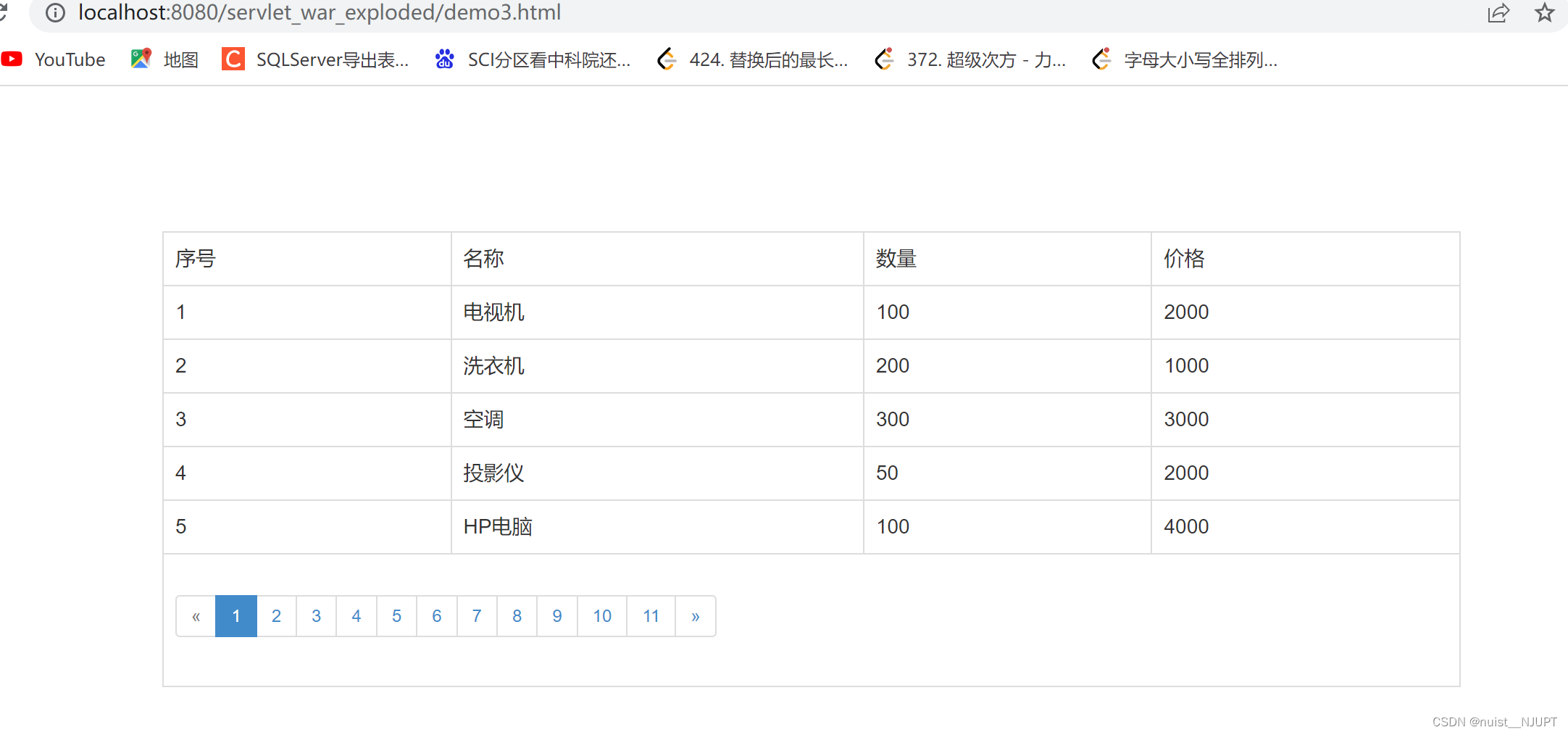
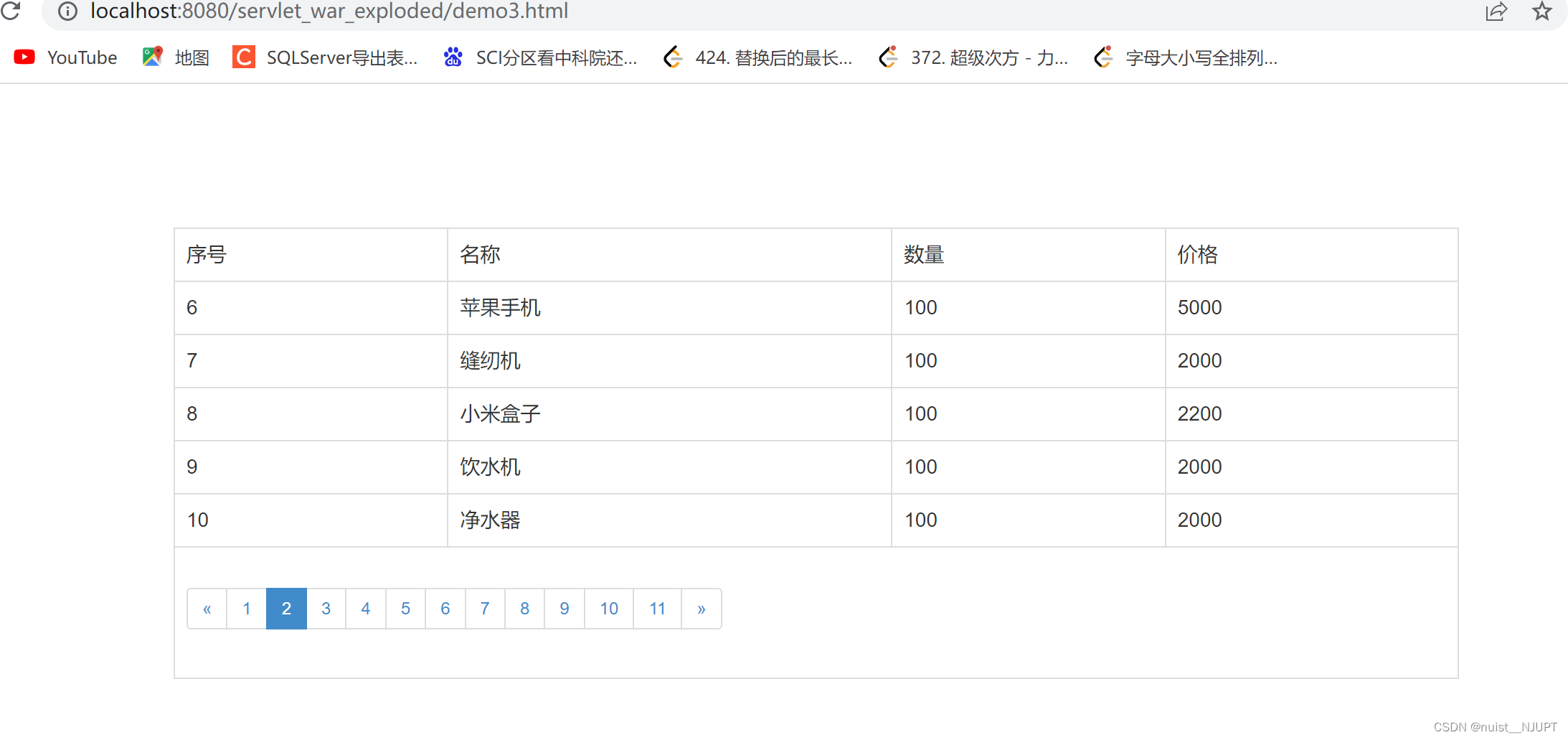
本文来自互联网用户投稿,文章观点仅代表作者本人,不代表本站立场,不承担相关法律责任。如若转载,请注明出处。 如若内容造成侵权/违法违规/事实不符,请点击【内容举报】进行投诉反馈!