Python爬取天气网历史天气数据
我的第一篇博客,哈哈哈,记录一下我的Python进阶之路!
今天写了一个简单的爬虫。
使用Python的requests 和BeautifulSoup模块,Python 2.7.12可在命令行中直接使用pip进行模块安装。爬虫的核心是利用BeautifulSoup的select语句获取需要的信息。
pip install requests
pip install bs4
以武汉市2017年5~7月的历史为例爬取天气网中武汉市的历史天气数据。
7月对应的网址为http://lishi.tianqi.com/wuhan/201707.html
1.requests模块获取网页内容
url='http://lishi.tianqi.com/wuhan/201707.html'
response = requests.get(url)
soup = BeautifulSoup(response.text, 'html.parser')
2.利用.select语句找到网页中天气数据所在的div
weather_list = soup.select('div[class="tqtongji2"]') 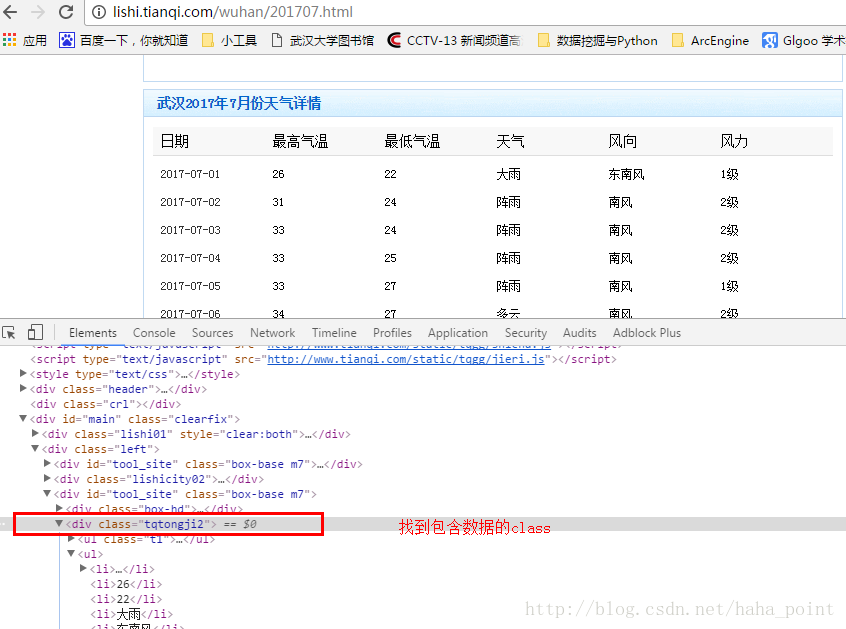
3.找出日期、最高气温、最低气温、天气等数据,用li.string获取li中的信息。
ul_list = weather.select('ul')
for ul in ul_list:li_list= ul.select('li')for li in li_list:li.string.encode('utf-8')  #具体的天气信息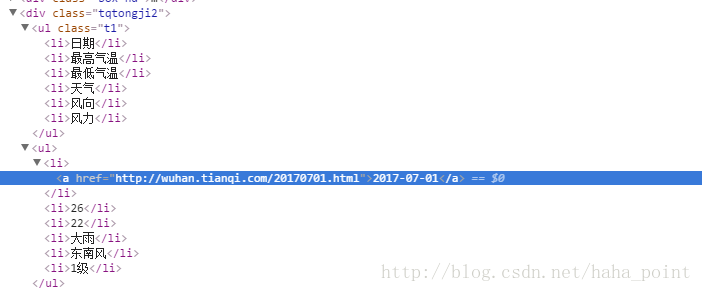
具体代码实现如下:
#encoding:utf-8
import requests
from bs4 import BeautifulSoup                                                        urls = ["http://lishi.tianqi.com/wuhan/201707.html",                                 "http://lishi.tianqi.com/wuhan/201706.html",                                 "http://lishi.tianqi.com/wuhan/201705.html"]
file = open('wuhan_weather.csv','w')
for url in urls:                                                                     response = requests.get(url)                                                     soup = BeautifulSoup(response.text, 'html.parser')                               weather_list = soup.select('div[class="tqtongji2"]')                             for weather in weather_list:                                                     weather_date = weather.select('a')[0].string.encode('utf-8')                 ul_list = weather.select('ul')                                               i=0                                                                          for ul in ul_list:                                                           li_list= ul.select('li')                                                 str=""                                                                   for li in li_list:                                                       str += li.string.encode('utf-8')+','                                 if i!=0:                                                                 file.write(str+'\n')                                                 i+=1
file.close()
最后的结果:
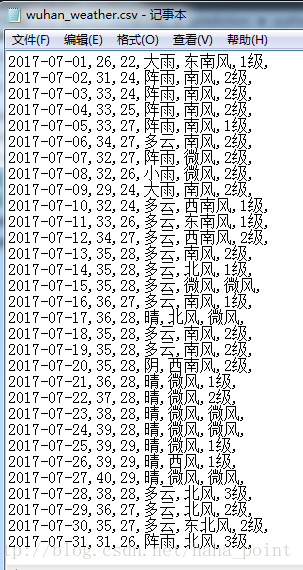
相比正则表达式,使用select语句爬取数据就是这么简单啦!
正则表达式还不是很理解,等理清楚,再来写总结。
本文来自互联网用户投稿,文章观点仅代表作者本人,不代表本站立场,不承担相关法律责任。如若转载,请注明出处。 如若内容造成侵权/违法违规/事实不符,请点击【内容举报】进行投诉反馈!