Unity Rigidbody组件
Unity 学习笔记汇总
Rigidbody官方API使用文档
文章目录
- 1. 碰撞器1
- 1.1. 前台
- 1.2. 代码
- 1.3. 结果
- 2. 碰撞器2
- 3. 碰撞器3
- 3.1. 前台
- 3.2. 代码
- 3.3. 结果
1. 碰撞器1
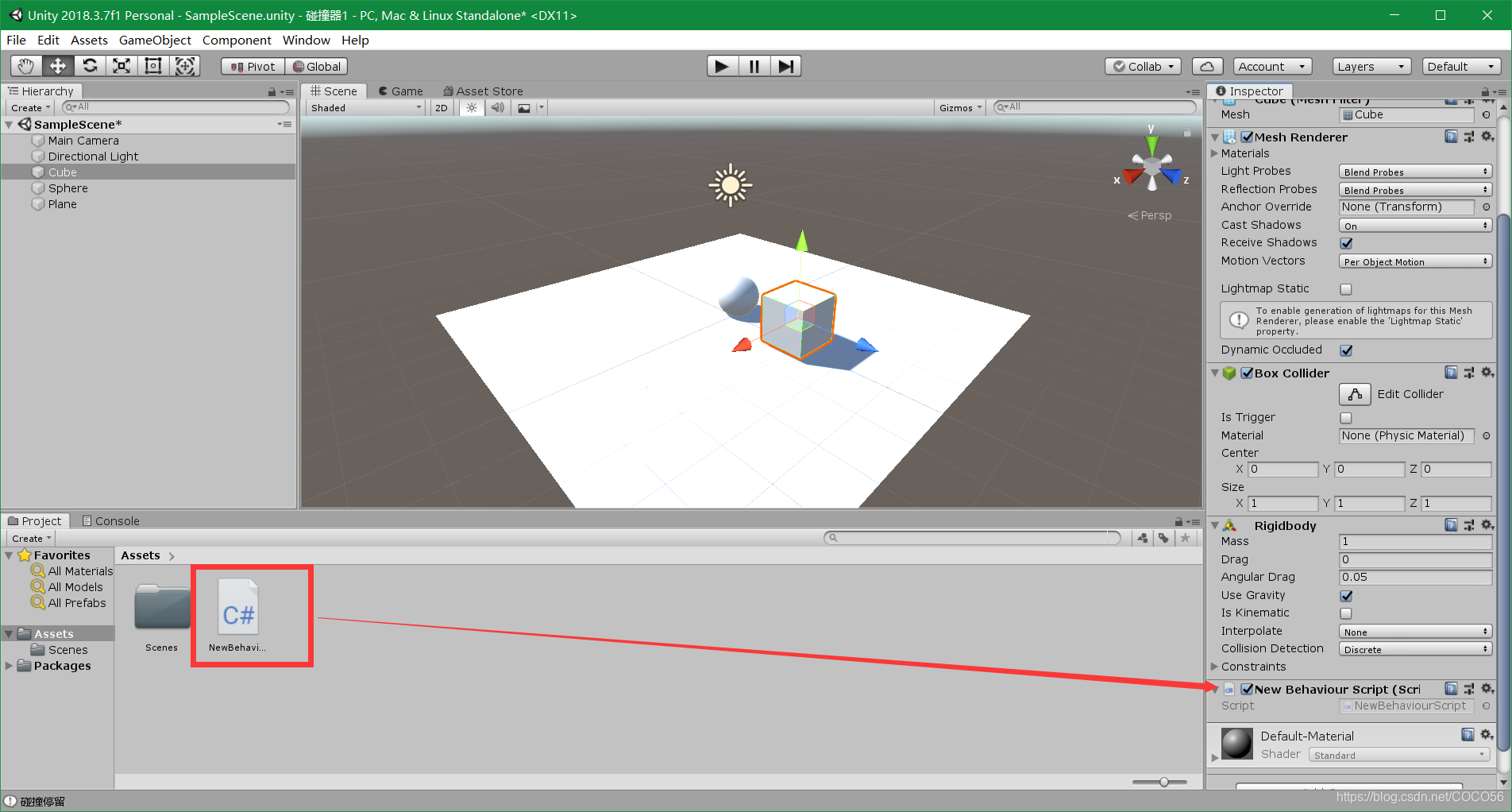
1.1. 前台
- 创建
GameObject\3D Object\Cube、GameObject\3D Object\Sphere、GameObject\3D Object\Plane - 给
Cube和Sphere添加Component\Physics\Rigidbody - 将C#脚本挂载到
Cube上
1.2. 代码
using System.Collections;
using System.Collections.Generic;
using UnityEngine;public class NewBehaviourScript : MonoBehaviour
{// Start is called before the first frame updatevoid Start(){}// Update is called once per framevoid Update(){}void OnCollisionEnter(Collision collision){Debug.Log("检测到了碰撞");}void OnCollisionStay(Collision collision){Debug.Log("碰撞停留");}void OnCollisionExit(Collision collision){Debug.Log("碰撞结束");}
}
1.3. 结果
在控制台上会实时输出碰撞状态。
2. 碰撞器2
using System.Collections;
using System.Collections.Generic;
using UnityEngine;public class NewBehaviourScript : MonoBehaviour
{// Start is called before the first frame updatevoid Start(){}// Update is called once per framevoid Update(){}void OnCollisionEnter(Collision collision){Debug.Log("检测到了碰撞");//collision: 指的是身上没有该函数脚本的那个物体Debug.Log(collision.gameObject.name);Destroy(collision.gameObject);  //销毁的是未挂载当前脚本的物体Destroy(gameObject);  //销毁的是挂载当前脚本的物体}void OnCollisionStay(Collision collision){//Debug.Log("碰撞停留");}void OnCollisionExit(Collision collision){Debug.Log("碰撞结束");}
}
3. 碰撞器3
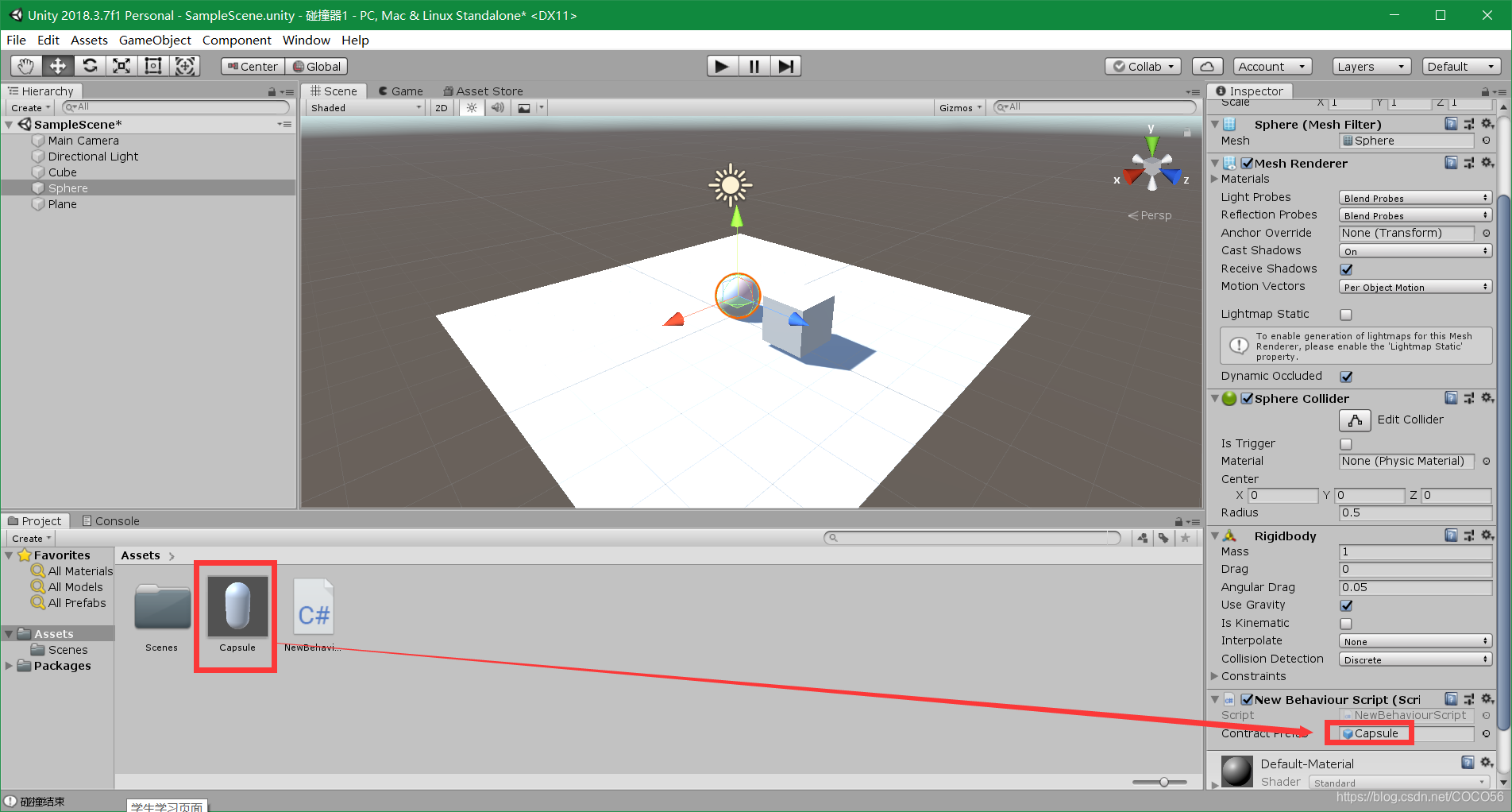
3.1. 前台
创建一个Capsule的预制体,并与脚本中的变量进行绑定
3.2. 代码
using System.Collections;
using System.Collections.Generic;
using UnityEngine;public class NewBehaviourScript : MonoBehaviour
{public GameObject contractPrefab;GameObject clone;// Start is called before the first frame updatevoid Start(){}// Update is called once per framevoid Update(){}void OnCollisionEnter(Collision collision){//Debug.Log("检测到了碰撞");collision: 指的是身上没有该函数脚本的那个物体//Debug.Log(collision.gameObject.name);//Destroy(collision.gameObject);  //销毁的是未挂载当前脚本的物体//Destroy(gameObject);  //销毁的是挂载当前脚本的物体ContactPoint[] points = collision.contacts;if (clone == null){clone = Instantiate(contractPrefab, points[0].point,contractPrefab.transform.rotation) as GameObject;}else{Destroy(clone.gameObject, 0.5f);//clone = Instantiate(contractPrefab, points[0].point,//                                contractPrefab.transform.rotation) as GameObject;}}void OnCollisionStay(Collision collision){//Debug.Log("碰撞停留");}void OnCollisionExit(Collision collision){Debug.Log("碰撞结束");}
}
3.3. 结果
Sphere发生碰撞后,会生成一个Capsule的预制体
本文来自互联网用户投稿,文章观点仅代表作者本人,不代表本站立场,不承担相关法律责任。如若转载,请注明出处。 如若内容造成侵权/违法违规/事实不符,请点击【内容举报】进行投诉反馈!