亚马逊sp-api通过api修改价格,标题
最近在对接亚马逊的修改价格这个api,可能是因为习惯不一样吧,实在是踩了太多的坑了,而且全网没找到相关能看的博客,所以一直在坑里,最近差不多做出来了,所以写一个总结,希望其他人再对接的时候不要像我一样了。
注:我这里主要写的是对接修改价格,授权相关可以找一下其他的博客,这个还是有很多人写的
对接亚马逊的这个接口主要还是看官方文档,目录是Feeds API v2021-06-30 reference,修改的方式是通过xml上传到他们系统里,具体参考可以看官方示例,全是英文看的是真的难受,而且费劲。
0.修改价格的流程
先创建一个上传xml格式的内容的url,通过xml格式的内容去修改对应的属性,上传完成后,根据创建最后通过查询对应的feedid,一直等待修改成功,最后查看文档报错,如果失败一直重复这个流程就可以了,完整的代码在文章最后,已经封装过了。
1.获取相关jar包
在GitHub上找到amazon-sp-api-master这个项目,这个是亚马逊写好了的一个api,具体链接找不到了,使用这个即可快捷的调用api
2.授权+初始化+创建feedDocument
public void init() {awsAuthenticationCredentials = AWSAuthenticationCredentials.builder().accessKeyId(USER_ACCESS_KEY_ID).secretKey(USER_SECRET_ACCESS_KEY).region("us-east-1").build();/** user IAM ARN* */awsAuthenticationCredentialsProvider = AWSAuthenticationCredentialsProvider.builder().roleArn(ROLE_ARN).roleSessionName(getRandomNonce()).build();/** application* */lwaAuthorizationCredentials = LWAAuthorizationCredentials.builder().clientId(APP_CLIENT_ID).clientSecret(APP_CLIENT_SECRET).refreshToken(REFRESH_TOKEN).endpoint("https://api.amazon.com/auth/o2/token").build();api1 = new FeedsApi.Builder().awsAuthenticationCredentials(awsAuthenticationCredentials).lwaAuthorizationCredentials(lwaAuthorizationCredentials).awsAuthenticationCredentialsProvider(awsAuthenticationCredentialsProvider).endpoint("https://sellingpartnerapi-na.amazon.com").build();}
上面返回的url就是下一步需要的上传xml的url,feedDocumentId是第四步需要的参数
3.上传xml文件到url内
这里是官方给出的xml示例:
<AmazonEnvelope xmlns:xsi="http://www.w3.org/2001/XMLSchema-instance"xsi:noNamespaceSchemaLocation="amzn-envelope.xsd"><Header><DocumentVersion>1.01DocumentVersion><MerchantIdentifier>XXXXXXXXXXXXXMerchantIdentifier>Header><MessageType>ProductMessageType><PurgeAndReplace>falsePurgeAndReplace><Message><MessageID>1MessageID><OperationType>UpdateOperationType><Product><SKU>56789SKU><StandardProductID><Type>ASINType><Value>B0EXAMPLEGValue>StandardProductID><ProductTaxCode>A_GEN_NOTAXProductTaxCode><DescriptionData><Title>Example Product TitleTitle><Brand>Example Product BrandBrand><Description>This is an example product description.Description><BulletPoint>Example Bullet Point 1BulletPoint><BulletPoint>Example Bullet Point 2BulletPoint><MSRP currency="USD">25.19MSRP><Manufacturer>Example Product ManufacturerManufacturer><ItemType>example-item-typeItemType>DescriptionData><ProductData><Health><ProductType><HealthMisc><Ingredients>Example IngredientsIngredients><Directions>Example DirectionsDirections>HealthMisc>ProductType>Health>ProductData>Product>Message>
AmazonEnvelope>
/*** 上传到亚马逊** @param xml* @param url*/public void upload(String xml, String url) {byte[] source = xml.getBytes(StandardCharsets.UTF_8);OkHttpClient client = new OkHttpClient();// The contentType must match the input provided to the createFeedDocument operation. This example uses text/xml, but your contentType may be different depending upon on your chosen feedType (text/plain, text/csv, and so on).String contentType = String.format("text/xml; charset=%s", StandardCharsets.UTF_8);try {Request request = new Request.Builder().url(url).put(RequestBody.create(MediaType.parse(contentType), source)).build();Response response = client.newCall(request).execute();if (!response.isSuccessful()) {System.out.println(String.format("Call to upload document failed with response code: %d and message: %s",response.code(), response.message()));}} catch (IOException e) {System.out.println(e.getMessage());}}
4.创建feed
public CreateFeedResponse createFeed(CreateFeedDocumentResponse feedDocument) throws ApiException {CreateFeedSpecification specification = new CreateFeedSpecification();FeedOptions feedOptions = new FeedOptions();specification.setInputFeedDocumentId(feedDocument.getFeedDocumentId());specification.setFeedType("POST_PRODUCT_PRICING_DATA");specification.setMarketplaceIds(Arrays.asList("ATVPDKIKX0DER"));specification.setFeedOptions(feedOptions);CreateFeedResponse feed = api1.createFeed(specification);return feed;}
在这里返回的是一个feedId,后面查询要用到
5.查询结果
public String getFeedResult(String feedId) throws IOException, ApiException {Feed feed = api1.getFeed(feedId);FeedDocument feedDocument = api1.getFeedDocument(feed.getResultFeedDocumentId());return download(feedDocument.getUrl());}
这里下载展示的操作结果,
完整代码
package com.bseera.shopai.db.utils.amazon_spapi;import com.amazon.spapi.SellingPartnerAPIAA.AWSAuthenticationCredentials;
import com.amazon.spapi.SellingPartnerAPIAA.AWSAuthenticationCredentialsProvider;
import com.amazon.spapi.SellingPartnerAPIAA.LWAAuthorizationCredentials;
import com.amazon.spapi.api.FeedsApi;
import com.amazon.spapi.client.ApiException;
import com.amazon.spapi.model.feeds.*;
import com.bseera.shopai.spidercommon.util.StringUtils;
import com.squareup.okhttp.*;
import org.slf4j.Logger;
import org.slf4j.LoggerFactory;import java.io.*;
import java.nio.charset.Charset;
import java.nio.charset.StandardCharsets;
import java.util.Arrays;
import java.util.UUID;public class AmazonApiUtils {private static Logger logger = LoggerFactory.getLogger(AmazonApiUtils.class);public static final String USER_ACCESS_KEY_ID = "";public static final String USER_SECRET_ACCESS_KEY = "";private static final String ROLE_ARN = "";private static final String APP_CLIENT_ID = "";private static final String APP_CLIENT_SECRET = "";private static final String REFRESH_TOKEN = "";private LWAAuthorizationCredentials lwaAuthorizationCredentials;private AWSAuthenticationCredentialsProvider awsAuthenticationCredentialsProvider;private AWSAuthenticationCredentials awsAuthenticationCredentials;private FeedsApi api1;public String xml = "\n" +" +" xsi:noNamespaceSchemaLocation=\"amzn-envelope.xsd\">\n" +" \n" +" 1.01 \n" +" XXXXXXXXXXXXX \n" +" \n" +" Product \n" +" false \n" +" \n" +" 1 \n" +" Update \n" +" \n" +" {sku} \n" +" \n" +" ASIN \n" +" {asin} \n" +" \n" +" \n" +" {title} \n" +" Viapipa \n" +" {price} \n" +" \n" +" \n" +" \n" +" ";public AmazonApiUtils() {init();}public static void main(String[] args) throws IOException, ApiException {//创建feedAmazonApiUtils amazonApiUtils = new AmazonApiUtils();String feedId = amazonApiUtils.updateTitleAndPrice("Viapipa", "29.98", "asin", "sku");try {//查询结果AmazonApiUtils amazonApiUtils1 = new AmazonApiUtils();String feedResult = amazonApiUtils1.getFeedResult(feedId);System.out.println(feedResult);} catch (Exception e) {System.out.println(e);}}/*** @param feedId* @return* @throws IOException* @throws ApiException*/public String getFeedResult(String feedId) throws IOException, ApiException {Feed feed = api1.getFeed(feedId);FeedDocument feedDocument = api1.getFeedDocument(feed.getResultFeedDocumentId());return download(feedDocument.getUrl());}/*** 根据传入的sku和asin 修改title和Price** @param title 修改的标题* @param price 修改的价格* @param asin 被修改的asin* @param sku 被修改的sku* @return 返回是一个feedId,实时查询提交的状态,feedDocumentId,实时查看文档状态;* @throws ApiException*/public String updateTitleAndPrice(String title, String price, String asin, String sku) throws ApiException {if (StringUtils.isEmpty(title) || StringUtils.isEmpty(price) || StringUtils.isEmpty(asin) || StringUtils.isEmpty(sku)) {return null;}xml = xml.replace("{title}", title);xml = xml.replace("{price}", price);xml = xml.replace("{asin}", asin);xml = xml.replace("{sku}", sku);//1.创建feedDocumentCreateFeedDocumentResponse feedDocumentResponse = createFeedDocumentResponse();//2.上传到url内upload(xml, feedDocumentResponse.getUrl());//3.创建feedCreateFeedResponse feed = createFeed(feedDocumentResponse);return feed.getFeedId();}public void init() {awsAuthenticationCredentials = AWSAuthenticationCredentials.builder().accessKeyId(USER_ACCESS_KEY_ID).secretKey(USER_SECRET_ACCESS_KEY).region("us-east-1").build();/** user IAM ARN* */awsAuthenticationCredentialsProvider = AWSAuthenticationCredentialsProvider.builder().roleArn(ROLE_ARN).roleSessionName(getRandomNonce()).build();/** application* */lwaAuthorizationCredentials = LWAAuthorizationCredentials.builder().clientId(APP_CLIENT_ID).clientSecret(APP_CLIENT_SECRET).refreshToken(REFRESH_TOKEN).endpoint("https://api.amazon.com/auth/o2/token").build();api1 = new FeedsApi.Builder().awsAuthenticationCredentials(awsAuthenticationCredentials).lwaAuthorizationCredentials(lwaAuthorizationCredentials).awsAuthenticationCredentialsProvider(awsAuthenticationCredentialsProvider).endpoint("https://sellingpartnerapi-na.amazon.com").build();}/*** 创建上传url** @return* @throws ApiException*/public CreateFeedDocumentResponse createFeedDocumentResponse() throws ApiException {CreateFeedDocumentSpecification body = new CreateFeedDocumentSpecification();body.setContentType("text/xml; charset=UTF-8");CreateFeedDocumentResponse feedDocument = api1.createFeedDocument(body);return feedDocument;}/*** 上传到亚马逊** @param xml* @param url*/public void upload(String xml, String url) {byte[] source = xml.getBytes(StandardCharsets.UTF_8);OkHttpClient client = new OkHttpClient();// The contentType must match the input provided to the createFeedDocument operation. This example uses text/xml, but your contentType may be different depending upon on your chosen feedType (text/plain, text/csv, and so on).String contentType = String.format("text/xml; charset=%s", StandardCharsets.UTF_8);try {Request request = new Request.Builder().url(url).put(RequestBody.create(MediaType.parse(contentType), source)).build();Response response = client.newCall(request).execute();if (!response.isSuccessful()) {System.out.println(String.format("Call to upload document failed with response code: %d and message: %s",response.code(), response.message()));}} catch (IOException e) {System.out.println(e.getMessage());}}/*** 创建一个feed** @param feedDocument* @return* @throws ApiException*/public CreateFeedResponse createFeed(CreateFeedDocumentResponse feedDocument) throws ApiException {CreateFeedSpecification specification = new CreateFeedSpecification();FeedOptions feedOptions = new FeedOptions();specification.setInputFeedDocumentId(feedDocument.getFeedDocumentId());//设置feed类型specification.setFeedType("POST_PRODUCT_PRICING_DATA");//设置地域specification.setMarketplaceIds(Arrays.asList("ATVPDKIKX0DER"));specification.setFeedOptions(feedOptions);CreateFeedResponse feed = api1.createFeed(specification);return feed;}public String getRandomNonce() {return UUID.randomUUID().toString().replace("-", "");}public String download(String url) throws IOException, IllegalArgumentException {OkHttpClient httpclient = new OkHttpClient();Request request = new Request.Builder().url(url).get().build();Response response = httpclient.newCall(request).execute();if (!response.isSuccessful()) {System.out.println(String.format("Call to download content was unsuccessful with response code: %d and message: %s",response.code(), response.message()));return "";}try (ResponseBody responseBody = response.body()) {MediaType mediaType = MediaType.parse(response.header("Content-Type"));Charset charset = mediaType.charset();if (charset == null) {throw new IllegalArgumentException(String.format("Could not parse character set from '%s'", mediaType.toString()));}Closeable closeThis = null;try {InputStream inputStream = responseBody.byteStream();closeThis = inputStream;// This example assumes that the download content has a charset in the content-type header, e.g.// text/plain; charset=UTF-8//Handle content with binary data/other media types here.InputStreamReader inputStreamReader = new InputStreamReader(inputStream, charset);closeThis = inputStreamReader;BufferedReader reader = new BufferedReader(inputStreamReader);closeThis = reader;String line;StringBuilder out = new StringBuilder();do {out.append(reader.readLine());line = reader.readLine();// Process line by line.} while (line != null);return out.toString();} finally {if (closeThis != null) {closeThis.close();}}}}}md又错了,这个文档不是修改价格的。。。。。
修改价格是/listings/2021-08-01/items/{sellerId}/{sku}这个接口,这个我也不知道是干什么的。。。。参考链接Listings Items是用这个修改的,代码还是用上面的
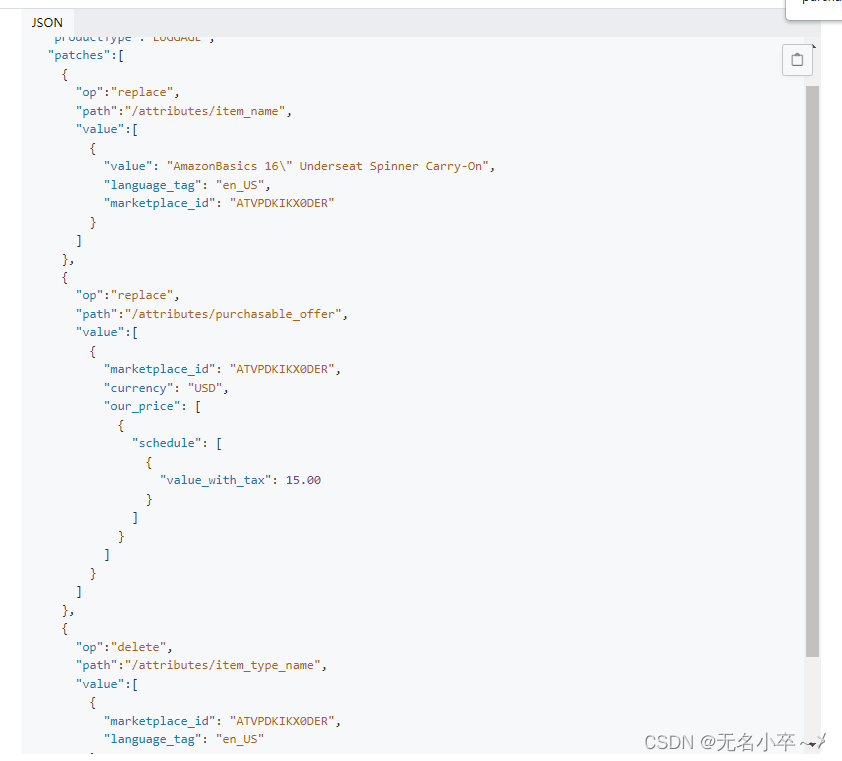
这一块确实是可以修改价格,生效时间有点长,代码就不写了,心累
本文来自互联网用户投稿,文章观点仅代表作者本人,不代表本站立场,不承担相关法律责任。如若转载,请注明出处。 如若内容造成侵权/违法违规/事实不符,请点击【内容举报】进行投诉反馈!