QT 实现软件在线更新功能
更新程序只需要替换部分需要更新的文件,不必整个程序重新安装。
主程序在运行的时候会一直占用需要的依赖文件。无法进行覆盖替换,所以当主程序将文件下载完后。启动另一个可执行程序解压下载的zip包,完成后在启动主程序。
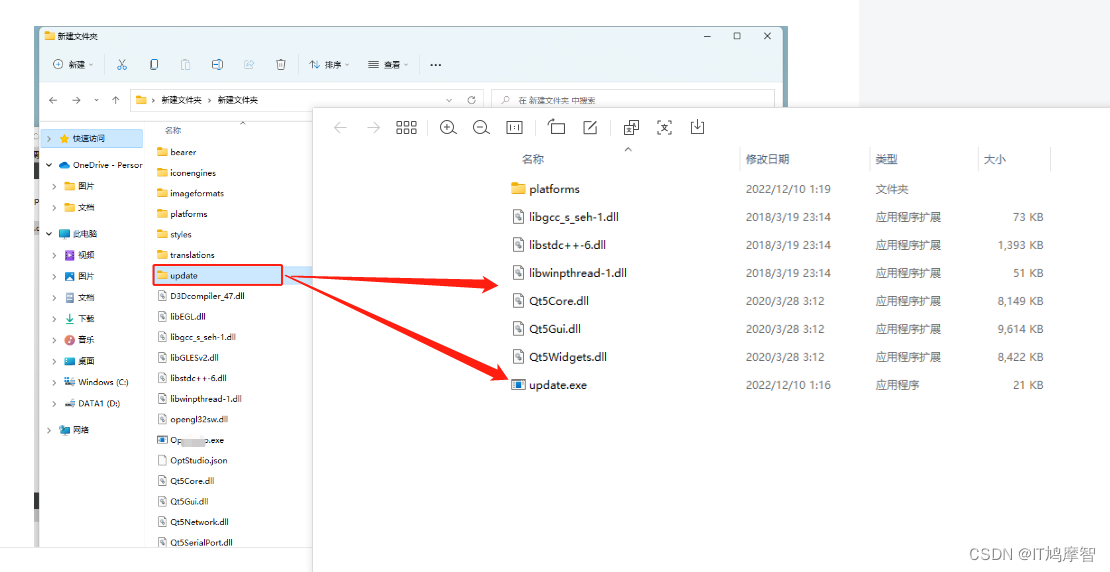
解压zip的可执行程序需要的依赖不可以和主程序共享。需要单独拥有一份。so 要在主程序的目录下建一个文件夹用于存放解压zip的程序和依赖。
所以需要编写另一个解压zip的可执行程序,zip是从服务器下载的更新文件,下载到主程序目录下将zip 解压后直接替换主程序的文件,
- 检查是否需要更新
- 编写更新程序替换旧文件
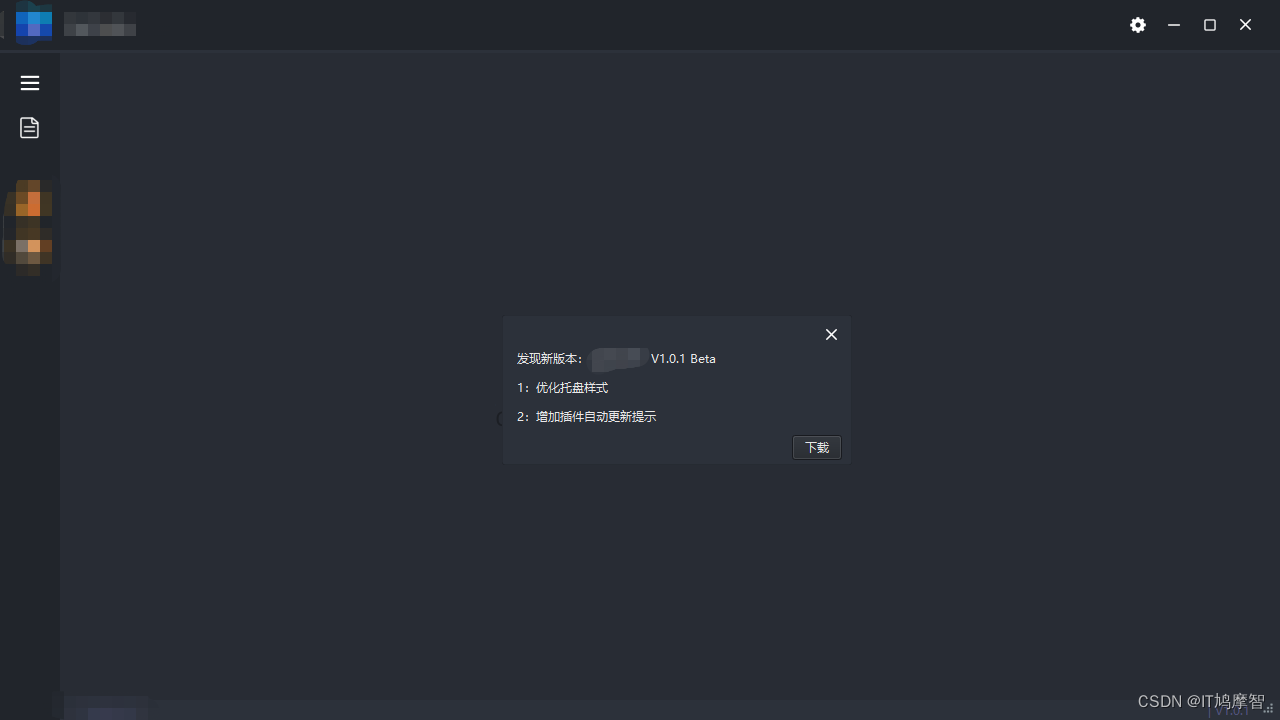
效果:
AppUpdate.h
#include
#include
#include
#include
#include
#include
#include
#include
#include
#include
#include
#include
#include class AppUpdate : public QMainWindow {
Q_OBJECTpublic:explicit AppUpdate(QWidget *parent = nullptr) : QMainWindow(parent) {//发起请求mPostRequest.post(QNetworkRequest(QUrl("http://127.0.0.1:8000/update/")), QByteArray());// 完成后触发信号connect(&mPostRequest, &QNetworkAccessManager::finished, [=](QNetworkReply *r) {if (r->error() == QNetworkReply::NoError) {QString mallJson = QString::fromUtf8(r->readAll());QJsonParseError jsonError{};QJsonDocument document = QJsonDocument::fromJson(mallJson.toUtf8(), &jsonError);if (jsonError.error == QJsonParseError::NoError) {QJsonObject mHosts = document.object();// 更新程序下载地址 由服务器返回 // 比如:http://127.0.0.1:8000/update/update.zipDownloadFileUrl = mHosts["url"].toString();// 获取的版本格式为 1.0.1 字符串已点分割,转intint newVersion = mHosts["version"].toString().split(".").join("").toInt();if (mVersion.split(".").join("").toInt() < newVersion) {// 询问是否需要更新软件int index = QMessageBox::information(this, "版本更新提示", "发现新版本 V 1.0.1 是否更新",QMessageBox::Ok | QMessageBox::No, QMessageBox::Ok);if (index == QMessageBox::No)return;// 下载插件mDownloadProgress->show();// 显示进度条mDownloadFile = new QFile(QCoreApplication::applicationDirPath() + "/update.zip");// 文件下载后存储路径直接下载到当前主程序目录下mDownloadFile->open(QIODevice::WriteOnly);//打开文件reply = mGetRequest.get(QNetworkRequest(QUrl(DownloadFileUrl)));// 下载请求connect(reply, &QIODevice::readyRead, [=] {//打开写入文件if (mDownloadFile) mDownloadFile->write(reply->readAll());}); //读取插件connect(&mGetRequest, &QNetworkAccessManager::finished, [=] {//插件下载完成QFileInfo fi;if (mDownloadFile) {const QString &OldName = mDownloadFile->fileName();fi.setFile(OldName);mDownloadFile->close();// 关闭文件mDownloadFile->reset();// 重置// 退出主程序 运行更新程序// 需要将下载的新文件替换已安装的旧文件 ,如果不退出程序,文件被主程序使用用无法替换if (QProcess::startDetached(QCoreApplication::applicationDirPath() + "/update/" + "update.exe"))// 如果成功打开更新程序QApplication::exit(0);  // 退出主程序}});connect(reply, &QNetworkReply::downloadProgress, [=](qint64 bytesRead, qint64 totalBytes) {//下载进度qreal progress = qreal(bytesRead) / qreal(totalBytes);mDownloadProgress->setValue(progress * 100);
//    qDebug() << QString::number(progress * 100, 'f', 2) << "%    " << bytesRead / (1024 * 1024) << "MB" << "/"<< totalBytes / (1024 * 1024) << "MB";});}}}});}private:const QString mVersion = "1.0.0";// 当前版本QNetworkAccessManager mPostRequest;// Post请求QNetworkAccessManager mGetRequest;// Get请求QPointer reply;QFile *mDownloadFile;// 保存文件QProgressBar *mDownloadProgress = new QProgressBar(this);// 下载进度条QString DownloadFileUrl;
};
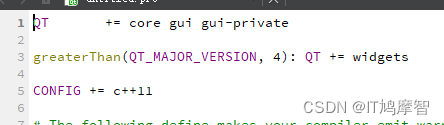
解压zip 的可执行文件 需要在.por 文件中加入 QT += core gui gui-private
update.h
#include
#include
#include
#include
int main(int argc, char *argv[])
{QApplication a(argc, argv);const QString &ZipPath = QCoreApplication::applicationDirPath();QDir Dir(ZipPath);  Dir.cdUp();//上级目录QStringList pFiles = Dir.entryList(QDir::Files);            //获取所有文件for (int i = 0; i < pFiles.length(); ++i) {if (pFiles[i].split(".").back() == "zip") {// 解压zip文件QZipReader reader(Dir.path()+"/"+pFiles[i]);// 将文件解压到主程序目录下 解压后会无提示覆盖主程序旧文件reader.extractAll(Dir.path());reader.close();QFile::remove(Dir.path()+"/"+pFiles[i]); // 删除文件break;}}// 完成后启动主程序QProcess::startDetached(Dir.path()+"/"+"main.exe");return 0;
}
用于解压zip覆盖主程序旧文件的可执行文件,其中依赖独立,不共享主程序的依赖。
本文来自互联网用户投稿,文章观点仅代表作者本人,不代表本站立场,不承担相关法律责任。如若转载,请注明出处。 如若内容造成侵权/违法违规/事实不符,请点击【内容举报】进行投诉反馈!