java多线程下载文件(断点下载、进度展示、网速展示)
引言
多线程是多任务的一种特别的形式,但多线程使用了更小的资源开销。
多线程能满足程序员编写高效率的程序来达到充分利用 CPU 的目的。
一个线程可以创建和撤销另一个线程;同一个进程中的多个线程之间可以并发执行。
相对进程而言,线程是一个更加接近于执行体的概念,它可以与同进程中的其他线程共享数据,但拥有自己的栈空间,拥有独立的执行序列。
在串行程序基础上引入线程和进程是为了提高程序的并发度,从而提高程序运行效率和响应时间。
实现功能
1、设置指定下载线程数
2、可以设置是否开启断点继续下载(为了保护磁盘,默认关闭)
3、下载进度展示
4、网速展示
多线程下载原理
把网络中的文件分成若干块(下载线程数量),然后客户端开启子线程分别下载对应的区域。打个比方假如把文件比作成一个水缸,我们要从水缸把水取出来,单线程就是插一根水管接水,那么多线程就是插很多根管子同时接水。速度就可以大大的提升,当然,最大速度还是取决于你的网络带宽。
断点继续下载原理
下载文件的时候,把下载进度实时写入到本地临时文件储存,下次打开判断是否存在下载进度。
基本步骤
1、本地先创建一个大小跟服务器文件相同大小的临时文件
2、计算分配几个线程去下载服务器上的资源,知道每个线程下载文件的位置。文件的长度/3(线程个数)=得到每个线程下载文件的大小,假如文件长度为10
线程1负责区域:0-2;
线程2负责区域:3-5;
线程3负责区域:6-文件末尾
每一个线程下载的起始位置计算方式
开始位置:
(线程id-1)每一块大小
结束位置:
(线程id每一块大小)-1
3、开启每一个线程下载对应位置的文件
4、如果所有的线程都把自己负责的区域下载完毕,那么就删除临时文件
代码实现
线程抽象类
import java.io.File;/*** 线程下载抽象接口,增强了Runnable接口,主要增加下载断点开关*/
public abstract class Downer implements Runnable {//开启是否断点下载,为了保护磁盘,默认关闭//文件下载地址private String url_path;//文件保存地址private String save_path;//下载进度保存位置,默认为C:\ProgramDataprivate String temp_path="C:\\ProgramData\\";public String getTemp_path() {return temp_path;}public void setTemp_path(String temp_path) {this.temp_path = temp_path;}public Downer(String url_path, String save_path) {this.url_path = url_path;this.save_path = save_path;}public String getUrl_path() {return url_path;}public void setUrl_path(String url_path) {this.url_path = url_path;}public String getFileName(){return new File(save_path).getName();}public String getSave_path() {return save_path;}public void setSave_path(String save_path) {this.save_path = save_path;}public boolean bpDownload=false;public boolean isBpDownload() {return bpDownload;}public void setBpDownload(boolean bpDownload) {this.bpDownload = bpDownload;}
}
下载类,主要通过URL类的openConnection()方法对服务器发起请求,获取文件资源大小,分配各个子线程负责下载的区域;
关于getResponseCode()方法返回的请求码说明:如果是请求服务器所有资源,返回值是200;如果请求服务器部分资源,比如多线程下载,那么返回值是206;
import java.io.RandomAccessFile;
import java.net.HttpURLConnection;
import java.net.URL;
import java.util.concurrent.ExecutorService;/*** 多线程下载类*/
public class ThreadDownload extends Downer{//线程下载数量,默认是1public static int threadCount=1;//记录各个子线程是否下载完毕,下载完一个减去1public static int runningThread=1;//文件总大小public volatile static int len=0;//文件进度public volatile static int progress;public ThreadDownload(String url_path, String save_path) {super(url_path, save_path);}public void setThreadCount(int threadCount){ThreadDownload.threadCount=threadCount;runningThread=threadCount;}@Overridepublic void run() {try {URL url = new URL(getUrl_path());HttpURLConnection conn = (HttpURLConnection) url.openConnection();conn.setConnectTimeout(100);conn.setRequestMethod("GET");if (conn.getResponseCode() == 200) {//服务器返回的数据的长度int length = conn.getContentLength();ThreadDownload.len=length;System.out.println(length);//在客户端本地创建一个大小跟服务器创建一个大小和服务器相等的临时文件RandomAccessFile raf = new RandomAccessFile(getSave_path(), "rwd");//指定创建的这个文件的长度raf.setLength(length);raf.close();//计算平均每个线程下载的文件的大小int blockSize = length /threadCount;for(int i=1;i<=threadCount;i++){//第一个线程下载的开始位置int startIndex=(i-1)*blockSize;//结束位置int endIndex=i*blockSize-1;//最后一个线程结束位置是文件末尾if(i==threadCount){endIndex=length;}System.out.println("线程:"+i+"下载"+startIndex+"--->"+endIndex);SonThreadDownload sonThreadDownload = new SonThreadDownload(getUrl_path(), getSave_path());sonThreadDownload.setBpDownload(this.isBpDownload());sonThreadDownload.setter(i,startIndex,endIndex);//这里使用了线程池,可以new Thread(sonThreadDownload).start();//MyExecutorService.getThread().submit(sonThreadDownload);new Thread(sonThreadDownload).start();}//开始监听下载进度speed();}}catch (Exception e){e.printStackTrace();}finally {}}private void speed() {int temp=0;//循环监控网速,如果下载进度达到100%就结束监控while(ThreadDownload.progress!=ThreadDownload.len) {//System.out.println("ThreadDownload.progress="+ThreadDownload.progress+"--ThreadDownload.len="+ThreadDownload.len);temp=progress;try {Thread.sleep(1000);} catch (InterruptedException e) {e.printStackTrace();}//当前下载进度除以文件总长得到下载进度double p=(double)temp/(double)len*100;//当前下载进度减去前一秒的下载进度就得到一秒内的下载速度temp= progress-temp;//System.out.println(p);sl.speed(temp,p);}sl.speed(temp,100);System.out.println("整个文件下载完毕啦");}SpeedListener sl;/*** * @param sl 网速监听回调接口*/public void addSpeedListener(SpeedListener sl){this.sl=sl;}}
下载进度和下载网速监听接口 SpeedListener .java
public interface SpeedListener {/**** @param s 当前下载速度,单位字节* @param progress 下载进度,百分比*/void speed(int s,double progress);
}
负责下载指定区域的子线程
import java.io.*;
import java.net.HttpURLConnection;
import java.net.URL;
/*** 负责下载上级分配的指定区域*/
public class SonThreadDownload extends Downer{private int threadId;private int startIndex;private int endIndex;public SonThreadDownload(String url_path, String save_path) {super(url_path, save_path);}/**** @param threadId 该线程下载id* @param startIndex 该线程下载开始位置* @param endIndex 该线程下载的结束位置*/public void setter(int threadId,int startIndex,int endIndex){this.threadId=threadId;this.startIndex=startIndex;this.endIndex=endIndex;}@Overridepublic void run() {InputStream is=null;RandomAccessFile raf=null;try {//检查是否存在记录下载长度的文件,如果存在就读取这个文件的数据File tempFile = new File(getTemp_path()+getFileName()+threadId + ".temp");//检查是否开启断点继续下载if(this.isBpDownload()&&tempFile.exists()&&tempFile.length()>0) {FileInputStream fis = new FileInputStream(tempFile);byte[] temp = new byte[1024];int leng = fis.read(temp);fis.close();String s = new String(temp, 0, leng);int dowloadlenInt = Integer.parseInt(s)-1;//修改下载的开始位置startIndex+=dowloadlenInt;//System.out.println(threadId+"线程真是开始位置:"+startIndex);}URL url = new URL(getUrl_path());HttpURLConnection conn = (HttpURLConnection) url.openConnection();conn.setConnectTimeout(100);conn.setRequestMethod("GET");//请求服务器下载部分文件的指定位置的位置conn.setRequestProperty("Range","bytes="+startIndex+"-"+endIndex);//请求服务器全部资源200ok,如果从服务器请求部分资源206okint responseCode = conn.getResponseCode();if(responseCode==206){raf = new RandomAccessFile(getSave_path(), "rwd");is = conn.getInputStream();//定位文件从哪个位置开始写raf.seek(startIndex);int len=0;byte[] buff=new byte[1024*1024];//已经下载的数据长度int total=0;while((len=is.read(buff))!=-1){raf.write(buff,0,len);synchronized (ThreadDownload.class) {ThreadDownload.progress += len;}total+=len;if(isBpDownload()) {//以文件名加线程id保存为临时文件,保存当前线程的下载进度RandomAccessFile info = new RandomAccessFile(getTemp_path() + getFileName() + threadId + ".temp", "rwd");info.write(String.valueOf(total + startIndex).getBytes());info.close();}}}System.out.println("线程:"+threadId+"号下载完毕了");if(isBpDownload()) {synchronized (ThreadDownload.class) {//下载中的线程--,当减到0时代表整个文件下载完毕,如果中途异常,那么这个文件就没下载完ThreadDownload.runningThread--;if (ThreadDownload.runningThread == 0) {for (int i = 0; i < ThreadDownload.threadCount; i++) {File file = new File(getTemp_path() + getFileName() + (i + 1) + ".temp");file.delete();System.out.println(getFileName() + (i + 1) + ".txt下载完毕,清除临时文件");}}}}} catch (Exception e) {e.printStackTrace();System.out.println(threadId+"号线程炸了");}finally {if(raf!=null){try {raf.close();} catch (IOException e) {e.printStackTrace();}}if(is!=null){try {is.close();} catch (IOException e) {e.printStackTrace();}}}}
}
RandomAccessFile 类说明
jdk帮助文档中是这样说明的:
此类的实例支持对随机访问文件的读取和写入。随机访问文件的行为类似存储在文件系统中的一个大型 byte 数组。存在指向该隐含数组的光标或索引,称为文件指针;输入操作从文件指针开始读取字节,并随着对字节的读取而前移此文件指针。如果随机访问文件以读取/写入模式创建,则输出操作也可用;输出操作从文件指针开始写入字节,并随着对字节的写入而前移此文件指针。写入隐含数组的当前末尾之后的输出操作导致该数组扩展。该文件指针可以通过 getFilePointer 方法读取,并通过 seek 方法设置。
主要构造方法
RandomAccessFile(File file, String mode)
创建从中读取和向其中写入(可选)的随机访问文件流,该文件由 File 参数指定。
RandomAccessFile(String name, String mode)
创建从中读取和向其中写入(可选)的随机访问文件流,该文件具有指定名称。
mode定义:mode 参数指定用以打开文件的访问模式。允许的值及其含意为:
| 值 | 含义 |
|---|---|
| “r” | 以只读方式打开。调用结果对象的任何 write 方法都将导致抛出 IOException。 |
| “rw” | 打开以便读取和写入。如果该文件尚不存在,则尝试创建该文件。 |
| “rws” | 打开以便读取和写入,对于 “rw”,还要求对文件的内容或元数据的每个更新都同步写入到底层存储设备。 |
| “rwd” | 打开以便读取和写入,对于 “rw”,还要求对文件内容的每个更新都同步写入到底层存储设备。 |
由于采用实时保存下载进度,怕万一中途断点啥的,在断点的前一秒把数据写入到磁盘保存时最安全的。
最后,再来一个测试类
String game2="http://big.xiazaicc.com/bigfile/100/VB6.0qyb_downcc.com.zip";//1、连接服务器,获取一个文件,获取文件的长度,在本地创建一个大小跟服务器文件一样大的临时文件ThreadDownload threadDownload = new ThreadDownload(game2, "E:\\demo.zip");//设置线程数threadDownload.setThreadCount(15);//开启断点下载//threadDownload.setBpDownload(true);//添加进度和网速监听threadDownload.addSpeedListener(new SpeedListener() {@Overridepublic void speed(int s, double progress) {String m=String.format("%.2f",(double) s/1024/1024);String pro=String.format("%.2f",progress);System.out.println(m+"m/s--进度:"+pro+"%");}});//由于ThreadDownload类也是个线程类,可以开启线程threadDownload.run();
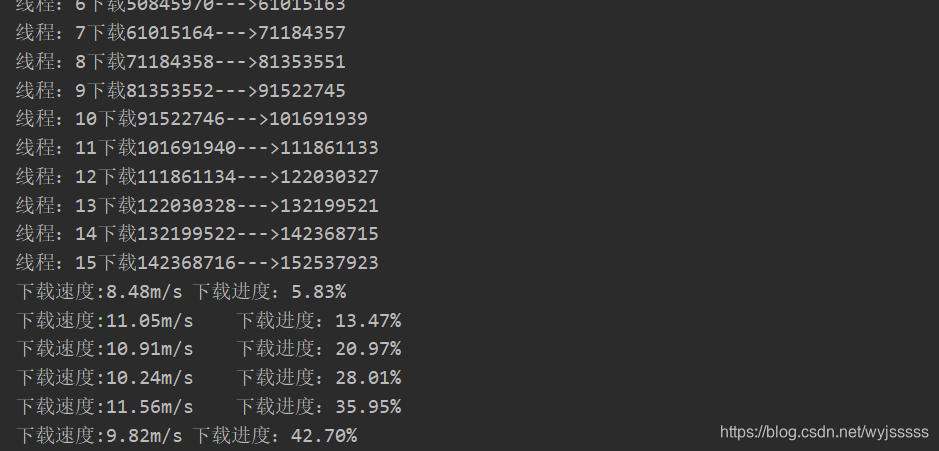
最后效果如下:
本文来自互联网用户投稿,文章观点仅代表作者本人,不代表本站立场,不承担相关法律责任。如若转载,请注明出处。 如若内容造成侵权/违法违规/事实不符,请点击【内容举报】进行投诉反馈!