canvas在图片上绘制图形
说明
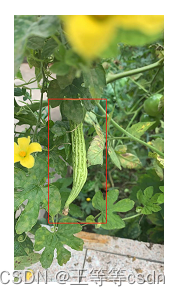
在vue项目中,后台返回图片的url和矩形的顶点坐标(左上和右下),需要在图片上绘制矩形框,并在前端进行展示(一张张的播放图片)。
其中返回的数据是多张图片的集合,前端也需要整合一个绘制后的图片集合,由于image onload是异步的,为了保证图片顺序不变,用到了async await。
<canvas id="canvas" width="640" height="320" style="display: none" />
loadImg(src) {return new Promise((resolve, reject) => {const img = new Image()img.src = srcimg.setAttribute('crossOrigin', 'anonymous') //跨域处理img.onload = () => resolve(img)img.onerror = () => resolve('') //图片加载失败也走resolve})
},
async getPictures() {try {const that = thisconst { data } = await getPicturesFun() // 调用接口获取返回数据for (let i = 0; i <= data.length; i++) {await that.loadImg(data[i].src).then((image) => {that.canvas = document.getElementById('canvas')that.canvas.width = image.widththat.canvas.height = image.widththat.ctx = this.canvas.getContext('2d')that.ctx.drawImage(image, 0, 0, image.width, image.height) // 在画布上定位图像,并规定图像的宽度和高度that.ctx.lineWidth = 2that.ctx.strokeSteyle = "#0000FF"let {x1, y1, x2, y2} = data[i]that.ctx.strokeRect(x1, y1, x2-x1, y2-y1) // 矩形的位置(x1, y1)宽(x2-x1)高(y2-y1)const imgSrc = that.canvas.toDataURL()if (i === 0) {that.imageUrl = imgSrc // 第一张图片src}that.imageUrls.push(imgSrc) // 组成绘制后的图片集合})}} catch(err) {console.log(err)}
}
效果图
本文来自互联网用户投稿,文章观点仅代表作者本人,不代表本站立场,不承担相关法律责任。如若转载,请注明出处。 如若内容造成侵权/违法违规/事实不符,请点击【内容举报】进行投诉反馈!