用PyOpenGL/OpenGL高速(异步)保存像素到内存
用Pyopengl高速保存像素到内存(保存成图片)
最近用到Pyopengl需要将实时渲染窗口保存成array以便进一步对图片操作处理,基于对速度上的需求,采用PBO的方式。将直接glreadpixels, 单个PBO,异步双PBO分别进行速度比较,异步PBO速度最快。
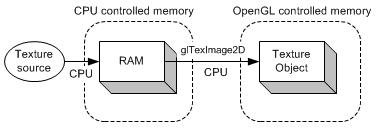
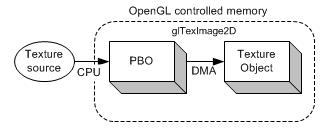
传统使用glReadPixels将阻塞渲染管道(流水线),直到所有的像素数据传递完成,才会将控制权交还给应用程序。相反,使用PBO的glReadPixels可以调度异步DMA传递,能够立即返回而不用等待。因此,CPU可以在OpenGL(GPU)传递像素数据的时候进行其它处理。
用两个PBO异步glReadPixels
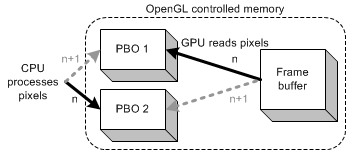
例子程序也使用了两个PBO,在第n帧时,应用帧缓存读出像素数据到PBO1中,同时在PBO2中对像素数据进行处理。读与写的过程可同时进行,是因为,在调用glReadPixels时立即返回了,而CPU立即处理PBO2而不会有延迟。在下一帧时,PBO1和PBO2的角色互换。
渲染模型的代码来自dalong10
https://blog.csdn.net/dalong10/article/details/94183092
参考FBO PBO
http://blog.sina.com.cn/s/blog_4062094e0100alvt.html
1、对于直接读数据到内存,全部都是由CPU执行的,速度很慢。
对于单个PBO和异步PBO的速度差异上的理解,我的理解是:
2、对于单个PBO,传递1帧数据到CPU的时间为:帧缓存写到PBO的时间加上PBO到CPU的时间,总是先写,再读,这里CPU就要等待帧缓存写到PBO;
对于异步PBO,传递1帧数据到CPU的时间仅为PBO到CPU的这段时间,帧缓存到PBO由GPU执行,从PBO到CPU由CPU执行,两者同步执行,互不干扰,所以速度上更快了。
说实话pyopengl资料太少,有些bug根本不知道怎么改,比如glreadpixels用在PBO上的话,最后一个参数得填成0,或者c_void_p(0),如果写成None的话就会报错。上stackoverflow上查了半天没查到,上github上搜了一下有人用过,最后才改出来…,这个坑填了两天。
OpenGL.error.GLError: GLError(err = 1282,description = b'\xce\xde\xd0\xa7\xb2\xd9\xd7\xf7',baseOperation = glReadPixels,cArguments = (0,0,800,600,GL_RGB,GL_UNSIGNED_BYTE,array([[[0, 0, 0],[0, 0, 0],[0, 0, 0],...,[0, 0, 0],[0, 0, 0],[...,)
)
下面是C++实现:
// "index" is used to copy pixels from a PBO to a texture object
// "nextIndex" is used to update pixels in the other PBO
index = (index + 1) % 2;
nextIndex = (index + 1) % 2;// bind the texture and PBO
glBindTexture(GL_TEXTURE_2D, textureId);
glBindBuffer(GL_PIXEL_UNPACK_BUFFER, pboIds[index]);// copy pixels from PBO to texture object
// Use offset instead of ponter.
glTexSubImage2D(GL_TEXTURE_2D, 0, 0, 0, WIDTH, HEIGHT, GL_BGRA, GL_UNSIGNED_BYTE, 0);// bind PBO to update texture source
glBindBuffer(GL_PIXEL_UNPACK_BUFFER, pboIds[nextIndex]);// Note that glMapBuffer() causes sync issue.
// If GPU is working with this buffer, glMapBuffer() will wait(stall)
// until GPU to finish its job. To avoid waiting (idle), you can call
// first glBufferData() with NULL pointer before glMapBuffer().
// If you do that, the previous data in PBO will be discarded and
// glMapBuffer() returns a new allocated pointer immediately
// even if GPU is still working with the previous data.
glBufferData(GL_PIXEL_UNPACK_BUFFER, DATA_SIZE, 0, GL_STREAM_DRAW);// map the buffer object into client's memory
GLubyte* ptr = (GLubyte*)glMapBuffer(GL_PIXEL_UNPACK_BUFFER, GL_WRITE_ONLY);
if(ptr)
{// update data directly on the mapped bufferupdatePixels(ptr, DATA_SIZE);glUnmapBuffer(GL_PIXEL_UNPACK_BUFFER); // release the mapped buffer
}// it is good idea to release PBOs with ID 0 after use.
// Once bound with 0, all pixel operations are back to normal ways.
glBindBuffer(GL_PIXEL_UNPACK_BUFFER, 0);
下面是Python实现方式:
#前半部分渲染模型的代码来自 @dalong10 这个博主
import glutils  # Common OpenGL utilities,see glutils.py
import sys, random, math
import OpenGL
from OpenGL.GL import *
from OpenGL.GL.shaders import *
from OpenGL.GLU import *
import numpy
import numpy as np
import glfw
from PIL import Image
import cv2
import timestrVS = """
#version 330 core
layout(location = 0) in vec3 position;
layout (location = 1) in vec2 inTexcoord;
out vec2 outTexcoord;
uniform mat4 uMVMatrix;
uniform mat4 uPMatrix;
uniform float a;
uniform float b;
uniform float c;
uniform float scale;
uniform float theta;void main(){mat4 rot1=mat4(vec4(1.0, 0.0,0.0,0),vec4(0.0, 1.0,0.0,0),vec4(0.0,0.0,1.0,0.0),vec4(a,b,c,1.0));mat4 rot2=mat4(vec4(scale, 0.0,0.0,0.0),vec4(0.0, scale,0.0,0.0),vec4(0.0,0.0,scale,0.0),vec4(0.0,0.0,0.0,1.0));mat4 rot3=mat4( vec4(0.5+0.5*cos(theta),  0.5-0.5*cos(theta), -0.707106781*sin(theta), 0),vec4(0.5-0.5*cos(theta),0.5+0.5*cos(theta), 0.707106781*sin(theta),0),vec4(0.707106781*sin(theta), -0.707106781*sin(theta),cos(theta), 0.0),vec4(0.0,         0.0,0.0, 1.0));gl_Position=uPMatrix * uMVMatrix * rot2 *rot1 *rot3 * vec4(position.x, position.y, position.z, 1.0);outTexcoord = inTexcoord;}
"""strFS = """
#version 330 core
out vec4 FragColor;
in vec2 outTexcoord;
uniform sampler2D texture1;
void main(){FragColor = texture(texture1, outTexcoord);}
"""class FirstCube:def __init__(self, side):self.side = side# load shadersself.program = glutils.loadShaders(strVS, strFS)glUseProgram(self.program)# attributesself.vertIndex = glGetAttribLocation(self.program, b"position")self.texIndex = glGetAttribLocation(self.program, b"inTexcoord")s = side / 2.0cube_vertices = [-s, -s, -s,s, -s, -s,s, s, -s,s, s, -s,-s, s, -s,-s, -s, -s,-s, -s, s,s, -s, s,s, s, s,s, s, s,-s, s, s,-s, -s, s,-s, s, s,-s, s, -s,-s, -s, -s,-s, -s, -s,-s, -s, s,-s, s, s,s, s, s,s, s, -s,s, -s, -s,s, -s, -s,s, -s, s,s, s, s,-s, -s, -s,s, -s, -s,s, -s, s,s, -s, s,-s, -s, s,-s, -s, -s,-s, s, -s,s, s, -s,s, s, s,s, s, s,-s, s, s,-s, s, -s]# texture coordst = 1.0quadT = [0, 0, t, 0, t, t, t, t, 0, t, 0, 0,0, 0, t, 0, t, t, t, t, 0, t, 0, 0,t, 0, t, t, 0, t, 0, t, 0, 0, t, 0,t, 0, t, t, 0, t, 0, t, 0, 0, t, 0,0, t, t, t, t, 0, t, 0, 0, 0, 0, t,0, t, t, t, t, 0, t, 0, 0, 0, 0, t]# set up vertex array object (VAO)self.vao = glGenVertexArrays(1)glBindVertexArray(self.vao)# set up VBOsvertexData = numpy.array(cube_vertices, numpy.float32)self.vertexBuffer = glGenBuffers(1)glBindBuffer(GL_ARRAY_BUFFER, self.vertexBuffer)glBufferData(GL_ARRAY_BUFFER, 4 * len(vertexData), vertexData, GL_STATIC_DRAW)tcData = numpy.array(quadT, numpy.float32)self.tcBuffer = glGenBuffers(1)glBindBuffer(GL_ARRAY_BUFFER, self.tcBuffer)glBufferData(GL_ARRAY_BUFFER, 4 * len(tcData), tcData, GL_STATIC_DRAW)  # 4*len(tcData) 相当于 sizeof(tcData),即sizeof(float)*len(tcData)# enable arraysglEnableVertexAttribArray(self.vertIndex)glEnableVertexAttribArray(self.texIndex)# Position attributeglBindBuffer(GL_ARRAY_BUFFER, self.vertexBuffer)glVertexAttribPointer(self.vertIndex, 3, GL_FLOAT, GL_FALSE, 0, None)# TexCoord attributeglBindBuffer(GL_ARRAY_BUFFER, self.tcBuffer)glVertexAttribPointer(self.texIndex, 2, GL_FLOAT, GL_FALSE, 0, None)# unbind VAOglBindVertexArray(0)glBindBuffer(GL_ARRAY_BUFFER, 0)def render(self, pMatrix, mvMatrix, texid, a, b, c, scale, r):self.texid = texid# enable textureglActiveTexture(GL_TEXTURE0)glBindTexture(GL_TEXTURE_2D, self.texid)# use shader# set proj matrixglUniformMatrix4fv(glGetUniformLocation(self.program, 'uPMatrix'),1, GL_FALSE, pMatrix)# set modelview matrixglUniformMatrix4fv(glGetUniformLocation(self.program, 'uMVMatrix'),1, GL_FALSE, mvMatrix)glUseProgram(self.program)glUniform1f(glGetUniformLocation(self.program, "a"), a)glUniform1f(glGetUniformLocation(self.program, "b"), b)glUniform1f(glGetUniformLocation(self.program, "c"), c)glUniform1f(glGetUniformLocation(self.program, "scale"), scale)theta = r * PI / 180.0glUniform1f(glGetUniformLocation(self.program, "theta"), theta)# bind VAOglBindVertexArray(self.vao)glEnable(GL_DEPTH_TEST)# drawglDrawArrays(GL_TRIANGLES, 0, 36)# unbind VAOglBindVertexArray(0)count = 0
time_total = 0
if __name__ == '__main__':import sysimport glfwimport OpenGL.GL as glcamera = glutils.Camera([0.0, 0.0, 5.0],[0.0, 0.0, 0.0],[0.0, 1.0, 0.0])def on_key(window, key, scancode, action, mods):if key == glfw.KEY_ESCAPE and action == glfw.PRESS:glfw.set_window_should_close(window, 1)# Initialize the libraryif not glfw.init():sys.exit()# Create a windowed mode window and its OpenGL contextwindow = glfw.create_window(800, 600, "draw Cube ", None, None)if not window:glfw.terminate()sys.exit()# Make the window's context currentglfw.make_context_current(window)# Install a key handlerglfw.set_key_callback(window, on_key)PI = 3.14159265358979323846264texid = glutils.loadTexture("container2.png")# Loop until the user closes the windowa = 0firstCube0 = FirstCube(1.0)'''用前两种的时候要把下面这一段的注释,现在用异步PBO'''pixelformat = {'gl': GL_RGB, 'image': 'RGB', 'size': 3}idx, nextidx = 0, 0width1, height1 = 800, 600bufferSize = width1 * height1 * 3pbo = glGenBuffers(2)glBindBuffer(GL_PIXEL_PACK_BUFFER, pbo[0])glBufferData(GL_PIXEL_PACK_BUFFER, bufferSize, None, GL_STREAM_READ)glBindBuffer(GL_PIXEL_PACK_BUFFER, pbo[1])glBufferData(GL_PIXEL_PACK_BUFFER, bufferSize, None, GL_STREAM_READ)glBindBuffer(GL_PIXEL_PACK_BUFFER, 0)while not glfw.window_should_close(window):# Render herewidth, height = glfw.get_framebuffer_size(window)ratio = width / float(height)gl.glViewport(0, 0, width, height)gl.glClear(gl.GL_COLOR_BUFFER_BIT | gl.GL_DEPTH_BUFFER_BIT)gl.glMatrixMode(gl.GL_PROJECTION)  # 将当前矩阵指定为投影矩阵gl.glLoadIdentity()  # 然后把矩阵设为单位矩阵gl.glOrtho(-ratio, ratio, -1, 1, 1, -1)  # 生成的矩阵会与当前的矩阵相乘,生成透视的效果gl.glMatrixMode(gl.GL_MODELVIEW)  # 对模型视景的操作,接下来的语句描绘一个以模型为基础的适应,这样来设置参数,接下来用到的就是像gluLookAt()这样的函数;gl.glLoadIdentity()gl.glClearColor(0.0, 0.0, 0.0, 0.0)i = acamera.eye = [5 * math.sin(a * PI / 180.0), 0, 5 * math.cos(a * PI / 180.0)]pMatrix = glutils.perspective(100.0, 1, 0.1, 100.0)# modelview matrixmvMatrix = glutils.lookAt(camera.eye, camera.center, camera.up)glBindTexture(GL_TEXTURE_2D, texid)firstCube0.render(pMatrix, mvMatrix, texid, 0.0, 1, 0, 0.4, i)firstCube0.render(pMatrix, mvMatrix, texid, 1.0, 0, 0.4, 0.5, i)firstCube0.render(pMatrix, mvMatrix, texid, 0.0, -1, -0.5, 0.3, i)firstCube0.render(pMatrix, mvMatrix, texid, -1.0, 0, 0.2, 0.2, i)a = a + 1if a > 360:a = 0# Swap front and back buffers'''直接将屏幕读取到cpu, 速度最慢'''# time1 = time.time()# buffer = (GLubyte * (3 * width * height))(0)# glReadPixels(0, 0, width, height, GL_RGB, GL_UNSIGNED_BYTE, buffer)# image = Image.frombytes(mode="RGB", size=(width, height), data=buffer)# image = image.transpose(Image.FLIP_TOP_BOTTOM)# img = cv2.cvtColor(numpy.asarray(image), cv2.COLOR_RGB2BGR)# cv2.imshow("img", img)# timecost = time.time() - time1# print("time:", timecost)'''单pbo, 速度比直接读快一点点'''time1 = time.time()size = width * height * 3pixel_buffer = glGenBuffers(1)glBindBuffer(GL_PIXEL_PACK_BUFFER, pixel_buffer)glBufferData(GL_PIXEL_PACK_BUFFER, size, None, GL_STREAM_READ)glReadPixels(0, 0, width, height, GL_RGB, GL_UNSIGNED_BYTE, 0)bufferdata = glMapBuffer(GL_PIXEL_PACK_BUFFER, GL_READ_ONLY)image = Image.frombuffer("RGB", (width, height), ctypes.string_at(bufferdata, size), 'raw',"RGB", 0, 1)# image = Image.frombytes(mode="RGB", size=(width, height), data=bufferdata)image = image.transpose(Image.FLIP_TOP_BOTTOM)img = cv2.cvtColor(numpy.asarray(image), cv2.COLOR_RGB2BGR)glUnmapBuffer(GL_PIXEL_PACK_BUFFER)glBindBuffer(GL_PIXEL_PACK_BUFFER, 0)glDeleteBuffers(1, [pixel_buffer])cv2.imshow("img", img)timecost = time.time() - time1print("time:", timecost)'''异步双PBO, 速度最快!''''''比如说第1帧的时候将帧缓存数据存到PBO1里,''''''通过PBO2将第0帧数据(此时没有)存到CPU中。''''''第2帧的时候将帧缓存数数据存到PBO2中,''''''通过PBO1将第1帧的数据存到CPU中。如此反复'''time1 = time.time()idx = (idx + 1) % 2nextidx = (idx + 1) % 2glBindBuffer(GL_PIXEL_PACK_BUFFER, pbo[idx])glReadPixels(0, 0, width, height, GL_RGB, GL_UNSIGNED_BYTE, 0)glBindBuffer(GL_PIXEL_PACK_BUFFER, pbo[nextidx])bufferdata = glMapBuffer(GL_PIXEL_PACK_BUFFER, GL_READ_ONLY)image = Image.frombuffer(pixelformat["image"], (width, height), ctypes.string_at(bufferdata, bufferSize), 'raw',pixelformat['image'], 0, 1)# image = Image.frombytes(mode="RGB", size=(width, height), data=bufferdata)image = image.transpose(Image.FLIP_TOP_BOTTOM)glUnmapBuffer(GL_PIXEL_PACK_BUFFER)glBindBuffer(GL_PIXEL_PACK_BUFFER, 0)img = cv2.cvtColor(numpy.asarray(image), cv2.COLOR_RGB2BGR)cv2.imshow("img", img)timecost = time.time() - time1print(timecost)time_total += timecostcount += 1glfw.swap_buffers(window)# Poll for and process eventsglfw.poll_events()print("total_cost:", time_total/count)glfw.terminate()
本文来自互联网用户投稿,文章观点仅代表作者本人,不代表本站立场,不承担相关法律责任。如若转载,请注明出处。 如若内容造成侵权/违法违规/事实不符,请点击【内容举报】进行投诉反馈!