高考学生信息管理系统(大二第一学期python期末项目)
项目简介
采取堆排序实现对高考模拟数据分别基于各个单科成绩,总分等获取整体排序结果、topN排序结果和每个学生在西南地区的排名与所在省的排名。
采取快速排序实现基于学生的身份证与姓名查询对应考生的基本信息与成绩信息,并使用tkinter将以上前4个基本功能的实现采用界面实现。在输入端操作进行限制方面,我们主要针对所要查询省份名称、topn数据的输入类型及范围、学生身份证号及姓名的输入进行规范化处理。
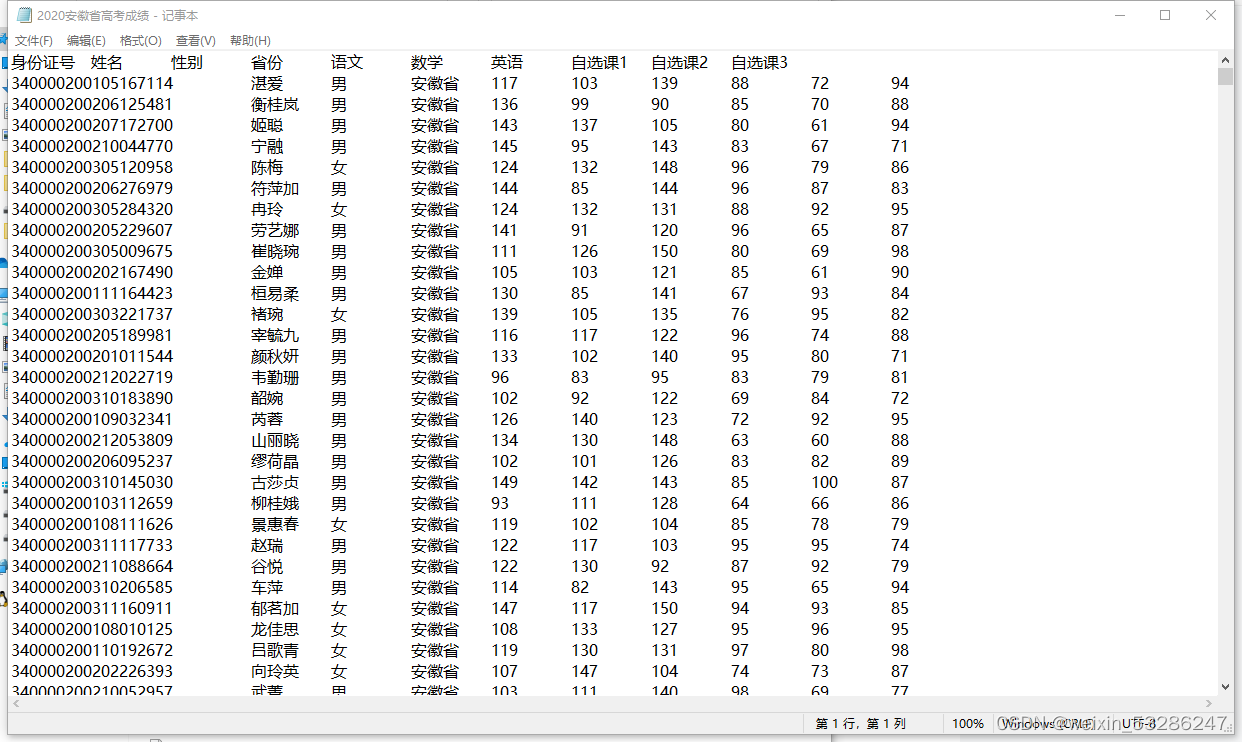
PS:数据是任课老师随机生成的,并非爬取的真实数据,测试数据量较少。原始数据存放在"D:/pythonProject/python_12/raw_data(1)"这个路径下。原始数据在文章结尾,大家可以试试看。
raw_data(1)文件夹:

”2020安徽省高考成绩“文件内:
项目功能
功能 1 :对高考模拟数据分别基于各个单科成绩,总分等获取整体排序结果 功能 2 :对高考模拟数据分别基于各个单科成绩,总分等获取 topN 排序结果 功能 3:对重庆,四川,贵州,云南的成绩进行合并排序,得到每个学生在西南地区的排名与所在省的排名 功能 4 :实现基于学生的身份证与姓名查询对应考生的基本信息与成绩信息 功能 5 :将以上前 4 个基本功能的实现采用界面实现项目代码
import pandas as pd
import tkinter as tk
from tkinter import ttk
from tkinter import scrolledtext
# 界面
# 创建标签
def label_eg(window, x, y, text, font):label = tk.Label(window, text=text, font=font)label.place(x=x, y=y)return label# 创建输入框
def entry_eg(window, x, y, width, height, font):mu_name = tk.StringVar()entry = tk.Entry(window, textvariable=mu_name, font=font)entry.place(x=x, y=y, width=width, height=height)return entry# 创建一个下拉框
# 省份
def combox_eg_pro(window,x ,y ,width,height, font):provinces = ["安徽省","澳门","北京市","福建省","甘肃省","广东省","广西壮族自治区","贵州省","海南省","河北省","河南省","黑龙江省","湖北省","湖南省","吉林省","江苏省","江西省","辽宁省","内蒙古自治区","宁夏回族自治区","青海省","山东省","山西省","陕西省","上海市","四川省","台湾省","天津市","西藏自治区","新疆维吾尔自治区","云南省","浙江省","重庆市"]provinces_select = ttk.Combobox(window, values=provinces, font=font,state="readonly")provinces_select.set(provinces[0])provinces_select.place(x=x, y=y, width=width, height=height)return provinces_select# 科目
def combox_eg_sub(window,x ,y ,width,height, font):sub_select = ttk.Combobox(window, values=["语文","数学","英语","自选课1","自选课2","自选课3","总分"], font=font,state="readonly")sub_select.place(x=x, y=y, width=width, height=height)return sub_select# 创建按钮
def button_eg(window, x, y, width, height, text, font, command):btn1 = tk.Button(window, text=text, command=command, font=font)btn1.place(x=x, y=y, width=width, height=height)# 堆排序实现代码
def sift1(data, low, high, num1):i = lowj = 2*i+1tmp = data[low]tmp1 = int(data[low][num1])while j <= high:if j+1 <= high and int(data[j+1][num1]) > int(data[j][num1]):j += 1if int(data[j][num1]) > tmp1:data[i] = data[j]i = jj = 2*i+1else:data[i] = tmpbreakelse:data[i] = tmpdef heap_sort1(data, topn, num1):n = len(data)num1 = num1for i in range((n-2)//2,-1,-1):sift1(data,i,n-1,num1)#print(data)m = 0for i in range(n-1,-1,-1):data[0],data[i] = data[i],data[0]sift1(data,0,i-1,num1)m+=1if m==topn:breakreturn data[-topn:]def huoqu1(provinces):# 功能一/功能二path = r"D:/pythonProject/python_12/raw_data(1)/2020" + provinces + "高考成绩.txt"file = open(path, "r", encoding="utf_8")line = file.read().strip()line = line.split('\n')list = []for i in range(1, len(line)):a = line[i].split()sum = str(int(a[4]) + int(a[5]) + int(a[6]) + int(a[7]) + int(a[8]) + int(a[9]))a.append(sum)list.append(a)# 获取省名单return list
def huoqu2(list,topn,index1):index_ = {"语文": 4, "数学": 5, "英语": 6, "自选课1": 7, "自选课2": 8, "自选课3": 9, "总分": 10}result = heap_sort1(list, topn, num1=index_[index1])result.reverse()result1 = []for i in result:result2 = []result2.append(i[0])result2.append(i[1])result2.append(i[3])result2.append(i[index_[index1]])result1.append(result2)# 获取topn名单return result1
# 堆排序
def sift2(data, low, high):i = lowj = 2 * i + 1tmp = data[low]while j <= high:if j + 1 <= high and data[j + 1]["总分"] < data[j]["总分"]:j += 1if data[j]["总分"] < tmp["总分"]:data[i] = data[j]i = jj = 2 * i + 1else:data[i] = tmpbreakelse:data[i] = tmpdef heap_sort2(data):n = len(data)for i in range((n - 2) // 2, -1, -1):sift2(data, i, n - 1)for i in range(n - 1, -1, -1):data[0], data[i] = data[i], data[0]sift2(data, 0, i - 1)return data
# 获得堆排序后的dataframe
def demo(data):data = data.to_dict("records")data = heap_sort2(data)# 将列表转成dataframedata = pd.DataFrame(data)return data
# 堆排序获省排名
def sheng_pai_xu(province):path = r"D:/pythonProject/python_12/raw_data(1)/2020" + province + "高考成绩.txt"data = pd.read_csv(path, sep="\t", header=0)# 添加总分data["总分"] = data.iloc[0:len(data), 4:10].sum(axis=1)# data = data.sort_values(by="总分",axis=1,ascending=False)# 根据总分排序data = demo(data)# 重置索引data.index = range(1, len(data) + 1)# 添加所在省排名data["省排名"] = list(data.index)return data
# 快速排序获取位次
def home(data, left, right):# 写成字典列表data = data.to_dict("records")tmp = data[left]while left < right:while tmp["总分"] <= data[right]["总分"] and left < right:right -= 1data[left] = data[right]while data[left]["总分"] <= tmp["总分"] and left < right:left += 1data[right] = data[left]data[left] = tmpdata = pd.DataFrame(data)# 重置索引data.index = range(len(data), 0, -1)# 添加所在省排名data["省排名"] = list(data.index)return data
# 第三题
def project_3():# 获取重庆市学生名单datacq = sheng_pai_xu("重庆市")# 获取云南省学生名单datayn = sheng_pai_xu("云南省")# 获取贵州省学生名单datagz = sheng_pai_xu("贵州省")# 获取四川省学生名单datasc = sheng_pai_xu("四川省")# 获取西南地区学生名单data = datayn.append(datasc.append(datagz.append(datacq)))# 按照总分排序(西南地区)data = demo(data)# 重新获取索引data.index = range(1, len(data) + 1)# 添加西南地区排序名次data["西南地区排名"] = list(data.index)# 写成文件形式path = 'D:/pythonProject/python_12/西南地区及西南四省学生排名.txt'data.to_csv(path, sep='\t', index=False)return path
# 第四题
def project_4(province, stuid, stuname):# 判断输入是否合法for i in stuid:if ord(i) < 48 or ord(i) > 57:return Noneif int(stuid) <= 0:return Nonepath = r"D:/pythonProject/python_12/raw_data(1)/2020" + province + "高考成绩.txt"data = pd.read_csv(path, sep="\t", header=0)# 判断考生是否存在# 获取学生信息stuinf = data[(data["身份证号"] == int(stuid)) & (data["姓名"] == stuname)]# 未查询到考生if stuinf["身份证号"].empty:return None# 将待排学生移到第一个stuind =data[(data["身份证号"] == int(stuid)) & (data["姓名"] == stuname)].index[0]tmp1 = data.loc[0]# 将学生信息移到第一个data.loc[0,"身份证号"] = data.loc[stuind,"身份证号"]data.loc[0,"姓名"] = data.loc[stuind,"姓名"]data.loc[0,"性别"] = data.loc[stuind,"性别"]data.loc[0,"省份"] = data.loc[stuind,"省份"]data.loc[0,"语文"] = data.loc[stuind,"语文"]data.loc[0,"数学"] = data.loc[stuind,"数学"]data.loc[0,"英语"] = data.loc[stuind,"英语"]data.loc[0,"自选课1"] = data.loc[stuind,"自选课1"]data.loc[0,"自选课2"] = data.loc[stuind,"自选课2"]data.loc[0,"自选课3"] = data.loc[stuind,"自选课3"]# 将第一个学生的信息移到待归位学生data.loc[stuind,"身份证号"] = tmp1["身份证号"]data.loc[stuind, "姓名"] = tmp1["姓名"]data.loc[stuind, "性别"] = tmp1["性别"]data.loc[stuind, "省份"] = tmp1["省份"]data.loc[stuind, "语文"] = tmp1["语文"]data.loc[stuind, "数学"] = tmp1["数学"]data.loc[stuind, "英语"] = tmp1["英语"]data.loc[stuind, "自选课1"] = tmp1["自选课1"]data.loc[stuind, "自选课2"] = tmp1["自选课2"]data.loc[stuind, "自选课3"] = tmp1["自选课3"]# 重新获取索引data.index = range(0, len(data))# 添加总分data["总分"] = data.iloc[0:len(data), 4:10].sum(axis=1)# 根据总分排序data = home(data, 0, len(data)-1)stuinf = data[(data["身份证号"] == int(stuid)) & (data["姓名"] == stuname)]return stuinf
# 第五题
def callback1_1(provinces, sub):result = huoqu1(provinces=provinces)result = huoqu2(list=result,topn=len(result),index1=sub)result = pd.DataFrame(result,columns=["身份证号","姓名","省份",sub])result.index = range(1, len(result) + 1)result["省排名"] = list(result.index)path = 'D:/pythonProject/python_12/单科整体排名.txt'result.to_csv(path, sep='\t', index=False)win7 = tk.Tk()win7.title("单科整体排名")win7.geometry("560x570+330+130")sda = scrolledtext.ScrolledText(win7, width=550, height=550, font=("微软雅黑", 10))sda.place(x=5, y=5)f = open(path, "r", encoding="utf-8")s = f.read()sda.insert(tk.END, s)def callback1():win1 = tk.Tk()win1.title("查询单科成绩、总分整体排名")win1.geometry("805x405+330+130")label_eg(window=win1, x=170, y=30, text="查询单科成绩、总分整体排名", font=("微软雅黑", 30))label_eg(window=win1, x=100, y=110, text="输入省份:", font=("微软雅黑", 20))label_eg(window=win1, x=100, y=200, text="输入科目:", font=("微软雅黑", 20))entry_pro = combox_eg_pro(window=win1, x=250, y=110, width=250, height=50, font=("微软雅黑", 15))entry_sub = combox_eg_sub(window=win1, x=250, y=200, width=250, height=50, font=("微软雅黑", 15))button_eg(window=win1, x=320, y=330, width=100, height=50, text="查询", font=("微软雅黑", 20),command=lambda: callback1_1(provinces=entry_pro.get(), sub=entry_sub.get()))def callback2_1(provinces, sub, topn):for i in topn:if ord(i) < 48 or ord(i) > 57 or int(topn) <= 0:win6 = tk.Tk()win6.title("查询情况")win6.geometry("350x100+120+300")label_eg(window=win6, x=105, y=20, text="输入错误,请重新输入!", font=("微软雅黑", 15))returntopn = int(topn)result = huoqu1(provinces=provinces)result = huoqu2(list=result, topn=topn, index1=sub)result = pd.DataFrame(result, columns=["身份证号", "姓名", "省份", sub])result.index = range(1, len(result) + 1)result["省排名"] = list(result.index)path = 'D:/pythonProject/python_12/单科topn排名.txt'result.to_csv(path, sep='\t', index=False)win7 = tk.Tk()win7.title("单科topn排名")win7.geometry("570x570+330+130")sda1 = scrolledtext.ScrolledText(win7, width=550, height=550, font=("微软雅黑", 10))sda1.place(x=5, y=5)f = open(path, "r", encoding="utf-8")s = f.read()sda1.insert(tk.END, s)def callback2():win2 = tk.Tk()win2.title("查询单科成绩、总分前n名")win2.geometry("805x405+330+130")label_eg(window=win2, x=170, y=30, text="查询单科成绩、总分前n名", font=("微软雅黑", 30))label_eg(window=win2, x=100, y=110, text="输入省份:", font=("微软雅黑", 20))label_eg(window=win2, x=100, y=190, text="输入科目:", font=("微软雅黑", 20))label_eg(window=win2, x=100, y=270, text="输入topn:", font=("微软雅黑", 20))entry_pro = combox_eg_pro(window=win2, x=250, y=110, width=250, height=50, font=("微软雅黑", 15))entry_sub = combox_eg_sub(window=win2, x=250, y=190, width=250, height=50, font=("微软雅黑", 15))topn = entry_eg(window=win2, x=250, y=270, width=250, height=50, font=("微软雅黑", 15))button_eg(window=win2, x=320, y=330, width=100, height=50, text="查询", font=("微软雅黑", 20),command=lambda: callback2_1(provinces=entry_pro.get(), sub=entry_sub.get(),topn=topn.get()))def callback3():win3 = tk.Tk()win3.title("西南地区及西南四省总分排名")win3.geometry("1000x600+330+130")sda = scrolledtext.ScrolledText(win3, width=750, height=500, font=("微软雅黑", 10))sda.place(x=5, y=5)f = open(project_3(), "r", encoding="utf-8")s = f.read()sda.insert(tk.END, s)def callback4_1(province, stuid, stuname):stuinf = project_4(province=province, stuid=stuid, stuname=stuname)if project_4(province=province, stuid=stuid, stuname=stuname) is None:win6 = tk.Tk()win6.title("查询情况")win6.geometry("350x100+120+300")label_eg(window=win6, x=105, y=20, text="输入错误,请重新输入!", font=("微软雅黑", 15))returnpath = r"D:/pythonProject/python_12/"+stuname+"信息.txt"stuinf.to_csv(path, sep='\t', index=False)win5 = tk.Tk()win5.title("学生信息")win5.geometry("1350x100+120+300")file = open(path,"r",encoding="utf-8")s = file.read()label_eg(window=win5,x=15,y=20,text=s,font=("微软雅黑", 15))def callback4():win4 = tk.Tk()win4.title("学生基本信息与成绩")win4.geometry("805x455+330+130")label_eg(window=win4, x=220, y=10, text="查询学生基本信息与成绩", font=("微软雅黑", 30))label_eg(window=win4, x=100, y=90, text="输入省份:", font=("微软雅黑", 20))label_eg(window=win4, x=100, y=180, text="输入学生身份证号:", font=("微软雅黑", 20))label_eg(window=win4, x=100, y=270, text="输入学生姓名:", font=("微软雅黑", 20))entry_pro = combox_eg_pro(window=win4,x=350,y=90,width=250,height=50, font=("微软雅黑", 15))entry_id = entry_eg(window=win4, x=350, y=180, width=250, height=50, font=("微软雅黑", 15))entry_name = entry_eg(window=win4, x=350, y=270, width=250, height=50, font=("微软雅黑", 15))button_eg(window=win4, x=320, y=330, width=100, height=50, text="查询", font=("微软雅黑", 20), command=lambda: callback4_1(province=entry_pro.get(), stuid=entry_id.get(), stuname=entry_name.get()))
# 创建界面
win = tk.Tk()
# 设置标题
win.title("高考成绩查询系统")
# 设置页面的高与宽是否可拉伸
win.resizable(height=1, width=1)
# 设定界面的初始几何尺寸 800 位置上为横向长度,600为纵向长度,300为平面坐标的x,100为y(坐标原点为屏幕左上角)
win.geometry("800x600+300+100")
label_eg(window=win, x=250, y=60, text="高考成绩查询系统", font=("微软雅黑", 30))
# 设置查询选项
label_eg(window=win, x=100, y=150, text="功能", font=("微软雅黑", 20))
# 功能一
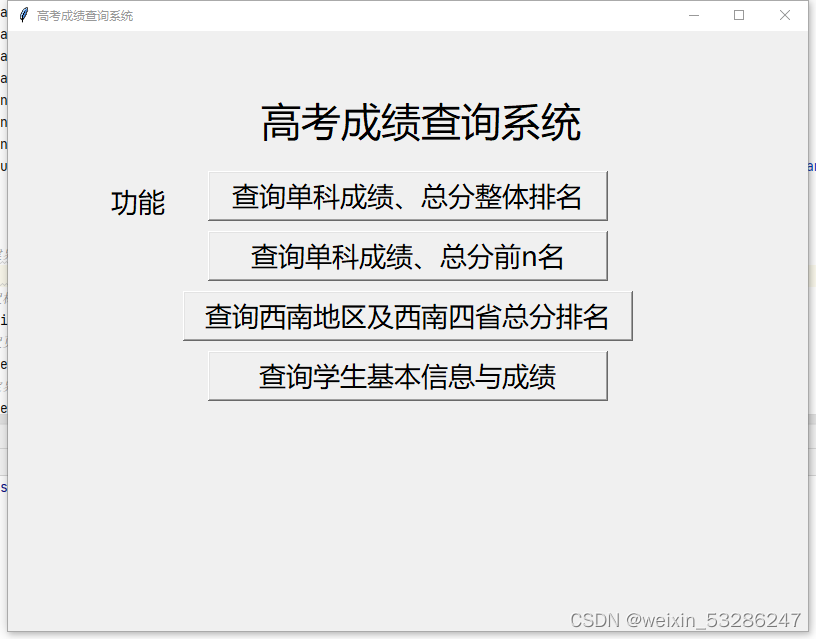
button_eg(window=win, x=200, y=140, width=400, height=50, text="查询单科成绩、总分整体排名", font=("微软雅黑", 20), command=callback1)
# 功能二
button_eg(window=win, x=200, y=200, width=400, height=50, text="查询单科成绩、总分前n名", font=("微软雅黑", 20), command=callback2)
# 功能三
button_eg(window=win, x=175, y=260, width=450, height=50, text="查询西南地区及西南四省总分排名", font=("微软雅黑", 20), command=callback3)
# 功能四
button_eg(window=win, x=200, y=320, width=400, height=50, text="查询学生基本信息与成绩", font=("微软雅黑", 20), command=callback4)win.mainloop()
界面实现效果


原始数据:链接:https://pan.baidu.com/s/1fl-DViACMp5Qt-_bLcOPzA?pwd=0lnu
提取码:0lnu
本文来自互联网用户投稿,文章观点仅代表作者本人,不代表本站立场,不承担相关法律责任。如若转载,请注明出处。 如若内容造成侵权/违法违规/事实不符,请点击【内容举报】进行投诉反馈!