在腾讯云试用Elastic Cloud Enterprise及Enterprise高级功能 一
文章目录
- 开始之前
- 申请ECE所需的资源
- 硬件先决条件
- 内存
- 存储
- 软件先决条件
- 操作系统与Docker
- 申请配置
- 安装
- 查看已经申请的主机
- 安装ansible
- ansible授信
- ansible 脚本下载
- ansible playbook创建
- 运行ansible-playbook
- 使用
- 踩坑指南
- 网络连接问题
- ansible运行问题
开始之前
尽量先熟悉ECE官方文档中的内容。了解大概的结构,以便当我们想进行某些尝试的时候,知道可以在文档的哪些部分找到支持
- Introducing Elastic Cloud Enterprise
- Preparing your installation
- Installing Elastic Cloud Enterprise
- Configuring your installation
- Securing your installation
- Monitoring your installation
- Administering your installation
- Getting started with deployments
- Administering deployments
- Troubleshooting
- RESTful API
- Script reference
- Glossary
- Release notes
- About this product
本文中,我们先尝试安装,因此需要关注:
- Preparing your installation
- Installing Elastic Cloud Enterprise
在先决条件中,主要关心:
- Hardware prerequisites
- Software prerequisites
- System configuration
- Networking prerequisites
申请ECE所需的资源
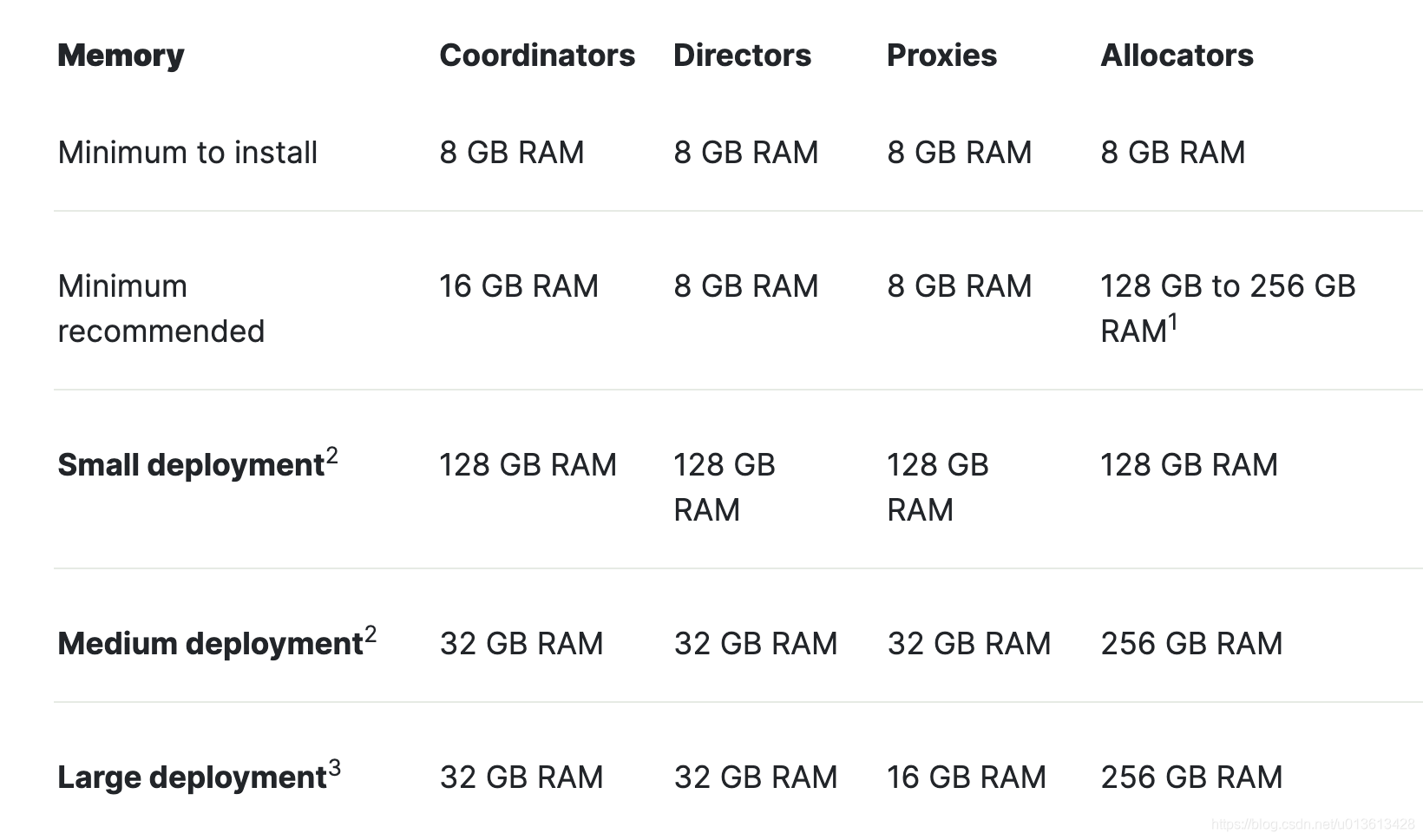
ECE的高可用和ES集群是类似的,为了避免单点故障和脑裂,我们通常需要3个可用区来保证高可用。因此我们要申请三台机器来分别对应三个ECE的instance
硬件先决条件
内存
存储
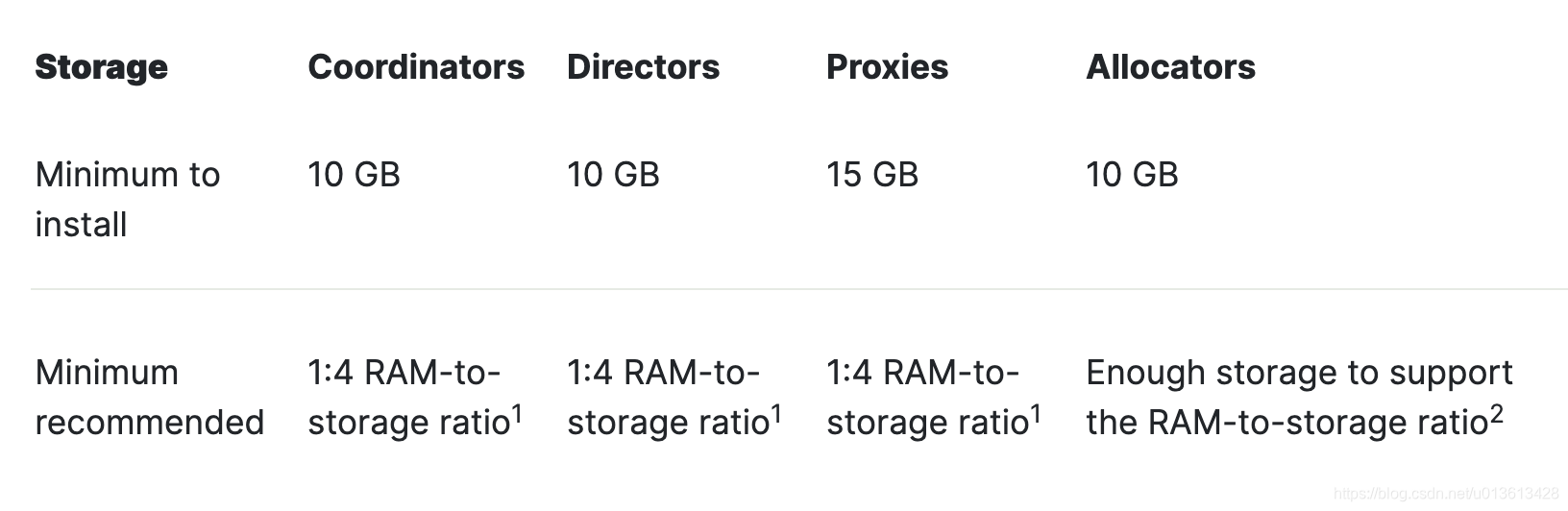
注意:coordiantors和Directors提供的ECE管理服务需要快速的SSD存储才能正常工作。对于将ECE管理服务与代理和分配器共同放置在同一主机上的小型部署,必须在整个部署中使用快速SSD存储。
软件先决条件
操作系统与Docker

申请配置
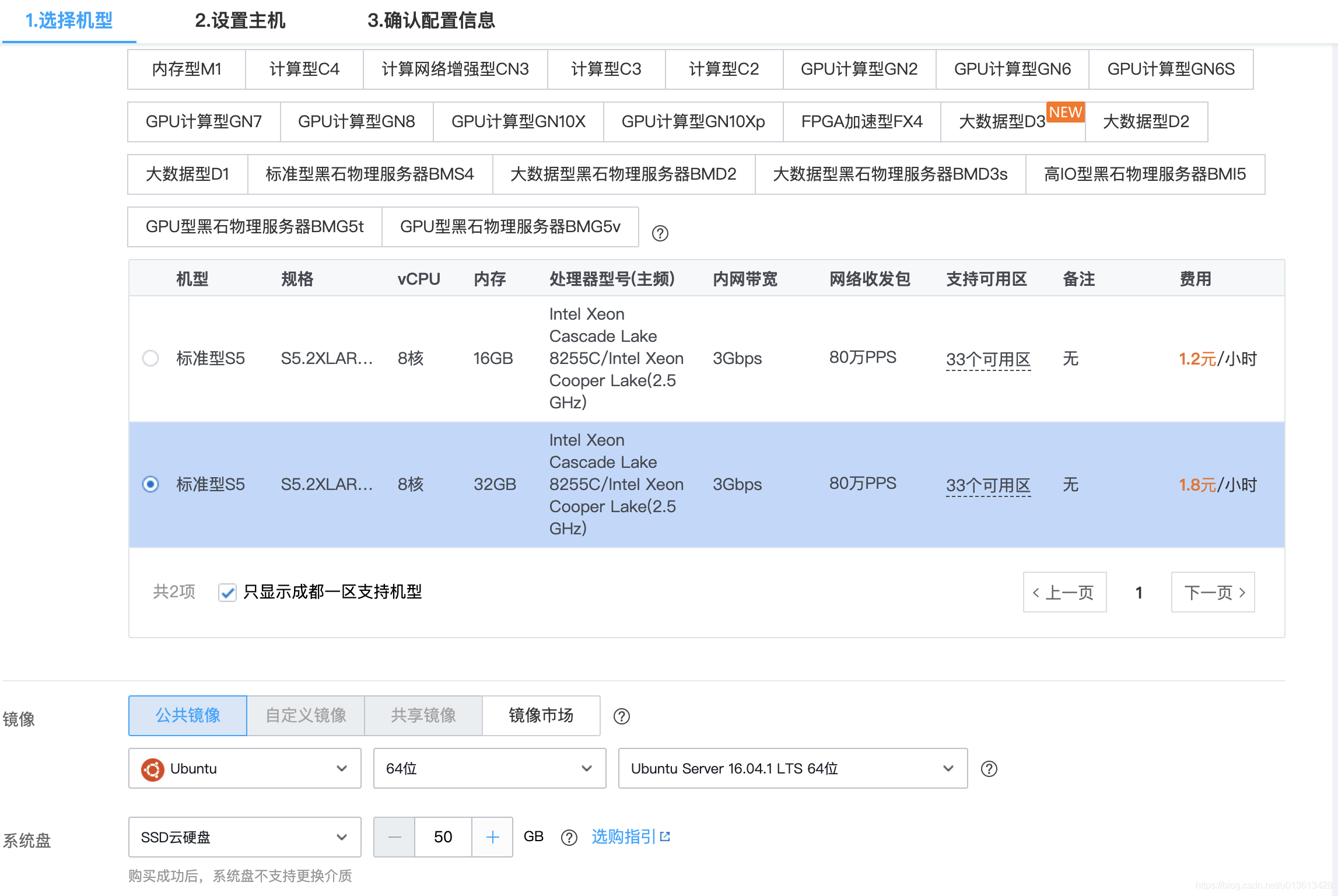
我们可以申请按量使用机器,拉起如下配置的节点:
- instance: 8C 32GB ram 50GB SSD * 3
安装
查看已经申请的主机
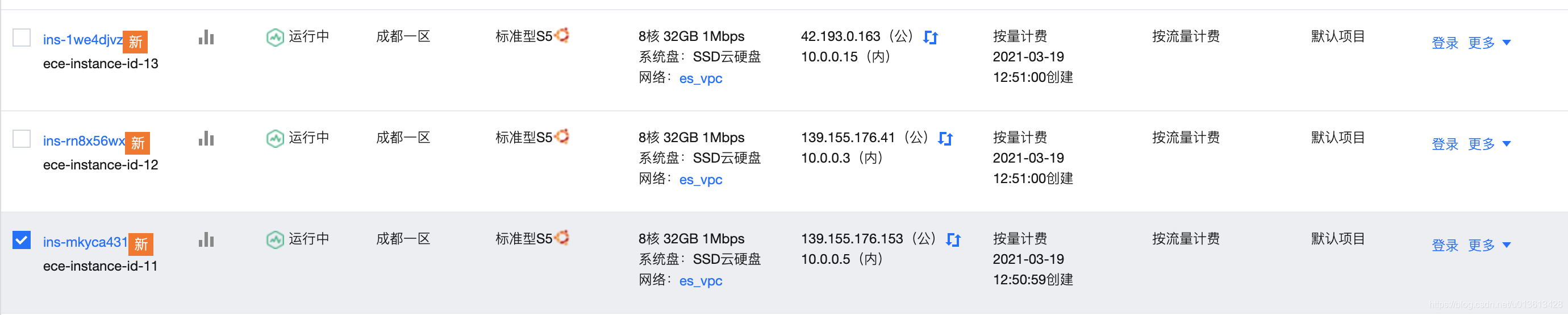
记住这里的ip:
- 139.155.176.153
- 139.155.176.41
- 42.193.0.163
注意:也可以用内网ip,登上任意一台腾讯云服务器,执行下面操作。
在你的电脑上,执行以下操作:
安装ansible
- 安装ansible [若已安装,可省略]
apt install ansible -y
ansible授信
-
生成免密登录需要的秘钥对
ssh-keygen -t rsa -b 4096 -
把公钥发送到授信机器,注意这里的用户名是ubuntu,腾讯云上默认创建的
ssh-copy-id ubuntu@139.155.176.153
ssh-copy-id ubuntu@139.155.176.41
ssh-copy-id ubuntu@42.193.0.163
- 测试ansible的网络连通
ansible all -m ping
ansible 脚本下载
- 创建一个
ECE的目录,下载Elastic提供的ansible安装脚本到roles目录
cd roles
git clone https://github.com/elastic/ansible-elastic-cloud-enterprise.git

ansible playbook创建
- [可选,如果您的网络可以访问外网] 在目录下新建一个
files目录,并且将https://download.elastic.co/cloud/elastic-cloud-enterprise.sh文件下载到该目录
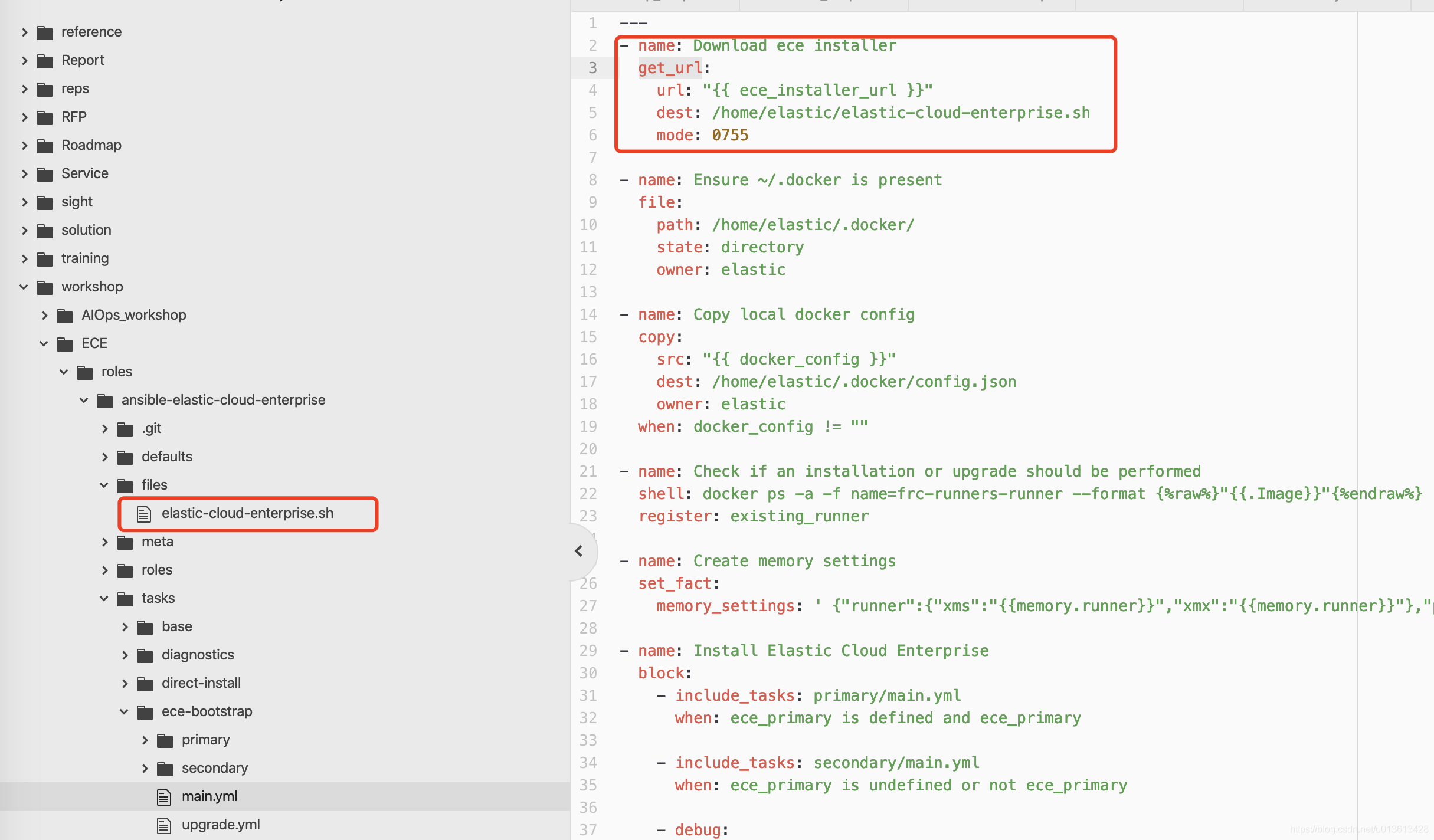
并将download ece installer的任务修改为:
---
- name: Download ece installercopy:src: elastic-cloud-enterprise.shdest: /home/elastic/elastic-cloud-enterprise.shmode: 0755
- 登录主机,通过
sudo fdisk -l查看磁盘挂载情况
sudo fdisk -l
Disk /dev/sda: 30 GiB, 32212254720 bytes, 62914560 sectors
Units: sectors of 1 * 512 = 512 bytes
Sector size (logical/physical): 512 bytes / 4096 bytes
I/O size (minimum/optimal): 4096 bytes / 4096 bytes
Disklabel type: gpt
Disk identifier: 8E3A05F9-1FB4-4275-8B45-1F6E71F81A78Device      Start      End  Sectors  Size Type
/dev/sda1  227328 62914526 62687199 29.9G Linux filesystem
/dev/sda14   2048    10239     8192    4M BIOS boot
/dev/sda15 10240 227327 217088 106M EFI System- 创建一个
inventory.yml文件,包含我们要部署ECE的主机,并且通过device_name,指定要被刷为xfs的磁盘 [可选]
all:vars:ansible_become: yesansible_user: ubuntudevice_name: sdachildren:primary:hosts:139.155.176.153:availability_zone: zone-1secondary:hosts:139.155.176.41:availability_zone: zone-2tertiary:hosts:42.193.0.163:availability_zone: zone-3
- 创建一个
small.yml文件,包含我们要部署ECE的配置,这里指定的roles,就是我们之前下载并修改的ansible脚本
---
- hosts: primarygather_facts: trueroles:- ansible-elastic-cloud-enterprisevars:ece_primary: true- hosts: secondarygather_facts: trueroles:- ansible-elastic-cloud-enterprisevars:ece_roles: [director, coordinator, proxy, allocator]- hosts: tertiarygather_facts: trueroles:- ansible-elastic-cloud-enterprisevars:ece_roles: [director, coordinator, proxy, allocator]
运行ansible-playbook
- 通过ansible-playbook运行定义好的剧本:
ansible-playbook -i inventory.yml small.yml - 静候安装完成
PLAY [primary] *******************************************************************************************************************************************************************************************TASK [Gathering Facts] ***********************************************************************************************************************************************************************************
ok: [35.241.124.252]TASK [ansible-elastic-cloud-enterprise : Download ece installer] *****************************************************************************************************************************************
ok: [35.241.124.252]TASK [ansible-elastic-cloud-enterprise : Ensure ~/.docker is present] ************************************************************************************************************************************
ok: [35.241.124.252]TASK [ansible-elastic-cloud-enterprise : Copy local docker config] ***************************************************************************************************************************************
skipping: [35.241.124.252]TASK [ansible-elastic-cloud-enterprise : Ensure docker deamon is running] ********************************************************************************************************************************
ok: [35.241.124.252]TASK [ansible-elastic-cloud-enterprise : Check if an installation or upgrade should be performed] ********************************************************************************************************
changed: [35.241.124.252]TASK [ansible-elastic-cloud-enterprise : Create memory settings] *****************************************************************************************************************************************
ok: [35.241.124.252]TASK [ansible-elastic-cloud-enterprise : include_tasks] **************************************************************************************************************************************************
included: /home/lex/ECE/roles/ansible-elastic-cloud-enterprise/tasks/ece-bootstrap/primary/main.yml for 35.241.124.252TASK [ansible-elastic-cloud-enterprise : include_tasks] **************************************************************************************************************************************************
included: /home/lex/ECE/roles/ansible-elastic-cloud-enterprise/tasks/ece-bootstrap/primary/install_stack.yml for 35.241.124.252TASK [ansible-elastic-cloud-enterprise : Execute the primary installation] *******************************************************************************************************************************
changed: [35.241.124.252]TASK [ansible-elastic-cloud-enterprise : Remember the bootstrap secrets] *********************************************************************************************************************************
changed: [35.241.124.252]TASK [ansible-elastic-cloud-enterprise : Fetch the bootstrap secrets] ************************************************************************************************************************************
changed: [35.241.124.252]TASK [ansible-elastic-cloud-enterprise : set_fact] *******************************************************************************************************************************************************
ok: [35.241.124.252]TASK [ansible-elastic-cloud-enterprise : set_fact] *******************************************************************************************************************************************************
ok: [35.241.124.252]TASK [ansible-elastic-cloud-enterprise : set_fact] *******************************************************************************************************************************************************
ok: [35.241.124.252]TASK [ansible-elastic-cloud-enterprise : include_tasks] **************************************************************************************************************************************************
skipping: [35.241.124.252]TASK [ansible-elastic-cloud-enterprise : debug] **********************************************************************************************************************************************************
ok: [35.241.124.252] => {"msg": "Adminconsole is reachable at: https://35.241.124.252:12443"
}TASK [ansible-elastic-cloud-enterprise : debug] **********************************************************************************************************************************************************
ok: [35.241.124.252] => {"msg": "Adminconsole password is: MqlXCes9xD4u9OAKX7Nfb7QjFihaWiKMJKwrPe9MZ91"
}TASK [ansible-elastic-cloud-enterprise : include_tasks] **************************************************************************************************************************************************
skipping: [35.241.124.252]PLAY [secondary] *****************************************************************************************************************************************************************************************TASK [Gathering Facts] ***********************************************************************************************************************************************************************************
ok: [34.96.221.122]TASK [ansible-elastic-cloud-enterprise : Download ece installer] *****************************************************************************************************************************************
changed: [34.96.221.122]TASK [ansible-elastic-cloud-enterprise : Ensure ~/.docker is present] ************************************************************************************************************************************
changed: [34.96.221.122]TASK [ansible-elastic-cloud-enterprise : Copy local docker config] ***************************************************************************************************************************************
skipping: [34.96.221.122]TASK [ansible-elastic-cloud-enterprise : Ensure docker deamon is running] ********************************************************************************************************************************
ok: [34.96.221.122]TASK [ansible-elastic-cloud-enterprise : Check if an installation or upgrade should be performed] ********************************************************************************************************
changed: [34.96.221.122]TASK [ansible-elastic-cloud-enterprise : Create memory settings] *****************************************************************************************************************************************
ok: [34.96.221.122]TASK [ansible-elastic-cloud-enterprise : include_tasks] **************************************************************************************************************************************************
skipping: [34.96.221.122]TASK [ansible-elastic-cloud-enterprise : include_tasks] **************************************************************************************************************************************************
included: /home/lex/ECE/roles/ansible-elastic-cloud-enterprise/tasks/ece-bootstrap/secondary/main.yml for 34.96.221.122TASK [ansible-elastic-cloud-enterprise : set_fact] *******************************************************************************************************************************************************
ok: [34.96.221.122]TASK [ansible-elastic-cloud-enterprise : set_fact] *******************************************************************************************************************************************************
ok: [34.96.221.122]TASK [ansible-elastic-cloud-enterprise : include_tasks] **************************************************************************************************************************************************
included: /home/lex/ECE/roles/ansible-elastic-cloud-enterprise/tasks/ece-bootstrap/secondary/install_stack.yml for 34.96.221.122TASK [ansible-elastic-cloud-enterprise : Set default ece role if not defined] ****************************************************************************************************************************
skipping: [34.96.221.122]TASK [ansible-elastic-cloud-enterprise : Get the roles token] ********************************************************************************************************************************************
ok: [34.96.221.122]TASK [ansible-elastic-cloud-enterprise : Execute installation] *******************************************************************************************************************************************
changed: [34.96.221.122]TASK [ansible-elastic-cloud-enterprise : debug] **********************************************************************************************************************************************************
ok: [34.96.221.122] => {"msg": "Adminconsole is reachable at: https://35.241.124.252:12443"
}TASK [ansible-elastic-cloud-enterprise : debug] **********************************************************************************************************************************************************
ok: [34.96.221.122] => {"msg": "Adminconsole password is: MqlXCes9xD4u9OAKX7Nfb7QjFihaWiKMJKwrPe9MZ91"
}TASK [ansible-elastic-cloud-enterprise : include_tasks] **************************************************************************************************************************************************
skipping: [34.96.221.122]PLAY [tertiary] ******************************************************************************************************************************************************************************************TASK [Gathering Facts] ***********************************************************************************************************************************************************************************
ok: [34.96.207.252]TASK [ansible-elastic-cloud-enterprise : Download ece installer] *****************************************************************************************************************************************
changed: [34.96.207.252]TASK [ansible-elastic-cloud-enterprise : Ensure ~/.docker is present] ************************************************************************************************************************************
changed: [34.96.207.252]TASK [ansible-elastic-cloud-enterprise : Copy local docker config] ***************************************************************************************************************************************
skipping: [34.96.207.252]TASK [ansible-elastic-cloud-enterprise : Ensure docker deamon is running] ********************************************************************************************************************************
ok: [34.96.207.252]TASK [ansible-elastic-cloud-enterprise : Check if an installation or upgrade should be performed] ********************************************************************************************************
changed: [34.96.207.252]TASK [ansible-elastic-cloud-enterprise : Create memory settings] *****************************************************************************************************************************************
ok: [34.96.207.252]TASK [ansible-elastic-cloud-enterprise : include_tasks] **************************************************************************************************************************************************
skipping: [34.96.207.252]TASK [ansible-elastic-cloud-enterprise : include_tasks] **************************************************************************************************************************************************
included: /home/lex/ECE/roles/ansible-elastic-cloud-enterprise/tasks/ece-bootstrap/secondary/main.yml for 34.96.207.252TASK [ansible-elastic-cloud-enterprise : set_fact] *******************************************************************************************************************************************************
ok: [34.96.207.252]TASK [ansible-elastic-cloud-enterprise : set_fact] *******************************************************************************************************************************************************
ok: [34.96.207.252]TASK [ansible-elastic-cloud-enterprise : include_tasks] **************************************************************************************************************************************************
included: /home/lex/ECE/roles/ansible-elastic-cloud-enterprise/tasks/ece-bootstrap/secondary/install_stack.yml for 34.96.207.252TASK [ansible-elastic-cloud-enterprise : Set default ece role if not defined] ****************************************************************************************************************************
skipping: [34.96.207.252]TASK [ansible-elastic-cloud-enterprise : Get the roles token] ********************************************************************************************************************************************
ok: [34.96.207.252]TASK [ansible-elastic-cloud-enterprise : Execute installation] *******************************************************************************************************************************************
changed: [34.96.207.252]TASK [ansible-elastic-cloud-enterprise : debug] **********************************************************************************************************************************************************
ok: [34.96.207.252] => {"msg": "Adminconsole is reachable at: https://35.241.124.252:12443"
}TASK [ansible-elastic-cloud-enterprise : debug] **********************************************************************************************************************************************************
ok: [34.96.207.252] => {"msg": "Adminconsole password is: MqlXCes9xD4u9OAKX7Nfb7QjFihaWiKMJKwrPe9MZ91"
}TASK [ansible-elastic-cloud-enterprise : include_tasks] **************************************************************************************************************************************************
skipping: [34.96.207.252]PLAY RECAP ***********************************************************************************************************************************************************************************************
34.96.207.252              : ok=14   changed=4    unreachable=0    failed=0
34.96.221.122              : ok=14   changed=4    unreachable=0    failed=0
35.241.124.252             : ok=16   changed=4    unreachable=0    failed=0
使用
我们可以用上面脚本生成的地址和密码,访问ECE的控制台界面:

可以通过界面按需来创建集群:

这里要注意,刚创建的集群可能会使用云上的私有ip。需要在如下界面,把 Deployments domain name 中的私有ip改成公有ip,比如(10.170.0.7 改成 35.241.124.252)

踩坑指南
整个安装的过程其实并不像我上面显示的那样简单。实际上遇到的问题还是很多的,这里列举一些我遇到的
网络连接问题
整个安装过程需要下载诸多内容,主要包括:
- ansible脚本
- docker images
如果现有的环境无法联网,需要自己配置局域网内的私有数据源来支撑安装过程,并需要修改自动化安装脚本进行适配。无网环境的安装参考:Install ECE offline
注:最好申请海外的服务器!
ansible运行问题
ansible脚本实际上是把Installing Elastic Cloud Enterprise里面的内容固化为了playbook,将其中过程拆分成了很多tasks,在开始运行之前,务必:
- 了解文档中提到的安装细节
- 详细阅读ansible脚本中的playbook,特别是关于 Roles Tags的部分
The following tags are available to limit the execution, due to the nature of tags in ansible you should only use
--skip-tagswith these to skip certain parts instead of using--tagsto limit the execution.
baseDetermines the execution of all tasks that setup the system (everything except the actual installation of Elastic Cloud Enterprise)
-setup_filesystemIf system tasks are executed, this determines if the filesystem tasks should get executed - includes creating the partitions for xfs and mount points
-install_dockerIf system tasks are executed, this determines if existing docker packages should get removed and the current, supported version should get installed and configureddestructiveThis tag indicates whether a task is potentially destructive, like removing packages or doing filesystem partitioningeceDetermines if Elastic Cloud Enterprise should get installedvmimagePrepare the system for building a Virtual Machine Image (Amazon AMI, …). This will install a cloud-init script which will auto-discover and mount disk selected when an instance is launched with this image.bootstrapThis tags should be picked for only installing Elastic Cloud Entreprise itself (no prerequistes)
By default, all tags are applied, exceptvmimage, which means that it will install all prerequisites and Elastic Cloud Entreprise.
In order to use this ansible playbook for building a VM image, the following tags should be selected:--tags base,vmimage(this won’t install Elastic Cloud Enterprise)
整个安装分成几个部分:
- 删除现有的Docker安装
- 安装所需的常规软件包
- 安装当前受支持的Docker版本
- 创建所需的用户并为其设置限制
- 创建一个xfs分区并对其进行配置
- 配置docker
- 根据不同的角色,使用docker下载并安装ECE
其实整个过程中会因为环境的差异出现非常多的问题。反复调试的过程不可避免,因此,不必每次都运行所有的步骤,可以组合tags,按需运行特定的内容:
ansible-playbook -i inventory.yml small.yml --tags install_dockeransible-playbook -i inventory.yml small.yml --tags base,install_dockeransible-playbook -i inventory.yml small.yml --skip-tags setup_filesystemansible-playbook -i inventory.yml small.yml --tags setup_filesystem --skip-tags destructiveansible-playbook -i inventory.yml small.yml --tags eceansible-playbook -i inventory.yml small.yml --tags bootstrap或者直接调用命令调试:
ansible -i inventory.yml primary -m lvg -a 'vg=vg.services pvs=/dev/sda1 pesize=32'ansible -i inventory.yml primary -m shell -a “docker ps -a -f name=frc-runners-runner”
用新的playbook调试:
---
- hosts: primary, secondary, tertiaryvars:data_dir: '/mnt/data/'tasks:- name: impoart taskimport_tasks: "roles/ansible-elastic-cloud-enterprise/tasks/base/general/setup_mount_permissions.yml"
本文来自互联网用户投稿,文章观点仅代表作者本人,不代表本站立场,不承担相关法律责任。如若转载,请注明出处。 如若内容造成侵权/违法违规/事实不符,请点击【内容举报】进行投诉反馈!