Spring Cloud Stream中文指导手册
Spring Cloud Stream中文指导手册
source
文章目录
- Spring Cloud Stream中文指导手册
- @[toc]
- Spring Cloud Stream 核心
- 1.简介
- 2.主要概念
- 2.1.应用程序模型
- 2.1.1."胖"JAR
- 2.2.**Binder**抽象
- 2.3.支持持久的发布-订阅模式
- 2.4. 消费者组
- 2.4.1.持久性
- 2.5.分区支持
- 3.编程模型
- 3.1. 声明和绑定通道
- 3.1.1. 通过```@EnableBinding```触发绑定
- 3.1.2. ```@Input```和```@Output```注解
- 自定义通道名
- 3.1.3. 访问绑定通道
- 注入绑定接口
- 直接注入通道
- 3.1.4. 生产和消费消息
- 本地Spring 集成支持
- Spring Integration错误通道支持
- 消息通道绑定和错误通道
- 使用@StreamListener进行自动内容类型处理
- 使用@StreamListener来分发消息到到多个方法
- 3.1.5. Reactive 编程支持
- 基于Reactor的handler
- 3.1.6. 聚合
- 配置聚合应用
- 配置非独立聚合应用的绑定服务属性
- 4. 绑定(Binder)
- 4.1. 生产者和消费者
- 4.2. Binder SPI
- 4.3. Binder探测
- 4.3.1. classpath探测
- 4.4. classpath下有多个Binder
- 4.5. 连接到多个系统
- 4.6. Binder配置属性
- 5. 配置选项
- 5.1. **Spring Cloud Stream**属性
- 5.2. 绑定属性
- 5.2.1. Spring Cloud Stream的使用属性
- 5.2.2. 消费者属性
- 5.2.3 生产者属性
- 5.3. 使用动态绑定目的地(destination)
- 6. 内容类型和转换
- 6.1. MIME类型
- 6.2. 通道contentType和消息头
- 6.3. 输出通道的ContentType处理
- 6.4. 输入通道的ContentType处理
- 6.5. 自定义消息转换
- 6.6. ```@StreamListener```和消息转换
- 7. Schema evolution support
- 8. 应用间通信
- 8.1. 连接多个应用实例
- 8.2. 实例索引和实例计数
- 8.3. 分区
- 8.3.1. 为分区配置输出绑定
- 使用Spring管理自定义```PartitionKeyExtractorClass```实现
- 为分区配置输入绑定
- 9. 测试
- 9.1. 禁用测试绑定的自动配置
- 10. 健康指示器
- 11. Metrics Emitter
- 12. 示例
- 13. 快速开始
- 13.1 在CloudFoundry上部署Stream应用
- 绑定(binder)实现
- 14. Apache Kafka 绑定(binder)
- 14.1 用法
- 14.2. Apache Kafka 绑定(binder)概览
- 14.3. 配置选项
- 14.2.1. Kafka 绑定(binder)属性
- 14.3.2. Kafka 消费者属性
- 14.3.3. Kafka生产者属性
- 14.3.5. 用法示例
- 示例:设置```autoCommitOffset```为false并依赖手动确认
- 示例:安全配置
- 使用JAAS配置文件
- 使用Spring Boot属性
- 14.4. **Spring Cloud Stream**的Kafka Streams Binding功能
- 14.4.1. 高级流式DSL范例
- 14.4.2. 支持交互式查询
- 14.4.3. Kafka Streams属性
- 14.5. 错误通道
- 14.6. Kafka Metrics
- 14.7. Dead-Letter Topic 处理
- 15. RabbitMQ Binder
- @[toc]
- Spring Cloud Stream 核心
- 1.简介
- 2.主要概念
- 2.1.应用程序模型
- 2.1.1."胖"JAR
- 2.2.**Binder**抽象
- 2.3.支持持久的发布-订阅模式
- 2.4. 消费者组
- 2.4.1.持久性
- 2.5.分区支持
- 3.编程模型
- 3.1. 声明和绑定通道
- 3.1.1. 通过```@EnableBinding```触发绑定
- 3.1.2. ```@Input```和```@Output```注解
- 自定义通道名
- 3.1.3. 访问绑定通道
- 注入绑定接口
- 直接注入通道
- 3.1.4. 生产和消费消息
- 本地Spring 集成支持
- Spring Integration错误通道支持
- 消息通道绑定和错误通道
- 使用@StreamListener进行自动内容类型处理
- 使用@StreamListener来分发消息到到多个方法
- 3.1.5. Reactive 编程支持
- 基于Reactor的handler
- 3.1.6. 聚合
- 配置聚合应用
- 配置非独立聚合应用的绑定服务属性
- 4. 绑定(Binder)
- 4.1. 生产者和消费者
- 4.2. Binder SPI
- 4.3. Binder探测
- 4.3.1. classpath探测
- 4.4. classpath下有多个Binder
- 4.5. 连接到多个系统
- 4.6. Binder配置属性
- 5. 配置选项
- 5.1. **Spring Cloud Stream**属性
- 5.2. 绑定属性
- 5.2.1. Spring Cloud Stream的使用属性
- 5.2.2. 消费者属性
- 5.2.3 生产者属性
- 5.3. 使用动态绑定目的地(destination)
- 6. 内容类型和转换
- 6.1. MIME类型
- 6.2. 通道contentType和消息头
- 6.3. 输出通道的ContentType处理
- 6.4. 输入通道的ContentType处理
- 6.5. 自定义消息转换
- 6.6. ```@StreamListener```和消息转换
- 7. Schema evolution support
- 8. 应用间通信
- 8.1. 连接多个应用实例
- 8.2. 实例索引和实例计数
- 8.3. 分区
- 8.3.1. 为分区配置输出绑定
- 使用Spring管理自定义```PartitionKeyExtractorClass```实现
- 为分区配置输入绑定
- 9. 测试
- 9.1. 禁用测试绑定的自动配置
- 10. 健康指示器
- 11. Metrics Emitter
- 12. 示例
- 13. 快速开始
- 13.1 在CloudFoundry上部署Stream应用
- 绑定(binder)实现
- 14. Apache Kafka 绑定(binder)
- 14.1 用法
- 14.2. Apache Kafka 绑定(binder)概览
- 14.3. 配置选项
- 14.2.1. Kafka 绑定(binder)属性
- 14.3.2. Kafka 消费者属性
- 14.3.3. Kafka生产者属性
- 14.3.5. 用法示例
- 示例:设置```autoCommitOffset```为false并依赖手动确认
- 示例:安全配置
- 使用JAAS配置文件
- 使用Spring Boot属性
- 14.4. **Spring Cloud Stream**的Kafka Streams Binding功能
- 14.4.1. 高级流式DSL范例
- 14.4.2. 支持交互式查询
- 14.4.3. Kafka Streams属性
- 14.5. 错误通道
- 14.6. Kafka Metrics
- 14.7. Dead-Letter Topic 处理
- 15. RabbitMQ Binder
Spring Cloud Stream 核心
本节将详细介绍如何使用Spring Cloud Stream,并包含了诸如如何创建和运行Stream应用的内容。
1.简介
Spring Cloud Stream是一个构建消息驱动微服务应用的框架。它基于Spring Boot构建独立的、生产级的Spring应用,并使用Spring Integration为消息代理提供链接。
你可以添加@EnableBinding注解到你的应用中来快速连接到消息代理,添加@StreamListener注解到一个方法上,这个方法会接收到Stream处理事件。下面是一个接收外部消息的简单接收应用。
@(Spring Cloud Stream)SpringBootApplication
@EnableBinding(Sink.class)
public class VoteRecordingSinkApplication {public static void main(String[] args) {SpringApplication.run(VoteRecordingSinkApplication.class, args);}@StreamListener(Sink.INPUT)public void processVote(Vote vote) {votingService.recordVote(vote);}
}
@EnableBinding注解接收一个或者多个接口类型的参数(在这个例子里面,参数是单个Sink接口)。接口参数声明了输入和/或输出通道。Spring Cloud Stream提供了Source、Sink和Process接口。你也可以定义你自己的接口。
下面是Sink接口的定义:
public interface Sink {String INPUT = "input";@Input(Sink.INPUT)SubscribableChannel input();
}
@Input注解标识了一个输入通道,应用程序通过它接收消息;@Output注解标识了一个输出通道,应用程序通过它发布消息。@Input和@Output注解接收一个参数,这个参数将作为通道的名称;如果没有定义名字,默认会使用被注解的方法名。
Spring Cloud Stream会创建接口的实现。你可以像下面的示例一样在你的应用中注入并使用它。
@RunWith(SpringJUnit4ClassRunner.class)
@SpringApplicationConfiguration(classes = VoteRecordingSinkApplication.class)
@WebAppConfiguration
@DirtiesContext
public class StreamApplicationTests {@Autowiredprivate Sink sink;@Testpublic void contextLoads() {assertNotNull(this.sink.input());}
}
2.主要概念
Spring Cloud Stream提供许多可以简化消息驱动微服务应用程序编写的抽象和原语。本节将概述一下内容:
- Spring Cloud Stream的应用程序模型
- Binder抽象
- 持久的订阅-发布模型支持
- 消费者组支持
- 分区支持
- 可拔插的Binder API
2.1.应用程序模型
一个Spring Cloud Stream应用程序由一个中立的中间件核心组成。应用通过Spring Cloud Stream注入的输入和输出通道与外部世界通信。通道通过专用的Binder实现与外部代理连接。
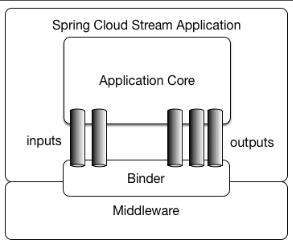
图1.Spring Cloud Stream应用
2.1.1."胖"JAR
Spring Cloud Stream应用程序可以在IDE中以独立模式运行以进行测试。要在生产环境运行Spring Cloud Stream应用,你可以用标准的Spring Boot提供的Maven或者Gradle工具创建一个可执行的Jar("胖"jar)。
2.2.Binder抽象
Spring Cloud Stream为Kafka和Rabbit MQ提供了Binder实现。Spring Cloud Stream也包含了一个TestSupportBinder,它包含一个未做更改的通道,这样一来,测试的时候可以和直接与通道交互并且能断言收到的是什么。你可以使用可扩展的API来编写你自己的Binder。
Spring Cloud Stream使用Spring Boot进行配置,而Binder抽象使得Spring Cloud Stream应用可以灵活的连接到中间件。例如,部署人员可以在运行时动态选择通道连接destination(例如,Kafka的topic或者RabbitMQ的exchange)。这样的配置可以通过外部配置的属性和Spring Boo支持的任何形式来提供(包括应用启动参数、环境变量和application.yml或者application.properties文件)。在简介一节中的接收示例中,设置应用属性spring.cloud.stream.bindings.input.destination为raw-sensor-data会让它从Kafka的raw-sensor-data主题、或者从绑定到RabbitMQraw-sensor-data交换机的一个队列读取消息。
Spring Cloud Stream自动探测并使用在classpath下找到的binder。你可以轻松地在相同的代码中使用不同类型的中间件:仅仅需要在构建时包含进不同的binder。在更加复杂的使用场景中,你也可以在应用中打包多个binder并让它自己选择binder,甚至在运行时为不同的通道使用不同的binder。
2.3.支持持久的发布-订阅模式
应用间的通信遵循发布-订阅模式,在这个模式中,数据通过共享的主题进行广播。可以在下图中看到一组相互作用的Spring Cloud Stream应用的典型部署。
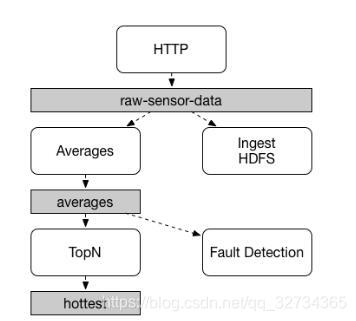
图2.Spring Cloud Stream的发布-订阅
传感器上传到HTTP端点的数据被发送到名为raw-sensor-data的通用destination。两个微服务从这个destination中接收到数据,
一个微服务应用(Averages)独立地处理数据并计算平均时窗,另外一个微服务应用(Ingest HDFS)将原始数据读入HDFS。为了处理数据,两个应用都在运行时指定这个主题为它们的输入。
发布-订阅通信模型降低了生产者和消费者之间的复杂性,并允许添加新的应用到拓扑中而不破坏已有的流程。例如,在”Averages“应用程序的下游,添加一个计算用于展示和监控的最高温度值的应用。然后可以添加另一个应用程序来解释相同的平均流量以进行故障检测。通过共享的主体而不是点对点的队列来通信降低了微服务之间的耦合性。
发布-订阅消息的概念并不新潮,Spring Cloud Stream采取额外的步骤,使其成为应用程序模型的自由选项。通过支持使用本地中间件,Spring Cloud Stream也简化了在不同的平台上发布-订阅模型的使用。
2.4. 消费者组
虽然发布-订阅模型使得通过共享主题来连接应用更加简单容易,但通过创建给定应用的多个实例来进行扩展的能力同样重要。当这样做的时候,一个应用程序的不同实例被放置在竞争的消费者关系中,对于给定的消息,只有一个实例会接收并进行处理。
Spring Cloud Stream通过消费者组的概念来模拟这种行为。(Spring Cloud Stream消费者组与Kafka的消费者组相似,并收到它的启发)每个消费者绑定可以使用spring.cloud.stream.bindings.属性来指定一个组名。下图中显示的是多个此属性被设置为spring.cloud.stream.bindings.或者spring.cloud.stream.bindings.的消费者。

图3.Spring Cloud Stream消费者组
订阅给定destination的所有分组会接收到发布消息的一个副本,但是在每个组中,只有一个成员会从destination接收到这个消息。默认情况下,没有指定组的时候,Spring Cloud Stream会将应用程序分配到一个匿名、独立且单一的消费者组,这个消费者组与所有其他消费者组都出于同一个发布-订阅关系中。
2.4.1.持久性
与Spring Cloud Stream的opinionated 应用模型一致,消费者组订阅是持久的。也就是说,binder实现确保组订阅是持久的,一旦一个组中创建了一个订阅,就算这个组里边的所有应用都挂掉了,这个组也会受到消息。
匿名订阅生来就是不持久的。在一些binder实现中(例如:RabbitMQ),存在不持久的组订阅是有可能的。
通常来说,当绑定一个应用到给定的destination时,最好是指定一个消费者组。在扩展Spring Cloud Stream应用的时候,你必须队每个输入绑定指定你一个消费者组。这将保护应用实例不会接收到重复信息(除非你的确想要这么做)。
2.5.分区支持
Spring Cloud Stream支持在一个应用程序的多个实例间分区数据。在分区场景中,物理通信媒介(例如:代理topic)被视为是结构化的多个分区。一个或多个生产者应用实例发送消息到多个消费者应用实例,并确保通过共同特征标识的数据由相同的消费者实例处理。
Spring Cloud Stream为统一实现分区处理提供了一个通用抽象。因此,不管代理自己本来是支持分区的(例如:Kafka)或者不支持分区的(例如:RabbitMQ),都能够使用分区。

图4. Spring Cloud Stream分区
分区是状态处理中的关键概念,无论是出于性能还是一致性的原因,分区对于保证所有相关数据一起处理至关重要。例如,在时窗平均计算示例中,从任何传感器接收到的测量数据都被同一个应用实例处理是非常重要的。
配置一个分区处理的场景,必须在数据生产端和数据消费端都要配置。
3.编程模型
本节描述了Spring Cloud Stream的编程模型。Spring Cloud Stream为声明绑定输入、输出通道以及如何监听通道提供了许多已经定义好的注解。
3.1. 声明和绑定通道
3.1.1. 通过@EnableBinding触发绑定
你可以通过将@EnableBinding注解应用到应用的某个配置中,这样可以将Spring应用转成Spring Cloud Stream应用。@EnableBinding注解本身使用@Configuration进行元注解,并触发Spring Cloud Stream的基础配置:
...
@Import(...)
@Configuration
@EnableIntegration
public @interface EnableBinding {...Class<?>[] value() default {};
}
@EnableBinding注解接受一个或多个接口类作为参数,这些接口必须包含表示可绑定组件(通常为消息通道)的方法。
@EnableBinding注解只需要需要注解到在配置类中,你可以提供许多绑定接口,例如:@EnableBinding(value={Orders.class,Payment.class}),这配置了Order和Payment接口会声明@Input和@Output通道。
3.1.2. @Input和@Output注解
Spring Cloud Stream应用可以在一个接口中将任意数量的输入和输出通道定义为@Input和@Output方法:
public interface Barista {@InputSubscribableChannel orders();@OutputMessageChannel hotDrinks();@OutputMessageChannel coldDrinks();
}
在@EnableBinding注解中使用Barista 接口作为参数会触发创建绑定通道的动作,分创建三个名为order,hotDrinks和coldDrinks的绑定通道。
@EnableBinding(Barista.class)
public class CafeConfiguration {...
}
在Spring Cloud Stream中,可绑定的
MessageChannel组件是Spring MessageMessageChannel(用于输出)及其扩展SubsrcibableChannel(用于输入)。支持使用相同机制的其他可绑定的组件。类似的示例是Spring Cloud Stream Kafka绑定中支持的KStream,KStream被用作输入、输出可绑定的组件。
自定义通道名
使用@Input和@Output注解,你可以像下面的实例一样为通道指定一个自定义的通道名字:
public interface Barista {...@Input("inboundOrders")SubscribableChannel orders();
}
在这个示例中,创建的绑定通道会被命名为inboundOrders。
Source,Sink和Processor
为了便于处理最常见的用例,包括输入、输出通道中的一个或全部,Spring Cloud Stream提供了三个已经定义好的开箱即用的接口。
Source可以用于一个单输出通道的应用中。
public interface Source {String OUTPUT = "output";@Output(Source.OUTPUT)MessageChannel output();}
Sink可以用于一个单输入通道的应用中。
public interface Sink {String INPUT = "input";@Input(Sink.INPUT)SubscribableChannel input();}
Processor可以用于既有输入又有输出通道应用中。
Spring Cloud Stream没有对这些接口进行任何特殊处理,它们仅仅被提供开箱即用。
3.1.3. 访问绑定通道
注入绑定接口
对于每个绑定接口,Spring Cloud Stream会生成一个实现接口的bean。执行bean中的@Input或者@Output注解的方法会返回相关的绑定通道。
下例中的bean,在调用hello方法的时候会发送一条消息到输出通道。它执行注入的Sourcebeanoutput()方法来获取到目标通道。
@Component
public class SendingBean {private Source source;@Autowiredpublic SendingBean(Source source) {this.source = source;}public void sayHello(String name) {source.output().send(MessageBuilder.withPayload(name).build());}
}
直接注入通道
绑定通道可以被直接注入:
@Component
public class SendingBean {private MessageChannel output;@Autowiredpublic SendingBean(MessageChannel output) {this.output = output;}public void sayHello(String name) {output.send(MessageBuilder.withPayload(name).build());}
}
如果通道的名字在声明的注解上自定义了,那么应该使用自定义的名字。给定以下声明:
public interface CustomSource {...@Output("customOutput")MessageChannel output();
}
如下例所示,通道会被注入:
@Component
public class SendingBean {private MessageChannel output;@Autowiredpublic SendingBean(@Qualifier("customOutput") MessageChannel output) {this.output = output;}public void sayHello(String name) {this.output.send(MessageBuilder.withPayload(name).build());}
}
3.1.4. 生产和消费消息
你可以使用Spring Integration注解或者Spring Cloud Stream的@StreamListener注解编写一个Spring Cloud Stream应用。@StreamListener注解在其他Spring Message注解(例如,@MessageMapping,@JmsListener,@RabbitListener等等)之后建模,但是添加了内容类型管理和强制类型转换功能。
本地Spring 集成支持
由于Spring Cloud Stream是基于Spring Integration的,Stream完全继承了Integration的基础和基础设施以及组件本身。例如,你可以将Source的输出通道附加到到MessageSource:
@EnableBinding(Source.class)
public class TimerSource {@Value("${format}")private String format;@Bean@InboundChannelAdapter(value = Source.OUTPUT, poller = @Poller(fixedDelay = "${fixedDelay}", maxMessagesPerPoll = "1"))public MessageSource<String> timerMessageSource() {return () -> new GenericMessage<>(new SimpleDateFormat(format).format(new Date()));}
}
或者你可以在transformer中使用processor的通道:
@EnableBinding(Processor.class)
public class TransformProcessor {@Transformer(inputChannel = Processor.INPUT, outputChannel = Processor.OUTPUT)public Object transform(String message) {return message.toUpperCase();}
}
重要的是要明白,当你在发布-订阅模型下,使用
@StreamListener从同一个绑定中消费的时候,每个用@StreamListener注解的方法都会接收到消息的副本,每个方法都有自己的消费者组。
然而,如果你共享一个可绑定的通道作为@Aggregator,@Tranformer或者@ServiceActivetor的输入,它们会在竞争模型中消费,而没有为每个订阅创建独立的消费者组。
Spring Integration错误通道支持
Spring Cloud Stream支持发布被Spring Integeration全局错误通道接收的错误信息。通过配置名为error的绑定的流出目的地,发送到errorChannel的错误信息可以被发布到代理的特定destination。例如,要发布错误信息到名为“myErrors”的代理destination,指定以下属性:spring.cloud.stream.bindings.error.destination=myErrors。
消息通道绑定和错误通道
从1.3版本开始,一些基于MessageChannel的binder将错误发布到每个destination的各自的错误通道。此外,这些错误通道桥接到上面提到的全局Spring Integration errorChannel。因此,你可以使用标准Spring Integration流(IntegrationFlow,@ServiceActivator等等)消费特定destination或者所有destination的错误。
在消费者这边,监听线程捕捉任何异常并转发ErrorMessage到destination的错误通道。消息传递的是带有标准failedMessage和cause属性的MessagingException。通常,从代理接收到的原始数据是包含在头部里边的。对于支持(和配置为支持)“dead letter” destination的binders,一个MessagePublishingErrorHandler会订阅该通道,原始数据被转发到"dead letter" destination。
在生产者这边,对于某些发布消息后支持异步结果(例如:RabbitMQ,Kafka)的binder,你可以通过设置...producer.errorChannelEnabled属性为true来启用错误通道。ErrorMessage的负载取决于绑定的实现,但是将会是带有标准failedMessage属性的MessagingException,以及有关失败的其他属性。有关完整的详细信息,请参阅binder的文档。
使用@StreamListener进行自动内容类型处理
作为对Spring Integration支持的补充,Spring Cloud Stream提供了自己的@StreamListener注解,它在其他Spring Message注解(例如,@MessageMapping,@JmsListener,@RabbitListener等等)之后建模。@StreamListener注解为处理输入消息提供了更简单的模型,特别是处理包含内容类型管理和强制类型转换的用例。
Spring Cloud Stream提供了可扩展的MessageConverter机制来处理绑定通道的数据转换,在这种情况下,分派到用@StreamListener注解的方法。下面是一个处理外部Vote事件的应用示例:
@EnableBinding(Sink.class)
public class VoteHandler {@AutowiredVotingService votingService;@StreamListener(Sink.INPUT)public void handle(Vote vote) {votingService.record(vote);}
}
当考虑载有String和contentType头为application/json的流入Message时,能看到@StreamListener和Spring Integration @ServiceActivator之间的区别。在使用@StreamListener的情况下,MessageConverter机制将使用contentType头来将String负载解析为一个Vote对象。
和其他Spring Messaging方法一样,方法参数可以用@Payload,@Headers和@Header来注释。
对于返回数据的方法,你必须使用
@SendTo注解来指定方法返回的数据的输出绑定destination。
@EnableBinding(Processor.class)
public class TransformProcessor {@AutowiredVotingService votingService;@StreamListener(Processor.INPUT)@SendTo(Processor.OUTPUT)public VoteResult handle(Vote vote) {return votingService.record(vote);}
}
使用@StreamListener来分发消息到到多个方法
从1.2版本开始,Spring Could Stream支持根据条件将消息分发到注册在输入通道的多个@StreamListener方法。
为了能支持带条件的分发,方法必须满足以下的条件:
- 不能有返回值
- 必须是单独的消息处理方法(不支持reactive API 方法)
条件通过注解中condition属性的SpEL表达式指定,并对于每条消息都会进行评估。所有符合条件的handler都会在同一个线程中执行,并且顺序不被保证。
下边的示例展示了使用带分发条件的@StreamListener。在这个示例中,所有带有值为foo的type头的消息将被分发到receiveFoo方法,而所有带有值为bar的type头的消息会被分发到receiveBar方法。
@EnableBinding(Sink.class)
@EnableAutoConfiguration
public static class TestPojoWithAnnotatedArguments {@StreamListener(target = Sink.INPUT, condition = "headers['type']=='foo'")public void receiveFoo(@Payload FooPojo fooPojo) {// handle the message}@StreamListener(target = Sink.INPUT, condition = "headers['type']=='bar'")public void receiveBar(@Payload BarPojo barPojo) {// handle the message}
}
通过
@StreamListener的条件分发仅支持单个消息的处理程序,而不支持reactive编程(如下所述)。
3.1.5. Reactive 编程支持
Spring Could Stream还支持使用reactive API,将流入和流出数据作为连续数据流处理。通过spring-cloud-stream-reactive支持reactive API,但你需要显式添加到你的程序中。
reactive API的编程模型是声明式的,你可以使用描述从输入到输出数据流的函数式转换的运算符,而不是指定每条消息应该被怎样处理。
Spring Could Stream支持以下reactive API:
- Reactor
- RxJava 1.x
将来,它将支持基于Reactive Streams的更加通用的模型。
reactive编程模型也使用@StreamListner注解来设置reactive handler。不同的是: @StreamListener注解不能指定输入或输出,因为它们是提供来作为参数和方法的返回值的;- 方法的参数必须使用
@Input和@Output注解,以指定输入和输出的数据流连接到那个输入或输出; - 如果方法有返回值,将被
@Output注解,以指定数据会被发送到的输入。
Reactive 编程支持需要Java 1.8
从Spring Cloud Stream 1.1.1及更高版本(从发行版Brooklyn.SR2开始),反应式编程支持需要使用Reactor 3.0.4.RELEASE及更高版本。早期版本的Reactor(包括3.0.1.RELEASE,3.0.2.RELEASE和3.0.3.RELEASE)不受支持。spring-cloud-stream-reactive会传递的检索正确的版本,但是项目结构可能将io.projectreactor:reactor-core的版本设置为较早的版本,特别是使用Maven的时候。如果通过Spring Initializr和Spring Boot 1.x生成项目,会覆盖Reactor版本为2.0.8.RELEASE。在这种情况下,你必须确保artifact的正确版本是已经发布的( In such cases you must ensure that the proper version of the artifact is released)。 这可以通过在项目中添加对io.projectreactor:reactor-core的3.0.4.RELEASE或更高版本的直接依赖来实现。
当前使用的术语reactive,指的是所使用的reactive API而不是reactive的执行模型(即,绑定的端点使用的仍然是"push"而不是"pull")。尽管通过使用Reactor提供了一些反压支持,我们仍然打算从长远角度来通过使用本地reactive客户端为连接中间件支持完全reactive的管道。
基于Reactor的handler
基于Reactor的handler可以使用以下的参数类型:
- 用
@Input注解的参数,支持Reactor的Flux类型。输入Flux的参数化遵循与单条消息处理相同的规则:参数可以是整个Message、可以被Message负载的POJO或者是基于Messagecontent-type头转换的结果的POJO。支持多个输入。 - 用
@Output注解的参数,支持FluxSender类型,它将方法生成的Flux与输出连接。通常来说,只有在方法有多个输出的时候才需要将输出指定为参数。
基于Reactor的handler支持返回Flux类型,在这种情况下必须使用@Output进行注释。当单个输出flux可用的时候,我们建议使用该方法的返回值。
Reactive 支持 待续…
3.1.6. 聚合
Spring Cloud Stream支持聚合多个应用,通过代理直接连接各个应用的输入和输出通道,并避免额外的消息交换成本。在Spring Cloud Stream的1.0版本,只支持以下类型应用的聚合:
- sources:含有单个名为
output的输出通道的应用,通常是带有org.springframework.cloud.stream.messaging.Source类型的单个绑定。 - sinks:含有单个名为
iniput的输入通道的应用,通常是带有org.springframework.cloud.stream.messaging.Sink类型的单个绑定。 - processors:含有单个名为
input的输入通道和单个名为output的输出通道的应用,通常是带有org.springframework.cloud.stream.messaging.Processor类型的单个绑定。
可以通过创建一个互连的应用序列将他们聚合在一起,其中,序列中一个元素的输出通道连接到下一个元素的输入通道(如果有下一个元素的话)。序列可以从一个source或者processor开始,它可以包含任意数量的processor而且必须以一个processor或者sink结束。
取决于开始和结尾的元素的性质,此序列可能有一个或多个可以绑定的通道,如下所示: - 如果序列以source开始,以sink结束,应用间的所有通讯都是直接的,不会绑定任何通道。
- 如果序列以processor开始,那么它的输入通道将成为聚合的
Input通道,并进行相应的绑定。 - 如果序列以processor结束,那么它的输出通道将成为聚合的
Output通道,并进行相应的绑定。
聚合使用AggregateApplicationBuilder工具类执行,如下示例中所示。考虑这样一个工程,它含source、processor和sink,这些source、processor和sink可能定义在本工程中,也有可能在工程的依赖中。
如果配置类使用
@SpringBootApplication,那么聚合应用中的每个组件(source、processor或sink)都要放置在不同的包中。由于@SpringBootApplication对同一包内的配置类执行的classpath扫描,需要避免应用间的串道。下边的示例中,可以看到Source、Processor和Sink应用类分在不同的包中。另外一种选择是,在不同的@Configuration类中提供Source、Processor和Sink,且不要使用@SpringBootApplication或者@ComponentScan。
package com.app.mysink;// Imports omitted@SpringBootApplication
@EnableBinding(Sink.class)
public class SinkApplication {private static Logger logger = LoggerFactory.getLogger(SinkApplication.class);@ServiceActivator(inputChannel=Sink.INPUT)public void loggerSink(Object payload) {logger.info("Received: " + payload);}
}
package com.app.myprocessor;// Imports omitted@SpringBootApplication
@EnableBinding(Processor.class)
public class ProcessorApplication {@Transformer(inputChannel = Processor.INPUT, outputChannel = Processor.OUTPUT)public String loggerSink(String payload) {return payload.toUpperCase();}
}
package com.app.mysource;// Imports omitted@SpringBootApplication
@EnableBinding(Source.class)
public class SourceApplication {@InboundChannelAdapter(value = Source.OUTPUT)public String timerMessageSource() {return new SimpleDateFormat().format(new Date());}
}
每个配置都可以用来运行一个隔离的组件,但在这种情况下,他们可以 像这样聚合:
package com.app;// Imports omitted@SpringBootApplication
public class SampleAggregateApplication {public static void main(String[] args) {new AggregateApplicationBuilder().from(SourceApplication.class).args("--fixedDelay=5000").via(ProcessorApplication.class).to(SinkApplication.class).args("--debug=true").run(args);}
}
该序列的头组件被用作from()方法的参数。序列的尾组件被用作to()方法的参数。中间的processor被用作via()方法的参数。多个相同类型的processor可以链接在一起(例如,用于不同配置的管道转换)。对于每个组件,构建器都可以为Spring Boot配置提供运行时参数。
配置聚合应用
Spring Cloud Stream支持为聚合应用内的单个应用传递属性,但必须使用"namespace"前缀。
应用的命名空间可以如下设置:
@SpringBootApplication
public class SampleAggregateApplication {public static void main(String[] args) {new AggregateApplicationBuilder().from(SourceApplication.class).namespace("source").args("--fixedDelay=5000").via(ProcessorApplication.class).namespace("processor1").to(SinkApplication.class).namespace("sink").args("--debug=true").run(args);}
}
一旦设置了单个应用的"namespace",使用这个namespace作为前缀的属性可以通过使用任何支持的属性源(命令行、环境属性等)传递到聚合应用。
例如,要覆盖“source”和"sink"应用默认的fixedDelay和``debug```属性:
java -jar target/MyAggregateApplication-0.0.1-SNAPSHOT.jar --source.fixedDelay=10000 --sink.debug=false
配置非独立聚合应用的绑定服务属性
非独立聚合应用程序通过聚合应用程序的输入/输出组件(通常是消息通道)中的任一个或两个绑定到外部代理,而聚合应用程序内部的应用程序直接绑定。例如,一个source应用的输出和一个processor应用的输入是直接绑定的,而processor应用的输出通道绑定到代理的外部目的地。当为非独立聚合应用程序传递绑定服务属性时,需要将绑定服务属性传递给聚合应用程序,而不是将它们设置为单个子应用程序的“参数”。例如:
@SpringBootApplication
public class SampleAggregateApplication {public static void main(String[] args) {new AggregateApplicationBuilder().from(SourceApplication.class).namespace("source").args("--fixedDelay=5000").via(ProcessorApplication.class).namespace("processor1").args("--debug=true").run(args);}
}
像--spring.cloud.stream.bindings.output.destination=processor-output这样的绑定属性需要被指定为外部配置(命令行参数等等)属性之一。
4. 绑定(Binder)
Spring Cloud Stream提供了一个Binder抽象,用于连接外部中间件的物理destination。本节提供了有关Binder SPI主要概念、主要组件和实现特定细节的信息。
4.1. 生产者和消费者
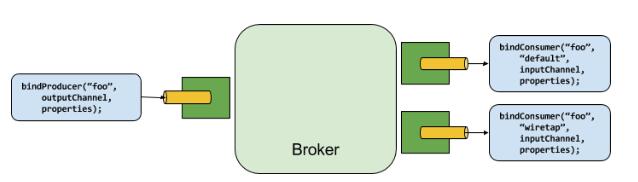
图5. 生产者和消费者
生产者是任何发送消息到通道的组件。通道可以通过某种代理的Binder实现来绑定到这种外部消息代理。当执行bindProducer()方法时,第一个参数是代理中destination的名称,第二个参数是生产者将向其发送消息的本地通道实例,第三个参数包含要在为该通道创建的适配器内使用的属性(如分区key表达式)。
消费者是从通道接收消息的组件。和生产者一样,消费者的通道可以绑定到外部消息代理。当执行bindConsumer()方法时候,第一个参数是destination名称,第二个参数提供了消费者逻辑组名称。每个代表消费者的组绑定到给定的destiantion,并收到生产者发送到该destination的每条消息的副本(即,发布 - 订阅语义)。如果有多个使用相同组名绑定的消费者实例,那么消息会在这些消费者实例之间均衡负载,这意味着生产者发送的每条消息只会被每个组的唯一一个消费者实例消费掉(即,队列语义)。
4.2. Binder SPI
Binder SPI包含许多接口、开箱即用的工具类和为连接到外部中间件提供可拔插机制的发现策略。
SPI的关键点是Binder接口,它是连接输入和输出通道到外部中间件的策略。
public interface Binder<T, C extends ConsumerProperties, P extends ProducerProperties> {Binding<T> bindConsumer(String name, String group, T inboundBindTarget, C consumerProperties);Binding<T> bindProducer(String name, T outboundBindTarget, P producerProperties);
}
这个接口是参数化的,并提供了许多可扩展的点:
- 输入和输出通道的绑定目标。在1.0版本,只支持
MessageChannel,但这在将来会作为一个扩展点。 - 继承consumer和producer属性。允许并以类型安全的方式支持特定的Binder实现添加补充属性。
一个典型的binder实现包含以下内容: - 一个实现
Binder接口的类 - 一个Spring
Configuration类,用于创建上述类型的bean以及中间件连接基础设施。 - 一个classpath上的
META-INF/spring.binders文件夹,它包含一个或多个binder定义,例如:
kafka: org.springframework.cloud.stream.binder.kafka.config.KafkaBinderConfiguration
4.3. Binder探测
Spring Cloud Stream依赖于Binder SPI实现来执行连接通道到消息代理的任务。每个Binder实现通常连接到一种消息系统。
4.3.1. classpath探测
默认情况下,Spring Cloud Stream依赖于Spring Boot的自动配置来配置绑定过程。如果在类路径上找到单个Binder实现,Spring Cloud Stream会自动使用它。例如,一个只想要绑定RabbitMQ的Spring Cloud Stream应用,可以只添加以下的依赖:
<dependency><groupId>org.springframework.cloudgroupId><artifactId>spring-cloud-stream-binder-rabbitartifactId>
dependency>
有关其他binder依赖的特定Maven坐标,请参阅该binder实现的文档。
4.4. classpath下有多个Binder
当classpath下出现多个Binder的时候,应用必须指定要使用哪一个binder来绑定所有的通道。每个binder配置都包含一个META-INF/spring.binders,它是一个简单的属性文件:
rabbit: org.springframework.cloud.stream.binder.rabbit.config.RabbitServiceAutoConfiguration
提供的其他binder实现(例如,Kafka)也有相似的文件,自定义binder实现也需要提供这样一个文件。key代表这个binder实现的识别名称,而value是一个逗号分隔的配置类列表,每个配置类都包含有且只有一个类型为org.springframework.cloud.stream.binder.Binder的bean定义。
通过使用spring.cloud.stream.defaultBinder属性(例如:spring.cloud.stream.defaultBinder=rabbit)为每个通道绑定配置binder,或者对每个通道各自配置此属性,也可以全局执行binder选择。例如,一个从Kafka读入并写入到RabbitMQ的processor应用(具有分别用于读/写的名为input和output的通道)可以指定一下配置:
spring.cloud.stream.bindings.input.binder=kafka
spring.cloud.stream.bindings.output.binder=rabbit
4.5. 连接到多个系统
默认情况下,binder共享应用的Spring Boot自动配置,因此可以创建在classpath上找到的每个Binder的一个实例。如果你的应用需要连接到一个以上相同类型的代理,你可以指定多个binder配置,每个配置都有不同的环境设置。
使用显式binder配置会完全关闭默认binder配置过程。如果你这样做,所有要使用的binder必须要在配置中包含进来。使用Spring Cloud Stream的框架可能创建可以按名称引用的binder配置。为了这样做,binder配置可能将
defaultCandidate标志设置为false,例如,spring.cloud.stream.binders.。这表示存在独立于默认binder配置过程的配置。.defaultCandidate=false
例如,这是连接到两个RabbiMQ代理实例的一个processor应用的典型配置:
spring:cloud:stream:bindings:input:destination: foobinder: rabbit1output:destination: barbinder: rabbit2binders:rabbit1:type: rabbitenvironment:spring:rabbitmq:host: rabbit2:type: rabbitenvironment:spring:rabbitmq:host:
4.6. Binder配置属性
创建自定义binder配置的时候,可以使用以下属性。它们必须以spring.cloud.stream.binders.为前缀。
Type
binder的类型。通常应用classpath上找到的一个binder,特别是META-INF/spring/binders文件中的key。
默认情况下,它和配置名称的值相同。
inheritEnvironment
配置是否会继承应用自身的环境。
默认为true。
environment
支持(Root for)一组可用于自定义binder环境的属性。当配置完成后它,创建binder的上下文不再是应用程序上下文的子节点。这允许binder组件和应用组件的完全分离。
默认为empty。
defaultCandidate
binder配置是否是默认binder的候选项,或者只在显式引用时使用。这允许添加不干涉默认过程的binder配置。
默认为true
5. 配置选项
Spring Cloud Stream支持常规配置选项以及绑定和binder的配置。一些binder允许额外的绑定属性来支持特定中间件的特性。
配置选项可以通过任何Spring Boot支持的机制提供给Spring Cloud Stream应用。这包含应用程序参数、环境变量和YAML/properties文件。
5.1. Spring Cloud Stream属性
spring.cloud.stream.instanceCount
应用已部署实例的数量。如果使用Kafka和分区,必须要设置。
默认为1。
spring.cloud.stream.instanceIndex
应用的实例索引:从0到instanceCount-1的数字。用于分区和使用Kafka。在Cloud Foundry中自动设置以匹配应用程序的实例索引。
spring.cloud.stream.dynamicDestinations
可以被动态绑定的一组目的地(destination)(例如,在动态路由的场景下)。如果设置了,只有列出的目的地(destination)可以被绑定。
默认为:empty(允许绑定任何目的地(destination)。
spring.cloud.stream.defaultBinder
配置了多个Binder的情况下,要默认使用的binder。查阅classpath下有多个Binder。
默认为:empty。
spring.cloud.stream.overrideCloudConnectors
此属性仅适用于启用Cloud配置文件且Spring Cloud Connector随应用程序提供的情况。如果属性值为false(默认),binder会检测一个适合的绑定服务(例如,绑定在Cloud Foundry的RabbitMQ服务将用于RabbitMQ binder)并使用它来创建连接(通常通过Spring Cloud Connector)。当属性值设置为true,此属性指定binder完全忽略绑定服务并依赖于Spring Boot属性(例如,依赖于为RabbitMQ binder环境提供的spring.rabbitmq.*属性)。这个属性的典型用法是要连接到多个系统时嵌入到自定义环境中。
默认为:false。
5.2. 绑定属性
绑定属性为格式为spring.cloud.stream.bindings.。代表配置的channel的名称(例如,Source的output)。
为了避免重复,Spring Cloud Stream支持为所有的通道设置值,格式为spring.cloud.stream.default.。
下文中,我们指出了我们在哪里省略了spring.cloud.stream.bindings.前缀并只关注属性名,因为运行时会包含前缀。
5.2.1. Spring Cloud Stream的使用属性
下边的绑定属性对输入和输出绑定都是可用的但必须以spring.cloud.stream.bindings.为前缀。例如,spring.cloud.stream.bindings.input.destination=ticktock。
destination
绑定中间件(例如, RabbitMQ的exchange或者Kafka的topic)上的通道的目标destination。如果通道绑定为消费者,则可以将其绑定到多个destination(消费者可以绑定到多个destination),并且可以将destination名称指定为逗号分隔的字符串值。 如果未设置,则使用通道名称。 该属性的默认值不能被覆盖。
group
通道的消费者组。应用于流入绑定。查看消费者组。
默认为:null(也就是一个匿名的消费者)。
contentType
通道的内容的类型。
默认为:null(不会执行强制类型转换)。
binder
这个绑定使用的binder。更多细节请查阅classpath下有多个Binder。
默认为:null(如果有,则使用默认binder)。
5.2.2. 消费者属性
下边的绑定属性值对输入绑定可用的且必须以spring.cloud.stream.bindings.为前缀。例如,spring.cloud.stream.bindings.input.consumer.concurrency=3。
默认值可以使用spring.cloud.stream.default.consumer前缀来设置,例如,spring.cloud.stream.default.consumer.headerMode=none。
concurrency
流入消费者的并发性。
默认为:1。
partitioned
消费者是否接受来自一个分区的生产者数据。
默认为:false。
headerMode
如果设置为none,则禁用输入的头部处理。仅对本身不支持消息头但需要嵌入头部的消息传递中间件有效。 当从非Spring Cloud Stream应用消费数据而原生头部不被支持的时候,此选项非常有用。如果设置为headers,使用使用中间件本身的头部机制。如果设置为embeddedHeaders,在消息负载中嵌入头部。
默认为:取决于binder实现。
maxAttempts
如果处理失败,则尝试处理该消息的次数(包括第一次)。 设置为1以禁用重试。
默认值为: 3。
backOffInitialInterval
回退乘数
默认值为:2.0。
instanceIndex
当设置为大于等于0的值的时候,允许自定义此消费者的实例索引(如果与spring.cloud.stream.instanceIndex不同)。当设置为一个负值的时候,默认为spring.cloud.stream.instanceIndex。
默认值为:-1。
instanceCount
当设置为大于等于0的值的时候,允许自定义此消费者的实例数量(如果不同于spring.cloud.stream.instanceCount)。如果设置为负值,默认为spring.cloud.stream.instanceCount。
默认值为:-1。
5.2.3 生产者属性
以下绑定属性可用于输出绑定,但只能并必须以spring.cloud.stream.bindings.为前缀。例如,spring.cloud.stream.bindings.input.producer.partitionKeyExpression=payload.id。
默认值可以使用spring.cloud.stream.default.producer前缀来设置,例如,spring.cloud.stream.default.producer.partitionKeyExpression=payload.id。
partitionKeyExpression
决定如何分区流出数据的SpEL表达式。如果设置,或者设置了partitionKeuExtractorClass,这个通道的流出数据会被分区,且partitionCount必须设置为大于1的值才能生效。这两个选项是互斥的。参阅分区支持。
默认值为:null。
partitionKeyExtractorClass
PartitionKeyExtractorStrategy的实现。如果设置,或者设置了partitionKeyExpression,此通道的流出数据会被分区,且partitionCount必须设置为大于1的值才能生效。这两个选项是互斥的。参阅分区支持。
默认值为:null。
partitionSelectorClass
PartitionSelecctorStrategy的实现。和partitionSelecorExpression互斥。如果设置了其中一个,分区将被选择为hashCode(key) % partitionCount,其中的key是通过partitionKeyExpression或partitionKeyExtractorClass来计算的。
默认值为:null。
partitionSelectorExpression
用于自定义分区选择的SpEL表达式。和partitionSelectorClass互斥。如果设置了其中一个,分区将被选择为hashCode(key) % partitionCount,其中的key是通过partitionKeyExpression或partitionKeyExtractorClass来计算的。
默认值为:null。
partitionCount
数据的目标分区的数量(如果分区已启用)。 如果生产者是分区的,则必须设置为大于1的值。 在Kafka上意味着使用 此值和目标主题分区数量中的较大值。
默认值为:1。
requiredGroups
生产者必须确保消息传递的组群列表(逗号分隔),即使它们是在创建之后启动的(例如,通过在RabbitMQ中预先创建持久队列)。
headerMode
设置为none时,禁用输出上的头部嵌入。 仅对本身不支持消息头但需要嵌入头部的消息中间件有效。 当从非Spring Cloud Stream应用消费数据而原生头部不被支持的时候,此选项非常有用。如果设置为headers,使用使用中间件本身的头部机制。如果设置为embeddedHeaders,在消息负载中嵌入头部。
默认值为:取决于binder实现。
useNativeEncoding
设置为true时,流出消息将直接由客户端库序列化,客户端库必须相应地进行配置(例如,设置适当的Kafka生产者value serializer)。 使用此配置时,流出消息编组不是基于绑定的contentType。 当使用本地编码时,消费者有责任使用适当的解码器(例如:Kafka消费者value de-serializer)来反序列化流入消息。 而且,当使用本地编码/解码时,headerMode = embeddedHeaders属性将被忽略,并且头部不会嵌入到消息中。
errorChannelEnabled
设置为true时,如果binder支持异步发送结果; 发送失败的消息将被发送到目的地(destination)的错误通道。 有关更多信息,请参阅消息通道绑定和错误通道。
默认值为:false。
5.3. 使用动态绑定目的地(destination)
除了通过@EnableBinding定义的通道之外,Spring Cloud Stream还允许应用将消息发送到动态绑定的目的地。这非常有用,例如,需要在运行时决定目标目的地。应用可以通过使用由@EnableBinding注解自动注册的BinderAwareChannelResolverbean来完成上述操作。
spring.cloud.stream.dynamicDestinations属性可以用来将动态目的地的名字限制为事先设置的一个集合(白名单)。如果没有设置这个属性,可以绑定任何目的地。
BinderAwareChannelResolver可以直接使用,如下例所示,其中REST controller使用路径变量来决定目标通道。
@EnableBinding
@Controller
public class SourceWithDynamicDestination {@Autowiredprivate BinderAwareChannelResolver resolver;@RequestMapping(path = "/{target}", method = POST, consumes = "*/*")@ResponseStatus(HttpStatus.ACCEPTED)public void handleRequest(@RequestBody String body, @PathVariable("target") target,@RequestHeader(HttpHeaders.CONTENT_TYPE) Object contentType) {sendMessage(body, target, contentType);}private void sendMessage(String body, String target, Object contentType) {resolver.resolveDestination(target).send(MessageBuilder.createMessage(body,new MessageHeaders(Collections.singletonMap(MessageHeaders.CONTENT_TYPE, contentType))));}
}
在默认端口8080上启动应用后,发送以下数据时:
curl -H "Content-Type: application/json" -X POST -d "customer-1" http://localhost:8080/customerscurl -H "Content-Type: application/json" -X POST -d "order-1" http://localhost:8080/orders
目的地’customers’和’orders’在代理中创建(例如:Rabbit的exchange或Kafka的topic),并将数据发布到适当的目的地。
BinderAwareChannelResolver是一个通用的Spring Integration DestinationResolver并可以注入到其他组件中。例如,在使用SpEL表达式(表达式语句传入JSON消息的target字段)的路由中。
@EnableBinding
@Controller
public class SourceWithDynamicDestination {@Autowiredprivate BinderAwareChannelResolver resolver;@RequestMapping(path = "/", method = POST, consumes = "application/json")@ResponseStatus(HttpStatus.ACCEPTED)public void handleRequest(@RequestBody String body, @RequestHeader(HttpHeaders.CONTENT_TYPE) Object contentType) {sendMessage(body, contentType);}private void sendMessage(Object body, Object contentType) {routerChannel().send(MessageBuilder.createMessage(body,new MessageHeaders(Collections.singletonMap(MessageHeaders.CONTENT_TYPE, contentType))));}@Bean(name = "routerChannel")public MessageChannel routerChannel() {return new DirectChannel();}@Bean@ServiceActivator(inputChannel = "routerChannel")public ExpressionEvaluatingRouter router() {ExpressionEvaluatingRouter router =new ExpressionEvaluatingRouter(new SpelExpressionParser().parseExpression("payload.target"));router.setDefaultOutputChannelName("default-output");router.setChannelResolver(resolver);return router;}
}
6. 内容类型和转换
为了传播有关生成消息的内容类型的信息,Spring Cloud Stream默认将contentType头附加到流出的消息。 对于不直接支持头部的中间件,Spring Cloud Stream提供了将流出消息自动封装在自己的包中的机制。 对于支持头的中间件,Spring Cloud Stream应用可以从非Spring Cloud Stream应用程序接收具有给定内容类型的消息。
Spring Cloud Stream 2.0已经重新设计了内容类型解析流程。
请阅读1.3部分的迁移,以了解使用框架版本与应用程序交互时所做的更改。
框架依赖于一个contentType作为头部,以便知道如何序列化/反序列化消息负载。
Spring Cloud Stream允许使用spring.cloud.stream.bindings。属性来声明式地配置输入和输出的类型转换。注意通用类型转换也可以通过在应用中使用转换来轻松完成。
对于输入和输出通道,如果
contentType消息头不存在,则通过属性或注释设置contentType只会触发default转换器。 这对于只发送POJO而不发送任何头信息,或者消费没有contentType头的消息的情况非常有用。 框架将始终使用消息头中的值覆盖任何默认设置。
虽然contentType成为必需的属性,但框架将为所有输入/输出通道设置application / json默认值(如果用户没有设置)。
6.1. MIME类型
contentType值被解析为媒体类型,例如application / json或text / plain; charset = UTF-8。
MIME类型对于指示如何转换为String或byte []内容特别有用。 Spring Cloud Stream还使用MIME类型格式来表示Java类型:使用具有type参数的常规类型application / x-java-object。 例如,可以将application / x-java-object; type = java.util.Map或application / x-java-object; type = com.bar.Foo设置为输入绑定的content-type属性。 另外,Spring Cloud Stream提供了自定义的MIME类型,值得注意的是,application / x-spring-tuple指定了一个Tuple(元组)
6.2. 通道contentType和消息头
可以使用spring.cloud.stream.bindings.属性或使用@Input和@Output注解来配置消息通道的内容类型。 通过这样做,即使您发送的POJO没有contentType信息,框架也会将MessageHeader的contentType设置为为该通道设置的指定值。
但是,如果发送Message 并手动设置contentType,则优先于配置的属性值。 这对于输入和输出通道都是有效的。MessageHeader将始终优先于通道的默认配置的contentType。
6.3. 输出通道的ContentType处理
从2.0版本开始,框架将不再尝试根据Message的负载T来推断contentType。 它将使用contentType头(或由框架提供的默认值)来配置正确的MessageConverter以将负载序列化为byte []。
设置的contentType是示意激活相应的MessageConverter。 然后,转换器可以修改contentType以增加信息,例如Kryo和Avro转换器的情况。
对于流出消息,如果您的负载是 byte []类型,则框架将跳过转换逻辑,并将这些字节写入连线。 在这种情况下,如果消息的contentType不存在,它会将指定的默认值设置为channel。
如果打算绕过转换,就要确保设置了适当的
contentType头,否则你可能会发送一些任意的二进制数据,框架可能会设置头为application / json(默认)。
以下片段显示了如何绕过转换并设置正确的contentType头。
@Autowired
private Source source;public void sendImageData(File f) throws Exception{byte[] data = Files.readAllBytes(f.toPath());MimeType mimeType = (f.getName().endsWith("gif")) ? MimeTypeUtils.IMAGE_GIF : MimeTypeUtils.IMAGE_JPEG;source.output().send(MessageBuilder.withPayload(data).setHeader(MessageHeaders.CONTENT_TYPE, mimeType).build());}
不管使用哪种contentType,结果总是一个设置了contentType头的Message。 这是传递binder通过连线
送的内容。
| content-type头 | MessageConverter | 增加的content-type | 支持的类型 | 解释 |
|---|---|---|---|---|
| application/json | CustomMappingJackson2 MessageConverter | application/json | POJO、基础类型和代表JSON数据的字符串 | 如果没有指定的话,这是默认的转换器。注意,如果发送一个原始字符串,它将被引号括起来 |
| text/plain | ObjectStringMessageConverter | text/plain | 执行对象的toString()方法 | |
| application/x-spring-tuple | TupleJsonMessageConverter | application/x-spring-tuple | org.springframework.tuple.Tuple | |
| application/x-java-serialized-object | JavaSerializationMessageConverter | application/x-java-serialized-object | 任何实现了```Serializable```的类型 | 该转换器使用java本地序列化。数据的接收者必须在类路径上具有相同的类。 |
| application/avro | AvroMessageConverter | application/avro | Avro类型的泛型或特定记录(SpecificRecord ),如果使用反射,则为POJO | Avro需要一个关联的模式来写/读数据。请参阅有关如何正确使用它的文档 |
6.4. 输入通道的ContentType处理
对于输入通道,Spring Cloud Stream使用@StreamListener和@ServiceActivator内容处理来支持转换。检查通道的content-type是否已经通过@Input(contentType =“text / plain”)注解或者spring.cloud.stream.bindings.属性设置了,或者是否存在contentType头,以此来支持内容类型处理。
框架将检查为Message设置的contentType,选择合适的MessageConverter并应用传递参数作为目标类型的转换 。
如果转换器不支持目标类型,它将返回null,如果所有配置的转换器都返回null,则抛出MessageConversionException。
就像输出通道一样,如果你的方法负载参数的类型是Message 、byte []或者Message <?>,就会跳过转换,你会的到来自连线的原始字节以及相应的头部。
记住,MessageHeader总是优先于注释或属性配置。
|content-type头|MessageConverter|支持的目标类型|说明|
|:-😐:-😐:-😐:-😐
|application/json|CustomMappingJackson2MessageConverter|POJO或者字符串| |
|text/plain|ObjectStringMessageConverter|字符串| |
|application/x-spring-tuple|TupleJsonMessageConverter|org.springframework.tuple.Tuple| |
|application/x-java-serialized-object|JavaSerializationMessageConverter|任何实现了Serializable的JAVA类| |
|application/x-java-object|KryoMessageConverter|任何可以使用Kryo序列化的JAVA类| |
|application/avro|AvroMessageConverter|Avro类型的泛型或特定记录(SpecificRecord ),如果使用反射,则为POJO|Avro需要一个关联的模式来写/读数据。请参阅有关如何正确使用它的文档|
6.5. 自定义消息转换
除了支持开箱即用的转换外,Spring Cloud Stream还支持注册你自己的消息转换实现。 这允许您以各种自定义格式(包括二进制)发送和接收数据,并将它们与特定的contentType关联。
Spring Cloud Stream将所有使用@StreamConverter注释限定的的org.springframework.messaging.converter.MessageConverter类型的自定义消息转换器以及开箱即用的消息转换器注册为bean。
框架需要
@StreamConverter限定符注释,以避免获取到ApplicationContext上可能存在的其他转换器,并可能与默认的转换器重叠。
如果你的消息转换器需要使用特定的content-type和目标类(对于输入和输出),则消息转换器需要扩展org.springframework.messaging.converter.AbstractMessageConverter。若使用@StreamListener进行转换,一个实现org.springframework.messaging.converter.MessageConverter的消息转换器就足够了。
下面是在Spring Cloud Stream应用程序中创建消息转换器bean(带有内容类型application/bar)的示例:
@SpringBootApplication
public static class SinkApplication {...@Bean@StreamConverterpublic MessageConverter customMessageConverter() {return new MyCustomMessageConverter();}
public class MyCustomMessageConverter extends AbstractMessageConverter {public MyCustomMessageConverter() {super(new MimeType("application", "bar"));}@Overrideprotected boolean supports(Class<?> clazz) {return (Bar.class == clazz);}@Overrideprotected Object convertFromInternal(Message<?> message, Class<?> targetClass, Object conversionHint) {Object payload = message.getPayload();return (payload instanceof Bar ? payload : new Bar((byte[]) payload));}
}
Spring Cloud Stream还支持基于Avro的转换器和schema evolution。 详情请参阅特定章节。
6.6. @StreamListener和消息转换
@StreamListener注解而又为转换传入消息提供了一种便捷方式,无需指定输入通道的内容类型。 在使用@StreamListener注解的方法分发过程中,如果参数需要,将自动应用转换。
例如,让考虑一个带有字符串内容{“greeting”:“Hello,world”}的消息,并在输入通道上接收到application / json的content-type头。 让我们考虑接收它的以下应用:
public class GreetingMessage {String greeting;public String getGreeting() {return greeting;}public void setGreeting(String greeting) {this.greeting = greeting;}
}@EnableBinding(Sink.class)
@EnableAutoConfiguration
public static class GreetingSink {@StreamListener(Sink.INPUT)public void receive(Greeting greeting) {// handle Greeting}}
方法的参数会被包含由JSON 串解析出来的POJO自动填充。
7. Schema evolution support
待续
8. 应用间通信
8.1. 连接多个应用实例
虽然Spring Cloud Stream让Spring Boot应用更加容易地连接到消息系统,但Spring Cloud Stream的典型场景是创建多应用管道,微服务应用可以通过管道互发数据。你可以通过关联邻近应用的输入和输出目的地(destination)来实现此方案。
假设设计需要Time Source应用将数据发送到Log Sink应用程序,就可以使用在两个应用中使用名为ticktock的通用目的地(destination)进行绑定。
Time Source(拥有名为output的通道)应用设置以下属性:
spring.cloud.stream.bindings.output.destination=ticktock
Log Sink(拥有名为input的通道)应用设置以下属性:
spring.cloud.stream.bindings.input.destination=ticktock
8.2. 实例索引和实例计数
当扩展Spring Cloud Stream应用的时候,每个实例会接收到有关此应用有多少个其他实例和当前实例索引的信息。Spring Cloud Stream通过spring.cloud.stream.instanceCount和spring.cloud.stream.instanceIndex属性来实现此功能。例如,如果HDFS sink应用有三个实例,三个实例的spring.cloud.stream.instanceCount都会被设置为3,每个应用的spring.cloud.stream.instanceIndex属性会分别设置为0、1和2。
当通过Spring Cloud Data Flow 部署Spring Cloud Stream应用,这些数值回会被自动配置;如果Spring Cloud Stream应用独立运行,这些属性一定要被正确设置。默认情况下,spring.cloud.stream.instanceCount为1,spring.cloud.stream.instanceIndex为0。
在的场景中,通常来说这两个属性的正确配置对于解决分区(参见下文)是很重要的,并且这两个属性在某些绑定中是必须的(例如,Kafka绑定)以确保多个消费者实例场景下数据的正确分割。
8.3. 分区
8.3.1. 为分区配置输出绑定
通过配置partitionKeyExpression或者partitionKeyExtractorClass属性中的一个(并且只能配置一个),以及partitionCount属性来配置配置输出绑定。例如,以下是一个典型有效的配置:
spring.cloud.stream.bindings.output.producer.partitionKeyExpression=payload.id
spring.cloud.stream.bindings.output.producer.partitionCount=5
基于以上示例的配置,数据会使用以下逻辑发送到目标分区。
根据partitionKeyExpression计算每个发送到分区的输出通道的消息的分区键值(partition key’s value) partitionKeyExpression是一个根据流出消息计算的SpEL表达式,用于取得分区的key(partitioning key)。
如果一个SpEL表达式不能满足需求,你可以通过将属性partitionKeyExtractorClass设置为实现了org.springframework.cloud.stream.binder.PartitionKeyExtractorStrategy接口的类来计算分区键值。 虽然SpEL表达通常情况下够用,但更复杂的情况下可以使用自定义实现策略。 在这种情况下,属性’partitionKeyExtractorClass’可以设置如下:
spring.cloud.stream.bindings.output.producer.partitionKeyExtractorClass=com.example.MyKeyExtractor
spring.cloud.stream.bindings.output.producer.partitionCount=5
一旦计算出消息的key,分区选择程序将把目标分区确定为介于0和partitionCount - 1之间的值。在大多数情况下适用的默认计算基于公式key.hashCode()%partitionCount。 这可以在绑定上自定义,通过设置SpEL表达式来根据“key”计算(通过partitionSelectorExpression属性),或通过设置org.springframework.cloud.stream.binder.PartitionSelectorStrategy实现(通过partitionSelectorClass属性)。
可以指定’partitionSelectorExpression’和’partitionSelectorClass’的绑定级别属性,类似于在上面的例子中指定’partitionKeyExpression’和’partitionKeyExtractorClass’属性的方式。 可以为更高级的场景配置其他属性,如以下部分所述。
使用Spring管理自定义PartitionKeyExtractorClass实现
在上面的示例中,像MyKeyExtractor这样的自定义策略,被***Spring Cloud Stream***直接实例化。 在某些情况下,这样的自定义策略实现必须被创建为一个Spring bean,以便能够被Spring管理,这样就可以使用依赖注入,属性绑定等。可以这样实现:配置实现类为应用程序上下文中的@Bean,并使用全限定的类名作为bean的名称,如下例所示。
@Bean(name="com.example.MyKeyExtractor")
public MyKeyExtractor extractor() {return new MyKeyExtractor();
}
作为Spring bean,自定义策略会从Spring bean的整个生命周期中受益。 例如,如果实现类需要直接访问应用程序上下文,则可以实现“ApplicationContextAware”。
为分区配置输入绑定
输入绑定(拥有名为input的通道)被配置为通过设置其partitioned属性以及应用的instanceIndex和instanceCount属性来接收分区数据,如下例所示:
spring.cloud.stream.bindings.input.consumer.partitioned=true
spring.cloud.stream.instanceIndex=3
spring.cloud.stream.instanceCount=5
instanceCount值表示数据需要在其之间进行分区的应用的实例总数,instanceIndex必须是多个实例之间的唯一的值,介于0和instanceCount - 1之间。实例索引帮助每个应用实例标识要接收数据的唯一分区(在Kafka的场景下是分区集合)。 为了确保所有数据都被消费以及应用实例接收互斥的数据集,正确设置这两个值是非常重要的。
虽然使用多个实例进行分区数据处理的情况在独立运行的情况下可能会很复杂,但Spring Cloud Data flow可以显著地简化流程:通过正确填充输入和输出的值以及依赖于运行时下层架构提供的关于实例索引和实例数量信息 。
9. 测试
Spring Cloud Stream支持在不连接消息传递系统的情况下测试微服务应用。 可以通过使用spring-cloud-stream-test-support库提供的TestSupportBinder来做到这一点,它可以作为测试依赖项添加到应用程序中:
<dependency><groupId>org.springframework.cloudgroupId><artifactId>spring-cloud-stream-test-supportartifactId><scope>testscope>dependency>
TestSupportBinder使用Spring Boot自动配置机制来代替classpath上的其他绑定。 因此,添加一个绑定作为依赖项时,确保正在使用test作用域。
TestSupportBinder允许用户与绑定的通道进行交互,并检查应用发送和接收的消息.
对于输出消息通道,TestSupportBinder注册一个订阅者,并将应用发出的消息保留在MessageCollector中。 他们可以在测试过程中检索,并根据他们进行断言。
用户还可以将消息发送到流入消息通道,以便消费者应用可以消费这些消息。 以下示例显示如何在processor上测试输入和输出通道。
@RunWith(SpringRunner.class)
@SpringBootTest(webEnvironment= SpringBootTest.WebEnvironment.RANDOM_PORT)
public class ExampleTest {@Autowiredprivate Processor processor;@Autowiredprivate MessageCollector messageCollector;@Test@SuppressWarnings("unchecked")public void testWiring() {Message<String> message = new GenericMessage<>("hello");processor.input().send(message);Message<String> received = (Message<String>) messageCollector.forChannel(processor.output()).poll();assertThat(received.getPayload(), equalTo("hello world"));}@SpringBootApplication@EnableBinding(Processor.class)public static class MyProcessor {@Autowiredprivate Processor channels;@Transformer(inputChannel = Processor.INPUT, outputChannel = Processor.OUTPUT)public String transform(String in) {return in + " world";}}
}
9.1. 禁用测试绑定的自动配置
测试绑定(binder)的目的是代替classpath中的所有其他绑定(binder),以便在不更改生产依赖关系的情况下测试应用。 在某些情况下(如集成测试),使用实际的生产的绑定(binder)更好,蛋需要禁用测试绑定(binder)的自动配置。 为此,可以使用Spring Boot自动配置排除机制之一来排除org.springframework.cloud.stream.test.binder.TestSupportBinderAutoConfiguration类,如下例所示。
@SpringBootApplication(exclude = TestSupportBinderAutoConfiguration.class)@EnableBinding(Processor.class)public static class MyProcessor {@Transformer(inputChannel = Processor.INPUT, outputChannel = Processor.OUTPUT)public String transform(String in) {return in + " world";}}
当禁用自动配置时,测试绑定(binder)在类路径中可用,但其defaultCandidate属性设置为false,这样一来它不会干扰常规的用户配置。 它可以以test引用,例如:
spring.cloud.stream.defaultBinder=test
10. 健康指示器
Spring Cloud Stream为绑定(binder)提供了健康指示器。 它是以binders为名注册的,可以通过设置management.health.binders.enabled属性来启用或禁用。
11. Metrics Emitter
待续
12. 示例
想要获取Spring Cloud Stream示例,请参阅GitHub上的spring-cloud-stream-samples存储库。
13. 快速开始
要创建Spring Cloud Stream应用程序,请访问Spring Initializr并创建一个名为“GreetingSource”的新的Maven项目。 在下拉列表中选择Spring Boot {supported-spring-boot-version}。 在Search for dependencies文本框中输入Stream Rabbit或Stream Kafka,具体取决于要使用的绑定(binder)。
接下来,在与GreetingSourceApplication类相同的包中创建一个新类GreetingSource。 GreetingSource代码如下:
import org.springframework.cloud.stream.annotation.EnableBinding;
import org.springframework.cloud.stream.messaging.Source;
import org.springframework.integration.annotation.InboundChannelAdapter;@EnableBinding(Source.class)
public class GreetingSource {@InboundChannelAdapter(Source.OUTPUT)public String greet() {return "hello world " + System.currentTimeMillis();}
}
@EnableBinding注解触发Spring Integration下层架构组件的创建。 具体来说,它将创建一个Kafka连接工厂,一个Kafka输出通道适配器,以及Source接口中定义的消息通道:
public interface Source {String OUTPUT = "output";@Output(Source.OUTPUT)MessageChannel output();}
自动配置也会创建一个默认的轮询器(poller),
每秒会调用一次greet()方法。 标准Spring Integration@InboundChannelAdapter注解将消息的返回值作为消息的负载,将消息发送到source的输出通道。
要测试此设置,先运行Kafka消息代理。 使用Docker镜像来运更简单:
# On OS X
$ docker run -p 2181:2181 -p 9092:9092 --env ADVERTISED_HOST=`docker-machine ip \`docker-machine active\`` --env ADVERTISED_PORT=9092 spotify/kafka# On Linux
$ docker run -p 2181:2181 -p 9092:9092 --env ADVERTISED_HOST=localhost --env ADVERTISED_PORT=9092 spotify/kafka
构建应用:
./mvnw clean package
消费者应用以类似的方式编写。 回到Initializr并创建另一个名为LoggingSink的项目。 然后在与类LoggingSinkApplication相同的包中使用以下代码创建一个新类LoggingSink:
import org.springframework.cloud.stream.annotation.EnableBinding;
import org.springframework.cloud.stream.annotation.StreamListener;
import org.springframework.cloud.stream.messaging.Sink;@EnableBinding(Sink.class)
public class LoggingSink {@StreamListener(Sink.INPUT)public void log(String message) {System.out.println(message);}
}
构建应用:
./mvnw clean package
要将GreetingSource应用连接到LoggingSink应用,每个应用必须共享相同的目的地(destiantion)名称。 如下所示启动这两个应用,你将看到消费者应用在控制台上打印“hello world”和一个时间戳:
cd GreetingSource
java -jar target/GreetingSource-0.0.1-SNAPSHOT.jar --spring.cloud.stream.bindings.output.destination=mydestcd LoggingSink
java -jar target/LoggingSink-0.0.1-SNAPSHOT.jar --server.port=8090 --spring.cloud.stream.bindings.input.destination=mydest
(不同的服务器端口可防止用于服务两个应用程序中Spring Boot Actuator端点的HTTP端口的冲突。)
LoggingSink应用程序的输出如下所示:
[           main] s.b.c.e.t.TomcatEmbeddedServletContainer : Tomcat started on port(s): 8090 (http)
[           main] com.example.LoggingSinkApplication       : Started LoggingSinkApplication in 6.828 seconds (JVM running for 7.371)
hello world 1458595076731
hello world 1458595077732
hello world 1458595078733
hello world 1458595079734
hello world 1458595080735
13.1 在CloudFoundry上部署Stream应用
略
绑定(binder)实现
14. Apache Kafka 绑定(binder)
14.1 用法
要使用Apache Kafka 绑定(binder),只需将以下Maven坐标添加到Spring Cloud Stream应用中:
<dependency><groupId>org.springframework.cloudgroupId><artifactId>spring-cloud-stream-binder-kafkaartifactId>
dependency>
或者使用Spring Cloud Stream Kafka Starter。
<dependency><groupId>org.springframework.cloudgroupId><artifactId>spring-cloud-starter-stream-kafkaartifactId>
dependency>
14.2. Apache Kafka 绑定(binder)概览
以下是关于Apache Kafka绑定(binder)运行情况的简图。
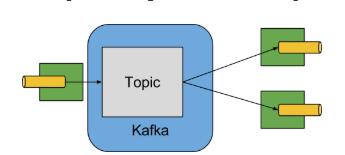
图9. Kafka Binder
Apache Kafka Binder实现将每个目的地(destination)映射到Apache Kafka的主题。 消费者组直接映射到相同的Apache Kafka概念。 分区也直接映射到Apache Kafka分区。
14.3. 配置选项
本节包含Apache Kafka绑定(binder)使用的配置选项。
有关绑定(binder)的常见配置选项和属性,请参阅核心文档。
14.2.1. Kafka 绑定(binder)属性
spring.cloud.stream.kafka.binder.brokers
Kafka绑定(binder)将连接到的代理(broker)列表。
默认为: localhost。
spring.cloud.stream.kafka.binder.defaultBrokerPort
代理(broker)允许指定具有或不具有端口信息的主机(例如,host1,host2:port2)。 当代理列表(broker)中没有配置端口时,将设置默认端口。
默认为: 9092。
spring.cloud.stream.kafka.binder.zkNodes
Kafka绑定(binder)可以连接的ZooKeeper节点列表。
默认为: localhost。
spring.cloud.stream.kafka.binder.defaultZkPort
zkNodes允许指定具有或不具有端口信息的主机(例如,host1,host2:port2)。 当节点列表中没有配置端口时,将设置默认端口。
默认为: 2181。
spring.cloud.stream.kafka.binder.configuration
传递给由绑定器创建的所有客户端的用户属性(包括生产者和消费者)的键/值 map。 由于生产者和消费者都会使用这些属性,因此应该将使用限制在公共属性中,特别是安全设置。
默认为: 空map。
spring.cloud.stream.kafka.binder.headers
将由绑定(binder)传输的自定义头部的列表。
默认为: 空。
spring.cloud.stream.kafka.binder.healthTimeout
以秒为单位的等待分区信息的时间,默认值60。如果此计时器到期,运行状况将报告为down。
默认为: 10。
spring.cloud.stream.kafka.binder.offsetUpdateTimeWindow
以毫秒为单位的保存偏移量的频率。 如果为0,则忽略。
默认为: 10000。
spring.cloud.stream.kafka.binder.offsetUpdateCount
持续消费偏移量更新数量的频率(The frequency, in number of updates, which which consumed offsets are persisted.)。 如果为0,则忽略。与offsetUpdateTimeWindow互斥。
默认为: 0。
spring.cloud.stream.kafka.binder.requiredAcks
需要代理(broker)受到应答的数量。
默认为: 1。
spring.cloud.stream.kafka.binder.minPartitionCount
仅在设置autoCreateTopics或autoAddPartitions时有效。 绑定(binder)将在其生产/消费数据的主题(topic)上配置的分区的全局最小数量。 它可以被生产者的partitionCount设置或生产者的instanceCount* concurrency设置的值所替代(其中较大的值)。
默认为: 1。
spring.cloud.stream.kafka.binder.replicationFactor
autoCreateTopics处于活动状态时,自动创建主题(topics )复制因子( replication factor )。
默认为: 1。
spring.cloud.stream.kafka.binder.autoCreateTopics
如果设置为true,则绑定(binder)将自动创建新的主题(topic)。 如果设置为false,则绑定(binder)将依赖于已经配置的主题(topic)。 在后一种情况下,如果主题(topic)不存在,绑定(binder)将无法启动。 值得注意的是,此设置与代理(topic)的auto.topic.create.enable设置无关,并且不影响代理:如果服务器设置为自动创建主题(topic),则可以将它们和默认代理设置一起创建为元数据检索请求的一部分。
默认为: true。
spring.cloud.stream.kafka.binder.autoAddPartitions
如果设置为true,则绑定(binder)将根据需要创建添加新分区。 如果设置为false,则绑定(binder)将依赖于已经配置的主题的分区大小。 如果目标主题的分区数量小于期望值,绑定(binder)将无法启动。
默认为: false。
spring.cloud.stream.kafka.binder.socketBufferSize
Kafka消费者使用的套接字缓冲区的大小(以字节为单位)。
默认为: 2097152。
spring.cloud.stream.kafka.binder.transaction.transactionIdPrefix
在绑定(binder)中启用事务; 请参阅Kafka文档中的transaction.id和spring-kafka文档中的事务。 启用事务时,将忽略各个的producer属性,并且所有生产者都使用spring.cloud.stream.kafka.binder.transaction.producer.*属性。
默认为: null(没有事务)。
spring.cloud.stream.kafka.binder.transaction.producer.
事务绑定(binder)中生产者的全局生产者属性。 请参阅spring.cloud.stream.kafka.binder.transaction.transactionIdPrefix和[Kafka Producer Properties以及所有绑定(binder)支持的常规生产者属性。
默认为:查看各个生产者属性。
14.3.2. Kafka 消费者属性
以下属性仅供Kafka使用者使用,且必须以spring.cloud.stream.kafka.bindings.为前缀。
autoRebalanceEnabled
如果为true,则主题(topic)分区将在消费者组的成员之间自动重新平衡。 如果为false,则会根据spring.cloud.stream.instanceCount和spring.cloud.stream.instanceIndex为每个使用者分配一组固定的分区。 这需要在每个启动的实例上正确设置spring.cloud.stream.instanceCount和spring.cloud.stream.instanceIndex属性。 在这种情况下,属性spring.cloud.stream.instanceCount通常必须大于1。
默认为: true。
autoCommitOffset
是否在处理消息完成后自动提交偏移量。 如果设置为false,则在流入消息中将包含一个类型为org.springframework.kafka.support.Acknowledgment的keykafka_acknowledgment的头部。 应用可以使用这个头来确认消息。 详细信息请参阅示例部分。 当此属性设置为···false···时,Kafka绑定(binder)将把应答确认模式设置为org.springframework.kafka.listener.AbstractMessageListenerContainer.AckMode.MANUAL。
默认为: true。
autoCommitOnError
仅在autoCommitOffset设置为true时有效。 如果设置为false,则会取消导致错误的消息的自动提交,并且只会提交成功的消息,允许流从上次成功处理的消息中自动重放,以防发生持续失败。 如果设置为true,它将始终自动提交(如果启用了自动提交)。 如果未设置(默认),则它与enableDlq实际上具有相同的值,如果消息被发送到DLQ,则自动提交错误消息,否则不提交它们。
默认为:not set。
recoveryInterval
尝试恢复连接的间隔,以毫秒为单位。
默认为:5000。
resetOffsets
是否将消费者的偏移量重置为startOffset提供的值。
默认为:false。
startOffset
新组的量起始偏移。 允许值:earliest,latest。 如果消费者组被显式设置为消费者“绑定”(通过spring.cloud.stream.bindings.),那么’startOffset’被设置为earliest; 否则将其设置为anonymous消费者组的latest。
默认为:null (等同于earliest)。
enableDlq
设置为true时,它将为消费者发送启用DLQ行为。 默认情况下,导致错误的消息将被转发到名为error.的主题(topic)。 DLQ主题(topic)名称可以通过属性dlqName进行配置。 当错误数量相对较少时,这为更常见的Kafka重放场景提供了一个替代选项,但重放整个原来的主题可能太麻烦。
默认为:false。
configuration
包含通用Kafka消费者属性的键/值对的Map。
默认为:Empty map。
dlqName
接收错误消息的DLQ主题(topic )的名称。
默认为:null(如果未指定,则导致错误的消息将被转发到名为error.的主题(topic)。
14.3.3. Kafka生产者属性
以下属性仅适用于Kafka生产者,必须以spring.cloud.stream.kafka.bindings.为前缀。
bufferSize
Kafka 生产者在发送之前将尝试批量处理多少数据的上限(以字节为单位)。
默认为:16384。
sync
生产者是否为异步的。
默认为:false。
batchTimeout
在发送之前,生产者需要等待多长时间才能让更多的消息在同一批次中累积。 (通常情况下,生产者根本不会等待,只是发送前一次发送过程中累积的所有消息。)非零值可能会增加吞吐量,但会提高延迟。
默认为:0。
messageKeyExpression
根据流出消息计算的SpEL表达式,用于填充生成的Kafka消息的key。 例如headers.key或payload.myKey。
默认为:none。
headerPatterns
以逗号分隔的简单模式列表,用于匹配Spring消息头以映射到ProducerRecord中的kafka headers。 模式可以以通配符(星号)开始或结束。 模式可以通过用!前缀来取反。 匹配在第一次匹配成功后停止(positive or negative)。 例如!foo,fo *会通过fox但foo不会通过。 id和timestamp不会进行映射。
默认为:*(除了id和timestamp之外的所有头部)。
configuration
包含通用Kafka生产者属性的键/值对的Map。
默认为:Empty map。
Kafka 绑定(binder)将使用生产者的
partitionCount设置作为提示来创建具有给定分区数量的主题(与minPartitionCount一起使用,使用两者中的最大值)。 当为应用的binder和partitionCount配置minPartitionCount时,请谨慎使用,因为将使用二者中较大的值。 如果一个主题已经存在较小的分区数量,并禁用autoAddPartitions(默认),那么binder将无法启动。 如果某个主题已经存在,分区数量较小,但启用了autoAddPartitions,则将添加新的分区。 如果一个主题已经存在大于(minPartitionCount和partitionCount)最大值的分区数量,将使用现有的分区数量。
14.3.5. 用法示例
在本节中,我们将说明如何将上述属性用于特定场景。
示例:设置autoCommitOffset为false并依赖手动确认
这个例子说明了如何在消费者应用中手动确认偏移量。
这个例子要求将spring.cloud.stream.kafka.bindings.input.consumer.autoCommitOffset设置为false。 在你的示例中使用相应的输入通道名称。
@SpringBootApplication
@EnableBinding(Sink.class)
public class ManuallyAcknowdledgingConsumer {public static void main(String[] args) {SpringApplication.run(ManuallyAcknowdledgingConsumer.class, args);}@StreamListener(Sink.INPUT)public void process(Message<?> message) {Acknowledgment acknowledgment = message.getHeaders().get(KafkaHeaders.ACKNOWLEDGMENT, Acknowledgment.class);if (acknowledgment != null) {System.out.println("Acknowledgment provided");acknowledgment.acknowledge();}}
示例:安全配置
Apache Kafka 0.9支持客户端和代理之间的安全连接。 要使用此功能,请遵循Apache Kafka文档以及Kafka 0.9Confluent文档中的安全指南中的指南。 使用spring.cloud.stream.kafka.binder.configuration选项为由绑定(binder)创建的所有客户端设置安全属性。
例如,要将security.protocol设置为SASL_SSL,请设置:
spring.cloud.stream.kafka.binder.configuration.security.protocol=SASL_SSL
所有其他安全属性可以以相同的方式设置。
使用Kerberos时,请按照参考文档中的说明创建和引用JAAS配置。
Spring Cloud Stream支持使用JAAS配置文件和Spring Boot属性将JAAS配置信息传递给应用程序。
使用JAAS配置文件
可以使用系统属性为Spring Cloud Stream应用程序设置JAAS和(可选)krb5文件位置。 以下是使用JAAS配置文件启动带有SASL和Kerberos的Spring Cloud Stream应用程序的示例:
java -Djava.security.auth.login.config=/path.to/kafka_client_jaas.conf -jar log.jar \--spring.cloud.stream.kafka.binder.brokers=secure.server:9092 \--spring.cloud.stream.kafka.binder.zkNodes=secure.zookeeper:2181 \--spring.cloud.stream.bindings.input.destination=stream.ticktock \--spring.cloud.stream.kafka.binder.configuration.security.protocol=SASL_PLAINTEXT
使用Spring Boot属性
作为JAAS配置文件的替代方案,Spring Cloud Stream提供了一种使用Spring Boot属性为Spring Cloud Stream应用程序设置JAAS配置的机制。
以下属性可用于配置Kafka客户端的登录上下文。
spring.cloud.stream.kafka.binder.jaas.loginModule
登录模块名称。 在正常情况下不需要设置。
默认为:com.sun.security.auth.module.Krb5LoginModule。
spring.cloud.stream.kafka.binder.jaas.controlFlag
登录模块的控制标志。
默认为:required。
spring.cloud.stream.kafka.binder.jaas.options
包含登录模块选项的键/值对的Map。
默认为:空map。
以下是使用Spring Boot配置属性启动带有SASL和Kerberos的Spring Cloud Stream应用程序的示例:
java --spring.cloud.stream.kafka.binder.brokers=secure.server:9092 \--spring.cloud.stream.kafka.binder.zkNodes=secure.zookeeper:2181 \--spring.cloud.stream.bindings.input.destination=stream.ticktock \--spring.cloud.stream.kafka.binder.autoCreateTopics=false \--spring.cloud.stream.kafka.binder.configuration.security.protocol=SASL_PLAINTEXT \--spring.cloud.stream.kafka.binder.jaas.options.useKeyTab=true \--spring.cloud.stream.kafka.binder.jaas.options.storeKey=true \--spring.cloud.stream.kafka.binder.jaas.options.keyTab=/etc/security/keytabs/kafka_client.keytab \--spring.cloud.stream.kafka.binder.jaas.options.principal=kafka-client-1@EXAMPLE.COM
这和一下JAAS文件等同:
KafkaClient {com.sun.security.auth.module.Krb5LoginModule requireduseKeyTab=truestoreKey=truekeyTab="/etc/security/keytabs/kafka_client.keytab"principal="kafka-client-1@EXAMPLE.COM";
};
如果所需的主题(topic)已经存在于代理(broker)上,或者将由管理员创建,则可以关闭自动创建,只需发送客户端JAAS属性。 作为设置spring.cloud.stream.kafka.binder.autoCreateTopics的替代方法,您可以简单地从应用程序中删除代理依赖项。 有关详细信息,请参阅从基于绑定(binder)应用的classpath中排除Kafka broker jar。
不要在同一个应用程序中混用JAAS配置文件和Spring Boot属性。 如果
-Djava.security.auth.login.config系统属性已经存在,则Spring Cloud Stream将忽略Spring Boot属性。
如果使用Kerberos,请谨慎使用autoCreateTopics和autoAddPartitions。 通常,应用程序可能使用在Kafka和Zookeeper中没有管理权限的主体(principal),依靠Spring Cloud Stream创建/修改主题(topic)可能会失败。 在安全环境中,我们强烈建议使用Kafka工具管理性地创建主题(topic)和管理ACL。
在Apache Kafka 0.10上使用绑定(binder)
Spring Cloud Stream Kafka binder中的默认Kafka支持Kafka0.10.1.1版本。 这个binder还支持连接到其他基于0.10的版本和0.9客户端。 为了做到这一点,当你创建包含你的应用程序的项目时,像通常为默认binder所做的那样添加spring-cloud-starter-stream-kafka。 然后在pom.xml文件的
以下是将应用依赖的Kafka版本下降到0.10.0.1的示例。 由于它仍然为0.10版本,因此可以保留默认的spring-kafka和spring-integration-kafka版本。
<dependency><groupId>org.apache.kafkagroupId><artifactId>kafka_2.11artifactId><version>0.10.0.1version><exclusions><exclusion><groupId>org.slf4jgroupId><artifactId>slf4j-log4j12artifactId>exclusion>exclusions>
dependency>
<dependency><groupId>org.apache.kafkagroupId><artifactId>kafka-clientsartifactId><version>0.10.0.1version>
dependency>
以下是另外一个使用 0.9.0.1版本的示例:
<dependency><groupId>org.springframework.kafkagroupId><artifactId>spring-kafkaartifactId><version>1.0.5.RELEASEversion>
dependency>
<dependency><groupId>org.springframework.integrationgroupId><artifactId>spring-integration-kafkaartifactId><version>2.0.1.RELEASEversion>
dependency>
<dependency><groupId>org.apache.kafkagroupId><artifactId>kafka_2.11artifactId><version>0.9.0.1version><exclusions><exclusion><groupId>org.slf4jgroupId><artifactId>slf4j-log4j12artifactId>exclusion>exclusions>
dependency>
<dependency><groupId>org.apache.kafkagroupId><artifactId>kafka-clientsartifactId><version>0.9.0.1version>
dependency>
以上版本仅供参考。 为获得最佳效果,我们建议为项目使用最新的0.10兼容版本。
从基于绑定(binder)应用的classpath中排除Kafka broker jar
Apache Kafka Binder使用属于Apache Kafka server 库的管理工具来创建和重新配置主题(topic)。 如果由于应用将依赖以管理方式配置的主题,而在运行时不需要包含Apache Kafka server 库及其依赖项,,则Kafka binder允许将Apache Kafka server依赖项从应用中排除。
如果你按照上面的建议使用Kafka依赖的非默认版本,那你只需要包含kafka broker 依赖。 如果使用默认Kafka版本,请确保从spring-cloud-starter-stream-kafka依赖中排除了kafka broker jar,如下所示。
<dependency><groupId>org.springframework.cloudgroupId><artifactId>spring-cloud-starter-stream-kafkaartifactId><exclusions><exclusion><groupId>org.apache.kafkagroupId><artifactId>kafka_2.11artifactId>exclusion>exclusions>
dependency>
如果你排除了Apache Kafka server依赖,并且该主题(topic)在服务器上不存在,则在服务器上启用自动创建主题(topic)的情况下,Apache Kafka broker将创建该主题。 请记住,如果你依赖于此,那么Kafka server将使用默认的分区数量和复制因子。 另一方面,如果在服务器上禁用了自动主题创建,那么在运行应用程序之前必须小心地创建具有所需分区数量的主题(topic)。
如果你想完全控制如何分配分区,那么就保留默认设置,即不要排除kafka broker jar,并确保将spring.cloud.stream.kafka.binder.autoCreateTopics设置为true(这也是默认配置)。
14.4. Spring Cloud Stream的Kafka Streams Binding功能
Spring Cloud Stream Kafka support还包含专门为Kafka Streams binding设计的binder。 使用这个binder,可以编写应用Kafka Streams API的应用。 有关Kafka Streams的更多信息,请参阅Kafka Streams API开发者手册。
Spring Cloud Stream中的Kafka Streams support基于Spring Kafka项目提供的基础。 有关该support的详细信息,请参阅Spring Kafka中的Kafaka Streams support。
以下是**Spring Cloud Stream KStream binder **的maven坐标。
<dependency><groupId>org.springframework.cloudgroupId><artifactId>spring-cloud-stream-binder-kstreamartifactId>
dependency>
除了利用基于Spring Boot的Spring Cloud Stream编程模型之外,KStream binder 提供的另一个重要的优点是避免了直接使用Kafka Streams API时需要编写的样板配置。 通过Kafka Streams API提供的高级流式DSL可以通过Spring Cloud Stream在当前的支持中使用。
14.4.1. 高级流式DSL范例
这个应用将监听Kafka topic,并在5秒的时间窗内为每个唯一的单词记下单词数量。
@SpringBootApplication
@EnableBinding(KStreamProcessor.class)
public class WordCountProcessorApplication {@StreamListener("input")@SendTo("output")public KStream<?, String> process(KStream<?, String> input) {return input.flatMapValues(value -> Arrays.asList(value.toLowerCase().split("\\W+"))).map((key, word) -> new KeyValue<>(word, word)).groupByKey(Serdes.String(), Serdes.String()).count(TimeWindows.of(5000), "store-name").toStream().map((w, c) -> new KeyValue<>(null, "Count for " + w.key() + ": " + c));}public static void main(String[] args) {SpringApplication.run(WordCountProcessorApplication.class, args);}
如果将它构建为Spring Boot可运行的”胖“jar,则可以通过以下方式运行上述示例:
java -jar uber.jar --spring.cloud.stream.bindings.input.destination=words --spring.cloud.stream.bindings.output.destination=counts
这意味着应用程序将监听传入Kafka topic的单词并将计数写入到输出topic。
Spring Cloud Stream将确保来自传入和传出topic的消息都绑定为KStream对象。 正如我们所看到的那样,开发人员可以专注于代码的业务方面,即编写处理程序所需的逻辑,而不是设置Kafka Streams下层结构所需的特定流的配置。 所有这些样板都是由Spring Cloud Stream在幕后处理的。
14.4.2. 支持交互式查询
如果交互式查询需要访问KafkaStreams,则可以通过KStreamBuilderFactoryBean.getKafkaStreams()访问内部的KafkaStreams实例。 你可以注入由KStream binder提供的KStreamBuilderFactoryBean实例。 然后你可以从中获取KafkaStreams实例,并检索底层存储,执行查询等。
14.4.3. Kafka Streams属性
confituration
包含与Kafka Streams API有关的属性的键/值对的map。 该属性必须以spring.cloud.stream.kstream.binder.为前缀。
以下是使用此属性的一些示例。
spring.cloud.stream.kstream.binder.configuration.key.serde=org.apache.kafka.common.serialization.Serdes$StringSerde
spring.cloud.stream.kstream.binder.configuration.value.serde=org.apache.kafka.common.serialization.Serdes$StringSerde
spring.cloud.stream.kstream.binder.configuration.commit.interval.ms=1000
有关stream配置的所有属性的更多信息,请参阅StreamsConfig JavaDocs。
还可以绑定特定属性。
例如,你可以为输入或输出的destination使用不同的Serde。
spring.cloud.stream.kstream.bindings.output.producer.keySerde=org.apache.kafka.common.serialization.Serdes$IntegerSerde
spring.cloud.stream.kstream.bindings.output.producer.valueSerde=org.apache.kafka.common.serialization.Serdes$LongSerde
14.5. 错误通道
从1.3版本开始,binder 将无条件地将异常发送到每个消费者的destination的错误通道,并且可以配置为将异步生产者发送失败的消息发送到错误通道。 有关更多信息,请参阅消息通道绑定和错误通道。
发送失败的错误消息运载的是带有属性的Kafka Send FailureException,其属性为:
failedMessage,发送失败的Spring消息Message。record,根据failedMessage创建的未处理的ProducerRecord。
我们没有自动处理这些异常(例如发送到Dead-Letter队列),你可以使用自己的 Spring Integration flow来消费这些异常。
14.6. Kafka Metrics
Kafka binder 模块公开了以下metrics:
spring.cloud.stream.binder.kafka.someGroup.someTopic.lag,这个度量标准显示给定消费者组在给定binder的topic中还没有多少消息没有被消费。
例如,如果度量标准spring.cloud.stream.binder.kafka.myGroup.myTopic.lag的值是1000,则消费者组myGroup有1000条消息等待从topicmyTopic被消费。 此度量标准对于向你选择的PaaS平台提供自动扩展反馈特别有用。
14.7. Dead-Letter Topic 处理
由于不能预测用户如何处理Dead-lettered 消息,框架没有提供任何标准的机制来处理它们。 如果dead-lettering的原因是短暂的,您可能希望将消息路由回原topic。 但是,如果问题是一个持续性问题,那么可能会导致无限循环。 下面的spring-boot示例应用程序显示了如何将这些消息路由回原topic,但是在三次尝试之后将它们移动到第三个 “parking lot” topic。 该应用程序仅仅是另一个从dead-letter topic中读取消息的spring-cloud-stream应用程序。 当5秒内没有收到消息时它终止。
示例假设原destination so8400out,而消费者组是so8400。
以下是一些考虑因素。
- 考虑只在主应用程序没有运行时运行重新路由。 否则,暂时性错误的重试将很快耗尽。
- 或者,使用两阶段方法: 使用此应用路由到第三个topic,另一个从第三个topic那里路由回主topic。
- 由于这种技术使用消息头来跟踪重试,所以它不能和
headerMode=raw一起工作。 在这种情况下,考虑向负载添加一些数据(主应用程序可以忽略这些数据)。 - 必须在此应用和主应用的
headers属性中添加x-retries:spring.cloud.stream.kafka.binder.headers = x-retries,以便在应用程序之间传输头部。 - 由于kafka是发布/订阅模式,所以重放的消息将被发送给每个消费者组,甚至第一次可能已经成功处理了消息的消费者组。
application.properties
spring.cloud.stream.bindings.input.group=so8400replay
spring.cloud.stream.bindings.input.destination=error.so8400out.so8400spring.cloud.stream.bindings.output.destination=so8400out
spring.cloud.stream.bindings.output.producer.partitioned=truespring.cloud.stream.bindings.parkingLot.destination=so8400in.parkingLot
spring.cloud.stream.bindings.parkingLot.producer.partitioned=truespring.cloud.stream.kafka.binder.configuration.auto.offset.reset=earliestspring.cloud.stream.kafka.binder.headers=x-retries
Application
@SpringBootApplication
@EnableBinding(TwoOutputProcessor.class)
public class ReRouteDlqKApplication implements CommandLineRunner {private static final String X_RETRIES_HEADER = "x-retries";public static void main(String[] args) {SpringApplication.run(ReRouteDlqKApplication.class, args).close();}private final AtomicInteger processed = new AtomicInteger();@Autowiredprivate MessageChannel parkingLot;@StreamListener(Processor.INPUT)@SendTo(Processor.OUTPUT)public Message reRoute(Message failed) {processed.incrementAndGet();Integer retries = failed.getHeaders().get(X_RETRIES_HEADER, Integer.class);if (retries == null) {System.out.println("First retry for " + failed);return MessageBuilder.fromMessage(failed).setHeader(X_RETRIES_HEADER, new Integer(1)).setHeader(BinderHeaders.PARTITION_OVERRIDE,failed.getHeaders().get(KafkaHeaders.RECEIVED_PARTITION_ID)).build();}else if (retries.intValue() < 3) {System.out.println("Another retry for " + failed);return MessageBuilder.fromMessage(failed).setHeader(X_RETRIES_HEADER, new Integer(retries.intValue() + 1)).setHeader(BinderHeaders.PARTITION_OVERRIDE,failed.getHeaders().get(KafkaHeaders.RECEIVED_PARTITION_ID)).build();}else {System.out.println("Retries exhausted for " + failed);parkingLot.send(MessageBuilder.fromMessage(failed).setHeader(BinderHeaders.PARTITION_OVERRIDE,failed.getHeaders().get(KafkaHeaders.RECEIVED_PARTITION_ID)).build());}return null;}@Overridepublic void run(String... args) throws Exception {while (true) {int count = this.processed.get();Thread.sleep(5000);if (count == this.processed.get()) {System.out.println("Idle, terminating");return;}}}public interface TwoOutputProcessor extends Processor {@Output("parkingLot")MessageChannel parkingLot();}}
15. RabbitMQ Binder
待续
本文来自互联网用户投稿,文章观点仅代表作者本人,不代表本站立场,不承担相关法律责任。如若转载,请注明出处。 如若内容造成侵权/违法违规/事实不符,请点击【内容举报】进行投诉反馈!