【Unity3d教程】如何让NavMesh上的载具和车辆能像现实一样优雅地掉头和转向
如果在unity中制作了一辆带有NavMeshAgent的坦克,当你要控制它掉头时,它会这样
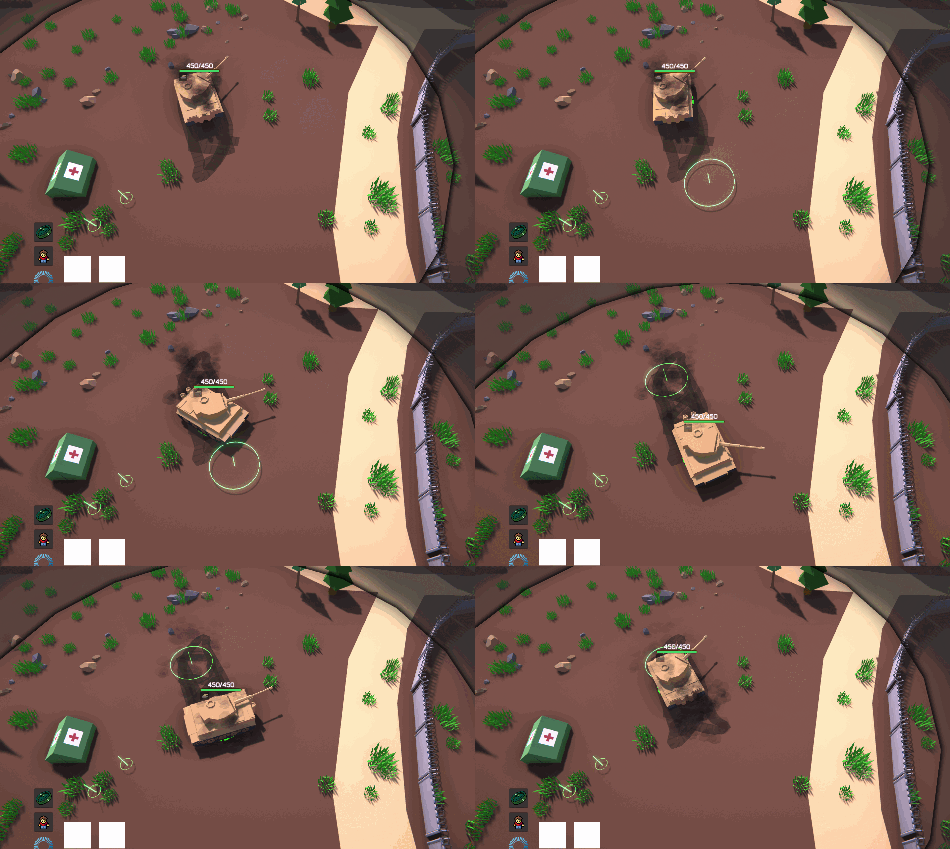
但是我们想要这样,这也是本期教程的最终效果

国内网站我完全搜不到相关的内容,但是谷歌倒是能搜到一些。
第一个视频:
https://www.youtube.com/watch?v=SV1eE1hvuqY&t=38s
这个是使用navmeshAgent.Move()来在转弯时增加额外的移动来达到转弯时也会前进从而达到增加转弯半径的效果。但是由于navmeshAgent在启动和停止时有加速度,导致很难确定move多少。经常会有突然加速的情况而且使用这个后navmeshAgent的自动停止也会无法正常使用。可能需要禁用navmeshAgent的本身的速度并完全重写速度函数。个人觉得挺难的
第二个视频:
https://www.youtube.com/watch?v=Zn9F_1G5Gwg&list=PLvFYWuKxAmL8sNdSIlQpNxw5sFkgyRsVG&index=18

这个视频是在要掉头时在背后挖一个这样的洞来迫使tank寻找新的路径来完成转弯。这个看着效果不错,但仔细一想如果有一个士兵跟在坦克后面,坦克掉头并且挖洞士兵就会因为不在导航网格上而出错或者瞬移,所以我觉得这个也不是很行。
然后是我最后采取的方法,其实之前想过,但是刚开始觉得有点复杂就没采用,但是看到别人也提出了这个方案,我又尝试了一下做出来发现效果还可以
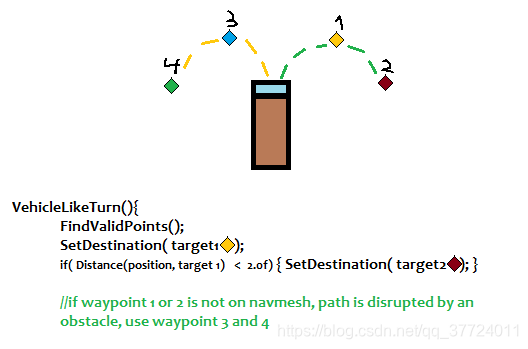
简单来说就是在要掉头或者转弯的时候,先根据目标点在左边或者右边来确定要往哪边转,确定后在对应方向设置一条新的转弯路径,让载具沿着转弯路径移动,直到不需要再转弯时就让载具直接向目标寻路。

这是更加细致一点的方案。比如朝右时,先通过创建路径函数获得路径点A,到达A后判断是否还需要转弯,需要就创建新的路径并得到路径点b,不需要就寻路到真正的目标点。
再寻路过程中,称pointA,pointB等这些点为临时路径点,真正的路径点为realDest;
using System;
using BattleScene.Scripts;
using BehaviorDesigner.Runtime.Tasks.Unity.UnityNavMeshAgent;
using UnityEngine;
using UnityEngine.AI;namespace DefaultNamespace
{public class NavMeshVehicleMovement : MonoBehaviour{private NavMeshAgent navMeshAgent;private Animator animator;public bool overrideMovementCtrl;public bool moveByAnim;public bool isTurnRound;private bool hasSetTurnRoundDes = false;public float turnRadius = 4;public int turnDegreeStepValue = 120;//每次寻找路径点时的转弯角度public int turnAngleThreshold = 90;//大于这个角度就开始转弯public void Start(){navMeshAgent = GetComponent();animator = GetComponent();}private Vector3 realDest;//点击的真正路径点private Vector3 d1;//临时路径点public void Update(){if (overrideMovementCtrl == false || navMeshAgent.enabled == false || HasArrived() ||navMeshAgent.isStopped)return;Vector3 targetDir = navMeshAgent.destination - transform.position;if (Vector3.Angle(targetDir, transform.forward) > turnAngleThreshold && isTurnRound == false)//如果在背后   {realDest = navMeshAgent.destination;//在转弯开始时确定真正路径点,但是在转弯过程中如果玩家设定了新的目标点则会通过SetRealDest()函数更新真正目标点.isTurnRound = true;//只执行一次并开始转弯 navMeshAgent.autoBraking = false;//这是自动刹车的变量,不关闭的话就会有走一步停一步的感觉 }if (isTurnRound){if (hasSetTurnRoundDes == false) //d1为第一个临时路径点{d1 = FindTurnPoint(realDest);BattleFxManager.Instance.SpawnFxAtPosInPhotonByFxType(BattleFxType.DestionMark,d1,Vector3.forward);// 显示路径点标志hasSetTurnRoundDes = true;navMeshAgent.SetDestination(d1);}if (Vector3.Distance(transform.position, d1) <= navMeshAgent.stoppingDistance*1.2f)//到达临时路径点后寻找下一个临时路径点{if (Vector3.Angle(realDest - transform.position, transform.forward) > turnAngleThreshold)//注意对比角度是和真正路径点对比{d1 = FindTurnPoint(realDest);BattleFxManager.Instance.SpawnFxAtPosInPhotonByFxType(BattleFxType.DestionMark,d1,Vector3.forward);navMeshAgent.SetDestination(d1);}}if (Vector3.Angle(realDest - transform.position, transform.forward) < turnAngleThreshold)//当角度小于90度时,结束转弯 {navMeshAgent.SetDestination(realDest);hasSetTurnRoundDes = false;isTurnRound = false;navMeshAgent.autoBraking = true;}}Vector3 FindTurnPoint(Vector3 realDest)//Find temporary turn point;{Vector3 direction = realDest - transform.position;var cross = Vector3.Cross(transform.forward, direction); //通过叉积来判断目标地点在左边还是右边来决定超哪边旋转Vector3 targetPos;NavMeshHit navMeshHit;if (cross.y < 0) //在左边,{targetPos = transform.position - transform.right * turnRadius -transform.right * (turnRadius * Mathf.Cos((180 - turnDegreeStepValue) * Mathf.Deg2Rad)) +transform.forward * (turnRadius * Mathf.Sin((180 - turnDegreeStepValue) * Mathf.Deg2Rad));}else //在右边{targetPos = transform.position + transform.right * turnRadius +transform.right * (turnRadius * Mathf.Cos(turnDegreeStepValue * Mathf.Deg2Rad)) +transform.forward * (turnRadius * Mathf.Sin(turnDegreeStepValue * Mathf.Deg2Rad));}//使用SamplePosition来保证找到的路径点再导航网格上, SamplePosition的半径不应太大,否则可能因为障碍物找到较远的位置导致奇怪的寻路路径if (NavMesh.SamplePosition(targetPos, out navMeshHit, 2f, -1)){targetPos = navMeshHit.position; //找到在导航网格上的点}else //如果导航网格没有合适的目的地便直接朝realDest前进{targetPos = this.realDest;}return targetPos;}}public void SetRealDest(Vector3 pos)//the real destination is the position you clicked;{realDest = pos;}private bool HasArrived(){float remainingDistance;if (navMeshAgent.pathPending){remainingDistance = float.PositiveInfinity;}else{remainingDistance = navMeshAgent.remainingDistance;}return remainingDistance <= navMeshAgent.stoppingDistance;}}
}
需要注意的是,因为是通过SetDestination来设置新的路径点,所以在转弯过程中不能使用SetDestination来设置新的目标地点,否则半圆路径会被打断,也就失去了效果。在我的代码中转弯开始时会记录真正的目标点,在转弯结束后会继续向真正的目标点寻路。
要在转弯过程中设置新的目标地点应该通过设置记录的目标点变量而不是直接导航,通过SetRealDestPos函数来设置记录的目标地点,在转弯结束后,就会朝着新设置的目标点导航。
相关的伪代码
public virtual void SetTargetPos(Vector3 pos, bool showMark = true)
{if (navMeshVehicleMovement && navMeshVehicleMovement.isTurnRound){navMeshVehicleMovement.SetRealDest(pos);}else{navMeshAgent.SetDestination(pos);}
}
如果你有疑问或者你有更好的思路请评论。
如果这篇博客有帮助到你,建议点一个赞。
本文来自互联网用户投稿,文章观点仅代表作者本人,不代表本站立场,不承担相关法律责任。如若转载,请注明出处。 如若内容造成侵权/违法违规/事实不符,请点击【内容举报】进行投诉反馈!