YOLOV7训练TT100K交通标识符数据集
《临江仙》
作者:缠中说禅
浊水倾波三万里,愀然独坐孤峰。龙潜狮睡候飙风。无情皆竖子,有泪亦英雄。
长剑倚天星斗烂,古今过眼成空。乾坤俯仰任穷通。半轮沧海上,一苇大江东。
一、yolov7环境搭建
参见我的其他博客文章,还有个下载文档,免费的
二、TT100K数据集处理
2.1 数据集下载19多个G
https://bj.bcebos.com/ai-studio-online/11d4aa5b64674c399ae4a092dd2c99a1be48927a53ba41f09659040497f7ad23?authorization=bce-auth-v1%2F5cfe9a5e1454405eb2a975c43eace6ec%2F2022-09-04T15%3A26%3A20Z%2F-1%2F%2Fb6ad292a7a8dea9aaaa342f6c29ddf7f238f17f4b0de359440ad2ecffd88196d&responseContentDisposition=attachment%3B%20filename%3Dtt100k_2021.zip
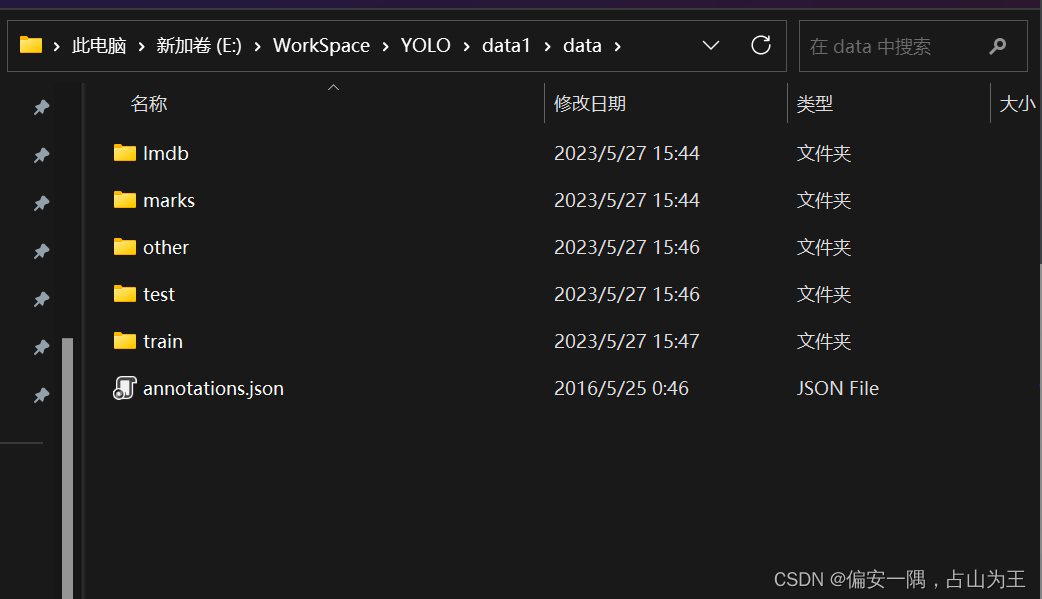
解压后的目录:
2.2 代码用法说明
我是在如下文章指导下进行的数据处理,把他的代码做了一些改动,参考时候请注意。
参考链接:
win下YOLOv7训练自己的数据集(交通标志TT100K识别)_tt100k数据集_我宿孤栈的博客-CSDN博客
tt100k.class_statistics()#对TT100K中的数据集进行预处理,代码中是只保留包含图片数超过100的类别;
tt100k.original_datasets2object_datasets_re()#对TT100K数据集的训练集、验证集和测试集进行比例划分;7:2:1=train:val:test.然后我加了一些代码,顺便把分类好的数据图片进行了转移,也就是把保留包含图片数超过100的类别的图片换了个地方保存。
tt100k.coco_json2yolo_txt('val')#将CoCo格式的标签json文件(3个json文件)转换为YOLO格式的txt(注意此处需要分别调用三次,train、val和test,对应生成其3个.txt文件);
2.3 代码
2.3.1 如下是整体代码
import os
import json
from random import random
import cv2
import shutil
import json
import xml.dom.minidom
from tqdm import tqdm
import argparse# from jinxSkills.jinx_opencv.datasets_transform.dataset_transform import DataSets_transformclass TT100K2COCO:def __init__(self):self.original_datasets = 'tt100k'self.to_datasets = 'coco'def class_statistics(self):# os.makedirs('annotations', exist_ok=True)# 存放数据的父路径parent_path = 'E:/WorkSpace/YOLO/data/data'#print(parent_path)# 读TT100K原始数据集标注文件with open(os.path.join(parent_path, 'annotations.json')) as origin_json:origin_dict = json.load(origin_json)classes = origin_dict['types']# 建立统计每个类别包含的图片的字典sta = {}for i in classes:sta[i] = []images_dic = origin_dict['imgs']# 记录所有保留的图片saved_images = []# 遍历TT100K的imgsfor image_id in images_dic:image_element = images_dic[image_id]##image_path = 'E:/WorkSpace/YOLO/data/data/'+image_element['path']#print(image_path)# 添加图像的信息到dataset中image_path = image_path.split('/')[-1]obj_list = image_element['objects']#print(image_path)# 遍历每张图片的标注信息for anno_dic in obj_list:label_key = anno_dic['category']# 防止一个图片多次加入一个标签类别if image_path not in sta[label_key]:sta[label_key].append(image_path)# 只保留包含图片数超过100的类别(重新划分,阈值100可根据需求修改)result = {k: v for k, v in sta.items() if len(v) >= 100}for i in result:#print("the type of {} includes {} images".format(i, len(result[i])))saved_images.extend(result[i])saved_images = list(set(saved_images))#print("total types is {}".format(len(result)))type_list = list(result.keys())result = {"type": type_list, "details": result, "images": saved_images}print(type_list)# 保存结果json_name = os.path.join(parent_path, 'statistics.json')with open(json_name, 'w', encoding="utf-8") as f:json.dump(result, f, ensure_ascii=False, indent=1)def original_datasets2object_datasets_re(self):'''重新划分数据集:return:'''# os.makedirs('annotations2', exist_ok=True)# 存放数据的父路径parent_path = 'E:/WorkSpace/YOLO/data/data/'# 读TT100K原始数据集标注文件with open(os.path.join(parent_path, 'annotations.json')) as origin_json:origin_dict = json.load(origin_json)with open(os.path.join(parent_path, 'statistics.json')) as select_json:select_dict = json.load(select_json)classes = select_dict['type']train_dataset = {'info': {}, 'licenses': [], 'categories': [], 'images': [], 'annotations': []}val_dataset = {'info': {}, 'licenses': [], 'categories': [], 'images': [], 'annotations': []}test_dataset = {'info': {}, 'licenses': [], 'categories': [], 'images': [], 'annotations': []}label = {}  # 记录每个标志类别的idcount = {}  # 记录每个类别的图片数owntype_sum = {}info = {"year": 2021,  # 年份"version": '1.0',  # 版本"description": "TT100k_to_coco",  # 数据集描述"contributor": "Tecent&Tsinghua",  # 提供者"url": 'https://cg.cs.tsinghua.edu.cn/traffic-sign/',  # 下载地址"date_created": 2021 - 1 - 15}licenses = {"id": 1,"name": "null","url": "null",}train_dataset['info'] = infoval_dataset['info'] = infotest_dataset['info'] = infotrain_dataset['licenses'] = licensesval_dataset['licenses'] = licensestest_dataset['licenses'] = licenses# 建立类别和id的关系for i, cls in enumerate(classes):train_dataset['categories'].append({'id': i, 'name': cls, 'supercategory': 'traffic_sign'})val_dataset['categories'].append({'id': i, 'name': cls, 'supercategory': 'traffic_sign'})test_dataset['categories'].append({'id': i, 'name': cls, 'supercategory': 'traffic_sign'})label[cls] = icount[cls] = 0owntype_sum[cls] = 0images_dic = origin_dict['imgs']#源annotations.jsonobj_id = 1# 计算出每个类别共‘包含’的图片数for image_id in images_dic:image_element = images_dic[image_id]image_path = image_element['path']image_name = image_path.split('/')[-1]#print(image_name)#32770.jpg# 在所选的类别图片中if image_name not in select_dict['images']:continueelse:#加一个赋值图片的语句i=0# 处理TT100K中的标注信息obj_list = image_element['objects']# 记录图片中包含最多的实例所属的typeincludes_type = {}for anno_dic in obj_list:if anno_dic["category"] not in select_dict["type"]:continue# print(anno_dic["category"])if anno_dic["category"] in includes_type:includes_type[anno_dic["category"]] += 1else:includes_type[anno_dic["category"]] = 1# print(includes_type)own_type = max(includes_type, key=includes_type.get)owntype_sum[own_type] += 1# TT100K的annotation转换成coco的for image_id in images_dic:image_element = images_dic[image_id]image_path = image_element['path']image_name = image_path.split('/')[-1]# 在所选的类别图片中if image_name not in select_dict['images']:continue##print("dealing with {} image".format(image_path))# shutil.copy(os.path.join(parent_path,image_path),os.path.join(parent_path,"dataset/JPEGImages"))# 处理TT100K中的标注信息obj_list = image_element['objects']# 记录图片中包含最多的实例所属的typeincludes_type = {}for anno_dic in obj_list:if anno_dic["category"] not in select_dict["type"]:continue# print(anno_dic["category"])if anno_dic["category"] in includes_type:includes_type[anno_dic["category"]] += 1else:includes_type[anno_dic["category"]] = 1# print(includes_type)own_type = max(includes_type, key=includes_type.get)count[own_type] += 1num_rate = count[own_type] / owntype_sum[own_type]# 切换dataset的引用对象,从而划分数据集根据每个类别类别的总数量按7:2:1分为了train_set,val_set,test_set。# 其中每个图片所属类别根据该图片包含的类别的数量决定(归属为含有类别最多的类别)target = 'E:/WorkSpace/YOLO/data/'if num_rate < 0.7:dataset = train_dataset#print(image_path)shutil.copyfile(parent_path + image_path, target + '/train/' + image_path.split("/")[1])elif num_rate < 0.9:dataset = val_datasetshutil.copyfile(parent_path + image_path, target + '/val/' + image_path.split("/")[1])#print(image_path)else:#print("dataset=test_dataset")dataset = test_dataset#print(image_path)shutil.copyfile(parent_path + image_path, target + '/test/' + image_path.split("/")[1])for anno_dic in obj_list:if anno_dic["category"] not in select_dict["type"]:continuex = anno_dic['bbox']['xmin']y = anno_dic['bbox']['ymin']width = anno_dic['bbox']['xmax'] - anno_dic['bbox']['xmin']height = anno_dic['bbox']['ymax'] - anno_dic['bbox']['ymin']label_key = anno_dic['category']dataset['annotations'].append({'area': width * height,'bbox': [x, y, width, height],'category_id': label[label_key],'id': obj_id,'image_id': image_id,'iscrowd': 0,# mask, 矩形是从左上角点按顺时针的四个顶点'segmentation': [[x, y, x + width, y, x + width, y + height, x, y + height]]})# 每个标注的对象id唯一obj_id += 1# 用opencv读取图片,得到图像的宽和高im = cv2.imread(os.path.join(parent_path, image_path))#####---------------------------------------------##print(image_path)  #test  other trainprefix = image_path.split("/")[0]H,W,_ = im.shape# 添加图像的信息到dataset中dataset['images'].append({'file_name': image_name,'id': image_id,'width': W,'height': H})# 保存结果for phase in ['train', 'val', 'test']:json_name = os.path.join(parent_path, 'dataset/annotations/{}.json'.format(phase))with open(json_name, 'w', encoding="utf-8") as f:if phase == 'train':shutil.copyfile(parent_path + image_path, target + '/train/' + image_path.split("/")[1])json.dump(train_dataset, f, ensure_ascii=False, indent=1)if phase == 'val':json.dump(val_dataset, f, ensure_ascii=False, indent=1)if phase == 'test':json.dump(test_dataset, f, ensure_ascii=False, indent=1)def coco_json2yolo_txt(self, class_json):# COCO 格式的数据集转化为 YOLO 格式的数据集# --json_path 输入的json文件路径# --save_path 保存的文件夹名字,默认为当前目录下的labels。def convert(size, box):dw = 1. / (size[0])dh = 1. / (size[1])x = box[0] + box[2] / 2.0y = box[1] + box[3] / 2.0w = box[2]h = box[3]# round函数确定(xmin, ymin, xmax, ymax)的小数位数x = round(x * dw, 6)w = round(w * dw, 6)y = round(y * dh, 6)h = round(h * dh, 6)return (x, y, w, h)# class_json = 'train'json_file = os.path.join('E:/WorkSpace/YOLO/data/data/dataset/annotations/%s.json' % class_json)  # COCO Object Instance 类型的标注#E:/WorkSpace/YOLO/data/data/dataset/annotations/val.json#print(json_file)# ana_txt_save_path = 'D:/jinxData/TT100K/data/dataset/annotations/train'  # 保存的路径ana_txt_save_path = os.path.join('E:/WorkSpace/YOLO/data/data/dataset/annotations/', class_json)  # 保存的路径#print(class_json)#val#print(ana_txt_save_path)#E:/WorkSpace/YOLO/data/data/dataset/annotations\valdata = json.load(open(json_file, 'r'))if not os.path.exists(ana_txt_save_path):os.makedirs(ana_txt_save_path)id_map = {}  # coco数据集的id不连续!重新映射一下再输出!with open(os.path.join(ana_txt_save_path, 'classes.txt'), 'w') as f:# 写入classes.txtfor i, category in enumerate(data['categories']):f.write(f"{category['name']}\n")id_map[category['id']] = i# print(id_map)# 这里需要根据自己的需要,更改写入图像相对路径的文件位置。list_file = open(os.path.join(ana_txt_save_path, '%s.txt' % class_json.format()), 'w')for img in tqdm(data['images']):filename = img["file_name"]img_width = img["width"]img_height = img["height"]img_id = img["id"]head, tail = os.path.splitext(filename)ana_txt_name = head + ".txt"  # 对应的txt名字,与jpg一致f_txt = open(os.path.join(ana_txt_save_path, ana_txt_name), 'w')for ann in data['annotations']:if ann['image_id'] == img_id:box = convert((img_width, img_height), ann["bbox"])f_txt.write("%s %s %s %s %s\n" % (id_map[ann["category_id"]], box[0], box[1], box[2], box[3]))f_txt.close()#将图片的相对路径写入train2017或val2017的路径  'E:/WorkSpace/YOLO/yolov7-main/yolov7-main/dataset/TT100K/images/'#list_file.write('%s/%s/%s.jpg\n' % ('E:/WorkSpace/YOLO/data/data/',class_json.format(), head))list_file.write('%s/%s/%s.jpg\n' % ('E:/WorkSpace/YOLO/yolov7-main/yolov7-main/data/TT100K/images/', class_json.format(), head))list_file.close()if __name__ == '__main__':tt100k = TT100K2COCO()#tt100k.class_statistics()#tt100k.original_datasets2object_datasets_re()tt100k.coco_json2yolo_txt('val')tt100k.coco_json2yolo_txt('test')tt100k.coco_json2yolo_txt('train')
2.3.2 如下是每个函数的代码以及我的注释
class_statistics(self)函数:把data1看成data把,因为我已经有了个data文件夹,为了写教程又重新解压了一份。

parent_path = 'E:/WorkSpace/YOLO/data/data'
这一块可以不用加上'E:/WorkSpace/YOLO/data/data/'+
直接为image_path  = image_element['path']就可以了
image_path = 'E:/WorkSpace/YOLO/data/data/'+image_element['path']
改完上述两个部分后,运行该函数,会生成一个statistics.json文件。
def class_statistics(self):# os.makedirs('annotations', exist_ok=True)# 存放数据的父路径parent_path = 'E:/WorkSpace/YOLO/data/data'#print(parent_path)# 读TT100K原始数据集标注文件with open(os.path.join(parent_path, 'annotations.json')) as origin_json:origin_dict = json.load(origin_json)classes = origin_dict['types']# 建立统计每个类别包含的图片的字典sta = {}for i in classes:sta[i] = []images_dic = origin_dict['imgs']# 记录所有保留的图片saved_images = []# 遍历TT100K的imgsfor image_id in images_dic:image_element = images_dic[image_id]##image_path = 'E:/WorkSpace/YOLO/data/data/'+image_element['path']#print(image_path)# 添加图像的信息到dataset中image_path = image_path.split('/')[-1]obj_list = image_element['objects']#print(image_path)# 遍历每张图片的标注信息for anno_dic in obj_list:label_key = anno_dic['category']# 防止一个图片多次加入一个标签类别if image_path not in sta[label_key]:sta[label_key].append(image_path)# 只保留包含图片数超过100的类别(重新划分,阈值100可根据需求修改)result = {k: v for k, v in sta.items() if len(v) >= 100}for i in result:#print("the type of {} includes {} images".format(i, len(result[i])))saved_images.extend(result[i])saved_images = list(set(saved_images))#print("total types is {}".format(len(result)))type_list = list(result.keys())result = {"type": type_list, "details": result, "images": saved_images}print(type_list)# 保存结果json_name = os.path.join(parent_path, 'statistics.json')with open(json_name, 'w', encoding="utf-8") as f:json.dump(result, f, ensure_ascii=False, indent=1)
original_datasets2object_datasets_re函数
改动比较多注意。
1.parent_path = 'E:/WorkSpace/YOLO/data/data/' 不用说了吧
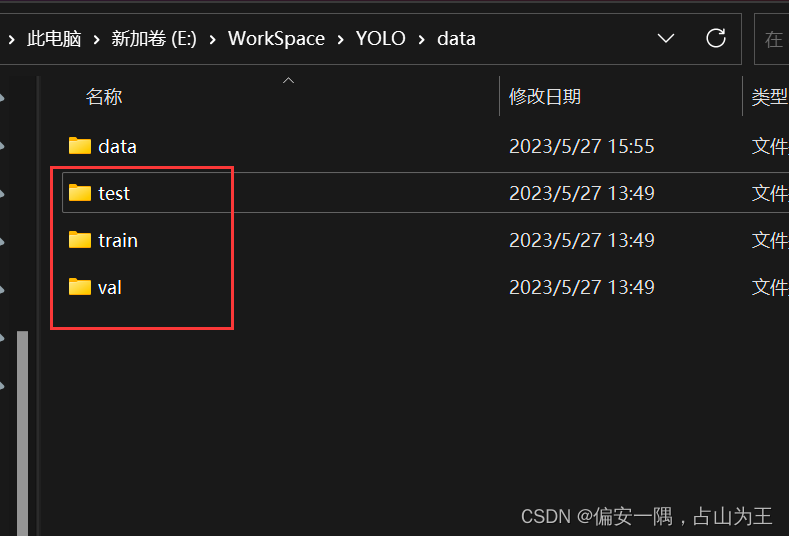
2.加一句target = 'E:/WorkSpace/YOLO/data/',就是一个你最后要用的test train val图片的目录,可以自己指定。
3.3个复制函数,我最后生成的三个文件夹
4.运行函数,会很慢,最后会生成3的三个文件夹,已经3个json文件,还有label文件

def original_datasets2object_datasets_re(self):'''重新划分数据集:return:'''# os.makedirs('annotations2', exist_ok=True)# 存放数据的父路径parent_path = 'E:/WorkSpace/YOLO/data/data/'# 读TT100K原始数据集标注文件with open(os.path.join(parent_path, 'annotations.json')) as origin_json:origin_dict = json.load(origin_json)with open(os.path.join(parent_path, 'statistics.json')) as select_json:select_dict = json.load(select_json)classes = select_dict['type']train_dataset = {'info': {}, 'licenses': [], 'categories': [], 'images': [], 'annotations': []}val_dataset = {'info': {}, 'licenses': [], 'categories': [], 'images': [], 'annotations': []}test_dataset = {'info': {}, 'licenses': [], 'categories': [], 'images': [], 'annotations': []}label = {} # 记录每个标志类别的idcount = {} # 记录每个类别的图片数owntype_sum = {}info = {"year": 2021, # 年份"version": '1.0', # 版本"description": "TT100k_to_coco", # 数据集描述"contributor": "Tecent&Tsinghua", # 提供者"url": 'https://cg.cs.tsinghua.edu.cn/traffic-sign/', # 下载地址"date_created": 2021 - 1 - 15}licenses = {"id": 1,"name": "null","url": "null",}train_dataset['info'] = infoval_dataset['info'] = infotest_dataset['info'] = infotrain_dataset['licenses'] = licensesval_dataset['licenses'] = licensestest_dataset['licenses'] = licenses# 建立类别和id的关系for i, cls in enumerate(classes):train_dataset['categories'].append({'id': i, 'name': cls, 'supercategory': 'traffic_sign'})val_dataset['categories'].append({'id': i, 'name': cls, 'supercategory': 'traffic_sign'})test_dataset['categories'].append({'id': i, 'name': cls, 'supercategory': 'traffic_sign'})label[cls] = icount[cls] = 0owntype_sum[cls] = 0images_dic = origin_dict['imgs']#源annotations.jsonobj_id = 1# 计算出每个类别共‘包含’的图片数for image_id in images_dic:image_element = images_dic[image_id]image_path = image_element['path']image_name = image_path.split('/')[-1]#print(image_name)#32770.jpg# 在所选的类别图片中if image_name not in select_dict['images']:continueelse:#加一个赋值图片的语句i=0# 处理TT100K中的标注信息obj_list = image_element['objects']# 记录图片中包含最多的实例所属的typeincludes_type = {}for anno_dic in obj_list:if anno_dic["category"] not in select_dict["type"]:continue# print(anno_dic["category"])if anno_dic["category"] in includes_type:includes_type[anno_dic["category"]] += 1else:includes_type[anno_dic["category"]] = 1# print(includes_type)own_type = max(includes_type, key=includes_type.get)owntype_sum[own_type] += 1# TT100K的annotation转换成coco的for image_id in images_dic:image_element = images_dic[image_id]image_path = image_element['path']image_name = image_path.split('/')[-1]# 在所选的类别图片中if image_name not in select_dict['images']:continue##print("dealing with {} image".format(image_path))# shutil.copy(os.path.join(parent_path,image_path),os.path.join(parent_path,"dataset/JPEGImages"))# 处理TT100K中的标注信息obj_list = image_element['objects']# 记录图片中包含最多的实例所属的typeincludes_type = {}for anno_dic in obj_list:if anno_dic["category"] not in select_dict["type"]:continue# print(anno_dic["category"])if anno_dic["category"] in includes_type:includes_type[anno_dic["category"]] += 1else:includes_type[anno_dic["category"]] = 1# print(includes_type)own_type = max(includes_type, key=includes_type.get)count[own_type] += 1num_rate = count[own_type] / owntype_sum[own_type]# 切换dataset的引用对象,从而划分数据集根据每个类别类别的总数量按7:2:1分为了train_set,val_set,test_set。# 其中每个图片所属类别根据该图片包含的类别的数量决定(归属为含有类别最多的类别)target = 'E:/WorkSpace/YOLO/data/'if num_rate < 0.7:dataset = train_dataset#print(image_path)shutil.copyfile(parent_path + image_path, target + '/train/' + image_path.split("/")[1])elif num_rate < 0.9:dataset = val_datasetshutil.copyfile(parent_path + image_path, target + '/val/' + image_path.split("/")[1])#print(image_path)else:#print("dataset=test_dataset")dataset = test_dataset#print(image_path)shutil.copyfile(parent_path + image_path, target + '/test/' + image_path.split("/")[1])for anno_dic in obj_list:if anno_dic["category"] not in select_dict["type"]:continuex = anno_dic['bbox']['xmin']y = anno_dic['bbox']['ymin']width = anno_dic['bbox']['xmax'] - anno_dic['bbox']['xmin']height = anno_dic['bbox']['ymax'] - anno_dic['bbox']['ymin']label_key = anno_dic['category']dataset['annotations'].append({'area': width * height,'bbox': [x, y, width, height],'category_id': label[label_key],'id': obj_id,'image_id': image_id,'iscrowd': 0,# mask, 矩形是从左上角点按顺时针的四个顶点'segmentation': [[x, y, x + width, y, x + width, y + height, x, y + height]]})# 每个标注的对象id唯一obj_id += 1# 用opencv读取图片,得到图像的宽和高im = cv2.imread(os.path.join(parent_path, image_path))#####---------------------------------------------##print(image_path) #test other trainprefix = image_path.split("/")[0]H,W,_ = im.shape# 添加图像的信息到dataset中dataset['images'].append({'file_name': image_name,'id': image_id,'width': W,'height': H})# 保存结果for phase in ['train', 'val', 'test']:json_name = os.path.join(parent_path, 'dataset/annotations/{}.json'.format(phase))with open(json_name, 'w', encoding="utf-8") as f:if phase == 'train':json.dump(train_dataset, f, ensure_ascii=False, indent=1)if phase == 'val':json.dump(val_dataset, f, ensure_ascii=False, indent=1)if phase == 'test':json.dump(test_dataset, f, ensure_ascii=False, indent=1)
coco_json2yolo_txt(self, class_json)函数:生成路径txt
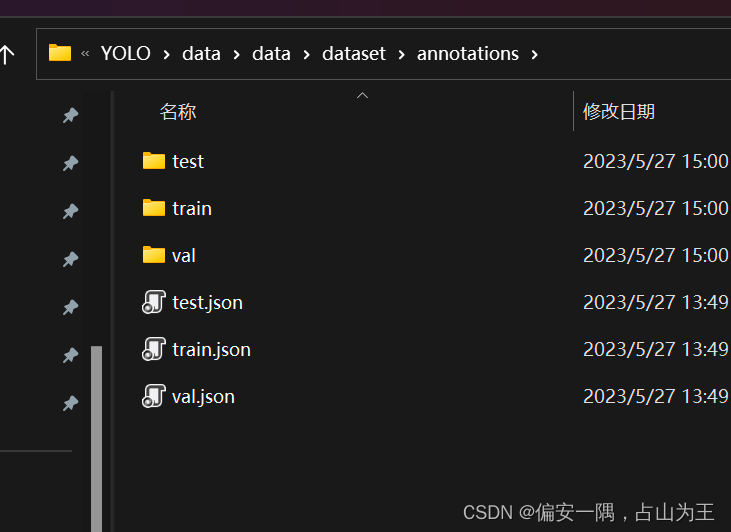
第一个框是你的 如下三个文件路径,第二个框是你要生成的txt文件保存路径,可以自己定
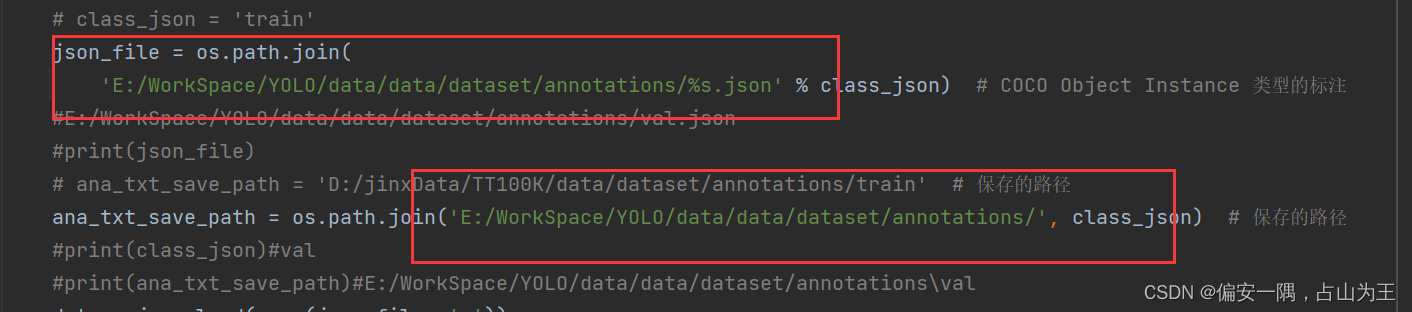
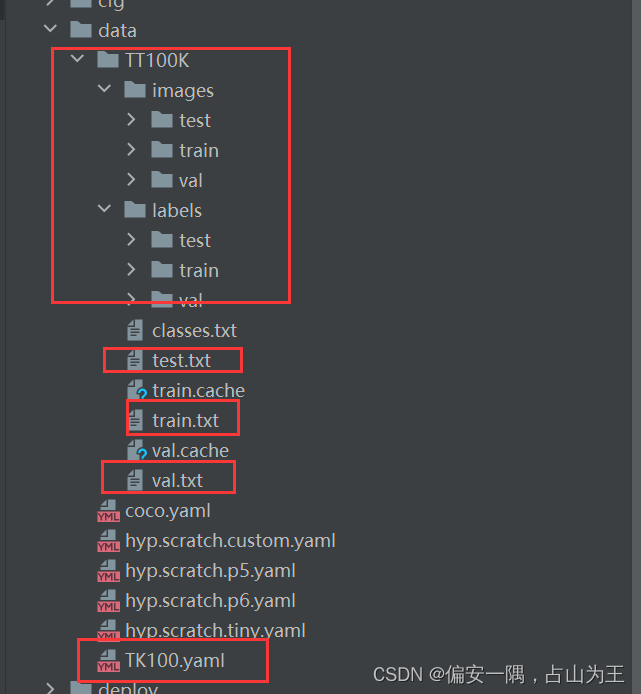
这个地方是yolo源码文件里面的一个路径,可以先看看我后面的yolo数据集文件夹的建立了,再来确认这个路径

def coco_json2yolo_txt(self, class_json):# COCO 格式的数据集转化为 YOLO 格式的数据集# --json_path 输入的json文件路径# --save_path 保存的文件夹名字,默认为当前目录下的labels。def convert(size, box):dw = 1. / (size[0])dh = 1. / (size[1])x = box[0] + box[2] / 2.0y = box[1] + box[3] / 2.0w = box[2]h = box[3]# round函数确定(xmin, ymin, xmax, ymax)的小数位数x = round(x * dw, 6)w = round(w * dw, 6)y = round(y * dh, 6)h = round(h * dh, 6)return (x, y, w, h)# class_json = 'train'json_file = os.path.join('E:/WorkSpace/YOLO/data/data/dataset/annotations/%s.json' % class_json) # COCO Object Instance 类型的标注#E:/WorkSpace/YOLO/data/data/dataset/annotations/val.json#print(json_file)# ana_txt_save_path = 'D:/jinxData/TT100K/data/dataset/annotations/train' # 保存的路径ana_txt_save_path = os.path.join('E:/WorkSpace/YOLO/data/data/dataset/annotations/', class_json) # 保存的路径#print(class_json)#val#print(ana_txt_save_path)#E:/WorkSpace/YOLO/data/data/dataset/annotations\valdata = json.load(open(json_file, 'r'))if not os.path.exists(ana_txt_save_path):os.makedirs(ana_txt_save_path)id_map = {} # coco数据集的id不连续!重新映射一下再输出!with open(os.path.join(ana_txt_save_path, 'classes.txt'), 'w') as f:# 写入classes.txtfor i, category in enumerate(data['categories']):f.write(f"{category['name']}\n")id_map[category['id']] = i# print(id_map)# 这里需要根据自己的需要,更改写入图像相对路径的文件位置。list_file = open(os.path.join(ana_txt_save_path, '%s.txt' % class_json.format()), 'w')for img in tqdm(data['images']):filename = img["file_name"]img_width = img["width"]img_height = img["height"]img_id = img["id"]head, tail = os.path.splitext(filename)ana_txt_name = head + ".txt" # 对应的txt名字,与jpg一致f_txt = open(os.path.join(ana_txt_save_path, ana_txt_name), 'w')for ann in data['annotations']:if ann['image_id'] == img_id:box = convert((img_width, img_height), ann["bbox"])f_txt.write("%s %s %s %s %s\n" % (id_map[ann["category_id"]], box[0], box[1], box[2], box[3]))f_txt.close()#将图片的相对路径写入train2017或val2017的路径 'E:/WorkSpace/YOLO/yolov7-main/yolov7-main/dataset/TT100K/images/'#list_file.write('%s/%s/%s.jpg\n' % ('E:/WorkSpace/YOLO/data/data/',class_json.format(), head))list_file.write('%s/%s/%s.jpg\n' % ('E:/WorkSpace/YOLO/yolov7-main/yolov7-main/data/TT100K/images/', class_json.format(), head))list_file.close()以上部分是对数据集处理部分代码的修改,每个函数可以单独运行。且我丢弃了原作者的几个函数。
三、开始训练
参考链接:yolov7训练自己的数据集_我把把C的博客-CSDN博客
3.1数据集准备
创建目录,把生成的相关文件移动到对应目录,上面说到的这个路径就知道怎么改了
3.2 创建yaml文件
train: E:/WorkSpace/YOLO/yolov7-main/yolov7-main/data/TT100K/train.txt
val: E:/WorkSpace/YOLO/yolov7-main/yolov7-main/data/TT100K/val.txt
test: E:/WorkSpace/YOLO/yolov7-main/yolov7-main/data/TT100K/test.txt
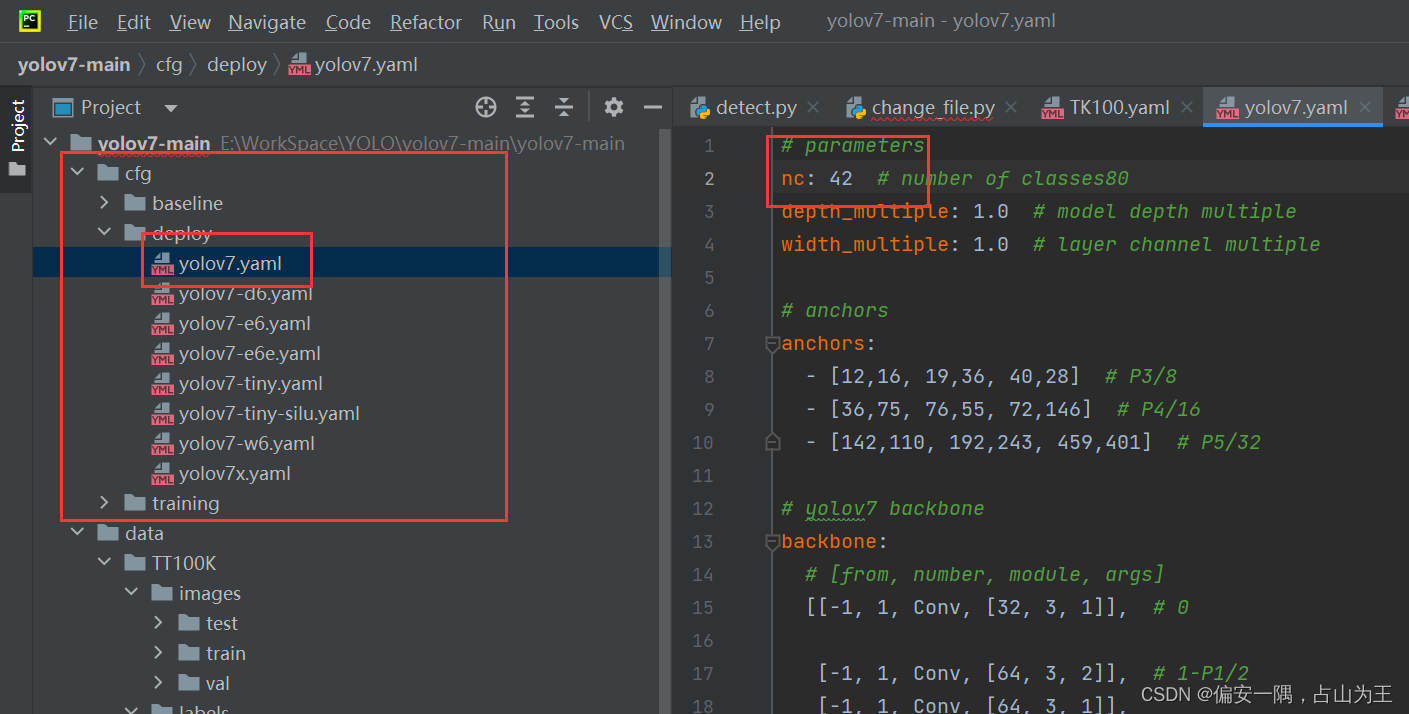
nc: 42
names: ['i2','i4','i5','il100','il60','il80','io','ip','p10','p11','p12','p19','p23','p26','p27','p3','p5','p6','pg','ph4','ph4.5','pl100','pl120','pl20','pl30','pl40','pl5','pl50','pl60','pl70','pl80','pm20','pm30','pm55','pn','pne','po','pr40','w13','w55','w57','w59'
]
3.3 修改yolov7.yaml文件
3.4 修改训练文件参数

大功告成,训练中出现的问题,网上都能找到,我就不列举了
本文来自互联网用户投稿,文章观点仅代表作者本人,不代表本站立场,不承担相关法律责任。如若转载,请注明出处。 如若内容造成侵权/违法违规/事实不符,请点击【内容举报】进行投诉反馈!