react学习—新版Context
这里写目录标题
- 一、新版Context
- 1、创建上下文
- 2、使用上下文
- 1.类组件中使用
- 2.函数组件中使用
- 3、多个上下文
一、新版Context
旧版API存在严重的效率问题,并且容易导致滥用
1、创建上下文
上下文是一个独立于组件的对象,该对象通过React.createContext(默认值)创建
返回的是一个包含两个属性的对象
- Provider属性:生产者。一个组件,该组件会创建一个上下文,该组件有一个value属性,通过该属性,可以为其数据赋值
import React, { Component } from 'react'
const ctx = React.createContext({a: 0,b: 'abc'
})export default class NewContext extends Component {render() {const Provider = ctx.Provider;return (<Provider value={}>//value类似旧版的上下文中创建的改变值的方法<div></div></Provider>)}
}
2、使用上下文
- 在类组件中,直接使用this.context获取上下文数据
- 要求:必须拥有静态属性 contextType , 应赋值为创建的上下文对象
- 在函数组件中,需要使用Consumer来获取上下文数据
- Consumer是一个组件
- 它的子节点,是一个函数(它的props.children需要传递一个函数)
使用时可以直接将state状态给上下文。
import React, { Component } from 'react'
const ctx = React.createContext();function ChildA(props) {return <div><h1>ChildA</h1><ChildB /></div>
}class ChildB extends React.Component {static contextType = ctx;//使用上下文时时必须要有contextTyperender() {return <p>ChildB,上下文中的数据a:{this.context.a}</p>}
}export default class NewContext extends Component {state = {a: 0,b: 'abc'}render() {const Provider = ctx.Provider;return (<Provider value={this.state}><div><ChildA /></div></Provider>)}
}
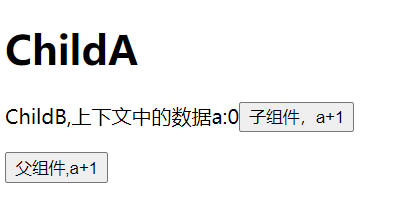
和旧版类似,我们可以改变上下文中的值。
1.类组件中使用
import React, { Component } from 'react'
const ctx = React.createContext();function ChildA(props) {return <div><h1>ChildA</h1><ChildB /></div>
}
class ChildB extends React.Component {static contextType = ctx;render() {return <p>ChildB,上下文中的数据a:{this.context.a}<button onClick={()=>{this.context.changeA(this.context.a + 2)}}>子组件,a+1</button></p>}
}
export default class NewContext extends Component {state = {a: 0,b: 'abc',changeA: (newA) =>{this.setState({a: newA})}}render() {const Provider = ctx.Provider;return (<Provider value={this.state}><div><ChildA /><button onClick={()=>{this.setState({a: this.state.a+1})}}>父组件,a+1</button></div></Provider>)}
}
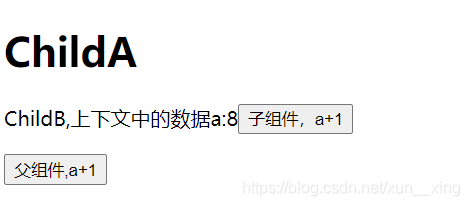
2.函数组件中使用
function ChildA(props) {return <div><h1>ChildA</h1><p><ctx.Consumer>{value=><>子组件A,{value.a}</>}</ctx.Consumer></p><ChildB /></div>
}
//或者使用children语法
function ChildA(props) {return <div><h1>ChildA</h1><p>{/* {value=><>子组件A,{value.a}} */}<ctx.Consumer children={value=><>子组件A,{value.a}</>}></ctx.Consumer></p><ChildB /></div>
}

当然,类组件中也可以使用Consumer
class ChildB extends React.Component {static contextType = ctx;render() {return (<ctx.Consumer>{value=>(<p>ChildB,上下文中的数据a:{value.a}<button onClick={()=>{this.context.changeA(value.a + 2)}}>子组件,a+1</button></p>)}</ctx.Consumer>)}
}
3、多个上下文
新的context将上下文与组件分离,那么我们想用那个上下文中数据,就很方便了。
import React, { Component } from 'react'
const ctx1 = React.createContext();
const ctx2 = React.createContext();function ChildA(props) {return (<ctx2.Provider value={{x: 999,y: 'xyz'}}><div><h1>ChildA</h1><p><ctx1.Consumer>{value=><>子组件A,{value.a}</>}</ctx1.Consumer></p><ChildB /></div></ctx2.Provider>)
}
class ChildB extends React.Component {static contextType = ctx1;render() {return (<ctx1.Consumer>{value=>(<><p>ChildB,上下文中的数据a:{value.a}<button onClick={()=>{this.context.changeA(value.a + 2)}}>子组件,a+1</button></p><p><ctx2.Consumer>{val => (<>上下文ctx2的数据:x:{val.x}</>)}</ctx2.Consumer></p></>)}</ctx1.Consumer>)}
}export default class NewContext extends Component {state = {a: 0,b: 'abc',changeA: (newA) =>{this.setState({a: newA})}}render() {const Provider = ctx1.Provider;return (<Provider value={this.state}><div><ChildA /><button onClick={()=>{this.setState({a: this.state.a+1})}}>父组件,a+1</button></div></Provider>)}
}

注意细节
如果,上下文提供者(Context.Provider)中的value属性发生变化(Object.is比较),会导致该上下文提供的所有后代元素全部重新渲染,无论该子元素是否有优化(无论shouldComponentUpdate函数返回什么结果)
如下代码(每次使用setState,尽管没有任何操作,也会提供一个新的state)
import React, { Component } from 'react'const ctx = React.createContext();
class ChildB extends React.Component {static contextType = ctx;shouldComponentUpdate(nextProps, nextState) {console.log("运行了优化")return false;}render() {console.log("childB render");return (<h1>a:{this.context.a},b:{this.context.b}</h1>);}
}export default class NewContext extends Component {state = {a: 0,b: "abc",changeA: (newA) => {this.setState({a: newA})}}render() {return (<ctx.Provider value={this.state}><div><ChildB /><button onClick={() => {this.setState({a: this.state.a+1})}}>父组件的按钮,a加1</button></div></ctx.Provider>)}
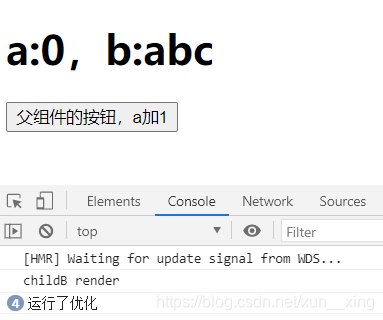
}当上下文改变,我们发现生命周期函数并没有运行,而是直接重新渲染,这就是“强制更新”

那么在一些组件中我们需要使用生命周期函数进行性能优化,如何避免强制更新呢?
我们将需要用到的向下文ctx保存在state属性中,虽然每次调用setState函数state都会更新一次,但是内部的对象仍然指向的是同一个地址,所以就不会强制更新了
import React, { Component } from 'react'const ctx = React.createContext();
class ChildB extends React.Component {static contextType = ctx;shouldComponentUpdate(nextProps, nextState) {console.log("运行了优化")return false;}render() {console.log("childB render");return (<h1>a:{this.context.a},b:{this.context.b}</h1>);}
}export default class NewContext extends Component {state = {ctx: {a: 0,b: "abc",changeA: (newA) => {this.setState({a: newA})}}}render() {return (<ctx.Provider value={this.state.ctx}><div><ChildB /><button onClick={() => {this.setState({})}}>父组件的按钮,a加1</button></div></ctx.Provider>)}
}
博主开始运营自己的公众号啦,感兴趣的可以关注“飞羽逐星”微信公众号哦,拿起手机就能阅读感兴趣的博客啦!
本文来自互联网用户投稿,文章观点仅代表作者本人,不代表本站立场,不承担相关法律责任。如若转载,请注明出处。 如若内容造成侵权/违法违规/事实不符,请点击【内容举报】进行投诉反馈!