NPOI合并单元格后的边框设置
通过NPOI将单元格B2-C3进行单元格合并,并添加边框。一开始我的写法是这样的:
static void Main(string[] args){HSSFWorkbook workbook = new HSSFWorkbook();HSSFSheet sheet = workbook.CreateSheet("Sheet1") as HSSFSheet;HSSFRow dataRow = sheet.CreateRow(1) as HSSFRow;dataRow = sheet.CreateRow(1) as HSSFRow;CellRangeAddress region = new CellRangeAddress(1, 2, 1, 2);sheet.AddMergedRegion(region);ICell cell = dataRow.CreateCell(1);cell.SetCellValue("test");ICellStyle style = workbook.CreateCellStyle();style.BorderBottom = BorderStyle.Thin;style.BorderLeft = BorderStyle.Thin;style.BorderRight = BorderStyle.Thin;style.BorderTop = BorderStyle.Thin;style.BottomBorderColor = HSSFColor.Black.Index;style.LeftBorderColor = HSSFColor.Black.Index;style.RightBorderColor = HSSFColor.Black.Index;style.TopBorderColor = HSSFColor.Black.Index;cell.CellStyle = style;using (MemoryStream ms = new MemoryStream()){workbook.Write(ms);ms.Flush();ms.Position = 0;using (FileStream fs = new FileStream("C:\\TestConsole.xls", FileMode.Create, FileAccess.Write)){byte[] data = ms.ToArray();fs.Write(data, 0, data.Length);fs.Flush();}}}但输出的结果却是这样的:

由此可见NPOI还是认为我Create的Cell是B2,但由于合并后,右侧和下部边框不存在了,产生了以上的结果。
我的解决方案是对合并区域的所有单元格遍历设置边框,代码如下
static void Main(string[] args){HSSFWorkbook workbook = new HSSFWorkbook();HSSFSheet sheet = workbook.CreateSheet("Sheet1") as HSSFSheet;HSSFRow dataRow = sheet.CreateRow(1) as HSSFRow;dataRow = sheet.CreateRow(1) as HSSFRow;CellRangeAddress region = new CellRangeAddress(1, 2, 1, 2);sheet.AddMergedRegion(region);ICell cell = dataRow.CreateCell(1);cell.SetCellValue("test");ICellStyle style = workbook.CreateCellStyle();style.BorderBottom = BorderStyle.Thin;style.BorderLeft = BorderStyle.Thin;style.BorderRight = BorderStyle.Thin;style.BorderTop = BorderStyle.Thin;style.BottomBorderColor = HSSFColor.Black.Index;style.LeftBorderColor = HSSFColor.Black.Index;style.RightBorderColor = HSSFColor.Black.Index;style.TopBorderColor = HSSFColor.Black.Index;//cell.CellStyle = style;for (int i = region.FirstRow; i <= region.LastRow; i++){IRow row = HSSFCellUtil.GetRow(i, sheet);for (int j = region.FirstColumn; j <= region.LastColumn; j++){ICell singleCell = HSSFCellUtil.GetCell(row, (short)j);singleCell.CellStyle = style;}}using (MemoryStream ms = new MemoryStream()){workbook.Write(ms);ms.Flush();ms.Position = 0;using (FileStream fs = new FileStream("C:\\TestConsole.xls", FileMode.Create, FileAccess.Write)){byte[] data = ms.ToArray();fs.Write(data, 0, data.Length);fs.Flush();}}}
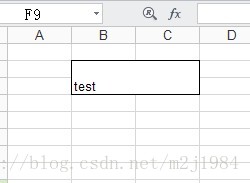
大功告成。
本文来自互联网用户投稿,文章观点仅代表作者本人,不代表本站立场,不承担相关法律责任。如若转载,请注明出处。 如若内容造成侵权/违法违规/事实不符,请点击【内容举报】进行投诉反馈!