python-docx包部分记录
官方文档
python-docx
结构记录
这次主要是使用了paragraph和table,就只记录比较熟悉的部分。

- document:这个是整个文档的对象
- paragraph:承载文字信息的一个基础单元
- run:最基本的单元,一个paragraph里可能包含多个run
- table:表格结构的基本单元
- paragraph:承载文字信息的一个基础单元
基础操作
特别基础的操作,官方文档里的范例都有,不在赘述。
改变字体
经常会碰到修改了font.name了,但是字体并没有改变。
# 这两行的调用需要一块用上
run.font.name = u"黑体"
run._element.rPr.rFonts.set(qn('w:eastAsia'), u"黑体")
设置字号和图像的大小
需要用到docx.shared里面的属性。
from docx.shared import Pt, Cm
run.font.size = Pt(10.5)  # 设置字体的磅数
shape = paragraphs.add_run("\n").add_picture(draft_file_path, height=Cm(10.58), width=Cm(14.11))
# 或者是下面的操作
shape.height = Cm(10.58)  # 设置图像大小的厘米数
shape.width = Cm(14.11)
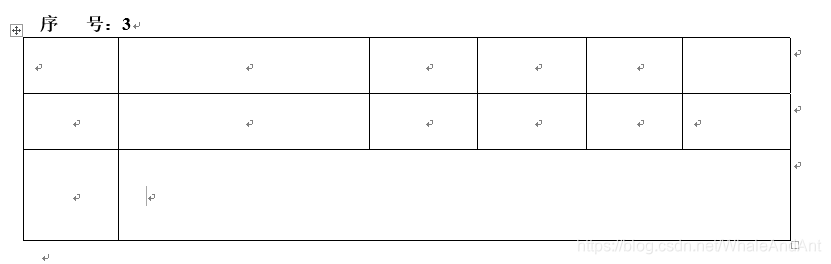
给表格加边框
这个是借鉴别人博客里的代码,出处有点找不到了。
def set_cell_border(cell, **kwargs):"""Set cell`s borderUsage:set_cell_border(cell,top={"sz": 12, "val": "single", "color": "#FF0000", "space": "0"},bottom={"sz": 12, "color": "#00FF00", "val": "single"},left={"sz": 24, "val": "dashed", "shadow": "true"},right={"sz": 12, "val": "dashed"},)"""tc = cell._tctcPr = tc.get_or_add_tcPr()# check for tag existnace, if none found, then create onetcBorders = tcPr.first_child_found_in("w:tcBorders")if tcBorders is None:tcBorders = OxmlElement('w:tcBorders')tcPr.append(tcBorders)# list over all available tagsfor edge in ('left', 'top', 'right', 'bottom', 'insideH', 'insideV'):edge_data = kwargs.get(edge)if edge_data:tag = 'w:{}'.format(edge)# check for tag existnace, if none found, then create oneelement = tcBorders.find(qn(tag))if element is None:element = OxmlElement(tag)tcBorders.append(element)# looks like order of attributes is importantfor key in ["sz", "val", "color", "space", "shadow"]:if key in edge_data:element.set(qn('w:{}'.format(key)), str(edge_data[key]))# 调用
set_cell_border(table2.rows[i].cells[j], top={"sz": 0.5, "val": "single", "color": "#000000", "space": "0"},bottom={"sz": 0.5, "val": "single", "color": "#000000", "space": "0"},left={"sz": 0.5, "val": "single", "color": "#000000", "space": "0"},right={"sz": 0.5, "val": "single", "color": "#000000", "space": "0"})
效果如下图。
连接sqlsever遇见的中文乱码问题
关键代码节选
self.conn = pymssql.connect(host=self.cf['host'], user=self.cf['user'], password=self.cf['pwd'],database=self.cf['db'], charset='UTF-8')
name = name.encode('latin-1').decode('GBK')
本文来自互联网用户投稿,文章观点仅代表作者本人,不代表本站立场,不承担相关法律责任。如若转载,请注明出处。 如若内容造成侵权/违法违规/事实不符,请点击【内容举报】进行投诉反馈!