Linux 模拟触摸滑动以及按下
首先,通过查看手动按下和滑动触摸屏时的内核日志输出:
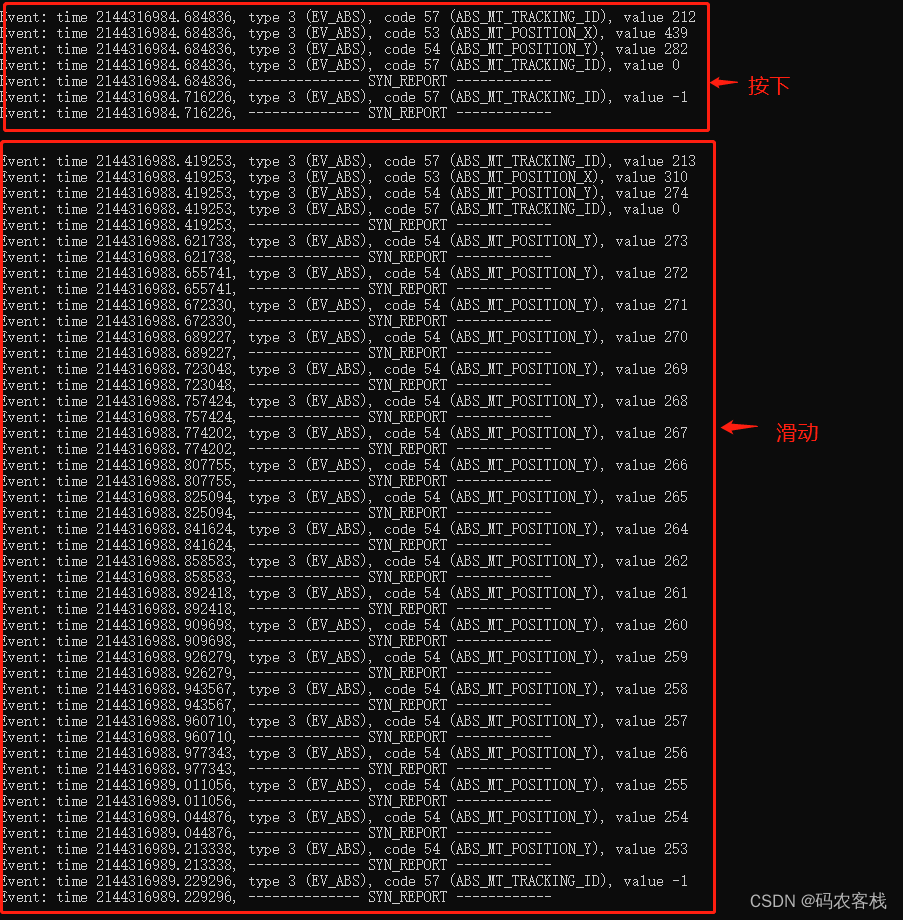
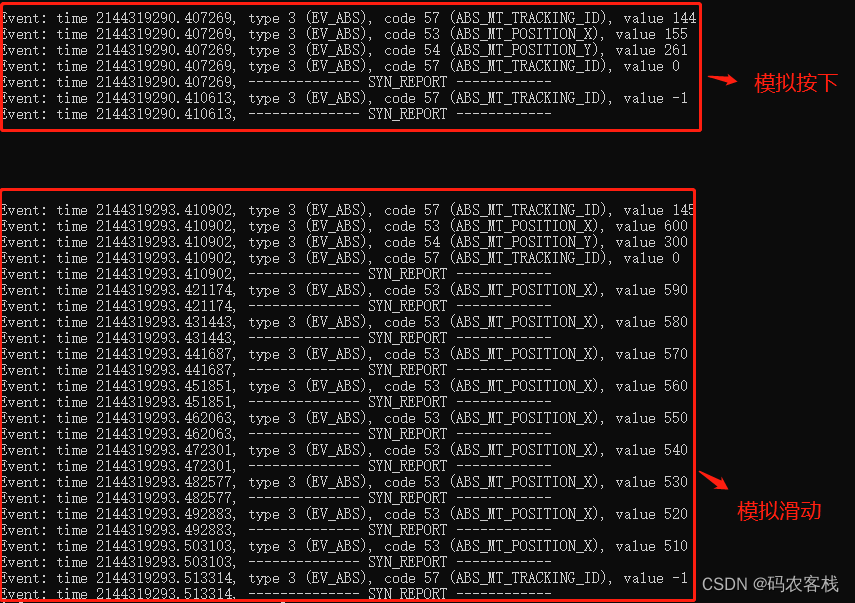
然后,我们可以根据上面的日志,在/dev/input/event3(不同平台可能不一样)文件中写入数据以模拟手动按下和滑动触摸屏的效果,代码如下:
#include
#include
#include
#include
#include
#include
#include
#include
#include #define SILDING_DELAY 10000
#define SILDING_STEP 10int id = 100;
int TOUCH_FD;int reportkey(int fd, int type, int code, int32_t value)
{struct input_event event;event.type = type;event.code = code;event.value = value;gettimeofday(&event.time, 0);if (write(fd, &event, sizeof(struct input_event)) < 0){perror("report key error!\n");return -1;}return 0;
}//构造点击事件
void LCD_Touch_Pressed(int posx,int posy,int sec)
{reportkey(TOUCH_FD,EV_ABS,ABS_MT_SLOT,0);reportkey(TOUCH_FD,EV_ABS,ABS_MT_TRACKING_ID,id);reportkey(TOUCH_FD,EV_ABS,ABS_MT_POSITION_X,posx);reportkey(TOUCH_FD,EV_ABS,ABS_MT_POSITION_Y,posy);reportkey(TOUCH_FD,EV_ABS,ABS_MT_TRACKING_ID,0);reportkey(TOUCH_FD,EV_SYN,EV_SYN,EV_SYN);reportkey(TOUCH_FD,EV_ABS,ABS_PRESSURE,200);reportkey(TOUCH_FD,EV_ABS,ABS_MT_TRACKING_ID,-1);reportkey(TOUCH_FD,EV_SYN,EV_SYN,EV_SYN);
}//构造滑动事件
void LCD_Press_Silding(int sx,int sy,int ex,int ey ,int sec)
{int nextPosX,nextPosY;if(ex == sx && ey==sy) // the same two points{LCD_Touch_Pressed(sx,sy,sec);return ;}reportkey(TOUCH_FD,EV_ABS,ABS_MT_SLOT,0);reportkey(TOUCH_FD,EV_ABS,ABS_MT_TRACKING_ID,id);reportkey(TOUCH_FD,EV_ABS,ABS_MT_POSITION_X,sx);reportkey(TOUCH_FD,EV_ABS,ABS_MT_POSITION_Y,sy);reportkey(TOUCH_FD,EV_ABS,ABS_MT_TRACKING_ID,0);reportkey(TOUCH_FD,EV_ABS,ABS_PRESSURE,200);reportkey(TOUCH_FD,EV_SYN,EV_SYN,EV_SYN);usleep(SILDING_DELAY);/**Report pressed-down event END----*/nextPosX = sx;nextPosY = sy;if(ex == sx) // vertical Line{nextPosY = ey > sy ? (nextPosY + SILDING_STEP) : (nextPosY - SILDING_STEP);while (abs(nextPosY-sy)< abs(ey-sy)){reportkey(TOUCH_FD,EV_ABS,ABS_MT_POSITION_X,ex);reportkey(TOUCH_FD,EV_ABS,ABS_MT_POSITION_Y,nextPosY);reportkey(TOUCH_FD,EV_SYN,EV_SYN,EV_SYN);usleep(SILDING_DELAY);nextPosY = ey > sy ? (nextPosY + SILDING_STEP) : (nextPosY - SILDING_STEP);}}else if(ey == sy) // horizontal Line{nextPosX = ex > sx ? (nextPosX + SILDING_STEP) : (nextPosX - SILDING_STEP);while (abs(nextPosX-sx)< abs(ex-sx)){reportkey(TOUCH_FD,EV_ABS,ABS_MT_POSITION_X,nextPosX);reportkey(TOUCH_FD,EV_ABS,ABS_MT_POSITION_Y,ey);reportkey(TOUCH_FD,EV_SYN,EV_SYN,EV_SYN);usleep(SILDING_DELAY);nextPosX = ex > sx ? (nextPosX + SILDING_STEP) : (nextPosX - SILDING_STEP);}}reportkey(TOUCH_FD,EV_ABS,ABS_MT_TRACKING_ID,-1);reportkey(TOUCH_FD,EV_SYN,EV_SYN,EV_SYN);
}int main()
{TOUCH_FD = open("/dev/input/event3",O_RDWR);if(TOUCH_FD<=0){printf("%s\n", strerror(errno));return 0;}while (1){id++;sleep(3);LCD_Press_Silding(600,300,500,300 ,100);id++;sleep(3);LCD_Touch_Pressed(155,261,500);}close(TOUCH_FD);return 0;
}

最后,大家可以查看自己设备的界面是不是有变化呢?
参考:https://blog.csdn.net/weixin_36437103/article/details/116876467
需要源代码的可自行下载:点击跳转
本文来自互联网用户投稿,文章观点仅代表作者本人,不代表本站立场,不承担相关法律责任。如若转载,请注明出处。 如若内容造成侵权/违法违规/事实不符,请点击【内容举报】进行投诉反馈!
