R语言笔记⑥——网络爬虫
网络爬虫
R语言对于网络爬虫的操作需要rvest包的支持
安装rvest包
install.packages('rvest')
加载rvest包
library(rvest)
rvest包中的常用函数如下:
read_html(url):读取html文档;html_nodes(html):获取所有指定的元素;html_node(html):获取第一个指定的元素;html_attrs(html):提取指定元素中所有的属性名和值;html_text(html):获取指定元素的文本。
爬取新闻文本
假设有如下页面
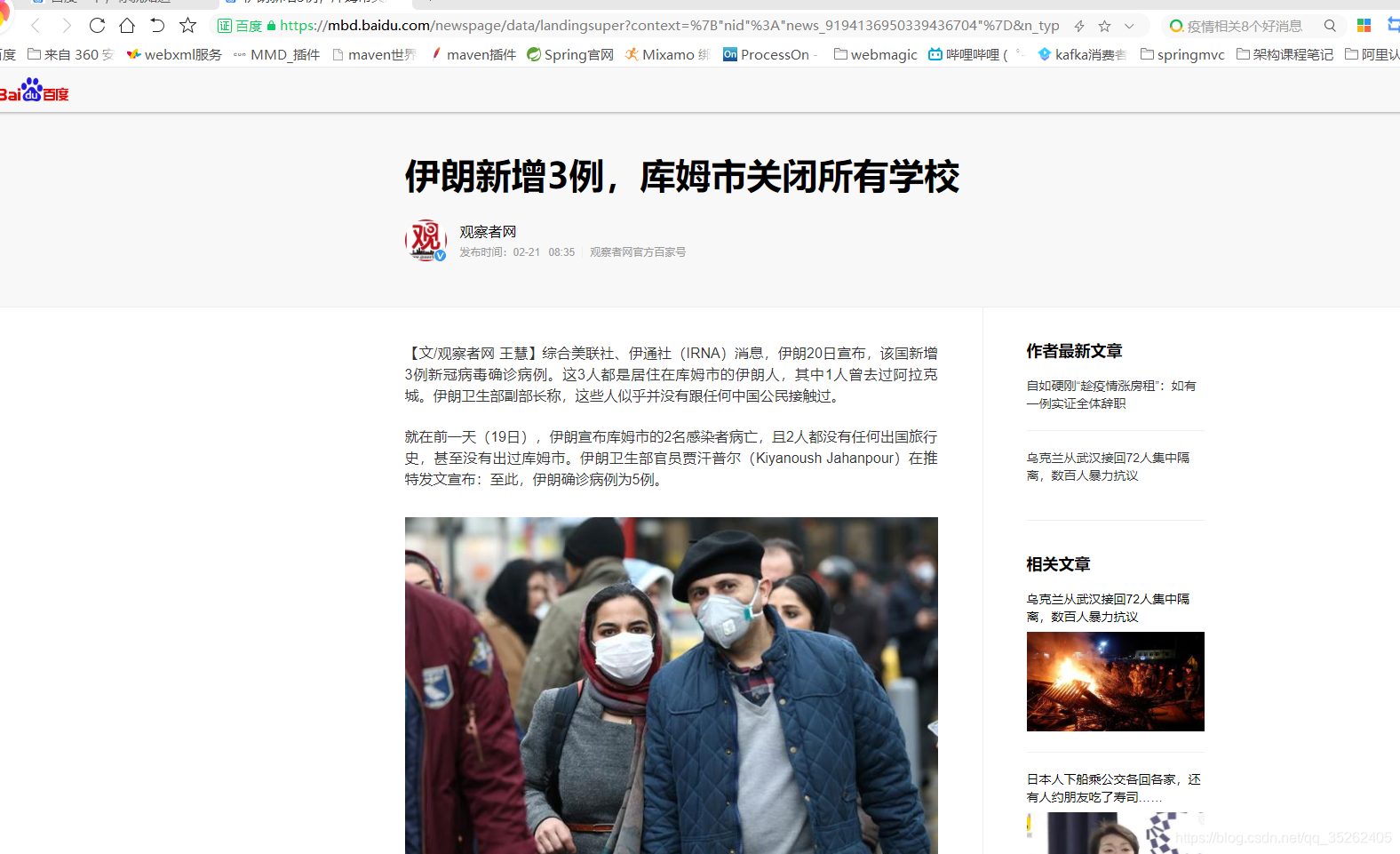
下面将新闻的内容提取出来
> url <- 'https://mbd.baidu.com/newspage/data/landingsuper?context=%7B"nid"%3A"news_9194136950339436704"%7D&n_type=0&p_from=1'
> web <- read_html(url,encoding = 'utf-8')
> > web
{html_document}
<html xmlns="http://www.w3.org/1999/xhtml">
[1] <head>\n<meta http-equiv="Content-Type" content="text/html; charset=UTF-8">\n<meta charset="utf- ...
[2] <body>\n<script>/* eslint-disable */var s_domain = {"protocol":"https:","staticUrl":"https://ss0 ...
> html_nodes(web,'div.article-content span') %>% html_text()[1] "【文/观察者网 王慧】综合美联社、伊通社(IRNA)消息,伊朗20日宣布,该国新增3例新冠病毒确诊病例。这3人都是居住在库姆市的伊朗人,其中1人曾去过阿拉克城。伊朗卫生部副部长称,这些人似乎并没有跟任何中国公民接触过。"[2] "就在前一天(19日),伊朗宣布库姆市的2名感染者病亡,且2人都没有任何出国旅行史,甚至没有出过库姆市。伊朗卫生部官员贾汗普尔(Kiyanoush Jahanpour)在推特发文宣布:至此,伊朗确诊病例为5例。"                       [3] "伊朗德黑兰大巴扎(集市),一对伊朗夫妇戴着防护口罩,防止新冠病毒感染 图源:路透社"                                                                                                                              [4] "目前,伊朗库姆市所有的学校、大学,包括什叶派宗教神学院在内,都已经关闭。伊朗当局正在调查病毒感染源,以及感染者与来自巴基斯坦或其他国家宗教朝圣者的可能联系。"                                                   [5] "库姆市位于伊朗首都德黑兰以南大约140公里处,是一个受欢迎的宗教目的地,也是一个什叶派穆斯林的学习和宗教研究中心。这些穆斯林中既有伊朗人,也有伊拉克人、巴基斯坦人、阿富汗人和阿塞拜疆人。"                        [6] "伊朗卫生部长纳马基(Saeed Namaki)称,中国新冠疫情爆发后,伊朗从武汉撤回大约60名留学生,这些学生在被隔离14天后已经解禁,没有发现任何健康问题。"                                                                 [7] "除伊朗外,中东地区出现确诊病例的国家还有阿联酋和埃及。其中,阿联酋确诊9例(7个中国人、1个菲律宾人、1个印度人),埃及确诊1例。"                                                                                  [8] "目前,伊朗邻国伊拉克尚未出现新冠病毒感染者。但为了防止病毒蔓延,伊拉克已采取紧急措施,如禁止伊朗公民入境、暂停两国间直航、对从伊朗回国的伊拉克公民进行检查等。"                                                 [9] "本文系观察者网独家稿件,未经授权,不得转载。"
[10] "本文系观察者网独家稿件,未经授权,不得转载。"
下面是爬取a标签中的属性值,通过html_attrs函数爬取
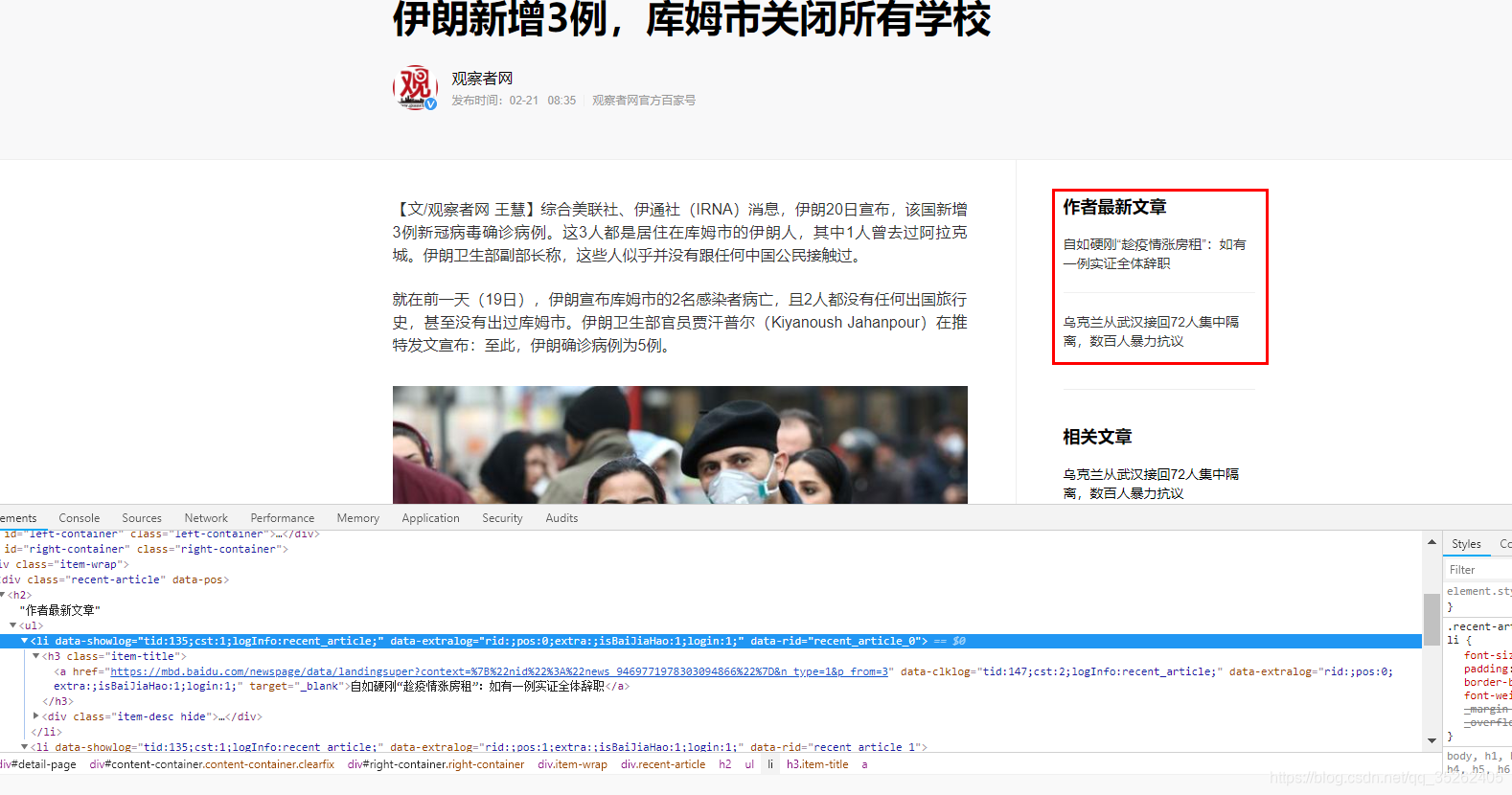
> html_nodes(web,'div.recent-article h2 ul a')
{xml_nodeset (2)}
[1] <a href="https://mbd.baidu.com/newspage/data/landingsuper?context=%7B%22nid%22%3A%22news_9469771 ...
[2] <a href="https://mbd.baidu.com/newspage/data/landingsuper?context=%7B%22nid%22%3A%22news_9962603 ...
> html_nodes(web,'div.recent-article h2 ul a') %>% html_attrs()
[[1]]href
"https://mbd.baidu.com/newspage/data/landingsuper?context=%7B%22nid%22%3A%22news_9469771978303094866%22%7D&n_type=1&p_from=3" data-clklog "tid:147;cst:2;logInfo:recent_article;" data-extralog "rid:;pos:0;extra:;isBaiJiaHao:1;login:0;" target "_blank" [[2]]href
"https://mbd.baidu.com/newspage/data/landingsuper?context=%7B%22nid%22%3A%22news_9962603416869769543%22%7D&n_type=1&p_from=3" data-clklog "tid:147;cst:2;logInfo:recent_article;" data-extralog "rid:;pos:1;extra:;isBaiJiaHao:1;login:0;" target "_blank"
爬取新浪新闻
下面是需要爬取的新闻

url1 <- 'http://vr.sina.com.cn'
web <- read_html(url1)
# 新闻标题
title <- html_nodes(web,'#mid_data h3 a') %>% html_text()
# 新闻链接
link_ <- html_nodes(web,'#mid_data h3 a')  %>% html_attrs()
link <- c(1:length(link_))
for (i in c(1:length(link_))) {link[i] <-  link_[[i]][1]
}
# 新闻时间
time <- html_nodes(web,'#mid_data span.time') %>% html_text()
# 以csv格式保存到本地
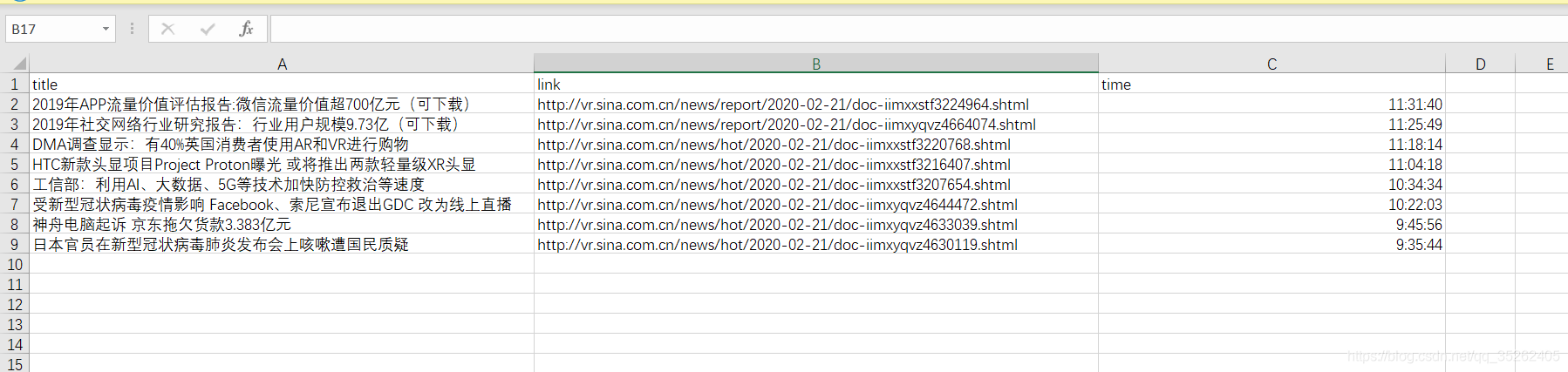
write.csv(data.frame(title,link,time),'D:\\webdata\\news.csv',row.names = FALSE)
保存的位置如下
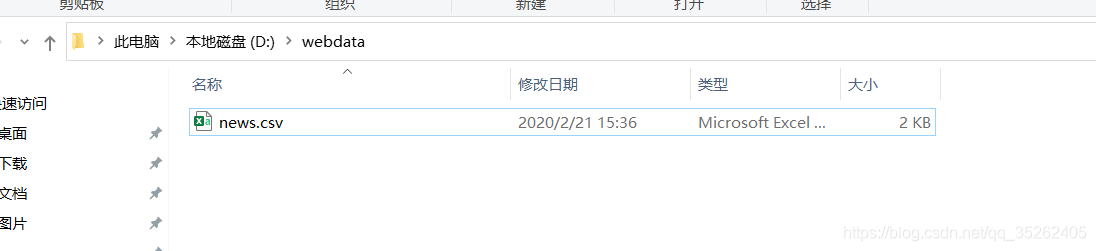
生成的csv表格
爬取慕课网课程
下面是我们要爬取的页面

爬虫代码
uri <- 'https://coding.imooc.com'
url <- 'https://coding.imooc.com/?c=be&sort=0&unlearn=0&page=1'
count <- length(str_locate_all(url,'=')[[1]])/2
url_ <- substring(url,first = 1,last = str_locate_all(url,'=')[[1]][count,1])
web <- read_html(url)
# 算出页数
page.count <- length(html_nodes(web,'div.page a'))-2
# 课程名
title_ <- html_nodes(web,'div.shizhan-course-wrap .shizan-name') %>% html_text()
title <- c(2:length(title_))
for (i in c(2:length(title_))) {title[i-1] <- title_[i]
}
# 课程链接
link_ <- html_nodes(web,'div.shizhan-course-wrap a') %>% html_attrs()
link <- c(3:length(link_))
for (i in c(3:length(link_))) {link[i-2] <- paste0(uri,link_[[i]][1])
}
# 课程信息
infor_ <- html_nodes(web,'div.shizhan-course-wrap .shizhan-info span') %>% html_text()
infor <- c(3:length(infor_))
for (i in c(3:length(infor_))) {infor[i-2] <- infor_[i]
}
infor.grad <- infor[seq(1,length(infor),3)]
infor.num <- infor[seq(2,length(infor),3)]
infor.evaluate <- infor[seq(3,length(infor),3)]
dat <- data.frame(title,link,infor.grad,infor.num,infor.evaluate)
# 循环后面的页数
for (i in c(2:page.count)) {url <- paste0(url_,i)web <- read_html(url)title <- html_nodes(web,'div.shizhan-course-wrap .shizan-name') %>% html_text()link_ <- html_nodes(web,'div.shizhan-course-wrap a') %>% html_attrs()link <- c(1:length(link_))for (i in c(1:length(link_))) {link[i] <- paste0(uri,link_[[i]][1])}infor <- html_nodes(web,'div.shizhan-course-wrap .shizhan-info span') %>% html_text()infor.grad <- infor[seq(1,length(infor),3)]infor.num <- infor[seq(2,length(infor),3)]infor.evaluate <- infor[seq(3,length(infor),3)]dat <- rbind(dat,data.frame(title,link,infor.grad,infor.num,infor.evaluate))
}
# 将数据写入csv文件中
write.csv(dat,file = 'D:\\webdata\\course.csv',row.names = FALSE)
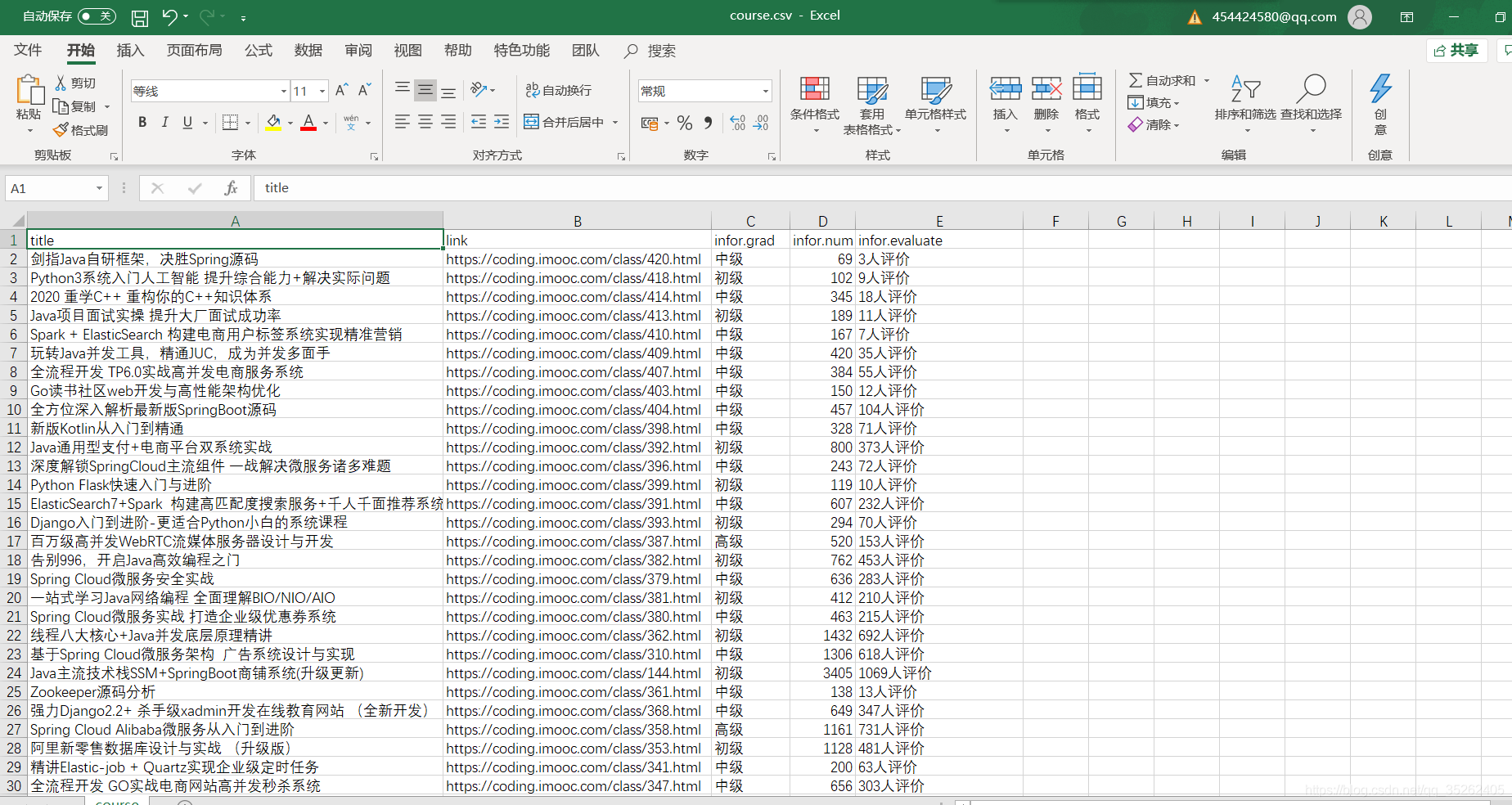
保存的爬虫数据如下
爬取前程无忧职位信息
下面是需要爬取的页面
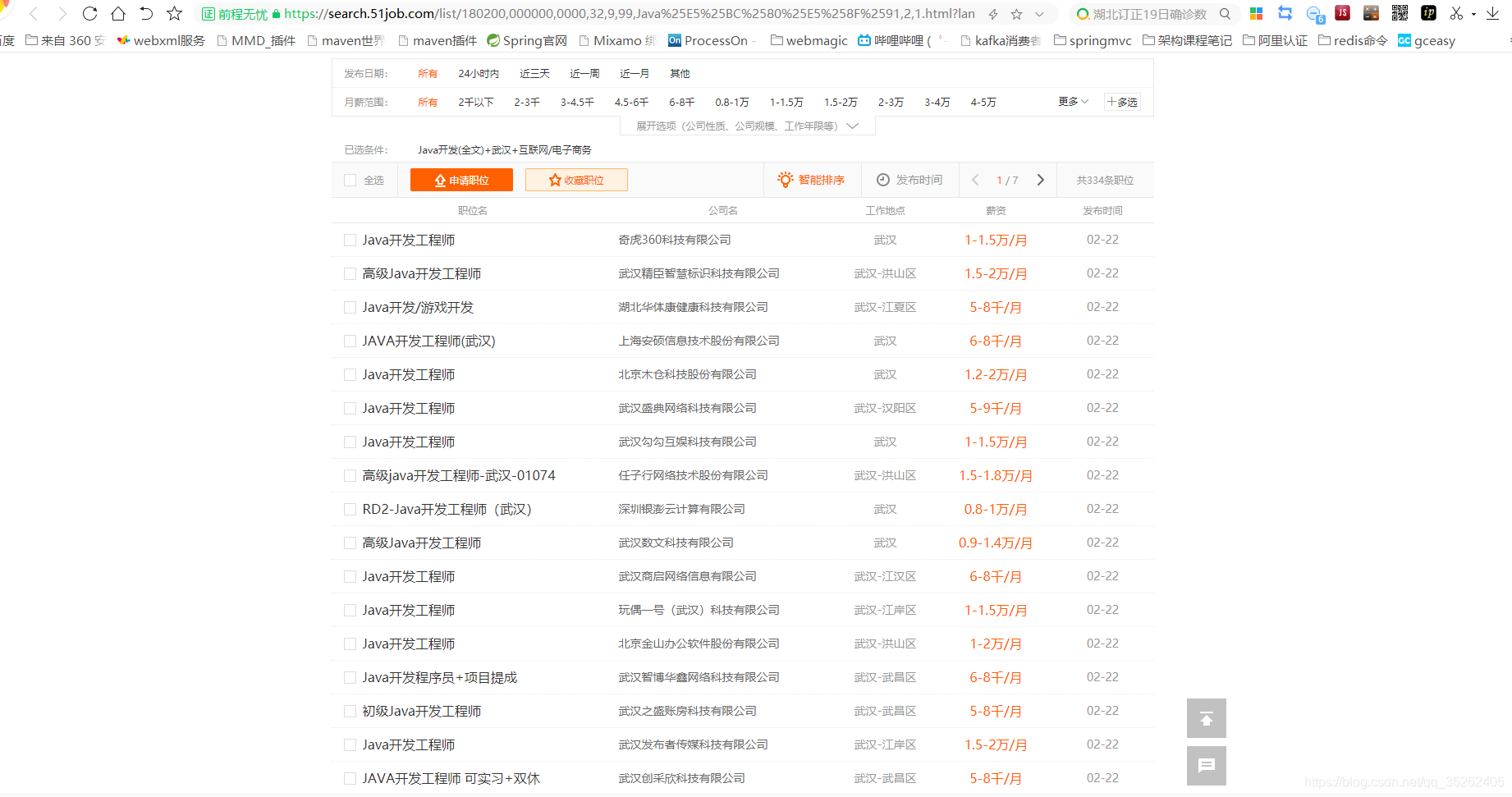
下面是爬取第一页的数据
url <- 'https://search.51job.com/list/180200,000000,0000,32,9,99,Java%25E5%25BC%2580%25E5%258F%2591,2,1.html?lang=c&stype=1&postchannel=0000&workyear=99&cotype=99°reefrom=99&jobterm=99&companysize=99&lonlat=0%2C0&radius=-1&ord_field=0&confirmdate=9&fromType=&dibiaoid=0&address=&line=&specialarea=00&from=&welfare='
web <- read_html(url)
# 爬取招聘的职位名称
title_ <- html_nodes(web,'div.el p span a') %>% html_text()
# 将多余的换行符和空格去除
title_ <- str_extract_all(title_,'[^\r\n| ]+')
title <- c(1:length(title_))
for (i in c(1:length(title_))) {title[i] <- title_[[i]][1]
}
# 爬取公司名称
company.name <- html_nodes(web,'div.el .t2 a') %>% html_text()
# 爬取工作地点
location <- html_nodes(web,'div.el .t3') %>% html_text()
# 将表头去除
location <- location[2:length(location)]
# 爬取工资
salary <- html_nodes(web,'div.el .t4') %>% html_text()
salary <- salary[2:length(salary)]
# 爬取发布时间
publish.time <-  html_nodes(web,'div.el .t5') %>% html_text()
publish.time <- publish.time[2:length(publish.time)]
dat <- data.frame(title,company.name,location,salary,publish.time)
names(dat) <- c("职位名称","公司名称",'工作地点','工资','发布时间')
下面这是爬取所有页面的代码,最后同样输出到一个csv文件中
url <- 'https://search.51job.com/list/180200,000000,0000,32,9,99,Java%25E5%25BC%2580%25E5%258F%2591,2,1.html?lang=c&stype=1&postchannel=0000&workyear=99&cotype=99°reefrom=99&jobterm=99&companysize=99&lonlat=0%2C0&radius=-1&ord_field=0&confirmdate=9&fromType=&dibiaoid=0&address=&line=&specialarea=00&from=&welfare='
web <- read_html(url)
# 爬取招聘的职位名称
title_ <- html_nodes(web,'div.el p span a') %>% html_text()
# 将多余的换行符和空格去除
title_ <- str_extract_all(title_,'[^\r\n| ]+')
title <- c(1:length(title_))
for (i in c(1:length(title_))) {title[i] <- title_[[i]][1]
}
# 爬取公司名称
company.name <- html_nodes(web,'div.el .t2 a') %>% html_text()
# 爬取工作地点
location <- html_nodes(web,'div.el .t3') %>% html_text()
# 将表头去除
location <- location[2:length(location)]
# 爬取工资
salary <- html_nodes(web,'div.el .t4') %>% html_text()
salary <- salary[2:length(salary)]
# 爬取发布时间
publish.time <-  html_nodes(web,'div.el .t5') %>% html_text()
publish.time <- publish.time[2:length(publish.time)]
dat <- data.frame(title,company.name,location,salary,publish.time)
# 获取下一页的链接
page_ <- html_nodes(web,'div.p_in .bk a') %>% html_attrs()
page <- page_[[1]][1]
while (1) {web <- read_html(page)# 爬取招聘的职位名称title_ <- html_nodes(web,'div.el p span a') %>% html_text()# 将多余的换行符和空格去除title_ <- str_extract_all(title_,'[^\r\n| ]+')title <- c(1:length(title_))for (i in c(1:length(title_))) {title[i] <- title_[[i]][1]}# 爬取公司名称company.name <- html_nodes(web,'div.el .t2 a') %>% html_text()# 爬取工作地点location <- html_nodes(web,'div.el .t3') %>% html_text()# 将表头去除location <- location[2:length(location)] # 爬取工资salary <- html_nodes(web,'div.el .t4') %>% html_text()salary <- salary[2:length(salary)] # 爬取发布时间publish.time <-  html_nodes(web,'div.el .t5') %>% html_text()publish.time <- publish.time[2:length(publish.time)] dat <- rbind(dat,data.frame(title,company.name,location,salary,publish.time))page_ <- html_nodes(web,'div.p_in .bk a') %>% html_attrs()if(length(page_)==1){break()}page <- page_[[2]][1]
}names(dat) <- c("职位名称","公司名称",'工作地点','工资','发布时间')
write.csv(dat,file = 'D:\\webdata\\前程无忧.csv',row.names = FALSE)
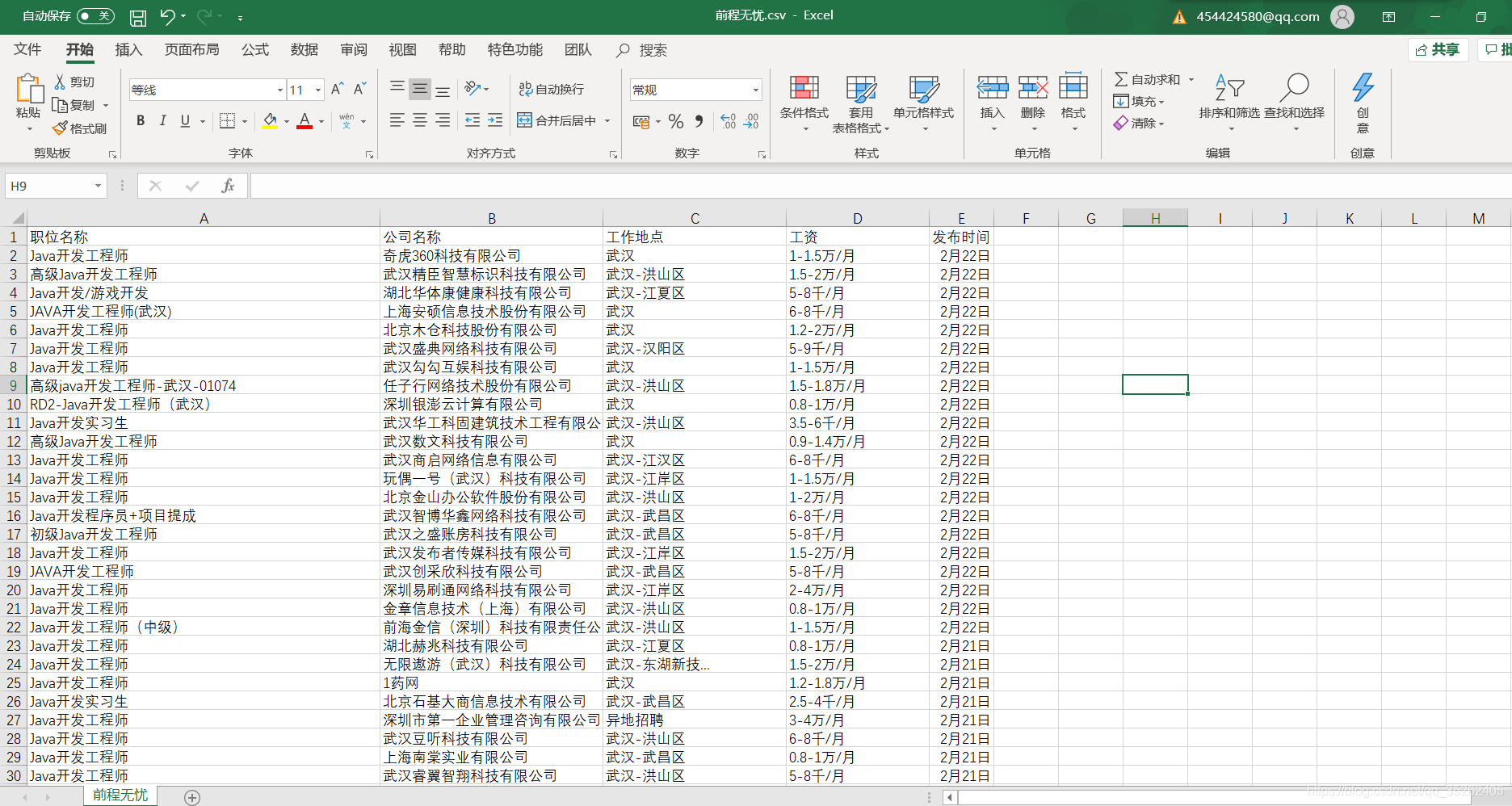
下面是爬取后保存的csv页面
本文来自互联网用户投稿,文章观点仅代表作者本人,不代表本站立场,不承担相关法律责任。如若转载,请注明出处。 如若内容造成侵权/违法违规/事实不符,请点击【内容举报】进行投诉反馈!