微信小程序实战,基于vue2实现瀑布流
1、什么是瀑布流呢?
瀑布流,又称瀑布流式布局。是比较流行的一种网站页面布局,视觉表现为参差不齐的多栏布局,随着页面滚动条向下滚动,这种布局还会不断加载数据块并附加至当前尾部。
瀑布流对于图片的展现,是高效而具有吸引力的,用户一眼扫过的快速阅读模式可以在短时间内获得更多的信息量,而瀑布流里懒加载模式又避免了用户鼠标点击的翻页操作,瀑布流的主要特性便是错落有致,定宽而不定高的设计让页面区别于传统的矩阵式图片布局模式,巧妙的利用视觉层级,视线的任意流动又缓解了视觉疲劳,同时给人以不拘一格的感觉,切中年轻一族的个性化心理。
下面这些就是用瀑布流来实现,看起来是不是很美观呢?
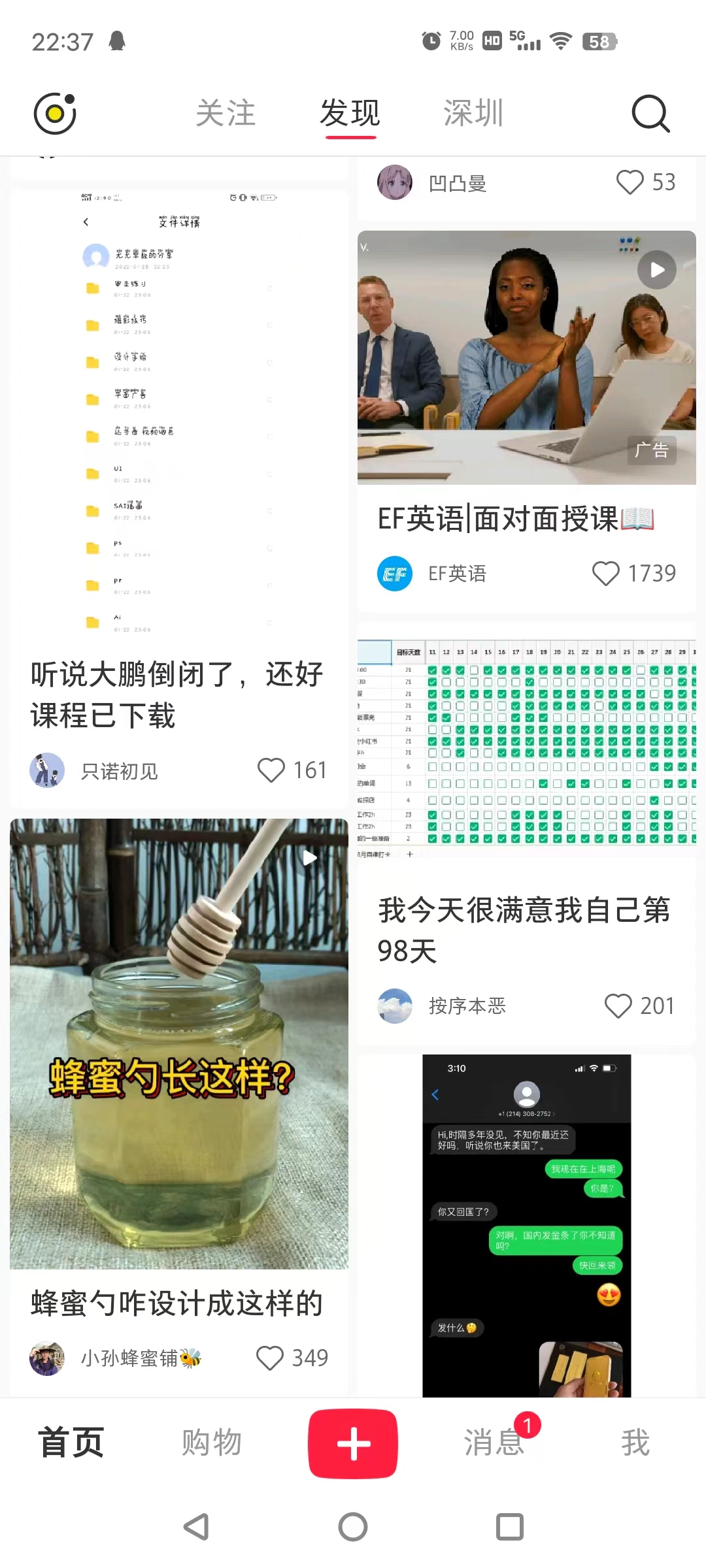

2、实现一个简单的瀑布流
先看一下咱们最终的试下效果吧,只是简单传入文字进行演示

1、瀑布流的特点
1、琳琅满目:整版以图片为主,大小不一的图片按照一定的规律排列。
2、唯美:图片的风格以唯美的图片为主。
3、操作简单:在浏览网站的时候只需要轻轻滑动一下鼠标滚轮,一切的美妙的图片精彩便可呈现在你面前
2、核心算法
通过图片我们可以直观的看到,每一个卡片的高度都是不一样的,需要我们实时能计算高度,同时左右的高度还是不能相互影响。
这里我们主要通过两个数组进行实现,即分为左右数组,核心代码如下:
<view id="u-left-column" class="u-column"><slot name="left" :leftList="leftList"></slot>
</view>
<view id="u-right-column" class="u-column"><slot name="right" :rightList="rightList"></slot>
</view>data() {return {leftList: [],rightList: [],tempList: [],scrollTop: 0,}
}
对传入数组进行分组和计算高度
async splitData() {if (!this.tempList.length) return;let leftRect = await this.$uGetRect('#u-left-column');let rightRect = await this.$uGetRect('#u-right-column');// 如果左边小于或等于右边,就添加到左边,否则添加到右边let item = this.tempList[0];// 解决多次快速上拉后,可能数据会乱的问题,因为经过上面的两个await节点查询阻塞一定时间,加上后面的定时器干扰// 数组可能变成[],导致此item值可能为undefinedif (!item) return;if (leftRect.height < rightRect.height) {this.leftList.push(item);} else if (leftRect.height > rightRect.height) {this.rightList.push(item);} else {// 这里是为了保证第一和第二张添加时,左右都能有内容// 因为添加第一张,实际队列的高度可能还是0,这时需要根据队列元素长度判断下一个该放哪边if (this.leftList.length <= this.rightList.length) {this.leftList.push(item);} else {this.rightList.push(item);}}// 移除临时列表的第一项this.tempList.splice(0, 1);// 如果临时数组还有数据,继续循环if (this.tempList.length) {this.splitData();return}
}
3、完整的组件代码如下
<template><scroll-view class="scroll-y" scroll-y="true" @scrolltolower="tolower" :scroll-top="scrollTop"><view class="u-waterfall" id="list"><view id="u-left-column" class="u-column"><slot name="left" :leftList="leftList"></slot></view><view id="u-right-column" class="u-column"><slot name="right" :rightList="rightList"></slot></view></view></scroll-view>
</template><script>export default {name: "waterfall",props: {value: {// 瀑布流数据type: Array,required: true,default: function() {return [];}},scrolltolower: {type: Function,default: () => {}}},data() {return {leftList: [],rightList: [],tempList: [],scrollTop: 0,}},watch: {copyFlowList(nVal, oVal) {this.tempList = this.cloneData(this.copyFlowList);this.splitData();}},mounted() {this.tempList = this.cloneData(this.copyFlowList);this.splitData();// this.$on('clearWaterFall', this.clear)},computed: {// 破坏flowList变量的引用,否则watch的结果新旧值是一样的copyFlowList() {return this.cloneData(this.value);}},methods: {async splitData() {if (!this.tempList.length) return;let leftRect = await this.$uGetRect('#u-left-column');let rightRect = await this.$uGetRect('#u-right-column');// 如果左边小于或等于右边,就添加到左边,否则添加到右边let item = this.tempList[0];// 解决多次快速上拉后,可能数据会乱的问题,因为经过上面的两个await节点查询阻塞一定时间,加上后面的定时器干扰// 数组可能变成[],导致此item值可能为undefinedif (!item) return;if (leftRect.height < rightRect.height) {this.leftList.push(item);} else if (leftRect.height > rightRect.height) {this.rightList.push(item);} else {// 这里是为了保证第一和第二张添加时,左右都能有内容// 因为添加第一张,实际队列的高度可能还是0,这时需要根据队列元素长度判断下一个该放哪边if (this.leftList.length <= this.rightList.length) {this.leftList.push(item);} else {this.rightList.push(item);}}// 移除临时列表的第一项this.tempList.splice(0, 1);// 如果临时数组还有数据,继续循环if (this.tempList.length) {this.splitData();return}},// 复制而不是引用对象和数组cloneData(data) {return JSON.parse(JSON.stringify(data));},tolower(e) {this.scrolltolower()},clear() {this.leftList = []this.rightList = []}}}
</script><style lang="scss" scoped>@mixin vue-flex($direction: row) {/* #ifndef APP-NVUE */display: flex;flex-direction: $direction;/* #endif */}.scroll-y {height: 78vh;margin-top: 18px;}.u-waterfall {@include vue-flex;flex-direction: row;align-items: flex-start;}.u-column {@include vue-flex;flex: 1;flex-direction: column;height: auto;width: 45vw;word-break: break-all;}
</style>
3、简单使用
基于vue的语法进行使用,先进行导入和注册
<script>
import waterfall from '../../component/waterfall/index.vue'
export default {name: 'content',components: {waterfall}
}
</script>
因为组件是基于插槽的形式进行开发的,所以我们可以直接传入咱们的样式和标签
<template><view class="main"><waterfall :value="dataList" :scrolltolower="getRecommendLove" ref="child"><template v-slot:left="left"><view v-for="item in left.leftList" :key="item.id" class="left-content" @click="copy(item)"><view class="item">{{item.content}}</view></view></template><template v-slot:right="right"><view v-for="item in right.rightList" :key="item.id" class="right-content" @click="copy(item)"><view class="item">{{item.content}}</view></view></template></waterfall></view>
</template>
最终的效果就可以达到我们的目标了
本文来自互联网用户投稿,文章观点仅代表作者本人,不代表本站立场,不承担相关法律责任。如若转载,请注明出处。 如若内容造成侵权/违法违规/事实不符,请点击【内容举报】进行投诉反馈!