el-date-picker 最多只能选中一个月 选中第一个日期后 第二个日期给出可选范围限制
效果: 选中2020年5月13日之后 前面4月13日到5月13日可选 后面5月13日到6月13日可选
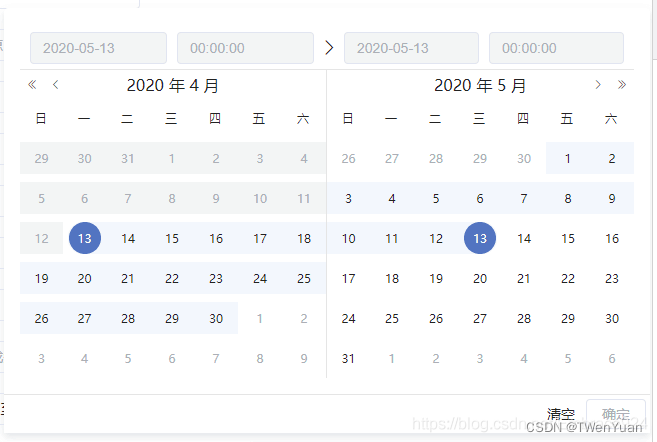
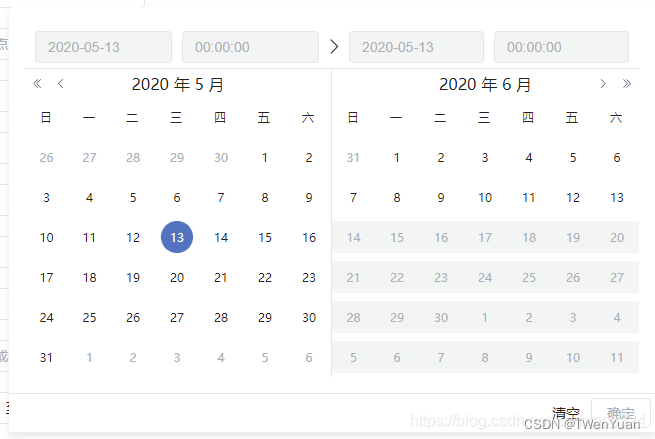
<el-date-pickerv-model="value2"type="datetimerange"size="small":picker-options="pickerOptions"range-separator="至"start-placeholder="开始日期"end-placeholder="结束日期"align="right"></el-date-picker>
            choiceDate0: '',pickerOptions: {// 设置不能选择的日期onPick: ({ maxDate, minDate }) => {this.choiceDate0 = minDate.getTime();if (maxDate) {this.choiceDate0 = '';}},disabledDate:(time) => {let choiceDateTime = new Date(this.choiceDate0).getTime();const minTime = new Date(choiceDateTime).setMonth(new Date(choiceDateTime).getMonth() - 1);const maxTime = new Date(choiceDateTime).setMonth(new Date(choiceDateTime).getMonth() + 1);const min = minTime;const newDate = new Date(new Date().toLocaleDateString()).getTime() + 24 * 60 * 60 * 1000 - 1;const max = newDate < maxTime ? newDate : maxTime;
//如果已经选中一个日期 则 返回 该日期前后一个月时间可选if (this.choiceDate0) {return time.getTime() < min || time.getTime() > max;}
//若一个日期也没选中 则 返回 当前日期以前日期可选return time.getTime() > newDate;}},
当前日期不可选,最少选择一个月 最多3个月
const minTime = new Date(choiceDateTime).setMonth(new Date(choiceDateTime).getMonth() - 2);
const maxTime = new Date(choiceDateTime).setMonth(new Date(choiceDateTime).getMonth() + 2);
本文来自互联网用户投稿,文章观点仅代表作者本人,不代表本站立场,不承担相关法律责任。如若转载,请注明出处。 如若内容造成侵权/违法违规/事实不符,请点击【内容举报】进行投诉反馈!