3D酷炫扭动卡片 html+css+js
看效果,动起来~:
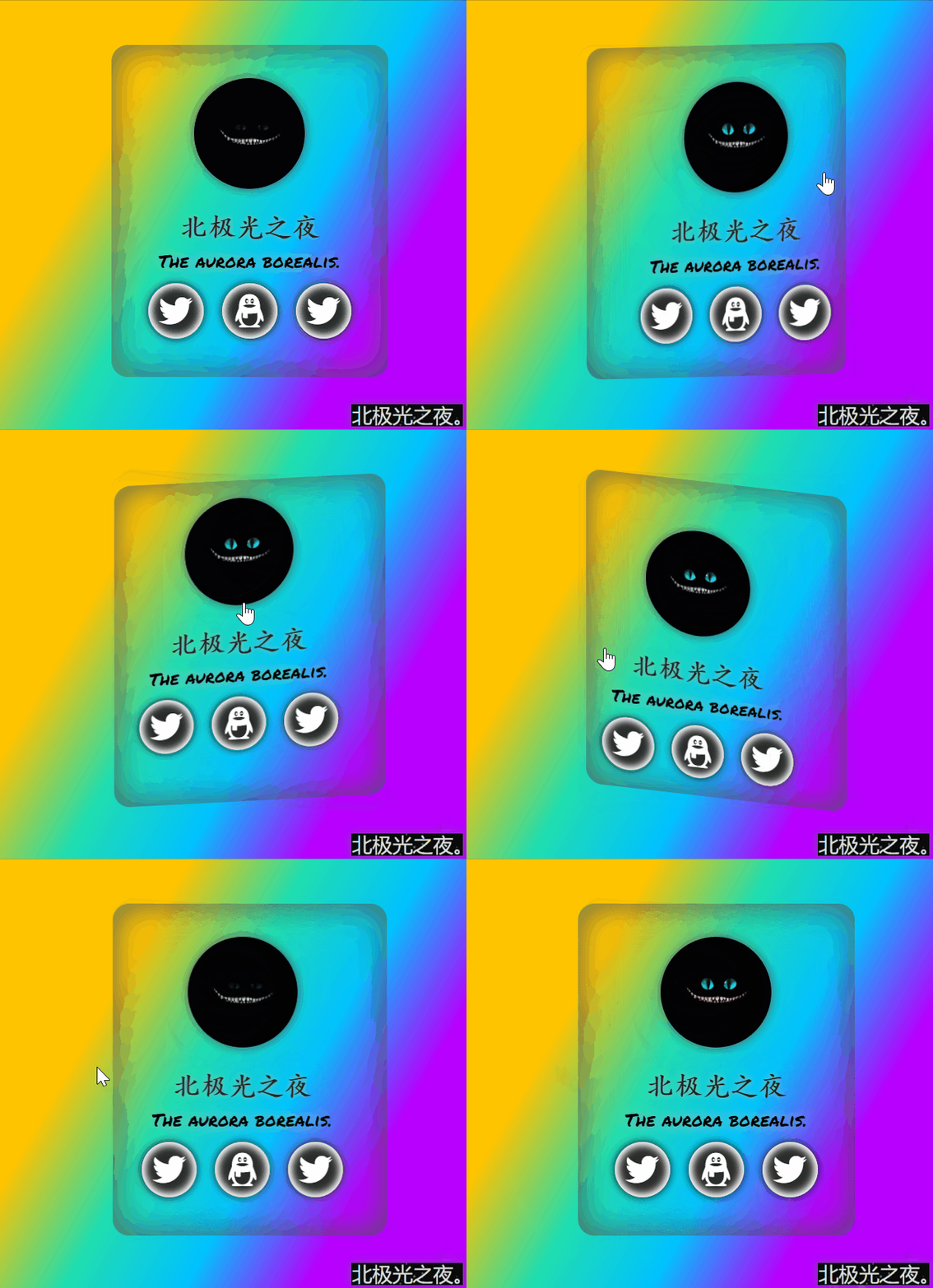
实现:
1. 定义标签,.card是底层盒子,.card2是呈现卡片效果的盒子,然后里面就是一些图片和文字,字体图标的标签了。:
<div class="card"><div class="card2"><img src="img/haha.gif" alt="haha"><h2>北极光之夜h2><p class="txt">The aurora borealis.p><div class="font"><span> span><span> span><span> span>div>div>div>
2. 定义底层盒子.card的基本样式:
.card {position: relative;width: 250px;height: 300px;transform-style: preserve-3d;cursor: pointer;}
position: relative; 相对定位。
transform-style: preserve-3d; 其子元素获得3D位置。
cursor: pointer; 鼠标样式变为小手。
3. 定义卡片盒子 .card2 的基本样式:
.card2 {position: absolute;top: 0;left: 0;width: 100%;height: 100%;background-color: transparent;border-radius: 15px;transition: all 0.2s;transform-style: preserve-3d;box-shadow: inset 0 0 30px rgb(83, 83, 82);}
position: absolute; 绝对定位。
background-color: transparent; 背景色为透明色。
border-radius: 15px; 边角的弧度。
transiton: all 0.2s;过渡效果。
transform-style:preserve-3d;子元素获得3D位置。
box-shadow: 内阴影。
4. 定义头像图片得基本样式:
.card2 img {position: absolute;top: 30px;left: 75px;width: 100px;height: 100px;border-radius: 50%;transform: translateZ(50px);box-shadow: 0 0 10px rgb(83, 83, 83);}
position:绝对定位。
transform:translateZ(50px);图片向 Z 轴移动 50 px ,这样更有层次感和立体效果。
box-shadow: 0 0 10px rgb(83, 83, 83); 阴影。
5. 标题的基本样式:
.card2 h2 {font-family: 'Permanent Marker', cursive;position: absolute;top: 150px;width: 100%;height: 28px;font-size: 25px;line-height: 28px; text-align: center;text-shadow: 0 0 5px rgb(177, 174, 174);color: rgb(33, 34, 34);transform: translateZ(50px);}
font-family: 字体样式。
font-size:字体大小。
text-align:文本居中对齐。
text-shadow: 文字阴影。
transform: translateZ(50px);文字也向 Z 轴移动 50 px ,更有层次感和立体效果。
6. 小标题基本样式:
.txt{font-family: 'Permanent Marker', cursive;position: absolute;top: 180px;width: 100%;line-height: 30px;font-size: 16px;text-align: center; text-shadow: 0 0 10px rgb(185, 187, 186);transform: translateZ(50px);}
font-family: ‘Permanent Marker’, cursive; 字体样式。字体样式大全
line-height: 30px; 行间距。
…略…
7. 字体图标的基本样式,宽,高等:
.font{position: absolute;top: 215px;left: 50%;width: 80%;height: 50px;display: flex;align-items: center;justify-content: space-around;transform: translateZ(50px) translateX(-50%);}.font span{display: inline-block;width: 50px;height: 50px;line-height: 50px;text-align: center;font-size: 30px;color: white;border-radius: 50%;background-color: rgb(61, 60, 60);box-shadow: inset 0 0 8px white,inset 0 0 8px white,inset 0 0 8px white,0 0 8px black; }
display: flex;
align-items: center;
justify-content: space-around; flex布局,主轴平分空间对齐,侧轴居中对齐。
display: inline-block; 转为行内块元素。
box-shadow: 阴影,写多行可以让阴影效果更亮。
…略…
8. js部分,看注释,公式可以结合注释自己理解下:
<script>/* 获取底层盒子标签*/var card = document.querySelector('.card');/*获取卡片标签*/var card2 = document.querySelector('.card2');/*给底层盒子添加鼠标经过mousemove事件*/card.addEventListener('mousemove', function (e) {/* x为鼠标距离页面左侧距离减去底层盒子距离页面左侧距离*/let x = e.clientX - card.offsetLeft;/* left为底层盒子宽度的一半*/let left = card.offsetWidth / 2;/* rotateY 为卡片绕Y轴旋转的大小,旋转度看自己,我除以5,也可以大点或小点 */let rotateY = -(left - x) / 5;/* y为鼠标距离页面顶侧距离减去底层盒子距离页面顶侧距离*/let y = e.clientY - card.offsetTop;/* top为底层盒子高度的一半*/let top = card.offsetHeight / 2;/* rotateX 为卡片绕X轴旋转的大小,旋转度看自己,我除以5,也可以大点或小点 */ let rotateX = (top - y) / 5;/*为卡片添加transform属性 */ card2.style.cssText = `transform: rotateX(${rotateX}deg) rotateY(${rotateY}deg); `})/*给底层盒子添加鼠标离开事件mouseout*/card.addEventListener('mouseout', function (e) {/* 让卡片的transform属性的绕X,Y轴的rotate都是0deg*/card2.style.cssText = `transform: rotateY(0deg) rotateX(0deg); `})</script>
完整代码:
<html lang="zh-CN"><head><meta charset="UTF-8"><meta name="viewport" content="width=device-width, initial-scale=1.0"><title>Documenttitle><link href="https://fonts.font.im/css?family=Dancing+Script" rel="stylesheet"><link href="https://fonts.font.im/css?family=Permanent+Marker" rel="stylesheet"><style>@font-face {font-family: 'icomoon';src: url('fonts/icomoon.eot?wr5es');src: url('fonts/icomoon.eot?wr5es#iefix') format('embedded-opentype'),url('fonts/icomoon.ttf?wr5es') format('truetype'),url('fonts/icomoon.woff?wr5es') format('woff'),url('fonts/icomoon.svg?wr5es#icomoon') format('svg');font-weight: normal;font-style: normal;font-display: block;}* {font-family: 'icomoon';margin: 0;padding: 0;box-sizing: border-box;}body {min-height: 100vh;display: flex;justify-content: center;align-items: center;background-image: linear-gradient(120deg,rgb(255, 196, 0) 40%,rgb(31, 223, 175),rgb(0, 195, 255),rgb(183, 0, 255) 60%);}.card {position: relative;width: 250px;height: 300px;transform-style: preserve-3d;cursor: pointer;}.card2 {position: absolute;top: 0;left: 0;width: 100%;height: 100%;background-color: transparent;border-radius: 15px;transition: all 0.2s;transform-style: preserve-3d;box-shadow: inset 0 0 30px rgb(83, 83, 82);}.card2 img {position: absolute;top: 30px;left: 75px;width: 100px;height: 100px;border-radius: 50%;transform: translateZ(50px);box-shadow: 0 0 10px rgb(83, 83, 83);}.card2 h2 {font-family: 'Permanent Marker', cursive;position: absolute;top: 150px;width: 100%;height: 28px;font-size: 25px;line-height: 28px; text-align: center;text-shadow: 0 0 5px rgb(177, 174, 174);color: rgb(33, 34, 34);transform: translateZ(50px);} .txt{font-family: 'Permanent Marker', cursive;position: absolute;top: 180px;width: 100%;line-height: 30px;font-size: 16px;text-align: center; text-shadow: 0 0 10px rgb(185, 187, 186);transform: translateZ(50px);}.font{position: absolute;top: 215px;left: 50%;width: 80%;height: 50px;display: flex;align-items: center;justify-content: space-around;transform: translateZ(50px) translateX(-50%);}.font span{display: inline-block;width: 50px;height: 50px;line-height: 50px;text-align: center;font-size: 30px;color: white;border-radius: 50%;background-color: rgb(61, 60, 60);/* border: 1px solid rgb(173, 172, 172) ; */box-shadow: inset 0 0 8px white,inset 0 0 8px white,inset 0 0 8px white,0 0 8px black; }style>
head><body><div class="card"><div class="card2"><img src="img/haha.gif" alt="haha"><h2>北极光之夜h2><p class="txt">The aurora borealis.p><div class="font"><span> span><span> span><span> span>div>div>div><script>var card = document.querySelector('.card');var card2 = document.querySelector('.card2');card.addEventListener('mousemove', function (e) {let x = e.clientX - card.offsetLeft;let left = card.offsetWidth / 2;let rotateY = -(left - x) / 5;let y = e.clientY - card.offsetTop;let top = card.offsetHeight / 2;let rotateX = (top - y) / 5;card2.style.cssText = `transform: rotateX(${rotateX}deg) rotateY(${rotateY}deg); `})card.addEventListener('mouseout', function (e) {card2.style.cssText = `transform: rotateY(0deg) rotateX(0deg); `})script>
body>html>
总结:
这个效果涉及的知识点是比较全的,拿来练习很不错~
2021年最大的愿望就是疫情消失。
在生命中还有许多激动人心的事情等着我们去做~
其它文章~:
炫彩流光文字 html+css
气泡浮动背景特效 html+css
简约时钟特效 html+css+js
赛博朋克风格按钮 html+css
响应式卡片悬停效果 html+css
水波加载动画 html+css
导航栏滚动渐变效果 html+css+js
书本翻页 html+css
3D立体相册 html+css
炫彩流光按钮 html+css
记一些css属性总结(一)
Sass总结笔记
…等等
本文来自互联网用户投稿,文章观点仅代表作者本人,不代表本站立场,不承担相关法律责任。如若转载,请注明出处。 如若内容造成侵权/违法违规/事实不符,请点击【内容举报】进行投诉反馈!