《React-Native系列》44、基于多个TextInput的键盘遮挡处理方案优化
以前写过两篇关于在ReactNative上处理键盘遮挡输入表单TextInput的情况,建议读者可以先看看
1、《React-Native系列》33、 键盘遮挡问题处理
2、《React-Native系列》42、键盘遮挡问题官方处理方法KeyboardAvoidingView
以前给出的解决方案,是使用ScrollView的scrollTo方法,将表单的输入域移动到可见区域(从键盘遮挡处移到键盘上方)。
这个方案存在以下问题:
1、移动距离的计算不精确
2、如果表单中有多个TextInput,怎么处理?
今天,我们来给出个比较好的方案。
'use strict';
import React, { Component } from 'react';
import {View,Text,ScrollView,NativeModules,TouchableOpacity,TouchableHighlight,AppRegistry,Image,Platform,TextInput,Dimensions,Keyboard,
}from 'react-native';
var dismissKeyboard = require('dismissKeyboard');
const {width, height} = Dimensions.get('window');
import styles from '../styles/goods/Spec.css';export default class Spec extends Component {constructor(props) {super(props);this.state = {groupValueList:[1,2,3,4,5,6,7,8,9,10,11,12,13,14,15,16],};this.contentHeight = 0;this.textInputView = null;//当前编辑的textInputthis.moveH = 0;//ScrollView滑动的距离this.lastMoveH = 0;//保留上次滑动的距离this.needMove = false;//弹出键盘时,textInputView是否需要滑动}componentWillMount(){if (Platform.OS === 'ios') {this.subscriptions = [Keyboard.addListener('keyboardDidShow', this._keyboardDidShow),Keyboard.addListener('keyboardDidHide', this._keyboardDidHide)];}}componentWillUnmount(){if (Platform.OS === 'ios') {this.subscriptions.forEach((sub) => sub.remove());}}_keyboardDidShow = (e) => {if(! this.textInputView) return ;this.needMove = false;this.refs[this.textInputView].measure((ox, oy, w, h, px, py)=>{let leftHeight = height - py;//输入框距离底部的距离 = (屏幕的高度 - 当前TextInput的高度)//输入框距离底部的距离小于键盘的高度,需要滑动if( leftHeight < e.startCoordinates.height + 25 ){this.needMove = true;// 需要移动的距离let moveHeight = 30 + (e.startCoordinates.height - leftHeight);console.log("this.moveH=" + this.moveH,"this.contentHeight=" + this.contentHeight,"height=" + height);//moveH 异常数据处理if(this.moveH + height > this.contentHeight) {this.moveH = this.contentHeight - height;console.log("===error===");}this.lastMoveH = this.moveH;this.refs.scroll.scrollTo({y:this.moveH + moveHeight ,x:0});}});}_keyboardDidHide = () => {if(this.needMove){this.refs.scroll.scrollTo({y:this.lastMoveH ,x:0});}this.textInputView = null;}/*** 展示规格项组合项*/_renderGroupItem(item , i) {let refId = i;return ({ marginLeft:15,borderTopWidth:1,borderTopColor:'#DBDBDB',justifyContent:'center',height:70}}>{width:110,alignSelf:'center',borderWidth: 1,borderColor:'#BDBDBD',textAlign:'center',fontSize:13,color:'#333333',height:25,}}maxLength={5}placeholderTextColor="#b2b2b2"placeholder="请输入价格"multiline={false}keyboardType="numeric"returnKeyType={'done'}value={"" }onFocus={()=>{this.textInputView = refId}}/> );}render(){return ({flex: 1,backgroundColor: '#ffffff'}}>{this.contentHeight = parseInt(contentHeight);}}onScrollEndDrag={(e)=>{this.moveH = e.nativeEvent.contentOffset.y;// console.log("this.moveH",this.moveH);}}>{dismissKeyboard();}}>{ this.state.groupValueList.map((item,i)=>this._renderGroupItem(item,i)) } );}
}
AppRegistry.registerComponent('你的模块',() => Spec);
代码注释比较详细了,但是这里还是简单说明下以下几个点:
1、只对iOS平台进行处理,RN已经对Android做了键盘的处理
2、当前TextInput的高度
获取到当前正在被编辑的textInput ,this.textInputView
在键盘弹出监听_keyboardDidShow 中,调用 this.refs[this.textInputView].measure((ox, oy, w, h, px, py)=>{});
此时的py就是当前TextInput在屏幕上的高度
3、 输入框距离底部的距离 (leftHeight)
输入框距离底部的距离 = (屏幕的高度 - 当前TextInput在屏幕上的高度)
判断leftHeight 是否大于键盘高度,如果大于键盘的高度,默认不处理,如果小于键盘的高度,那么说明TextInput被键盘覆盖
4、移动距离的计算
通过ScrollView的onScrollEndDrag方法,计算ScrollView滑动的距离。 this.moveH = e.nativeEvent.contentOffset.y;
通过键盘的高度和leftHeight ,计算出需要移动的距离
5、moveH异常数据的处理
当快速滑动的时候,点击TextInput还是会出现移动距离错误的情况,因为ScrollView滑动的距离计算有误
譬如向下滑动到顶部后,继续滑动,this.moveH 会出现负数 ,此情况不需要处理,因为TextInput在键盘上方
向上滑动到底部后,继续滑动,this.moveH会有问题 ,此情况需要处理
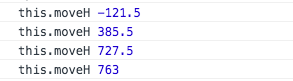
解决方案:我们将moveH的数据纠正
如果 moveH + 屏幕的高度 大于 ScrollView内容的高度,说明moveH数值偏高,此时需要将moveH的值纠正为this.contentHeight - height,即:滑动到页面底部的状态。
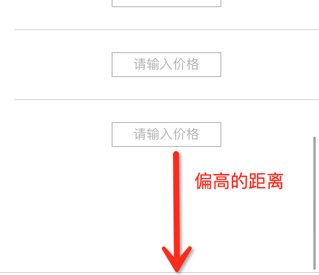
if(this.moveH + height > this.contentHeight) {this.moveH = this.contentHeight - height;console.log("===error===");}下图可见:moveH数据异常

界面展示如下:
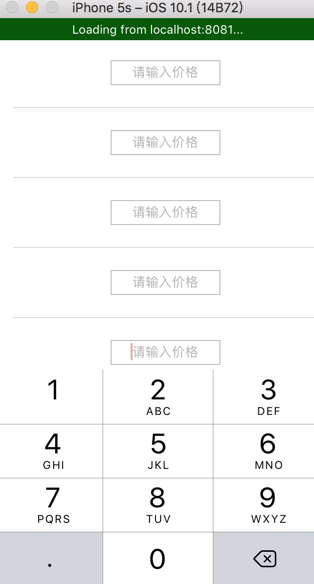
以上都是基于 RN 0.29.2版本,如果使用其他版本,可能API会有不一致的情况。
如果您有更好的方案,希望可以交流,联系我见:与我联系
参考:
http://blog.csdn.net/lxq0426/article/details/51838653
http://blog.csdn.net/pz789as/article/details/53404352
本文来自互联网用户投稿,文章观点仅代表作者本人,不代表本站立场,不承担相关法律责任。如若转载,请注明出处。 如若内容造成侵权/违法违规/事实不符,请点击【内容举报】进行投诉反馈!