CDH5.11环境下用java的API操作hive
创建一个maven项目,pom.xml文件配置如下
eccom
hive
1.0-SNAPSHOT
org.apache.hive hive-jdbc 1.1.0 junit junit 4.9 org.apache.hadoop hadoop-core 1.1.0 HiveJdbcClient org.apache.maven.plugins maven-compiler-plugin 1.8 1.8 UTF-8 net.alchim31.maven scala-maven-plugin 3.2.2 compile testCompile -dependencyfile ${project.build.directory}/.scala_dependencies org.apache.maven.plugins maven-shade-plugin 2.4.3 package shade *:* META-INF/*.SF META-INF/*.DSA META-INF/*.RSA reference.conf HIVE.HiveJdbcClient 创建测试类HiveJDBC,代码如下
package HIVE;import java.sql.*;public class HiveJdbcClient {private static String driverName = "org.apache.hive.jdbc.HiveDriver";/*** @param args* @throws SQLException*/public static void main(String[] args) throws SQLException {try {Class.forName(driverName);} catch (ClassNotFoundException e) {// TODO Auto-generated catch blocke.printStackTrace();System.exit(1);}//replace "hive" here with the name of the user the queries should run asConnection con = DriverManager.getConnection("jdbc:hive2://master:10000/neteagle", "master", "");Statement stmt = con.createStatement();String tableName = "testHiveDriverTable";stmt.execute("drop table if exists " + tableName);stmt.execute("create table " + tableName + " (key int, value string)");// show tablesString sql = "show tables '" + tableName + "'";System.out.println("Running: " + sql);ResultSet res = stmt.executeQuery(sql);if (res.next()) {System.out.println(res.getString(1));}// describe tablesql = "describe " + tableName;System.out.println("Running: " + sql);res = stmt.executeQuery(sql);while (res.next()) {System.out.println(res.getString(1) + "\t" + res.getString(2));}// load data into table// NOTE: filepath has to be local to the hive server// NOTE: /tmp/a.txt is a ctrl-A separated file with two fields per lineString filepath = "/tmp/a.txt";sql = "load data local inpath '" + filepath + "' into table " + tableName;System.out.println("Running: " + sql);stmt.execute(sql);// select * querysql = "select * from " + tableName;System.out.println("Running: " + sql);res = stmt.executeQuery(sql);while (res.next()) {System.out.println(String.valueOf(res.getInt(1)) + "\t" + res.getString(2));}// regular hive querysql = "select count(1) from " + tableName;System.out.println("Running: " + sql);res = stmt.executeQuery(sql);while (res.next()) {System.out.println(res.getString(1));}}
}
打jar包运行代码
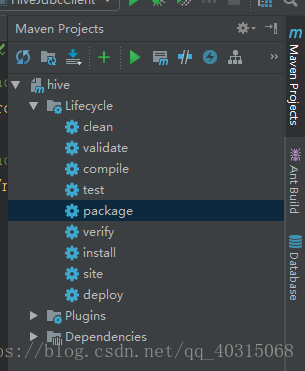
选择package,点击运行(绿色的三角形)
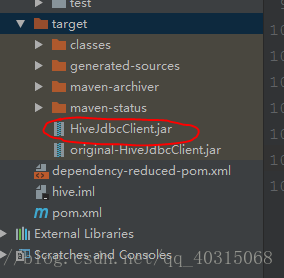
运行完毕后会在target目录下生成我们需要的jar包文件。
复制到集群运行jar包
java -jar HiveJdbcClient.jar
异常分析
这里显示没有找到hadoop的配置,需要添加jar包

org.apache.hadoop hadoop-core 1.1.0 再次运行结果正常。

参考网站:
https://www.bbsmax.com/A/VGzl2QnN5b/
https://blog.csdn.net/hg_harvey/article/details/77688703
https://cwiki.apache.org/confluence/display/Hive/HiveServer2+Clients
本文来自互联网用户投稿,文章观点仅代表作者本人,不代表本站立场,不承担相关法律责任。如若转载,请注明出处。 如若内容造成侵权/违法违规/事实不符,请点击【内容举报】进行投诉反馈!