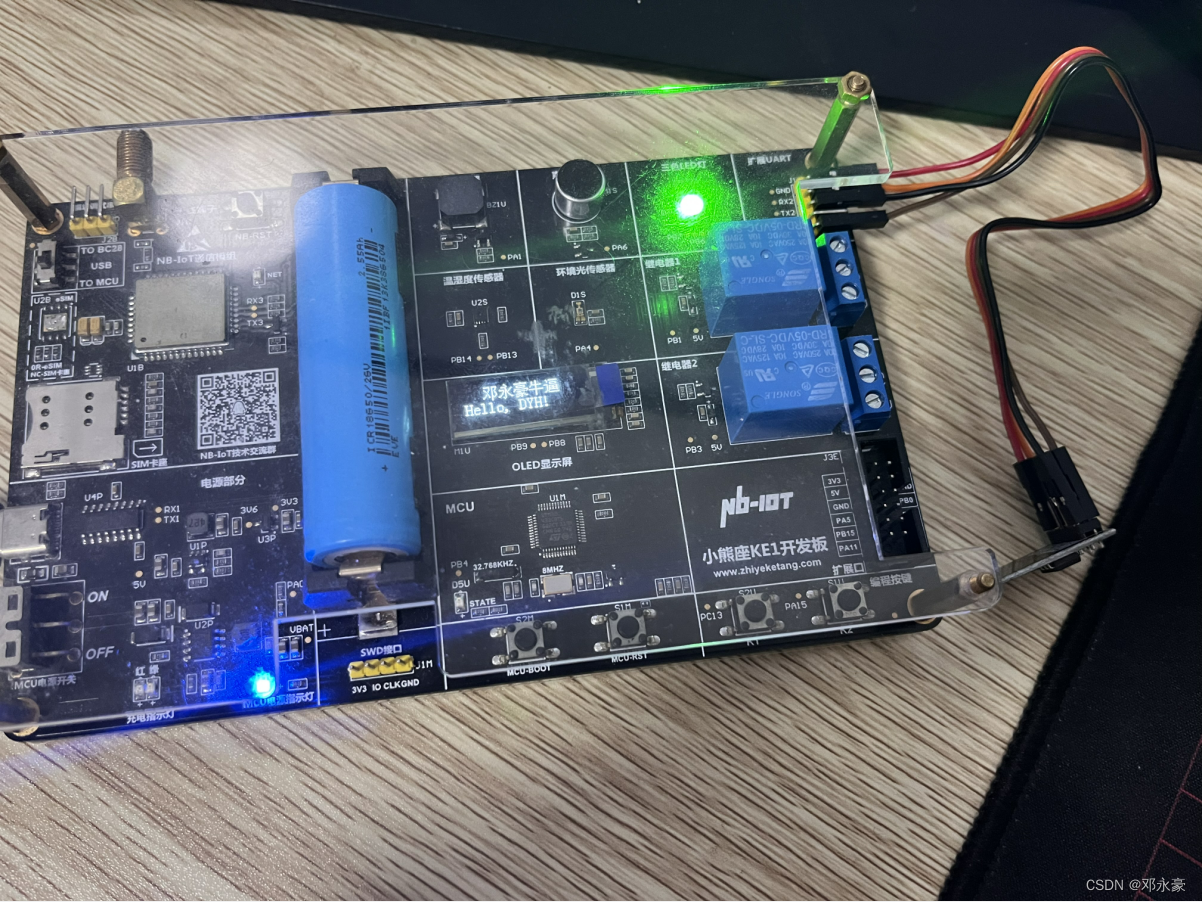
【STM32】ESP8266 WiFi模块实时上报温湿度及控制LED灯项目笔记

ESP8266 WiFi模块实时上报温湿度及控制LED灯项目笔记

  • 一、ESP8266模块
    • 1.模块介绍
    • 2.AT指令介绍
    • 2.硬件连接
  • 二、串口转发及调试
    • 1.串口转发流程
    • 2.串口转发程序实现
      • STM32CubeMX配置
      • 修改usart.h/.c文件
      • 修改main.c文件
    • 3.运行测试
  • 三、AT指令学习
    • 1.WiFi初始化命令
    • 2.无线连接命令
    • 3.数据收发命令
  • 四、WiFi模块实时上报温湿度与远程控制LED灯实现
    • 1.esp8266.h/.c
    • 2.main.c
    • 3.运行测试
  • 总结


一、ESP8266模块

1.模块介绍

本项目无线通讯模块使用的是WiFi模块ESP8266,乐鑫公司推出的高性能、低功耗串口WiFi模块ESP8266应该是使用最广泛的一种WIFI模块之一了,它自身带有高性能的MCU(Microcontroller Unit),因此它既可以通过串口连接为外部MCU提供 WiFi通信功能,也就是我们本项目所用到的功能;当然它也可以让用户直接在模块内置的MCU上基于RTOS SDK进行软件编程,开发出具有低功耗、低成本的WiFi连接产品,如市面上大部分WiFi智能插座就用了ESP8266模块和它的这一功能。
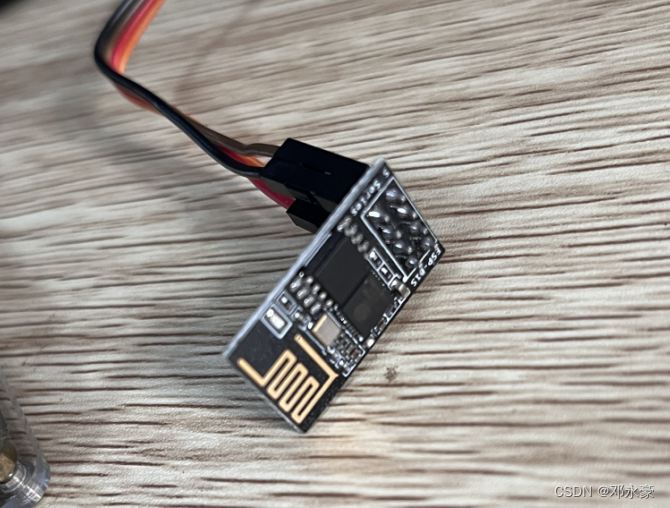
我的ESP8266模块

ESP8266内置一个Tensilica(泰思立达)Xtensa架构的32位处理器L106,具有5级流水线(ARM CortexM3是3级流水线),最大时钟速度为160MHz,可以使用高达16MB的外部SPI Flash。该模块采用串口与MCU(或其他串口设备)通信,内置 TCP/IP协议栈,能够实现串口与 WiFi之间的转换。通过该模块,传统的串口设备只需要简单的串口配置,即可通过WiFi传输自己的数据。

WiFi具有两种功能模式:一种叫AP(Access Point)模式,一种叫Station模式。AP就是我们平时所说的热点,如无线路由器,开了热点的手机等,这些AP设备可以允许其他设备(如手机,PC等)输入热点名(SSID)和密码(也可不设置密码)后连接上网;Station模式则是前面说的连接AP的设备(如手机,PC等)。

ESP8266除支持上述两种模式以外,还可以支持第三种模式:AP+Station,即:将AP和Station的功能合二为一,它主要是实现无线桥接的功能,该模式应用的场景不多。

STM32单片机在与ESP8266进行串口通信时采用AT命令进行通信,这样想要做ESP8266 WiFi模块的程序开发的话,那我们首先得学习并熟练掌握ESP8266 WiFi模块的AT指令。

2.AT指令介绍

AT指令是以AT作为开头,\r\n字符结束的字符串,每个指令执行成功与否都有相应的返回。其他的一些非预期的信息(如有人拨号进来、线路无信号等),模块将有对应的一些信息提示,接收端可做相应的处理。

不同模块的AT命令可能不一样的,这要对着模块的AT指令手册来查看。

AT命令可分为四类:

类型指令格式描述
执行指令AT+该命令用于执行受模块内部程序控制的变参数不可变的功能。
测试指令AT+=?该命令用于该命令用于查询设置指令的参数以及取值范围。
查询指令AT+?该命令用于返回参数的当前值。
设置指令AT+=<···>该命令用于设置用户自定义的参数值。

2.硬件连接

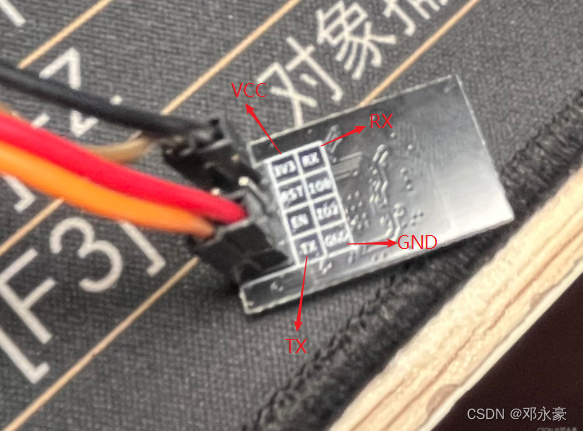
由于我的开发板当中3.3V电源是LDO电路从USB TypeC接口提供的5V降压而来,电流较低,所以连ESP8266模块可能会导致它不能正常工作,所以这里我连了5V做VCC,而我所用的ESP8266能够正常工作,具体所用的时候可以视情况而定。
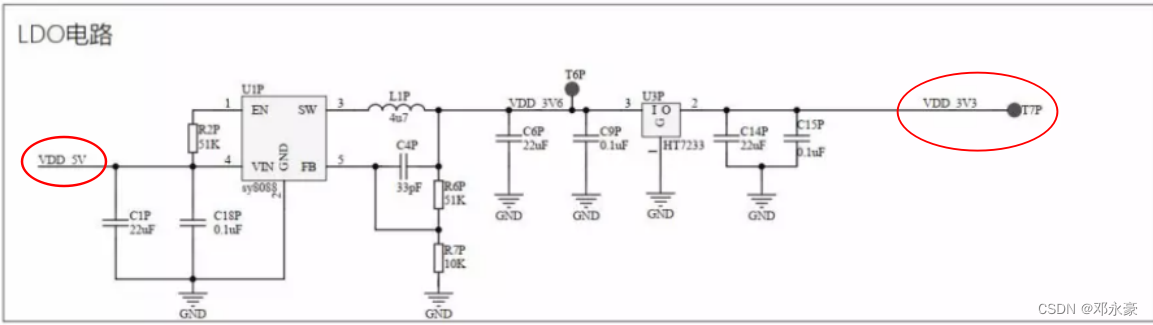
LDC电路
提示:USB3.0的接口电流较高,如果必要用5V,最好不用USB3.0

ESP8266模块提供TTL串口通信接口,而我所使用的开发板上的扩展UART2串口也是TTL电平,所以直接连接如下:
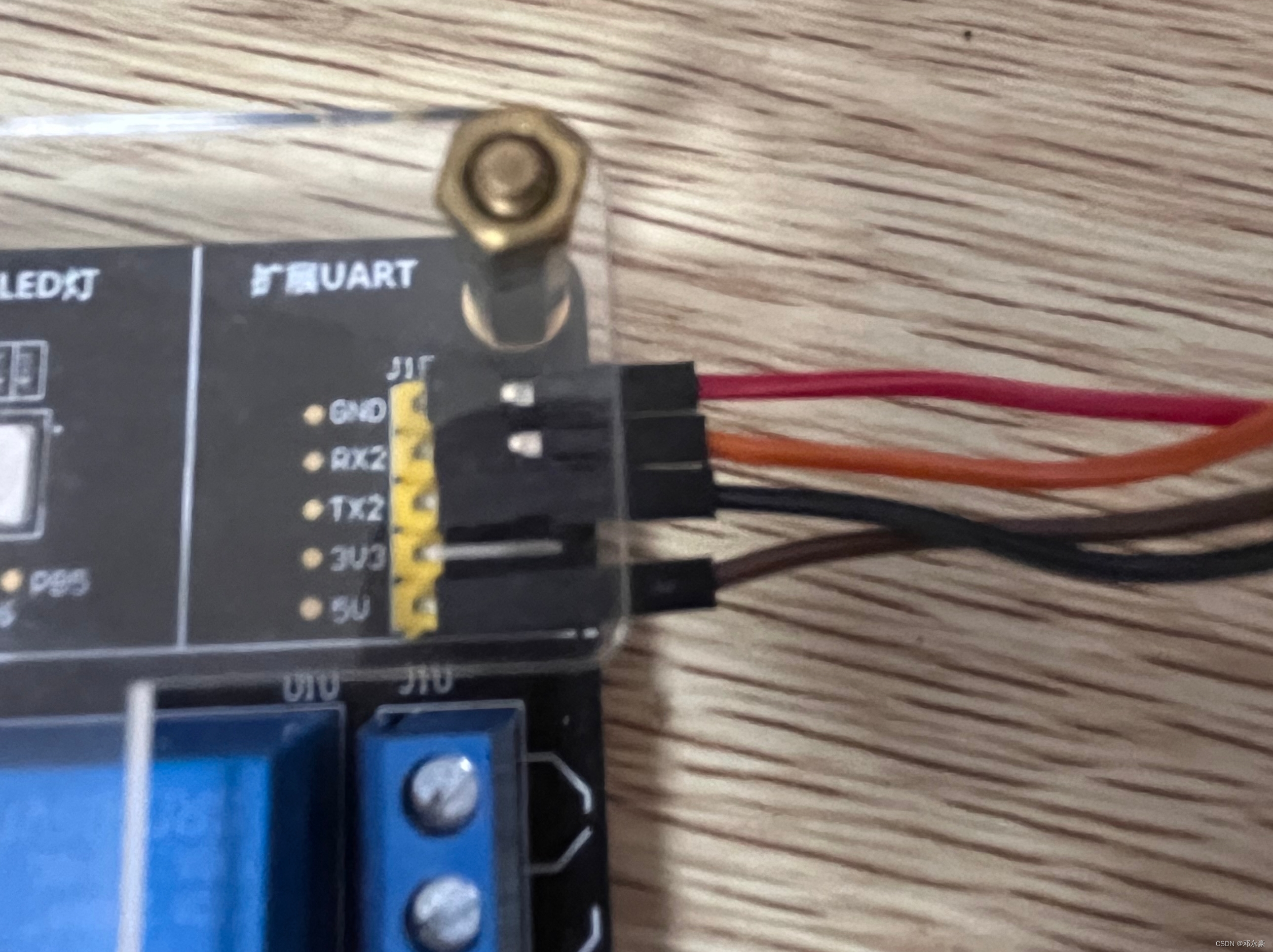
请添加图片描述
在这里插入图片描述

二、串口转发及调试

1.串口转发流程

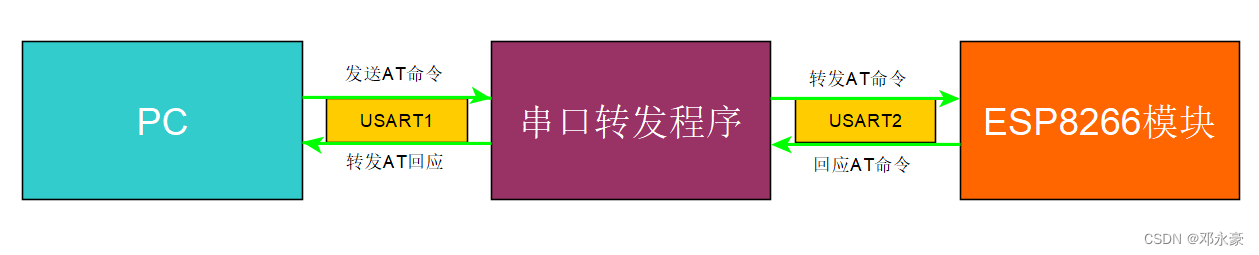
开发板的USART2串口连接了ESP8266模块,当然我们要通过PC来对它进行调试,所以我们需要STM32写一个单片机上写一个串口接收转发的程序如下图:
在这里插入图片描述

2.串口转发程序实现

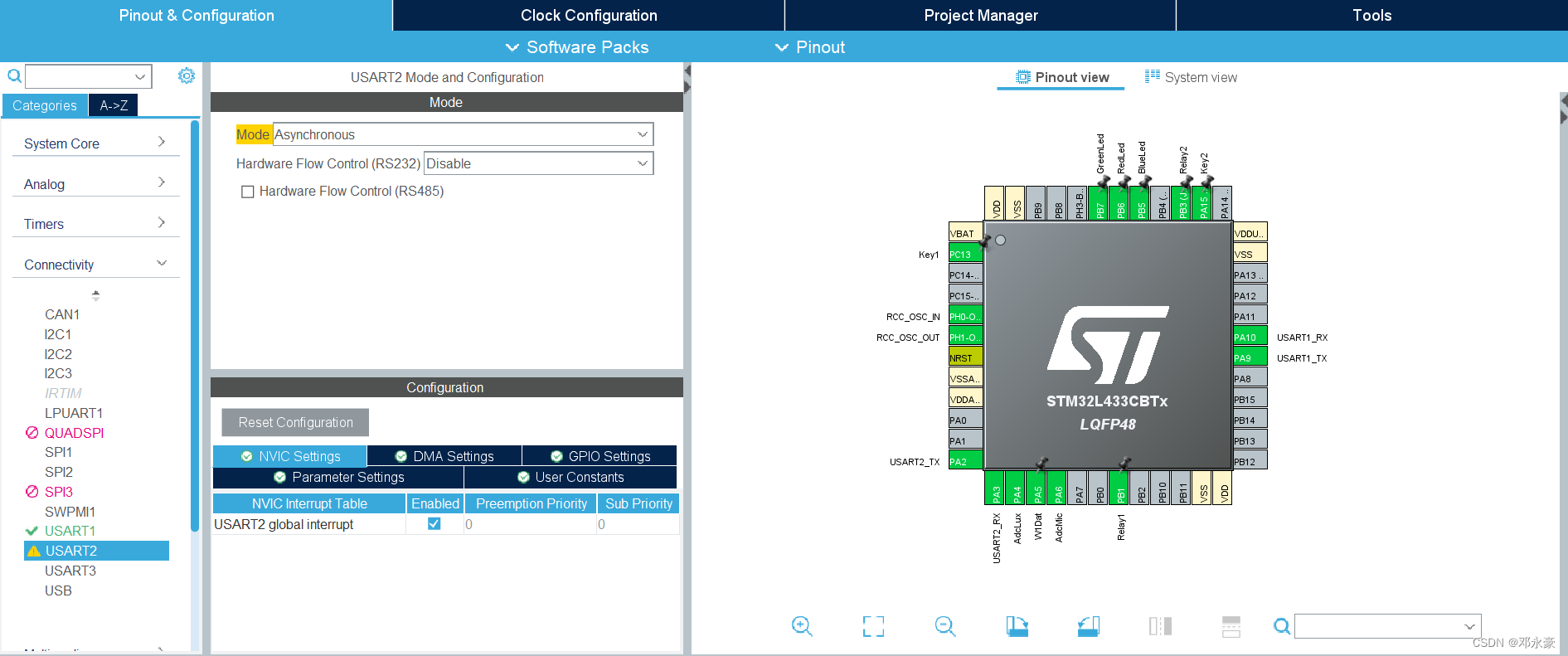
STM32CubeMX配置

在这里插入图片描述

修改usart.h/.c文件

对usart.h文件做如下修改:

... ...
/* USER CODE BEGIN Private defines */
extern char g_uart1_rxbuf[256];
extern uint8_t g_uart1_bytes;#define clear_uart1_rxbuf() do { memset(g_uart1_rxbuf, 0, sizeof(g_uart1_rxbuf)); \g_uart1_bytes=0; } while(0)//在这里添加uar2接收 buffer相关变量声明,并添加一个宏 clear_uart2_rxbuf()用来清除接收 buffer里的数据
extern char g_uart2_rxbuf[256];
extern uint8_t g_uart2_bytes;#define clear_uart2_rxbuf() do { memset(g_uart2_rxbuf, 0, sizeof(g_uart2_rxbuf)); \g_uart2_bytes=0; } while(0)//添加串口接收转发函数的声明
extern void uart_forward(void);/* USER CODE END Private defines */
... ...

对usart.c文件做如下修改:

... ...
/* USER CODE BEGIN 0 */
static	uint8_t			s_uart1_rxch;
char					g_uart1_rxbuf[256];
uint8_t					g_uart1_bytes;static	uint8_t			s_uart2_rxch;
char					g_uart2_rxbuf[256];
uint8_t					g_uart2_bytes;
/* USER CODE END 0 */
... ...void MX_USART2_UART_Init(void)
{
... .../* USER CODE BEGIN USART2_Init 2 */HAL_UART_Receive_IT(&huart2 , &s_uart2_rxch, 1);//HAL_UART_Receive_IT中断服务处理程序/* USER CODE END USART2_Init 2 */}
... .../* USER CODE BEGIN 1 */
void HAL_UART_RxCpltCallback(UART_HandleTypeDef *huart)
{if (huart->Instance == USART1){if( g_uart1_bytes< sizeof(g_uart1_rxbuf) ){g_uart1_rxbuf[g_uart1_bytes++] = s_uart1_rxch;}HAL_UART_Receive_IT(&huart1 , &s_uart1_rxch, 1);}if (huart->Instance == USART2){if( g_uart2_bytes< sizeof(g_uart2_rxbuf) ){g_uart2_rxbuf[g_uart2_bytes++] = s_uart2_rxch;}HAL_UART_Receive_IT(&huart2 , &s_uart2_rxch, 1);}
}//添加usart1和usart2的收发转发功能函数,main()函数中调用
void uart_forward(void)
{if(strstr(g_uart1_rxbuf, "\r\n")){HAL_UART_Transmit(&huart2, (uint8_t *)g_uart1_rxbuf, g_uart1_bytes,0xFF);clear_uart1_rxbuf();}if(g_uart2_bytes > 0){HAL_Delay(100);/*Wait AT command reply receive over*/HAL_UART_Transmit(&huart1, (uint8_t *)g_uart2_rxbuf, g_uart2_bytes,0xFF);clear_uart2_rxbuf();}
}
... .../* USER CODE END 1 */... ...

修改main.c文件

如下:

... ...while(1){uart_forward();//后面使用无线通讯时只需要用Socket通信,不在需要此转发程序,如果没有注释掉会报错,并不会执行PC发的JOSN指令
#if 0
... ...
#endif/* USER CODE END WHILE *//* USER CODE BEGIN 3 */}... ...

3.运行测试

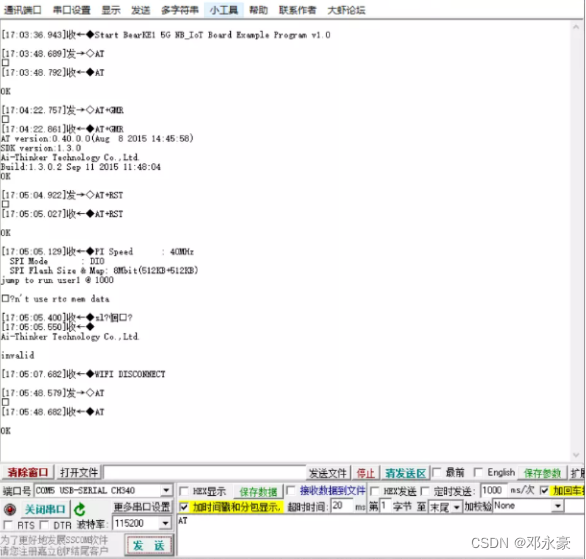
用串口调试工具进行测试:
在这里插入图片描述

三、AT指令学习

每一个使用AT指令通信的模块都有自己详细的AT指令使用说明文档,模块里的软件固件版本不一样,其AT指令可能也不大一样,可以通过你的模块以及版本找到对应的说明文档对照。

对于我所使用的ESP8266 WiFi模块:

1.WiFi初始化命令

AT命令说明
ATAT命令用来确认模块是否正常工作以及串口通信是否正常
AT+GMR获取WiFi模块的软件固件版本信息
AT+RST重启、复位WiFi模块
AT+CWMODE_CUR=1设置ESP8266 WiFi模块工作在Station模式
AT+CWDHCP_CUR=1,1设置使能ESP8266 WiFi模块Station模式的DHCP服务
AT+CIPSTA_CUR静态设置ESP8266的IP地址,子网掩码和默认网关

2.无线连接命令

AT命令说明
AT+CWJAP_CUR=“Router_SSID” ,“Password”该命令用来连接指定的无线路由器
AT+CIPSTA_CUR?该命令用来查看ESP8266当前的IP地址
AT+PING=“192.168.0.1”该命令用来测试与目标主机的连通性

3.数据收发命令

AT命令说明
AT+CIPMUX=0该命令用来禁用多个socket连接,一般只连接一个目标服务器。
AT+CIPSTART=“TCP”,“192.168.0.100"”,12345该命令用来连接指定的目标socket 服务器
AT+CIPSEND=5该命令用来发送5个字节的数据,在收到模块回应的‘>’字符后,开始输入要发送的数据内容。
AT+CIPCLOSE该命令用来断开Socket连接

注意:指令带_CUR后缀则表示只更改当前系统配置,并不写入Flash存储器中,重启复位后失效。而如果需要重启后依然有效则用带_DEF后缀的命令。

四、WiFi模块实时上报温湿度与远程控制LED灯实现

1.esp8266.h/.c

代码如下:

/** esp8266.h**  Created on: 2023年2月26日*      Author: ASUS*/#ifndef INC_ESP8266_H_
#define INC_ESP8266_H_#include #define wifi_huart			&huart2			/*wiFi模块使用的串口*/
#define g_wifi_rxbuf		g_uart2_rxbuf	/*wiFi模块的接收buffer */
#define g_wifi_rxbytes		g_uart2_bytes 	/*wiFi模块接收的数据大小*//*清除WiFi模块接收 buffer里的数据内容宏,用宏不用函数是因为函数调用需要额外时间开销*/
#define clear_atcmd_buf()	do { memset(g_wifi_rxbuf, 0, sizeof(g_wifi_rxbuf));g_wifi_rxbytes=0; } while(0)/*ESP8266 WiFi模块发送AT命令函数,返回值为О表示成功,!0表示失败*/
#define EXPECT_OK	"OK\r\n"
extern int send_atcmd(char *atcmd, char *expect_reply, unsigned int timeout);/*ESP8266 WiFi模块初始化函数。返回值为0表示成功,!0表示失败*/
extern int esp8266_module_init(void);/*ESP8266 WiFi模块复位重启函数。返回值为О表示成功,!0表示失败*/
extern int esp8266_module_reset(void);/*ESP8266 WiFi模块连接路由器函数。返回值为О表示成功,!0表示失败*/
extern int esp8266_join_network( char *ssid,char *pwd) ;/*ESP8266获取自己的IP地址和网关IP地址。返回值为О表示成功,!O表示失败*/
int esp8266_get_ipaddr(char *ipaddr, char *gateway, int ipaddr_size);/*ESP8266 WiFi模块做ping 命令测试网络连通性。返回值为О表示成功,!0表示失败*/
int esp8266_ping_test(char *host);/*ESP8266 WiFi模块建立TCP socket连接函数。返回值为О表示成功,!0表示失败*/
extern int esp8266_sock_connect( char *servip, int port);/* ESP8266 WiFi模块断开TCP socket连接函数。返回值为О表示成功,!0表示失败*/
extern int esp8266_sock_disconnect(void);/*ESP8266 WiFi通过 TCP Socket发送数据函数。返回值为0表示失败,>0表示成功发送字节数*/
extern int esp8266_sock_send(unsigned char *data, int bytes);/* ESP8266 WiFi通过TCP Socket 接收数据函数。返回值为0无数据,>0表示接收到数据字节数*/
extern int esp8266_sock_recv(unsigned char *buf, int size);#endif /* INC_ESP8266_H_ */
/** esp8266.c**  Created on: 2023年2月26日*      Author: ASUS*/#include 
#include "usart.h"
#include "esp8266.h"/*WiFi模块驱动调试宏,注释下面两个宏定义可以取消调试打印*/
//#define CONFIG_WIFI_DEBUG
#define CONFIG_WIFI_PRINT#ifdef CONFIG_WIFI_DEBUG
#define wifi_dbg(format,args...) printf(format, ##args)
#else
#define wifi_dbg(format,args...) do{} while(0)
#endif#ifdef CONFIG_WIFI_PRINT
#define wifi_print(format,args...) printf(format, ##args)
#else
#define wifi_print(format,args...) do{} while(0)
#endifint send_atcmd(char *atcmd, char *expect_reply, unsigned int timeout)
{int				rv = 1;unsigned int	i;char			*expect;/*check function input arguments validation*/if( !atcmd || strlen(atcmd)<=0 ){wifi_print("ERROR:Invalid input arguments\r\n");return -1;}wifi_dbg("\r\nStart send AT command: %s",atcmd);clear_atcmd_buf();HAL_UART_Transmit(wifi_huart, (uint8_t *)atcmd, strlen(atcmd), 1000);expect = expect_reply ? expect_reply : "OK\r\n";/*Receive AT reply string by UART interrupt handler,stop by "OK/ERROR" or timeout*/for(i=0; i<timeout; i++){if( strstr(g_wifi_rxbuf, expect)){wifi_dbg("AT command Got expect reply '%s'\r\n", expect);rv = 0;goto CleanUp;}if( strstr(g_wifi_rxbuf, "ERROR\r\n") || strstr(g_wifi_rxbuf, "FAIL\r\n")){rv = 2;goto CleanUp;}HAL_Delay(1);}CleanUp:wifi_dbg("<<<< AT command reply:\r\n%s", g_wifi_rxbuf);return rv;}int atcmd_send_data(unsigned char *data, int bytes, unsigned int timeout)
{int				rv = -1;unsigned int	i;/* check function input arguments validation */if( !data || bytes <= 0 ){wifi_print("ERROR: Invalid input arguments\r\n");return -1;}wifi_dbg("\r\nStart AT command send [%d] bytes data\n", bytes);clear_atcmd_buf();HAL_UART_Transmit(wifi_huart, data, bytes, 1000);/*Receive AT reply string by UART interrupt handler,stop by "OK/ERROR" or timeout */for(i=0; i<timeout; i++){if(strstr(g_wifi_rxbuf, "SEND OK\r\n")){rv = 0;goto CleanUp;}if(strstr(g_wifi_rxbuf, "ERROR\r\n")){rv = 1;goto CleanUp;}HAL_Delay(1);}CleanUp:wifi_dbg("<<<< AT command reply:\r\n%s", g_wifi_rxbuf);return rv;
}int esp8266_module_init(void)
{int		i;wifi_print("INFO: Reset ESP8266 module now...\r\n");send_atcmd("AT+RST\r\n", EXPECT_OK, 500);for(i=0; i<6; i++){if( !send_atcmd("AT\r\n", EXPECT_OK, 500) ){wifi_print("INFO: Send AT to ESP8266 and got reply ok \r\n");break;}HAL_Delay(100);}if( i>= 6 ){wifi_print("ERROR: Can't receive AT replay after reset\r\n");return -2;}if( send_atcmd( "AT+CWMODE=1\r\n", EXPECT_OK, 500) ){wifi_print("ERROR : Set ESP8266 work as station mode failure\r\n");return -3;}if( send_atcmd("AT+CWDHCP=1,1\r\n", EXPECT_OK, 500) ){wifi_print("ERROR: Enable ESP8266 Station mode DHCP failure\r\n");return -4;}#if 0if( send_atcmd( "AT+GMR\r\n",EXPECT_OK,500)){wifi_print("ERROR: AT+GMR check ESP8266 reversion failure\r\n");return -5;}
#endifHAL_Delay(500);return 0;
}int esp8266_join_network(char *ssid, char *pwd)
{char			atcmd[128] = {0x00};int				i;if( !ssid || !pwd ){wifi_print( "ERROR:Invalid input arguments\r\n");return -1;}snprintf(atcmd, sizeof(atcmd), "AT+CWJAP=\"%s\",\"%s\"\r\n", ssid, pwd);if( send_atcmd(atcmd, "CONNECTED", 10000) ){wifi_print("ERROR: ESP8266 connect to '%s' failure\r\n", ssid);return -2 ;}wifi_print("INFO: ESP8266 connect to '%s' ok\r\n", ssid);/*check got IP address or not by netmask (255.)*/for(i=0; i<10; i++){if( !send_atcmd( "AT+CIPSTA_CUR?\r\n", "255.", 1000)){wifi_print( "INFO: ESP8266 got Ip address ok\r\n" );return 0;}HAL_Delay(300);}wifi_print("ERROR: ESP8266 assigned IP address failure\r\n");return -3;
}/*
+CIPSTA_CUR:ip: "192.168.0.120"
+CIPSTA_CUR:gateway: "192.168.0.1"
*/
static int util_parser_ipaddr(char *buf, char *key, char *ipaddr, int size)
{char		*start;char		*end;int			len;if(!buf || !key || !ipaddr){return -1;}/*find the key string */start = strstr(buf, key);if( !start ){return -2;}start+=strlen(key) + 1;/*Skip ”*/end = strchr(start,'"');/*find last " */if( !end ){return -3;}len = end - start;len = len>size ? size : len;memset(ipaddr, 0, size);strncpy(ipaddr, start, len);return 0;
}int esp8266_get_ipaddr(char *ipaddr, char *gateway, int ipaddr_size)
{if( !ipaddr || !gateway || ipaddr_size<7 ){wifi_print("ERROR: Invalid input arguments\r\n");return -1;}if( send_atcmd( "AT+CIPSTA_CUR?\r\n", "255.", 1000) ){wifi_print("ERROR: ESP8266 AT+CIPSTA_CUR? command failure\r\n");return -2;}if( util_parser_ipaddr(g_wifi_rxbuf, "ip:", ipaddr, ipaddr_size) ){wifi_print("ERROR: ESP8266 AT+CIPSTA_CUR? parser IP address failure\r\n");return -3;}if( util_parser_ipaddr(g_wifi_rxbuf, "gateway:", gateway, ipaddr_size)){wifi_print("ERROR: ESP8266 AT+CIPSTA_CUR? parser gateway failure\r\n");return -4;}wifi_print("INFO: ESP8266 got IP address[%s] gateway[%s] ok\r\n", ipaddr, gateway);return 0;
}int esp8266_ping_test(char *host)
{char			atcmd[128]={0x00};if(!host){wifi_print( "ERROR: Invalid input arguments\r\n" );return -1;}snprintf(atcmd, sizeof(atcmd), "AT+PING=\"%s\"\r\n", host);if( send_atcmd( atcmd, EXPECT_OK, 3000) ){wifi_print("ERROR: ESP8266 ping test [%s ] failure\rin", host);return -2;}wifi_print("INFO: ESP8266 ping test [%s ] ok\r\n", host);return 0;
}int esp8266_sock_connect(char *servip, int port)
{char			atcmd[128] = {0x00};if( !servip || port<=0 ){wifi_print("ERROR: Invalid input arguments\rin");return -1;}send_atcmd ( "AT+CIPMUX=0\r\n", EXPECT_OK, 1500);snprintf(atcmd, sizeof(atcmd), "AT+CIPSTART=\"TCP\",\"%s\",%d\r\n", servip, port);if(send_atcmd(atcmd,"CONNECT\r\n", 1000) ){wifi_print("ERROR: ESP8266 socket connect to [%s:%d] failure\r\n", servip, port);return -2;}wifi_print("INFO: ESP8266 socket connect to [%s:%d] ok\r\n", servip, port);return 0;
}int esp8266_sock_disconnect(void)
{send_atcmd("AT+CIPCLOSE\r\n", EXPECT_OK, 1500);return 0;
}int esp8266_sock_send(unsigned char *data, int bytes)
{char			atcmd[128] = {0x00};if( !data || bytes<=0){wifi_print("ERROR: Invalid input arguments\r\n");return -1;}snprintf(atcmd, sizeof(atcmd),  "AT+CIPSEND=%d\r\n", bytes);if( send_atcmd(atcmd, ">", 500)){wifi_print("ERROR: AT+CIPSEND command failure\rin");return 0;}if( atcmd_send_data((unsigned char *)data, bytes, 1000)){wifi_print("ERROR: AT+CIPSEND send data failure\r\n");return 0;}return bytes;
}int esp8266_sock_recv( unsigned char *buf, int size)
{char			*data = NULL;char			*ptr = NULL;int				len;int				rv;int				bytes;if( !buf || size <= 0){wifi_print("ERROR: Invalid input arguments\r\n");return -1;}if( g_wifi_rxbytes <= 0 ){return 0;}/*No data arrive or not integrated */if( !(ptr=strstr(g_wifi_rxbuf, "+IPD,")) || !(data=strstr( ptr, ":")) ){return 0;}data++;bytes = atoi(ptr+strlen("+IPD,"));len = g_wifi_rxbytes - (data-g_uart2_rxbuf);if( len < bytes ){wifi_dbg("+IPD data not receive over, receive again later ...\r\n");return 0;}memset(buf, 0, size);rv = bytes>size ? size : bytes;memcpy(buf, data, rv);clear_atcmd_buf();return rv;
}

2.main.c

代码如下:

/* USER CODE BEGIN Header */
/********************************************************************************* @file           : main.c* @brief          : Main program body******************************************************************************* @attention** 

© Copyright (c) 2022 STMicroelectronics.* All rights reserved.

** This software component is licensed by ST under BSD 3-Clause license,* the "License"; You may not use this file except in compliance with the* License. You may obtain a copy of the License at:* opensource.org/licenses/BSD-3-Clause********************************************************************************/
/* USER CODE END Header */ /* Includes ------------------------------------------------------------------*/ #include "main.h" #include "adc.h" #include "tim.h" #include "usart.h" #include "gpio.h"/* Private includes ----------------------------------------------------------*/ /* USER CODE BEGIN Includes */ #include #include #include "dht11.h" #include "sht30.h" #include "core_json.h" #include "oled.h" #include "esp8266.h" /* USER CODE END Includes *//* Private typedef -----------------------------------------------------------*/ /* USER CODE BEGIN PTD *//* USER CODE END PTD *//* Private define ------------------------------------------------------------*/ /* USER CODE BEGIN PD */ /* USER CODE END PD *//* Private macro -------------------------------------------------------------*/ /* USER CODE BEGIN PM *//* USER CODE END PM *//* Private variables ---------------------------------------------------------*//* USER CODE BEGIN PV */ #define FLAG_WIFI_CONNECTED (1<<0) /* WiFi连接路由器标志位*/ #define FLAG_SOCK_CONNECTED (1<<1) /* Socket连接服务器标志位*/ /* USER CODE END PV *//* Private function prototypes -----------------------------------------------*/ void SystemClock_Config(void); /* USER CODE BEGIN PFP *//* USER CODE END PFP *//* Private user code ---------------------------------------------------------*/ /* USER CODE BEGIN 0 */ static int report_tempRH_json(void); static int parser_led_json(char *json_string, int bytes); static void proc_uart1_recv(void); /* USER CODE END 0 *//*** @brief The application entry point.* @retval int*/ int main(void) {/* USER CODE BEGIN 1 */// uint32_t lux,noisy; // uint32_t start = 0; // uint32_t light_status = 0; // float temperature, humidity;uint32_t last_time = 0; /*每隔3s上报一次,上一次上报的时间*/unsigned char buf[256]; /*WiFi模块socket接收的buffer */int rv;char ipaddr[16];char gateway[16];unsigned char wifi_flag = 0;/* USER CODE END 1 *//* MCU Configuration--------------------------------------------------------*//* Reset of all peripherals, Initializes the Flash interface and the Systick. */HAL_Init();/* USER CODE BEGIN Init *//* USER CODE END Init *//* Configure the system clock */SystemClock_Config();/* USER CODE BEGIN SysInit *//* USER CODE END SysInit *//* Initialize all configured peripherals */MX_GPIO_Init();MX_TIM6_Init();MX_USART1_UART_Init();MX_ADC1_Init();MX_USART2_UART_Init();/* USER CODE BEGIN 2 *//* USER CODE END 2 *//* Infinite loop *//* USER CODE BEGIN WHILE *///sysled_hearbeat();//beep_start(3,300);printf("Start BearKE1 5G NB_IoT Board Example Program v1.0\r\n");printf("Welcome Mr.deng!\r\n");OLED_Init();OLED_ShowBanner(TIME_1S*2);esp8266_module_init();while(1){/*wiFi没有连接上无线路由器的话,开始连接无线路由器并ping测试*/if(!(wifi_flag&FLAG_WIFI_CONNECTED)){if(esp8266_join_network("SSID", "password"))//填写自己的WiFi信息{esp8266_module_init();HAL_Delay(2000);continue;}if(esp8266_get_ipaddr(ipaddr, gateway, sizeof(ipaddr))){HAL_Delay(1000);continue;}if(esp8266_ping_test(gateway)){HAL_Delay(1000);continue;}wifi_flag |= FLAG_WIFI_CONNECTED; /* set wifi connected flag */}/*网络socket没有连接上Socket服务器的话就开始连接Socket服务器 */if(!(wifi_flag&FLAG_SOCK_CONNECTED)){if(esp8266_sock_connect("192.168.0.120", 12345))//修改为自己对应的IP与端口{HAL_Delay(1000);continue;}wifi_flag |= FLAG_SOCK_CONNECTED; /* set wifi connected flag */}/*接收并且打印Socket服务器发送过来的数据*/ // rv = esp8266_sock_recv(buf, sizeof(buf)); // printf(("%d\n"), rv);if( (rv=esp8266_sock_recv(buf, sizeof(buf))) > 0 ){parser_led_json((char *)buf, rv);printf("ESP8266 socket receive %d bytes data: %s\n", rv, buf);}/*定时发数据到Socket服务器*/if(time_after(HAL_GetTick(), last_time+3000)){rv = report_tempRH_json();if( rv == 0 ){printf("ESP8266 socket send message ok\n");}else{printf("ESP8266 socket send message failure, rv=%d\n", rv);wifi_flag &= ~FLAG_SOCK_CONNECTED;/* clear socket connected flag */if(esp8266_ping_test(gateway)){wifi_flag &= ~FLAG_WIFI_CONNECTED;/* clear wifi connected flag */}}last_time = HAL_GetTick();/*update last report time */} // uart_forward();//后面使用无线通讯时只需要用Socket通信,不在需要此转发程序,如果没有注释掉会报错,并不会执行PC发的JOSN指令 #if 0/*sht30*/report_tempRH_json();HAL_Delay(3000);/*json上报*/proc_uart1_recv();if( report_tempRH_json() < 0 ){printf("ERROR: UART report temperature and relative humidity failure\r\n");}HAL_Delay(3000);// if( DHT11_SampleData(&temperature, &humidity) < 0 ) // { // printf("ERROR: DHT11 Sample Data failure\r\n"); // } // else // { // printf("DHT11 Sample Temperature: %.3f Relative Humidity: %.3f\r\n", temperature, humidity); // } // // // HAL_Delay(1000);//Tag:灯光 // if( OFF == light_status ) // { // adc_sample_lux_noisy(&lux, &noisy); // printf("Lux[%lu] Noisy[%lu]\r\n", lux, noisy); // if( lux<400 && noisy>800 ) // { // printf("Turn Light on\r\n"); // turn_relay(Relay2,ON); // turn_led(GreenLed,ON);//还得写turn_Led() // light_status = ON; // // start = HAL_GetTick(); // } HAL_Delay(5000); // } // // else // { // if( time_after(HAL_GetTick(), start+15000) ) // { // printf("Turn Light off\r\n"); // turn_relay(Relay2,OFF); // turn_led(GreenLed,OFF); // turn_led(RedLed,ON); // // HAL_Delay(1000); // turn_led(RedLed,OFF); // // light_status = OFF; // } // // } // // HAL_Delay(10); #endif/* USER CODE END WHILE *//* USER CODE BEGIN 3 */}/* USER CODE END 3 */ }/*** @brief System Clock Configuration* @retval None*/ void SystemClock_Config(void) {RCC_OscInitTypeDef RCC_OscInitStruct = {0};RCC_ClkInitTypeDef RCC_ClkInitStruct = {0};RCC_PeriphCLKInitTypeDef PeriphClkInit = {0};/** Initializes the RCC Oscillators according to the specified parameters* in the RCC_OscInitTypeDef structure.*/RCC_OscInitStruct.OscillatorType = RCC_OSCILLATORTYPE_HSE;RCC_OscInitStruct.HSEState = RCC_HSE_ON;RCC_OscInitStruct.PLL.PLLState = RCC_PLL_ON;RCC_OscInitStruct.PLL.PLLSource = RCC_PLLSOURCE_HSE;RCC_OscInitStruct.PLL.PLLM = 1;RCC_OscInitStruct.PLL.PLLN = 20;RCC_OscInitStruct.PLL.PLLP = RCC_PLLP_DIV7;RCC_OscInitStruct.PLL.PLLQ = RCC_PLLQ_DIV2;RCC_OscInitStruct.PLL.PLLR = RCC_PLLR_DIV2;if (HAL_RCC_OscConfig(&RCC_OscInitStruct) != HAL_OK){Error_Handler();}/** Initializes the CPU, AHB and APB buses clocks*/RCC_ClkInitStruct.ClockType = RCC_CLOCKTYPE_HCLK|RCC_CLOCKTYPE_SYSCLK|RCC_CLOCKTYPE_PCLK1|RCC_CLOCKTYPE_PCLK2;RCC_ClkInitStruct.SYSCLKSource = RCC_SYSCLKSOURCE_PLLCLK;RCC_ClkInitStruct.AHBCLKDivider = RCC_SYSCLK_DIV1;RCC_ClkInitStruct.APB1CLKDivider = RCC_HCLK_DIV1;RCC_ClkInitStruct.APB2CLKDivider = RCC_HCLK_DIV1;if (HAL_RCC_ClockConfig(&RCC_ClkInitStruct, FLASH_LATENCY_4) != HAL_OK){Error_Handler();}PeriphClkInit.PeriphClockSelection = RCC_PERIPHCLK_USART1|RCC_PERIPHCLK_USART2|RCC_PERIPHCLK_ADC;PeriphClkInit.Usart1ClockSelection = RCC_USART1CLKSOURCE_PCLK2;PeriphClkInit.Usart2ClockSelection = RCC_USART2CLKSOURCE_PCLK1;PeriphClkInit.AdcClockSelection = RCC_ADCCLKSOURCE_PLLSAI1;PeriphClkInit.PLLSAI1.PLLSAI1Source = RCC_PLLSOURCE_HSE;PeriphClkInit.PLLSAI1.PLLSAI1M = 1;PeriphClkInit.PLLSAI1.PLLSAI1N = 9;PeriphClkInit.PLLSAI1.PLLSAI1P = RCC_PLLP_DIV7;PeriphClkInit.PLLSAI1.PLLSAI1Q = RCC_PLLQ_DIV2;PeriphClkInit.PLLSAI1.PLLSAI1R = RCC_PLLR_DIV6;PeriphClkInit.PLLSAI1.PLLSAI1ClockOut = RCC_PLLSAI1_ADC1CLK;if (HAL_RCCEx_PeriphCLKConfig(&PeriphClkInit) != HAL_OK){Error_Handler();}/** Configure the main internal regulator output voltage*/if (HAL_PWREx_ControlVoltageScaling(PWR_REGULATOR_VOLTAGE_SCALE1) != HAL_OK){Error_Handler();} }/* USER CODE BEGIN 4 */ int parser_led_json(char *json_string, int bytes) {JSONStatus_t result;char save;char *value;size_t valen;int i;printf("DBUG: Start parser JSON string: %s\r\n", json_string);result = JSON_Validate(json_string, bytes);/* JSON document is valid so far but incomplete */if( JSONPartial == result ){printf("WARN: JSON document is valid so far but incomplete!\r\n");return 0;}/* JSON document is not valid JSON */if( JSONSuccess != result ){printf("ERROR: JSON document is not valid JSON!\r\n");return -1;}/* Parser and set LED status */for(i=0; i<LedMax; i++){result = JSON_Search( json_string, bytes, leds[i].name, strlen(leds[i].name), &value, &valen);if( JSONSuccess == result ){save = value[valen];value[valen] = '\0';if( !strncasecmp(value, "on", 2) ){printf("DBUG: turn %s on\r\n", leds[i].name);turn_led(i, ON);}else if( !strncasecmp(value, "off", 3) ){printf("DBUG: turn %s off\r\n", leds[i].name);turn_led(i, OFF);}value[valen] = save;}}return 1; }void proc_uart1_recv(void) {if( g_uart1_bytes > 0 ){HAL_Delay(200);if( 0 != parser_led_json(g_uart1_rxbuf, g_uart1_bytes) ){clear_uart1_rxbuf();}} }/*json上报*/ //int report_tempRH_json(void) //{ // char buf[128]; // float temperature, humidity; // // // if ( DHT11_SampleData(&temperature, &humidity) < 0 ) // { // printf("ERROR: DHT11 Sample data failure\n"); // return -1; // } // // // memset(buf, 0, sizeof(buf)); // snprintf(buf, sizeof(buf), "{\"Temperature\":\"%.2f\", \"Humidity\":\"%.2f\"}", temperature, humidity); // // HAL_UART_Transmit(&huart1 , (uint8_t *)buf, strlen(buf), 0xFFFF); // // return 0; //}/*sht30采样*/ int report_tempRH_json(void) {char buf[128];float temperature, humidity;uint32_t temp, humd;int rv;if ( SHT30_SampleData(&temperature, &humidity) < 0 ){printf("ERROR: SHT30 Sample data failure\n");return -1;}memset(buf, 0, sizeof(buf));snprintf(buf, sizeof(buf), "{\"Temperature\":\"%.2f\", \"Humidity\":\"%.2f\"}", temperature, humidity);temp = (int)(temperature*100);humd = (int)(humidity*100);OLED_ShowTempHumdity(temp, humd, TIME_1S*2);rv = esp8266_sock_send((uint8_t *)buf, strlen(buf)); // HAL_UART_Transmit(&huart1 , (uint8_t *)buf, strlen(buf), 0xFFFF);return rv>0 ? 0 : -2; } /* USER CODE END 4 *//*** @brief This function is executed in case of error occurrence.* @retval None*/ void Error_Handler(void) {/* USER CODE BEGIN Error_Handler_Debug *//* User can add his own implementation to report the HAL error return state */__disable_irq();while (1){}/* USER CODE END Error_Handler_Debug */ }#ifdef USE_FULL_ASSERT /*** @brief Reports the name of the source file and the source line number* where the assert_param error has occurred.* @param file: pointer to the source file name* @param line: assert_param error line source number* @retval None*/ void assert_failed(uint8_t *file, uint32_t line) {/* USER CODE BEGIN 6 *//* User can add his own implementation to report the file name and line number,ex: printf("Wrong parameters value: file %s on line %d\r\n", file, line) *//* USER CODE END 6 */ } #endif /* USE_FULL_ASSERT *//************************ (C) COPYRIGHT STMicroelectronics *****END OF FILE****/

注意:需要注释掉转发程序,不然无法控制Led灯

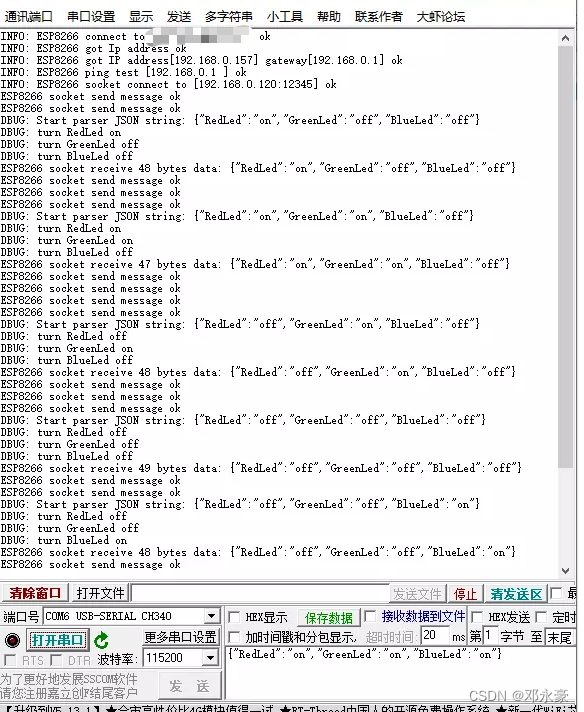
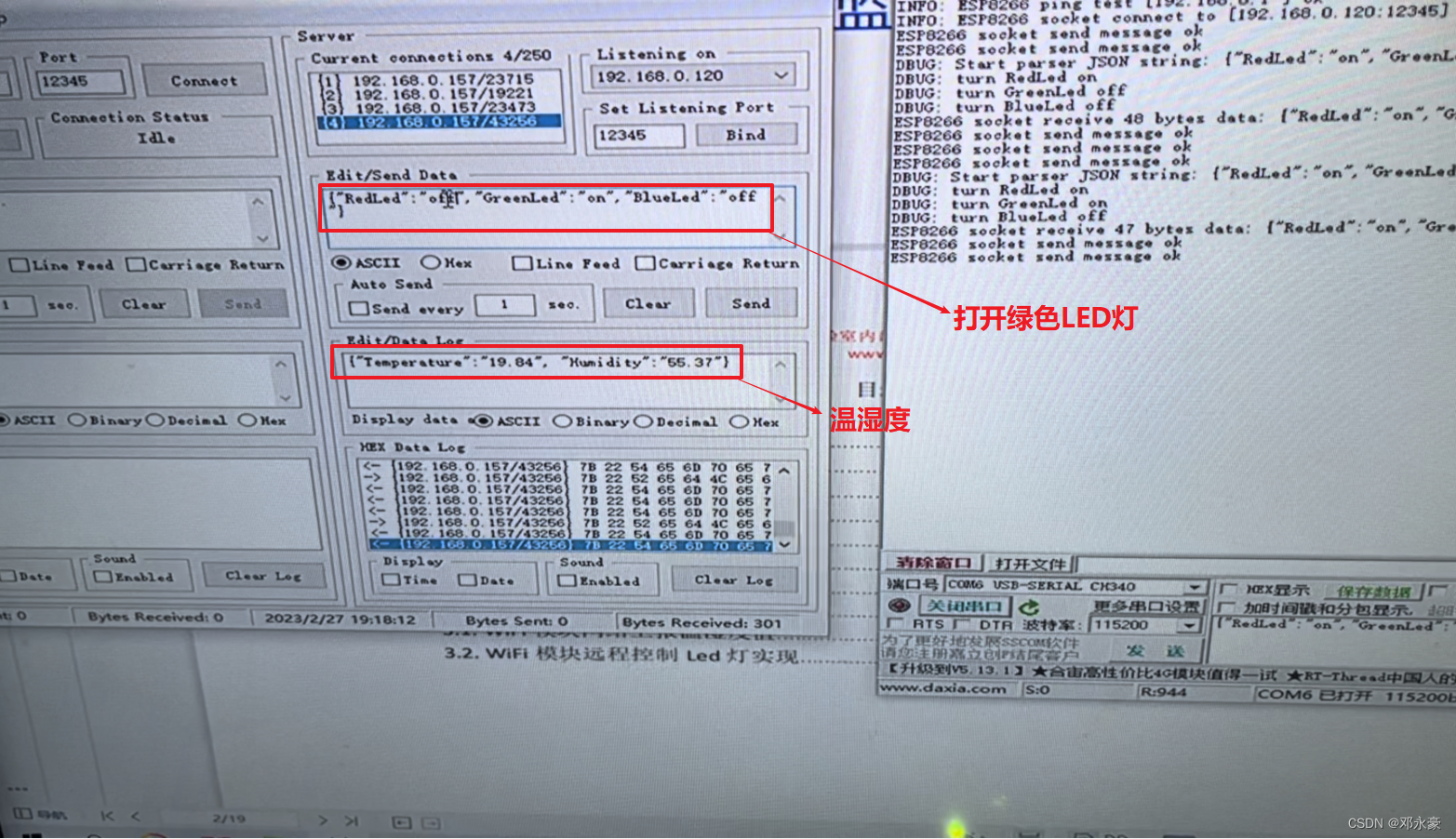
3.运行测试

在这里插入图片描述
在这里插入图片描述

在这里插入图片描述


总结

首先,对于STM32单片机在写博客之前学习了,所以没有,之后可能也会对之前的内容整理为博客,包括Led、DHT11、SHT30、I2C协议、SPI协议及JSON格式远程控制等,所以之前内容并未包括在此篇当中。

本篇为ESP8266 WiFi模块实时上报温湿度及控制LED灯项目笔记,主要介绍和应用了ESP8266 WiFi模块,编写了串口转发程序,学习了AT命令等,最终实现了ESP8266 WiFi模块实时上报温湿度及控制LED灯项目。

别忘了点赞 关注 收藏呀!


本文来自互联网用户投稿,文章观点仅代表作者本人,不代表本站立场,不承担相关法律责任。如若转载,请注明出处。 如若内容造成侵权/违法违规/事实不符,请点击【内容举报】进行投诉反馈!

相关文章

立即
投稿

微信公众账号

微信扫一扫加关注

返回
顶部