tensorflow分类任务——TFRecord读取自己制作的数据集
一、TensorFlow的数据读取机制
注意:这个地址是TensorFlow的数据读取机制,如果了解请跳过。
原博客地址:https://zhuanlan.zhihu.com/p/27238630
建议阅读博客:https://blog.csdn.net/pursuit_zhangyu/article/details/80607529
代码地址:https://github.com/hzy46/Deep-Learning-21-Examples/tree/master/chapter_2
1.1关键函数解读
- 对于文件名队列,我们使用tf.train.string_input_producer函数。这个函数需要传入一个文件名list,系统会自动将它转为一个文件名队列。
- reader = tf.TFRecordReader()创建读取
- imageBatch, labelBatch = tf.train.shuffle_batch([image, labels], batch_size=batchSize,
capacity=capacity, min_after_dequeue=min_after_dequeue)打包读取,意思为小批次读取数据 - threads = tf.train.start_queue_runners(sess=sess, coord=coord)创建会话和多线程,启动读取
二、TFRecord读取数据集
我的上一篇文章,我采用自己的图片制作了数据集,现在我写一下读取自己制作的数据集。
数据集地址:
链接:https://pan.baidu.com/s/1aIHzKsxUb67sJZAFrGH1ZQ
提取码:lvjp
工程地址:
链接:https://pan.baidu.com/s/1XGAA6UQ0JByhvDYQ__my4g
提取码:dxpn
import numpy as np
import tensorflow as tfbatchSize = 15
num_epochs = 20def tfRecordRead(fileNameQue, heigh, width, channels, n_class):reader = tf.TFRecordReader()# 创建一个队列来维护输入文件列表# 从文件中读出一个Example_, serialized_example = reader.read(fileNameQue)# 用FixedLenFeature将读入的Example解析成tensorfeatures = tf.parse_single_example(serialized_example,features={'image': tf.FixedLenFeature([], tf.string),'label': tf.FixedLenFeature([], tf.int64)})# 将字符串解析成图像对应的像素数组image = tf.decode_raw(features['image'], tf.float32)# image = tf.decode_raw(features["image"], tf.uint8)image = tf.reshape(image, [heigh, width, channels])# image = tf.cast(image, tf.float32) * (1 / 255.0)labels = tf.cast(features['label'], tf.int64)labels = tf.one_hot(labels, n_class)return image, labelsdef tfRecordBatchRead(filename, heigh, width, channels, n_class, batchSize):fileNameQue = tf.train.string_input_producer([filename], shuffle=False, num_epochs=num_epochs)image, labels = tfRecordRead(fileNameQue, heigh, width, channels, n_class)  # fetch图像和labelmin_after_dequeue = 1000capacity = min_after_dequeue + 3 * batchSize# 预取图像和label并随机打乱,组成batch,此时tensor rank发生了变化,多了一个batch大小的维度imageBatch, labelBatch = tf.train.shuffle_batch([image, labels], batch_size=batchSize,capacity=capacity, min_after_dequeue=min_after_dequeue)return imageBatch, labelBatchfilename = r'./record\Imageoutput.tfrecords'
# filename = 'Imageoutput.tfrecords'dataset = np.load('testData.npz')
x_test = dataset['test_X'][1:20]
y_test = dataset['test_Y'][1:20]heigh, width, channels, n_class = dataset['height'], dataset['width'], dataset['channels'], dataset['n_class']
print(heigh, width, channels, n_class)imageBatch, labelBatch = tfRecordBatchRead(filename, heigh, width, channels, n_class, batchSize)
# init_op = tf.group(tf.global_variables_initializer(), tf.local_variables_initializer())with tf.Session() as sess:sess.run(tf.global_variables_initializer())sess.run(tf.local_variables_initializer())coord = tf.train.Coordinator()threads = tf.train.start_queue_runners(sess=sess, coord=coord)for i in range(num_epochs):example, label = sess.run([imageBatch, labelBatch])print(label)coord.request_stop()coord.join(threads)
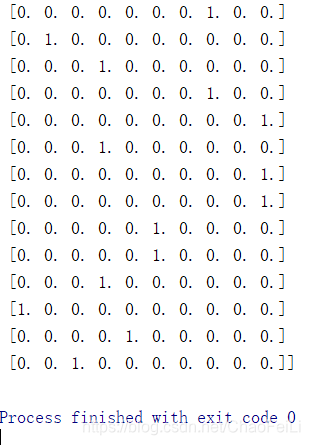
上述代码把label输出了,运行结果如下:
注意事项:
TFRecord读取数据集的过程中比前面说的TensorFlow数据读取机制多了一步:从TFRecord文件中解析出数据
features = tf.parse_single_example(serialized_example,features={'image': tf.FixedLenFeature([], tf.string),'label': tf.FixedLenFeature([], tf.int64)})# 将字符串解析成图像对应的像素数组image = tf.decode_raw(features['image'], tf.float32)# image = tf.decode_raw(features["image"], tf.uint8)image = tf.reshape(image, [heigh, width, channels])# image = tf.cast(image, tf.float32) * (1 / 255.0)labels = tf.cast(features['label'], tf.int64)labels = tf.one_hot(labels, n_class)
本文来自互联网用户投稿,文章观点仅代表作者本人,不代表本站立场,不承担相关法律责任。如若转载,请注明出处。 如若内容造成侵权/违法违规/事实不符,请点击【内容举报】进行投诉反馈!